

The best smart home security cameras balance dependable coverage with setup and storage choices that fit your home. I rank the Anona 4K Indoor Camera 2-Pack first for its sharp indoor video, pan-tilt coverage, and tracking, while the aosu solar-powered 4-camera kit stands out for outdoor coverage with less routine charging and the Wyze Cam v4 for flexible indoor-or-outdoor use. The main tradeoffs are wired convenience versus battery placement, broad coverage versus image detail, and local storage versus cloud-dependent features. A multi-camera kit can simplify coverage, but only if its app, hub, and power arrangements suit your layout. Read on for how each option differs and which one fits your needs.

Get the latest gadgets delivered free — and shop member deals
- Fast, free delivery on millions of items
- Access to Prime Big Deal Days deals on October 6–7
- Prime Video, Amazon Music and more included
Complete the kit



Key Takeaways
- Anona leads for indoor coverage: Its two 4K pan-tilt cameras with auto-tracking suit rooms where a fixed view would leave blind spots, but they are not outdoor picks.
- Solar changes the maintenance equation: The aosu D1 and Tapo SolarCam C402 KIT reduce charging work, though a suitable sunny mounting position matters.
- Blink offers the clearest range of kit sizes: Outdoor 4 kits span two, three, and five cameras, while the 2K+ five-camera bundle adds a higher-resolution option.
- Resolution is not the whole decision: Arlo‘s 2K HDR and Wyze‘s 2.5K color night vision offer distinct image advantages, but placement, night lighting, and recording access shape useful footage too.
- Choose a system, not just a camera count: Hub requirements, connectivity, storage choices, and power needs differ across these products and can matter more than adding another camera.




| smart home security camera | Night vision | Camera count | Resolution | Storage |
|---|---|---|---|---|
| Anona 4K UHD Indoor Security C | Infrared | — | 4K (8 MP) | AES-128 encrypted cloud or microSD up to 512 GB; card not included |
| aosu D1 Classic 4-Camera Solar | Color | 4 | — | 32 GB local storage in aosuBase |
| Blink Outdoor 4 Wireless Secur | — | 5 | — | Cloud storage requires a subscription; local storage not included with Sync Module Core |
| GMK 4-Pack Wireless Outdoor Se | Color and infrared | 4 | — | Local memory card or optional cloud storage |
| Blink Outdoor 4 Wireless Secur | Infrared | 2 | — | Optional cloud subscription; local storage not included with Sync Module Core |
| Blink Outdoor 2K+ Wireless Sec | — | 5 | 2K (2560 × 1440) | — |
| TP-Link Tapo SolarCam C402 KIT | Full color, up to 30 ft | — | 1080p | — |
| Blink Outdoor 4 Wireless Secur | Infrared | 3 | — | — |
| Arlo Pro Wireless Security Cam | Color night vision with integrated spotlight | 4 | 2K HDR | — |
| Wyze Cam v4 | Color, with Starlight Sensor and 72-lumen spotlight | — | 2560 × 1440 (2.5K QHD) | — |
More Details on Our Top Picks
Anona 4K UHD Indoor Security Camera (2 Pack), 360° Pan-Tilt, Auto-Tracking, AI Detection, Two-Way Audio, Dual-Band Wi-Fi 6
The Anona 4K two-pack is the indoor pick for buyers who want a camera to follow activity across a room, not just watch one fixed angle. Its 355° pan, 110° tilt, and auto-tracking can keep people or pets in view, while 4K resolution and 8x digital zoom help reveal more detail than the 1080p Blink Outdoor 4 systems. AI alerts include people, pets, and baby crying, making it more useful for mixed household monitoring than a basic motion-only setup. Dual-band Wi-Fi 6 adds flexibility for homes with busy wireless networks. The tradeoffs are a 15 fps frame rate, which may make fast movement less fluid, and a corded design that limits placement. Local microSD recording avoids depending on cloud storage, but the card is sold separately; cloud storage may require a subscription.
Pros:- 4K resolution and 8x digital zoom provide more image detail than the Blink Outdoor 4 models
- Pan-and-tilt coverage with auto-tracking can follow activity around a room
- AI detection includes people, pets, and baby crying
- Supports encrypted cloud storage or microSD cards up to 512 GB
Cons:- 15 fps footage can look less fluid when subjects move quickly
- Corded power restricts placement and requires a nearby outlet
- MicroSD card is not included, and cloud storage may require a subscription
Best for: Households that want detailed indoor monitoring of pets, children, or a large shared room, with pan-and-tilt tracking and local recording as an option
Not ideal for: People who need a wireless camera, smoother footage of fast action, or a complete local-storage setup without buying an additional microSD card
- Resolution:4K (8 MP)
- Digital zoom:8x
- Pan and tilt:355° pan / 110° tilt
- Connectivity:Dual-band Wi-Fi 6, 2.4 GHz / 5 GHz
- Storage:AES-128 encrypted cloud or microSD up to 512 GB; card not included
- Power:Corded electric, 5V, 10W
- Frame rate:15 fps
- Night vision:Infrared
Our verdict“Choose the Anona two-pack for detailed, actively tracked indoor coverage if corded power and the extra cost of a microSD card are acceptable.”
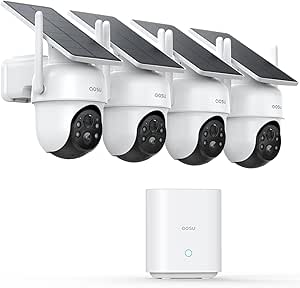
aosu D1 Classic 4-Camera Solar-Powered Outdoor Security Camera Kit
For buyers who want to cover several sides of a home without wiring each camera or signing up for cloud storage, the aosu D1 Classic kit is the clearest fit here. It includes four solar-powered 2K cameras and a base with 32 GB of encrypted local storage, while the GMK four-camera kit also offers local storage but relies on rechargeable batteries rather than solar charging. Aosu’s 360° pan-and-tilt, motion tracking, and color night vision help each camera monitor a wider area than a fixed-view model. The app can show four streams at once, useful when checking multiple entry points together. The main compromises are the limited 32 GB capacity and dependence on adequate sunlight for charging. Buyers in shaded locations may get less benefit from the solar setup, and Wi-Fi coverage still matters outdoors.
Pros:- Four cameras provide coverage for multiple outdoor areas
- Solar power reduces routine battery charging when panels receive sufficient sunlight
- Encrypted 32 GB local storage works without a subscription
- 360° pan-and-tilt, motion tracking, and color night vision support broader outdoor monitoring
Cons:- Solar charging depends on adequate sunlight at each camera location
- The included 32 GB local storage may limit how much footage can be retained
- Outdoor performance depends on reliable Wi-Fi coverage
Best for: Homeowners who need to monitor several outdoor areas, want encrypted local recording without a subscription, and can place cameras where their solar panels receive sunlight
Not ideal for: Households with heavily shaded camera locations or buyers who need substantial onboard storage for long video retention
- Camera count:4
- Video resolution:2K / 3 MP
- Field of view:360°
- Storage:32 GB local storage in aosuBase
- Power:Solar powered
- Weather resistance:IP65
- Night vision:Color
- Audio:Two-way audio
Our verdict“Pick the aosu kit for multi-area outdoor coverage with solar power and local recording, provided your camera locations get enough sunlight.”
Blink Outdoor 4 Wireless Security Camera System, 5 Cameras
The five-camera Blink Outdoor 4 system suits buyers who value a larger camera count and long battery life over maximum image detail. Its cameras deliver 1080p video at up to 30 fps and use AA lithium batteries rated for up to two years, making this a straightforward way to monitor several entry points without running power cables. Compared with the two-camera Blink Outdoor 4, this bundle makes more sense when coverage matters more than keeping the setup small. The aosu D1 Classic offers higher 2K resolution, pan-and-tilt tracking, and local recording without a subscription; Blink is the simpler fixed-view option, but its Sync Module Core does not include local storage. Cloud storage and person detection require a subscription, so ongoing recording features are less self-contained than aosu’s.
Pros:- Five cameras cover more locations than the two-camera Blink Outdoor 4 bundle
- 1080p live view and infrared night vision support day-and-night monitoring
- Batteries are rated for up to two years of use
- Two-way audio and enhanced motion detection are included
Cons:- Sync Module Core does not include local storage
- Cloud storage and person detection require a subscription
- 1080p resolution provides less detail than the aosu and GMK 2K systems
Best for: Households that want five fixed-view outdoor cameras, wireless installation, and long battery intervals across multiple entry points
Not ideal for: Buyers who need 2K or 4K detail, pan-and-tilt tracking, included local storage, or subscription-free person detection
- Camera count:5
- Video resolution:1080p HD
- Field of view:143° diagonal
- Frame rate:Up to 30 fps
- Battery life:Up to 2 years
- Batteries:2 non-rechargeable AA lithium batteries per camera
- Wi-Fi:2.4 GHz 802.11b/g/n
- Storage:Cloud storage requires a subscription; local storage not included with Sync Module Core
Our verdict“Choose the five-camera Blink kit when broad fixed-view coverage and long battery life matter more than higher resolution or subscription-free storage.”
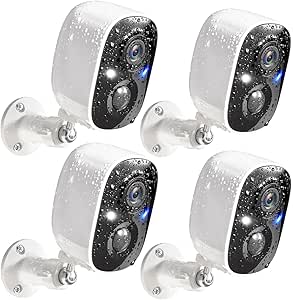
GMK 4-Pack Wireless Outdoor Security Camera System, 2K
The GMK four-camera kit is a practical match for buyers who want sharper-than-1080p video and a choice of color or infrared night vision across several outdoor areas. Unlike the solar-powered aosu D1 Classic, GMK uses rechargeable batteries, so it does not depend on sunlight but does need periodic charging. PIR motion detection, phone alerts, two-way talk, and a built-in siren add useful response options when activity is detected. It also supports local memory-card storage or optional cloud storage, giving buyers more than one recording path. That flexibility comes with limits: the cameras connect only to 2.4 GHz Wi-Fi, and battery standby is listed at one to six months, a much shorter stated interval than Blink Outdoor 4’s up-to-two-year battery rating. Advanced AI cloud analysis may require a subscription.
Pros:- 2K, 3 MP video offers more detail than the 1080p Blink Outdoor 4 systems
- Color and infrared night vision provide two monitoring modes
- Rechargeable, wire-free cameras avoid the need for outlet wiring
- Supports local memory-card storage, optional cloud storage, two-way talk, and a siren
Cons:- Supports 2.4 GHz Wi-Fi only, not 5 GHz
- Listed battery standby is one to six months, so charging may be frequent
- Cloud storage and advanced AI analysis may require a subscription after the free trial
Best for: Homeowners seeking a four-camera outdoor kit with 2K video, flexible night vision, and a local-storage option who are willing to recharge batteries
Not ideal for: Buyers with 5 GHz-only networks, shaded or hard-to-reach cameras they cannot recharge easily, or those seeking a long stated battery interval
- Camera count:4
- Video resolution:2K / 3 MP
- Wi-Fi:2.4 GHz only
- Night vision:Color and infrared
- Power:Rechargeable battery
- Battery standby:1–6 months
- Weather resistance:IP65
- Storage:Local memory card or optional cloud storage
Our verdict“Pick GMK for 2K outdoor coverage and flexible night vision if you can work with 2.4 GHz Wi-Fi and regular battery charging.”
Blink Outdoor 4 Wireless Security Camera System, 2 Cameras
For a smaller first step into outdoor monitoring, the two-camera Blink Outdoor 4 keeps the setup simple: wireless cameras, 1080p live view, infrared night vision, two-way audio, and batteries rated for up to two years. It is a more contained choice than the five-camera Blink Outdoor 4 bundle, which suits homes with several entrances but may be excessive for someone watching a front door and one other area. Compared with the GMK four-pack, Blink has a longer stated battery interval but gives up 2K video and color night vision. The key compromise is recording: the included Sync Module Core has no local storage, while cloud storage and person detection require a subscription. That makes it a better fit for basic live monitoring than for buyers who want a self-contained recording system.
Pros:- Two cameras suit a small setup better than the five-camera Blink bundle
- 1080p live view and infrared night vision support basic day-and-night monitoring
- Batteries are rated for up to two years of use
- Includes two-way audio, enhanced motion detection, and Alexa compatibility
Cons:- Sync Module Core does not include local storage
- Cloud storage and person detection require a subscription
- 1080p footage has less detail than the GMK and aosu 2K systems
Best for: Renters or homeowners who want to monitor one or two outdoor approaches with a compact wireless system and Alexa compatibility
Not ideal for: Buyers who need several cameras, 2K detail, local recording out of the box, or person detection without a subscription
- Camera count:2
- Video resolution:1080p HD
- Night vision:Infrared
- Audio:Two-way
- Battery life:Up to 2 years
- Included module:Sync Module Core
- Storage:Optional cloud subscription; local storage not included with Sync Module Core
- Compatibility:Amazon Alexa
Our verdict“Choose this Blink two-pack for simple monitoring of a couple of outdoor areas if you accept subscription-based recording and 1080p video.”
Blink Outdoor 2K+ Wireless Security Camera System, 5 Cameras with Sync Module Core
For buyers who need several outdoor angles covered without running power cables, this five-camera kit offers 2K video and IP65 weather resistance across a larger area than the three-camera Blink Outdoor 4 kit. Color vision in low light and two-way talk with noise cancellation add useful detail when checking a driveway, side entrance, and yard. Its included AA lithium batteries are rated for up to two years, though actual life depends on use and conditions. The tradeoff is that person and vehicle detection require a subscription, and the Sync Module Core does not make those features subscription-free. Compared with the Arlo Pro 2K kit, Blink gives you an extra camera and simpler battery power, while Arlo adds a wider view and broader smart-home compatibility.
Pros:- Five cameras cover more separate areas than the three-camera Blink Outdoor 4 kit
- 2K recording and color vision in low light provide more detail than basic 1080p video
- IP65 weather resistance suits outdoor placement
- Two-way audio includes noise cancellation
Cons:- Person and vehicle detection require an optional subscription
- Battery life varies with settings, usage, and environmental conditions
- Uses 2.4 GHz Wi-Fi rather than dual-band connectivity
Best for: Households that want to monitor several outdoor entry points with wire-free cameras and can accept subscription-based person and vehicle detection
Not ideal for: Buyers who need advanced person or vehicle alerts without a subscription, or who prefer rechargeable batteries and broad smart-home integrations
- Resolution:2K (2560 × 1440)
- Camera count:5
- Field of view:115° × 62° × 135°
- Weather resistance:IP65
- Battery:2 AA 1.5V lithium batteries per camera; up to 2 years
- Audio:Two-way talk with noise cancellation
- Connectivity:2.4 GHz 802.11b/g/n Wi-Fi
- Included hub:1 Blink Sync Module Core
Our verdict“Choose this kit when broad, battery-powered outdoor coverage matters more than subscription-free smart detection.”
TP-Link Tapo SolarCam C402 KIT 1080p Outdoor Security Camera with Solar Panel
The Tapo SolarCam is the clearest fit for buyers who want an outdoor camera that can keep charging without routine battery swaps. Its included solar panel is designed to provide a day’s use with 45 minutes of direct sunlight, and the camera can also run on its built-in battery for up to 180 days. Activity zones help reduce alerts from areas you do not want monitored, while person detection and color night vision cover everyday outdoor security needs. Compared with the five-camera Blink Outdoor 2K+ system, Tapo trades higher resolution and multiple camera angles for solar charging and local microSD storage up to 512GB. Its 1080p image is less detailed, and dependable solar charging depends on sunlight and temperatures above 32°F; cloud recording also requires a subscription.
Pros:- Included solar panel supports ongoing charging in a suitable sunny location
- Person and motion detection include customizable activity zones
- Local microSD storage supports cards up to 512GB
- Color night vision and two-way audio support after-dark checks and communication
Cons:- 1080p resolution offers less detail than the 2K Blink and Arlo kits
- Solar charging requires direct sunlight and temperatures above 32°F
- Cloud storage requires a Tapo Care subscription
Best for: Homeowners with a sunny outdoor mounting spot who want to reduce battery maintenance and save footage locally
Not ideal for: Buyers needing 2K detail, a multi-camera kit, or reliable solar charging in cold or shaded locations
- Resolution:1080p
- Power:Solar panel and built-in battery
- Battery life:Up to 180 days
- Solar charging:45 minutes of direct sunlight for a full day of use
- Weather resistance:IP65
- Night vision:Full color, up to 30 ft
- Local storage:microSD card up to 512GB
- Audio:Two-way audio
Our verdict“Pick the Tapo when solar charging and local storage matter more than higher resolution or multi-camera coverage.”
Blink Outdoor 4 Wireless Security Camera System, 3 Cameras with Sync Module Core
This three-camera kit is a straightforward choice for households already using Alexa and looking for wire-free coverage around a few outdoor areas. 1080p live view, infrared night vision, two-way talk, and enhanced motion detection cover the basics, while included lithium batteries are rated for up to two years. Compared with the five-camera Blink Outdoor 2K+ kit, this set covers fewer locations and records at lower resolution, but its Alexa compatibility makes it a natural match for a home already built around that ecosystem. The main limitation is storage: Sync Module Core does not include local storage, and cloud recording and person detection require a subscription. Buyers who want subscription-free local recording may prefer the Wyze Cam v4, though it is a single camera rather than a multi-camera kit.
Pros:- Three-camera kit covers several locations without separate power wiring
- Battery life is rated for up to two years
- Enhanced motion detection and two-way talk support everyday monitoring
- Works with Alexa
Cons:- Sync Module Core does not include local storage
- Cloud storage and person detection require an optional subscription
- 1080p video provides less detail than the 2K Blink Outdoor 2K+ and Arlo Pro kits
Best for: Alexa households needing a simple, battery-powered three-camera setup for routine outdoor monitoring
Not ideal for: Buyers who need local recording included, 2K detail, or person detection without an optional subscription
- Camera count:3
- Video resolution:1080p HD
- Night vision:Infrared
- Audio:Two-way talk
- Battery life:Up to 2 years
- Included batteries:6 AA Energizer lithium batteries
- Motion detection:Dual-zone enhanced motion detection
- Smart home compatibility:Alexa
Our verdict“Choose this Blink kit for basic multi-camera coverage in an Alexa home, provided you are comfortable with its storage and detection limits.”
Arlo Pro Wireless Security Camera 2K HDR (6th Gen) – 4-Camera Kit
Among these multi-camera kits, the Arlo Pro is the strongest choice for buyers who want broad views, detailed footage, and compatibility with several smart-home platforms. Its 160° panoramic field of view, 2K HDR video, color night vision, and integrated spotlight combine to show more of a scene than the narrower Blink Outdoor 2K+ listing. The swappable rechargeable batteries also give owners a way to keep cameras running while a depleted battery charges. Arlo goes further on smart features with AI detection and event summaries, but premium features require a paid plan after the included one-month trial. That makes it less appealing for buyers who prioritize ongoing costs or basic subscription-free recording. The stated functionality is also limited or unavailable in some regions outside the U.S., unlike the more straightforward Tapo solar setup.
Pros:- 2K HDR video and a 160° view capture detailed footage across a broad area
- Color night vision, spotlight, and two-way audio support monitoring after dark
- Swappable rechargeable batteries allow a depleted battery to be replaced while charging
- Supports Alexa, Apple Home, Google Home, SmartThings, and IFTTT
Cons:- Premium AI features and video history require a paid plan after the one-month trial
- Some functionality is limited or unavailable outside the U.S.
- Rechargeable batteries need periodic charging, unlike the solar-assisted Tapo kit
Best for: Smart-home households that want a four-camera kit with a wide view, rechargeable swappable batteries, and support for multiple platforms
Not ideal for: Buyers who want premium AI features without a subscription, live outside the U.S., or prefer solar charging over battery recharging
- Resolution:2K HDR
- Camera count:4
- Field of view:160° panoramic
- Night vision:Color night vision with integrated spotlight
- Zoom:12x
- Battery:Rechargeable and swappable
- Connectivity:Dual-band 2.4/5GHz Wi-Fi and Bluetooth setup
- Smart-home compatibility:Alexa, Apple Home, Google Home, Samsung SmartThings, IFTTT
Our verdict“Pick Arlo if wide-angle coverage and broad smart-home integration justify the ongoing plan for premium features.”
Wyze Cam v4 – 2.5K AI Indoor/Outdoor Security Camera with Color Night Vision
Wyze Cam v4 suits buyers who want a sharp single camera and control over local recordings without paying for cloud storage. Its 2.5K resolution and 120° field of view offer more detail than the 1080p Blink Outdoor 4, while the Starlight Sensor and 72-lumen spotlight provide color night vision. The camera can store footage on a separately purchased microSD card up to 512GB, which sets it apart from the Blink kit’s Sync Module Core, where local storage is not included. It also works indoors or outdoors, with a magnetic base for flexible placement and a 100 dB siren for deterrence. The tradeoffs are its single-camera format, 2.4 GHz-only Wi-Fi, and the need for an optional cloud plan for cloud backup features.
Pros:- 2.5K video provides more detail than the 1080p Blink Outdoor 4
- Local microSD recording supports cards up to 512GB without requiring a subscription
- Color night vision combines a Starlight Sensor with a 72-lumen spotlight
- Indoor/outdoor design, magnetic base, and two-way audio allow flexible placement and communication
Cons:- microSD card is sold separately
- Connects only to 2.4 GHz Wi-Fi
- Cloud backup features require an optional subscription
Best for: Buyers seeking one detailed indoor or outdoor camera with local microSD recording and no required subscription for local storage
Not ideal for: Households needing several cameras in one kit, dual-band Wi-Fi, or cloud backup without an optional plan
- Resolution:2560 × 1440 (2.5K QHD)
- Field of view:120°
- Night vision:Color, with Starlight Sensor and 72-lumen spotlight
- Weather resistance:IP65
- Local storage:microSD card up to 512GB; card sold separately
- Siren:100 dB
- Connectivity:2.4 GHz Wi-Fi and Bluetooth pairing
- Smart-home compatibility:Alexa, Google Assistant, IFTTT
Our verdict“Choose Wyze for one high-detail camera with subscription-free local storage, but look elsewhere for a multi-camera kit.”

How We Picked
I compared these smart home security cameras by the jobs buyers need them to do: cover indoor rooms, monitor outdoor approaches, or provide a multi-camera setup without excessive upkeep. The ranking weighs image capabilities alongside field of view, detection and tracking features, power method, setup demands, and whether a kit offers a practical route to covering more than one area. I also treated indoor and outdoor suitability as different needs rather than assuming one camera can handle every location.
The order reflects usefulness for the intended buyer, not a claim that one specification wins every home. Anona ranks first for versatile indoor observation; aosu follows for solar-assisted outdoor coverage; and Blink’s different kit sizes offer a straightforward route to expanding coverage. Arlo, GMK, Tapo, and Wyze serve more specific priorities, while the Blink bundles are separated by camera count and resolution. I account for tradeoffs such as mounting location, charging or sunlight needs, hub compatibility, and the gap between headline resolution and usable footage.
| smart home security camera | Night vision | Audio |
|---|---|---|
| Anona 4K UHD Indoor Security C | Infrared | — |
| aosu D1 Classic 4-Camera Solar | Color | Two-way audio |
| Blink Outdoor 4 Wireless Secur | — | — |
| GMK 4-Pack Wireless Outdoor Se | Color and infrared | — |
| Blink Outdoor 4 Wireless Secur | Infrared | Two-way |
| Blink Outdoor 2K+ Wireless Sec | — | Two-way talk with noise cancellation |
| TP-Link Tapo SolarCam C402 KIT | Full color, up to 30 ft | Two-way audio |
| Blink Outdoor 4 Wireless Secur | Infrared | Two-way talk |
| Arlo Pro Wireless Security Cam | Color night vision with integrated spotlight | — |
| Wyze Cam v4 | Color, with Starlight Sensor and 72-lumen spotlight | — |
Factors to Consider When Choosing Smart Home Security Cameras
Before choosing a kit, map the places you need to see and how you will power and access each camera. Coverage, recording access, and upkeep often matter more in daily use than picking the highest resolution on a product page. These factors can help you avoid buying extra cameras that cannot be placed well or a system that does not fit your home’s network and storage preferences.
Match Camera Type to the Area You Need to Cover
Start by deciding whether each view is indoors or exposed to weather, then check that the camera is intended for that setting. Indoor pan-tilt cameras can follow activity across a room, while outdoor models need a clear view of entry paths and a practical mounting point. A common mistake is counting cameras before checking what each can actually see from its planned location. Draw a simple map of doors, windows, stairs, and shared spaces, then identify overlapping views that add little value. Two well-placed cameras can outperform a crowded kit aimed at the same approach. If you need both indoor and outdoor monitoring, check whether one system covers both use cases or whether a mixed setup makes more sense.
Plan Power and Mounting Before You Buy
Battery-powered cameras make placement more flexible, but every camera adds a charging or battery-maintenance task. Solar panels can reduce that work only when the panel has suitable sunlight and a workable cable route; a shaded eave may undermine the benefit. Think through height, access for servicing, and whether a mount can point toward the area you need. Buyers often choose a wireless model for easy installation without checking Wi-Fi strength at the proposed spot. Test the intended network location before permanently mounting a camera. A camera that is simple to install but drops its connection is a poor fit for dependable monitoring.
Treat Resolution and Night Vision as a Pair
Higher resolution can help distinguish details in a well-framed scene, but it does not guarantee useful identification at night or from far away. Field of view, camera angle, lighting, motion blur, and subject distance all affect what a recording shows. Color night vision can be useful when there is enough light to preserve color; in a very dark area, results may differ from daytime footage. Avoid buying on resolution alone when the camera will face a long driveway or a dim side entrance. Choose the view first, then compare image features for that distance and lighting. If possible, plan a light source or a closer camera position rather than expecting a spec sheet to solve a poor angle.
Check Recording, Storage, and Feature Access
Live viewing and recorded clips are different needs: decide whether you need alerts only, saved motion events, or footage you can revisit over time. Storage and advanced detection features may depend on a hub, subscription, or particular app settings, so verify what is included before building a system around a feature. Local recording can appeal to buyers who want more control over where footage is kept, while cloud services may offer convenient remote access. A common mistake is comparing hardware bundles without comparing how recordings are saved and retrieved. Read the current storage terms for the exact camera and kit you plan to buy, since package names alone do not settle those details. Also consider how long clips remain available and whether several household members can access them.
Choose a Camera Count That Fits Your Layout
A multi-camera kit can simplify adding coverage, but a larger bundle is not automatically better value for your home. Count distinct sightlines first: a front door, rear entrance, garage, and interior common area may need different angles and power plans. Keep some flexibility for a later addition if you are uncertain about coverage, and check whether cameras can be mixed or expanded within the same system. System compatibility matters more than matching camera counts when adding devices over time. If a kit includes a hub, account for where it will sit and whether that location has a reliable connection. A smaller bundle can be the better starting point if it lets you confirm placement before expanding.
Balance Convenience Against Control
Smart cameras trade some convenience for choices about notifications, privacy, and access. Before buying, decide which people should receive alerts, when cameras should be active, and whether indoor cameras need a physical privacy measure or a clear off schedule. Motion sensitivity can also affect daily usefulness: too many notifications may lead you to ignore the alert that matters. Look for settings that let you tailor activity zones and notification behavior to each camera’s location. Set privacy and alert rules as part of installation, rather than leaving every camera on default settings. This is especially helpful in shared homes, where a system should protect entry points without sending avoidable alerts from everyday activity.
Frequently Asked Questions
Should I buy one multi-camera kit or mix cameras for indoor and outdoor use?
A single kit can be easier to manage when its cameras suit all the locations you need to cover. Mixed systems may make more sense when indoor areas need pan-tilt views but outdoor areas need weather-ready mounts or solar power. Before mixing brands, check whether you are comfortable managing separate apps, alerts, and storage plans. Also confirm how each model connects to your network and whether any hub is required. Choose based on the views and upkeep you need, not the appeal of having one brand throughout the house.
Are solar security cameras a good choice for a shaded yard?
Solar can cut down on charging, but it depends on the panel receiving enough usable sunlight at its installed position. A shaded yard, covered porch, or north-facing wall may not provide the conditions you want. Check whether the panel can be placed separately from the camera and whether its cable can reach without compromising the mount. If consistent sunlight is not available, compare the camera’s battery maintenance expectations with a wired option. Do not treat solar as maintenance-free; it is a power choice that works best when the site supports it.
Is a higher-resolution camera always better for identifying visitors?
No. More pixels can preserve detail, but distance, lighting, motion, and camera angle all affect what appears in a clip. A high-resolution camera pointed across a wide area may show less useful detail than a lower-resolution model aimed closely at a doorway. Night footage can also vary with available light and the camera’s night-vision approach. Frame the face or approach at a useful distance before paying extra for resolution. For critical entrances, placement and lighting deserve as much attention as the resolution label.
What should I verify about storage before choosing a camera system?
Find out whether motion clips can be stored locally, whether cloud storage is offered, and which features require a subscription or hub. Check how recordings are accessed, how long they remain available, and whether you can review them remotely. These details can vary by model and bundle, so do not assume that every camera from one brand works the same way. If you want footage during an internet outage, check the specific system’s behavior rather than relying on general claims about local storage. Confirm the recording path before purchase so the camera’s alerts are backed by footage you can actually retrieve.
How many cameras do I need for a typical home?
There is no useful count without a layout: prioritize distinct entry points and areas where a clear view would change how you respond to an alert. A front door, back door, and garage may need separate views, while a camera with pan-tilt coverage can monitor a larger indoor room. Avoid aiming multiple cameras at the same area unless the second angle fills a real blind spot. Start with the locations that matter most, then review whether the system leaves uncovered approaches. Plan around sightlines, not bundle size; it is easier to add a camera later than to maintain devices that do not improve coverage.
Conclusion
For the strongest indoor feature mix, I would start with the Anona 4K Indoor Camera 2-Pack; its pan-tilt view and tracking make it the best overall pick in this lineup for room monitoring. The GMK 4-Pack 2K is my best value direction for buyers who want several outdoor views in one bundle, while the Arlo Pro 2K HDR 4-Camera Kit is the best premium choice for shoppers prioritizing a higher-end image feature set. For beginners who want a familiar, scalable multi-camera approach, I would choose the Blink Outdoor 4 two-camera kit and add coverage only as needed. For low-maintenance outdoor monitoring, choose aosu D1 if its solar setup fits your site, or Tapo SolarCam C402 KIT for a solar-assisted single-camera approach; pick Wyze Cam v4 when flexible indoor/outdoor use and color night vision matter most. The right choice comes down to where you need a view, how you will power it, and how you want to retrieve recordings.
Evergreen bestsellers Picks
bestsellers
As an affiliate, we earn on qualifying purchases.