
The best Windows and Mac keyboard overall in this roundup is the Logitech MX Keys S for Mac, thanks to its comfortable low-profile typing, backlighting, and Mac-focused layout. For a more flexible Windows-and-Mac setup, the Logitech MX Keys for Business offers multi-device convenience, while the Keychron K4 Version 2 stands out for mechanical typing and a number pad. The main tradeoffs are layout compatibility, keyboard size, connection type, and whether you prefer quiet low-profile keys or a more tactile feel. Ergonomic models can change wrist and shoulder posture, but they take more desk space and may require an adjustment period. Read on for the full breakdown of where each keyboard fits and what to check before choosing.

Get the latest gadgets delivered free with Prime
- Fast, free delivery on millions of items
- Prime Video, Amazon Music and more included
- Member-only deals all year
Complete the kit



Key Takeaways
- The MX Keys models lead for refined low-profile typing: The MX Keys S for Mac favors Apple layouts, while the MX Keys for Business is the more flexible choice for mixed-device desks.
- Mechanical options fill a different need: The Keychron K4 Version 2 keeps a number pad, while the compact Keychron K3 Version 2 saves desk space with a low-profile 75% layout.
- Ergonomic shapes are not interchangeable: Wave Keys uses a gentler curved layout, while the split Ergo K860 makes a more substantial change to hand position.
- Compact keyboards demand layout compromises: The Pebble Keys 2 K380s and MX Keys Mini save space, but neither replaces a full-size layout for buyers who rely on a dedicated number pad.
- Simple wired and bundled choices still have a place: The Macally USB keyboard avoids wireless setup, while the ProtoArc KM100-A includes a mouse for buyers setting up a Mac desk on a budget-conscious accessory list.
| Logitech Wave Keys Ergonomic Wireless Keyboard with Palm Rest, Graphite |  | Best for Everyday Ergonomic Comfort | Layout: QWERTY, 101 keys | Switch type: Membrane | Connectivity: Bluetooth; USB-A via Logi Bolt receiver | VIEW LATEST PRICE | See Our Full Breakdown |
| Logitech Pebble Keys 2 K380s Wireless Bluetooth Keyboard, Tonal Graphite |  | Best Compact Travel Pick | Layout: QWERTY, 104 keys | Connectivity: Bluetooth | Device connections: Up to 3 | VIEW LATEST PRICE | See Our Full Breakdown |
| Logitech MX Keys for Business Wireless Illuminated Keyboard, Graphite |  | Best Premium Backlit Membrane Keyboard | Layout: QWERTY, 104 keys | Connectivity: Bluetooth Low Energy; Logi Bolt USB receiver | Compatible operating systems: ChromeOS, Linux, macOS, Windows | VIEW LATEST PRICE | See Our Full Breakdown |
| Keychron K4 Version 2 Wireless Mechanical Keyboard with Brown Switches and White LED Backlight |  | Best Compact Mechanical Keyboard with a Number Pad | Layout: 96%, 100 keys | Switch type: Tactile Keychron Apex Brown | Connectivity: Bluetooth 5.1; USB-C wired | VIEW LATEST PRICE | See Our Full Breakdown |
| Logitech Signature Slim K950 Wireless Keyboard, Graphite |  | Best Full-Size Multi-Device Pick | Layout: QWERTY, 108 keys | Connectivity: Bluetooth; USB via Logi Bolt receiver | Compatible operating systems: Windows, macOS, ChromeOS, Linux, iPadOS, iOS, Android | VIEW LATEST PRICE | See Our Full Breakdown |
| Logitech K250 Compact Bluetooth Keyboard with Number Pad |  | Best Compact Keyboard with a Number Pad | Connectivity: Bluetooth | Layout: QWERTY, 99 keys | Power: 2 included AAA batteries | VIEW LATEST PRICE | See Our Full Breakdown |
| Logitech Signature K650 Comfort Full-Size Wireless Keyboard, Graphite |  | Best for Cushioned Full-Size Typing | Connectivity: Bluetooth or included Logi Bolt USB receiver | Layout: Full-size QWERTY, 104 keys | Batteries: 2 AA batteries | VIEW LATEST PRICE | See Our Full Breakdown |
| ProtoArc KM100-A Backlit Bluetooth Keyboard and Mouse for Mac, Space Gray |  | Best Mac Keyboard-and-Mouse Set | Connectivity: Bluetooth 5.1 or later | Layout: Full-size QWERTY with numeric keypad | Backlighting: White LED with three brightness levels | VIEW LATEST PRICE | See Our Full Breakdown |
| Logitech Signature Slim Wired K620 for Business Full-Size Keyboard, Graphite |  | Best Wired Cross-Platform Office Keyboard | Connectivity: USB-C wired | Layout: QWERTY, 108 keys | Keyboard type: Membrane | VIEW LATEST PRICE | See Our Full Breakdown |
| Keychron K3 Version 2 75% Wireless Low-Profile Mechanical Keyboard |  | Best Compact Mechanical Keyboard for Windows and Mac | Layout: 75% QWERTY, 84 keys | Connectivity: Bluetooth 5.1 and USB-C wired | Switch type: Tactile Brown | VIEW LATEST PRICE | See Our Full Breakdown |
| Logitech Ergo K860 Wireless Ergonomic Split Keyboard with Wrist Rest |  | Best for Ergonomic Typing | Connectivity: Bluetooth or USB receiver | Layout: QWERTY, 105 keys | Design: Curved split layout with memory foam wrist rest | VIEW LATEST PRICE | See Our Full Breakdown |
| Macally Ultra-Slim Wired USB Keyboard with Numeric Keypad, Space Gray |  | Best Simple Wired Pick | Connectivity: Wired USB | Layout: Full-size QWERTY, 110 keys | Switch type: Scissor switch | VIEW LATEST PRICE | See Our Full Breakdown |
| Logitech MX Keys Mini Wireless Illuminated Keyboard, Graphite |  | Best Compact Backlit Pick | Connectivity: Bluetooth Low Energy | Layout: QWERTY, compact | Device pairing: Up to three devices | VIEW LATEST PRICE | See Our Full Breakdown |
| Logitech MX Mechanical Wireless Illuminated Keyboard, Tactile Quiet, Graphite | 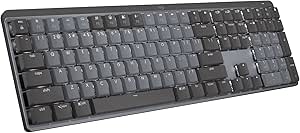 | Best Full-Size Mechanical Pick | Switch type: Tactile Quiet | Layout: Full-size QWERTY, 104 keys | Connectivity: Bluetooth Low Energy or Logi Bolt USB receiver | VIEW LATEST PRICE | See Our Full Breakdown |
| Logitech MX Keys S for Mac Wireless Keyboard, Space Gray |  | Best for Apple Multi-Device Desks | Connectivity: Bluetooth Low Energy | Layout: Mac QWERTY, 104 keys | Device pairing: Up to three Apple devices | VIEW LATEST PRICE | See Our Full Breakdown |
| Windows and Mac keyboard | Layout | Connectivity | Dimensions |
|---|---|---|---|
| Logitech Wave Keys Ergonomic W | QWERTY, 101 keys | Bluetooth; USB-A via Logi Bolt receiver | 14.8 × 8.62 × 1.18 in |
| Logitech Pebble Keys 2 K380s W | QWERTY, 104 keys | Bluetooth | 10.98 × 4.88 × 0.63 in |
| Logitech MX Keys for Business | QWERTY, 104 keys | Bluetooth Low Energy; Logi Bolt USB receiver | 0.81 × 16.94 × 5.18 in |
| Keychron K4 Version 2 Wireless | 96%, 100 keys | Bluetooth 5.1; USB-C wired | — |
| Logitech Signature Slim K950 W | QWERTY, 108 keys | Bluetooth; USB via Logi Bolt receiver | — |
| Logitech K250 Compact Bluetoot | QWERTY, 99 keys | Bluetooth | — |
| Logitech Signature K650 Comfor | Full-size QWERTY, 104 keys | Bluetooth or included Logi Bolt USB receiver | — |
| ProtoArc KM100-A Backlit Bluet | Full-size QWERTY with numeric keypad | Bluetooth 5.1 or later | — |
| Logitech Signature Slim Wired | QWERTY, 108 keys | USB-C wired | — |
| Keychron K3 Version 2 75% Wire | 75% QWERTY, 84 keys | Bluetooth 5.1 and USB-C wired | 12.05 × 4.57 × 0.87 in |
| Logitech Ergo K860 Wireless Er | QWERTY, 105 keys | Bluetooth or USB receiver | 17.95 × 9.17 × 1.89 in |
| Macally Ultra-Slim Wired USB K | Full-size QWERTY, 110 keys | Wired USB | 0.4 × 17 × 4.5 in |
| Logitech MX Keys Mini Wireless | QWERTY, compact | Bluetooth Low Energy | 11.65 × 5.19 × 0.82 in |
| Logitech MX Mechanical Wireles | Full-size QWERTY, 104 keys | Bluetooth Low Energy or Logi Bolt USB receiver | — |
| Logitech MX Keys S for Mac Wir | Mac QWERTY, 104 keys | Bluetooth Low Energy | 20.5 × 430.2 × 131.63 mm |
More Details on Our Top Picks
Logitech Wave Keys Ergonomic Wireless Keyboard with Palm Rest, Graphite
The Wave Keys is the comfort-focused choice in this group: its curved key layout and cushioned memory foam palm rest are designed to support a more natural hand position during long typing sessions. Compared with the flat, laptop-style Logitech Signature Slim K950, it gives wrist support a higher priority, though its distinctive shape may take time to get used to. Bluetooth and the included Logi Bolt receiver let you connect to compatible computers, while Easy-Switch supports up to three devices. The membrane keys favor a quieter, familiar feel over the tactile feedback of the Keychron K4 Version 2. A battery life of up to three years keeps charging off the routine, but the keyboard uses two batteries, and receiver-based USB connectivity depends on the included Logi Bolt dongle.
Pros:- Wavy layout and memory foam palm rest prioritize wrist comfort
- Pairs with up to three devices and supports Bluetooth or the included Logi Bolt receiver
- Works with Windows, macOS, iPadOS, and ChromeOS
- Battery life is up to three years
Cons:- The curved layout may feel unfamiliar compared with a conventional keyboard
- Requires two batteries rather than a rechargeable battery
- USB-A receiver connectivity depends on the included Logi Bolt receiver
Best for: Office workers who type for long stretches and want a cushioned palm rest plus easy switching between a computer and tablet
Not ideal for: Mechanical-keyboard fans, buyers who want a standard flat layout, or users who need a keyboard that connects by cable
- Layout:QWERTY, 101 keys
- Switch type:Membrane
- Connectivity:Bluetooth; USB-A via Logi Bolt receiver
- Compatible operating systems:Windows, macOS, iPadOS, ChromeOS
- Device switching:Up to 3 devices
- Power:2 batteries; up to 3 years of battery life
- Dimensions:14.8 × 8.62 × 1.18 in
- Material:Plastic; Graphite version contains 61% recycled plastic
Our verdict“Choose the Wave Keys if palm support and a more ergonomic layout matter more to you than a conventional shape or mechanical switches.”
Logitech Pebble Keys 2 K380s Wireless Bluetooth Keyboard, Tonal Graphite
For a shared desk, a backpack, or a setup that moves between devices, the Pebble Keys 2 K380s puts portability ahead of extras. Its 10.98-inch width is much shorter than the full-size Logitech Signature Slim K950, and Bluetooth Easy-Switch lets you move among three paired devices without a receiver. The quiet, low-profile keys feel closer to a laptop keyboard than the tactile switches on the Keychron K4 Version 2, making this a sensible pick for light, everyday typing rather than mechanical-key feedback. It supports a broad mix of operating systems, including Windows, macOS, iOS, and Android. The compact footprint also means a tighter typing area, and there is no numpad. It runs on two batteries and has no water resistance, so it is not the best fit for spill-prone desks.
Pros:- Compact, lightweight design suits travel and small workspaces
- Bluetooth Easy-Switch connects to up to three devices
- Quiet, low-profile keys offer a laptop-like typing feel
- Compatible with Windows, macOS, iPadOS, iOS, ChromeOS, and Android
Cons:- No number pad, which can slow frequent data entry
- Requires two batteries rather than a rechargeable battery
- Not water resistant
Best for: Students, commuters, and multi-device users who need a compact Bluetooth keyboard for a laptop, tablet, or phone
Not ideal for: Spreadsheet-heavy users who need a numpad, buyers who prefer full-size keys, or anyone seeking spill protection
- Layout:QWERTY, 104 keys
- Connectivity:Bluetooth
- Device connections:Up to 3
- Compatible operating systems:Windows, macOS, iPadOS, iOS, ChromeOS, Android
- Dimensions:10.98 × 4.88 × 0.63 in
- Power:2 batteries; up to 3 years of battery life
- Material:Plastic, including at least 49% certified post-consumer recycled plastic
- Water resistance:Not water resistant
Our verdict“Pick the K380s when portability and Bluetooth device switching matter more than a full-size layout or numpad.”
Logitech MX Keys for Business Wireless Illuminated Keyboard, Graphite
The MX Keys for Business is the premium choice here for people who want a stable, quiet typing surface with backlighting. Its smart illumination adjusts to ambient light and activates as your hands approach, helping keep keys visible without leaving the lights on constantly. Compared with the battery-focused Logitech Signature Slim K950, this model adds backlighting and a rechargeable battery, but its battery life can fall to up to 10 days per charge with illumination enabled. Turn the backlight off and the stated maximum rises to five months. It connects to up to three devices over Bluetooth Low Energy or Logi Bolt and can stay in use while charging. The full-width 104-key layout occupies more desk space than the compact Pebble Keys 2 K380s, and the illumination is single-color rather than customizable RGB.
Pros:- Smart backlighting responds to ambient light and hand proximity
- Quiet, stable keys suit focused office typing
- Connects to up to three devices through Bluetooth Low Energy or Logi Bolt
- Can be used while charging
Cons:- Battery life is up to 10 days per charge with backlighting on
- Backlighting is single-color
- Full-size dimensions take more desk space than compact options
Best for: Professionals who work across Windows and Mac devices and want a quiet, full-size keyboard with automatic backlighting
Not ideal for: Travelers seeking a small keyboard, buyers who want long intervals between charges while using backlighting, or those who want multicolor lighting
- Layout:QWERTY, 104 keys
- Connectivity:Bluetooth Low Energy; Logi Bolt USB receiver
- Compatible operating systems:ChromeOS, Linux, macOS, Windows
- Backlighting:Single-color smart illumination
- Device connections:Up to 3
- Power:Rechargeable; up to 10 days per charge with backlighting or up to 5 months with backlighting off
- Dimensions:0.81 × 16.94 × 5.18 in
- Materials:Aluminum and plastic
Our verdict“Choose the MX Keys for Business if you want a polished, backlit typing setup and can accept more frequent charging when the lights are on.”
Keychron K4 Version 2 Wireless Mechanical Keyboard with Brown Switches and White LED Backlight
The Keychron K4 Version 2 packs a number pad into a 96% layout, giving data-entry users more keys without taking up the space of a conventional full-size board. Its tactile Brown switches make it a better match for buyers who want distinct key feedback than the quieter membrane Logitech MX Keys for Business. For Windows and Mac households, Bluetooth 5.1 pairs with up to three devices, while USB-C wired operation offers another connection option. One tradeoff is that its compact arrangement brings keys closer together than a standard layout, so it may take adjustment if you rely on familiar spacing. Battery life reaches up to 240 hours with the backlight disabled, but white lighting reduces the appeal of that maximum, and wireless mode supports 6-key rollover rather than the N-key rollover available when wired.
Pros:- 96% layout keeps a 100-key arrangement, including a number pad
- Tactile Brown mechanical switches offer clear feedback
- Connects to up to three devices over Bluetooth 5.1 and also supports USB-C wired use
- Up to 240 hours of battery life with backlight disabled
Cons:- Wireless mode supports 6-key rollover rather than N-key rollover
- Compact key arrangement may take adjustment
- Not water resistant
Best for: Mac and Windows users who want mechanical, tactile typing and need a number pad in a smaller footprint than a standard full-size keyboard
Not ideal for: Quiet-office users, buyers who need N-key rollover wirelessly, or people who want spill resistance
- Layout:96%, 100 keys
- Switch type:Tactile Keychron Apex Brown
- Connectivity:Bluetooth 5.1; USB-C wired
- Compatibility:Mac and Windows
- Device pairing:Up to 3 devices
- Backlight:White LED
- Battery:4000 mAh; up to 240 hours with backlight disabled
- Key rollover:N-key rollover wired; 6-key rollover wireless
Our verdict“Choose the K4 if you want tactile mechanical keys and a number pad in a tighter footprint, and do not need wired-level rollover while wireless.”
Logitech Signature Slim K950 Wireless Keyboard, Graphite
The Signature Slim K950 is the straightforward full-size choice for people who want a familiar laptop-style keyboard across Windows and Mac. Its 108 keys include a number pad, and one-tap switching between three paired devices suits a desk shared by a work computer, personal laptop, and tablet. Unlike the smaller Pebble Keys 2 K380s, it gives frequent spreadsheet users a dedicated numpad; unlike the backlit MX Keys for Business, it keeps the setup focused on quiet typing and long battery life rather than illumination. Bluetooth and the included Logi Bolt receiver add connection flexibility, while battery life is listed at up to 36 months. The full-size body needs more desk space than compact options, and shortcut customization relies on the Logi Options+ app. It is battery powered, not rechargeable.
Pros:- Full-size 108-key layout includes a number pad
- Switches among up to three paired devices with a single tap
- Supports Bluetooth and USB connection via Logi Bolt
- Battery life is up to 36 months
Cons:- Full-size layout occupies more desk space than the Pebble Keys 2 K380s
- Customizable shortcuts require the Logi Options+ app
- Uses batteries rather than a rechargeable battery
Best for: Home-office and hybrid workers who need a full-size numpad, quiet laptop-style keys, and simple switching between three devices
Not ideal for: Travelers with limited bag space, users who want a rechargeable keyboard, or typists seeking mechanical switches and backlighting
- Layout:QWERTY, 108 keys
- Connectivity:Bluetooth; USB via Logi Bolt receiver
- Compatible operating systems:Windows, macOS, ChromeOS, Linux, iPadOS, iOS, Android
- Device switching:Up to 3 devices
- Power:Battery powered; up to 36 months of battery life
- Weight:685 g
- Material:At least 48% certified post-consumer recycled plastic
- Color:Graphite
Our verdict“Pick the K950 if you want a quiet, full-size keyboard for a multi-device Windows and Mac desk and do not need backlighting or rechargeable power.”
Logitech K250 Compact Bluetooth Keyboard with Number Pad
The Logitech K250 suits buyers who need number-pad input but want a smaller footprint than a conventional full-size board. Its 99-key layout keeps the number pad and function keys, while Bluetooth avoids tying up a USB port with a receiver. Compared with the full-size Logitech Signature K650, the K250 saves desk space but gives up the K650’s built-in palm rest and cushioned-key emphasis. Deep-profile keys and an adjustable tilt leg offer a straightforward typing setup, and its spill-resistant design adds some protection against everyday splashes—not a license to wash it or leave it wet. Two included AAA batteries are rated for up to 12 months of daily use, though they mean this is not a rechargeable option. It is listed for Windows 10 or later, so Mac buyers should check their layout and compatibility needs before choosing it.
Pros:- Keeps a number pad and function keys in a compact 99-key layout
- Bluetooth connection does not require a USB receiver
- Spill-resistant design offers added protection from minor spills
- Two included AAA batteries are rated for up to 12 months of daily use
Cons:- Uses replaceable AAA batteries rather than rechargeable power
- No USB receiver is included as an alternative to Bluetooth
- Listed minimum operating system is Windows 10, with Mac compatibility not specified
Best for: Windows users who regularly enter numbers and want Bluetooth connectivity in a smaller footprint than a typical full-size keyboard.
Not ideal for: Mac users seeking clearly specified Mac compatibility, rechargeable power, or a USB receiver for computers without Bluetooth.
- Connectivity:Bluetooth
- Layout:QWERTY, 99 keys
- Power:2 included AAA batteries
- Battery life:Up to 12 months of daily use
- Weight:380 g
- Spill resistance:Spill-resistant
- Recycled plastic:At least 64% of plastic parts
- Minimum operating system:Windows 10
Our verdict“Choose the K250 if you want number-pad convenience in a compact Bluetooth keyboard and are comfortable with battery power and its Windows-focused compatibility listing.”
Logitech Signature K650 Comfort Full-Size Wireless Keyboard, Graphite
The Logitech Signature K650 is the comfort-led choice here: its soft-touch palm rest, cushioned keys, and adjustable tilt make it a better fit for long desk sessions than the compact Logitech K250. The full-size 104-key layout preserves a dedicated number pad, while Bluetooth and the included Logi Bolt receiver give you a choice between wireless connection methods. Its broad operating-system support also makes it more flexible for mixed-device households than the Mac-specific ProtoArc KM100-A. The tradeoff is a larger footprint and a battery-powered design rather than USB-C charging; its two AA batteries are rated for up to 36 months. The keyboard is spill-resistant, not water-resistant, so it offers some protection from accidents but should not be treated as washable or waterproof.
Pros:- Soft-touch palm rest and cushioned keys support a comfort-focused typing setup
- Connects through Bluetooth or the included Logi Bolt receiver
- Works with Windows, macOS, ChromeOS, Linux, iPadOS, iOS, and Android
- Rated for up to 36 months of battery life from two AA batteries
Cons:- Full-size layout takes more desk space than the compact Logitech K250
- Requires two AA batteries instead of rechargeable power
- Spill-resistant but not water-resistant
Best for: Windows and Mac desk workers who prefer a full-size layout, a built-in palm rest, and the option of Bluetooth or a USB receiver.
Not ideal for: Buyers with limited desk space, anyone seeking a rechargeable keyboard, or users who need water resistance beyond spill protection.
- Connectivity:Bluetooth or included Logi Bolt USB receiver
- Layout:Full-size QWERTY, 104 keys
- Batteries:2 AA batteries
- Battery life:Up to 36 months
- Operating system compatibility:Windows, macOS, ChromeOS, Linux, iPadOS, iOS, and Android
- Comfort features:Soft-touch palm rest, cushioned keys, and adjustable tilt
- Shortcut commands:24
- Water protection:Spill-resistant; not water-resistant
Our verdict“Pick the K650 if comfort features and flexible wireless connections matter more than a compact footprint or rechargeable power.”
ProtoArc KM100-A Backlit Bluetooth Keyboard and Mouse for Mac, Space Gray
The ProtoArc KM100-A makes the most sense for Apple users who want a keyboard and mouse together, rather than a standalone board. Its full-size layout, quiet scissor-switch keys, and adjustable white backlight suit shared rooms and dim desks, while the flat profile is intended to keep the wrists in a more neutral position. Both devices are rechargeable, and the set can pair with up to three Bluetooth devices—a useful distinction from the Windows-focused Logitech K250. The tradeoff is narrow compatibility: the listed devices are Macs and Apple mobile products, not Windows or Linux computers. It also needs more space than a compact keyboard, and the backlight must be switched on again after the keyboard wakes from sleep. No USB dongle is included, so this set depends on Bluetooth.
Pros:- Includes a full-size keyboard and mouse for a coordinated desk setup
- Quiet scissor-switch keys and adjustable white backlighting suit shared or dim spaces
- Keyboard and mouse are rechargeable
- Can connect to up to three Bluetooth devices
Cons:- Not compatible with Windows or Linux
- Full-size layout and included mouse need more desk space than a compact set
- Backlighting must be turned on again after the keyboard wakes from sleep
Best for: Mac and Apple mobile-device users who want a matching rechargeable keyboard and mouse with quiet keys and adjustable backlighting.
Not ideal for: Windows or Linux users, people who need a compact desk setup, and anyone who wants a USB receiver or persistent backlighting after sleep.
- Connectivity:Bluetooth 5.1 or later
- Layout:Full-size QWERTY with numeric keypad
- Backlighting:White LED with three brightness levels
- Device connections:Up to three Bluetooth devices
- Keyboard battery:Rechargeable, 1200 mAh
- Mouse battery:Rechargeable, 300 mAh
- Mouse DPI:1000, 1600, and 2400
- Compatibility:Mac, MacBook, iPad, and iPhone; macOS 10.12 or later, iOS and iPadOS 13.0 or later
Our verdict“Choose the KM100-A if you use Apple devices and want a rechargeable, backlit keyboard-and-mouse set, but skip it for Windows or Linux.”
Logitech Signature Slim Wired K620 for Business Full-Size Keyboard, Graphite
The Logitech Signature Slim Wired K620 is the straightforward pick for a desk where reliability and laptop-style typing matter more than wireless freedom. Its low-profile membrane keys feel closer in form to a laptop keyboard than the deep-profile Logitech K250, and the USB-C wired connection avoids battery changes and Bluetooth pairing. A full-size 108-key layout keeps number entry practical, while customizable productivity shortcuts include AI launch and meeting controls. It supports Windows, macOS, and ChromeOS, giving it broader stated desktop compatibility than the Mac-only ProtoArc KM100-A. The compromise is clear: the cable limits placement and mobility, and setting up shortcut customization requires Logi Tune. This is a practical office option, but buyers seeking a mechanical feel, wireless use, or illumination should look elsewhere in the lineup.
Pros:- Low-profile keys offer a laptop-style typing format
- USB-C wired connection avoids battery replacement and wireless pairing
- Supports Windows, macOS, and ChromeOS
- Customizable AI launch and meeting-control shortcuts
Cons:- Wired connection restricts placement and mobility compared with the wireless K650
- Shortcut customization requires Logi Tune
- Membrane switches are not suited to buyers seeking a mechanical typing feel
Best for: Office users on Windows, Mac, or ChromeOS who prefer a full-size laptop-style keyboard and a dependable wired USB-C connection.
Not ideal for: People who need wireless portability, mechanical switches, backlighting, or customizable shortcuts without installing Logi Tune.
- Connectivity:USB-C wired
- Layout:QWERTY, 108 keys
- Keyboard type:Membrane
- Compatible operating systems:Windows, macOS, and ChromeOS
- Shortcut features:Customizable AI launch and meeting controls
- Customization software:Logi Tune
- Recycled plastic:66% post-consumer recycled plastic in plastic parts
- Color:Graphite
Our verdict“Choose the K620 for a full-size, low-profile office keyboard when USB-C reliability matters more than wireless convenience.”
Keychron K3 Version 2 75% Wireless Low-Profile Mechanical Keyboard
The Keychron K3 Version 2 is the mechanical choice for buyers who want to save desk space without giving up dedicated keys or Bluetooth multi-device pairing. Its 75% layout packs 84 tactile Brown-switch keys into a low-profile board, retaining more controls than a tiny travel keyboard while taking less room than the full-size Logitech Signature K650. Bluetooth supports up to three devices, and USB-C wired mode offers a direct connection when wireless use is inconvenient. QMK firmware adds key-remapping flexibility, while included Mac and Windows keycaps make the operating-system change less awkward. The tradeoffs are its lack of water resistance and the possibility of Bluetooth disruption from distance or interference. Its mechanical switches also give a more pronounced typing feel than the quiet scissor-switch ProtoArc KM100-A.
Pros:- Compact 75% layout retains 84 keys while using less desk space than the full-size K650
- Tactile Brown mechanical switches provide clear feedback
- Bluetooth connects to up to three devices, with USB-C wired support as another option
- QMK remapping and included Mac and Windows keycaps support customization across platforms
Cons:- No water resistance
- Bluetooth performance can be affected by distance or interference
- No number pad, unlike the full-size Logitech K650
Best for: Windows and Mac users who want compact mechanical typing, tactile feedback, multi-device Bluetooth, and the option of USB-C wired use.
Not ideal for: Buyers who need a number pad, a quiet scissor-key feel, water resistance, or wireless performance in a space with heavy interference.
- Layout:75% QWERTY, 84 keys
- Connectivity:Bluetooth 5.1 and USB-C wired
- Switch type:Tactile Brown
- Backlighting:White LED
- Operating system compatibility:macOS and Windows
- Dimensions:12.05 × 4.57 × 0.87 in
- Weight:500 g
- Materials:Aluminum body and plate; ABS bottom frame
- Water resistance:Not water resistant
Our verdict“Pick the K3 if you want a compact, customizable mechanical keyboard for both Mac and Windows and can do without a number pad or water protection.”
Logitech Ergo K860 Wireless Ergonomic Split Keyboard with Wrist Rest
The Ergo K860 is the clearest fit here for buyers prioritizing posture over a conventional flat layout. Its curved split design, scooped keys, and attached memory foam wrist rest are intended to support a more natural hand position, while the adjustable palm lift lets you change the angle for seated or standing work. Unlike the slimmer Macally Ultra-Slim Wired USB Keyboard, this is a substantial full-size board with a numpad and wireless Bluetooth or USB receiver connections. That shape may take time to get used to, and the two-battery power setup is less convenient than the rechargeable MX models. I’d choose it for a dedicated desk and long typing sessions, but skip it if you want a compact, backlit, or familiar straight keyboard.
Pros:- Curved split layout, scooped keys, and wrist rest support a more natural typing posture
- Adjustable palm lift offers three angle settings for seated or standing work
- Bluetooth and USB receiver connectivity support different desk setups
- Full-size layout includes a numeric keypad
Cons:- The unusual split shape can require an adjustment period
- Requires two batteries rather than USB-C charging
- Backlighting is not specified
Best for: Windows or Mac users who type for long stretches at a desk and want a split ergonomic layout, wrist support, and a full-size numpad.
Not ideal for: Buyers who want a compact keyboard, rechargeable power, backlighting, or a conventional straight layout with little adjustment time.
- Connectivity:Bluetooth or USB receiver
- Layout:QWERTY, 105 keys
- Design:Curved split layout with memory foam wrist rest
- Palm lift angles:0°, -4°, -7°
- Power:Two batteries
- Compatibility:Windows, macOS, Linux, Chrome OS
- Dimensions:17.95 × 9.17 × 1.89 in
- Recycled material:71% certified post-consumer recycled plastic
Our verdict“Choose the Ergo K860 if ergonomic posture and a full-size layout matter more to you than compactness or rechargeable power.”
Macally Ultra-Slim Wired USB Keyboard with Numeric Keypad, Space Gray
The Macally Ultra-Slim is a straightforward choice for anyone who wants a full-size Mac-friendly keyboard without wireless pairing or charging routines. Its wired USB connection is plug-and-play, and the low-profile scissor switches, aluminum backing, and 110-key layout make it a more traditional desk option than the compact Logitech MX Keys Mini. The numeric keypad and media shortcuts are useful for spreadsheet work and everyday controls, while compatibility also extends to Windows, ChromeOS, and Linux. The tradeoff is the cable: unlike the wireless Logitech models in this roundup, it ties the keyboard to a nearby USB port. Its 20 Apple shortcut keys also make it particularly appealing to Mac users, but less tailored to Windows workflows. I’d pick it for a stable, no-battery setup, not for a clutter-free or portable desk.
Pros:- Full-size layout includes a numeric keypad and media keys
- USB connection works without driver installation
- Low-profile scissor switches suit buyers who prefer a flatter typing feel
- Compatible with Mac, Windows, ChromeOS, and Linux
Cons:- Wired connection limits placement and portability
- Apple shortcut keys make it less tailored to Windows-first use
Best for: Mac users who want a low-profile full-size keyboard with a numpad, media controls, and a dependable wired USB connection.
Not ideal for: People who switch among devices wirelessly, need a portable keyboard, or want a layout focused equally on Windows shortcuts.
- Connectivity:Wired USB
- Layout:Full-size QWERTY, 110 keys
- Switch type:Scissor switch
- Features:Numeric keypad, media keys, 20 Apple shortcut keys
- Compatibility:Mac OS X 10.6 or later, Windows, ChromeOS, Linux
- Materials:Aluminum backing; steel enclosure
- Dimensions:0.4 × 17 × 4.5 in
- Weight:1.2 lb
- Warranty:One year
Our verdict“Choose the Macally if you want a simple, full-size wired keyboard for a Mac or mixed-OS desk and do not need wireless freedom.”
Logitech MX Keys Mini Wireless Illuminated Keyboard, Graphite
For a smaller desk or a multi-device setup, the MX Keys Mini trims away the number pad while keeping backlighting and a broad range of Windows and Mac compatibility. Its keys illuminate when your hands approach and adapt to room lighting, a more refined low-light feature than the simple wired Macally Ultra-Slim offers. Bluetooth pairing with up to three devices also makes it easier to move between a computer, tablet, and phone; USB-C charging avoids disposable batteries. The compact layout saves space, but the missing numpad is a real compromise for spreadsheet-heavy work. Battery life is listed as up to 10 days per charge, or up to five months with backlighting off, so frequent use of illumination means more regular charging. I’d choose it over the full-size MX models when desk space matters most.
Pros:- Compact layout leaves more room for a mouse or other desk gear
- Smart backlighting responds to nearby hands and ambient light
- Pairs with up to three devices
- USB-C rechargeable battery supports wireless use
Cons:- No numeric keypad
- Battery life is shorter with backlighting enabled
- Not compatible with Logitech Unifying Receiver, and some features need Logitech Options software
Best for: Windows and Mac users with limited desk space who want smart backlighting and easy Bluetooth switching among up to three devices.
Not ideal for: People who rely on a numeric keypad, need a USB receiver connection, or prefer a full-size layout for sustained data entry.
- Connectivity:Bluetooth Low Energy
- Layout:QWERTY, compact
- Device pairing:Up to three devices
- Backlighting:Single-color smart illumination
- Charging:USB-C
- Battery life:Up to 10 days per charge, or up to five months with backlighting off
- Compatibility:Windows, macOS, iOS, iPadOS, Android, Chrome OS, Linux
- Dimensions:11.65 × 5.19 × 0.82 in
- Weight:17.86 oz (506.4 g)
Our verdict“Pick the MX Keys Mini if you want a space-saving, illuminated keyboard for switching between devices and can work without a numpad.”
Logitech MX Mechanical Wireless Illuminated Keyboard, Tactile Quiet, Graphite
The MX Mechanical brings mechanical feedback to a full-size Windows-and-Mac keyboard without giving up wireless device switching or adaptive illumination. Its Tactile Quiet switches provide a distinct response compared with the flatter keys on the MX Keys S for Mac, while the full-size layout keeps the numpad for data entry. Bluetooth or a Logi Bolt receiver gives buyers two connection routes, and pairing supports up to three devices. This is the more feature-rich choice for someone who wants mechanical keys, but its 29.2-ounce weight and full-size footprint make it less suited to travel or crowded desks than the MX Keys Mini. Backlighting also shortens the stated battery life from up to 10 months to up to 15 days. I’d favor it for a permanent workstation, not for a minimal setup.
Pros:- Tactile Quiet switches add mechanical feedback without a louder switch specification
- Full-size layout includes a numeric keypad
- Pairs with up to three devices over Bluetooth
- Long stated battery life when backlighting is off
Cons:- Full-size dimensions and 29.2-ounce weight make it less portable
- Backlighting cuts stated battery life to up to 15 days
- Logi Bolt is not compatible with Logitech Unifying technology, and some features require Logi Options+
Best for: Windows and Mac users who want quiet tactile mechanical switches, a numpad, smart backlighting, and multi-device pairing at a fixed desk.
Not ideal for: Travelers, small-desk users, or buyers seeking the flatter feel and Mac-specific layout of the MX Keys S for Mac.
- Switch type:Tactile Quiet
- Layout:Full-size QWERTY, 104 keys
- Connectivity:Bluetooth Low Energy or Logi Bolt USB receiver
- Device pairing:Up to three devices
- Battery:Rechargeable 1500 mAh Li-Po
- Battery life:Up to 15 days; up to 10 months with backlighting off
- Charging:USB-C
- Compatibility:Windows, macOS, Linux, Chrome OS, iOS, iPadOS, Android
- Dimensions and weight:1.02 × 17.08 × 5.18 in; 29.2 oz (828 g)
Our verdict“Choose the MX Mechanical if you want tactile mechanical keys and a numpad in a wireless workstation keyboard, and can accommodate its size.”
Logitech MX Keys S for Mac Wireless Keyboard, Space Gray
The MX Keys S for Mac is the most Apple-focused option in this group: it has a Mac QWERTY layout, supports up to three Apple devices, and adds customizable Smart Actions for repetitive tasks. Its low-profile, fingertip-shaped keys offer a familiar alternative to the mechanical feel of the MX Mechanical, while proximity-activated adaptive backlighting helps when desk lighting changes. Compared with the MX Keys Mini, this model keeps a full-size 104-key layout, which is useful if you regularly enter numbers. The tradeoff is narrower OS compatibility: the listed systems are macOS, iPadOS, and iOS, rather than the Mini’s Windows and Android support. Customization also depends on Logi Options+, and a Logi Bolt receiver is not included. I’d choose it for an Apple-centered desk, not a mixed-platform household.
Pros:- Mac-specific layout suits Apple workflows
- Pairs with up to three Apple devices
- Adaptive backlighting responds to nearby hands and ambient conditions
- Smart Actions can automate repetitive tasks
Cons:- Listed compatibility is limited to macOS, iPadOS, and iOS
- Smart Actions customization requires Logi Options+
- Logi Bolt USB receiver is not included
Best for: Mac users who work across a Mac, iPad, and iPhone and want a full-size layout, adaptive backlighting, and programmable shortcuts.
Not ideal for: Windows-first or mixed-OS buyers, or anyone who wants included USB receiver connectivity or avoids companion software.
- Connectivity:Bluetooth Low Energy
- Layout:Mac QWERTY, 104 keys
- Device pairing:Up to three Apple devices
- Compatibility:macOS, iPadOS, iOS
- Backlighting:Proximity-activated adaptive backlighting
- Battery:Rechargeable 1500 mAh Li-Po
- Charging:USB-C
- Dimensions:20.5 × 430.2 × 131.63 mm
- Weight and color:810 g; Space Gray
Our verdict“Choose the MX Keys S for Mac if you want a full-size, illuminated keyboard dedicated to a multi-device Apple setup.”

How We Picked
I compared these keyboards by how well they serve people moving between Windows and Mac, not by treating every model as a general-purpose typing device. My main criteria were cross-platform layout clarity, connection options, key feel and noise, comfort over long sessions, footprint, and useful extras such as backlighting, a number pad, or a bundled mouse. I also weighed setup demands: a wired keyboard may be simpler, while a wireless model can better suit a multi-device desk.
The ranking favors keyboards that balance broad compatibility, day-to-day usability, and clear value for their intended buyer. Models with a narrower role still earn a place when they do that job distinctly well, such as a split ergonomic design or compact mechanical layout. A Mac-specific model ranks lower for mixed Windows-and-Mac use than a more neutral option, even if it may be a better fit for an Apple-only desk. Each pick has a real compromise, whether that is size, layout specificity, extra adjustment, or fewer connection conveniences.
Factors to Consider When Choosing Best Windows And Mac Keyboards
Choosing between these keyboards is less about finding one universal layout and more about matching the board to your devices, work habits, and desk. I would start with the compatibility details you cannot change later, then weigh feel and shape against the space you have.
Check the legends and shortcuts for both operating systems
A keyboard can connect to both Windows and Mac yet still feel awkward if its printed modifier keys or shortcut behavior favor only one system. Look for clear access to the keys you use most, especially Command, Option, Control, and Windows shortcuts. Some models offer operating-system modes or switchable layouts; others rely on the operating system to interpret keys differently. A common mistake is assuming Bluetooth compatibility guarantees an equally natural layout on both platforms. If you alternate computers daily, prioritize quick switching and legible dual-platform legends over a Mac-only or Windows-only design. If one computer is used rarely, a dedicated layout for your main machine may be the simpler choice.
Choose a size based on the work you actually do
Compact boards clear space for a mouse and make a desk easier to share, but removing keys can slow work that depends on function rows, navigation clusters, or number entry. A separate number pad can restore those keys, though it adds clutter and may be harder to position comfortably. Full-size designs are often the safer pick for spreadsheets and data entry, while compact layouts suit travel and small desks. Do not choose by width alone: check whether the layout moves or layers keys you use often. Buyers with a fixed desk can favor familiar full-size spacing; people who carry a keyboard should count both its footprint and the effort of adapting to a smaller layout.
Match key feel to your typing environment
Low-profile keyboards tend to keep hand movement compact and can suit quiet shared spaces, while mechanical boards offer more distinct feedback and a broader range of switch feels. Neither style is automatically better for speed or comfort; preference, typing habits, and noise tolerance matter more. If you work near other people, think about sound at your normal typing pace rather than relying on labels such as quiet or tactile. Buyers who have never used a mechanical keyboard may find a familiar low-profile board easier to adapt to. Paying more for a different switch style makes sense only when the feel is a priority you will notice throughout the workday.
Treat ergonomic layouts as a change in posture, not a quick fix
Curved and split keyboards can encourage a less cramped hand position, but they do not guarantee relief from discomfort. Desk height, chair position, mouse placement, and typing technique still shape how your arms and wrists feel. A more pronounced split layout can take time to learn, so buyers should allow an adjustment period rather than judging it after a short session. Avoid switching to an ergonomic board solely because it looks supportive; check whether its shape suits your natural shoulder width and whether it fits your workspace. A gentler curve may be an easier first step, while a split design makes more sense for someone ready to adapt their typing routine.
Decide whether wireless convenience is worth the setup
Wireless keyboards reduce cable clutter and can connect to more than one device, but they add pairing, charging or battery management, and occasional connection troubleshooting. A wired model sidesteps those tasks and can be a sensible choice for a permanent workstation. Before buying, check how many devices you need to use and whether changing between them is straightforward on the keyboard itself. A bundled keyboard-and-mouse set can simplify a new desk, but it may limit your choice of mouse shape or features. Paying extra for multi-device control is most useful when you regularly switch computers, tablets, or operating systems; for a single desktop, a simpler connection may be enough.
Pay for features that solve a recurring problem
Backlighting matters most when you work in dim rooms or want the keys visible without adding a desk lamp, while a number pad is valuable when numeric entry is part of your routine. A palm rest can change how the keyboard meets your hands, but it also affects desk depth and may not suit every typing posture. Extra media controls and customization options are useful only if they fit your regular workflow. One common misstep is paying for a feature list instead of identifying the bottleneck at your desk. Make a short list of the two or three tasks your current keyboard handles poorly, then favor the model that addresses those needs without forcing compromises you will face every day.
Frequently Asked Questions
Can I use one keyboard with both a Windows PC and a Mac?
Yes, many keyboards in this roundup connect to both systems, but compatibility does not mean every key will be labeled or placed the way you expect. Check the modifier-key legends and whether the model offers a way to switch operating-system modes or move between paired devices. If you switch often, a keyboard designed for multi-device use can reduce repeated pairing and shortcut confusion. If you mostly use one computer, a layout tailored to that system may feel more natural. Confirm the connection type your computers support before choosing a wireless model.
Should I choose a Mac-specific keyboard for a mixed Windows-and-Mac desk?
A Mac-specific keyboard makes sense when your Mac is the main computer and its labeled shortcuts matter more than Windows-first legends. For regular use across both platforms, a more neutral or multi-device model can reduce the friction of switching systems. Also check whether Windows keys are clearly marked or easy to map if other people share the keyboard. The best choice depends less on whether a model can connect to Windows and more on whether its layout remains intuitive there. If you move between computers throughout the day, prioritize layout flexibility over a single-platform appearance.
Is a compact keyboard a good choice if I work with spreadsheets?
It can be, but the main question is whether you need a dedicated number pad. Spreadsheet users who enter figures frequently may find a compact board slows them down or forces awkward shortcuts. If numeric work is occasional, a smaller layout can free desk space without much impact. A separate number pad is another option, though it adds an accessory and another item to position. Compare the keys omitted or relocated on the compact model against the shortcuts and navigation keys you use most.
Will an ergonomic keyboard help if my wrists feel uncomfortable?
An ergonomic shape may support a more open hand position, but it is not a guaranteed remedy for wrist discomfort. Desk and chair height, the distance to the keyboard, and mouse placement can matter just as much. Split layouts also change how you type and may require a learning period before they feel natural. If you are unsure, a less dramatic curved design may be easier to adapt to than a pronounced split board. Persistent pain is a reason to seek qualified guidance rather than relying on a keyboard purchase alone.
When is a wired keyboard a better choice than a wireless one?
A wired keyboard is a strong fit for a desk where the computer rarely moves and cable management is not a concern. It avoids pairing steps and battery or charging upkeep, which can be useful in shared workspaces or simple setups. Wireless makes more sense when you want a cleaner desk, move between devices, or need to reposition the keyboard often. Check whether your computer has the right port for a wired model, especially if it relies on USB-A and your device uses only newer ports. Choose based on how the keyboard will be used each day, not on the assumption that wireless is always more convenient.
Conclusion
For most mixed-device desks, I would start with the Logitech MX Keys for Business as the best overall balance of cross-platform practicality and refined low-profile typing. The Logitech Pebble Keys 2 K380s is my best value-style pick for buyers who want a compact wireless option, while the Logitech MX Keys S for Mac is the best premium fit for a Mac-centered workspace. Beginners who want a familiar, full-size layout can start with the Logitech Signature Slim K950 rather than adapting to a compact or split design. For specific needs, choose the Logitech Ergo K860 for a pronounced split ergonomic layout, the Keychron K4 Version 2 for mechanical typing with a number pad, or the Macally wired keyboard for a straightforward cable-connected Mac setup. Pick the layout and typing style you can live with every day; extra features matter less if the basic fit is wrong.