Among the best OLED MacBook Pro alternatives, I’d pick the ASUS Zenbook 14 Creator as the best overall balance of OLED quality, capable processing, and a practical 1TB SSD. The Lenovo IdeaPad Pro 5 stands out for buyers who need discrete graphics, while the Samsung Galaxy Book5 Pro 360 adds a pen-friendly convertible design. The main tradeoff is choosing between portability, sustained creative performance, and premium features such as touch or a second screen. OLED alone does not make these laptops MacBook Pro equivalents: screen size, graphics needs, software, and battery expectations matter too. Read on for how all 12 compare and which one best matches your workload.

Get the latest gadgets delivered free with Prime
- Fast, free delivery on millions of items
- Prime Video, Amazon Music and more included
- Member-only deals all year
Complete the kit



Key Takeaways
- The Zenbook 14 Creator is the strongest general-purpose pick in this lineup, pairing a high-resolution OLED touchscreen with an Intel Core Ultra 7 processor and 1TB storage, without the bulk of most 16-inch models.
- The IdeaPad Pro 5 is the more specialized creative choice because its RTX 5050 offers a discrete graphics path that the thin OLED ultrabooks generally do not.
- Portability and screen size pull in opposite directions: the 2.2-pound GEEKOM GeekBook X14 Pro favors frequent carrying, while 16-inch options such as the Acer Swift 16 AI and Galaxy Book5 Pro 360 give more room for multitasking.
- The Zenbook Duo trades simplicity for workspace. Its two OLED touch displays suit people who use multiple panels, but buyers should weigh the added setup and power demands against a conventional laptop.
- Several models prioritize a specific feature over being a MacBook Pro substitute in every respect: the Zenbook A14 emphasizes low weight and Snapdragon efficiency, while the Vivobook Flip focuses on convertible use and a 32GB memory configuration.
| GEEKOM GeekBook X14 Pro Laptop, 14-inch 2.8K OLED, Ultra Thin, 2.2 lbs |  | Best for Lightweight OLED Portability | Display: 14-inch 2.8K OLED, 120Hz, 450 nits | Processor: Intel Core Ultra 5 125U, 12 cores, up to 4.3 GHz | Graphics: Intel Arc with XeSS, ray tracing, and AV1 encoding | VIEW LATEST PRICE | See Our Full Breakdown |
| Samsung Galaxy Book5 Pro 360 16” Laptop with AI Processor and S Pen |  | Best for Pen-Based Work and Large-Screen Flexibility | Display: 16-inch 3K AMOLED touchscreen, 120Hz | Processor: Intel Core Ultra 7 Series | Graphics: Intel Arc 140V GPU with 8GB VRAM | VIEW LATEST PRICE | See Our Full Breakdown |
| ASUS Zenbook A14 Laptop 14″ WUXGA OLED, Qualcomm Snapdragon 8-core, 16GB RAM, 512GB SSD, Windows 11 |  | Best for Efficient Everyday Carry | Display: 14-inch WUXGA OLED, 1920×1200, HDR | Color coverage: 100% DCI-P3 | Processor: Qualcomm Snapdragon 8-core X Plus | VIEW LATEST PRICE | See Our Full Breakdown |
| GEEKOM GeekBook X16 Pro Laptop, 16″ 2.5K IPS, 2.8 lb Slim Portable Notebook |  | Best Large-Screen Non-OLED Alternative | Display: 16-inch 2.5K IPS, 120Hz, 100% sRGB, 400 nits | Processor: Intel Core Ultra 9 185H, 16 cores, up to 5.1 GHz | Graphics: Intel Arc with XeSS, ray tracing, and AV1 encoding | VIEW LATEST PRICE | See Our Full Breakdown |
| ASUS Zenbook 14 Creator Laptop with OLED Touchscreen, Intel 16-core Ultra 7 255H, 16GB RAM, 1TB SSD, Windows 11 |  | Best for Compact Creative Work | Display: 14-inch WUXGA OLED touchscreen, 1920×1200, 60Hz | Brightness and color: 500 nits HDR, 100% DCI-P3 | Processor: Intel Core Ultra 7 255H, 16 cores | VIEW LATEST PRICE | See Our Full Breakdown |
| Asus Zenbook 14X OLED Business Laptop, 14.5-inch 2.8K Touchscreen, 13th Gen Intel i7, 16GB RAM, 512GB SSD, Windows 11 |  | Best for High-Refresh Compact OLED | Processor: 13th Gen Intel Core i7-13700H, 14-core | Memory: 16GB DDR SDRAM | Storage: 512GB SSD | VIEW LATEST PRICE | See Our Full Breakdown |
| ASUS Zenbook 14 OLED Laptop with 14″ WUXGA OLED Touch Display |  | Best for Windows Pro and Portability | Processor: Intel Core Ultra 7 255H, 16-core | Memory: 16GB DDR5 | Storage: 512GB SSD | VIEW LATEST PRICE | See Our Full Breakdown |
| ASUS Vivobook 16″ OLED Touchscreen Flip Laptop – Intel EVO Core Ultra 7 258V, 32GB RAM, 1TB SSD, Wi-Fi 7, Windows 11 Pro |  | Best Convertible for Multitasking | Processor: Intel Core Ultra 7 258V | Memory: 32GB LPDDR5X | Storage: 1TB PCIe Gen 4 SSD | VIEW LATEST PRICE | See Our Full Breakdown |
| Samsung Galaxy Book3 Pro 16-Inch Laptop, Intel Core i7, 16GB RAM, 1TB SSD, 3K AMOLED Screen, 120Hz, Fingerprint Reader, FHD Webcam, 2023 Model, Graphite |  | Best Large-Screen MacBook Pro Alternative | Processor: 13th Gen Intel Core i7-1360P | Memory: 16GB | Storage: 1TB SSD; microSD expansion supported | VIEW LATEST PRICE | See Our Full Breakdown |
| Acer Swift 16 AI Laptop 16″ OLED Touchscreen Intel Core Ultra 5 322 16GB RAM 1TB SSD |  | Best Lightweight 16-Inch OLED | Processor: Intel Core Ultra 5 322, 6-core, up to 4.4GHz | Memory: 16GB DDR SDRAM | Storage: 1TB SSD | VIEW LATEST PRICE | See Our Full Breakdown |
| Lenovo IdeaPad Pro 5 16″ OLED Laptop with Ryzen AI and RTX 5050 |  | Best for GPU-Powered Creative Work | Display: 16-inch 2880 × 1800 OLED, 120Hz | Processor: AMD Ryzen AI Series | Graphics: NVIDIA GeForce RTX 5050 | VIEW LATEST PRICE | See Our Full Breakdown |
| ASUS Zenbook Duo Laptop, 14″ OLED Touch Display, Intel Core Ultra 9, 32GB RAM, 1TB SSD, Windows 11 | 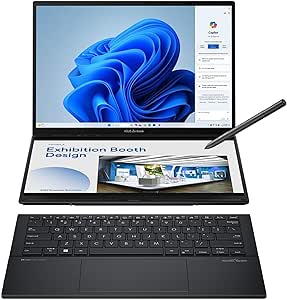 | Best for Dual-Screen Productivity | Displays: Dual 14-inch 2880 × 1800 OLED touchscreens, 120Hz, up to 500 nits | Processor: Intel Core Ultra 9 285H | Graphics: Intel Arc | VIEW LATEST PRICE | See Our Full Breakdown |
| OLED MacBook Pro alternatife | Processor | Graphics | Display | Weight |
|---|---|---|---|---|
| GEEKOM GeekBook X14 Pro Laptop | Intel Core Ultra 5 125U, 12 cores, up to 4.3 GHz | Intel Arc with XeSS, ray tracing, and AV1 encoding | 14-inch 2.8K OLED, 120Hz, 450 nits | 2.2 lbs |
| Samsung Galaxy Book5 Pro 360 1 | Intel Core Ultra 7 Series | Intel Arc 140V GPU with 8GB VRAM | 16-inch 3K AMOLED touchscreen, 120Hz | 3.7 pounds |
| ASUS Zenbook A14 Laptop 14" WU | Qualcomm Snapdragon 8-core X Plus | Qualcomm Adreno GPU | 14-inch WUXGA OLED, 1920×1200, HDR | 2.4 lbs |
| GEEKOM GeekBook X16 Pro Laptop | Intel Core Ultra 9 185H, 16 cores, up to 5.1 GHz | Intel Arc with XeSS, ray tracing, and AV1 encoding | 16-inch 2.5K IPS, 120Hz, 100% sRGB, 400 nits | 2.8 lbs |
| ASUS Zenbook 14 Creator Laptop | Intel Core Ultra 7 255H, 16 cores | Intel Arc 140T GPU | 14-inch WUXGA OLED touchscreen, 1920×1200, 60Hz | 2.65 lbs |
| Asus Zenbook 14X OLED Business | 13th Gen Intel Core i7-13700H, 14-core | Intel Iris Xe | 14.5-inch OLED touchscreen, 2880 x 1800, 120Hz | 3.44 lbs |
| ASUS Zenbook 14 OLED Laptop wi | Intel Core Ultra 7 255H, 16-core | Intel Arc 140T | 14-inch WUXGA OLED touchscreen, 1920 x 1200, HDR, 500 nits | 2.66 lbs |
| ASUS Vivobook 16" OLED Touchsc | Intel Core Ultra 7 258V | Intel Arc | 16-inch OLED touchscreen, 2880 x 1800, 120Hz | 3.92 lbs |
| Samsung Galaxy Book3 Pro 16-In | 13th Gen Intel Core i7-1360P | Integrated Intel Graphics | 16-inch 3K AMOLED, 2880 x 1800, 120Hz | 3.4 lbs |
| Acer Swift 16 AI Laptop 16" OL | Intel Core Ultra 5 322, 6-core, up to 4.4GHz | Integrated Intel Graphics | 16-inch WUXGA OLED touchscreen, 1920 x 1200, 100% DCI-P3 | 3 lbs |
| Lenovo IdeaPad Pro 5 16" OLED | AMD Ryzen AI Series | NVIDIA GeForce RTX 5050 | 16-inch 2880 × 1800 OLED, 120Hz | — |
| ASUS Zenbook Duo Laptop | Intel Core Ultra 9 285H | Intel Arc | — | 3.6 pounds |
More Details on Our Top Picks
GEEKOM GeekBook X14 Pro Laptop, 14-inch 2.8K OLED, Ultra Thin, 2.2 lbs
The GeekBook X14 Pro is the clearest pick here for buyers who want a sharp OLED screen without carrying a heavier 16-inch machine. Its 14-inch 2.8K OLED panel has more resolution than the WUXGA screens on the ASUS Zenbook A14 and Zenbook 14 Creator, while the 120Hz refresh rate makes scrolling and motion look smoother. At 2.2 pounds, it is also the lightest option in this group. Two USB4 ports plus HDMI 2.1 give it useful desk and travel connectivity. The tradeoff is a Core Ultra 5 processor rather than the stronger Ultra 7 in the Zenbook 14 Creator, and the supplied details say little about keyboard quality or memory and storage. Choose it for portability and display sharpness, not a clearly documented high-performance creator setup.
Pros:- At 2.2 pounds, it is lighter than every other product in this batch.
- 2.8K OLED resolution and a 120Hz refresh rate provide a sharper, smoother display than the WUXGA ASUS Zenbook models.
- Two USB4 ports and HDMI 2.1 support flexible monitor and accessory connections.
- 72Wh battery is rated for up to 16 hours, with actual runtime dependent on use.
Cons:- Core Ultra 5 125U is a less performance-focused choice than the Core Ultra 7 255H in the ASUS Zenbook 14 Creator.
- Memory and storage configurations are not specified in the supplied product data.
- The 450-nit brightness and 16-hour battery claim may not suit every bright-room or demanding-workload scenario.
Best for: Frequent travelers who want a light 14-inch Windows laptop with a high-resolution, high-refresh OLED display.
Not ideal for: Buyers who need clearly specified memory and storage, detailed keyboard information, or stronger documented processing power for demanding creative workloads.
- Display:14-inch 2.8K OLED, 120Hz, 450 nits
- Processor:Intel Core Ultra 5 125U, 12 cores, up to 4.3 GHz
- Graphics:Intel Arc with XeSS, ray tracing, and AV1 encoding
- Weight:2.2 lbs
- Battery:72Wh, rated up to 16 hours
- Chassis:Aerospace-grade magnesium alloy
- Thickness:0.23 inches
- Ports:Two USB4 with Power Delivery and DisplayPort 2.1, HDMI 2.1, USB 3.2 Type-A, 3.5mm audio jack
Our verdict“Choose the GeekBook X14 Pro if low carry weight and a sharp 120Hz OLED matter more than a documented high-end processor or configuration.”
Samsung Galaxy Book5 Pro 360 16” Laptop with AI Processor and S Pen
The Galaxy Book5 Pro 360 earns its place through flexibility rather than portability: its 16-inch 3K AMOLED touchscreen folds into tablet-style use and supports the included S Pen. That makes it a better fit for handwriting, sketching, and marking up documents than the conventional clamshell GEEKOM GeekBook X16 Pro. The 120Hz panel and claimed battery life of up to 25 hours also make it suited to long days of mixed work and media. Its 3.7-pound weight, however, is a substantial step up from the 2.8-pound X16 Pro. The listed 8GB of RAM is another constraint, particularly beside the Zenbook A14’s 16GB. Pick this Samsung for touch-and-pen versatility, but check that its memory configuration fits your workload before choosing it for sustained multitasking.
Pros:- 16-inch 3K AMOLED touchscreen combines a large workspace with vivid contrast and 120Hz refresh.
- Included S Pen and 2-in-1 hinge support handwriting, sketching, and tablet-style use.
- Two Thunderbolt 4 ports, HDMI, USB-A, and microSD provide a varied selection of connections.
- Battery is rated for up to 25 hours, though actual runtime varies by use and settings.
Cons:- At 3.7 pounds, it is much heavier than the 2.8-pound GEEKOM GeekBook X16 Pro.
- The listed 8GB of RAM is less than the 16GB in the ASUS Zenbook A14 and may limit heavier multitasking.
- The 16-inch body is less convenient for compact bags and frequent one-handed carrying.
Best for: Students, illustrators, and office users who want a large touchscreen laptop that can fold into tablet mode for notes, markup, or pen input.
Not ideal for: Frequent travelers prioritizing low weight, or multitaskers who need more than the listed 8GB of RAM.
- Display:16-inch 3K AMOLED touchscreen, 120Hz
- Processor:Intel Core Ultra 7 Series
- Graphics:Intel Arc 140V GPU with 8GB VRAM
- Memory:8GB RAM
- Storage:1TB SSD
- Battery:Rated up to 25 hours
- Weight:3.7 pounds
- Ports:HDMI, USB-A, two Thunderbolt 4, headphone jack, microSD slot
- Operating system:Windows 11 Home
Our verdict“Choose the Galaxy Book5 Pro 360 if pen input and a convertible 16-inch OLED screen matter more than light weight or a larger listed memory capacity.”
ASUS Zenbook A14 Laptop 14″ WUXGA OLED, Qualcomm Snapdragon 8-core, 16GB RAM, 512GB SSD, Windows 11
The Zenbook A14 is the balanced compact choice for buyers who want OLED color and a light Windows laptop without chasing the highest screen resolution. Its 14-inch WUXGA panel is less detailed than the 2.8K screen on the GEEKOM GeekBook X14 Pro, but its listed 100% DCI-P3 coverage and HDR support speak to color-rich photo and video viewing. At 2.4 pounds, it stays travel-friendly, while 16GB RAM and a 512GB SSD are clearly specified—an advantage over the X14 Pro’s unspecified configuration. The Snapdragon platform distinguishes it from the Intel-based Zenbook 14 Creator, but buyers should check that their required apps run well on this processor. Integrated components also limit future upgrades, and heavy workloads can affect battery life.
Pros:- 2.4-pound weight makes it practical for daily commuting and travel.
- OLED panel lists 100% DCI-P3 color coverage and HDR support.
- 16GB RAM and 512GB SSD provide a clearly defined configuration.
- Thunderbolt 4, USB-A, and HDMI 2.1 cover common desk and accessory connections.
Cons:- The 1920×1200 display is less detailed than the 2.8K OLED in the GEEKOM GeekBook X14 Pro.
- Integrated components limit later memory or storage upgrades.
- Battery life is not specified here, and demanding use may reduce runtime.
Best for: Mobile professionals and casual creators who want a lightweight 14-inch OLED laptop with specified 16GB memory and wide-gamut color.
Not ideal for: Buyers who need a high-resolution 2.8K screen, upgradeable internals, or software known to depend on Intel-specific compatibility.
- Display:14-inch WUXGA OLED, 1920×1200, HDR
- Color coverage:100% DCI-P3
- Processor:Qualcomm Snapdragon 8-core X Plus
- Memory:16GB DDR5
- Storage:512GB SSD
- Graphics:Qualcomm Adreno GPU
- Brightness:600 nits HDR
- Battery:70Wh
- Weight:2.4 lbs
Our verdict“Pick the Zenbook A14 for a light, color-capable everyday laptop with known memory and storage, provided its Snapdragon platform suits your apps.”
GEEKOM GeekBook X16 Pro Laptop, 16″ 2.5K IPS, 2.8 lb Slim Portable Notebook
The GeekBook X16 Pro is the deliberate exception in this OLED-focused roundup: its 16-inch screen is IPS, not OLED. That makes it a fit for buyers who want a larger, high-refresh workspace but are willing to give up OLED’s deeper contrast. Compared with the Samsung Galaxy Book5 Pro 360, it offers a more conventional clamshell design and weighs 2.8 pounds rather than 3.7, while the Core Ultra 9 185H is the strongest listed processor in this batch. Its 2.5K, 120Hz screen and 100% sRGB coverage suit general creative and productivity work, though color-sensitive buyers may prefer an OLED option such as the ASUS Zenbook 14 Creator. Storage capacity is not specified, so confirm the configuration before buying.
Pros:- 16-inch 2.5K IPS screen combines a 120Hz refresh rate with 100% sRGB coverage.
- Core Ultra 9 185H has 16 cores and boosts up to 5.1 GHz.
- At 2.8 pounds, it is lighter than the Samsung Galaxy Book5 Pro 360.
- USB4, HDMI 2.1, USB-A, and microSD support a range of external devices.
Cons:- IPS technology does not deliver the OLED contrast offered by the ASUS Zenbook 14 Creator and other picks.
- Storage capacity is not stated in the supplied product details.
- The listed graphics are integrated Intel Arc rather than a dedicated GPU.
Best for: Traveling professionals who want a light 16-inch, 120Hz screen and a high-core-count Intel processor, but do not require OLED contrast.
Not ideal for: Buyers set on OLED blacks and contrast, or color professionals who need a listed wide-gamut specification beyond 100% sRGB.
- Display:16-inch 2.5K IPS, 120Hz, 100% sRGB, 400 nits
- Processor:Intel Core Ultra 9 185H, 16 cores, up to 5.1 GHz
- Graphics:Intel Arc with XeSS, ray tracing, and AV1 encoding
- Battery:77Wh, rated up to 17 hours
- Weight:2.8 lbs
- Thickness:0.27 inches
- Cooling:IceBlade 2.0 dual fan with heat pipes
- Chassis:Aerospace-grade magnesium alloy, CNC unibody
- Ports:USB4 Type-C with Power Delivery and DisplayPort 2.1, USB 3.2 Type-C, HDMI 2.1, USB 3.2 Type-A, 3.5mm audio, microSD slot
Our verdict“Choose the GeekBook X16 Pro if a roomy, lightweight 16-inch screen and Core Ultra 9 matter more to you than OLED image contrast.”
ASUS Zenbook 14 Creator Laptop with OLED Touchscreen, Intel 16-core Ultra 7 255H, 16GB RAM, 1TB SSD, Windows 11
The Zenbook 14 Creator is the most clearly specified compact creative setup in this group: it pairs a 14-inch OLED touchscreen with a 16-core Core Ultra 7, 16GB RAM, and a 1TB SSD. That combination gives buyers a stronger stated processor and more storage than the Snapdragon-based Zenbook A14, while keeping the machine at 2.65 pounds. Its 1920×1200 resolution is lower than the GEEKOM GeekBook X14 Pro’s 2.8K, and its 60Hz refresh rate will not look as fluid in motion as that model’s 120Hz screen. For editing and color-focused work, the listed 100% DCI-P3 coverage and HDR brightness are useful strengths. Battery runtime is not provided, so this is easier to recommend for its workload configuration than for all-day unplugged use.
Pros:- 16-core Core Ultra 7 255H is a strong listed processor for a compact creator laptop.
- 16GB RAM and 1TB SSD provide more specified storage than the Zenbook A14’s 512GB.
- OLED touchscreen lists 100% DCI-P3 color coverage and 500-nit HDR brightness.
- Thunderbolt 4 and HDMI 2.1 offer practical options for external displays and accessories.
Cons:- The 60Hz refresh rate is less fluid than the 120Hz displays on the GEEKOM X14 Pro and Galaxy Book5 Pro 360.
- WUXGA resolution is below the GEEKOM X14 Pro’s 2.8K panel.
- Battery life is not specified in the supplied product details.
Best for: Creators who want a compact Windows laptop with a specified Intel processor, 16GB RAM, 1TB SSD, and wide-gamut OLED touchscreen.
Not ideal for: Buyers who prioritize a high-refresh display, longer stated battery runtime, or higher-than-WUXGA screen resolution.
- Display:14-inch WUXGA OLED touchscreen, 1920×1200, 60Hz
- Brightness and color:500 nits HDR, 100% DCI-P3
- Processor:Intel Core Ultra 7 255H, 16 cores
- Memory:16GB
- Storage:1TB SSD
- Graphics:Intel Arc 140T GPU
- Battery:75Wh
- Weight:2.65 lbs
- Ports:Two Thunderbolt 4, one USB-A 3.2, HDMI 2.1
Our verdict“Choose the Zenbook 14 Creator if your priority is a compact, color-capable OLED laptop with a strong listed Intel configuration rather than a high-refresh screen.”
Asus Zenbook 14X OLED Business Laptop, 14.5-inch 2.8K Touchscreen, 13th Gen Intel i7, 16GB RAM, 512GB SSD, Windows 11
The Zenbook 14X OLED is a strong pick for buyers who want a sharp, responsive display in a smaller footprint than a 16-inch MacBook Pro. Its 14.5-inch 2.8K OLED panel combines touch input with a 120Hz refresh rate, giving scrolling and animation a smoother feel while keeping fine text crisp. The 13th Gen Core i7-13700H and 16GB of memory suit demanding everyday work, and Thunderbolt 4 plus HDMI make connecting displays straightforward. Compared with the Samsung Galaxy Book3 Pro 16, this Asus is more compact and has a touch display, but gives up screen area and half the listed SSD capacity. The tradeoff is also visible in endurance: its stated battery life is up to 10 hours, and integrated Iris Xe graphics are not aimed at intensive gaming or GPU-heavy creative work.
Pros:- 14.5-inch 2.8K OLED touchscreen with a smooth 120Hz refresh rate
- 13th Gen Core i7-13700H and 16GB RAM for demanding everyday multitasking
- Thunderbolt 4, USB-A, and HDMI 2.1 provide useful display and accessory connections
- Lighter and more compact than the 16-inch Samsung Galaxy Book3 Pro
Cons:- 512GB SSD offers less built-in space than the Galaxy Book3 Pro’s 1TB drive
- Battery life is specified as up to 10 hours, which may fall short for a full day away from an outlet
- Intel Iris Xe graphics are not suited to demanding gaming or GPU-heavy creative workloads
Best for: Mobile professionals who want a compact, high-resolution OLED touchscreen for multitasking, presentations, and general creative work.
Not ideal for: Buyers who need a large editing canvas, all-day unplugged use, or dedicated graphics for demanding games and GPU-based workloads.
- Processor:13th Gen Intel Core i7-13700H, 14-core
- Memory:16GB DDR SDRAM
- Storage:512GB SSD
- Display:14.5-inch OLED touchscreen, 2880 x 1800, 120Hz
- Graphics:Intel Iris Xe
- Battery:70Wh; up to 10 hours
- Weight:3.44 lbs
- Ports:2x Thunderbolt 4, 1x USB-A 3.2, 1x HDMI 2.1
Our verdict“Choose the Zenbook 14X if a compact 120Hz OLED touchscreen matters more than a larger display, longer stated battery life, or dedicated graphics.”
ASUS Zenbook 14 OLED Laptop with 14″ WUXGA OLED Touch Display
This Zenbook 14 OLED favors mobility and a business-ready software setup over maximum display resolution. At 2.66 pounds, it is the lightest of these five options, while Windows 11 Pro, Wi-Fi 7, and Thunderbolt 4 suit frequent travel and modern office workflows. The 16-core Ultra 7 255H and 16GB of DDR5 memory provide a capable base for multitasking, and the OLED touch panel’s listed 500-nit brightness helps in brighter settings. Its 1920 x 1200 resolution is a clear step down in pixel density from the Zenbook 14X’s 2.8K screen and the Samsung Galaxy Book3 Pro’s 3K panel, though the lower resolution can be a sensible compromise for buyers who value portability over fine detail. The 512GB SSD is modest, and battery life is not specified, so storage-heavy users and travelers who need predictable unplugged runtime should compare carefully.
Pros:- At 2.66 pounds, it is the lightest model in this five-product group
- Windows 11 Pro and Wi-Fi 7 suit business-focused and mobile workflows
- 16-core Intel Ultra 7 255H with 16GB DDR5 memory
- OLED touchscreen lists HDR, 500-nit brightness, and 100% DCI-P3
Cons:- 1920 x 1200 resolution is less detailed than the Zenbook 14X and Galaxy Book3 Pro displays
- 512GB SSD may constrain users with large work files or media libraries
- Battery life details are not provided
Best for: Frequent travelers and Windows Pro users who want a very light laptop with an OLED touchscreen, current wireless connectivity, and business-oriented software.
Not ideal for: Photo editors, video professionals, or large-screen MacBook Pro shoppers who prioritize high resolution, generous storage, or clearly stated battery endurance.
- Processor:Intel Core Ultra 7 255H, 16-core
- Memory:16GB DDR5
- Storage:512GB SSD
- Display:14-inch WUXGA OLED touchscreen, 1920 x 1200, HDR, 500 nits
- Graphics:Intel Arc 140T
- Operating system:Windows 11 Pro
- Battery:75Wh
- Weight:2.66 lbs
- Ports:2x Thunderbolt 4, 1x USB-A 3.2, 1x HDMI 2.1 TMDS
Our verdict“Pick this Zenbook for a lightweight Windows Pro travel laptop, but choose a higher-resolution model if screen detail is a priority.”
ASUS Vivobook 16″ OLED Touchscreen Flip Laptop – Intel EVO Core Ultra 7 258V, 32GB RAM, 1TB SSD, Wi-Fi 7, Windows 11 Pro
The Vivobook 16 OLED Flip is the most adaptable pick here: its 360-degree hinge lets the large touchscreen serve as a laptop, presentation surface, or tablet-style device. A 16-inch 2880 x 1800 OLED panel at 120Hz gives it the resolution and refresh rate to compete with the Galaxy Book3 Pro’s 16-inch 3K AMOLED, while the Vivobook adds touch and flexible modes. Its 32GB of memory and 1TB SSD also provide more headroom than the 16GB, 512GB configurations in both Zenbooks. That flexibility comes with a portability cost: at 3.92 pounds, it is heavier than the Galaxy Book3 Pro and much heavier than the compact Zenbook 14 OLED. The product data does not specify battery life, so I would not choose it over a lighter laptop for frequent long-distance travel without checking runtime needs.
Pros:- 16-inch 2880 x 1800 OLED touchscreen with a 120Hz refresh rate
- 360-degree hinge supports laptop, tablet, and stand-style use
- 32GB RAM and 1TB SSD offer more capacity than either listed Zenbook 14
- Thunderbolt 4, HDMI 2.1, USB-A, and microSD reader broaden connectivity
Cons:- At 3.92 pounds, it is heavier than the Galaxy Book3 Pro and both 14-inch Zenbooks
- Battery life details are not specified
- Integrated Intel Arc graphics do not match a laptop with a dedicated GPU for demanding graphics work
Best for: Multitaskers and hybrid workers who want a roomy OLED touchscreen, ample memory and storage, and the option to use the laptop in tablet or stand modes.
Not ideal for: Commuters who prioritize a lightweight carry, or buyers who need confirmed long battery life for full days away from power.
- Processor:Intel Core Ultra 7 258V
- Memory:32GB LPDDR5X
- Storage:1TB PCIe Gen 4 SSD
- Display:16-inch OLED touchscreen, 2880 x 1800, 120Hz
- Graphics:Intel Arc
- Operating system:Windows 11 Pro
- Battery:75Wh Li-ion
- Weight:3.92 lbs
- Ports:USB-A, USB-C, Thunderbolt 4, HDMI 2.1, audio jack, microSD reader
Our verdict“Choose the Vivobook Flip if convertible use and higher memory capacity matter more than keeping your laptop light.”
Samsung Galaxy Book3 Pro 16-Inch Laptop, Intel Core i7, 16GB RAM, 1TB SSD, 3K AMOLED Screen, 120Hz, Fingerprint Reader, FHD Webcam, 2023 Model, Graphite
The Galaxy Book3 Pro 16 makes a strong case for buyers seeking a traditional clamshell with a large, detailed OLED-style display. Its 16-inch 3K AMOLED screen at 120Hz gives spreadsheets, timelines, and side-by-side windows more room than either 14-inch Zenbook, while the slim 3.4-pound body keeps it comparatively easy to carry. Compared with the convertible Vivobook 16, Samsung offers a lighter design and a fingerprint reader, but the Vivobook provides a touch-and-flip form and twice the memory. This Galaxy Book’s 16GB RAM and integrated Intel graphics are better suited to general productivity than intensive GPU workloads, and the product data lists only a limited set of ports. The 1TB SSD is a practical advantage over the 512GB Zenbooks, with microSD expansion available if more removable storage is useful.
Pros:- 16-inch 3K AMOLED display with a 120Hz refresh rate
- 1TB SSD provides more built-in storage than the Zenbook 14X and Zenbook 14 OLED
- 3.4-pound body is lighter than the 16-inch Vivobook Flip
- Fingerprint reader, Full HD webcam, HDMI, Thunderbolt 4, and microSD slot
Cons:- 16GB RAM and integrated Intel graphics limit headroom for demanding GPU-focused work
- Fewer listed connection options than the Vivobook Flip
- Not a convertible, unlike the touchscreen Vivobook with its 360-degree hinge
Best for: Professionals who want a large, high-resolution 120Hz AMOLED screen, a 1TB SSD, and a comparatively light clamshell for office and creative productivity.
Not ideal for: Buyers who need a convertible design, dedicated graphics, more memory for demanding workloads, or a broad selection of full-size ports.
- Processor:13th Gen Intel Core i7-1360P
- Memory:16GB
- Storage:1TB SSD; microSD expansion supported
- Display:16-inch 3K AMOLED, 2880 x 1800, 120Hz
- Graphics:Integrated Intel Graphics
- Operating system:Windows 11 Home
- Weight:3.4 lbs
- Security and webcam:Fingerprint reader; Full HD webcam
- Ports:Thunderbolt 4, USB-C, microSD slot, HDMI
Our verdict“Choose the Galaxy Book3 Pro for a light, large-screen AMOLED clamshell with 1TB storage, not for convertible flexibility or graphics-heavy work.”
Acer Swift 16 AI Laptop 16″ OLED Touchscreen Intel Core Ultra 5 322 16GB RAM 1TB SSD
The Acer Swift 16 AI is the portability-minded choice for anyone who wants a 16-inch OLED screen without the weight of many large-format laptops. At 3 pounds, it is lighter than the Galaxy Book3 Pro and substantially lighter than the convertible Vivobook 16, while still offering a touchscreen, 1TB SSD, Thunderbolt 4, and Windows 11 Pro. Its WUXGA resolution is the main compromise: the 1920 x 1200 panel is less detailed than the 3K Samsung and 2880 x 1800 Vivobook, even though its listed 100% DCI-P3 coverage supports a broad color range. The six-core Core Ultra 5 and integrated graphics make more sense for office work, browsing, and everyday multitasking than demanding rendering or gaming. Battery capacity is listed at 71Wh, but runtime is not, so frequent travelers should not assume all-day use.
Pros:- 3-pound weight is the lowest among the 16-inch laptops in this batch
- 16-inch OLED touchscreen lists 100% DCI-P3 coverage
- 1TB SSD and Windows 11 Pro suit work-focused file storage and workflows
- Thunderbolt 4, two USB-A ports, HDMI, and Wi-Fi 7 provide flexible connectivity
Cons:- 1920 x 1200 resolution is less detailed than the Galaxy Book3 Pro and Vivobook 16 displays
- Integrated Intel graphics are not aimed at demanding gaming or GPU-intensive creative tasks
- Battery runtime is not specified despite the 71Wh capacity
Best for: Traveling professionals who want a light 16-inch OLED touchscreen, Windows 11 Pro, and 1TB of storage for everyday productivity.
Not ideal for: High-resolution media editors, serious gamers, or travelers who need verified all-day battery runtime.
- Processor:Intel Core Ultra 5 322, 6-core, up to 4.4GHz
- Memory:16GB DDR SDRAM
- Storage:1TB SSD
- Display:16-inch WUXGA OLED touchscreen, 1920 x 1200, 100% DCI-P3
- Graphics:Integrated Intel Graphics
- Operating system:Windows 11 Pro
- Battery:71Wh
- Weight:3 lbs
- Connectivity:2x Thunderbolt 4, 2x USB-A 3.2, HDMI, Wi-Fi 7
Our verdict“Pick the Swift 16 AI if a light 16-inch OLED and 1TB drive matter more than high resolution or dedicated graphics.”
Lenovo IdeaPad Pro 5 16″ OLED Laptop with Ryzen AI and RTX 5050
The IdeaPad Pro 5 is the stronger fit for buyers who want an OLED MacBook Pro alternative with dedicated graphics. Its RTX 5050 can help with GPU-accelerated creative tasks and light gaming, a capability the ASUS Zenbook Duo’s integrated Intel Arc graphics do not match as directly. The 16-inch, 120Hz OLED also gives editors and multitaskers more screen space than the Duo’s 14-inch panels, while USB4, HDMI 2.1, and an SD card reader make connecting displays and importing media straightforward.
The tradeoff is portability: at nearly four pounds, this is less appealing for frequent travel than slimmer alternatives. Its 16GB of memory also gives demanding multitasking less headroom than the Zenbook Duo’s 32GB. I’d choose it for GPU-dependent work, not for the lightest carry or longest unplugged days; battery life is not specified.
Pros:- 16-inch 2.8K OLED panel with a 120Hz refresh rate
- Dedicated NVIDIA GeForce RTX 5050 for GPU-assisted creative work and light gaming
- USB4, HDMI 2.1, USB-A, and an SD card reader support a wide range of peripherals
- 1TB NVMe SSD provides substantial local storage
Cons:- Nearly four-pound weight makes it less convenient for daily commuting
- 16GB of memory offers less multitasking headroom than the ASUS Zenbook Duo’s 32GB
- Battery life is not specified, making mobile endurance harder to judge
Best for: Creative users who want a large OLED screen, dedicated RTX graphics, and built-in SD card access for photo or video workflows.
Not ideal for: Frequent travelers or heavy multitaskers who prioritize low carry weight, longer battery life, or more than 16GB of memory.
- Display:16-inch 2880 × 1800 OLED, 120Hz
- Processor:AMD Ryzen AI Series
- Graphics:NVIDIA GeForce RTX 5050
- Memory:16GB LPDDR5x
- Storage:1TB NVMe SSD
- Operating system:Windows 11 Home
- Connectivity:2× USB-C (USB4), 2× USB-A, HDMI 2.1, SD card reader, 3.5mm audio jack
Our verdict“Choose the IdeaPad Pro 5 if dedicated RTX graphics and a roomy OLED workspace matter more than light weight and extra memory.”
ASUS Zenbook Duo Laptop, 14″ OLED Touch Display, Intel Core Ultra 9, 32GB RAM, 1TB SSD, Windows 11
The Zenbook Duo takes a different route to replacing a MacBook Pro: instead of prioritizing a discrete GPU, it offers two 14-inch OLED touchscreens for keeping documents, timelines, or reference material visible alongside the main task. That layout is more distinctive for mobile productivity than the Lenovo IdeaPad Pro 5’s single 16-inch display, and its 32GB of memory gives heavy app juggling more room than the Lenovo’s 16GB. The Core Ultra 9, 1TB SSD, and included Pen 2.0 round out a setup aimed at people who work across several windows.
The second screen adds flexibility, but it also makes the experience more dependent on desk space and power use; the stated battery life can vary with dual-screen use. Integrated Intel Arc graphics are a weaker fit than the Lenovo’s RTX 5050 for GPU-heavy work, and its 3.6-pound weight is portable rather than ultralight. Pick this for screen flexibility, not graphics-first workloads.
Pros:- Two 14-inch 2880 × 1800 OLED touchscreens support flexible multitasking
- 32GB LPDDR5x memory suits demanding app switching
- Intel Core Ultra 9 285H processor and 1TB SSD
- Includes ASUS Pen 2.0, sleeve, and 65W USB-C charger
Cons:- Integrated Intel Arc graphics are less suited to GPU-heavy work than the Lenovo IdeaPad Pro 5’s RTX 5050
- Dual-screen use can reduce battery life from the stated up-to-16-hour figure
- At 3.6 pounds, it is not as light as a conventional compact laptop
Best for: Mobile professionals who routinely compare documents, present with a stylus, or keep reference material open beside their main workspace.
Not ideal for: Video editors, 3D creators, or gamers who need dedicated graphics, and buyers who prefer a simple single-screen laptop.
- Displays:Dual 14-inch 2880 × 1800 OLED touchscreens, 120Hz, up to 500 nits
- Processor:Intel Core Ultra 9 285H
- Graphics:Intel Arc
- Memory:32GB LPDDR5x
- Storage:1TB SSD
- Weight:3.6 pounds
- Battery:75Wh; up to 16 hours, with runtime varying during dual-screen use
- Connectivity:Wi-Fi 7, Bluetooth 5.4, HDMI, USB-C, USB-A, AUX
Our verdict“Choose the Zenbook Duo if a second OLED workspace and 32GB of memory matter more than dedicated graphics or a conventional laptop layout.”

How We Picked
I ranked these laptops around the reasons someone might seek an OLED MacBook Pro alternative: a vivid screen for creative or media work, enough performance for the intended workload, and a form factor that suits daily use. I compared the listed processor and graphics details, screen resolution and size, memory and storage, portability, and whether each design adds practical flexibility such as a touchscreen, pen, or second display. Those details matter because a lightweight travel laptop and a graphics-equipped 16-inch work machine solve different problems, even when both use OLED.
The order favors balanced fit over any single headline feature. The Zenbook 14 Creator leads as a capable, compact all-rounder; the IdeaPad Pro 5 earns a distinct place for discrete graphics, while the Galaxy Book5 Pro 360 and Zenbook Duo serve buyers who value convertible or multi-screen workflows. Older-generation and more narrowly specified models rank lower where the listed configuration offers less headroom or less clear separation from newer alternatives. I also treat OLED as one part of the decision: these listed products do not establish a direct match for every MacBook Pro strength, so buyers should compare their actual software, graphics, and battery needs before choosing.
| OLED MacBook Pro alternatife | Operating system |
|---|---|
| GEEKOM GeekBook X14 Pro Laptop | — |
| Samsung Galaxy Book5 Pro 360 1 | Windows 11 Home |
| ASUS Zenbook A14 Laptop 14" WU | — |
| GEEKOM GeekBook X16 Pro Laptop | — |
| ASUS Zenbook 14 Creator Laptop | — |
| Asus Zenbook 14X OLED Business | — |
| ASUS Zenbook 14 OLED Laptop wi | Windows 11 Pro |
| ASUS Vivobook 16" OLED Touchsc | Windows 11 Pro |
| Samsung Galaxy Book3 Pro 16-In | Windows 11 Home |
| Acer Swift 16 AI Laptop 16" OL | Windows 11 Pro |
| Lenovo IdeaPad Pro 5 16" OLED | Windows 11 Home |
| ASUS Zenbook Duo Laptop | — |
Factors to Consider When Choosing Best OLED MacBook Pro Alternatives
Choosing among the best OLED MacBook Pro alternatives starts with deciding what you want to keep from the MacBook Pro experience—and what you are willing to trade. A bright, high-contrast display may be the priority, or you may care more about graphics, carrying weight, or touch and pen input. Use these factors to narrow the list before comparing individual configurations.
Match Graphics to Your Actual Creative Work
Creative software does not place the same demands on every laptop. Photo editing, office work, and many design tasks can run well on integrated graphics, while 3D scenes, effects-heavy video timelines, and some GPU-accelerated tools can benefit from a discrete GPU. The IdeaPad Pro 5 is the only listed option that explicitly pairs OLED with an RTX 5050, giving it a different role from thin ultrabooks such as the Zenbook 14 Creator. Do not assume that an OLED panel makes a laptop a workstation; screen quality and rendering speed are separate questions. Check which applications you use and whether they rely on the CPU, GPU, or both before paying for graphics you may not use. If your work is mostly browser-based or document-heavy, a lighter model may be a better daily fit.
Choose Screen Size for Your Workspace, Not Just Your Bag
A 14-inch laptop is easier to carry and often works better on crowded tables, but a 16-inch panel can reduce the need to split windows or attach an external display. The lineup makes that compromise clear: compact models such as the GEEKOM X14 Pro favor mobility, while the Galaxy Book5 Pro 360 and Acer Swift 16 AI offer larger work areas. Screen resolution also affects how much detail and workspace you see, but it is only one part of display quality. If you routinely edit on a desk, consider how often you can connect a monitor; if you work in transit, weight and footprint may matter more than extra pixels. Avoid buying a large model solely for its screen if you rarely work away from an external display.
Treat Touch, Pen, and Convertible Designs as Workflow Choices
Touchscreens and 2-in-1 hinges are useful when your work involves annotating, sketching, presenting, or reading with the laptop in tablet mode. The Galaxy Book5 Pro 360 includes an S Pen, while the Zenbook Duo and Vivobook Flip offer touch-oriented designs for different workflows. Those features add flexibility, but they do not automatically improve typing or standard laptop use. A conventional clamshell can be simpler to set up and carry, and a second display can create more workspace while also making the device more complex. Before choosing a convertible, picture your actual tasks: if you will rarely use the hinge or pen, a traditional design may give you a more straightforward experience. Check what accessories are included with the specific configuration rather than assuming every pen or peripheral comes in the box.
Read Processor and Memory Specs Against Your Workload
Processor names span different generations and platforms in this group, including Intel Core Ultra chips, older Intel Core i7 options, and Qualcomm Snapdragon. A newer label does not answer every question about app compatibility, sustained speed, or battery behavior. Snapdragon-based Windows laptops can suit mobile productivity, but buyers who rely on specialized software or peripherals should verify compatibility before choosing one. Memory capacity also shapes how comfortably a machine handles many browser tabs, large creative files, or simultaneous applications; the Vivobook Flip and Zenbook Duo list 32GB, while several other picks list 16GB. Do not compare processor counts alone without checking the exact chip and the work you expect it to handle. If your workload is demanding, favor a configuration with enough memory and graphics capability rather than assuming a thin design can sustain every heavy task.
Separate OLED Benefits From Battery and Long-Session Expectations
OLED can deliver rich contrast and deep blacks, which are valuable for films, photography, and dark interfaces. It does not guarantee long battery life, a particular brightness level, or ideal color behavior for every professional workflow. Laptop configuration, screen size, software, and workload all affect how long a charge lasts, and the supplied product details do not provide a consistent basis for ranking battery endurance across these models. For color-critical work, check independent measurements of color coverage and accuracy for the exact model, then consider whether your workflow needs calibration. Buyers who spend long hours on static interface elements may also want to review the manufacturer’s OLED care guidance. Judge the whole display experience, not the OLED label alone.
Pay for Useful Headroom, Not a Feature You Will Ignore
Higher memory, larger storage, discrete graphics, and unusual designs can extend a laptop’s usefulness, but each earns its place only if it meets a real need. A 1TB SSD is helpful for large projects and offline media, while 512GB may be sufficient when most files live on external or cloud storage. Extra RAM can help with heavier multitasking, but buyers doing routine email and documents may gain more from a lighter chassis or a comfortable keyboard. The Zenbook Duo’s second screen is valuable for people who routinely keep reference material open, yet it is less compelling for someone who mainly uses one application at a time. Compare the upgrade to your likely workload over the laptop’s life, and do not let a distinctive feature obscure the basics of ports, keyboard comfort, and service support.
Frequently Asked Questions
Which OLED MacBook Pro alternative is the closest fit for a mix of creative work and everyday use?
I’d start with the ASUS Zenbook 14 Creator because its OLED touchscreen, Intel Core Ultra 7 processor, and 1TB SSD make it a balanced compact option for general productivity and creative tasks. It is not the strongest choice for every graphics-heavy workflow, since the IdeaPad Pro 5 is the listed model with an RTX 5050. Buyers who need more screen space may prefer a 16-inch laptop, even if that means carrying a larger machine. Match the choice to the software you use, not just the display type. For demanding GPU work, verify application performance on the exact configuration before deciding.
Should I choose the IdeaPad Pro 5 with RTX 5050 instead of a lighter OLED ultrabook?
Choose the IdeaPad Pro 5 if your work can benefit from discrete graphics, such as GPU-accelerated creative applications or some 3D workloads. A lighter ultrabook is usually the more sensible fit when portability, everyday productivity, and a smaller footprint matter more than graphics headroom. The RTX 5050 does not automatically make every task faster, and it can bring different power and cooling demands than a thin model. Confirm that your apps support and use the GPU before making it the deciding factor. If most of your work is writing, browsing, and light editing, the added graphics capability may not justify the larger format.
Is a Snapdragon Zenbook A14 a safe choice for work software?
It can be a good fit for buyers whose daily work centers on common Windows productivity apps and who value a light 14-inch OLED laptop. Compatibility deserves more checking if you rely on specialized software, older utilities, unusual drivers, or peripherals that have not been confirmed for Snapdragon-based Windows systems. Ask your software vendor or check compatibility documentation for the exact application version before buying. If your workflow depends on established Intel-specific tools, one of the Intel-based Zenbooks may be a safer starting point. The A14’s appeal is mobility, not a universal guarantee that every program will behave the same way.
Does a 16-inch OLED laptop make more sense than a 14-inch model for editing?
A 16-inch screen can make timelines, side panels, and reference windows easier to view without constant resizing, so it may suit desk-based editing. A 14-inch model is easier to carry and can still handle many creative tasks, especially when paired with an external monitor at a workstation. Screen size alone does not determine editing performance; processor, memory, graphics, and the software’s requirements matter too. The IdeaPad Pro 5’s RTX 5050 may matter more than panel size for GPU-heavy work, while a larger Galaxy Book or Acer can provide more on-screen room. Decide whether your main constraint is workspace or portability.
Is the Zenbook Duo worth choosing over a conventional OLED laptop?
The Zenbook Duo makes sense when you regularly work with two visible workspaces, such as a document beside reference material or a timeline beside preview windows. Its second OLED touchscreen is a functional difference, not simply a display upgrade, and the 32GB RAM and 1TB SSD support a more substantial multitasking setup. The added screen can also make the laptop more complex to arrange and less appealing if you usually work in one window. A conventional Zenbook is likely a simpler choice for writing, browsing, and standard office work. Pick the Duo when you already know how a second panel will change your routine.
Conclusion
For the best overall balance, I recommend the ASUS Zenbook 14 Creator; its OLED touchscreen, capable Intel processor, and 1TB SSD suit a wide range of everyday and creative work. The GEEKOM GeekBook X14 Pro is my best value-style pick for buyers who put light weight and a 2.8K OLED screen ahead of the highest listed performance, while the Samsung Galaxy Book5 Pro 360 is the premium choice for a larger convertible with S Pen support. Beginners who want a straightforward 14-inch OLED laptop can start with the ASUS Zenbook 14 OLED, provided its configuration meets their needs. For specific workloads, choose the Lenovo IdeaPad Pro 5 for its RTX 5050 graphics or the ASUS Zenbook Duo for dual-screen work. If portability leads your decision, look at the Zenbook A14; if screen area matters most, compare the 16-inch models. I’d make the final choice by checking software compatibility, graphics demands, and the exact configuration—not OLED branding alone.
Halloween Picks
halloween
As an affiliate, we earn on qualifying purchases.