TL;DR
Thorsten Meyer AI lists 10 gaming motherboards across AMD AM5 and AM4 platforms, highlighting the MSI MPG X870E Carbon WiFi as its overall pick and the ASUS TUF Gaming B850-PLUS WiFi as a value option. The source provides specifications and editorial recommendations, but no AI workload tests, comparative benchmarks or prices, so its “best for AI” label is not independently substantiated.
Thorsten Meyer AI’s guide to 10 gaming motherboards for prospective 2027 PC builds names the MSI MPG X870E Carbon WiFi its overall choice and the ASUS TUF Gaming B850-PLUS WiFi a value pick. The list may help readers compare platform features, but the supplied material does not report AI workload tests or establish that any board performs better for AI tasks.

Get the latest gadgets delivered free with Prime
- Fast, free delivery on millions of items
- Prime Video, Amazon Music and more included
- Member-only deals all year
The selection covers AMD AM5 boards with DDR5 and older AM4 boards using DDR4. Its AM5 options include X870E, X870 and B850 models from MSI, ASUS and Gigabyte; the AM4 choices use B550. The guide says AM5 provides a newer upgrade path, while B550 boards may suit people reusing an existing AM4 system.
The listed specifications include PCIe 5.0 support on the MSI X870E Carbon, Wi-Fi 7 on several AM5 models, and up to 5Gbps wired networking on some listings. The ASUS TUF B550-PLUS WiFi II is listed with Wi-Fi 6 and DDR4 support. The guide also identifies the ASUS ROG Strix X870E-E as a model for AI and content creation, citing its 18+2+2 power stages rated at 110 amps per stage.
Those are manufacturer or listing specifications and editorial labels in the supplied source, not results from a disclosed test. The guide gives no prices, AI software configuration, benchmark scores, power consumption comparisons or methodology for ranking the boards, considerations also relevant to gaming motherboards with AI features. It also includes two X870E-E entries under slightly different names, making the precise distinction between those listings unclear.
Choosing a motherboard for AI What the 2027 guide shows
The guide names the MSI MPG X870E Carbon WiFi its overall pick and the ASUS TUF Gaming B850-PLUS WiFi a value option. It offers specifications and editorial recommendations, but no AI workload tests to verify performance.
Two routes in the list
The guide frames AM5 for newer builds and B550 for people reusing compatible AM4 parts.
- Includes X870E, X870 and B850 models.
- Some listed boards offer Wi-Fi 7 and PCIe 5.0.
- Two B550 boards are included.
- The guide presents them for existing AM4 systems or budget builds.
Editorial picks
These are recommendations in the guide, not results from disclosed comparative tests.
MSI MPG X870E Carbon WiFi
The guide cites PCIe 5.0, Wi-Fi 7 and 5Gbps LAN among its listed features.
ASUS TUF Gaming B850-PLUS WiFi
Listed with an AM5 socket, DDR5 memory and Wi-Fi 7; no price comparison is provided.
ASUS ROG Strix X870E-E
The guide cites 18+2+2 power stages rated at 110 amps per stage, but reports no AI workload results.
What the guide leaves unanswered
Specifications and product labels alone cannot establish which board performs best for AI tasks.
Check your build before buying
Match the board to the components and AI work you actually plan to run.
Check the board revision and manufacturer specifications.
Verify CPU socket, memory type, GPU expansion and storage connections.
For AI work, look for benchmarks using your intended GPU and workload, and check current prices.
How Board Choice Shapes an AI PC
A motherboard affects which processor and memory a system can use, its expansion options, storage connections and network interfaces. That makes platform compatibility relevant to a gaming PC that may also run AI software. The guide’s AM5 and DDR5 emphasis points readers toward newer listed platforms, while its B550 options reflect a lower-cost route for owners of compatible AM4 parts.
For many AI workloads, however, the motherboard alone does not determine performance. The source provides no evidence that Wi-Fi 7, PCIe 5.0 or a particular power-stage count improves AI results. Readers comparing boards for local model work would still need to match the board to their processor, memory, GPU, storage and network requirements, then check current prices and compatibility.
Products Worth Considering

Apple Watch SE 3 GPS 44mm Smartwatch
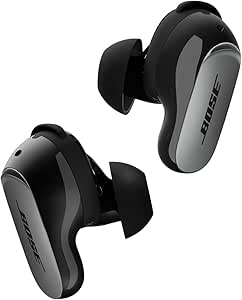
Bose QuietComfort Ultra Earbuds (2nd Gen), Wireless Noise-Cancelling Earbuds with Immersive Audio and Wireless Charging Case, Black

Samsung Galaxy Tab A11 8.7-Inch Wi-Fi Tablet, 64GB, 4GB RAM, 90Hz, Gray, with 20W Charger
As an affiliate, we earn on qualifying purchases.
AM5 and AM4 in the List
The guide describes AM5 with DDR5 as the standard for new builds and says AM4 remains a budget option for existing owners. It positions X870E and B850 boards as newer choices with PCIe 5.0 appearing increasingly often, and calls Wi-Fi 7 a differentiator for mid- to high-tier models. These are broad characterizations from the guide; it does not provide a chipset-by-chipset compatibility table or detail which slots and lanes are available on every board.
The ten named products are the MSI MPG X870E Carbon WiFi; ASUS TUF Gaming B850-PLUS WiFi; ASUS ROG Strix X870E-E Gaming WIFI7 NEO; ASUS ROG Strix X870-A Gaming WiFi; ASUS ROG Strix X870E-E Gaming WiFi; ASUS TUF Gaming B550-PLUS WiFi II; Gigabyte B850 AORUS Elite WIFI7; MSI B850 Gaming Plus WiFi bundle; ASUS ROG Strix B850-A Gaming WiFi; and ASUS ROG Strix B550-F Gaming WiFi II. The source identifies the MSI B850 bundle as including 32GB of DDR5-6000 memory.
“The MSI MPG X870E Carbon WiFi offers the best balance of connectivity and power delivery for high-end builds.”
— Thorsten Meyer AI guide
What the Guide Does Not Test
The source does not say when the guide was published, provide current prices, or explain how it selected and ranked the ten boards. It supplies no AI-specific benchmarks or tests of GPU support, memory capacity under AI workloads, sustained thermals or power delivery in a defined setup. Its “Best for AI & Content Creation” designation is therefore an editorial category rather than a demonstrated performance result in the material provided.
Some specifications are absent or inconsistent in the supplied table, including form factor and networking details for certain models. The X870E-E appears twice under different product names, with no explanation of whether the entries are distinct revisions or variants. Readers should confirm exact model numbers and manufacturer specifications before buying.
Checks Before Choosing a Board
The next step for a buyer is to confirm the exact board revision, CPU socket, memory type, expansion-slot layout and storage connections against the planned components. Anyone choosing primarily for AI work should also identify the intended GPU and workload, then compare real system-level benchmarks and current prices; this guide does not supply those comparisons.
The source gives no announced follow-up testing or update schedule. Its 2027 framing should be treated as the guide’s stated horizon, not as confirmation that prices, product availability or compatibility information will remain current through that year.
Key Questions
Which motherboard does the guide recommend overall?
It names the MSI MPG X870E Carbon WiFi as its overall choice, citing PCIe 5.0, Wi-Fi 7, 5Gbps LAN and power delivery for Ryzen 9000 series processors. The source includes no independent comparative benchmark.
Does the guide show which board is fastest for AI?
No. It does not provide AI workload tests or benchmark scores, so it cannot establish which model is fastest for AI tasks.
What is the listed value option?
The guide calls the ASUS TUF Gaming B850-PLUS WiFi a value choice. It lists an AM5 socket, DDR5 memory and Wi-Fi 7, but does not give a price comparison.
Are AM4 boards included?
Yes. The list includes two AMD B550 AM4 boards, which use DDR4. The guide presents them as options for budget builds or existing AM4 owners.
What should buyers verify before purchasing?
Check the exact model and revision, CPU and memory compatibility, GPU and storage connections, and current price. For AI use, compare systems with the intended GPU and workload, since the guide does not test those configurations.
Source: Thorsten Meyer AI