The best ASRock Taichi motherboards depend first on your processor platform and then on how much expansion and connectivity your build needs. My best overall pick is the ASRock X870E Taichi, a strong fit for a new high-end AM5 build; the B650E Taichi Lite stands out for buyers who want a simpler route into the Taichi lineup, while the Z890 Taichi is the leading choice for a current Intel build. The main tradeoff is between newer platform features and the cost and complexity of premium boards, with older Taichi models still relevant only for compatible CPUs or existing systems. A CPU-and-motherboard combo can also simplify a new build, but limits component choice. Read on for the full breakdown by platform, value, and buyer type.

Get the latest gadgets delivered free with Prime
- Fast, free delivery on millions of items
- Prime Video, Amazon Music and more included
- Member-only deals all year
Complete the kit



Key Takeaways
- Platform compatibility sets the shortlist: AM5 options include X870E, X670E, and B650E models; Intel choices span Z890, Z790, Z390, and X299, while the X570 is for AM4.
- The X870E Taichi is the strongest all-around modern AM5 choice in this group; the bundled Ryzen 9 9950X3D option suits buyers who want a matched CPU-and-board purchase rather than a motherboard alone.
- The B650E Taichi Lite is the value-oriented pick because it focuses on the AM5 platform without the premium positioning of the X870E models.
- Taichi Carrara boards prioritize a distinctive finish alongside their platform-specific feature set, making the X670E and Z790 Carrara options more about matching a build as well as selecting a chipset.
- Older models are targeted choices, not general upgrades: X570, X299, and Z390 make most sense for compatible CPUs or replacement builds, not buyers starting with a current-generation processor.
| AMD Ryzen 9 9950X3D CPU and ASRock X870E Taichi WiFi EATX Motherboard Combo |  | Best Complete AM5 Performance Bundle | Processor: AMD Ryzen 9 9950X3D | Socket: AM5 | Cores / threads: 16 / 32 | VIEW LATEST PRICE | See Our Full Breakdown |
| ASRock Z890 Taichi ATX Motherboard for Intel Core Ultra Processors |  | Best Intel Taichi Pick | Socket / chipset: LGA1851 / Intel Z890 | Compatible processors: Intel Core Ultra Series 2 | Form factor: ATX | VIEW LATEST PRICE | See Our Full Breakdown |
| ASRock X870E Taichi AMD AM5 EATX Motherboard |  | Best Overall AMD Taichi Motherboard | Socket / chipset: AM5 / AMD X870 | Compatible processors: AMD Ryzen 7000, 8000, and 9000 series | Form factor: EATX | VIEW LATEST PRICE | See Our Full Breakdown |
| ASRock X570 Taichi ATX Motherboard for AMD AM4 |  | Best Legacy AM4 Upgrade | Socket / chipset: AM4 / AMD X570 | Compatible processors: Ryzen 2000 and 3000; Ryzen 5000 may require a BIOS update | Form factor: ATX | VIEW LATEST PRICE | See Our Full Breakdown |
| ASRock X299 Taichi CLX ATX Motherboard for LGA 2066 |  | Best for High-Capacity Legacy Workstations | Socket / chipset: LGA 2066 / Intel X299 | Compatible processors: Intel Core X-Series | Form factor: ATX | VIEW LATEST PRICE | See Our Full Breakdown |
| ASRock B650E Taichi ATX Motherboard for AMD Ryzen 9000, 8000, and 7000 Series |  | Best Overall for Current AM5 Builds | Socket and chipset: AMD AM5; B650E | Compatible processors: AMD Ryzen 9000, 8000, and 7000 Series | Form factor: ATX, 12.0 × 9.6 in (30.5 × 24.4 cm) | VIEW LATEST PRICE | See Our Full Breakdown |
| ASRock X670E Taichi Carrara AMD AM5 X670E Motherboard |  | Best for Multi-Drive Storage Builds | Socket and chipset: AMD AM5; AMD X670 | Compatible processors: AMD Ryzen 7000 Series | Form factor: EATX, 30.5 × 26.7 cm | VIEW LATEST PRICE | See Our Full Breakdown |
| ASRock B650E Taichi Lite B650 |  | Best for a Refurbished Taichi Build | Socket and chipset: AMD AM5; AMD B650 | Supported processors: AMD Ryzen 7000 Series | Memory: 4 DDR5 slots; up to 256 GB | VIEW LATEST PRICE | See Our Full Breakdown |
| ASRock Z390 Taichi ATX Motherboard |  | Best for Reviving an Older Intel Build | Chipset and socket: Intel Z390; LGA1151 | Compatible processors: 8th- and 9th-generation Intel Core | Form factor: ATX | VIEW LATEST PRICE | See Our Full Breakdown |
| ASRock Z790 Taichi Carrara Motherboard | 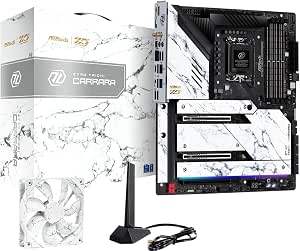 | Best Premium Intel Taichi | Chipset and socket: Intel Z790; LGA1700 | Compatible processors: 12th- and 13th-generation Intel Core | Memory: DDR5; up to 128 GB; up to 7400+ MHz overclocked | VIEW LATEST PRICE | See Our Full Breakdown |
| asrock taichi motherboard | Memory | Form factor | Compatible processors | Storage |
|---|---|---|---|---|
| AMD Ryzen 9 9950X3D CPU and AS | DDR5, up to 256 GB | EATX | — | 4 M.2 slots; 6 SATA ports |
| ASRock Z890 Taichi ATX Motherb | DDR5; 4 slots; up to 256 GB | ATX | Intel Core Ultra Series 2 | 4 SATA ports; M.2 expansion |
| ASRock X870E Taichi AMD AM5 EA | DDR5; 4 slots; up to 256 GB | EATX | AMD Ryzen 7000, 8000, and 9000 series | 4 M.2 sockets; 6 SATA ports |
| ASRock X570 Taichi ATX Motherb | DDR4; 4 slots; up to 128 GB | ATX | Ryzen 2000 and 3000; Ryzen 5000 may require a BIOS update | 3 M.2 slots; 8 SATA ports |
| ASRock X299 Taichi CLX ATX Mot | DDR4; 8 slots; up to 256 GB | ATX | Intel Core X-Series | 3 M.2 slots; 10 SATA 3 ports |
| ASRock B650E Taichi ATX Mother | 4 DDR5 DIMM slots; up to 256 GB | ATX, 12.0 × 9.6 in (30.5 × 24.4 cm) | AMD Ryzen 9000, 8000, and 7000 Series | 1 PCIe Gen5x4 M.2, 2 PCIe Gen4x4 M.2, 4 SATA3 ports |
| ASRock X670E Taichi Carrara AM | 4 DDR5 slots; up to 128 GB | EATX, 30.5 × 26.7 cm | AMD Ryzen 7000 Series | — |
| ASRock B650E Taichi Lite B650 | 4 DDR5 slots; up to 256 GB | — | — | 4 SATA III ports |
| ASRock Z390 Taichi ATX Motherb | 4 DDR4 DIMM slots; up to 64 GB | ATX | 8th- and 9th-generation Intel Core | — |
| ASRock Z790 Taichi Carrara Mot | DDR5; up to 128 GB; up to 7400+ MHz overclocked | — | 12th- and 13th-generation Intel Core | — |
More Details on Our Top Picks
AMD Ryzen 9 9950X3D CPU and ASRock X870E Taichi WiFi EATX Motherboard Combo
This combo is the easiest route here to a high-end AM5 build: the 16-core Ryzen 9 9950X3D and X870E Taichi WiFi arrive together, pairing 3D V-Cache with a board built for fast storage and current-generation connectivity. Compared with the standalone ASRock X870E Taichi, this bundle saves the CPU-matching step, but it also commits you to a specific, power-hungry processor. Its Wi-Fi 7, 5G LAN, USB4, and four M.2 slots suit gaming and creator systems that need room for peripherals and drives. The tradeoffs are substantial: you must supply a capable cooling solution, liquid cooling is recommended, and the EATX board needs a compatible case. I’d pick it for a premium build, not a compact or budget-conscious one.
Pros:- Combines a 16-core, 32-thread Ryzen 9 9950X3D with an X870E Taichi motherboard.
- Wi-Fi 7, 5G LAN, Bluetooth 5.4, and two rear USB4 Type-C ports.
- Four M.2 slots and six SATA ports offer flexible storage expansion.
- Supports DDR5 memory up to 256 GB and two PCIe 5.0 x16 slots.
Cons:- CPU thermal solution is not included, and liquid cooling is recommended.
- EATX dimensions call for a case with suitable motherboard clearance.
- The bundled 170 W CPU limits flexibility for buyers seeking a cooler, lower-power build.
Best for: Builders planning a powerful AM5 gaming and creator PC who want the CPU and Taichi motherboard bundled together.
Not ideal for: Compact-case builders and buyers who already own an AM5 processor or want to choose a less demanding CPU and cooling setup.
- Processor:AMD Ryzen 9 9950X3D
- Socket:AM5
- Cores / threads:16 / 32
- Memory:DDR5, up to 256 GB
- Form factor:EATX
- Storage:4 M.2 slots; 6 SATA ports
- Networking:Wi-Fi 7; 5G LAN; Bluetooth 5.4
- USB4:2 rear USB Type-C ports
Our verdict“Choose this bundle for a high-end AM5 system when you want the 9950X3D and a richly connected Taichi board in one package.”
ASRock Z890 Taichi ATX Motherboard for Intel Core Ultra Processors
For a new Intel Core Ultra Series 2 build, the Z890 Taichi brings enthusiast-grade power delivery and a strong mix of modern connections in a standard ATX layout. Its two Thunderbolt 4 Type-C ports can simplify high-speed external storage and display setups, while Wi-Fi 7 and four memory slots make it a capable base for a feature-rich desktop. Compared with the AMD-based X870E Taichi, this is the clear choice only if you’re building around Intel’s LGA1851 platform; the two boards are not interchangeable. Its listed memory overclocking ceiling is higher, but that figure requires overclocking and compatible components. Four SATA ports also give it less wired-drive capacity than the X870E Taichi’s six. I’d choose it for Intel-specific connectivity, not for platform flexibility.
Pros:- Supports Intel Core Ultra Series 2 processors on the LGA1851 socket.
- Two Thunderbolt 4 Type-C ports plus an HDMI output.
- Wi-Fi 7 and a 20+1+2+1+1 power-phase design.
- Four DDR5 slots support up to 256 GB, with BIOS Flashback listed.
Cons:- Requires an LGA1851-compatible Intel Core Ultra Series 2 processor.
- Memory speeds above standard specifications require overclocking.
- Four SATA ports offer less wired storage capacity than the X870E Taichi.
Best for: PC builders selecting an Intel Core Ultra Series 2 processor who want Thunderbolt 4, Wi-Fi 7, and enthusiast tuning features.
Not ideal for: AMD Ryzen owners or builders who need more than four SATA-connected drives.
- Socket / chipset:LGA1851 / Intel Z890
- Compatible processors:Intel Core Ultra Series 2
- Form factor:ATX
- Memory:DDR5; 4 slots; up to 256 GB
- Memory overclocking:Up to 9200+ MHz (OC)
- Connectivity:Wi-Fi 7; 2 Thunderbolt 4 Type-C; HDMI
- Storage:4 SATA ports; M.2 expansion
- Audio:Realtek ALC4082; ESS SABRE9219 DAC
Our verdict“Pick the Z890 Taichi when your build is Intel Core Ultra-based and Thunderbolt 4 matters more than the X870E Taichi’s extra SATA ports.”
ASRock X870E Taichi AMD AM5 EATX Motherboard
The standalone X870E Taichi is my strongest all-around AMD pick in this group because it combines AM5 support for Ryzen 7000, 8000, and 9000 processors with a broad set of high-end expansion features. Two PCIe 5.0 x16 slots can run at x16/x0 or x8/x8, while four M.2 sockets and six SATA ports leave room for a mix of fast and archival storage. Compared with the X570 Taichi, it adds DDR5, USB4, and Wi-Fi 7, making it a more current foundation for a new Ryzen system. The cost of that capability is a large EATX footprint, so case fit needs checking before purchase. It also lacks the bundled CPU offered by the 9950X3D combo, which gives builders more choice but means sourcing the processor separately.
Pros:- Supports AMD Ryzen 7000, 8000, and 9000 series processors.
- Two PCIe 5.0 x16 slots support x16/x0 or x8/x8 operation.
- Four M.2 sockets, six SATA ports, and onboard USB4.
- Wi-Fi 7, 5 Gbps LAN, and support for up to 256 GB of DDR5.
Cons:- EATX form factor requires a case with compatible motherboard support.
- CPU is not included, unlike the 9950X3D and X870E Taichi combo.
- The listed warranty is one year.
Best for: AM5 builders who want broad Ryzen-generation compatibility, PCIe 5.0 expansion, and multiple storage options without a bundled CPU.
Not ideal for: Owners of compact cases or buyers seeking a budget AM4 upgrade with existing DDR4 memory.
- Socket / chipset:AM5 / AMD X870
- Compatible processors:AMD Ryzen 7000, 8000, and 9000 series
- Form factor:EATX
- Memory:DDR5; 4 slots; up to 256 GB
- Memory speed:Up to 8200 MHz
- Expansion:2 PCIe 5.0 x16 slots; x16/x0 or x8/x8
- Storage:4 M.2 sockets; 6 SATA ports
- Networking and USB:Wi-Fi 7; 5 Gbps LAN; onboard USB4
Our verdict“Choose this board for a flexible, feature-rich AM5 build if your case accommodates EATX and you want to select your own Ryzen processor.”
ASRock X570 Taichi ATX Motherboard for AMD AM4
The X570 Taichi suits a different buyer from the newer X870E: someone keeping an AM4 system or building around compatible Ryzen processors and DDR4 memory. Its three M.2 sockets and eight SATA ports make it especially practical for a storage-heavy desktop, while Wi-Fi 6 and Bluetooth 5.0 provide built-in wireless connectivity. Compared with the X870E Taichi, it gives up DDR5, USB4, Wi-Fi 7, and newer AM5 processor support, but it uses the older platform that existing AM4 owners may already have. Ryzen 5000 compatibility may depend on a BIOS update, so buyers should check the firmware situation before assembling a system. The listed dimensions are unusual for a standard ATX board; confirm case clearance rather than assuming fit.
Pros:- Supports up to 128 GB of DDR4 memory across four slots.
- Three M.2 sockets and eight SATA ports provide broad storage options.
- Built-in Wi-Fi 6 and Bluetooth 5.0.
- Includes three PCIe 4.0 x16 slots.
Cons:- Ryzen 5000 series processors may require a BIOS update.
- Older AM4 platform lacks the DDR5 and USB4 features of the X870E Taichi.
- Listed dimensions warrant checking case compatibility before purchase.
Best for: AM4 owners reusing DDR4 memory who want built-in Wi-Fi and generous SATA and M.2 connectivity.
Not ideal for: Builders starting a current-generation Ryzen system or anyone who needs DDR5, USB4, or confirmed out-of-box Ryzen 5000 support.
- Socket / chipset:AM4 / AMD X570
- Compatible processors:Ryzen 2000 and 3000; Ryzen 5000 may require a BIOS update
- Form factor:ATX
- Memory:DDR4; 4 slots; up to 128 GB
- Expansion:3 PCIe 4.0 x16; 2 PCIe 4.0 x1
- Storage:3 M.2 slots; 8 SATA ports
- Wireless:Wi-Fi 6; Bluetooth 5.0
- Audio:7.1-channel HD audio with Realtek ALC1220
Our verdict“Choose the X570 Taichi to extend an AM4 build with DDR4 and ample storage, but look to the X870E Taichi for a new-generation platform.”
ASRock X299 Taichi CLX ATX Motherboard for LGA 2066
The X299 Taichi CLX earns its place as a specialized choice for buyers building around Intel Core X-Series processors, rather than as a general alternative to the newer Taichi boards. Its eight DDR4 slots support up to 256 GB, and the three M.2 sockets plus ten SATA ports suit a workstation with many drives. Wi-Fi 6 and dual Ethernet ports add useful networking options. Against the X570 Taichi, this model offers more memory capacity and SATA connections, but it requires Intel’s LGA 2066 platform and lists DDR4-2133 as its memory speed, with faster operation requiring overclocking. That makes it a poor fit for a fresh mainstream build, especially beside the AM5 X870E Taichi. I’d consider it only when the older Intel platform and high memory capacity are deliberate requirements.
Pros:- Eight DDR4 memory slots support up to 256 GB.
- Three M.2 slots and ten SATA ports accommodate substantial storage.
- Includes Wi-Fi 6 and two Ethernet ports.
- Large aluminum alloy heatsink uses a heatpipe design.
Cons:- Requires an Intel Core X-Series processor with an LGA 2066 socket.
- DDR4-2133 is the listed memory speed; faster speeds require overclocking.
- Older platform lacks the DDR5 and USB4 features found on the X870E Taichi.
Best for: Workstation builders with an LGA 2066 Core X-Series processor who need many DDR4 slots and SATA-connected drives.
Not ideal for: New PC builders or buyers seeking a current AM5 or LGA1851 platform with DDR5 and newer connectivity.
- Socket / chipset:LGA 2066 / Intel X299
- Compatible processors:Intel Core X-Series
- Form factor:ATX
- Memory:DDR4; 8 slots; up to 256 GB
- Listed memory speed:2133 MHz
- Storage:3 M.2 slots; 10 SATA 3 ports
- Networking:Wi-Fi 6; 2 Ethernet ports
- USB:11 USB ports
Our verdict“Choose the X299 Taichi CLX for an LGA 2066 workstation that needs high DDR4 capacity and numerous drives, not for a new platform build.”
ASRock B650E Taichi ATX Motherboard for AMD Ryzen 9000, 8000, and 7000 Series
The B650E Taichi is my strongest all-around pick here for a current AMD build: its listed support for Ryzen 9000, 8000, and 7000 processors gives it more CPU-generation flexibility than the X670E Taichi Carrara, which is listed for Ryzen 7000 only. It also combines a PCIe 5.0 graphics slot, a Gen5 M.2 socket, and 40 Gb/s USB4, so fast storage and peripheral connectivity are built in rather than add-ons. Wi-Fi 6E, Bluetooth 5.3, 2.5G LAN, and a 24+2+1-phase power design round out a capable ATX platform. The tradeoff is that the larger feature set may be more than a basic build needs, and its listed memory-speed figures conflict: the description gives 6600+ MT/s while the specs say up to 7600+ MT/s overclocked. I would verify memory compatibility before buying.
Pros:- Supports Ryzen 9000, 8000, and 7000 processors, according to the product data.
- Combines PCIe 5.0 graphics with a PCIe Gen5 M.2 socket.
- Includes USB4 up to 40 Gb/s, Wi-Fi 6E, Bluetooth 5.3, and 2.5G LAN.
- Four DDR5 slots support up to 256 GB.
Cons:- The product data gives conflicting maximum memory-speed figures of 6600+ and 7600+ MT/s.
- ATX dimensions require a compatible case and adequate component clearance.
Best for: AM5 builders who want broad Ryzen-generation support, PCIe 5.0 graphics and storage, and USB4 on one ATX board.
Not ideal for: Buyers assembling a basic system who will not use USB4 or PCIe 5.0, or anyone whose case cannot fit a full-size ATX board.
- Socket and chipset:AMD AM5; B650E
- Compatible processors:AMD Ryzen 9000, 8000, and 7000 Series
- Form factor:ATX, 12.0 × 9.6 in (30.5 × 24.4 cm)
- Memory:4 DDR5 DIMM slots; up to 256 GB
- Expansion:1 PCIe 5.0 x16 slot; 1 PCIe 4.0 x16 slot
- Storage:1 PCIe Gen5x4 M.2, 2 PCIe Gen4x4 M.2, 4 SATA3 ports
- Networking:Killer 2.5G LAN, Wi-Fi 6E, Bluetooth 5.3
- USB4:Rear USB-C, up to 40 Gb/s; supports 8K display output
Our verdict“Choose the B650E Taichi for a feature-rich, current AM5 system, especially if USB4 and PCIe 5.0 matter to your build.”
ASRock X670E Taichi Carrara AMD AM5 X670E Motherboard
For a storage-heavy AM5 workstation, I would put the X670E Taichi Carrara ahead of the B650E Taichi: its listed eight SATA ports and three Hyper M.2 slots offer more documented drive connections than the B650E model’s four SATA ports and three M.2 sockets. It also has two PCIe 5.0 x16 slots, appealing to builds that need multiple expansion cards. The tradeoffs are substantial: this is an EATX board, so case fit needs checking, and the supplied CPU support is limited to Ryzen 7000 rather than the broader generations listed for the B650E Taichi. Its memory ceiling is 128 GB, half the B650E Taichi’s listed 256 GB. I would choose it for connectivity and expansion, not for a compact build or maximum memory capacity.
Pros:- Eight SATA 3 ports suit builds with several conventional storage drives.
- Three Hyper M.2 slots provide multiple fast-storage options.
- Two PCIe 5.0 x16 slots support demanding expansion requirements.
- Includes Wi-Fi 6E and 2.5 Gigabit Ethernet.
Cons:- EATX dimensions need a case with suitable motherboard clearance.
- Listed CPU compatibility is limited to Ryzen 7000 Series.
- Maximum memory capacity is 128 GB, below the B650E Taichi’s listed 256 GB.
Best for: Ryzen 7000 workstation builders who need several SATA drives, multiple M.2 drives, and room for expansion cards.
Not ideal for: Buyers with standard-size or compact cases, users planning more than 128 GB of RAM, or those seeking the broader CPU support listed for the B650E Taichi.
- Socket and chipset:AMD AM5; AMD X670
- Compatible processors:AMD Ryzen 7000 Series
- Form factor:EATX, 30.5 × 26.7 cm
- Memory:4 DDR5 slots; up to 128 GB
- Expansion slots:2 PCIe 5.0 x16
- M.2 storage:3 Hyper M.2 slots; 1 vertical M.2 listed
- SATA storage:8 SATA 3 ports
- Networking:Wi-Fi 6E; 2.5 Gigabit LAN
Our verdict“Pick the X670E Taichi Carrara when drive connections and expansion slots matter more than case size or wider CPU-generation support.”
ASRock B650E Taichi Lite B650
The B650E Taichi Lite may appeal to buyers seeking the Taichi name and a high-capacity DDR5 platform, but the supplied listing describes a much leaner package than the full B650E Taichi. Its 256 GB memory ceiling matches that board’s, while the listed connectivity is sparse: four USB ports are identified as USB 2.0, and no modern USB 3.x ports are specified. That makes the listing harder to recommend for a new, accessory-heavy PC. The practical dividing line is less about capacity and more about documentation and condition: the full B650E Taichi lists USB4, Wi-Fi 6E, Bluetooth, and 2.5G LAN, while this listing does not establish comparable features. The 90-day refurbished warranty is another clear limitation. I would only choose this after confirming the exact board revision, included I/O, and condition.
Pros:- Four DDR5 slots support up to 256 GB.
- AM5 socket is listed for Ryzen 7000 Series processors.
- Includes four SATA III ports and optical S/PDIF audio output.
Cons:- The listing identifies only four USB 2.0 ports and does not specify USB 3.x connectivity.
- The stated refurbished warranty is limited to 90 days.
- The supplied details do not establish Wi-Fi, PCIe generation, or a full expansion-slot configuration.
Best for: A buyer specifically seeking a refurbished AM5 Taichi board who can confirm its exact hardware and needs up to 256 GB of DDR5.
Not ideal for: New-system builders who need confirmed high-speed USB, a longer warranty, or clearly documented networking and expansion details.
- Socket and chipset:AMD AM5; AMD B650
- Supported processors:AMD Ryzen 7000 Series
- Memory:4 DDR5 slots; up to 256 GB
- Memory speed:Up to 6400 MHz
- Storage:4 SATA III ports
- USB ports:4 listed, USB 2.0
- Video output:1 HDMI port
- Warranty:90 days, refurbished listing
Our verdict“Consider this refurbished Taichi Lite only after confirming its exact features and condition; the full B650E Taichi is the safer choice for modern connectivity.”
ASRock Z390 Taichi ATX Motherboard
The Z390 Taichi earns a place here for one specific job: building or extending an older Intel system. Its LGA1151 socket supports 8th- and 9th-generation Core processors, making it a very different proposition from the AM5-based B650E Taichi and X670E Taichi Carrara. It offers four DDR4 slots, Wi-Fi, dual Gigabit Ethernet, and a broad set of listed PCIe 3.0 slots, which can suit legacy parts and multi-card configurations. That older platform is also its central limitation: it cannot take the Ryzen CPUs supported by the newer AMD boards, and its 64 GB memory maximum is well below their listed capacities. I would not choose it for a fresh high-performance build when newer Taichi options offer DDR5 and newer-generation connectivity. Its value is compatibility with the right existing hardware.
Pros:- Supports 8th- and 9th-generation Intel Core processors on LGA1151.
- Four DDR4 DIMM slots support up to 64 GB.
- Includes Wi-Fi and dual Gigabit Ethernet.
- Provides three PCIe 3.0 x16 and two PCIe 3.0 x1 slots.
Cons:- Limited to an older Intel platform and is not compatible with the AMD CPUs supported by the B650E Taichi.
- The 64 GB memory ceiling is below the capacities listed for the current AM5 options.
- PCIe 3.0 expansion is an older standard than the PCIe 5.0 support on newer Taichi boards.
Best for: Owners of compatible 8th- or 9th-generation Intel Core CPUs who want to replace or expand an LGA1151 system.
Not ideal for: Buyers planning a new build with current AMD processors, DDR5 memory, or a newer platform with a larger memory ceiling.
- Chipset and socket:Intel Z390; LGA1151
- Compatible processors:8th- and 9th-generation Intel Core
- Form factor:ATX
- Memory:4 DDR4 DIMM slots; up to 64 GB
- Expansion slots:3 PCIe 3.0 x16; 2 PCIe 3.0 x1
- Networking:Wi-Fi; 2 Gigabit Ethernet ports
- USB:10 total ports, including USB 3.1
- Video output:1 HDMI port
Our verdict“Choose the Z390 Taichi only when your build needs LGA1151 compatibility; for a new platform, the B650E Taichi is the more current option.”
ASRock Z790 Taichi Carrara Motherboard
Among these five, the Z790 Taichi Carrara is the Intel choice for a high-spec build: its listed LGA1700 support covers 12th- and 13th-generation Core processors, and it pairs DDR5 with USB4 Type-C, PCIe 5.0 slots, and an ESS SABRE9218 DAC. Its storage specification is particularly generous, with one Gen5 and four Gen4 M.2 sockets plus eight SATA ports. Compared with the Z390 Taichi, it moves to a newer Intel platform and DDR5; compared with the AMD B650E Taichi, it offers a larger listed M.2 configuration but requires an Intel CPU. The tradeoff is platform specificity: it does not serve an AM5 build, and the supplied data lists compatibility only through 13th-generation Intel Core. The stated ATX size is implied rather than confirmed in the product data.
Pros:- Includes one PCIe Gen5x4 and four PCIe Gen4x4 M.2 slots, plus eight SATA ports.
- Lists two USB4 Type-C ports and 19 total USB ports.
- Premium audio components include a Realtek ALC4082 codec and ESS SABRE9218 DAC.
- Supports DDR5 memory up to 7400+ MHz overclocked and up to 128 GB.
Cons:- LGA1700 platform is listed for 12th- and 13th-generation Intel Core processors, not AMD CPUs.
- The supplied data does not list support beyond 13th-generation Intel Core.
- ATX form factor is implied in the product data rather than explicitly stated.
Best for: Intel builders using a listed 12th- or 13th-generation Core processor who want extensive M.2, SATA, USB4, and premium audio connections.
Not ideal for: AM5 buyers, people seeking listed support for newer Intel generations, or builders who do not need its extensive storage and connectivity.
- Chipset and socket:Intel Z790; LGA1700
- Compatible processors:12th- and 13th-generation Intel Core
- Memory:DDR5; up to 128 GB; up to 7400+ MHz overclocked
- Expansion slots:2 PCIe 5.0 x16; 1 PCIe 4.0 x16
- M.2 storage:1 PCIe Gen5x4; 4 PCIe Gen4x4
- SATA storage:8 ports
- USB:19 total, including USB4 Type-C and USB 3.2 Gen2x2
- Audio:Realtek ALC4082 codec; ESS SABRE9218 DAC
Our verdict“Pick the Z790 Taichi Carrara for an Intel 12th- or 13th-generation build that can use its extensive storage, USB4, and audio features.”
How We Picked
I ranked these boards around the decisions that matter before a motherboard purchase: CPU socket and platform fit, chipset capabilities, expansion and connectivity, and how clearly each model serves a particular build. A board cannot be a sensible recommendation if its socket does not match the buyer’s processor, so I treated generation compatibility as a first filter rather than a minor spec detail. I also separated standalone motherboards from the Ryzen 9 9950X3D combo, since a bundle can save component-selection effort but is not the same kind of purchase.
The order favors current-platform flexibility and broad buyer relevance, then gives specific roles to value-focused, premium-styled, and legacy-compatible models. A newer chipset does not automatically make a board the right choice: buyers with an existing AM4, LGA 2066, or Z390 system may get more practical value from the matching older option. Since the product list spans different CPU generations and form factors, I did not treat them as interchangeable or rank them by chipset name alone.
| asrock taichi motherboard | Form factor | Networking |
|---|---|---|
| AMD Ryzen 9 9950X3D CPU and AS | EATX | Wi-Fi 7; 5G LAN; Bluetooth 5.4 |
| ASRock Z890 Taichi ATX Motherb | ATX | — |
| ASRock X870E Taichi AMD AM5 EA | EATX | — |
| ASRock X570 Taichi ATX Motherb | ATX | — |
| ASRock X299 Taichi CLX ATX Mot | ATX | Wi-Fi 6; 2 Ethernet ports |
| ASRock B650E Taichi ATX Mother | ATX, 12.0 × 9.6 in (30.5 × 24.4 cm) | Killer 2.5G LAN, Wi-Fi 6E, Bluetooth 5.3 |
| ASRock X670E Taichi Carrara AM | EATX, 30.5 × 26.7 cm | Wi-Fi 6E; 2.5 Gigabit LAN |
| ASRock B650E Taichi Lite B650 | — | — |
| ASRock Z390 Taichi ATX Motherb | ATX | Wi-Fi; 2 Gigabit Ethernet ports |
| ASRock Z790 Taichi Carrara Mot | — | — |
Factors to Consider When Choosing Best Asrock Taichi Motherboards
Before choosing a Taichi board, I would narrow the list by processor, planned upgrades, and actual build needs. A premium motherboard can offer useful headroom, but paying for features your CPU, case, or peripherals cannot use may not improve the finished system.
Match the Socket Before Comparing Chipsets
Start with the exact processor model and confirm its socket, since the Taichi name covers several unrelated platforms. AM5 boards such as the X870E, X670E, and B650E models are not substitutes for AM4’s X570, and Intel boards on Z890, Z790, Z390, and X299 each belong to different CPU families. A common mistake is to compare chipset tiers before checking whether the board can physically and electrically support the intended CPU. If you are replacing a motherboard in an existing build, check the CPU support list and firmware requirements for that exact board revision. For a new system, choose the processor platform first, then compare boards within that platform. This avoids spending time weighing features on options that cannot serve your build.
Pay for Expansion You Can Actually Use
Extra storage slots, high-speed USB, and additional expansion room matter only when your components and workflow call for them. A creator with several fast drives or a system using multiple add-in cards may benefit from a higher-tier board more than a typical gaming build with one graphics card and a small number of drives. Check the manual for shared bandwidth and slot-disabling behavior, since adding one device can affect another connection. Do not assume that a larger chipset label means every slot can run at full speed at once. Make a short list of the devices you plan to install now and the ones you expect to add later. That list can show whether a premium board provides real headroom or just unused capacity.
Check Case Fit and Board Dimensions
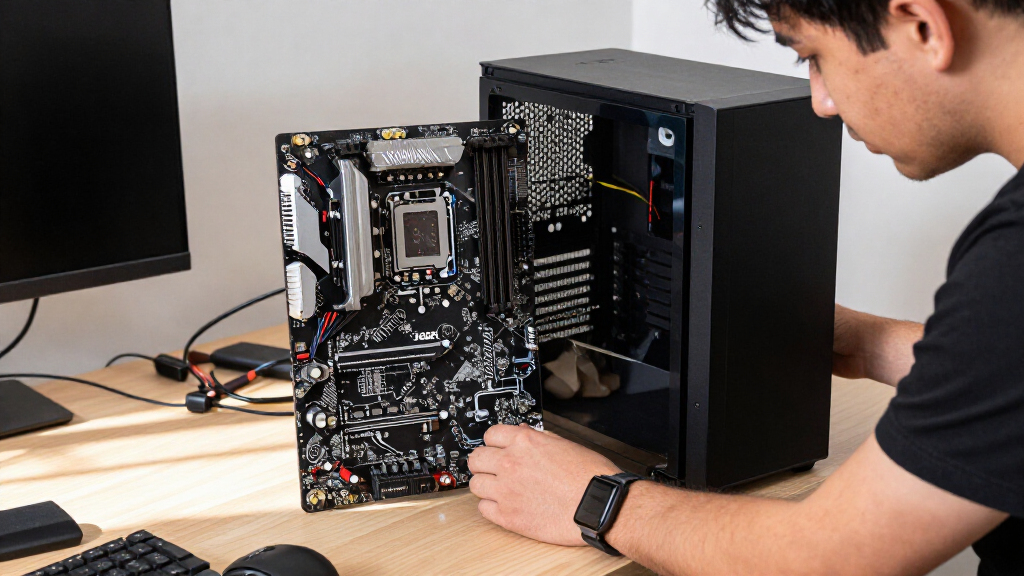
Form factor can rule out a motherboard even when the socket and chipset are right. The X870E Taichi is an EATX board, so buyers should check the case’s supported motherboard dimensions and leave room for cable routing and cooling hardware. An ATX board is generally easier to fit, but case compatibility still depends on the chassis layout and component clearances. Do not rely on a case listing that only says it supports ATX if the motherboard extends beyond standard ATX dimensions. Check the case manual and board measurements before ordering. This small check can prevent a build plan from turning into a fit problem after the parts arrive.
Decide Whether a Bundle Helps or Restricts You
The Ryzen 9 9950X3D and X870E Taichi combo can simplify shopping for someone committed to that high-end AM5 processor. A bundle is less appealing if you already own a compatible CPU, want to choose a different processor, or prefer to compare components independently. Compare the included parts and return terms rather than assuming a bundle is automatically a better fit. Also consider whether your cooling, power supply, and case are suited to the CPU you are pairing with the board. Buyers who want a flexible platform choice may prefer a standalone motherboard. The right route depends on whether convenience or component-by-component control matters more to you.
Treat Older Taichi Boards as Platform-Specific Choices
The X570, X299, and Z390 models can still make sense for a compatible CPU, a repair, or a build based around parts already on hand. They are poor default picks for a new system if you have not already chosen a processor that fits their older platforms. Check operating-system needs, firmware support, and the availability of replacement parts before building around an older board. A low-cost older motherboard can also lead to extra spending if you need a matching CPU or memory that is harder to source. Buyers keeping an existing system running should prioritize compatibility and condition over the appeal of a newer chipset name. For a fresh build, compare the total platform cost rather than the motherboard alone.
Frequently Asked Questions
Which ASRock Taichi motherboard should I choose for a new AM5 build?
I would start with the X870E Taichi if you want a high-end modern AM5 board with broad platform headroom. The B650E Taichi Lite is a more restrained alternative when you want AM5 support without making the board itself the centerpiece of the build. The X670E Taichi Carrara is another option for a buyer who prefers its distinctive styling and has checked that its feature set matches the system plan. Compare the rear and internal connections you will use, not just the chipset label. Case dimensions matter too, especially for the EATX X870E model.
Is the Ryzen 9 9950X3D and X870E Taichi combo better than buying the parts separately?
The combo is most useful if you have already chosen the Ryzen 9 9950X3D and want a compatible board in the same purchase. It removes some component-matching work, but it does not make the included motherboard the right choice for every AM5 buyer. If you already own a CPU or want to compare different processor options, buying separately gives you more flexibility. Check exactly what the bundle includes and review the seller’s return terms before choosing it. Also budget for suitable cooling, memory, and power delivery components for the full build.
Should I buy an older X570, X299, or Z390 Taichi for a new PC?
I would choose one of these older boards mainly when the build already centers on a compatible processor or when replacing a board in an existing system. Their sockets do not support current CPU platforms such as AM5 or Z890, so the motherboard may dictate a much older processor choice. Check the board’s CPU support list, firmware status, and condition, especially if buying used or from remaining stock. Consider the cost and availability of the matching CPU and memory before deciding. For a completely new build, comparing the total platform cost can make a newer socket the more practical route.
Does the EATX X870E Taichi fit in a standard ATX case?
Not necessarily: EATX dimensions can extend beyond standard ATX support, even when the case has enough room for a large graphics card. Check the case manufacturer’s maximum motherboard dimensions and compare them with the board’s specifications. Also look at cable-routing openings, side-panel clearance, and any radiator or fan placement near the motherboard edge. A case described as ATX-compatible is not proof that it will accommodate every EATX board. Confirm the fit before purchase rather than relying on product photos or general case labels.
How do I choose between the B650E Taichi Lite and a higher-tier AM5 Taichi board?
Choose the B650E Taichi Lite if its connections and expansion meet your needs and you would rather keep the motherboard choice straightforward. A higher-tier option makes more sense when you can name the extra capability you need, such as more expansion flexibility or a particular connectivity feature. Compare the board manuals for slot sharing, storage support, and port placement, since those details shape daily use more than the chipset name alone. Leave room for future devices only if you expect to add them. If you cannot identify a practical use for the extra features, the Lite model may be the more sensible match.
Conclusion
For most buyers planning a new high-end AM5 system, I recommend the X870E Taichi as the best overall; the Ryzen 9 9950X3D combo is the more convenient route if that exact CPU is already part of the plan. The B650E Taichi Lite is my best value and beginner-friendly pick for buyers who want a simpler AM5 choice without prioritizing the highest chipset tier. For a premium look, consider the X670E Taichi Carrara on AM5 or the Z790 Carrara on a compatible Intel build, while the Z890 Taichi is the standout current Intel option in this list. Choose the X570, X299, or Z390 only for a compatible legacy system or a deliberate platform-specific build. My final recommendation is to settle the CPU platform and case fit first, then pay for only the board features your build will use.