Looking for the best docking stations for dual monitors in 2026? I recommend checking out options like the Acer USB-C Dual Monitor Dock, Anker Dual HDMI hubs, and Plugable’s models, all offering high-resolution support, plenty of ports, and reliable power delivery. These docks work with various devices—Mac, Windows, ChromeOS—and feature secure builds. Continue exploring to find the perfect fit for your setup and your workflow.
Key Takeaways
- Supports dual 4K@60Hz displays via HDMI, DisplayPort, or both for high-resolution multitasking.
- Compatibility with various laptops and devices, including Thunderbolt, USB-C, Mac, and Windows.
- Offers high power delivery up to 130W, ensuring laptops charge while connected to multiple monitors.
- Provides multiple ports: HDMI, DisplayPort, USB-A, USB-C, Ethernet, and SD card readers for versatile connectivity.
- Features robust build quality and security options, suitable for professional and portable use in 2026.
| Acer USB-C Dual Monitor Docking Station (9-in-1) |  | Best Overall | Display Support: Dual 4K@60Hz via HDMI | Power Delivery (Charging): Up to 100W (90W output) | Number of Ports: 9-in-1 (multiple ports including SD/MicroSD) | VIEW LATEST PRICE | See Our Full Breakdown |
| Anker 7-in-1 USB-C Hub with Dual HDMI | 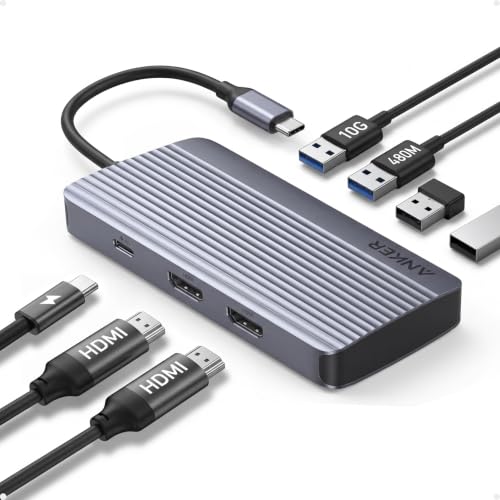 | Best Connectivity | Display Support: Dual HDMI 1080p@60Hz | Power Delivery (Charging): 85W (charger not included) | Number of Ports: 7-in-1 (HDMI, USB-A, SD) | VIEW LATEST PRICE | See Our Full Breakdown |
| Anker 8-in-1 USB-C Docking Station with Dual Monitors |  | Premium Choice | Display Support: Dual 4K@60Hz HDMI | Power Delivery (Charging): Up to 85W (charger not included) | Number of Ports: 8-in-1 (HDMI, USB-A/C, Ethernet) | VIEW LATEST PRICE | See Our Full Breakdown |
| USB C Dual Monitor Docking Station with 4K HDMI | Best Dual HDMI | Display Support: Dual 4K@60Hz HDMI | Power Delivery (Charging): Up to 100W (charger not included) | Number of Ports: 7-in-1 (HDMI, USB-A/C) | VIEW LATEST PRICE | See Our Full Breakdown | |
| Plugable Dual HDMI Laptop Docking Station (UD-3900) |  | Reliable Performance | Display Support: Dual HDMI 1920×1200 @60Hz | Power Delivery (Charging): No charging (no PD support) | Number of Ports: 6 ports (HDMI, Ethernet, USBs) | VIEW LATEST PRICE | See Our Full Breakdown |
| 13-in-1 USB C Docking Station with Dual Monitors |  | Best Budget | Display Support: Dual 4K@60Hz HDMI, DisplayPort | Power Delivery (Charging): 87W (via 100W input) | Number of Ports: 13-in-1 (multiple USB, HDMI, Ethernet) | VIEW LATEST PRICE | See Our Full Breakdown |
| Fophmo Dual 4K HDMI Docking Station for MacOS | Feature-Rich | Display Support: Dual HDMI 4K@30Hz (mirror on Mac) | Power Delivery (Charging): Up to 85W (requires charger) | Number of Ports: 4 ports (2 HDMI, USB-A, USB-C) | VIEW LATEST PRICE | See Our Full Breakdown | |
| USB-C Docking Station with Dual HDMI & USB Ports | User-Friendly | Display Support: Dual 4K@60Hz HDMI | Power Delivery (Charging): Up to 100W (charger not included) | Number of Ports: 8 ports (HDMI, USB-C, USB-A, SD) | VIEW LATEST PRICE | See Our Full Breakdown | |
| Dell Thunderbolt 4 Smart Dock SD25TB4 (130W 4K Wi-Fi) |  | Powerhouse | Display Support: Up to 4 4K monitors via HDMI/DP | Power Delivery (Charging): Up to 130W (for Dell) | Number of Ports: Multiple (HDMI, DisplayPort, USB-C, Ethernet) | VIEW LATEST PRICE | See Our Full Breakdown |
| Acer 13-in-1 Docking Station with Triple Monitor Support | Secure Design | Display Support: Triple 4K@30Hz (HDMI & DP) | Power Delivery (Charging): 85W (via 110W adapter) | Number of Ports: 13 ports (HDMI, USB, Ethernet, SD) | VIEW LATEST PRICE | See Our Full Breakdown | |
| Plugable USB-C & USB 3.0 Laptop Docking Station |  | Versatile Compatibility | Display Support: Dual HDMI 1920×1200 @60Hz | Power Delivery (Charging): Does not support charging | Number of Ports: 8 ports (HDMI, Ethernet, USBs) | VIEW LATEST PRICE | See Our Full Breakdown |
| Anker Prime Docking Station with 14 Ports |  | High-Capacity | Display Support: Dual 4K@60Hz HDMI | Power Delivery (Charging): 100W (via USB-C port) | Number of Ports: 14-in-1 (USB-C, USB-A, HDMI, Ethernet) | VIEW LATEST PRICE | See Our Full Breakdown |
More Details on Our Top Picks
-
Anker 7-in-1 USB-C Hub, Dual Monitor USB C Docking Station, Dual HDMI Display, 85W Max Output, 10Gbps Data Transfers for Dell XPS, ThinkPad T14 Gen2 and More
Powerful 7-in-1 Hub: Designed for the multitasker, this 7-in-1 USB-C hub features everything from ultra-fast data transfer to...
As an affiliate, we earn on qualifying purchases.
Acer USB-C Dual Monitor Docking Station (9-in-1)
If you’re looking for a versatile docking station that supports dual 4K displays and fast data transfer, the Acer USB-C Dual Monitor Docking Station (9-in-1) is an excellent choice. I love its compatibility with various laptops, including Acer, Dell, Mac, and Surface models. The built-in 0.66ft cable keeps things tidy, while the aluminum alloy body offers durability and style. It supports dual 4K@60Hz outputs via HDMI, perfect for extended or mirrored screens. Plus, it delivers up to 90W power, ensuring your laptop stays charged during use. The security lock button adds peace of mind, making this dock both functional and secure.
- Display Support:Dual 4K@60Hz via HDMI
- Power Delivery (Charging):Up to 100W (90W output)
- Number of Ports:9-in-1 (multiple ports including SD/MicroSD)
- Compatibility:Windows, Mac, Surface, Chromebook
- Connection Type:USB-C (built-in cable)
- Additional Features:Device lock button, aluminum body
- Additional Feature:Aluminum alloy construction
- Additional Feature:Device security lock button
- Additional Feature:Pre-setup guides available
-
Anker Laptop Docking Station Dual Monitor, 8-in-1 USB C Hub, 4K Dual Monitor with 2 HDMI, 1 Gbps Ethernet Hub, 85W Power Delivery, SD Card Reader, for XPS and More (Charger not Included)
The Anker Advantage: Join the 50 million+ powered by our leading technology.
As an affiliate, we earn on qualifying purchases.
Anker 7-in-1 USB-C Hub with Dual HDMI
The Anker 7-in-1 USB-C Hub with Dual HDMI stands out as an excellent choice for professionals and students who need reliable, high-performance connectivity for dual monitors. It supports dual 1080p@60Hz HDMI outputs, allowing me to extend my workspace easily across two screens. The hub delivers ultra-fast data transfer at 10Gbps and supports 85W charging with a 100W input, keeping my devices powered up. Compatible with USB-C, USB4, and Thunderbolt, it works seamlessly with macOS, Windows, and ChromeOS. This versatile hub boosts productivity, especially for multitasking, with a compact design and all-encompassing connectivity options.
- Display Support:Dual HDMI 1080p@60Hz
- Power Delivery (Charging):85W (charger not included)
- Number of Ports:7-in-1 (HDMI, USB-A, SD)
- Compatibility:Windows, Mac, ChromeOS
- Connection Type:USB-C (with cable)
- Additional Features:Compact, 18-month warranty
- Additional Feature:10Gbps data transfer
- Additional Feature:High-performance charging (85W)
- Additional Feature:Supports multiple OS
-

Glomtheia USB C Hub Docking Station Dual Monitor for Laptop, MacBook Air/Pro Dock Adapter Multiport Dongle with 2 HDMI Ports 4K 60Hz, 100W PD Charging, 3 USBA 3.0 & USBC
【7-in-1 USB C Hub for Ultimate Productivity】 Expand your laptop’s capabilities with dual HDMI 4K@60Hz, 3xUSB 3.0 ports...
As an affiliate, we earn on qualifying purchases.
Anker 8-in-1 USB-C Docking Station with Dual Monitors
For professionals seeking a reliable, all-in-one docking solution, the Anker 8-in-1 USB-C Docking Station stands out by supporting dual 4K monitors with impressive clarity. With versatile connectivity, it offers a USB-C PD-IN port, two USB-A ports, two HDMI outputs, Ethernet, and microSD/SD card readers. It supports 4K@60Hz on one HDMI and 4K@30Hz on both, making multitasking smooth. It delivers up to 85W of pass-through charging and works with various devices, including Windows, ChromeOS, and Thunderbolt laptops. Packaged with an 18-month warranty and customer support, it’s a solid choice for those needing dependable dual-monitor performance.
- Display Support:Dual 4K@60Hz HDMI
- Power Delivery (Charging):Up to 85W (charger not included)
- Number of Ports:8-in-1 (HDMI, USB-A/C, Ethernet)
- Compatibility:Windows, Mac, ChromeOS
- Connection Type:USB-C
- Additional Features:Extensive ports, compact design
- Additional Feature:Over 50 million users
- Additional Feature:Supports dual 4K displays
- Additional Feature:Suitable for portable use
USB C Dual Monitor Docking Station with 4K HDMI
A USB C dual monitor docking station with 4K HDMI is an ideal choice for professionals seeking seamless multitasking and high-resolution displays. It offers 7-in-1 connectivity, including dual HDMI ports supporting 4K@60Hz, three USB 3.0 ports, a USB-C data port, and 100W PD charging, all in a compact design. It enables extending or mirroring two 4K monitors, compatible with Windows and Mac. With support for up to 100W power delivery, it keeps your laptop charged while working. Fast data transfer at 5Gbps and plug-and-play compatibility with popular laptops make it a versatile, efficient hub for creative workflows and productivity.
- Display Support:Dual 4K@60Hz HDMI
- Power Delivery (Charging):Up to 100W (charger not included)
- Number of Ports:7-in-1 (HDMI, USB-A/C)
- Compatibility:Windows, Mac
- Connection Type:USB-C
- Additional Features:Plug-and-play, compact
- Additional Feature:Compact, all-in-one design
- Additional Feature:Supports gaming and creative workflows
- Additional Feature:Plug-and-play operation
Plugable Dual HDMI Laptop Docking Station (UD-3900)
If you’re seeking a reliable docking station for everyday productivity, the Plugable Dual HDMI Laptop Docking Station (UD-3900) offers a straightforward solution with its dual HDMI outputs and broad compatibility. It supports Windows 11, 10, 8.x, and 7 with plug-and-play ease via Windows Update, and works with macOS 10.14+ with manual driver installation. It features a hybrid USB 3.0 and USB-C cable, enabling a single connection. The dock supports two monitors at 1920×1200 @ 60Hz each, with a single display reaching 2560×1440. It includes Ethernet, audio jacks, and multiple USB ports, making it ideal for web browsing and productivity tasks.
- Display Support:Dual HDMI 1920×1200 @60Hz
- Power Delivery (Charging):No charging (no PD support)
- Number of Ports:6 ports (HDMI, Ethernet, USBs)
- Compatibility:Windows, macOS, ChromeOS
- Connection Type:Hybrid (USB-C and USB 3.0)
- Additional Features:Driver required for macOS, 2-year warranty
- Additional Feature:6 USB ports total
- Additional Feature:2-year warranty coverage
- Additional Feature:Supports wired Ethernet
13-in-1 USB C Docking Station with Dual Monitors
The 13-in-1 USB C docking station stands out as a top choice for professionals and power users who need seamless connectivity and multiple display support. It offers extensive ports, including dual 4K HDMI, DisplayPort, two USB-C ports with 100W Power Delivery, fast data transfer, and Gigabit Ethernet. Compatible with Windows and MacOS, it supports both mirror and extend modes, with 4K at 60Hz. The dock enables high-speed data transfer and fast charging simultaneously, consuming only 13W while delivering 87W to your laptop. Its robust network and audio options, combined with an 18-month warranty, make it an excellent all-in-one solution for productivity and connectivity needs.
- Display Support:Dual 4K@60Hz HDMI, DisplayPort
- Power Delivery (Charging):87W (via 100W input)
- Number of Ports:13-in-1 (multiple USB, HDMI, Ethernet)
- Compatibility:Windows, macOS, ChromeOS
- Connection Type:USB-C (with cable)
- Additional Features:18-month warranty, multiple video modes
- Additional Feature:MST and SST modes
- Additional Feature:10Gbps data speeds
- Additional Feature:87W laptop charging
Fophmo Dual 4K HDMI Docking Station for MacOS
Designed specifically for MacOS users who need reliable dual HDMI connectivity, the Fophmo Dual 4K HDMI Docking Station offers impressive display capabilities, though with some limitations. It supports dual HDTV connections in mirror and extended modes, but MacOS only allows mirror mode for dual displays, with extended mode limited to one monitor. It has two HDMI ports for high-definition visuals, plus USB-A, USB-C, SD, and Micro SD slots for data transfer. The dock also provides a Gigabit Ethernet port and supports up to 85W power delivery, perfect for charging compatible laptops. However, verify your Mac’s USB-C port supports PD for charging and video output.
- Display Support:Dual HDMI 4K@30Hz (mirror on Mac)
- Power Delivery (Charging):Up to 85W (requires charger)
- Number of Ports:4 ports (2 HDMI, USB-A, USB-C)
- Compatibility:Windows, Mac (mirror mode only)
- Connection Type:USB-C
- Additional Features:Mirror/extend modes, 12-month return
- Additional Feature:MacOS mirror mode only
- Additional Feature:Supports high-definition audio
- Additional Feature:12-month return policy
USB-C Docking Station with Dual HDMI & USB Ports
For professionals seeking a seamless dual-monitor setup, the Selore 8-in-1 USB C Docking Station stands out with its dual HDMI ports capable of supporting 4K resolution at 60Hz. It’s compatible with USB-C or Thunderbolt 3/4 laptops like MacBook Pro, Dell XPS, and Surface devices. The dock provides 100W power delivery, so you can charge your laptop while working. It also includes USB-C and USB 3.0 ports for peripherals, plus SD/TF card readers for quick data transfer. Designed for plug-and-play, it enhances productivity at home or in the office—just note that MST mode for extending displays isn’t supported on macOS.
- Display Support:Dual 4K@60Hz HDMI
- Power Delivery (Charging):Up to 100W (charger not included)
- Number of Ports:8 ports (HDMI, USB-C, USB-A, SD)
- Compatibility:Windows, Mac
- Connection Type:USB-C
- Additional Features:Temperature control, multiple ports
- Additional Feature:Advanced temperature control
- Additional Feature:Supports multiple peripherals
- Additional Feature:Dual monitor MST mode (Windows)
Dell Thunderbolt 4 Smart Dock SD25TB4 (130W 4K Wi-Fi)
If you need a docking station that effortlessly handles multiple high-resolution displays and offers robust connectivity, the Dell Thunderbolt 4 Smart Dock SD25TB4 stands out. It supports up to four 4K monitors via HDMI 2.1, DisplayPort 1.4, USB-C, and Thunderbolt 4, making it perfect for creative or data-intensive tasks. With dual Thunderbolt 4 ports, it can connect up to six devices in a daisy-chain setup. It delivers up to 130W power for Dell devices and 96W for others, ensuring fast charging. Its high-speed data transfer, reliable Ethernet, Wi-Fi management, and security features make it a versatile, eco-friendly choice for any professional workspace.
- Display Support:Up to 4 4K monitors via HDMI/DP
- Power Delivery (Charging):Up to 130W (for Dell)
- Number of Ports:Multiple (HDMI, DisplayPort, USB-C, Ethernet)
- Compatibility:Windows, some Mac models
- Connection Type:Thunderbolt 4, USB-C
- Additional Features:Security features, multi-monitor support
- Additional Feature:Business-level security features
- Additional Feature:Daisy-chain multiple devices
- Additional Feature:Eco-friendly recycled materials
Acer 13-in-1 Docking Station with Triple Monitor Support
The Acer 13-in-1 Docking Station stands out as an ideal choice for professionals and power users who need to run triple monitors seamlessly. Its sleek aluminum design packs extensive connectivity, including 2 HDMI ports, a DisplayPort 1.4, USB-C, and three USB-A ports, along with Gigabit Ethernet and SD card readers. It supports three independent displays via MST technology, enabling triple 4K output on compatible Windows systems. Plus, the 110W power adapter delivers 85W through USB-C, keeping laptops charged during intense multitasking. With built-in security features and a all-encompassing package, this dock offers a reliable, clutter-free solution for demanding multi-monitor setups.
- Display Support:Triple 4K@30Hz (HDMI & DP)
- Power Delivery (Charging):85W (via 110W adapter)
- Number of Ports:13 ports (HDMI, USB, Ethernet, SD)
- Compatibility:Windows, Mac
- Connection Type:USB-C
- Additional Features:Security slot, high power output
- Additional Feature:Security slot included
- Additional Feature:Supports triple 4K @30Hz
- Additional Feature:110W power adapter
Plugable USB-C & USB 3.0 Laptop Docking Station
Looking for a versatile docking station that seamlessly supports dual monitors and broad device compatibility? The Plugable USB-C & USB 3.0 Laptop Docking Station is a solid choice. It offers dual HDMI outputs supporting resolutions up to 1920×1200, perfect for dual 1080p displays. It connects via USB-C or USB 3.0 cables, making it compatible with Windows, macOS, and ChromeOS devices (drivers required). The dock includes gigabit Ethernet, a 3.5mm audio jack, and multiple USB ports for peripherals. While it doesn’t charge your laptop, it’s ideal for web and productivity tasks, with easy plug-and-play setup and a 2-year warranty backed by North American support.
- Display Support:Dual HDMI 1920×1200 @60Hz
- Power Delivery (Charging):Does not support charging
- Number of Ports:8 ports (HDMI, Ethernet, USBs)
- Compatibility:Windows, macOS, ChromeOS
- Connection Type:USB-C or USB 3.0
- Additional Features:Driver required, versatile
- Additional Feature:Supports M1/M2/M3 Macs
- Additional Feature:2 HDMI outputs
- Additional Feature:2-year warranty included
Anker Prime Docking Station with 14 Ports
For professionals seeking a versatile and all-in-one docking solution, the Anker Prime Docking Station with 14 ports stands out as an excellent choice. It offers extensive connectivity with USB-C, USB-A, HDMI, Ethernet, and audio ports, supporting a wide range of devices. With a total output of 160W, it can charge four devices simultaneously, including laptops and accessories. Its ports transfer data at speeds up to 10Gbps, making file sharing quick and efficient. It supports dual 4K displays via HDMI, ideal for multitasking. Plus, it includes a USB-C cable and customer support, ensuring a smooth setup and reliable use.
- Display Support:Dual 4K@60Hz HDMI
- Power Delivery (Charging):100W (via USB-C port)
- Number of Ports:14-in-1 (USB-C, USB-A, HDMI, Ethernet)
- Compatibility:Windows, macOS, ChromeOS
- Connection Type:USB-C, USB-A
- Additional Features:160W total power, supports multiple devices
- Additional Feature:Up to 160W power output
- Additional Feature:Supports multiple device types
- Additional Feature:Dual 4K display support
Factors to Consider When Choosing a Docking Station for Dual Monitors

When choosing a docking station for dual monitors, I focus on compatibility with my devices and the quality of video output to guarantee everything runs smoothly. Power delivery support and data transfer speeds are also essential for maintaining efficiency and avoiding bottlenecks. Finally, I check the station’s multi-monitor capabilities to match my setup needs and maximize productivity.
Compatibility With Devices
Choosing the right docking station for dual monitors hinges on guaranteeing compatibility with your device’s specific hardware and operating system. First, confirm the docking station supports your OS—Windows, macOS, or ChromeOS—to avoid connectivity issues. Next, check that the ports (USB-C, Thunderbolt, USB-A) match what your device offers. If using USB-C, make sure it supports video output via DisplayPort Alt Mode and provides Power Delivery if charging your laptop is necessary. Also, verify that the station can handle your monitor’s resolution and refresh rate, whether 4K@60Hz or 1080p@60Hz. Finally, confirm the hardware meets your device’s power needs, providing sufficient wattage for charging during use. Compatibility is essential for a seamless, efficient dual-monitor setup.
Video Output Quality
High-quality video output is essential for a dual monitor setup, especially if you want crisp visuals and smooth performance. To achieve this, I look for docking stations that support dual 4K output at 60Hz, ensuring sharp images and fluid motion on both screens. It’s important to verify that the video ports support HDMI 2.0 or higher, or DisplayPort 1.4, for better resolution and refresh rates. I also consider whether the docking station can extend or mirror displays effectively, tailored to my operating system’s capabilities. Compatibility with my laptop’s video output features, like Thunderbolt or DP Alt Mode, is key for optimal quality. Ultimately, I check for potential limitations on extended displays, especially on macOS, to avoid performance issues.
Power Delivery Support
Ensuring your docking station provides adequate Power Delivery (PD) is vital for a seamless dual monitor setup, especially if you want to keep your laptop charged without unplugging multiple cables. Look for a dock that supports at least 60W to ensure your laptop charges efficiently while connected. Check that the PD port matches your laptop’s power requirements—using an incompatible port can lead to slow or insufficient charging. Opt for docks supporting 100W or higher for fast, efficient charging and future-proofing. It’s also important that the dock can deliver power to multiple peripherals simultaneously without sacrificing charging speed. Additionally, consider whether it supports passthrough charging, so you can keep your laptop charged while using connected devices, reducing clutter and maintaining productivity.
Data Transfer Speeds
Since data transfer speeds directly impact how smoothly your peripherals and files communicate with your device, it’s vital to pay attention to the ports on your docking station. Faster transfer rates, like 10Gbps or higher, allow for quicker external drive performance and faster backups. USB-C and USB 3.1/3.2 ports typically offer these higher speeds compared to USB 2.0 ports. When using dual monitors, high-speed data ports are essential to prevent lag or buffering during display updates. Keep in mind, the maximum transfer rate depends on the port type, cable quality, and device compatibility, all of which influence overall efficiency. Choosing a docking station with robust, high-speed ports ensures smooth data flow, improved productivity, and a seamless experience across your peripherals and displays.
Multi-Monitor Capabilities
When selecting a docking station for dual monitors, it’s important to verify that it can handle multiple displays simultaneously without sacrificing performance. I look for stations that support at least 4K resolution at 60Hz, guaranteeing sharp, smooth visuals. MST (Multi-Stream Transport) technology is essential for extending or mirroring displays efficiently, especially when working across different operating systems like Windows or macOS. I also check if the dock offers the necessary video output ports, such as HDMI, DisplayPort, or USB-C with DisplayPort Alt Mode, to match my monitors’ inputs. Finally, I verify the dock can support my desired number of monitors without slowing down or facing compatibility issues. This guarantees a seamless, high-quality multi-monitor setup that meets my productivity needs.
Port Selection & Variety
Choosing a docking station with the right port selection is essential for building a versatile dual-monitor setup. I look for docks that include HDMI, DisplayPort, and USB-C, so I can connect monitors with different input types effortlessly. It’s also important to have enough USB-A and USB-C ports to connect peripherals like keyboards, mice, and external drives without clutter. Dedicated video output ports, such as dual HDMI or HDMI plus DisplayPort, ensure I can run two monitors simultaneously without issues. High-speed data transfer ports like Thunderbolt and USB 3.0/3.1 help me share files quickly across devices. Additionally, docks with power delivery options of 85W or 100W support charging my laptop and peripherals while I work, keeping everything powered and connected seamlessly.
Ease of Setup
Have you ever struggled to set up a docking station because of confusing instructions or incompatible connections? I’ve been there. A good docking station should support your laptop’s operating system and offer plug-and-play functionality, making setup quick and hassle-free. Look for clear, step-by-step instructions or pre-configuration guides—these save time and frustration. Verify the connection type (USB-C, Thunderbolt, or USB 3.0) matches your laptop’s ports for seamless integration. It’s also helpful if the docking station supports dual monitor setups, whether extended or mirrored, without needing complex driver installations. Ultimately, choose a device with minimal cables and integrated ports; this reduces clutter and simplifies connections. Ease of setup makes your workspace more efficient and less stressful.
Frequently Asked Questions
How Do Docking Stations Affect Overall System Performance and Latency?
Docking stations can impact system performance and latency, but it mostly depends on their quality and specifications. When I use a good docking station, I notice smooth data transfer and minimal lag because it efficiently manages connections between my laptop and peripherals. However, cheaper or outdated docks might introduce delays or bottlenecks, affecting performance. So, investing in a high-quality dock guarantees better speed, responsiveness, and overall system stability.
Can Docking Stations Support Different Monitor Brands and Resolutions Simultaneously?
Absolutely, docking stations can support different monitor brands and resolutions simultaneously—because nothing screams harmony like a jumble of mismatched screens, right? In reality, most modern docks are pretty flexible, handling various resolutions and brands without breaking a sweat. As long as your docking station has the right ports and supports the needed resolutions, you’ll be able to mix and match monitors effortlessly, creating your own personalized multi-display chaos—or paradise.
Are There Compatibility Issues With Specific Operating Systems or Hardware Setups?
Yes, compatibility issues can arise with certain operating systems or hardware setups. I’ve experienced cases where some docking stations don’t work well with older laptops or specific OS versions, causing display or connectivity problems. To avoid this, I always check the docking station’s compatibility list and verify my system’s drivers are up to date. Doing a bit of research beforehand helps me find a setup that works smoothly without surprises.
What Are the Security Considerations for Using Docking Stations in Public or Shared Spaces?
Imagine your docking station as a castle gate — it needs sturdy defenses. When you’re in public or shared spaces, I recommend using strong passwords, enabling device encryption, and avoiding automatic connections. Always keep firmware updated and disable unnecessary ports. These steps act like a moat around your digital fortress, shielding your data from prying eyes and malicious intruders, so your work stays safe amidst the chaos of shared environments.
How Do Power Delivery Features Impact Charging Speed and Device Lifespan?
Power delivery features greatly boost charging speed, allowing my devices to charge faster and get back to work quickly. They also help extend my device’s lifespan by providing a steady, ideal power flow, reducing stress on batteries. Without reliable power delivery, I’d risk slower charging and potential battery damage. So, I always choose docking stations with robust power delivery to keep my devices efficiently charged and healthy over time.
Conclusion
Choosing the right docking station is like finding the perfect bridge across a busy river — it connects your devices seamlessly and supports your workflow smoothly. With options ranging from compact hubs to feature-rich stations, you can tailor your setup to fit your needs. Remember, the best dock isn’t just about ports; it’s about creating a reliable, sturdy pathway that keeps your dual monitors in sync and your productivity flowing effortlessly.