
TL;DR
A November 19 guide matches AI workloads to a Mac mini, Mac Studio, Nvidia GPU PC or cloud API based on memory, software support and power. Its specifications are sourced from manufacturers and tool documentation, while the job-to-machine matches are the author’s assessment rather than independent performance tests.
A guide published by Thorsten Meyer AI on November 19, 2026, compares a Mac mini, Mac Studio, Nvidia GPU PC and cloud API for different AI jobs. It argues that memory capacity and software compatibility are key to choosing a machine, while noting that an always-on agent using cloud models may need little local computing power.

Get the latest gadgets delivered free with Prime
- Fast, free delivery on millions of items
- Prime Video, Amazon Music and more included
- Member-only deals all year
For agents that call a cloud model to handle tasks such as coding or inbox automation, the guide recommends a Mac mini or a computer already on hand: the local machine runs the agent loop, files and tools, while model processing happens remotely. Apple lists the base Mac mini at 4 watts idle power. That figure describes idle consumption, not power use during a workload.
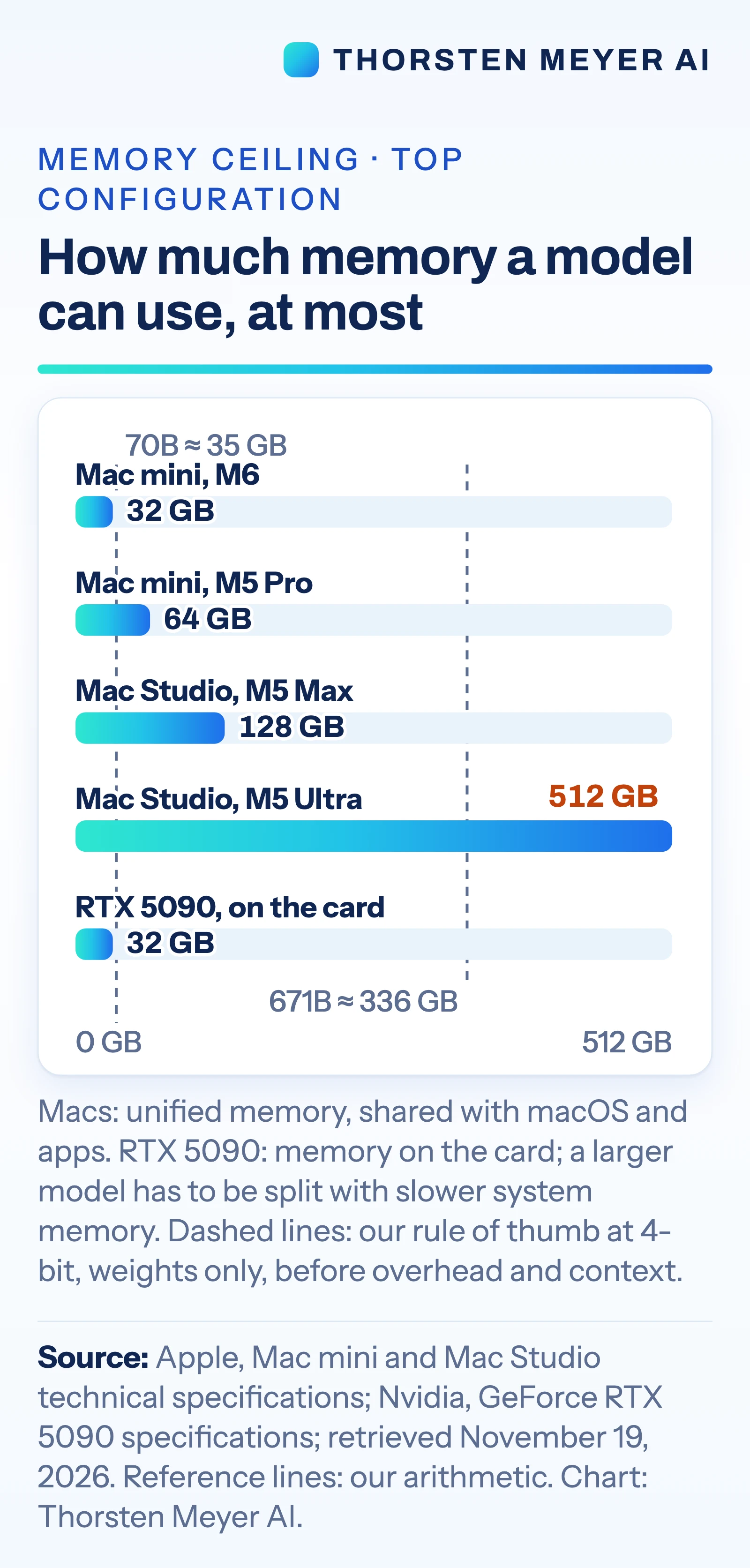
For private use of open models, the guide points to a Mac mini with 16 to 32 GB of memory for smaller models, and higher-memory systems for larger workloads. Apple lists the Mac mini with up to 64 GB of unified memory. The Mac Studio can be configured with up to 128 GB with M5 Max or 512 GB with M5 Ultra. Those capacities matter because model weights and the working space for conversation must fit in memory accessible to the processor.
A PC with an Nvidia GPU may be a better fit when the workload depends on software built for CUDA, Nvidia’s computing platform, or when fast inference is needed for models that fit on the card. The guide lists the GeForce RTX 5090 at 32 GB and 575 watts for the card, with Nvidia recommending a 1,000-watt system power supply. It says vLLM, a model-serving tool, provides CUDA binaries, while its Apple-silicon route relies on a community-maintained plugin. For the strongest closed models, which cannot be downloaded, the guide points to cloud APIs.
Memory and Software Set the Fit
The choice affects more than purchase price. For local AI, available memory limits which models can run; for a cloud-based agent, the local computer mainly has to keep its automation running. This means a larger and more power-hungry system may be unnecessary for an always-on workflow that sends requests to a remote model.
Software support also shapes what is practical. According to the guide, Nvidia’s CUDA ecosystem is the more direct route for tools such as vLLM, while Apple silicon supports local model work through other tools. That difference can matter to teams that need an established serving stack or plan to serve multiple users. The guide presents these as workload-based judgments, not measured comparisons of speed or cost.
Power is another trade-off: the listed 575-watt RTX 5090 rating applies to the card, while Apple’s stated maximum of 385 watts applies to the M5 Ultra Mac Studio as a whole system. Those figures have different scopes and should not be treated as a direct performance comparison. They do show why a high-end GPU PC may call for more attention to power supply, cooling, case size and noise.
Products Worth Considering

Bose QuietComfort Wireless Noise-Cancelling Headphones, Twilight Blue
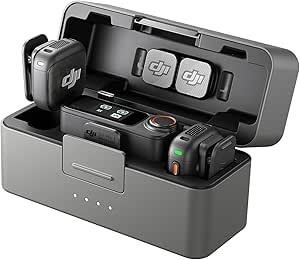
DJI Mic 3 Wireless Microphone (2 Transmitters, 1 Receiver, Charging Case)

Amazon Kindle Scribe Colorsoft 64GB with Premium Pen
As an affiliate, we earn on qualifying purchases.
The Guide’s November Specifications
The article follows an earlier Thorsten Meyer AI post about what a Mac mini with 16 to 64 GB of memory can run. The November 19 guide expands the question from model capacity to matching hardware and services with particular jobs: agents, private assistants, large open models, Nvidia-dependent tools and access to leading closed models.
Its hardware figures come from Apple and Nvidia specification pages, and its software claims draw on tool documentation, all checked on November 19, 2026. The guide uses a rule of thumb that a billion parameters at 4-bit precision takes about half a gigabyte for weights alone, before overhead and context. On that estimate, a 70-billion-parameter model needs about 35 GB for weights and a 671-billion-parameter model about 336 GB. These are estimates of weight storage, not complete memory requirements or performance results.
The article also says Apple’s MLX tools document LoRA and QLoRA fine-tuning, and that PyTorch’s Mac backend supports GPU training. It describes clustering Macs as possible but requiring setup, including Thunderbolt 5 connections between each pair and a macOS Recovery setting change. The base Mac mini with M6 is listed with Thunderbolt 4, a relevant limitation for that approach.
“the leading desktop for always-on agentic computing”
— Thorsten Meyer AI guide, describing Apple’s Mac mini launch language
Performance and Costs Still Vary
The guide does not provide independent speed tests for the Mac Studio running very large models, nor does it benchmark the machines against each other on a shared workload. Actual results can depend on model size, quantization, context length, software and how many people use the system.
It also does not establish a single cost comparison across buying hardware and paying for cloud use. Cloud APIs charge by usage, while local machines carry purchase and operating costs; which option costs less depends on workload and duration. The guide notes that a model’s weights are only part of its memory needs, so its parameter-to-memory estimates should not be read as guarantees that a model will run comfortably.
Some details are time-sensitive, including listed configurations, prices and software support. The guide gives the Mac Studio M5 Ultra a US starting price of $5,499 on Apple’s site as of November 19, 2026, but does not supply total costs for the other options or estimate cloud API bills for specific usage.
Test Against Your Own Workload
The guide’s practical next step is to identify whether a job uses a cloud model or runs locally, then check the model’s memory needs and the software it requires. For a specific decision, users would need to test their own models, prompts and tools on the intended setup, and compare local operating costs with expected cloud usage.
Further evidence would come from independent benchmarks covering the same models and tasks across Apple silicon, Nvidia systems and cloud services. Until those comparisons are available, the guide’s recommendations remain a specification-based assessment, and current hardware and software details should be checked before purchase.
Key Questions
Which machine does the guide suggest for an always-on AI agent?
It suggests a Mac mini or an existing Mac when the agent calls cloud models, because the local computer runs the automation while the remote service processes model requests.
Why does memory matter for running open models locally?
The model’s weights and additional working space for conversation need to fit in accessible memory. The guide lists up to 64 GB for Mac mini and up to 512 GB for Mac Studio, depending on configuration.
When might an Nvidia GPU PC be a better fit?
The guide favors an Nvidia PC for workloads using tools built around CUDA, including serving setups where the relevant software has more direct Nvidia support. Suitability still depends on the model and workload.
Does the guide show that one system is faster than the others?
No. It draws job-to-machine matches from specifications and documentation and reports no independent comparison benchmarks for the systems discussed.
Why does the guide recommend a cloud API for some models?
It says leading closed models cannot be downloaded, so cloud services are the route to those models. Cloud use also involves per-token charges and sends prompts and data to the service.
Source: Thorsten Meyer AI