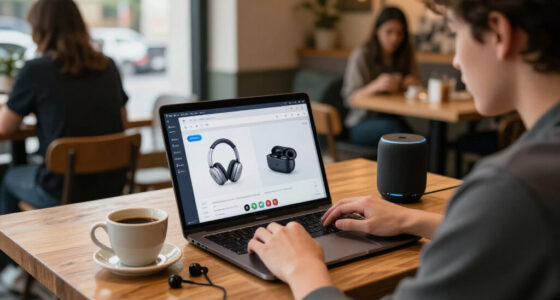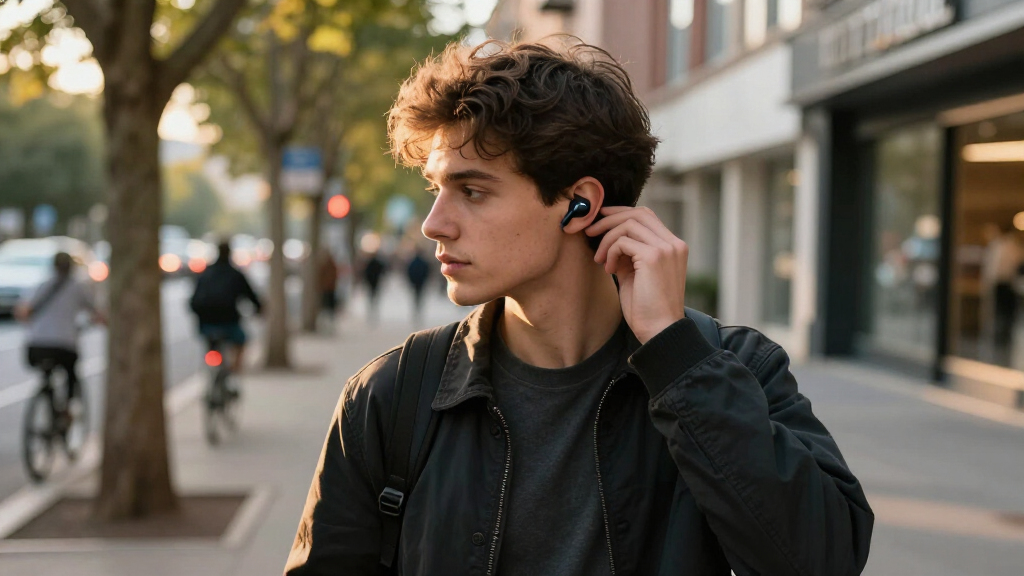

Set up your wireless noise-cancelling earbuds, connect them to a phone, and learn how to switch between noise cancellation, transparency, and normal listening. This guide is for first-time users and anyone replacing or resetting a pair. Allow about 15-25 minutes, including time to charge the earbuds if needed.

Get the latest gadgets delivered free with Prime
- Fast, free delivery on millions of items
- Prime Video, Amazon Music and more included
- Member-only deals all year
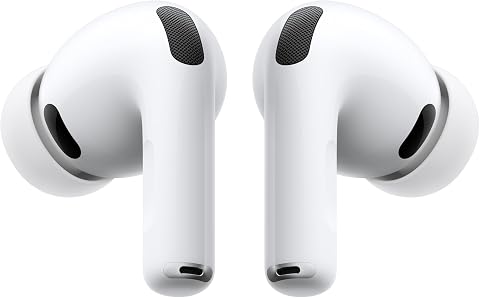
Apple AirPods Pro 3 Wireless Earbuds with Active Noise Cancellation
- ✔ Noise cancellation: Active Noise Cancellation
- ✔ Listening time: Up to 8 hours with ANC
- ✔ Ear-tip sizes: Five

Soundcore P30i Noise Cancelling Wireless Earbuds with Phone Stand Case
- ✔ Connectivity: Bluetooth 5.4
- ✔ Noise cancelling: Adaptive ANC; stated reduction up to 42 dB
- ✔ Driver size: 10 mm

JBL Vibe Beam 2 Noise-Cancelling Earbuds, Black
- ✔ Driver size: 8 mm dynamic drivers
- ✔ Noise control: Active Noise Cancelling and Smart Ambient
- ✔ Playback time: Up to 10 hours per charge; up to 40 hours total with case, ANC off
Difficulty: Beginner | Time: 15-25 minutes
What You’ll Need
Tools & Materials:
- Wireless noise-cancelling earbuds and their charging case
- A compatible phone, tablet, or computer with Bluetooth
- The ear tips supplied with the earbuds
Knowledge:
- Basic use of Bluetooth settings on your device
- How to identify the left and right earbuds
Keep the earbuds and case nearby, and check the maker’s quick-start sheet for model-specific pairing and button instructions. Some models require a companion app for setup or firmware updates; others work without one. If the earbuds are new, remove any protective film from the charging contacts.
Apple AirPods Pro 3 Wireless Earbuds with Active Noise Cancellation
The AirPods Pro 3 are our best overall choice because they pair active noise cancellation with the broadest set of fit and listening features in this group. Five ear-tip sizes give us more room to find a secure seal, which can make both comfort and noise isolation easier to achieve. They also offer Transparency mode, Adaptive EQ, three-dimensional audio, and up to eight hours with ANC enabled.Compared with the Soundcore P30i and JBL Vibe Beam 2, Apple puts more emphasis on connected features than case utility or app-based sound tweaking. Heart-rate sensing, hearing tools, Automatic Switching, and Audio Sharing may be useful additions for Apple households. Some functions, however, require Apple devices, and Live Translation and Workout Buddy require Apple Intelligence. Buyers outside that ecosystem should not count those extras as a reason to choose these over the more flexible Soundcore or JBL alternatives. AirPods suit us best when noise cancellation and Apple integration matter together; their platform dependence is the main drawback.
Pros:
- Active Noise Cancellation with up to eight hours of listening time enabled
- Five ear-tip sizes support a more tailored fit
- Transparency, Adaptive EQ, and three-dimensional audio
- Hearing health features and heart-rate sensing add utility beyond listening
Cons:
- Some connectivity and audio features require Apple devices
- Live Translation and Workout Buddy require Apple Intelligence
Best for: Apple users who want active noise cancellation, multiple fit options, and hearing or workout features in one pair.
Not ideal for: Buyers who use mostly non-Apple devices or want the longest listed total battery life.
Bottom line: Choose AirPods Pro 3 for the most complete noise-cancelling feature set here, provided Apple-device compatibility suits your setup.
“Choose AirPods Pro 3 for the most complete noise-cancelling feature set here, provided Apple-device compatibility suits your setup.”
Soundcore P30i Noise Cancelling Wireless Earbuds with Phone Stand Case
The Soundcore P30i stand out for practical extras: the charging case doubles as a phone stand, and the earbuds offer adaptive noise cancelling plus Transparency mode. That combination makes them a flexible pick for commuting, calls, or propping up a screen without carrying another accessory. Their stated battery life reaches up to 45 hours with the case, the longest total figure listed here, though that headline number is not the ANC-enabled estimate.With ANC on, Soundcore lists up to six hours per charge and up to 25 hours with the case. That per-charge figure trails the AirPods Pro 3’s stated eight hours with ANC, so frequent long listening sessions may call for more charging breaks. Compared with JBL, P30i adds adaptive cancellation and the phone-stand case, while JBL offers app-based EQ and connection to more devices. We would pick Soundcore when useful case design and long overall endurance matter more than Apple-specific hearing tools or extensive sound customization. Its four microphones and AI-enhanced call processing are helpful on paper, but the supplied information does not give a directly comparable call-quality measure.
Pros:
- Adaptive noise cancellation with Transparency mode
- Case doubles as a phone stand
- Up to 45 hours total stated battery life, depending on mode
- Four microphones with AI-enhanced call processing
Cons:
- ANC runtime is listed at up to 6 hours per charge
- Total ANC-enabled battery estimate is up to 25 hours, below the ANC-off headline
Best for: Listeners looking for adaptive ANC, long stated case-supported battery life, and a case that can prop up a phone.
Not ideal for: People who need the longest listed per-charge time with ANC enabled or Apple ecosystem features.
Bottom line: Pick the P30i for its useful stand case and flexible endurance, while keeping its shorter ANC runtime in mind.
“Pick the P30i for its useful stand case and flexible endurance, while keeping its shorter ANC runtime in mind.”
JBL Vibe Beam 2 Noise-Cancelling Earbuds, Black
The JBL Vibe Beam 2 are the most customization-focused option in this lineup. Active Noise Cancelling and Smart Ambient controls let us switch between reducing outside sound and staying more aware of it, while the JBL Headphones app provides EQ adjustments. They also support connection to up to eight devices, a useful distinction for people moving between a laptop, phone, and other sources.JBL’s battery claim needs context: the stated total of up to 40 hours with the case applies when ANC is off. The description does not give a separate ANC-on runtime, so buyers who plan to keep cancellation enabled should not assume they will reach that figure. Soundcore provides a specific ANC-enabled estimate of up to 25 hours with its case, while AirPods specify up to eight hours per charge with ANC. JBL’s three ear-tip sizes are fewer than Apple’s five, but the app controls and multi-device connections may matter more to listeners who adjust sound often. Choose JBL for control and device flexibility; skip it if you need clearly stated long endurance with ANC running.
Pros:
- Active Noise Cancelling with adjustable Smart Ambient mode
- JBL Headphones app offers EQ and sound customization
- Can connect to up to eight devices
- Four microphones support calls
Cons:
- Up to 40 hours total playback is specified with ANC off
- ANC-enabled battery runtime is not specified in the supplied details
Best for: Listeners who want app-based EQ, ambient listening controls, and the ability to connect to several devices.
Not ideal for: Buyers who need a clearly stated long battery estimate with ANC on or more extensive fit options.
Bottom line: Choose JBL Vibe Beam 2 for sound controls and multi-device flexibility, but treat its longest battery estimate as an ANC-off figure.
“Choose JBL Vibe Beam 2 for sound controls and multi-device flexibility, but treat its longest battery estimate as an ANC-off figure.”
As an Amazon Associate we earn from qualifying purchases.
Before You Start
Noise cancellation reduces some surrounding sounds, especially steady low sounds such as engine hum. It does not make you unable to hear every sound, and it is not a substitute for hearing protection. Keep the volume low enough to hear warnings when you are walking, cycling, or near traffic. Do not use noise cancellation to block environmental sound when awareness is needed.
Check that the earbuds have charge. If they will not power on or enter pairing mode, charge them in the case first. Avoid pairing them while they are connected to another nearby device, since some models reconnect automatically.
Step-by-Step Instructions
Step 1: Charge and inspect the earbuds
Place both earbuds in their matching slots in the case and check that each one sits securely. Connect the case to power if its battery is low, or leave it charging while you prepare your device. Look for a charging light or battery indicator described in the product guide. Remove any shipping film covering the metal contacts, then reseat the earbuds.
Tip:Charging lights differ by model: a light may show that the case is charging, that the earbuds are charging, or only that the case has power. Use the indicator guide for your model.
Check: The earbuds appear in the case’s battery display or the charging indicator responds when you reseat them.
Step 2: Choose a comfortable ear tip
Start with the tips already fitted. With clean hands, place one earbud in the matching ear and gently twist it until it feels secure. Walk your fingers around the outer edge of the earbud to check that it is not pressing painfully. If it feels loose, leaks sound, or slips out, try the next tip size. Repeat for the other ear; the best size may differ between ears.
Tip:A seal helps both bass and noise cancellation. Do not force a tip into your ear, and stop if you feel pain.
Check: Each earbud stays in place during a gentle head turn and feels comfortable without a sharp pressure point.
Step 3: Turn on Bluetooth on your device
Open Bluetooth settings on your phone, tablet, or computer and turn Bluetooth on. Keep this screen open. If the earbuds were previously paired with another device, disconnect them there or temporarily turn that device’s Bluetooth off so it does not take the connection first.
Tip:Keep the device within a few feet of the earbuds during pairing. Walls and other nearby wireless devices can make setup less reliable.
Check: Your device shows that Bluetooth is on and is ready to display nearby devices.
Step 4: Put the earbuds in pairing mode
Open the case with both earbuds inside, or remove them, depending on your model’s instructions. Start pairing mode using the case button or the earbuds’ touch controls. Hold the button for the stated time if required. Watch for a flashing light or listen for a pairing prompt. If the earbuds reconnect to a device you have used before, disconnect that device and repeat the pairing action.
Tip:Do not guess at a long button press if your model uses a different sequence. The quick-start sheet or manufacturer’s app gives the correct pairing steps.
Check: The indicator flashes in the pairing pattern or the earbuds announce that they are ready to pair.
Step 5: Pair the earbuds with your device
In the Bluetooth device list, select the earbuds’ name. If a confirmation prompt appears, accept it. Wait for the status to change to connected, then play a short audio clip at a low volume. If the list shows separate entries for each earbud, follow the model’s instructions rather than selecting both at random.
Tip:Some devices show a pairing request for calls, audio, or both. Allow the connection types you want to use.
Check: Bluetooth settings show the earbuds as connected, and audio plays through both sides.
Step 6: Install the companion app if your model uses one
Search your device’s official app store for the app named in the earbuds’ packaging or product guide. Check the publisher before installing. Open the app, grant only the permissions needed for features you want, and follow its setup prompts. Use the app to check battery levels, update controls, or install a firmware update if offered. Keep the earbuds close to the device and in the case if the app asks for that during an update.
Tip:Do not remove the earbuds from the case or close the app during a firmware update unless the app instructs you to. An interrupted update may leave the earbuds temporarily unavailable.
Check: The app recognizes the earbuds and displays their status or available settings.
Step 7: Turn on noise cancellation and test the fit
Open the earbuds’ app or use the documented touch, button, or stem control to select noise cancellation. Test it in a calm indoor place with a steady background sound, such as a fan. Keep audio low or paused so you can compare the modes. If cancellation seems weak or uneven, reseat the earbuds and try a different tip size before changing other settings.
Tip:Noise cancellation can sound different with music playing, and some models adjust it automatically. A loose seal often has a greater effect than an app setting.
Check: The app or spoken prompt confirms the noise-cancelling mode, and steady background noise sounds reduced compared with normal mode.
Step 8: Learn the listening modes and controls
Find the control that switches between noise cancellation, transparency or ambient mode, and off or normal mode. Use the maker’s guide to identify the tap, press, or app setting, then test each mode while audio is paused. Noise cancellation reduces some outside sound; transparency feeds outside sound into your ears; normal mode uses neither feature or uses less processing, depending on the model. Adjust volume from the phone or app, and learn how to pause playback and answer calls.
Tip:Test controls while stationary before relying on them while moving. Touch controls may respond differently when you adjust the earbuds in your ears.
Check: You can switch modes and pause audio without repeatedly opening Bluetooth settings.
Step 9: Set a safe listening level
Play audio at a low level and raise it only until it is clear. If your device offers a headphone-safety limit or listening-level notice, review it and set a limit that suits your use. Lower the volume before removing or reseating an earbud, since audio can seem louder when it is back in place. Take listening breaks, especially during long sessions.
Tip:Noise cancellation may make a lower music volume comfortable in a noisy setting. Avoid turning the volume up to overpower the environment.
Check: Audio is clear without sounding harsh, and you can listen without needing to raise the level to mask background noise.
Step 10: Store and maintain the earbuds
Pause playback, return both earbuds to the case, and close the lid. Keep the charging contacts and ear tips clean and dry. Follow the product guide for cleaning; do not rinse the earbuds or use sharp objects on the mesh. If the tips are removable, detach and clean them only as directed, then let them dry fully before refitting. Charge the case when its battery runs low.
Tip:Sweat and water resistance vary by model. Check the rating before using the earbuds in rain or during exercise.
Check: The earbuds sit correctly in the case, charging begins as expected, and the case is stored somewhere dry.
Common Mistakes to Avoid
- Choosing ear tips that are too small or too large. — Try the supplied sizes in each ear. Keep the tips that form a comfortable seal and stay in place without pain.
- Trying to pair while the earbuds reconnect to an older device. — Disconnect the older device or switch its Bluetooth off during setup, then put the earbuds back into pairing mode.
- Expecting noise cancellation to remove every sound. — Treat it as a way to reduce some surrounding noise. Use transparency or remove an earbud when you need to hear people, alerts, or traffic.
- Raising the volume to cover background noise. — Check the earbud seal and noise-cancelling mode first. Keep the volume comfortable and take breaks.
Troubleshooting
Problem: The earbuds do not appear in the Bluetooth list.
Solution:
Charge them, confirm that pairing mode is active, and move them near the device. Turn Bluetooth off and on again on the device. If the earbuds still do not appear, disconnect them from previously paired devices or follow the maker’s reset instructions, then retry pairing.
Problem: Only one earbud plays sound.
Solution:
Return both earbuds to the case, check that they are charging, and reseat them in your ears. Confirm that your device is connected to the earbuds as one pair. If one side remains silent, clean the sound outlet gently as the product guide directs and use the model’s re-pairing or reset procedure.
Problem: Noise cancellation seems weak.
Solution:
Try a different tip size and reseat each earbud to restore the seal. Confirm that noise cancellation is selected rather than transparency or normal mode. Check the app for fit-test instructions or a setting that changes cancellation strength. Test again with a steady background sound.
Problem: Audio drops, stutters, or disconnects.
Solution:
Keep the phone close and unobstructed, then pause other Bluetooth connections that may be competing for the earbuds. Charge the earbuds and case. Restart Bluetooth on the phone; if the problem continues, remove the earbuds from the saved device list and pair them again.
What Success Looks Like
The earbuds connect to your chosen device, play audio in both ears, stay comfortable and secure, and switch between the listening modes you use. Noise cancellation reduces some steady background sound, while transparency lets more outside sound through. The volume remains comfortable, and the earbuds charge when returned to the case.
Next Steps
Use the companion app or product guide when you want to change touch controls, check battery status, or review firmware updates. Clean the tips and charging contacts regularly according to the maker’s directions, and replace worn tips with compatible ones. If connection or sound problems return after re-pairing, consult the model’s support page with its exact model name and device details.
Frequently Asked Questions
Do noise-cancelling earbuds block every outside sound?
No. They usually reduce steady low-frequency sounds more effectively than speech, sudden noises, or high-pitched sounds. The ear tip seal also affects how much noise you hear.
Can I use noise cancellation without playing music?
Many models allow noise cancellation with playback paused, but the behavior varies. Select the mode in the app or with the earbud control and check the product guide if it switches off automatically.
Why does noise cancellation feel different in each ear?
The tips may seal differently, or the earbuds may not sit at the same angle. Try another tip size in the affected ear and reseat the earbud. Some models also provide a fit test in their app.
Should I use transparency mode outdoors?
Transparency can help you hear more of your surroundings, but it may not reproduce every sound clearly. Lower or pause audio near roads and remove an earbud when you need full awareness.
What should I do if I forget which device the earbuds are paired with?
Check the Bluetooth settings on nearby devices for a connected status. Disconnect the earbuds from the device you do not want to use, then select them in the Bluetooth settings of your preferred device. Follow the maker’s pairing instructions if they do not appear.
Halloween Picks
halloween
As an affiliate, we earn on qualifying purchases.