The best Logitech computer accessories depend on whether you need a more comfortable desk, clearer calls, or simpler control from across the room. My best overall pick is the Logitech MK540 Advanced Wireless Keyboard and Mouse Combo, a practical choice for everyday desktop work because it pairs a full-size keyboard with a mouse. For video calls, the Brio 101 offers a straightforward Full HD webcam, while the Lift is the standout for buyers seeking a vertical mouse shape. The tradeoff is breadth versus specialization: a combo covers core needs, while dedicated accessories can better serve a particular task but add more pieces to your setup. Read on for the full breakdown and help matching each option to your workspace.

Get the latest gadgets delivered free with Prime
- Fast, free delivery on millions of items
- Prime Video, Amazon Music and more included
- Member-only deals all year
Complete the kit



Key Takeaways
- The MK540 is the most balanced everyday bundle: it combines a full-size keyboard and mouse, while the MK270 is a simpler alternative for basic wireless input.
- Webcam choice depends on the job: the Brio 101 is a direct video-call option, while the C920x is better suited to buyers who want more camera flexibility.
- Logitech’s mouse lineup covers very different priorities: choose the Lift for a vertical grip, the G305 for wireless gaming, or the M196 for compact ambidextrous use.
- Several picks solve setup problems rather than input problems: the Litra Glow addresses face lighting, the MX Creative Console offers customizable controls, and the Studio Series Desk Mat defines the desk surface.
- Specialized accessories make the most sense when they fit an existing setup: the MX Keys Palm Rest is useful alongside a compatible keyboard, while the Mobi Fold targets portability over a conventional desktop feel.
| Logitech K400 Plus Wireless Touch TV Keyboard – Black |  | Best for TV and Couch Control | Layout: 84-key QWERTY | Touchpad size: 2.99 × 1.85 in (76 × 47 mm) | Connectivity: RF Unifying receiver | VIEW LATEST PRICE | See Our Full Breakdown |
| Logitech C920x HD Pro PC Webcam Full 1080p/30fps Video – Black |  | Best for Clear, Flexible Video Calls | Video resolution and frame rate: 1080p at 30 fps | Sensor: CMOS, 1/2.9-inch photo sensor | Focus: Autofocus | VIEW LATEST PRICE | See Our Full Breakdown |
| Logitech MX Creative Console with 9 Customizable Keys, Graphite | 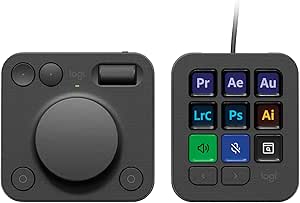 | Best for Creative-App Workflows | Controls: 9 customizable LCD keys, control dial, and roller | Keypad pages: Up to 15 per profile | Connectivity: USB-C | VIEW LATEST PRICE | See Our Full Breakdown |
| Logitech MK270 Full-Size Wireless Keyboard and Mouse Combo, Black |  | Best Value Full-Size Combo | Keyboard layout: 104-key QWERTY | Connectivity: 2.4 GHz wireless via USB receiver | Wireless range: Up to 33 ft (10 m) | VIEW LATEST PRICE | See Our Full Breakdown |
| Logitech Mobi Fold Foldable Wireless Mouse, Graphite |  | Best Compact Travel Mouse | Connectivity: Bluetooth | Tracking: Optical, up to 4,000 DPI | Buttons: 4 | VIEW LATEST PRICE | See Our Full Breakdown |
| Logitech Lift Vertical Ergonomic Wireless Mouse – Graphite |  | Best Ergonomic Mouse | Dimensions: 108 × 70 × 71 mm | Weight: 125 g | Tracking: Adjustable up to 4000 DPI | VIEW LATEST PRICE | See Our Full Breakdown |
| Logitech M196 Compact Ambidextrous Bluetooth Wireless Mouse, Rose |  | Best Compact Mouse | Connectivity: Bluetooth | Design: Compact, lightweight, ambidextrous | Tracking: Optical | VIEW LATEST PRICE | See Our Full Breakdown |
| Logitech MK540 Advanced Wireless Keyboard and Mouse Combo |  | Best Keyboard-and-Mouse Combo | Connectivity: USB wireless receiver | Wireless range: Up to 33 ft | Keyboard layout: QWERTY, 104 keys | VIEW LATEST PRICE | See Our Full Breakdown |
| Logitech MX Keys Premium Palm Rest, Black |  | Best Palm Rest for MX Keys | Model: MX Palm Rest | Material: Memory foam wrapped in leatherette | Dimensions: 16.93 × 0.3 × 2.63 in | VIEW LATEST PRICE | See Our Full Breakdown |
| Logitech G305 LIGHTSPEED Wireless Gaming Mouse, Black |  | Best Wireless Gaming Mouse | Connectivity: 2.4 GHz LIGHTSPEED wireless via USB receiver | Sensor: HERO optical | Sensitivity: 200–12,000 DPI | VIEW LATEST PRICE | See Our Full Breakdown |
| Logitech Studio Series Desk Mat, Large, Mid Gray |  | Best Desk Mat for Everyday Setups | Dimensions: 11.8 × 27.5 in (30 × 70 cm) | Color: Mid Gray | Surface material: Recycled polyester | VIEW LATEST PRICE | See Our Full Breakdown |
| Logitech Brio 101 Full HD 1080p Webcam, Black |  | Best Simple Webcam for Video Calls | Resolution: 1080p Full HD | Connectivity: USB-A | Microphone: Built-in mono | VIEW LATEST PRICE | See Our Full Breakdown |
| Logitech Litra Glow Premium LED Streaming Light | 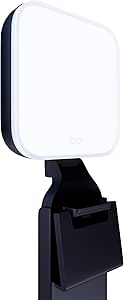 | Best Dedicated Light for Streaming | Light source: Full-spectrum LED | Power: USB-powered | Mount: Three-way monitor mount with adjustable height, tilt, and rotation | VIEW LATEST PRICE | See Our Full Breakdown |
| Logitech computer accessorie | Connectivity |
|---|---|
| Logitech K400 Plus Wireless To | RF Unifying receiver |
| Logitech C920x HD Pro PC Webca | USB |
| Logitech MX Creative Console w | USB-C |
| Logitech MK270 Full-Size Wirel | 2.4 GHz wireless via USB receiver |
| Logitech Mobi Fold Foldable Wi | Bluetooth |
| Logitech Lift Vertical Ergonom | Bluetooth Low Energy or Logi Bolt USB receiver |
| Logitech M196 Compact Ambidext | Bluetooth |
| Logitech MK540 Advanced Wirele | USB wireless receiver |
| Logitech MX Keys Premium Palm | — |
| Logitech G305 LIGHTSPEED Wirel | 2.4 GHz LIGHTSPEED wireless via USB receiver |
| Logitech Studio Series Desk Ma | — |
| Logitech Brio 101 Full HD 1080 | USB-A |
| Logitech Litra Glow Premium LE | — |
More Details on Our Top Picks
Logitech K400 Plus Wireless Touch TV Keyboard – Black
The K400 Plus is the clearest fit for controlling a computer from a sofa: its built-in touchpad handles pointer movement and clicks, so there is no separate mouse to manage. Its 33-foot wireless range and quiet keys suit a living-room setup better than the desk-focused MK270 combo, which includes a mouse but takes up more space. The K400 Plus also has a spill-resistant design and a stated battery life of up to 18 months, reducing routine upkeep. The tradeoffs are its 84-key layout, which omits some full-size keyboard keys, and its reliance on a Unifying receiver rather than Bluetooth. It also lacks backlighting, so dim-room use can be awkward. I’d choose it for couch navigation, not as a versatile everyday desktop keyboard.
Pros:- Integrated touchpad combines keyboard and pointer control in one device.
- Wireless range reaches up to 33 feet for flexible living-room placement.
- Stated battery life of up to 18 months reduces battery changes.
- Spill-resistant design adds protection around snacks and drinks.
Cons:- No backlighting makes the keys harder to see in a dark room.
- Uses AA batteries rather than a rechargeable battery.
- Requires the Unifying receiver and does not offer Bluetooth.
Best for: PC-to-TV users who want to browse, stream, and type from a sofa without keeping a separate mouse nearby.
Not ideal for: People who need Bluetooth pairing, backlit keys, or a full-size keyboard layout for regular desk work.
- Layout:84-key QWERTY
- Touchpad size:2.99 × 1.85 in (76 × 47 mm)
- Connectivity:RF Unifying receiver
- Wireless range:Up to 33 ft (10 m)
- Battery life:Up to 18 months
- Power:2 AA batteries
- Compatibility:Windows 7/8/10 or later, Android 7 or later, Chrome OS
- Water resistance:Water resistant
Our verdict“Choose the K400 Plus for comfortable couch-based PC control, but skip it if you need a backlit or full-size desk keyboard.”
Logitech C920x HD Pro PC Webcam Full 1080p/30fps Video – Black
The C920x suits people who want a sharper, more adjustable video-call image than a basic built-in laptop camera can provide. It records 1080p video at 30 fps, while autofocus and automatic light correction help keep the image usable as lighting or distance changes. Its 78-degree viewing angle frames one person or a small call setup without going as wide as a room-focused camera might. Compared with the Logitech Brio 101 in this roundup, the C920x adds dual stereo microphones and a three-month XSplit VCam license for background blur or removal without a green screen. Those extras make it a stronger fit for calls and streaming, but the USB connection limits portability, and there is no physical privacy shutter. Buyers who want a simpler webcam with fewer extras may prefer the Brio 101.
Pros:- Full HD 1080p video at 30 fps provides a detailed image for calls and recordings.
- Autofocus and automatic light correction adapt to changing distance and room lighting.
- Dual microphones capture stereo audio without requiring a separate mic for basic calls.
- XSplit VCam support enables background blur or removal without a green screen.
Cons:- No physical privacy shutter covers the lens when the webcam is not in use.
- USB-powered design is less convenient for portable setups.
- The 30 fps maximum may not suit buyers seeking higher-frame-rate video.
Best for: Remote workers, students, and streamers who want autofocus, light correction, stereo microphones, and software background effects.
Not ideal for: People who need a built-in lens cover, a battery-powered camera, or a compact setup for frequent travel.
- Video resolution and frame rate:1080p at 30 fps
- Sensor:CMOS, 1/2.9-inch photo sensor
- Focus:Autofocus
- Viewing angle:78 degrees
- Microphones:Dual side-mounted stereo microphones
- Connectivity:USB
- Dimensions:1.7 × 3.7 × 2.7 in (D × W × H)
- Weight:5.7 oz
Our verdict“Pick the C920x for flexible video calls and streaming features, but choose a simpler webcam if privacy-cover convenience matters more.”
Logitech MX Creative Console with 9 Customizable Keys, Graphite
The MX Creative Console is the specialist pick here: its nine customizable LCD keys, control dial, and roller turn repeated commands and fine adjustments into direct controls. That can make tasks in apps such as Photoshop, DaVinci Resolve, or Final Cut Pro easier to reach than keyboard shortcuts alone. Unlike the general-purpose MK270 combo, this is not a replacement for a keyboard and mouse; it is an add-on for people whose work involves recurring app actions. Profiles with up to 15 pages give users room to organize commands by task, though setup depends on Logi Options+ and may take time before the controls feel worthwhile. The listed Windows support starts at Windows 10, with Logi Options+ also available for recent macOS versions. Its plastic build and battery-powered design are less appealing for buyers seeking a simple, maintenance-free desk accessory.
Pros:- Nine customizable LCD keys can show icons for app-specific actions.
- Control dial and roller give tactile input for precise adjustments.
- Profiles can hold up to 15 keypad pages for organizing workflows.
- Integrations cover creative, productivity, and media apps.
Cons:- Software features require Logi Options+ and configuration.
- The specialized controls add little value for users with few repeated app commands.
- Battery-powered operation requires two batteries.
Best for: Video editors, designers, and other creative professionals who repeatedly use supported apps and want dedicated shortcut controls.
Not ideal for: Casual computer users who do not rely on creative software or would rather avoid configuring profiles and installing Logi Options+.
- Controls:9 customizable LCD keys, control dial, and roller
- Keypad pages:Up to 15 per profile
- Connectivity:USB-C
- Compatibility:Laptop and PC
- Operating system:Windows 10 or later; Logi Options+ available for recent macOS versions
- Power:Battery powered; requires 2 batteries
- Enclosure material:Plastic
- Color:Graphite
Our verdict“Choose the MX Creative Console if supported creative apps are central to your work; skip it if you only need everyday typing and pointing.”
Logitech MK270 Full-Size Wireless Keyboard and Mouse Combo, Black
The MK270 makes sense for buyers who want a complete wireless desk setup without choosing a keyboard and mouse separately. Its 104-key layout includes a number pad and eight multimedia hotkeys, while the compact ambidextrous mouse works for either hand. Compared with the K400 Plus, it is better suited to conventional desk use: the MK270 includes a separate mouse and full-size typing layout, while the K400 Plus combines a smaller keyboard with a touchpad for couch control. The MK270’s stated battery life—up to 36 months for the keyboard and 12 months for the mouse—also means less frequent battery replacement than the K400 Plus’s 18-month claim. In exchange, both devices need batteries, and the mouse’s compact shape may not suit long sessions for people who prefer a larger grip. It is also listed for Windows compatibility.
Pros:- Full-size 104-key layout includes a number pad and arrow keys.
- Eight multimedia hotkeys provide quick access to common controls.
- Keyboard and mouse have stated battery life of up to 36 and 12 months, respectively.
- Compact ambidextrous mouse accommodates left- and right-handed users.
Cons:- Both keyboard and mouse use batteries rather than rechargeable power.
- Compact mouse may feel small for users who prefer a larger hand fit.
- Compatibility is listed for Windows rather than a broad range of operating systems.
Best for: Home and office users who want a full-size Windows keyboard, number pad, hotkeys, and a mouse in one wireless set.
Not ideal for: People who need Bluetooth, broad non-Windows compatibility, a rechargeable setup, or a full-size ergonomic mouse.
- Keyboard layout:104-key QWERTY
- Connectivity:2.4 GHz wireless via USB receiver
- Wireless range:Up to 33 ft (10 m)
- Keyboard battery life:Up to 36 months
- Mouse battery life:Up to 12 months
- Keyboard features:Spill-resistant design, adjustable tilt legs, 8 multimedia hotkeys
- Mouse design:Compact and ambidextrous
- Compatibility:Laptop and PC; Windows
Our verdict“Choose the MK270 for a straightforward full-size wireless desk set, but look elsewhere if you need Bluetooth or a larger mouse.”
Logitech Mobi Fold Foldable Wireless Mouse, Graphite
The Mobi Fold is built around portability: it folds flat for travel, powers on when unfolded, and connects over Bluetooth without requiring a receiver for normal use. Its three-device switching is useful for people moving between a laptop, tablet, and phone, while the quiet clicks and adaptive touch scrolling suit shared workspaces. Compared with the MK270’s bundled mouse, the Mobi Fold is easier to pack and works across more operating systems, but it is a standalone, right-handed mouse rather than part of a full desktop kit. The 4,000 DPI optical tracking and quick-charge claim add flexibility, though the small folding form may not fit everyone’s preferred grip. A full charge is stated to last up to a month; the USB-C cable is not included, and buyers who want Logitech’s Logi Bolt receiver must purchase it separately.
Pros:- Folds flat for easier packing and turns on when unfolded.
- Bluetooth connection and Easy-Switch support up to three devices.
- Quiet clicks and adaptive touch scrolling suit shared work areas.
- USB-C quick charging is listed to provide up to 22 hours of use from a one-minute charge.
Cons:- Right-handed design does not suit left-handed users.
- USB-C charging cable is not included.
- Logi Bolt receiver is sold separately.
Best for: People who carry a mouse with a laptop or tablet and switch among up to three Bluetooth devices.
Not ideal for: Left-handed users, people who prefer a full-size mouse for long work sessions, or buyers who want a bundled receiver and charging cable.
- Connectivity:Bluetooth
- Tracking:Optical, up to 4,000 DPI
- Buttons:4
- Device switching:Up to 3 devices with Easy-Switch
- Compatibility:Windows, macOS, Chrome OS, Android, iPadOS
- Battery life:Up to 1 month per full charge
- Quick charge:Up to 22 hours of use from a 1-minute charge
- Charging:USB-C; cable not included
- Hand orientation and material:Right-handed; plastic enclosure, with 36% certified post-consumer recycled plastic in Graphite
Our verdict“Pick the Mobi Fold for a travel-ready mouse that moves between Bluetooth devices, but skip it if you need a left-handed or full-size shape.”
Logitech Lift Vertical Ergonomic Wireless Mouse – Graphite
The Logitech Lift earns this spot for buyers who want a more upright hand position rather than a conventional mouse shape. Its 57-degree angle is designed to encourage a natural wrist posture, while customizable buttons and the SmartWheel make everyday navigation more adaptable. Compared with the compact, straightforward Logitech M196, the Lift offers more ergonomic shaping and control options, but takes up more room and may feel unfamiliar at first. Its Bluetooth and Logi Bolt connections suit a desk shared between compatible devices, and the single AA battery can last up to 24 months. The main limitation is fit: this configuration is right-handed and intended for small to medium hands. I would skip it if you prefer a familiar, low-profile mouse or need a left-handed option.
Pros:- 57-degree vertical design encourages a more natural wrist posture.
- Customizable buttons and SmartWheel support flexible navigation.
- Bluetooth Low Energy and Logi Bolt provide two wireless connection options.
- Up to 24 months of battery life from one AA cell.
Cons:- This configuration is designed for right-handed use and small to medium hands.
- The vertical shape can take time to get used to.
- Requires a replaceable AA battery.
Best for: Right-handed users with small to medium hands who spend long periods at a computer and want a vertical mouse with customizable controls.
Not ideal for: Left-handed users, people with large hands, or anyone who wants a conventional mouse shape without an adjustment period.
- Dimensions:108 × 70 × 71 mm
- Weight:125 g
- Tracking:Adjustable up to 4000 DPI
- Connectivity:Bluetooth Low Energy or Logi Bolt USB receiver
- Battery:1 AA cell; up to 24 months
- Wireless range:10 m
- Compatibility:Windows 10/11, macOS 10.15+, iPadOS 14+, Chrome OS, Linux, Android 8.0+
- Graphite recycled content:70% post-consumer recycled plastic
Our verdict“Choose the Lift if ergonomic shape matters more to you than a familiar feel or ambidextrous use.”
Logitech M196 Compact Ambidextrous Bluetooth Wireless Mouse, Rose
The Logitech M196 is the simple, travel-friendly choice in this mouse lineup. Its compact ambidextrous shape accommodates either hand, and Bluetooth pairing avoids carrying a USB receiver—handy for compatible laptops and tablets. Compared with the more feature-rich Logitech Lift, the M196 gives up ergonomic shaping and customizable controls in favor of an easy-to-pack design and straightforward line-by-line scrolling. The optical tracking covers routine browsing and office work, while auto-sleep helps stretch one AA battery to up to 12 months. That simplicity also sets its limits: it has no included receiver for devices without Bluetooth, and its small form may be less comfortable as an all-day desktop mouse for users who prefer a fuller grip. I’d pick it for portability, not specialized control or wrist-position support.
Pros:- Ambidextrous design works for left- and right-handed users.
- Bluetooth connection requires no USB receiver.
- Compact, lightweight build suits travel and small workspaces.
- Auto-sleep helps provide up to 12 months of battery life.
Cons:- No USB receiver is included for devices without Bluetooth.
- Requires a replaceable AA battery.
- Its compact shape offers less ergonomic support than the Lift.
Best for: Students, commuters, and laptop users who want a lightweight Bluetooth mouse that works for either hand and packs easily.
Not ideal for: Desktop users who want a larger ergonomic shape, programmable controls, or a USB receiver for a computer without Bluetooth.
- Connectivity:Bluetooth
- Design:Compact, lightweight, ambidextrous
- Tracking:Optical
- Scrolling:Line-by-line
- Battery:1 included AA battery
- Battery life:Up to 12 months
- Color:Rose
- Recycled content:66% recycled plastic
Our verdict“Pick the M196 for basic, portable Bluetooth pointing in either hand, rather than ergonomic or programmable features.”
Logitech MK540 Advanced Wireless Keyboard and Mouse Combo
The MK540 Advanced is the most practical pick here for buyers outfitting a Windows desk with both core input devices at once. Its full-size keyboard includes a number pad, palm rest, adjustable tilt, media controls, and function hotkeys, while the included ambidextrous mouse covers everyday pointing. Compared with buying a mouse such as the Logitech M196 alone, this set supplies a complete keyboard-and-mouse setup and uses a USB receiver with a listed range of up to 33 feet. The keyboard’s spill resistance offers some protection from small accidents, but it is not waterproof: the stated test limit is 60 ml, and immersion is out. The tradeoff is a less flexible setup than Bluetooth accessories, with separate batteries for each device and compatibility focused on Windows and Chrome OS.
Pros:- Full-size 104-key layout includes a number pad and palm rest.
- Three tilt positions, media controls, and customizable function hotkeys support varied desk routines.
- Ambidextrous mouse is included with the keyboard.
- Long stated battery life: up to 36 months for the keyboard and 18 months for the mouse.
Cons:- Keyboard and mouse use separate batteries.
- Spill resistance is limited to tested spills up to 60 ml; the keyboard must not be immersed.
- USB receiver connectivity and listed compatibility are less flexible than Bluetooth options such as the M196.
Best for: Windows or Chrome OS users who want a full-size keyboard, number pad, and everyday mouse in one receiver-based desk setup.
Not ideal for: Mac users, buyers who need Bluetooth or multi-device pairing, and people who want a compact keyboard without a number pad.
- Connectivity:USB wireless receiver
- Wireless range:Up to 33 ft
- Keyboard layout:QWERTY, 104 keys
- Keyboard dimensions:7.62 × 18 × 0.94 in
- Keyboard battery:2 AAA alkaline batteries; up to 36 months
- Mouse:3 buttons; ambidextrous; 2.43 × 1.54 × 0.45 in
- Mouse battery:1 AA alkaline battery; up to 18 months
- Compatibility:Windows 7 or later, Chrome OS
Our verdict“Choose the MK540 if you want a full-size Windows-focused desk set with a number pad and palm rest, not a compact or Bluetooth-first setup.”
Logitech MX Keys Premium Palm Rest, Black
The MX Keys Premium Palm Rest is a targeted comfort add-on, not a general-purpose desk accessory. Its memory foam surface gives wrists a softer place to rest during long typing sessions, while the non-slip base helps keep it aligned in front of a keyboard. The leatherette covering is stain-resistant and easy to clean, a practical contrast with an uncovered foam rest. Its main advantage over relying on a keyboard’s built-in support, such as the palm rest on the MK540, is a dedicated cushion for compatible thin keyboards like MX Keys and Craft. That narrow fit is also the main drawback: Logitech only specifies those models, so I wouldn’t assume it will sit correctly with a taller or differently shaped keyboard. At just 8 mm deep, it stays low-profile, but adds another desk item rather than replacing keyboard support.
Pros:- Memory foam offers a cushioned wrist surface for longer typing sessions.
- Stain-resistant leatherette is easy to clean.
- Non-slip design helps the rest stay positioned on the desk.
- Low 8 mm depth suits thin keyboards such as MX Keys and Craft.
Cons:- Compatibility is specifically described for Logitech MX Keys and Craft.
- Adds a separate desk accessory rather than built-in keyboard support.
Best for: MX Keys or Logitech Craft owners who want a low-profile cushioned wrist rest for extended typing.
Not ideal for: People using keyboards outside the stated MX Keys and Craft compatibility, or anyone whose keyboard already has enough wrist support.
- Model:MX Palm Rest
- Material:Memory foam wrapped in leatherette
- Dimensions:16.93 × 0.3 × 2.63 in
- Depth:8 mm
- Weight:6.4 oz
- Compatible keyboards:Logitech MX Keys and Logitech Craft
- Color:Black
- Warranty:1-year limited hardware warranty
Our verdict“Buy this palm rest if you use MX Keys or Craft and want a separate, low-profile cushion; skip it if your keyboard fit is uncertain.”
Logitech G305 LIGHTSPEED Wireless Gaming Mouse, Black
The G305 LIGHTSPEED is the performance-focused mouse in this group, aimed at players who want fast wireless response and configurable controls without moving to a rechargeable design. Its 1 ms report rate, HERO sensor with sensitivity up to 12,000 DPI, and six programmable buttons give it more gaming-oriented control than the Lift or M196. The ambidextrous shape also makes it less hand-specific than the right-handed Lift, though it lacks that mouse’s vertical posture. A single AA battery can last up to 250 hours, and built-in receiver storage makes the USB dongle easier to keep with the mouse when travelling. The tradeoffs are a replaceable battery and receiver-dependent connection; the listed wireless range is only 1 meter. I’d choose it for responsive PC gaming, not for Bluetooth convenience or ergonomic shaping.
Pros:- LIGHTSPEED wireless connection has a 1 ms report rate.
- HERO sensor supports 200–12,000 DPI and up to 400 IPS tracking speed.
- Six programmable buttons provide options for game controls and shortcuts.
- Weighs 99 g and includes built-in USB receiver storage.
Cons:- Requires a replaceable AA battery rather than rechargeable power.
- Uses a 2.4 GHz USB receiver instead of Bluetooth.
- Listed wireless range is 1 meter.
Best for: PC and Mac gamers who want a lightweight wireless mouse with programmable buttons, adjustable sensitivity, and a stored USB receiver.
Not ideal for: Users who need Bluetooth pairing, a longer listed wireless range, rechargeable power, or a vertical ergonomic design.
- Connectivity:2.4 GHz LIGHTSPEED wireless via USB receiver
- Sensor:HERO optical
- Sensitivity:200–12,000 DPI
- Report rate:1 ms
- Maximum tracking speed:400 IPS
- Buttons:6 programmable
- Weight:99 g (3.4 oz)
- Battery:1 included AA battery; up to 250 hours
- Design and receiver storage:Ambidextrous; built-in USB receiver storage
Our verdict“Choose the G305 for receiver-based wireless gaming performance and programmable controls, not for Bluetooth or ergonomic wrist support.”
Logitech Studio Series Desk Mat, Large, Mid Gray
I’d choose the Studio Series Desk Mat to add a broad, quiet work surface without changing keyboards or mice. At 27.5 inches wide, it can hold both, with room left for smaller desk accessories; that makes it a more unified setup addition than the Logitech MX Keys Premium Palm Rest, which serves a narrower wrist-support purpose. Its fine-weave recycled polyester surface supports smooth mouse movement, while the spill-resistant finish can be wiped with a damp cloth. The rubber base helps keep the mat in place, and flat-stitched edges are designed to resist fraying. The tradeoff is the footprint: this large mat needs enough clear desk space, and its natural rubber base contains latex. It suits buyers who want desk protection and a consistent surface, but not those with latex sensitivities or a compact workstation.
Pros:- Spill-resistant surface can be wiped clean with a damp cloth
- Fine-weave fabric offers smooth, quiet mouse movement
- Anti-slip rubber base helps keep the mat steady
- Surface and inner layer use recycled polyester
Cons:- Natural rubber base contains latex
- Large footprint may not suit compact desks
Best for: Home-office users with enough desk space for a keyboard, mouse, and accessories who want a wipe-clean, steady surface.
Not ideal for: People with latex sensitivities or small desks where a 27.5-inch-wide mat would crowd other equipment.
- Dimensions:11.8 × 27.5 in (30 × 70 cm)
- Color:Mid Gray
- Surface material:Recycled polyester
- Inner layer:Recycled polyester
- Base material:Natural rubber (contains latex)
- Surface features:Spill-resistant finish; flat-stitch anti-fray edges
- Warranty:1-year limited hardware warranty
Our verdict“Choose this mat if you want a roomy, easy-to-clean surface for a full desk setup and have space for its wide footprint.”
Logitech Brio 101 Full HD 1080p Webcam, Black
The Brio 101 is a straightforward upgrade for people whose computer camera leaves them looking dim or unclear on calls. It captures 1080p Full HD video, and RightLight is designed to brighten the image and reduce shadows without requiring a separate light like the Logitech Litra Glow. Plugging its USB-A cable into a compatible computer keeps setup simple, while the built-in mono microphone and sliding privacy cover cover basic call needs. Compared with the Logitech C920x HD Pro Webcam, the Brio 101’s appeal here is its uncomplicated setup and integrated privacy cover, rather than a more feature-rich camera package. Its fixed-focus lens and 60-degree viewing angle limit framing flexibility, and the built-in microphone is a basic alternative to a dedicated audio device. I’d pick it for everyday calls, not for adjustable framing or a more involved streaming setup.
Pros:- Captures Full HD 1080p video
- RightLight helps brighten images and reduce shadows
- Integrated sliding cover provides a physical privacy option
- USB-A connection and built-in microphone support simple call setup
Cons:- Fixed-focus lens offers limited control over sharpness and framing
- 60-degree viewing angle may feel narrow for group calls
- Built-in mono microphone is basic compared with a separate mic
Best for: Students and remote workers who want a plug-and-play 1080p camera with a physical privacy cover for routine video calls.
Not ideal for: Streamers and presenters who need adjustable focus, a wider view, or more flexible camera positioning.
- Resolution:1080p Full HD
- Connectivity:USB-A
- Microphone:Built-in mono
- Privacy:Integrated sliding cover
- Focus:Fixed focus
- Viewing angle:60 degrees
- Compatible operating systems:Windows 7 and up, macOS 10.10 and up, Chrome OS
- Dimensions:1.26 × 2.87 × 2.62 in
Our verdict“Choose the Brio 101 for uncomplicated, well-lit everyday calls; pick a more adjustable camera or add a dedicated light for streaming.”
Logitech Litra Glow Premium LED Streaming Light
For buyers who already have a webcam but want more control over how they look on screen, the Litra Glow fills a different role from the Logitech Brio 101: it adds dedicated, adjustable lighting rather than capturing video. Its wide diffuser produces soft light intended to reduce harsh shadows, while adjustable brightness and color temperature let you tune the look for calls, streaming, or recording. The three-way monitor mount adjusts height, tilt, and rotation, giving it more placement control than a fixed clip alone. It is USB-powered, so it avoids a separate power adapter, but that also means it needs a suitable USB connection. The monitor-mounted design can restrict placement if your screen is awkwardly shaped or you want light from another angle. Some controls use Logitech G HUB on a desktop computer, a drawback for buyers who prefer hardware-only adjustment.
Pros:- Wide diffuser provides soft light designed to reduce harsh shadows
- Brightness and color temperature are adjustable
- Three-way mount allows height, tilt, and rotation adjustments
- USB-powered design supports plug-and-play use
Cons:- Monitor mount can limit placement and lighting angle
- App controls require Logitech G HUB on a desktop computer
Best for: Streamers and frequent video-call users who want adjustable, softened lighting mounted directly on a compatible monitor.
Not ideal for: People who need a freestanding light position, do not want to use a monitor mount, or prefer to avoid desktop control software.
- Light source:Full-spectrum LED
- Power:USB-powered
- Mount:Three-way monitor mount with adjustable height, tilt, and rotation
- Controls:Adjustable brightness and color temperature; Logitech G HUB app
- Weight:13.6 oz
- Model number:946-000001
- Warranty:1-year limited hardware warranty
Our verdict“Choose the Litra Glow if you want adjustable, soft monitor-mounted lighting and do not need a freestanding placement option.”

How We Picked
I compared these 13 Logitech accessories by the job they do, then ranked them for usefulness to a broad range of computer users. I weighed everyday usability, feature fit, build and design, setup demands, and versatility. A keyboard-and-mouse bundle can address two basic needs at once; a camera, light, or creative control surface must justify its narrower role through a clear benefit for the right buyer.
The order reflects how readily each product can improve a common setup, not a claim that one accessory suits everyone. The MK540 leads as a balanced desktop bundle, while specialized options rank for the users who need them. I also accounted for overlap: buyers choosing between the two webcams, several mice, or two wireless combos should prioritize the differences in purpose and form rather than treat similar categories as interchangeable.
Factors to Consider When Choosing Best Logitech Computer Accessories
Before choosing an accessory, start with the friction in your current setup—not the number of features on a product page. These distinctions can help you avoid buying a specialist device when a basic combo would do, or settling for a general-purpose pick when your work calls for a more tailored tool.
Start With the Problem You Want to Solve
List the task that interrupts your work most often: typing, pointer comfort, video calls, lighting, or controlling creative software. A keyboard-and-mouse combo covers common input needs, but it will not improve a dim video-call setup or provide programmable controls for a creative workflow. Buying multiple accessories before identifying the bottleneck can leave you with overlapping tools and a cluttered desk. If you need only one improvement, prioritize the accessory that changes that task directly. Add secondary items only when they fit a routine you already have.
Match the Accessory to Your Desk and Device
Think about where the accessory will live and what it must connect to. A living-room keyboard with a touchpad serves a different setup from a full-size desktop keyboard, while a compact mouse may be easier to carry than to use all day at a fixed desk. Check connection requirements and device compatibility before buying, especially if you switch between computers or use a less common operating system. Also account for available space: a large desk mat or separate lighting can be awkward on a shallow surface. Measure your work area and identify nearby ports or placement limits first.
Choose Ergonomics for Your Habits, Not a Promise
Alternative shapes can change how you hold or reach for an input device, but they are not a guaranteed fix for discomfort. A vertical mouse like the Lift asks for an adjustment period, while a conventional compact mouse may feel more familiar but offer a different grip. Consider how many hours you use a mouse, whether you need to move between devices, and whether your current hand position feels strained. Try to assess fit before committing when that is possible. A supportive accessory helps only if its size and shape suit your hand and desk habits.
Separate Video Quality From Call Quality
A webcam’s resolution is only one part of how you appear on a call. Room lighting, camera placement, background, and the software you use all affect the result, so a new camera cannot compensate for a dark room or an awkward viewing angle. If your calls are mostly routine meetings, a straightforward Full HD option may be sufficient. If you need more control over framing or camera use, compare models by those needs rather than by resolution alone. A dedicated light can be a better next step when lighting—not the camera—is the weak link.
Pay for Specialized Features Only When You Will Use Them
Customizable controls, gaming-focused wireless performance, and dedicated streaming lights are easier to justify when they support regular work or play. For occasional use, a standard mouse or webcam may be simpler to set up and maintain. Consider whether specialized functions will save repeated effort, improve a task you perform often, or just add another device to manage. Accessories designed to work with other equipment also deserve a compatibility check before purchase. A narrower tool can be the better choice, but only when its extra focus matches your routine.
Check the Full Setup Before Adding Comfort Accessories
A palm rest, desk mat, or lighting accessory can improve how a workstation feels without changing how the computer operates. These items are easy to overlook when planning a desk, yet their usefulness depends heavily on the keyboard, desk dimensions, and placement you already have. Confirm that a palm rest fits your keyboard and that a mat leaves room for your mouse movement. For lighting, check where the fixture can sit relative to your screen and face. Buying around your existing setup reduces the chance of a useful accessory becoming a poorly placed extra.
Frequently Asked Questions
Should I choose the MK540 or MK270 wireless combo?
Choose between them based on how much you value a more advanced everyday setup versus basic wireless input. The MK540 is the stronger fit when you want a full-size keyboard-and-mouse pairing for regular desktop work. The MK270 makes more sense when a straightforward combo is enough and you do not need to prioritize extra refinements. Before deciding, check the desk space available and whether the keyboard’s layout suits your typing habits. If you already own a mouse you like, a standalone keyboard may be a better use of your setup than either bundle.
For video calls, should I buy the Brio 101 or C920x?
Start with how you use your camera, not just its Full HD label. The Brio 101 is a direct option for buyers who want a simple webcam for regular calls, while the C920x is the alternative to examine if you want a more feature-focused camera choice. Neither can fix poor room lighting or a camera placed too low, so test your setup conditions before replacing your webcam. If your image already looks sharp but your face appears dim, a lighting accessory may make a more relevant change. Check the camera’s compatibility with your meeting software and computer as well.
Is a vertical mouse a good choice for someone who has never used one?
It can be worth considering if you want to change your hand position, but expect the grip and pointer movement to feel unfamiliar at first. The Lift is a more specialized choice than the M196 or a conventional gaming mouse, so it should be selected for its shape rather than as a general upgrade. Think about the hours you spend using a mouse and whether you can adapt without disrupting work that depends on precise, fast movement. If possible, try the shape before relying on it for a full workday. Comfort varies by hand size, grip, and preference, so no design is a universal answer.
Do I need a separate streaming light if I already own a webcam?
Not automatically: a webcam and a light address different parts of the image. If your camera is adequate but your room leaves your face poorly lit, the Litra Glow may target the problem more directly than replacing the camera. First test whether moving a lamp or changing your position relative to a window improves the picture. A dedicated light makes more sense for frequent calls or streaming when consistent illumination matters. Make sure you have a practical place to position it without adding glare or taking up needed desk space.
Which Logitech accessory is most useful for a small or shared workspace?
There is no single answer because space constraints can mean different things. The Mobi Fold is aimed at portability, while the M196 keeps to a compact ambidextrous mouse format; the K400 Plus is designed for controlling a computer from a distance, such as a living-room setup. For a crowded desktop, a compact pointer may be more useful than adding a full-size keyboard-and-mouse bundle. For shared use, choose controls that feel intuitive to occasional users and are easy to store or move. Measure the available surface and consider whether the accessory must travel before deciding.
Conclusion
For the best overall everyday setup, I recommend the MK540 because its keyboard-and-mouse pairing covers two common desktop needs. The MK270 is my best value-style pick for buyers who want a basic wireless combo without a more specialized setup. Beginners should start with a straightforward combo or the Brio 101 if their main need is video calls. For a premium, workflow-focused upgrade, the MX Creative Console suits users who will make regular use of customizable controls; the Lift, G305, Litra Glow, and C920x each serve more specific needs. Choose the accessory that fixes your most frequent frustration first, then add supporting pieces only when your desk and routine call for them.