
For most buyers seeking the best graphics cards, I’d start with the ASUS Prime Radeon RX 9070 EVO 16GB as the best overall balance of modern performance and 16GB of memory. The GIGABYTE Radeon RX 9070 XT Gaming OC is a stronger choice for higher-end gaming, while the ASUS Dual GeForce RTX 5060 suits buyers who want a more modest, current-generation card. The main tradeoffs are graphics performance, memory capacity, power and case fit, and whether NVIDIA or AMD features better match your games and software. Older and entry-level cards can still suit lighter workloads, but they make different compromises than the newer options here. Read on for the full breakdown and help matching a card to your system and priorities.

Get the latest gadgets delivered free with Prime
- Fast, free delivery on millions of items
- Prime Video, Amazon Music and more included
- Member-only deals all year
Complete the kit



Key Takeaways
- The 16GB Radeon RX 9070 models stand out as balanced picks: they pair substantial memory with newer-generation hardware without requiring a flagship-class card.
- The RX 9070 XT and RTX 5080 occupy the high-performance tier, while the RTX 5090 is the specialist choice for buyers who want the highest ceiling and can accommodate its size and power demands.
- Memory capacity separates several cards with similar everyday appeal: the RTX 3060 models offer 12GB, while the RTX 5060 and RX 7600 options have 8GB.
- The two RTX 3050 cards and three RTX 3060 options serve different kinds of budget builds: the 3050 models are entry-level picks, while the 3060 cards provide more memory and broader headroom.
- Product naming does not tell the whole fit story: OC editions and gaming-focused coolers vary in size and power needs, so case clearance and power supply capacity matter alongside the GPU model.
| NVIDIA GeForce RTX 4080 16GB GDDR6X Graphics Card |  | Best for 4K Ray Tracing | GPU: NVIDIA GeForce RTX 4080 | Memory: 16GB GDDR6X | CUDA cores: 9,728 | VIEW LATEST PRICE | See Our Full Breakdown |
| XFX Swift AMD Radeon RX 9060 XT OC Graphics Card, 16GB GDDR6 |  | Best for High-Clocked 4K Output | Chipset: AMD Radeon RX 9060 XT | Memory: 16GB GDDR6 | Boost clock: Up to 3320 MHz | VIEW LATEST PRICE | See Our Full Breakdown |
| MSI GeForce RTX 3050 Ventus 2X 6G OC Graphics Card |  | Best Entry-Level NVIDIA Pick | GPU: NVIDIA GeForce RTX 3050 | Memory: 6GB GDDR6 | Memory interface: 96-bit | VIEW LATEST PRICE | See Our Full Breakdown |
| ASUS Dual GeForce RTX 3050 6GB GDDR6 OC Edition Graphics Card | 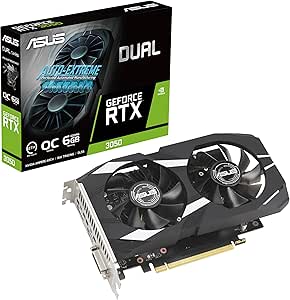 | Best Compact Graphics Card | GPU: NVIDIA GeForce RTX 3050 | Graphics memory: 6GB GDDR6 | Boost clock: 1500 MHz (OC mode); 1470 MHz (default mode) | VIEW LATEST PRICE | See Our Full Breakdown |
| ASUS Prime Radeon RX 9070 EVO 16GB GDDR6 OC Graphics Card |  | Best for Quiet, Tunable Cooling | GPU: AMD Radeon RX 9070 | Graphics memory: 16GB GDDR6 | Boost clock: Up to 2610 MHz (OC mode) | VIEW LATEST PRICE | See Our Full Breakdown |
| ASUS TUF Gaming GeForce RTX 4080 OC Edition Graphics Card, 16GB GDDR6X |  | Best for Rugged, High-End Cooling | GPU: NVIDIA GeForce RTX 4080 | Memory: 16GB GDDR6X (one supplied field conflicts and lists 16 MB) | Interface: PCI Express 4.0 | VIEW LATEST PRICE | See Our Full Breakdown |
| ASUS Prime GeForce RTX 5080 16GB GDDR7 Graphics Card |  | Best for Compact High-End Builds | GPU: NVIDIA GeForce RTX 5080 | Memory: 16GB GDDR7 | Boost clock: 2617 MHz default; 2640 MHz OC mode | VIEW LATEST PRICE | See Our Full Breakdown |
| ASRock Radeon RX 9070 Challenger 16GB OC Graphics Card |  | Best AMD 16GB Pick | GPU: AMD Radeon RX 9070 | Architecture: AMD RDNA 4 | Memory: 16GB GDDR6, 256-bit bus | VIEW LATEST PRICE | See Our Full Breakdown |
| ASUS ROG Strix GeForce RTX 3070 Ti OC Edition Graphics Card |  | Best for Existing RTX 3070 Ti Builds | GPU: NVIDIA GeForce RTX 3070 Ti | Memory: 8GB GDDR6X | Memory clock speed: 4000 MHz | VIEW LATEST PRICE | See Our Full Breakdown |
| ASUS Dual NVIDIA GeForce RTX 5060 OC Edition 8GB GDDR7 Graphics Card |  | Best Compact NVIDIA Pick | GPU: NVIDIA GeForce RTX 5060 | Memory: 8GB GDDR7 | GPU clock speed: 2535 MHz default; 2565 MHz OC mode | VIEW LATEST PRICE | See Our Full Breakdown |
| ZOTAC Gaming GeForce RTX 3060 Twin Edge OC 12GB Graphics Card |  | Best Compact RTX 3060 | GPU: NVIDIA GeForce RTX 3060 | CUDA cores: 3,584 | Memory: 12GB GDDR6 | VIEW LATEST PRICE | See Our Full Breakdown |
| ASRock Radeon RX 7600 Challenger Pro OC 8GB Graphics Card |  | Best for Quiet 1080p Gaming | GPU: AMD Radeon RX 7600 | Architecture: AMD RDNA 3 | Memory: 8GB GDDR6, 128-bit, 18 Gbps | VIEW LATEST PRICE | See Our Full Breakdown |
| ASUS TUF Gaming GeForce RTX 5090 OC Edition Graphics Card, 32GB GDDR7 |  | Best Premium Performance | GPU: NVIDIA GeForce RTX 5090 | Architecture: NVIDIA Blackwell | Memory: 32GB GDDR7 | VIEW LATEST PRICE | See Our Full Breakdown |
| GIGABYTE Radeon RX 9070 XT Gaming OC 16G Graphics Card |  | Best AMD Upgrade Pick | GPU: AMD Radeon RX 9070 XT | Memory: 16GB GDDR6 | GPU clock speed: 3,060 MHz | VIEW LATEST PRICE | See Our Full Breakdown |
| GIGABYTE GeForce RTX 3060 Gaming OC 12G Rev. 2.0 Graphics Card |  | Best RTX 3060 for Multi-Monitor Setups | GPU: NVIDIA GeForce RTX 3060 | Memory: 12GB GDDR6 | Memory interface: 192-bit | VIEW LATEST PRICE | See Our Full Breakdown |
| graphics card | GPU | Memory | Cooling | Interface |
|---|---|---|---|---|
| NVIDIA GeForce RTX 4080 16GB G | NVIDIA GeForce RTX 4080 | 16GB GDDR6X | — | PCI Express |
| XFX Swift AMD Radeon RX 9060 X | — | 16GB GDDR6 | Triple fan | PCI Express x16 |
| MSI GeForce RTX 3050 Ventus 2X | NVIDIA GeForce RTX 3050 | 6GB GDDR6 | — | PCI Express x16 |
| ASUS Dual GeForce RTX 3050 6GB | NVIDIA GeForce RTX 3050 | — | Two Axial-tech fans | PCI Express 4.0 x16 |
| ASUS Prime Radeon RX 9070 EVO | AMD Radeon RX 9070 | — | 3 fans, phase-change thermal pad, dual BIOS, 0dB technology | PCI Express x16 |
| ASUS TUF Gaming GeForce RTX 40 | NVIDIA GeForce RTX 4080 | 16GB GDDR6X (one supplied field conflicts and lists 16 MB) | Three Axial-tech fans | PCI Express 4.0 |
| ASUS Prime GeForce RTX 5080 16 | NVIDIA GeForce RTX 5080 | 16GB GDDR7 | Three fans, vapor chamber, phase-change thermal pad | — |
| ASRock Radeon RX 9070 Challeng | AMD Radeon RX 9070 | 16GB GDDR6, 256-bit bus | Triple fan with 0dB silent feature | PCIe 5.0 |
| ASUS ROG Strix GeForce RTX 307 | NVIDIA GeForce RTX 3070 Ti | 8GB GDDR6X | Three Axial-tech fans | PCIe 4.0, PCI-Express x16 |
| ASUS Dual NVIDIA GeForce RTX 5 | NVIDIA GeForce RTX 5060 | 8GB GDDR7 | Two Axial-tech fans | — |
| ZOTAC Gaming GeForce RTX 3060 | NVIDIA GeForce RTX 3060 | 12GB GDDR6 | IceStorm 2.0 with Active Fan Control and Freeze Fan Stop | — |
| ASRock Radeon RX 7600 Challeng | AMD Radeon RX 7600 | 8GB GDDR6, 128-bit, 18 Gbps | Triple fan with 0dB silent mode | PCIe 4.0 x8 |
| ASUS TUF Gaming GeForce RTX 50 | NVIDIA GeForce RTX 5090 | 32GB GDDR7 | 3 Axial-tech fans and vapor chamber; dual BIOS | PCIe 5.0 x16 |
| GIGABYTE Radeon RX 9070 XT Gam | AMD Radeon RX 9070 XT | 16GB GDDR6 | WINDFORCE cooling system with Hawk fans | PCIe 5.0, PCI-Express x16 |
| GIGABYTE GeForce RTX 3060 Gami | NVIDIA GeForce RTX 3060 | 12GB GDDR6 | WINDFORCE 3X with 3 fans | PCI-Express x16 |
More Details on Our Top Picks
NVIDIA GeForce RTX 4080 16GB GDDR6X Graphics Card
The RTX 4080 is the clearest fit here for buyers who want a high-end 4K card with dedicated ray-tracing support and 16GB of fast GDDR6X memory. Its 9,728 CUDA cores and 2.51 GHz boost clock give it a higher-end profile than either RTX 3050 option, while the 3840 × 2160 target matches demanding gaming displays. Compared with the ASUS Prime Radeon RX 9070 EVO, this card pairs NVIDIA hardware with GDDR6X memory, while the ASUS offers a three-fan cooler and dual BIOS profiles. The RTX 4080’s two-fan configuration and nearly 12-inch length still call for a case with room and suitable airflow. It is a strong choice for a premium build, but overkill for buyers focused on lighter games or compact systems.
Pros:- 16GB of GDDR6X memory suits high-resolution gaming workloads.
- Dedicated ray tracing supports more advanced lighting effects.
- Supports output resolutions up to 3840 × 2160.
- 2.51 GHz boost clock and 9,728 CUDA cores place it above the RTX 3050 picks in this roundup.
Cons:- Nearly 12 inches long, so case clearance needs checking.
- Requires a desktop with a compatible PCI Express slot.
- Two fans may be less suited to buyers prioritizing the three-fan cooling design of the ASUS Prime Radeon RX 9070 EVO.
Best for: Desktop gamers building a high-end 4K system who want dedicated ray tracing and 16GB of graphics memory.
Not ideal for: Small-case builders and budget-focused gamers who do not need high-end 4K performance.
- GPU:NVIDIA GeForce RTX 4080
- Memory:16GB GDDR6X
- CUDA cores:9,728
- Boost clock:2.51 GHz
- Interface:PCI Express
- Video outputs:DisplayPort, HDMI
- Maximum resolution:3840 × 2160
- Dimensions:11.97 × 4.84 inches
Our verdict“Choose the RTX 4080 for a premium 4K build centered on ray tracing, and skip it if your case or gaming needs are modest.”
XFX Swift AMD Radeon RX 9060 XT OC Graphics Card, 16GB GDDR6
The XFX Swift RX 9060 XT OC stands out for pairing 16GB of GDDR6 with a listed boost clock of up to 3320 MHz and a triple-fan cooler. That combination makes it a sensible option for desktop buyers seeking a current AMD card with 4K output support and a cooling design built around three fans. Against the NVIDIA GeForce RTX 4080, the XFX listing gives a higher stated boost-clock figure, but the supplied specs do not establish that this translates into stronger gaming performance; the RTX 4080 is the more explicitly positioned high-end ray-tracing pick. This card also lacks listed ray-tracing details, so buyers weighing graphics features should check their game needs. It is a more balanced fit for a mainstream 4K-capable build than for someone chasing the strongest high-end rendering features.
Pros:- 16GB of GDDR6 provides substantial graphics memory.
- Triple-fan cooling is suited to builds prioritizing multi-fan airflow.
- Supports output resolutions up to 3840 × 2160.
- Listed boost clock reaches up to 3320 MHz.
Cons:- The supplied product details do not specify ray-tracing features.
- Triple-fan cooling may be a poor match for space-constrained cases.
- The stated boost clock alone does not establish gaming performance relative to the RTX 4080.
Best for: Desktop gamers who want an AMD card with 16GB of memory, three-fan cooling, and 4K UHD output support.
Not ideal for: Buyers whose priority is documented ray-tracing capability or a compact build that cannot accommodate a triple-fan card.
- Chipset:AMD Radeon RX 9060 XT
- Memory:16GB GDDR6
- Boost clock:Up to 3320 MHz
- Base clock:1900 MHz
- Memory clock speed:20 GHz
- Cooling:Triple fan
- Interface:PCI Express x16
- Maximum resolution:3840 × 2160 (4K UHD)
- Warranty:3 years
Our verdict“Pick the XFX Swift for a 16GB AMD desktop card with triple-fan cooling and 4K output, but compare feature support carefully if ray tracing is a priority.”
MSI GeForce RTX 3050 Ventus 2X 6G OC Graphics Card
The MSI RTX 3050 Ventus 2X 6G OC is the modest NVIDIA option in this group: it includes dedicated ray-tracing and AI Tensor cores, but its 6GB of GDDR6 puts a firm ceiling on how appealing it is for memory-heavy games and workloads. Its 7.4-inch length is shorter than the ASUS Dual RTX 3050, making the MSI easier to place in some compact cases, though the ASUS card has a slightly higher listed OC-mode boost clock and names DLSS 3 support. Compared with the RTX 4080, this is a much more limited card, not a substitute for high-end 4K gaming. The high maximum-resolution figure describes display support, not a promise of strong performance at that resolution. I’d choose it for a basic gaming desktop that benefits from NVIDIA features and skip it for demanding settings or long-term memory headroom.
Pros:- Dedicated ray-tracing and AI Tensor cores.
- Compact 7.4-inch card length compared with the longer RTX 4080.
- Includes one DisplayPort 1.4a and two HDMI 2.1a outputs.
- Supports a stated maximum resolution of 7680 × 4320.
Cons:- 6GB of video memory can constrain demanding games and workloads.
- Its 1492 MHz boost clock is below the ASUS Dual RTX 3050’s listed OC-mode clock.
- Maximum display resolution should not be mistaken for high-resolution gaming performance.
Best for: First-time PC builders and casual gamers seeking a short NVIDIA card with ray-tracing and Tensor-core features for lighter gaming.
Not ideal for: Players targeting demanding modern games, high graphics settings, or sustained high-resolution gaming, since 6GB of memory is limiting.
- GPU:NVIDIA GeForce RTX 3050
- Memory:6GB GDDR6
- Memory interface:96-bit
- Memory speed:14 Gbps
- Boost clock:1492 MHz
- Video outputs:1 × DisplayPort 1.4a, 2 × HDMI 2.1a
- Interface:PCI Express x16
- Dimensions:7.4 × 4.3 inches
- Warranty:3 years
Our verdict“Choose the MSI for a compact, entry-level NVIDIA build with ray tracing, not for demanding games or high-resolution performance.”
ASUS Dual GeForce RTX 3050 6GB GDDR6 OC Edition Graphics Card
The ASUS Dual RTX 3050 is the pick for a space-conscious build: its compact 2-slot, 7.9-inch design is easier to fit than the 11.97-inch RTX 4080, while two Axial-tech fans and IP5X dust resistance add practical details for a small desktop. It supports ray tracing and DLSS 3, giving it a feature advantage over the XFX Swift RX 9060 XT, whose supplied details do not list either feature. Its 6GB of memory is the tradeoff shared with MSI’s RTX 3050 Ventus 2X; ASUS lists a slightly higher OC-mode boost clock, while MSI is shorter. The 4K maximum-resolution specification indicates display support, not a suitable target for demanding games. This card makes sense when case fit and NVIDIA features matter more than memory capacity or high-end performance.
Pros:- Compact 2-slot design measures 7.9 × 4.7 inches.
- Supports ray tracing and DLSS 3.
- Two Axial-tech fans and IP5X dust resistance are useful build features.
- OC-mode boost clock reaches 1500 MHz.
Cons:- 6GB of GDDR6 may limit demanding games and graphics workloads.
- The MSI RTX 3050 Ventus 2X is shorter at 7.4 inches.
- 3840 × 2160 maximum resolution does not indicate strong 4K gaming capability.
Best for: Small-form-factor PC builders who need a 2-slot NVIDIA card with ray tracing and DLSS 3 support.
Not ideal for: Gamers who need more than 6GB of graphics memory or expect demanding games to run well at 4K.
- GPU:NVIDIA GeForce RTX 3050
- Graphics memory:6GB GDDR6
- Boost clock:1500 MHz (OC mode); 1470 MHz (default mode)
- Cooling:Two Axial-tech fans
- Card dimensions:7.9 × 4.7 inches
- Interface:PCI Express 4.0 x16
- Maximum resolution:3840 × 2160
- Features:DLSS 3, ray tracing, IP5X dust resistance, stainless steel bracket
- Warranty:3 years
Our verdict“Choose the ASUS Dual RTX 3050 when compact dimensions and DLSS 3 matter more than extra memory or high-end gaming performance.”
ASUS Prime Radeon RX 9070 EVO 16GB GDDR6 OC Graphics Card
The ASUS Prime Radeon RX 9070 EVO is the cooling-focused 16GB choice in this batch. Three Axial-tech fans, a phase-change thermal pad, dual BIOS profiles, and 0dB technology give buyers more ways to balance airflow, performance, and noise than the two-fan RTX 4080 listing. Its 2.5-slot form is less bulky than a larger multi-slot card might be, but at 12 inches long it is not a small-case pick; the compact ASUS Dual RTX 3050 is far easier to place in tight builds. The RX 9070’s 16GB of GDDR6 and listed 7680 × 4320 maximum resolution suit buyers seeking ample memory and high-resolution display support, though those specs do not establish gaming performance at that resolution. Choose it for cooling flexibility, not minimal dimensions.
Pros:- 16GB of GDDR6 memory.
- Three fans and a phase-change thermal pad support cooling.
- Dual BIOS offers Quiet and Performance profiles.
- 0dB technology supports quieter operation during light gaming.
Cons:- The 12-inch length and 2.5-slot design may not fit compact cases.
- Requires a desktop with a PCI Express x16 interface.
- Maximum resolution of 7680 × 4320 does not establish performance at that resolution.
Best for: Desktop gamers with room for a 12-inch card who want 16GB of memory and selectable quiet or performance cooling profiles.
Not ideal for: Small-case builders and buyers seeking a compact card like the ASUS Dual RTX 3050.
- GPU:AMD Radeon RX 9070
- Graphics memory:16GB GDDR6
- Boost clock:Up to 2610 MHz (OC mode)
- Game clock:Up to 2140 MHz (OC mode)
- Video outputs:2 × HDMI 2.1b, 3 × DisplayPort 2.1a
- Cooling:3 fans, phase-change thermal pad, dual BIOS, 0dB technology
- Interface:PCI Express x16
- Maximum resolution:7680 × 4320 pixels
- Dimensions:12 × 5 inches
Our verdict“Pick the ASUS Prime RX 9070 EVO for a roomy desktop build where 16GB of memory and flexible cooling matter more than compact dimensions.”
ASUS TUF Gaming GeForce RTX 4080 OC Edition Graphics Card, 16GB GDDR6X
I’d choose the ASUS TUF RTX 4080 OC for a high-performance build where a substantial cooler and sturdy construction matter. Its three Axial-tech fans, dual ball bearings, and metal exoskeleton are aimed at sustained cooling, while the RTX 4080 supports demanding gaming, ray tracing, and AI workloads. Compared with the newer ASUS Prime RTX 5080, this card uses an older GPU generation and lacks the listed newer display connections, so it makes more sense for buyers who prioritize its TUF build and already have a compatible setup. The tradeoff is physical: at 13.7 inches long and 4.2 pounds, it calls for careful case and support checks. The product data also conflicts on memory capacity; one field says 16 MB while another says 16GB, so I would verify the listing before buying.
Pros:- RTX 4080 GPU supports demanding gaming, ray tracing, and AI workloads
- Three Axial-tech fans are designed to increase airflow
- Dual ball bearings and a metal exoskeleton emphasize durability
- Supports a maximum resolution of 7680 × 4320
Cons:- 13.7-inch length and 4.2-pound weight may require case clearance and card support
- Memory capacity is inconsistent across the supplied product data
- Compared with the ASUS Prime RTX 5080, it is based on an older GPU generation
Best for: High-end PC builders who want a robust triple-fan RTX card for gaming, ray tracing, and AI workloads and have room for a long, heavy GPU.
Not ideal for: Small-case builders or buyers who need confirmed, consistent memory specifications before purchase.
- GPU:NVIDIA GeForce RTX 4080
- Memory:16GB GDDR6X (one supplied field conflicts and lists 16 MB)
- Interface:PCI Express 4.0
- Video outputs:DisplayPort 1.4a, HDMI 2.1a
- Maximum resolution:7680 × 4320
- Cooling:Three Axial-tech fans
- Dimensions:13.7 × 5.9 inches
- Weight:4.2 pounds
- Warranty:3 years
Our verdict“Choose this TUF RTX 4080 if you want a robust, high-performance card and have the space, but verify the memory listing before ordering.”
ASUS Prime GeForce RTX 5080 16GB GDDR7 Graphics Card
The ASUS Prime RTX 5080 pairs a current-generation GPU with a relatively slim 2.5-slot design, making it a distinctive choice for builders who want high-end performance without a wider cooler. Its vapor chamber, phase-change thermal pad, and three Axial-tech fans address heat, while Dual BIOS lets you choose between Quiet and Performance profiles. Compared with the larger ASUS TUF RTX 4080 OC, it occupies less slot width and brings Blackwell architecture and GDDR7 memory, though the TUF remains a substantial alternative for buyers drawn to its reinforced construction. This card is still 306 mm long, so “compact” does not mean suitable for every small case. I’d also plan around its 850W minimum PSU requirement and 16-pin power connector.
Pros:- 2.5-slot width can suit builds with tighter slot spacing
- Vapor chamber and phase-change thermal pad support heat dissipation
- Dual BIOS provides Quiet and Performance profiles
- 0dB technology allows low-noise operation during light gaming
Cons:- 306 mm length still rules it out of many compact cases
- Requires a minimum 850W power supply and a 16-pin connector
- Its thinner slot profile does not remove the need to check case and cable clearance
Best for: Small-form-factor and space-conscious builders who want an RTX 5080, can fit a 306 mm card, and have the required power supply and connector.
Not ideal for: Builders with short cases, limited slot clearance, or power supplies that lack the specified capacity and 16-pin connector.
- GPU:NVIDIA GeForce RTX 5080
- Memory:16GB GDDR7
- Boost clock:2617 MHz default; 2640 MHz OC mode
- Dimensions:12 in × 5 in; 306 mm length
- Slot width:2.5 slots
- Power supply requirement:Minimum 850W with 16-pin 12V-2×6 (12VHPWR) connector
- Video outputs:3 × DisplayPort 2.1a, 2 × HDMI 2.1b
- Cooling:Three fans, vapor chamber, phase-change thermal pad
Our verdict“Pick the Prime RTX 5080 for a high-end, relatively narrow build only if your case and power supply meet its substantial requirements.”
ASRock Radeon RX 9070 Challenger 16GB OC Graphics Card
I’d put the ASRock Radeon RX 9070 Challenger on the shortlist for buyers who want an AMD card with 16GB of memory and a factory overclock. Its 256-bit memory bus, RDNA 4 GPU, and triple-fan cooler make it a well-equipped option for gaming, while the 0dB feature can keep the fans quiet when active cooling is unnecessary. Compared with the ASUS Prime RTX 5080, this is an AMD alternative rather than a higher-tier Blackwell card; the supplied details don’t establish a direct performance comparison, so I’d choose based on your preferred GPU platform and build needs. The Challenger’s 290 mm length and 2.5-slot profile still take planning, and its two 8-pin connectors plus recommended 700W PSU rule out some existing systems.
Pros:- 16GB GDDR6 memory on a 256-bit bus
- Factory overclock with boost speeds up to 2520 MHz
- Triple-fan cooling includes a 0dB silent feature
- PCIe 5.0 interface
Cons:- Requires two 8-pin power connectors and a recommended 700W PSU
- 290 mm length and 2.5-slot width need case-clearance checks
- Compared with the ASUS Prime RTX 5080, it offers a different GPU platform rather than the same Blackwell feature set
Best for: AMD-focused gamers who want a factory-overclocked card with 16GB of GDDR6 memory and have a case that accommodates a 290 mm, 2.5-slot GPU.
Not ideal for: Small-case builders or anyone whose power supply lacks two 8-pin connectors or falls short of the recommended 700W.
- GPU:AMD Radeon RX 9070
- Architecture:AMD RDNA 4
- Memory:16GB GDDR6, 256-bit bus
- Boost clock:Up to 2520 MHz
- Interface:PCIe 5.0
- Cooling:Triple fan with 0dB silent feature
- Dimensions:290 × 123 × 51 mm
- Power:Two 8-pin connectors; 700W recommended PSU
- Warranty:2 years
Our verdict“Choose the RX 9070 Challenger if you want AMD RDNA 4 with 16GB of memory and your case and PSU can accommodate it.”
ASUS ROG Strix GeForce RTX 3070 Ti OC Edition Graphics Card
The ROG Strix RTX 3070 Ti OC is a fit for buyers specifically seeking this older NVIDIA GPU with a substantial triple-fan cooler and 8GB of GDDR6X memory. Its 2.9-slot heatsink and Axial-tech fans prioritize cooling over a small footprint, while AURA Sync adds configurable lighting for a coordinated build. Compared with the ASUS Dual RTX 5060 OC, this card has a much larger cooler and uses GDDR6X rather than GDDR7, so the right choice depends on the build and workloads—not just the memory generation. The 8GB capacity can constrain memory-heavy games and workloads, and support for an 8K maximum resolution does not itself indicate how smoothly demanding games will run at that resolution. At 12.53 inches and nearly three slots wide, it also needs a roomy case.
Pros:- GeForce RTX 3070 Ti GPU with 8GB GDDR6X memory
- Three Axial-tech fans and a large heatsink support cooling
- AURA Sync RGB lighting can coordinate with compatible components
- Supports a maximum resolution of 7680 × 4320
Cons:- 8GB of memory may limit demanding games and memory-heavy workloads
- 2.9-slot cooler and 12.53-inch length require substantial case space
- Compared with the newer ASUS Dual RTX 5060 OC, it lacks the listed Blackwell architecture and DLSS 4 support
Best for: Owners of compatible systems who specifically want an RTX 3070 Ti with a large triple-fan cooler and RGB lighting.
Not ideal for: Buyers building a compact PC or those who need more than 8GB of graphics memory for demanding games or workloads.
- GPU:NVIDIA GeForce RTX 3070 Ti
- Memory:8GB GDDR6X
- Memory clock speed:4000 MHz
- Interface:PCIe 4.0, PCI-Express x16
- Video outputs:DisplayPort, HDMI 2.1
- Cooling:Three Axial-tech fans
- Slot size:2.9 slots
- Dimensions:12.53 × 5.51 inches
- Warranty:3 years
Our verdict“Choose the ROG Strix RTX 3070 Ti if you specifically want this GPU and have room for its large cooler, but skip it if 8GB is too limiting.”
ASUS Dual NVIDIA GeForce RTX 5060 OC Edition 8GB GDDR7 Graphics Card
The ASUS Dual RTX 5060 OC is the easiest fit here for a compact build: its 9-inch length, 2.5-slot form, and 1.4-pound weight are much less demanding than the ROG Strix RTX 3070 Ti and its 2.9-slot cooler. Blackwell architecture, DLSS 4, and two Axial-tech fans make this a current-generation option for buyers who want a smaller card, while three DisplayPort 2.1b outputs provide useful display flexibility. The main compromise is its 8GB of GDDR7 memory, which may limit demanding games or other memory-heavy work. It is a better match for space-conscious systems than the 16GB ASRock RX 9070 Challenger, but buyers who prioritize memory capacity should look closely at that AMD alternative instead.
Pros:- Compact 9-inch length and 2.5-slot form
- Blackwell architecture and DLSS 4 support
- Two Axial-tech fans provide active cooling
- Three DisplayPort 2.1b outputs and one HDMI 2.1b output
Cons:- 8GB of memory may limit demanding games and workloads
- Its 2.5-slot width still needs clearance in especially tight cases
- Compared with the 16GB ASRock RX 9070 Challenger, it has half the listed memory capacity
Best for: Small-PC builders and NVIDIA users who want a short, light card with Blackwell features and mostly play games that fit within 8GB of graphics memory.
Not ideal for: Buyers running memory-heavy games or workloads, or anyone who prioritizes 16GB capacity over a compact card and NVIDIA features.
- GPU:NVIDIA GeForce RTX 5060
- Memory:8GB GDDR7
- GPU clock speed:2535 MHz default; 2565 MHz OC mode
- AI performance:623 AI TOPS
- Video outputs:3 × DisplayPort 2.1b, 1 × HDMI 2.1b
- Cooling:Two Axial-tech fans
- Form factor:2.5-slot
- Dimensions:9 × 4.8 inches
- Warranty:3 years
Our verdict“Choose the ASUS Dual RTX 5060 OC for a compact NVIDIA build, but favor a 16GB alternative if your games or workloads need more memory.”
ZOTAC Gaming GeForce RTX 3060 Twin Edge OC 12GB Graphics Card
The ZOTAC RTX 3060 Twin Edge OC pairs a relatively compact dual-slot design with 12GB of GDDR6, giving it more memory headroom than many entry-level cards in this roundup. That capacity can help with memory-heavy games and creative projects, while DLSS and ray tracing add access to NVIDIA features absent from the Radeon picks. Compared with the GIGABYTE RTX 3060 Gaming OC, this model is shorter and takes less room, but its cooling uses two slots rather than a larger triple-fan arrangement. Fan stop can reduce noise when the card is cool; under sustained gaming, the smaller cooler may have less thermal headroom. It also calls for a 600-watt power supply, so buyers should check their existing system before choosing it.
Pros:- 12GB of GDDR6 provides useful memory capacity for games and creative workloads
- Supports NVIDIA DLSS and ray tracing
- Shorter 224.1 mm, dual-slot design than the GIGABYTE RTX 3060 Gaming OC
- Fan-stop mode can keep the card quieter during light use
Cons:- Requires a 600-watt minimum power supply and an 8-pin connector
- Dual-slot cooling may have less thermal headroom than larger triple-fan cards
- RTX 3060 performance is a less compelling fit for buyers targeting demanding high-resolution gaming
Best for: PC builders who want an RTX 3060 with 12GB of memory and need a shorter, dual-slot card for a tighter case.
Not ideal for: Owners of low-wattage power supplies or buyers seeking a newer-generation GPU with more performance headroom.
- GPU:NVIDIA GeForce RTX 3060
- CUDA cores:3,584
- Memory:12GB GDDR6
- Memory bus:192-bit
- Boost clock:1,807 MHz
- Cooling:IceStorm 2.0 with Active Fan Control and Freeze Fan Stop
- Video outputs:3 x DisplayPort 1.4a, 1 x HDMI 2.1
- Power:170 W maximum; 600 W minimum power supply; 1 x 8-pin connector
- Dimensions:224.1 x 116.3 mm; dual-slot
Our verdict“Choose the ZOTAC if you want 12GB of NVIDIA graphics memory in a relatively compact dual-slot card and your power supply meets its requirements.”
ASRock Radeon RX 7600 Challenger Pro OC 8GB Graphics Card
The ASRock Radeon RX 7600 Challenger Pro OC is a sensible pick for a gaming build centered on standard-resolution play, with RDNA 3 hardware, an overclocked boost clock, and a triple-fan cooler that stops at low temperatures. Its 0dB mode suits quiet desktops during lighter tasks, while three DisplayPort connections and HDMI 2.1 give multi-monitor setups room to grow. Compared with the ZOTAC RTX 3060 Twin Edge OC, it uses newer AMD architecture but has 8GB rather than 12GB of memory, a meaningful limit for some memory-intensive games and workloads. Its 303 mm length and 2.5-slot thickness also make it less convenient for compact cases than the ZOTAC. Buyers should verify case clearance and provide the recommended 550-watt supply.
Pros:- RDNA 3 architecture with a boost clock up to 2,695 MHz
- Triple-fan cooler includes a 0dB mode for low-temperature operation
- Three DisplayPort 1.4a outputs and one HDMI 2.1 support up to four displays
- Supports ray tracing and AI acceleration
Cons:- 8GB of memory is less headroom than the 12GB on the ZOTAC RTX 3060 Twin Edge OC
- 303 mm length and 2.5-slot thickness may not fit compact cases
- Needs a recommended 550-watt power supply and one 8-pin connector
Best for: 1080p-focused gamers building a quiet desktop with space for a 303 mm, 2.5-slot card.
Not ideal for: Small-form-factor builders or people who prioritize extra video memory for demanding games, large projects, or longer-term headroom.
- GPU:AMD Radeon RX 7600
- Architecture:AMD RDNA 3
- Memory:8GB GDDR6, 128-bit, 18 Gbps
- Game clock:2,280 MHz
- Boost clock:Up to 2,695 MHz
- Cooling:Triple fan with 0dB silent mode
- Interface:PCIe 4.0 x8
- Video outputs:3 x DisplayPort 1.4a, 1 x HDMI 2.1
- Dimensions and power:303 x 131 x 45 mm; recommended 550 W PSU; 1 x 8-pin connector
Our verdict“Pick this RX 7600 for a quiet, 1080p-oriented build if your case has room and 8GB of memory meets your workload needs.”
ASUS TUF Gaming GeForce RTX 5090 OC Edition Graphics Card, 32GB GDDR7
The ASUS TUF RTX 5090 OC is the clear premium-tier choice here, built around NVIDIA Blackwell and a substantial 32GB of GDDR7. That memory capacity and the listed 772 AI TOPS make it better suited than the RTX 3060 options to demanding workloads, high-resolution gaming, and projects that benefit from a large GPU memory pool. Its vapor chamber, three Axial-tech fans, and dual BIOS give buyers a choice between quieter and performance-focused operation. Compared with the GIGABYTE Radeon RX 9070 XT Gaming OC, this ASUS card has twice the listed memory capacity and newer PCIe 5.0 connectivity, but it is also a far larger, heavier build at 13.7 inches and five pounds. Case clearance is a real constraint, and the supplied data does not specify power requirements.
Pros:- 32GB of GDDR7 gives substantial capacity for demanding games and GPU-heavy creative tasks
- Blackwell GPU with listed AI performance of 772 AI TOPS
- Vapor chamber and three Axial-tech fans support heat management
- Dual BIOS offers Quiet and Performance profiles
Cons:- 13.7-inch length and five-pound weight create significant case and support requirements
- A premium-class GPU is excessive for buyers focused on ordinary gaming needs
- Power supply requirements are not provided in the supplied specifications
Best for: Enthusiasts and creators who want a high-end Blackwell GPU, large memory capacity, and have a spacious case built for a flagship card.
Not ideal for: Compact-PC builders, buyers who do not need flagship-class hardware, or anyone unable to confirm suitable power and case clearance.
- GPU:NVIDIA GeForce RTX 5090
- Architecture:NVIDIA Blackwell
- Memory:32GB GDDR7
- Boost clock:Up to 2,580 MHz in OC mode
- AI performance:772 AI TOPS
- Interface:PCIe 5.0 x16
- Cooling:3 Axial-tech fans and vapor chamber; dual BIOS
- Video outputs:3 x DisplayPort 2.1a, 2 x HDMI 2.1b
- Dimensions and weight:13.7 x 5.7 inches; 5 pounds
Our verdict“Choose the ASUS TUF RTX 5090 OC for demanding high-end gaming or GPU-heavy work only if your case and power setup can accommodate a very large flagship card.”
GIGABYTE Radeon RX 9070 XT Gaming OC 16G Graphics Card
The GIGABYTE Radeon RX 9070 XT Gaming OC brings 16GB of GDDR6 and a PCIe 5.0 x16 interface to a newer-generation AMD option. That memory capacity gives it more room for demanding games and creative projects than the 8GB RX 7600 Challenger Pro, without stepping up to the 32GB flagship ASUS RTX 5090. GIGABYTE’s WINDFORCE cooling with Hawk fans is aimed at managing heat under sustained use, and RGB lighting adds a visual touch for windowed builds. The tradeoffs are physical size and incomplete output details: at 11.34 inches, it needs a case with adequate clearance, and the supplied data lists only DisplayPort without specifying a count or HDMI. Its memory clock is given as 2600 GHz, a likely malformed figure, so I would not use that value for comparisons.
Pros:- 16GB of GDDR6 offers more capacity than the RX 7600 Challenger Pro’s 8GB
- PCIe 5.0 x16 interface
- WINDFORCE cooling system with Hawk fans
- Listed maximum resolution of 7680 x 4320
Cons:- At 11.34 inches long, it may not fit compact cases
- Supplied video-output details list DisplayPort but provide no port count or HDMI information
- The listed 2600 GHz memory clock appears malformed and cannot be treated as reliable
Best for: AMD-focused gamers who want a newer-generation card with 16GB of memory and have room for an 11.34-inch graphics card.
Not ideal for: Builders who need confirmed HDMI connectivity or precise memory-speed information before choosing a card.
- GPU:AMD Radeon RX 9070 XT
- Memory:16GB GDDR6
- GPU clock speed:3,060 MHz
- Memory clock speed:Listed as 2,600 GHz; likely malformed specification
- Interface:PCIe 5.0, PCI-Express x16
- Cooling:WINDFORCE cooling system with Hawk fans
- Video output:DisplayPort; port count and HDMI details not specified
- Maximum resolution:7680 x 4320
- Dimensions and weight:11.34 x 5.2 inches; 1.78 kg
Our verdict“Choose this Radeon RX 9070 XT for an AMD build where 16GB of memory and newer connectivity matter, after confirming the card’s case fit and display ports.”
GIGABYTE GeForce RTX 3060 Gaming OC 12G Rev. 2.0 Graphics Card
The GIGABYTE RTX 3060 Gaming OC 12G gives buyers the same core combination as the ZOTAC RTX 3060 Twin Edge OC—an RTX 3060 GPU and 12GB of GDDR6—but takes a different approach with a larger WINDFORCE 3X triple-fan cooler. That cooling design may appeal to builders expecting longer gaming sessions, while the two HDMI 2.1 and two DisplayPort 1.4 outputs make it a particularly flexible fit for multi-monitor desktops. It is the more feature-rich board for display connections compared with the ZOTAC, but its 11.1-inch length makes it a less convenient choice for compact cases. Like the other RTX 3060, it supports the NVIDIA feature set, but neither card matches the newer RX 9070 XT or RTX 5090 in generation and performance class.
Pros:- 12GB of GDDR6 and a 192-bit memory interface
- WINDFORCE 3X triple-fan cooling
- Two HDMI 2.1 and two DisplayPort 1.4 outputs
- Includes a metal back plate and RGB Fusion 2.0 lighting
Cons:- 11.1-inch length may limit compatibility with compact cases
- Older RTX 3060 GPU is a lower-performance-class option than the RX 9070 XT and RTX 5090
- Requires a desktop with a PCI-Express x16 slot
Best for: RTX 3060 buyers who want a triple-fan cooler and need a mix of HDMI and DisplayPort connections for several monitors.
Not ideal for: Small-case builders or gamers seeking a newer-generation card for demanding high-resolution play.
- GPU:NVIDIA GeForce RTX 3060
- Memory:12GB GDDR6
- Memory interface:192-bit
- Core clock:1,837 MHz
- Memory clock:15,000 MHz
- Cooling:WINDFORCE 3X with 3 fans
- Video outputs:2 x HDMI 2.1, 2 x DisplayPort 1.4
- Interface:PCI-Express x16
- Dimensions:11.1 x 4.6 inches
Our verdict“Pick the GIGABYTE RTX 3060 Gaming OC if you want 12GB of NVIDIA graphics memory, triple-fan cooling, and four versatile display outputs in a case that fits its length.”
How We Picked
I ranked these 15 cards by how well they serve distinct buyer needs, weighing expected performance tier, memory capacity, generation, and the practical demands of installing and powering each model. A faster GPU can deliver more headroom for demanding games and creative workloads, but that advantage matters less if the card exceeds a buyer’s case clearance, power budget, or intended resolution.
The order favors strong all-round choices before narrower recommendations: modern 16GB cards rank highly for their mix of capability and memory, while flagship models earn their place for buyers who specifically need maximum performance. Older RTX 30-series and entry-level cards appear lower because they suit tighter builds or lighter workloads rather than the broadest range of current demands. I also distinguish products that share a GPU family by their board design and likely fit considerations, without treating an OC label alone as proof of a meaningful performance gain.
Factors to Consider When Choosing Best Graphics Cards
Choosing a graphics card is about matching the GPU to the rest of your system and the work you actually do. These checks can prevent a common mistake: buying a card for its headline model name, then finding its memory, power needs, or physical dimensions do not fit the plan.
Match the GPU to Your Display and Games
Start with the resolution and frame rate you want, then look for performance evidence in the specific games you play. A card suited to lighter gaming may feel outmatched at higher resolutions or with demanding visual settings, while a flagship can be a poor use of system capacity if your display cannot show the difference you want. Check results for the games and settings that matter to you rather than relying on a single overall ranking. Also account for features such as ray tracing and upscaling, which can change how two GPUs compare in a supported title. The right target is a card that meets your desired experience without paying for performance your setup cannot use.
Treat VRAM as Workload Headroom, Not a Speed Score
Video memory holds game assets, textures, and data used by creative applications, so capacity can affect how comfortably a card handles demanding workloads. It does not, on its own, tell you how fast a GPU is: a card with more VRAM can still be slower overall than a newer or higher-tier alternative. The lineup illustrates why comparisons need both figures, with 12GB RTX 3060 options sitting alongside 8GB entry-level and newer midrange cards. Check the software and games you use for memory needs, especially if you create large projects or favor high-resolution textures. Avoid choosing by capacity alone, but do not dismiss it if your work regularly pushes memory limits.
Check Power, Connectors, and Case Clearance Before Buying
A graphics card must fit physically and electrically, not just perform well on paper. Compare its length, height, and slot thickness against your case’s clearance, and check whether a front radiator or other components reduce the available space. Then confirm that your power supply can support the card and has the connectors it requires; a small case or older power supply may rule out a powerful OC model. Cooling design also affects noise and airflow, especially when a card sits close to other components. Treat the exact board model as part of the purchase decision, since two cards using the same GPU can have different dimensions and cooling hardware.
Choose a GPU Brand Around Your Software and Features
NVIDIA and AMD cards can differ in feature support, software compatibility, and performance across particular applications, not just in gaming speed. If you rely on a specific creative program, rendering workflow, or streaming setup, check its current support and benchmarks for the GPU families you are considering. Compare ray tracing, upscaling, frame-generation support, and video encoding only where those features matter to your use. A feature list is not useful if your favorite games or tools do not support it. This check can justify choosing a card below another model’s raw-performance tier because it better fits your actual software.
Pay for Useful Headroom, Not an OC Label
Factory overclocking and premium cooling can distinguish board models, but the GPU itself usually matters more to the performance tier. An OC edition may offer a different cooling setup or factory tuning; it does not automatically turn a midrange card into a higher-tier product. Compare the card’s size, temperatures, noise behavior, and power requirements alongside its GPU, and look for independent testing when available. Paying extra for a larger cooler may make sense in a quiet build or sustained workload, but not if it creates a fit problem or exceeds your power budget. Prioritize the capabilities you will notice over branding or a small specification bump.
Weigh Generation Against the Work You Need Done
A newer generation can bring updated features and stronger performance, but an older card may still make sense for a lightweight gaming PC or a system upgrade with strict constraints. Compare the exact models, not just generation labels: a high-tier older GPU can outperform a lower-tier newer one in some tasks, while newer features may favor the newer card in others. Also consider how long you plan to keep the card and whether its memory capacity suits future games or projects. Buyers who already own a compatible system may value a straightforward upgrade more than a complete platform change. Choose based on the full workload and ownership plan rather than assuming newest always means best fit.
Frequently Asked Questions
Is a 16GB graphics card automatically a better choice than an 8GB card?
No. Memory capacity affects how much data a card can hold, but it does not establish the GPU’s overall speed. An 8GB card may be a better match for lighter games, a smaller build, or a buyer whose software does not need more memory. A 16GB model can offer more headroom for demanding textures and some creative workloads, but its performance still depends on the GPU and the task. Compare both memory and workload-specific performance before deciding.
Should I choose an RTX 3060 with 12GB or a newer 8GB card?
The choice depends on which matters more for your games and applications: memory capacity, newer hardware features, or raw performance. The RTX 3060 options in this roundup provide 12GB, while the RTX 5060 has 8GB and belongs to a newer generation. Check tests for your intended games and software, including the settings you plan to use, rather than treating either capacity or generation as a complete answer. Also verify that the specific card fits your case and power supply. If you expect memory-heavy use, the 12GB option may suit you better; if newer features or performance are a priority, compare the newer card directly.
Do I need a flagship card such as the RTX 5090 for 4K gaming?
Not every 4K setup requires a flagship card; the answer depends on the games, quality settings, and frame rate you want. A higher-end GPU can offer more performance headroom for demanding titles, but it also brings greater power, cooling, and case-fit demands. Compare results for your own games and decide whether you value maximum settings, high refresh rates, or a more moderate build. The RTX 5080 and RX 9070 XT are also high-performance options in this lineup, so the RTX 5090 is best reserved for buyers who can use its extra capacity. Check the exact card’s dimensions and power requirements before building around it.
Can I put a large OC graphics card in a compact PC case?
Only if the exact card’s dimensions and cooling needs fit the case. OC models can use larger coolers, and card thickness may block adjacent slots even when the length appears acceptable. Check the case’s GPU clearance, account for radiators and front fans, and confirm the required power connectors are accessible. Also consider whether the case has enough airflow to keep a powerful card running comfortably. If any measurement is close, choose a card with more clearance rather than relying on a tight fit.
Should I replace my power supply when upgrading to a newer graphics card?
Not automatically, but you should check your power supply’s capacity, condition, and available connectors against the exact card’s requirements. Flagship and high-performance models can place more demands on a system than an entry-level replacement, while an older power supply may lack the connectors a new card needs. Leave suitable headroom for the rest of the PC rather than matching the GPU’s stated draw alone. Confirm the manufacturer’s guidance for the card and power supply, and avoid improvised connector arrangements. If the supply is undersized, aging, or incompatible, a GPU upgrade may call for replacing it too.
Conclusion
For the broadest mix of modern performance and memory, I’d choose the ASUS Prime Radeon RX 9070 EVO 16GB as the best overall pick. The ASRock Radeon RX 9070 Challenger 16GB OC is the value-minded alternative for buyers who want a similar 16GB class without stepping up to a flagship. For the best premium option, consider the ASUS Prime GeForce RTX 5080; reserve the RTX 5090 for buyers whose workloads can use its higher ceiling and whose build can support its demands. Beginners and lighter-gaming builders should compare the ASUS Dual RTX 3050 or MSI RTX 3050 Ventus against the newer RTX 5060, keeping their intended games and memory needs in mind. For specific needs, choose an RTX 3060 model when 12GB matters, or the RX 9070 XT when you want a stronger gaming tier; whichever card you pick, confirm case fit, power, and software support first.