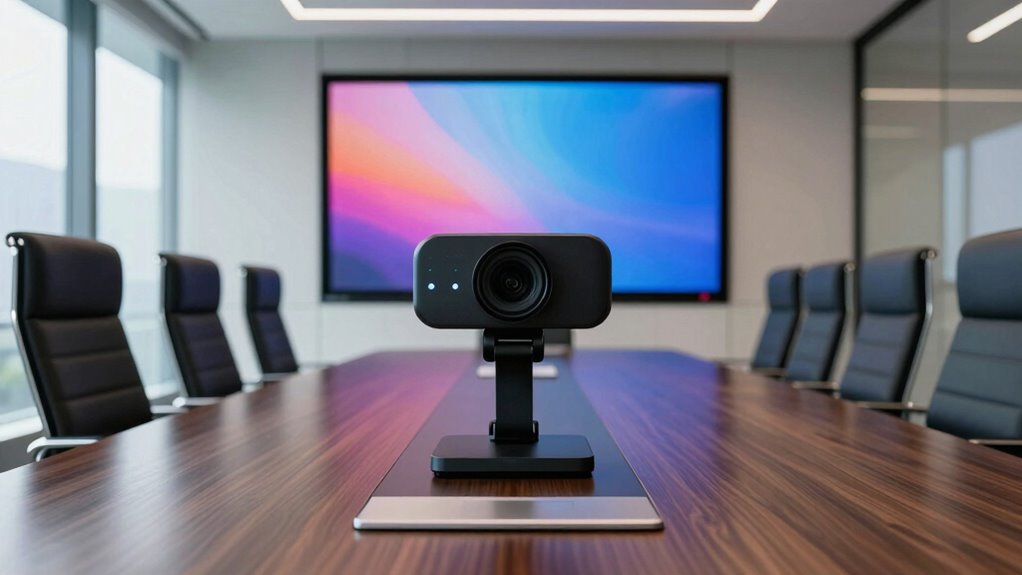
Choosing the right conference room webcam is essential for clear, professional virtual meetings. The best models balance video quality, ease of use, and features like auto-framing and AI tracking. The Logitech Brio Ultra 4K stands out for its premium resolution, ideal for high-stakes presentations, while the Logitech C920x offers excellent value with 1080p clarity. For larger rooms or advanced features like auto-tracking, models like the WYRESTORM or TONGVEO provide impressive capabilities. However, tradeoffs often involve price, complexity, and compatibility. Continue reading for a detailed breakdown of these top options and what to consider before buying.

Get the latest gadgets delivered free with Prime
- Fast, free delivery on millions of items
- Prime Video, Amazon Music and more included
- Member-only deals all year
Complete the kit



Key Takeaways
- Video resolution varies from 1080p to 4K, impacting clarity and file sizes.
- Auto-tracking and AI features are common in premium models but add to cost and setup complexity.
- Field of view can range from standard to ultra-wide, affecting room coverage and image distortion.
- Ease of use and compatibility are often overlooked but crucial for seamless meetings.
- Price ranges from affordable webcams to high-end systems with PTZ controls; choose based on room size and needs.
| Logitech Brio Ultra 4K HD Webcam for Streaming and Meetings |  | Best Overall for High-Quality, Versatile Conference Rooms | Resolution: 4K at 30 fps | Field of View: 65°, 78°, 90° | Zoom: 5x digital zoom | VIEW ON AMAZON | See Our Full Breakdown |
| Logitech C920x HD Pro PC Webcam 1080p/30fps with Autofocus and Lighting Adjustment |  | Best Value for Reliable 1080p Video in Conference Settings | Resolution: 1080p/30fps | Autofocus: Yes | Lighting Adjustment: Yes | VIEW ON AMAZON | See Our Full Breakdown |
| Logitech MeetUp Video Conferencing System 4K 3 Microphones – Black |  | Best for Small and Huddle Rooms with Wide Coverage | Resolution: 4K Ultra HD | Field of View: 120° (expandable to 170° with pan/tilt) | Zoom: 5x HD zoom | VIEW ON AMAZON | See Our Full Breakdown |
| WYRESTORM 4K AI-Powered Conference Webcam – Zoom Certified |  | Best for Small Meeting Rooms with Auto-Framing and AI Tracking | Resolution: 4K | Field of View: 120° | Audio: Dual AI noise-canceling microphones | VIEW ON AMAZON | See Our Full Breakdown |
| j5create 360 Degree All Around Meeting Webcam |  | Best for Full Room Coverage and Versatile Viewing Angles | Video Resolution: Full HD 1080p @ 30Hz | Field of View: 360° | Microphone: Omnidirectional | VIEW ON AMAZON | See Our Full Breakdown |
| j5create 4K 360° AI Conference Camera with Auto Framing and People Detection |  | Best Overall Conference Camera for Intelligent Auto Framing | Resolution: 12MP with HDR | Display Modes: Six modes including Host, Dual Host, PIP Tracking | Audio Features: Acoustic Echo Cancellation, Automatic Noise Reduction | VIEW ON AMAZON | See Our Full Breakdown |
| Logitech MX Brio Ultra HD 4K Webcam – Graphite |  | Best Premium 4K Webcam for Professional Streaming | Resolution: 4K at 30fps, 1080p at 60fps | Sensor Size: 70% larger pixels | Microphones: Dual beamforming noise-reducing microphones | VIEW ON AMAZON | See Our Full Breakdown |
| Logitech BCC950 Desktop Video Conferencing Webcam & Speakerphone – Black |  | Best All-in-One Conference Solution for Small to Medium Rooms | Sensor Type: CCD | Connectivity Technology: USB | Color: Black | VIEW ON AMAZON | See Our Full Breakdown |
| TONGVEO 4K Conference Room Camera System with Gesture Control, AI Auto-Tracking, PTZ Camera, 5X Digital Zoom, Wide-Angle USB3.0 for Remote Meetings |  | Best Advanced PTZ System with AI Auto-Tracking and Gesture Control | Resolution: 4K UHD@30fps | Sensor: 1/2.8″ 8.29 MP | Zoom: 5X digital | VIEW ON AMAZON | See Our Full Breakdown |
| conference room webcam | Resolution | Compatibility | Field of View | Connectivity |
|---|---|---|---|---|
| Logitech Brio Ultra 4K HD Webc | 4K at 30 fps | Windows, Mac, ChromeOS | 65°, 78°, 90° | — |
| Logitech C920x HD Pro PC Webca | 1080p/30fps | Windows 11 | — | — |
| Logitech MeetUp Video Conferen | 4K Ultra HD | Microsoft Teams Rooms, Zoom Rooms, Google Meet | 120° (expandable to 170° with pan/tilt) | USB |
| WYRESTORM 4K AI-Powered Confer | 4K | Zoom, Teams, Webex | 120° | USB |
| j5create 360 Degree All Around | — | Major video conferencing platforms | 360° | USB UVC/UAC |
| j5create 4K 360° AI Conference | 12MP with HDR | Windows 11/10, macOS 10.14+, Chrome OS | — | — |
| Logitech MX Brio Ultra HD 4K W | 4K at 30fps, 1080p at 60fps | Windows, macOS, Chrome OS, Linux | — | USB-C |
| Logitech BCC950 Desktop Video | — | — | — | — |
| TONGVEO 4K Conference Room Cam | 4K UHD@30fps | — | 120° wide-angle | USB3.0, RS232, RS485, Bluetooth |
More Details on Our Top Picks
Logitech Brio Ultra 4K HD Webcam for Streaming and Meetings
This webcam stands out for delivering stunning 4K resolution with adjustable fields of view, making it ideal for professional conference rooms that require crisp video quality. Compared with the Logitech C920x, the Brio offers higher resolution and facial recognition capabilities, but at a significantly higher price. Its dual noise-canceling microphones and Windows Hello support enhance security and audio clarity. The attachable privacy shutter adds a quick privacy toggle, yet setup can be complex for less tech-savvy users. The Brio’s main tradeoff is its premium cost, which might be prohibitive for smaller teams or casual users.
Pros:- Exceptional 4K video quality with adjustable FOV
- Dual noise-canceling microphones for clear audio
- Supports Windows Hello facial recognition for secure login
- Attachable privacy shutter for quick privacy control
Cons:- Relatively high price point compared to similar webcams
- Setup can be complex for less experienced users
- Requires compatible software to access full features
Best for: Large conference rooms or organizations needing top-tier video quality and integrated security features
Not ideal for: Small teams or budget-conscious buyers who can’t justify the high price or complex setup
- Resolution:4K at 30 fps
- Field of View:65°, 78°, 90°
- Zoom:5x digital zoom
- Microphones:Dual omnidirectional with noise canceling
- Compatibility:Windows, Mac, ChromeOS
- Privacy Shutter:Yes
Our verdict“This webcam is best suited for organizations prioritizing high-resolution video and integrated security, despite its premium price.”
Logitech C920x HD Pro PC Webcam 1080p/30fps with Autofocus and Lighting Adjustment
The C920x offers solid 1080p video at 30fps with autofocus and automatic lighting adjustment, making it a dependable choice for daily video calls and streaming. Unlike the Logitech Brio, it doesn’t support 4K but compensates with affordability and ease of use. It includes stereo microphones for natural sound and a 3-month XSplit VCam license, enhancing its appeal for professional meetings. However, the absence of a privacy shutter and limited frame rate at 1080p might be drawbacks for those seeking more advanced features. Its straightforward setup makes it suitable for teams needing reliable quality without extra complexity.
Pros:- Reliable 1080p video with autofocus
- Automatic lighting adjustment ensures clear images
- Stereo microphones provide natural sound
- Includes background editing software
Cons:- No privacy shutter included
- Limited to 30fps at 1080p
- Requires compatible software for background removal
Best for: Small to medium-sized teams seeking affordable, high-quality video with easy setup
Not ideal for: Users requiring 4K resolution or integrated security features like facial recognition
- Resolution:1080p/30fps
- Autofocus:Yes
- Lighting Adjustment:Yes
- Microphones:Stereo dual mics
- Compatibility:Windows 11
- Includes:3-month XSplit VCam license
Our verdict“This webcam makes the most sense for budget-conscious small teams prioritizing dependable 1080p video quality with minimal setup effort.”
Logitech MeetUp Video Conferencing System 4K 3 Microphones – Black
The MeetUp delivers a comprehensive conference room solution with 4K ultra HD resolution and a wide 120° field of view, making it ideal for small and huddle rooms. Its beamforming microphones ensure clear, natural audio, and multiple mounting options provide deployment flexibility. While the MeetUp is tailored for small spaces, it’s less suitable for larger rooms or spaces requiring extensive expansion, unlike the WYRESTORM that offers AI auto framing for larger settings. Its main limitation is the need for additional components if you want full room coverage, and expansion microphones are sold separately. Overall, it balances quality and ease of setup for small environments.
Pros:- High-quality 4K video with a wide 120° FOV
- Beamforming microphones for clear audio
- Multiple mounting options for versatile deployment
- Compatible with various room solutions like Zoom and Teams
Cons:- Expansion microphone sold separately
- Limited to small and huddle room sizes
- Requires additional components for full deployment
Best for: Small conference or huddle rooms needing high-quality video and flexible mounting options
Not ideal for: Large conference rooms or spaces requiring extensive microphone coverage without additional purchases
- Resolution:4K Ultra HD
- Field of View:120° (expandable to 170° with pan/tilt)
- Zoom:5x HD zoom
- Microphones:3 beamforming microphones
- Connectivity:USB
- Compatibility:Microsoft Teams Rooms, Zoom Rooms, Google Meet
Our verdict“This system is best suited for small rooms where high-quality video and flexible mounting are priorities, despite needing extra components for complete coverage.”
WYRESTORM 4K AI-Powered Conference Webcam – Zoom Certified
The WYRESTORM webcam offers 4K resolution and AI-driven auto framing and presenter tracking, making meetings more engaging in small conference spaces. Unlike the Logitech Brio, its AI features help focus on speakers automatically, which enhances remote engagement. Designed specifically for small rooms, it’s less suitable for larger spaces where wider coverage or multiple cameras are needed. The USB connection is straightforward, but limited details on additional features or cost can be a concern. Its main strength is AI automation, but it’s best for quick deployment in small rooms rather than high-end, large conference setups.
Pros:- High-quality 4K video with wide 120° angle
- AI auto framing and presenter tracking enhance meeting focus
- Easy plug-and-play setup
- Zoom Webex certified for broad compatibility
Cons:- Primarily suited for small rooms, not larger spaces
- Limited details on advanced features or pricing
- USB connection may restrict mobility
Best for: Small conference rooms needing AI auto framing and presenter tracking for dynamic meetings
Not ideal for: Large conference rooms or users who want extensive zoom or multi-camera setups
- Resolution:4K
- Field of View:120°
- Audio:Dual AI noise-canceling microphones
- Compatibility:Zoom, Teams, Webex
- Connectivity:USB
- Privacy:Physical lens cover
Our verdict“Ideal for small rooms seeking AI-enhanced auto framing and tracking, though less suited for larger, more complex environments.”
j5create 360 Degree All Around Meeting Webcam
The j5create 360-degree webcam provides a unique panoramic view, capturing the entire room at 1080p resolution. Its six display modes and omnidirectional microphone allow for flexible usage, especially in large or irregularly shaped spaces. Compared with the Logitech Brio‘s fixed view, this model offers comprehensive coverage but sacrifices some detail in wide-angle footage. Its plug-and-play connectivity and compatibility with major platforms make it accessible, although app permissions and firmware updates can pose minor hurdles. This pick suits environments where capturing the entire room is more important than ultra-high resolution.
Pros:- 360° panoramic video coverage
- Full HD 1080p resolution
- Omnidirectional microphone for clear audio
- Easy plug-and-play setup
Cons:- App permissions may require authorization
- Firmware updates might be necessary for best performance
- Limited zoom and detail compared to dedicated zoom-capable webcams
Best for: Large conference rooms or classrooms needing full-room video coverage
Not ideal for: Small, focused meetings where high resolution and zoom are priorities
- Video Resolution:Full HD 1080p @ 30Hz
- Field of View:360°
- Microphone:Omnidirectional
- Connectivity:USB UVC/UAC
- Display Modes:Six modes
- Compatibility:Major video conferencing platforms
Our verdict“This webcam is best for environments where capturing the entire room outweighs the need for detailed zoom or high resolution, despite minor setup requirements.”
j5create 4K 360° AI Conference Camera with Auto Framing and People Detection
This camera stands out for its impressive 4K HDR video quality combined with AI-powered auto framing and people detection, making it ideal for dynamic meeting environments. Unlike the Logitech BCC950, which offers excellent HD video but lacks AI features, this model adapts smoothly to multiple participants, keeping everyone centered. The six display modes provide versatility, though AI functions are disabled in 360° mode, which could be a drawback for users needing full AI tracking in all views. Its omnidirectional audio with noise reduction complements the video clarity, creating a well-rounded package for interactive meetings. The main tradeoff is that full AI features demand compatible operating systems, limiting use on some older setups.
Pros:- High-quality 4K HDR video ensures crisp image clarity
- AI auto framing and people detection improve meeting engagement
- Multiple display modes add versatility for different setups
- Omnidirectional noise-reducing audio enhances clarity
Cons:- AI functions are unavailable in 360° mode, limiting flexibility
- Requires compatible OS to access full AI features, restricting older systems
Best for: Organizations seeking a high-quality, AI-enhanced conference camera with flexible display options for large or variable meeting rooms
Not ideal for: Users with older operating systems or those requiring simple plug-and-play solutions without AI features
- Resolution:12MP with HDR
- Display Modes:Six modes including Host, Dual Host, PIP Tracking
- Audio Features:Acoustic Echo Cancellation, Automatic Noise Reduction
- Compatibility:Windows 11/10, macOS 10.14+, Chrome OS
- Cable Included:USB-C to USB Type-A
Our verdict“This pick is ideal for tech-savvy teams wanting intelligent auto framing and flexible display modes in a conference camera.”
Logitech MX Brio Ultra HD 4K Webcam – Graphite
The Logitech MX Brio offers a significant step up in image quality with 4K resolution at 30fps and 1080p at 60fps, designed for professional streaming and collaboration. Compared to the j5create model, which emphasizes AI auto framing, the Brio focuses on customizable controls and superior image clarity through its larger pixel sensor. Its dual microphones reduce ambient noise effectively, but its premium price may not be justifiable for casual users or small teams on a tight budget. The privacy shutter adds security, yet the bulkier build could pose challenges for portable setups. Overall, this camera excels in delivering crisp, adjustable video but demands a higher investment and compatible software for advanced features.
Pros:- Ultra HD 4K resolution with AI-enhanced clarity
- Customizable image controls for professional-quality video
- Effective noise-reducing microphones for clear audio
- Privacy shutter ensures security during idle times
Cons:- Higher price point may be a barrier for some users
- Requires compatible software for full feature access
- Bulkier design reduces portability
Best for: Professional content creators and remote workers who prioritize image quality and customizable controls
Not ideal for: Budget-conscious teams or users seeking a compact, plug-and-play webcam without extensive customization
- Resolution:4K at 30fps, 1080p at 60fps
- Sensor Size:70% larger pixels
- Microphones:Dual beamforming noise-reducing microphones
- Compatibility:Windows, macOS, Chrome OS, Linux
- Certifications:Zoom, Microsoft Teams, Google Meet, Streamlabs
- Connectivity:USB-C
Our verdict“This webcam is best suited for professionals who need high-resolution, customizable video with top-tier image quality.”
Logitech BCC950 Desktop Video Conferencing Webcam & Speakerphone – Black
The Logitech BCC950 combines 1080p HD video with a Carl Zeiss lens and a built-in speakerphone, creating a comprehensive conference system ideal for small to medium-sized rooms. Unlike the more advanced AI-based options, this model emphasizes simplicity and reliability, perfect for teams needing straightforward video communication with decent audio quality. Its auto focus and zoom are useful, but the device’s weight and bulk can hinder portability, and it’s only compatible with Windows and macOS. For organizations that want an easy-to-use, dependable setup without the need for complex features, the BCC950 delivers solid performance, but it’s less suited for large, multi-participant environments or those requiring advanced AI tracking.
Pros:- Full HD 1080p video with quality Carl Zeiss lens
- Built-in full duplex speakerphone with noise-canceling mic
- Compatible with major conferencing platforms
- Remote control for camera and call management
Cons:- Limited to Windows and macOS, reducing flexibility
- Heavy, less portable for mobile setups
- No outdoor or rugged environment resistance
Best for: Small business teams seeking a simple, reliable all-in-one video and audio conferencing system
Not ideal for: Large conference rooms or teams needing AI auto-tracking and advanced features
- Sensor Type:CCD
- Connectivity Technology:USB
- Color:Black
- Special Feature:Low Light
- Maximum FHD:Yes
- Number of Speakers:1
Our verdict“This all-in-one system suits small teams needing dependable video and audio without complex features.”
TONGVEO 4K Conference Room Camera System with Gesture Control, AI Auto-Tracking, PTZ Camera, 5X Digital Zoom, Wide-Angle USB3.0 for Remote Meetings
This system offers 4K resolution combined with AI auto-tracking, gesture control, and a 120° wide-angle lens, making it highly adaptable for dynamic remote meetings. Unlike the j5create camera, which focuses on auto framing and display modes, the TONGVEO system provides comprehensive pan, tilt, and zoom capabilities, covering large conference spaces with ease. Its 5X digital zoom and 350° horizontal pan make it suitable for larger rooms or flexible setups. However, the remote control’s limited focus functions and the need for support for 4K in connected devices could pose hurdles. Its long battery life and multiple mounting options make it a versatile choice for professional environments, though setup complexity might be higher for less tech-savvy users.
Pros:- High-resolution 4K video with AI auto-tracking
- Wide 120° field of view with pan, tilt, and zoom
- Flexible mounting options and long battery life
- Supports multiple conferencing platforms with plug-and-play connectivity
Cons:- Remote control may not support all focus functions
- Requires support for 4K in connected equipment, which may limit compatibility
- Setup can be more complex compared to basic webcams
Best for: Large conference rooms or dynamic remote teams needing extensive auto-tracking and flexible camera control
Not ideal for: Small, simple meeting spaces or users seeking plug-and-play solutions without advanced PTZ features
- Resolution:4K UHD@30fps
- Sensor:1/2.8″ 8.29 MP
- Zoom:5X digital
- Field of View:120° wide-angle
- Pan/Tilt Range:350° horizontal, 180° vertical
- Connectivity:USB3.0, RS232, RS485, Bluetooth
Our verdict“Ideal for large, dynamic meeting spaces where comprehensive camera control and auto-tracking are needed for professional remote collaboration.”

How We Picked
Our evaluation focused on performance, usability, build quality, and value for different conference room sizes and budgets. We prioritized models with high video resolution, reliable auto-framing, and easy installation. Compatibility with common video conferencing platforms and user-friendly controls influenced rankings as well. Products were compared based on features that enhance remote communication, such as AI auto-tracking and microphone integration. The goal was to identify options that provide a solid balance between advanced capabilities and practical usability for various professional settings.| conference room webcam | Connectivity |
|---|---|
| Logitech Brio Ultra 4K HD Webc | — |
| Logitech C920x HD Pro PC Webca | — |
| Logitech MeetUp Video Conferen | USB |
| WYRESTORM 4K AI-Powered Confer | USB |
| j5create 360 Degree All Around | USB UVC/UAC |
| j5create 4K 360° AI Conference | — |
| Logitech MX Brio Ultra HD 4K W | USB-C |
| Logitech BCC950 Desktop Video | — |
| TONGVEO 4K Conference Room Cam | USB3.0, RS232, RS485, Bluetooth |
Factors to Consider When Choosing Conference Room Webcam
When selecting a conference room webcam, it’s vital to consider factors beyond just resolution. Room size, lighting conditions, and the number of participants influence which features matter most. Understanding these broader considerations helps prevent overpaying for unnecessary features or missing out on critical capabilities that improve meeting quality.Room Size and Field of View
Choosing a webcam with the right field of view ensures everyone is visible without distortion. Larger rooms benefit from ultra-wide lenses or PTZ (pan-tilt-zoom) features, while smaller, more intimate spaces can manage with standard angles. Be cautious of wide-angle lenses that may introduce fish-eye distortion, which can distract or misrepresent the room layout.
Video Resolution and Frame Rate
Higher resolution webcams, like 4K models, deliver sharper images but demand more bandwidth and processing power. For most conference rooms, 1080p at 30fps provides a good balance of clarity and smoothness, especially if bandwidth is limited. Prioritize resolution based on the importance of image quality versus smooth streaming, especially in high-stakes meetings or recordings.
Auto-Framing and AI Features
Features like auto-framing and AI tracking help keep focus on the speaker and adapt to movement, which is valuable in dynamic meetings. However, these capabilities can increase cost and complexity, and sometimes introduce lag or inaccuracies. Consider your room layout and meeting style; if most participants stay seated and stationary, simpler webcams may suffice.
Ease of Use and Compatibility
Intuitive controls and broad compatibility with platforms like Zoom, Teams, or Webex are essential for hassle-free meetings. Some models require complex setup or proprietary software, which can hinder quick deployment. Opt for products with straightforward plug-and-play operation and regular updates to ensure reliability over time.
Audio Integration and Microphones
Clear audio is just as important as video in conference settings. Many webcams include built-in microphones, but their quality varies. For larger rooms, consider webcams with multiple microphones or external audio solutions to reduce echo and improve speech clarity. Remember, poor audio quality can undermine even the best video setup.
Frequently Asked Questions
How do I choose a webcam suitable for a large conference room?
For larger conference rooms, prioritize webcams with ultra-wide fields of view, high resolution, and features like auto-tracking or PTZ controls. These models can cover more space and keep the speaker in frame without manual adjustment. External microphones or speakerphones can further enhance audio quality, ensuring everyone is heard clearly. Balance the cost with the room size and the level of automation needed to avoid overpaying for unnecessary features.
Is 4K resolution necessary for a conference room webcam?
While 4K provides sharper images, it is not always necessary for most meeting environments. 1080p webcams deliver excellent clarity for typical video calls and require less bandwidth and processing power. If your meetings involve high-quality presentations or recording for professional use, 4K can be beneficial, but for everyday meetings, 1080p often suffices and offers better performance in bandwidth-constrained settings.
Should I prioritize auto-tracking features in my webcam?
Auto-tracking is valuable in dynamic environments where speakers move around or in larger rooms where manual control is impractical. However, these features can add to the cost and complexity and may sometimes lag or misidentify subjects. If your meetings are mostly static, a simpler fixed-angle webcam will be more reliable and easier to operate. Consider your room setup and meeting style before investing in AI-powered auto-tracking.
What is the best way to ensure my webcam works seamlessly with my conferencing platform?
Choose webcams that explicitly support compatibility with your preferred platform, such as Zoom, Microsoft Teams, or Webex. Look for plug-and-play models that don’t require complicated drivers or proprietary software. Regularly update firmware and software to fix bugs and improve performance. Testing your setup in advance can prevent surprises during important meetings and help identify any compatibility issues early.
How important is audio quality compared to video features in a conference room webcam?
While high-quality video captures the meeting environment clearly, audio quality often has a more immediate impact on communication effectiveness. Poor audio can cause misunderstandings and frustration, overshadowing even the best video quality. Consider webcams with multiple microphones or invest in dedicated audio equipment for larger rooms. Combining good audio with high-resolution video creates a more engaging and productive meeting experience.
Conclusion
For most professional settings, the Logitech Brio Ultra 4K offers the best overall performance with high resolution and advanced features. If you’re seeking the best value, the Logitech C920x balances quality and affordability perfectly. For larger or more dynamic rooms, models like the WYRESTORM 4K AI-Powered Conference Webcam or TONGVEO 4K System excel with auto-tracking and PTZ capabilities. Beginners or smaller teams should consider plug-and-play options, while those with higher demands may prefer premium systems with auto-framing and AI. Match your choice to your room size, budget, and meeting style for the best results.
As an affiliate, we earn on qualifying purchases.Evergreen bestsellers Picks
bestsellers