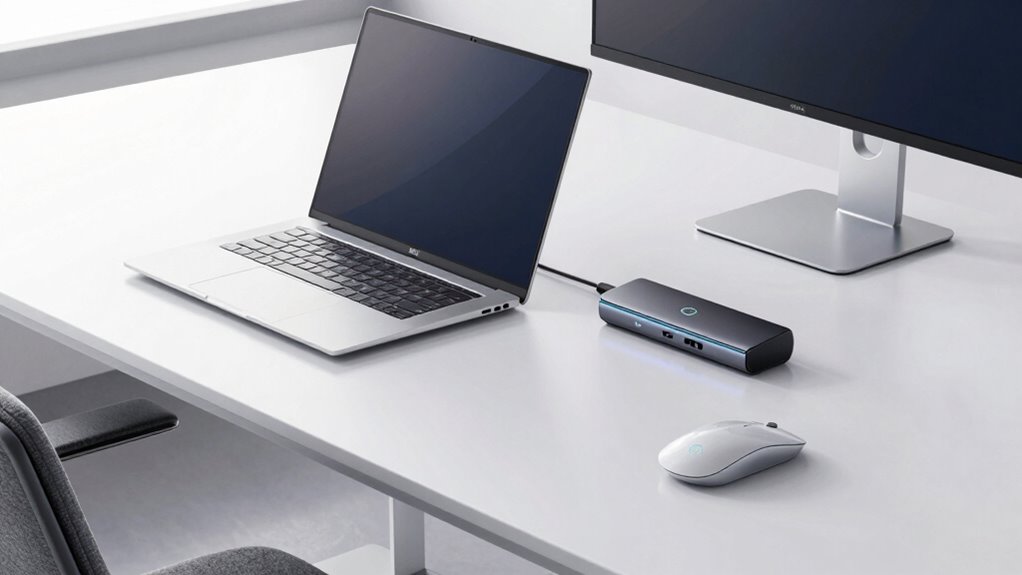
Finding the perfect dock for a Dell XPS can significantly improve your productivity and workspace organization. The best options deliver seamless connectivity, high power delivery, and support for multiple displays, but tradeoffs often exist between price, port variety, and compatibility. The Dell WD15 Monitor Dock stands out as the best overall choice thanks to its reliable performance and broad compatibility. For those needing ultra-fast data transfer, the Dell Pro Thunderbolt 4 Smart Dock offers impressive features, while budget-conscious buyers might prefer the UGREEN USB C Docking Station for its value. Keep reading to explore these options and find the perfect fit for your Dell XPS setup.

Get the latest gadgets delivered free with Prime
- Fast, free delivery on millions of items
- Prime Video, Amazon Music and more included
- Member-only deals all year
Complete the kit



Key Takeaways
- The top-ranked docks balance power delivery, multiple display support, and port variety, with the Dell WD15 leading for overall reliability.
- Thunderbolt 4 options like the Dell SD25TB4 excel in data transfer speeds and future-proofing but come at a higher price.
- Budget-friendly docks such as UGREEN still offer dual 4K display support, but may lack some advanced features like high wattage charging.
- Compatibility and ease of setup are critical; docks optimized for Dell XPS tend to deliver smoother integration and fewer driver issues.
- Premium docks often include features like sustainable design and enhanced durability, suitable for professional environments.
| Dell WD15 Monitor Dock 4K with 180W Adapter, USB-C, Dual Display |  | Best Overall for Compatibility and Dual Display Support | Power Adapter: 180W | Display Output: 1x HDMI, 1x VGA, 1x Mini DisplayPort | USB Ports: 3x USB 3.0, 2x USB 2.0 | VIEW ON AMAZON | See Our Full Breakdown |
| Acer USB-C Docking Station Dual Monitor, 9-in-1 Laptop Dock with 2 HDMI |  | Best for 4K@60Hz Dual Monitors and Versatile Connectivity | Number of Ports: 9-in-1 | HDMI Output: 2 HDMI (4K@60Hz) | USB Ports: 3 USB-A, 1 USB-C | VIEW ON AMAZON | See Our Full Breakdown |
| Dell Pro Thunderbolt 4 Smart Dock SD25TB4 – USB-C Station 130W, 4 Displays 4K, 2X DP 1.4, HDMI 2.1, 2X Thunderbolt 4, 2.5GbE, Wi-Fi, Sustainable Design |  | Best for Creative Professionals and Multi-Display Power Users | Power Output: 130W USB-C, 96W for others | Display Support: Up to 4 4K monitors | Video Ports: 2x DisplayPort 1.4, HDMI 2.1, 2x Thunderbolt 4 | VIEW ON AMAZON | See Our Full Breakdown |
| Dell WD19TB Thunderbolt Docking Station with 180W Power Adapter |  | Best for High-Power, Versatile Connectivity with Multiple Displays | Ports: USB-C 3.1, USB-A 3.1, DisplayPort 1.4, HDMI 2.0B, Thunderbolt 3, Gigabit Ethernet | Power: 180W AC Power Adapter | Dimensions: 8.1 x 3.5 x 1.1 inches | VIEW ON AMAZON | See Our Full Breakdown |
| UGREEN USB C Docking Station Dual Monitor 4K@60Hz, 10-in-1 Dock with 2 HDMI Ports |  | Best Budget-Friendly Dual 4K@60Hz Dock with Versatile Ports | Number of Ports: 10 | HDMI Output: 2 ports, 4K@60Hz | Power Delivery: 85W | VIEW ON AMAZON | See Our Full Breakdown |
| Dell WD19S Docking Station Dual Monitor 180W USB-C HDMI DisplayPort |  | Best Overall for Dell Enthusiasts | Power: 180W | Video Ports: HDMI, mini-DisplayPort | USB Ports: 2 USB-C, 3 USB-A 3.0 | VIEW ON AMAZON | See Our Full Breakdown |
| Dell WD22TB4 Thunderbolt 4 Dock with 130W Power |  | Best for Power Users Needing Thunderbolt 4 | Ports: 2 Thunderbolt 4, USB-C, USB-A, DisplayPort, HDMI, Ethernet | Power Adapter: 180W | Voltage: 120/230 V AC | VIEW ON AMAZON | See Our Full Breakdown |
| Dell Pro Laptop Docking Station WD25, USB-C, 100W, DisplayPort, HDMI |  | Best for Multi-Display Workspaces with Moderate Power Needs | Power Output: 100W | Display Support: Up to 4 high-res displays | Ports: DisplayPort, HDMI, USB-C, USB | VIEW ON AMAZON | See Our Full Breakdown |
| Dell WD19TB Thunderbolt Dock – 180W Power Adapter, Dual Monitor Support, HDMI, DisplayPort, Thunderbolt Cable, Renewed |  | Best for High-Power Dual Monitor Setups | Power Adapter: 180W | Connectivity: USB-C, USB-A, DisplayPort, HDMI, Thunderbolt 3 | Ports: 2x DisplayPort, HDMI, USB-C, USB-A, Ethernet | VIEW ON AMAZON | See Our Full Breakdown |
| Dell Pro Smart Dock SD25 USB-C Docking Station |  | Best for Managed, Secure Workspaces | VIEW ON AMAZON | See Our Full Breakdown | |||
| Dell WD19TBS Thunderbolt Dock with 130W Power Delivery |  | Best for High-Resolution Multi-Display Setups | Power Delivery: 130W | Display Support: Up to three displays (including 1x 5K and 2x 4K) | Compatibility: Dell, HP, Lenovo, Thunderbolt-enabled notebooks | VIEW ON AMAZON | See Our Full Breakdown |
More Details on Our Top Picks
Dell WD15 Monitor Dock 4K with 180W Adapter, USB-C, Dual Display
The Dell WD15 Monitor Dock excels in delivering reliable dual 4K display support with a straightforward setup for compatible Dell laptops. Its multiple USB ports and legacy video options make it a versatile choice for users who need a dependable, all-in-one solution. Compared with the Dell WD19TB, this dock offers slightly less flexible display options, limited to 30Hz at 4K, which may affect high-refresh-rate needs. This dock is ideal for office setups where stability and broad compatibility are priorities, but it’s less suited for gamers or creative professionals who require higher refresh rates or more advanced video features. Its primary tradeoff is the limited 4K resolution at 30Hz, which could be restrictive for fast-paced content.
Pros:- Supports 4K resolution at 30Hz for dual displays
- Multiple USB ports for peripherals and accessories
- Compatible with a wide range of Dell laptops
Cons:- Maximum resolution at 30Hz may limit smooth motion for some users
- Requires compatible Dell systems for full functionality
Best for: Dell laptop users seeking seamless dual 4K display support and broad compatibility for professional or office use
Not ideal for: High-refresh-rate gamers or creative professionals who need 60Hz or higher at 4K resolutions
- Power Adapter:180W
- Display Output:1x HDMI, 1x VGA, 1x Mini DisplayPort
- USB Ports:3x USB 3.0, 2x USB 2.0
- Max Resolution:3840 x 2160 @ 30Hz, 2560 x 1600 @ 60Hz
- Ethernet:Gigabit Ethernet RJ-45
- Compatibility:Dell Latitude 3379, 3390, 3490, 3590, 5280, 5285, 5289, 5290, 5480, 5490, 5580, 5590, 7280, 7380, 7480, 7490; Precision 3520, 3530, 5520, 5530, 7520, 7730; XPS 9360, 9560, 9570
Our verdict“This dock suits Dell users needing reliable dual display support and broad compatibility, even if at a lower refresh rate.”
Acer USB-C Docking Station Dual Monitor, 9-in-1 Laptop Dock with 2 HDMI
The Acer USB-C Docking Station stands out for supporting dual 4K@60Hz monitors, making it suitable for high-resolution workflows. Its multiple USB-A ports, SD card reader, and compact aluminum design provide a versatile expansion hub that works well with laptops supporting full-featured USB-C for display, charging, and data. Compared to the UGREEN Dock, this model offers higher refresh rates at 4K and more robust video support, but it requires a device with a capable USB-C port—limiting compatibility with some Macs that only mirror displays. Its main tradeoff is the absence of an included power supply, requiring users to supply their own, which could add to setup complexity. This dock is best for productivity-focused users prioritizing high-resolution displays and multiple port options.
Pros:- Supports dual 4K@60Hz output for crisp visuals
- Multiple USB ports and SD card slots for extensive connectivity
- Compact aluminum design with built-in cable for security
Cons:- Requires device with full-featured USB-C supporting display, charging, and data
- Power adapter not included, requiring additional purchase
Best for: Professionals needing dual 4K@60Hz monitors and multiple peripherals on Windows or Linux laptops
Not ideal for: Mac users seeking extended displays, as they can only mirror, not extend, their screens
- Number of Ports:9-in-1
- HDMI Output:2 HDMI (4K@60Hz)
- USB Ports:3 USB-A, 1 USB-C
- Power Delivery:100W
- SD/MicroSD Slots:Yes
- Material:Aluminum alloy
Our verdict“This dock is ideal for users who need high-performance dual 4K outputs and versatile connectivity, especially on Windows or Linux systems.”
Dell Pro Thunderbolt 4 Smart Dock SD25TB4 – USB-C Station 130W, 4 Displays 4K, 2X DP 1.4, HDMI 2.1, 2X Thunderbolt 4, 2.5GbE, Wi-Fi, Sustainable Design
The Dell Pro Thunderbolt 4 Smart Dock offers unmatched display support, capable of handling four 4K monitors simultaneously, making it a top choice for creative or multitasking professionals. Its high-speed 130W charging ensures demanding devices stay powered, while Thunderbolt 4 and DisplayPort 1.4 support deliver maximum flexibility. Compared with the WD19TB, this model’s support for four 4K displays at high refresh rates and its eco-friendly recycled materials make it stand out, though its setup can be complex for less tech-savvy users. The premium price reflects its advanced features, which might be unnecessary for casual users. This dock is best for professionals who need peak multi-monitor performance and sustainable design.
Pros:- Supports up to four 4K displays for extensive multitasking
- High 130W power delivery for demanding devices
- Eco-friendly design with recycled materials and remote management features
Cons:- Setup complexity may be daunting for less technical users
- High price point might be prohibitive for some buyers
Best for: Creative professionals and power users needing four 4K displays and high-speed connectivity
Not ideal for: Casual users or those with limited technical experience, due to setup complexity and cost
- Power Output:130W USB-C, 96W for others
- Display Support:Up to 4 4K monitors
- Video Ports:2x DisplayPort 1.4, HDMI 2.1, 2x Thunderbolt 4
- Ethernet:2.5GbE
- Wireless:Wi-Fi
- Design:Recycled plastic and sustainable packaging
Our verdict“This dock is best suited for professionals requiring maximum multi-monitor support and sustainability, despite its premium price and setup complexity.”
Dell WD19TB Thunderbolt Docking Station with 180W Power Adapter
The Dell WD19TB offers a solid balance of power and port versatility, supporting multiple high-resolution displays via DisplayPort and HDMI, with a 180W power adapter capable of handling demanding setups. Its wide array of USB-A and USB-C ports makes it suitable for expanding connectivity on compatible Dell laptops. Compared to the WD15, the WD19TB provides more modern ports and higher power delivery, but its compatibility depends heavily on the specific laptop model, which might require checking. Its size and port layout may limit some configurations, and it lacks advanced features like remote management. Overall, this dock provides ample power and connectivity for professional environments, though it’s less specialized than Thunderbolt-exclusive docks.
Pros:- Multiple ports supporting high-resolution displays
- Powerful 180W adapter for demanding setups
- Supports various peripherals with USB-A and USB-C ports
Cons:- Compatibility depends on specific Dell models
- Size may restrict certain port arrangements
Best for: Dell laptop users seeking high-powered, multi-port expansion for professional or multimedia tasks
Not ideal for: Mac users or those requiring Thunderbolt 4 features, as compatibility may be limited
- Ports:USB-C 3.1, USB-A 3.1, DisplayPort 1.4, HDMI 2.0B, Thunderbolt 3, Gigabit Ethernet
- Power:180W AC Power Adapter
- Dimensions:8.1 x 3.5 x 1.1 inches
- Weight:20.63 ounces
Our verdict“This dock offers strong power and port support for Dell users with demanding peripherals, though compatibility needs careful checking.”
UGREEN USB C Docking Station Dual Monitor 4K@60Hz, 10-in-1 Dock with 2 HDMI Ports
The UGREEN USB C Dock provides a compelling balance of affordability and performance, supporting dual 4K@60Hz displays and multiple high-speed data ports. Its 85W power delivery supports everyday laptop charging, and the inclusion of Ethernet and SD card reader adds to its versatility. Compared with the Acer Dock, it offers similar dual 4K support but with some ports limited in charging or video capabilities. Its main drawback is the limited support on macOS, where monitors may mirror rather than extend, and some ports do not support charging or video output. This dock is a practical choice for users who need solid dual 4K support without the premium price tag.
Pros:- Supports dual 4K@60Hz displays for crisp visuals
- Multiple high-speed USB and Ethernet ports
- Affordable price with decent performance
Cons:- Limited macOS support for extended displays
- Some ports do not support charging or video output
Best for: Budget-conscious professionals needing dual 4K displays and multiple data ports on Windows laptops
Not ideal for: Mac users seeking extended displays or users needing high-end video features
- Number of Ports:10
- HDMI Output:2 ports, 4K@60Hz
- Power Delivery:85W
- USB-C Data Ports:2 ports, 10Gbps
- USB-A Ports:2 ports, 3.0 and 3.2
- Ethernet:1000Mbps
- Card Reader:SD/TF
Our verdict“This dock is well-suited for budget-minded users who need reliable dual 4K output and versatile connectivity on Windows systems.”
Dell WD19S Docking Station Dual Monitor 180W USB-C HDMI DisplayPort
The Dell WD19S stands out for its robust dual-monitor support and extensive connectivity options, making it ideal for those who prioritize a seamless Dell ecosystem integration. Compared with the Dell WD22TB4, it offers similar port versatility but lacks the modular upgrade feature and Thunderbolt support. Its focus on Dell systems means it delivers reliable compatibility, but this can limit flexibility with non-Dell laptops. The absence of built-in charging capabilities may require an additional power source for some users, which is a tradeoff for its straightforward setup. This dock makes the most sense for Dell users who want a dependable, all-in-one connection hub without needing the latest Thunderbolt features.
Pros:- Supports dual monitor setup for increased productivity
- Multiple USB and Ethernet ports for versatile connectivity
- Compatible with a wide range of Dell laptops
Cons:- Limited to Dell devices for optimal compatibility
- No charging capabilities built-in, requiring separate power sources
Best for: Dell laptop users seeking a reliable, straightforward dual monitor setup with extensive ports
Not ideal for: Mac or non-Dell Windows users who need Thunderbolt 4 support or more flexible compatibility
- Power:180W
- Video Ports:HDMI, mini-DisplayPort
- USB Ports:2 USB-C, 3 USB-A 3.0
- Ethernet:RJ-45
Our verdict“This dock is best suited for Dell users who want a reliable, multi-port solution without the need for Thunderbolt features.”
Dell WD22TB4 Thunderbolt 4 Dock with 130W Power
The Dell WD22TB4 excels with its Thunderbolt 4 ports and modular design, making it ideal for users who need high-speed data transfers and multiple 4K displays. Its support for up to 4 monitors surpasses many competitors like the WD19S, which typically supports fewer displays. However, its focus on Windows systems and complexity can pose setup challenges for less tech-savvy users. The 130W power delivery, while sufficient for many laptops, may fall short for high-power workstations. This dock makes the most sense for professionals who prioritize speed, multiple high-resolution outputs, and system flexibility, despite its steeper learning curve and limited Mac support.
Pros:- Supports multiple 4K displays for expansive workspace
- High-speed 40 GB/s data transfer rate
- Multiple Thunderbolt 4 ports for fast peripherals
Cons:- Designed primarily for Windows, limited Mac compatibility
- Setup can be complex for non-technical users
Best for: Power users with Windows systems requiring multiple 4K monitors and Thunderbolt 4 performance
Not ideal for: Mac users or those seeking a simple plug-and-play experience without complex setup
- Ports:2 Thunderbolt 4, USB-C, USB-A, DisplayPort, HDMI, Ethernet
- Power Adapter:180W
- Voltage:120/230 V AC
Our verdict“Ideal for Windows users who need maximum display and data transfer performance, accepting a more complex setup process.”
Dell Pro Laptop Docking Station WD25, USB-C, 100W, DisplayPort, HDMI
The Dell WD25 offers impressive support for up to four high-resolution displays, making it a strong choice for multi-monitor setups. Its 100W power delivery keeps most laptops charged during intensive work, though it’s less than the 180W offered by some other docks like the WD19S, which might be necessary for high-power workstations. Its compatibility with both Dell and non-Dell PCs broadens its appeal, but setup can be tricky without clear port specifications, and lack of detailed specs might leave some buyers uncertain. This dock suits office environments where multi-display productivity and moderate charging are priorities, but it may fall short for users needing the highest power output or extensive port options.
Pros:- Supports up to four high-res displays for multitasking
- Provides 100W power delivery to keep laptops charged
- Compatible with non-Dell PCs, broadening usability
Cons:- Setup may be complex for some users
- Limited details on port types and numbers
Best for: Office workers and professionals needing multi-monitor support with moderate charging requirements
Not ideal for: Power users with high-power laptops or those seeking extensive port options beyond four displays
- Power Output:100W
- Display Support:Up to 4 high-res displays
- Ports:DisplayPort, HDMI, USB-C, USB
- Compatibility:Dell and non-Dell PCs
Our verdict“This dock is well-suited for multi-monitor setups requiring reliable power delivery and broad compatibility.”
Dell WD19TB Thunderbolt Dock – 180W Power Adapter, Dual Monitor Support, HDMI, DisplayPort, Thunderbolt Cable, Renewed
The Dell WD19TB offers the highest power delivery at 180W and supports dual monitors through multiple DisplayPort and HDMI ports, making it ideal for high-performance workflows. Its Thunderbolt 3 connectivity ensures fast data transfer and broad compatibility with Dell systems. Compared to the WD19S, its dual monitor support and high wattage make it more suitable for power users running demanding applications. The renewed status might cause concern about warranty coverage, and its exclusive focus on Dell systems limits versatility. This dock makes the most sense for users with high-power requirements and dual monitor needs who prioritize fast, reliable connections in a Dell environment.
Pros:- Supports dual monitor setup with multiple video ports
- High 180W power adapter ensures reliable charging
- Plug & Play with no driver installation needed
Cons:- Renewed product may have limited warranty
- Limited to Dell systems for full features
Best for: Dell users with high-power laptops needing dual monitors and maximum charging capability
Not ideal for: Non-Dell systems or users preferring new, non-renewed products with full warranty coverage
- Power Adapter:180W
- Connectivity:USB-C, USB-A, DisplayPort, HDMI, Thunderbolt 3
- Ports:2x DisplayPort, HDMI, USB-C, USB-A, Ethernet
Our verdict“Best suited for Dell users who require high-power, dual-monitor support with fast, straightforward connectivity.”
Dell Pro Smart Dock SD25 USB-C Docking Station
The Dell Pro Smart Dock SD25 emphasizes security and manageability, with enterprise-grade WPA-3 encryption and remote management features. Its focus on cable routing flexibility and eco-friendly materials make it ideal for large organizations seeking durable, sustainable solutions. Unlike the WD19S or WD22TB4, it lacks detailed port specifications and is less about high-performance multitasking, instead prioritizing security and environmental concerns. Its limited details on port options suggest it’s better suited for controlled, managed settings rather than diverse home or creative workspaces. This dock is perfect for enterprise environments where security and sustainability outweigh raw connectivity and display support.
Pros:- Flexible cable routing for easy setup
- Remote management capabilities reduce IT workload
- Secure with enterprise-grade encryption
Cons:- Limited details on port options and compatibility
- No price or customer ratings available
Best for: Large organizations requiring secure, manageable, and eco-friendly workspace solutions
Not ideal for: Power users or creative professionals needing extensive ports and high-resolution outputs
Our verdict“Ideal for enterprise settings focused on security, manageability, and sustainability over high-end display needs.”
Dell WD19TBS Thunderbolt Dock with 130W Power Delivery
The Dell WD19TBS Thunderbolt Dock stands out for supporting up to three high-resolution displays, including a 5K monitor, making it ideal for power users who need exceptional visual clarity. Compared with the Dell WD15, which tops out at dual 4K, this dock provides a significant boost in multi-monitor productivity, but its reliance on Thunderbolt connections limits compatibility to newer systems. The dock’s secure VESA mounting helps maintain a tidy workspace, especially in cluttered environments, and firmware updates are straightforward, reducing management headaches. However, its high price and complex setup may deter casual users or those with non-Thunderbolt laptops. This pick is perfect for professionals with Thunderbolt-enabled systems who require maximum display flexibility.
Pros:- Supports up to three high-resolution displays including 5K and dual 4K monitors
- Secure VESA mounting keeps workspace tidy
- Easy firmware updates and management tools
Cons:- Limited to Thunderbolt-enabled systems, reducing compatibility
- Setup can be complex for non-technical users
- Higher price point compared to basic docks
Best for: Power users and creative professionals using Thunderbolt-enabled Dell, HP, or Lenovo laptops who need multiple high-res displays.
Not ideal for: Owners of older or non-Thunderbolt laptops, or users seeking a budget-friendly docking solution, because of compatibility and cost issues.
- Power Delivery:130W
- Display Support:Up to three displays (including 1x 5K and 2x 4K)
- Compatibility:Dell, HP, Lenovo, Thunderbolt-enabled notebooks
- Connectivity:Thunderbolt, USB, audio, video
- Mounting:VESA mount compatible
- Cable Length:0.8 meters
Our verdict“This dock is ideal for professionals who need maximum display support and have compatible systems, accepting the higher cost and setup complexity.”

How We Picked
To determine the best docks for Dell XPS, I evaluated each product based on performance, build quality, port selection, power delivery capacity, and compatibility with the latest Dell XPS models. I prioritized docks that support multiple 4K displays and fast data transfer, while considering user convenience and value for money. The ranking also reflects how well each dock integrates into a typical Dell XPS setup, including ease of use and reliability. Products with advanced features or premium design elements were weighted higher for professional or power users, but practical options remained accessible for everyday needs.Factors to Consider When Choosing Dock For Dell Xps
Selecting the right dock for your Dell XPS involves balancing several factors to meet your specific needs. Understanding key features like power delivery, port variety, and compatibility can prevent costly mistakes and ensure a seamless experience. Here are the main considerations to keep in mind:Power Delivery and Charging
Assess how much wattage your Dell XPS requires to charge efficiently while operating multiple peripherals. Opting for a dock with at least 130W ensures your laptop stays charged during intensive tasks. However, higher wattage docks tend to be more expensive, so consider your actual power needs to avoid overspending on unused capacity.
Port Selection and Compatibility
Identify which ports you need—such as HDMI, DisplayPort, USB-C, Ethernet, or SD card slots—and verify that the dock provides enough of each. Compatibility with your specific Dell XPS model is crucial; some docks may not support newer Thunderbolt 4 features or might require additional drivers, so check the manufacturer’s specifications beforehand.
Display Support
If multiple monitors are essential, focus on docks that support dual or even triple 4K displays with high refresh rates. Keep in mind that not all docks can handle the same resolutions or numbers of screens simultaneously, which can limit your productivity if overlooked.
Build Quality and Reliability
Durability matters, especially if you plan to move your dock frequently. Metal construction and premium materials usually offer longer-lasting performance. Additionally, look for brands with good reviews on reliability and customer support to avoid frustrations with malfunction or compatibility issues.
Price and Future-Proofing
While it might be tempting to choose the cheapest option, investing in a slightly more expensive dock with Thunderbolt 4 support or higher power capacity can provide better longevity and compatibility with future devices. Consider your long-term needs and whether a premium dock justifies the initial investment for your workflow.
Frequently Asked Questions
Will a generic USB-C dock work with my Dell XPS?
Many USB-C docks are compatible with Dell XPS laptops, but not all are optimized for the specific features of your device. Compatibility depends on the dock’s support for standards like Thunderbolt 3 or 4, USB-C Power Delivery, and video output specifications. Using a dock designed with Dell XPS compatibility in mind typically results in fewer connection issues and a smoother experience, especially with features like high refresh rate displays or fast data transfer.
Is it better to choose a dock with Thunderbolt 4 or USB-C only?
Thunderbolt 4 docks offer faster data transfer, higher power delivery, and better multi-display support, making them ideal for demanding workflows. They are more future-proof, supporting newer peripherals and higher resolutions. However, they tend to cost more. If your needs are basic or budget-conscious, a high-quality USB-C dock can still meet most daily tasks, but with some limitations in speed and display options.
How important is the number of ports on a dock for my Dell XPS?
The number of ports directly impacts your workspace flexibility. If you connect multiple monitors, external drives, and peripherals, a dock with a variety of ports can reduce clutter and improve efficiency. However, more ports may also mean higher cost and complexity. Assess your current and future device needs to pick a dock that offers enough connectivity without overwhelming your workspace.
Can I use a dock with my Dell XPS for gaming or high-performance tasks?
Yes, but with some caveats. Docks supporting Thunderbolt 4 and high refresh rate outputs can handle gaming or demanding creative work, especially when paired with a compatible external monitor. However, latency and bandwidth limitations of some docks might impact performance slightly. For serious gaming or high-end professional tasks, pairing your XPS directly with high-performance external hardware might still be preferable.
Should I prioritize a dock with 4K support or multiple screens?
If your workflow relies on high-resolution visuals, prioritize docks that explicitly support dual 4K outputs at 60Hz or higher. For general multitasking, a dock supporting a single 4K display with additional lower-resolution ports might suffice. Balance your display needs with your budget and device compatibility to choose the best option for your setup.
Conclusion
For most users seeking a reliable, versatile docking solution, the Dell WD15 offers excellent value and compatibility, making it the best overall choice. Professionals who need top-tier performance and future-proofing will appreciate the Dell Pro Thunderbolt 4 Smart Dock as a premium option. Budget-conscious buyers should consider the UGREEN USB C Docking Station for its solid feature set at a lower price point. Beginners or casual users might prefer the simpler, plug-and-play docks like the Dell WD19S. Ultimately, your choice depends on your specific needs, whether it’s high-powered multitasking, affordability, or ease of use.
Fall Picks
fall essentials
As an affiliate, we earn on qualifying purchases.