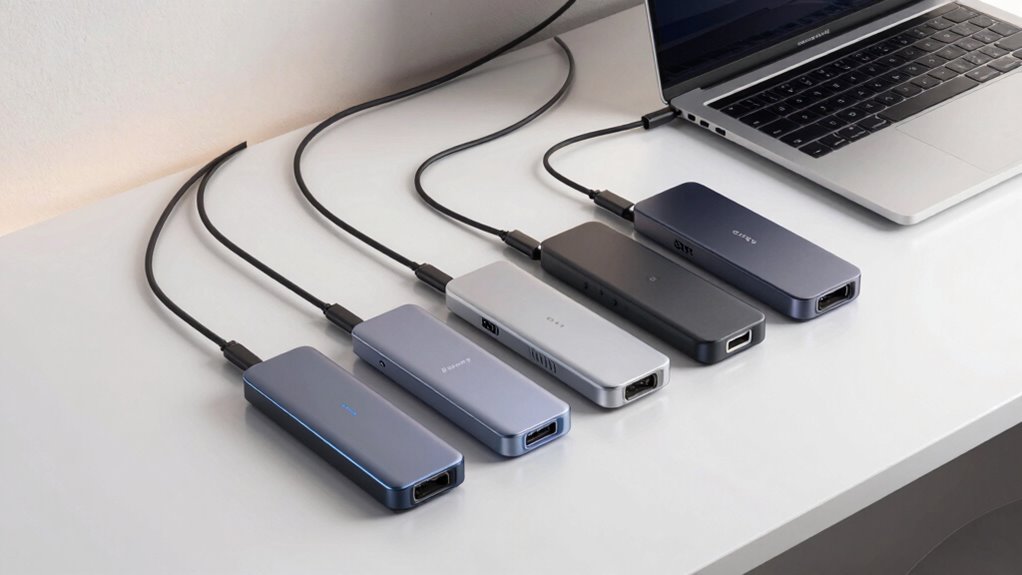
If you’re searching for a dock for your MacBook Pro M3, you’re likely looking to expand connectivity and simplify your workspace. The best options today balance high performance, reliability, and compatibility with the latest MacBook Pro models. The MOKiN MacBook Pro Docking Station stands out for dual monitor support and versatile ports, while the TobenONE MacBook Pro/Air Docking Station offers a robust combination of 4K displays and fast charging. However, choosing the right dock involves tradeoffs between port variety, power delivery, size, and price. Continue reading for a detailed breakdown of the top options and what makes each unique.

Get the latest gadgets delivered free with Prime
- Fast, free delivery on millions of items
- Prime Video, Amazon Music and more included
- Member-only deals all year
Complete the kit



Key Takeaways
- Most docks in this roundup prioritize dual 4K monitor support, reflecting the needs of professional users.
- Power delivery (PD) wattage varies, influencing compatibility with charging larger MacBook Pro models and peripherals.
- Design and size differ significantly; compact docks are more portable but may have fewer ports, while larger stations offer extensive connectivity.
- Price ranges from budget-friendly to premium, with higher-cost options typically offering more ports and higher charging wattages.
- Compatibility with the latest M3 chips, along with support for multiple displays at 60Hz, is a common baseline for these docks.
| MOKiN MacBook Pro Docking Station Dual Monitor HDMI Adapter |  | Best Overall for Versatile Connectivity and Dual 4K Support | Ports: 2 HDMI, 2 USB 3.0, USB 2.0, SD/TF Card Reader, Ethernet, Thunderbolt 3, USB-C Power Delivery | Resolution: Up to 4K@60Hz (single HDMI), 4K@30Hz (dual HDMI) | Power Delivery: 100W | VIEW ON AMAZON | See Our Full Breakdown |
| TobenONE MacBook Pro/Air Docking Station Stand with Dual 4K HDMI and 100W Charger |  | Best for Space-Saving Dual Display with Power Delivery | Display Support: Dual 4K@60Hz via HDMI1, HDMI2, and VGA | Power Delivery: 100W PD3.0, up to 87W charging | Ports: 2×4K HDMI, 1×VGA, 1×USB-C data, 2×USB 3.0, 2×USB 2.0, SD/Micro SD, Gigabit Ethernet, 3.5mm Audio | VIEW ON AMAZON | See Our Full Breakdown |
| MacBook Pro Docking Station Dual Monitor 4K@60Hz for MacBook Pro/Air M4/M5 |  | Best for Future-Proof Dual 4K@60Hz Support with Clamshell Mode | Number of HDMI ports: 2 | HDMI resolution: 4K@60Hz | USB ports: 1 x USB A 10Gbps, 2 x USB C 10Gbps, 1 x USB A 2.0 | VIEW ON AMAZON | See Our Full Breakdown |
| iVANKY 12-in-2 FusionDock 1 for M5 MacBook Pro Docking Station |  | Best for High-Performance Dual 4K@120Hz on M4/M5 MacBooks | Display Support: Dual 4K@120Hz (M4/M5), Single 4K@120Hz (M1/M2/M3) | Charging Power: 150W | Laptop Charging Output: Up to 96W | VIEW ON AMAZON | See Our Full Breakdown |
| Anker USB-C Hub for MacBook, 7-in-2 Multi-Function Dock with 4K@60Hz HDMI |  | Best Compact Hub for Versatile Connectivity and 4K Output | Number of ports: 7 | HDMI resolution: 4K@60Hz | Data transfer speed: 40 Gb/s | VIEW ON AMAZON | See Our Full Breakdown |
| TobenONE 18-in-2 Docking Station Dual 4K Monitor for MacBook M5/M4 Pro/Max |  | Best Overall for Versatile Connectivity and Future-Proofing | Hardware Interface: 3.5mm Audio, Ethernet, HDMI, MicroSD, USB 2.0, USB 3.0 Type A, USB 3.1 Type C | Compatible Devices: MacBook Intel Series (2016-2020), MacBook M1 Pro/Max, M2 Pro/Max, M3 Pro/Max, M4 Series, M5 | Total USB Ports: 7 | VIEW ON AMAZON | See Our Full Breakdown |
| Plugable USB C Laptop Docking Station, Dual 4K 60Hz for MacBook and Windows, DisplayLink Dock with 14-in-1 Ports |  | Best Value for Versatile Cross-Platform Use and Multiple Ports | Number of Ports: 14-in-1 | Monitor Support: 2x 4K at 60Hz | Compatibility: macOS 11+, Windows 10+, ChromeOS | VIEW ON AMAZON | See Our Full Breakdown |
| TobenONE 16-in-2 MacBook Docking Station Dual 4K@60Hz, 7 USB, 2 HDMI |  | Best for Creatives with Moderate Multi-Monitor Needs | Display Output: Dual 4K@60Hz HDMI | USB Ports: 4 USB 3.0, 2 USB 2.0, 1 USB-C data | Ethernet: Gigabit | VIEW ON AMAZON | See Our Full Breakdown |
| MacBook Pro Dual Monitor Docking Station 4K@60Hz |  | Best Compact for Space-Conscious Users | Hardware Interface: HDMI, MicroSD, USB 2.0, USB 3.2 Gen 2×2 | Compatible Devices: MacBook Pro 14″/16″ (2021-2026), MacBook Air 13″/15″ (2025-2026), older models | Total USB Ports: 4 | VIEW ON AMAZON | See Our Full Breakdown |
| TobenONE MacBook Pro Docking Station Dual 4K Monitor, 150W Charger, 7 USB Ports |  | Best for Seamless Workstation Setup and High Power | Display Output: 2 x 4K@60Hz HDMI | Power Delivery: 150W charger, 100W to MacBook, 30W PD ports | USB Ports: 7 USB-C/A | VIEW ON AMAZON | See Our Full Breakdown |
| MacBook Docking Station Dual Monitor 4K@60Hz, PD100W, Audio for Home Office |  | Best for Multi-Display Productivity in Home Offices | Monitor Output: 2x 4K@60Hz HDMI | USB-C Ports: 2x 10Gbps | USB-A Ports: 1x 10Gbps, 1x 2.0 | VIEW ON AMAZON | See Our Full Breakdown |
| dock for macbook pro m3 | Compatibility | Power Delivery |
|---|---|---|
| MOKiN MacBook Pro Docking Stat | MacBook Pro/Air 2018-2021 | 100W |
| TobenONE MacBook Pro/Air Docki | MacBook Pro 2016-2024, MacBook Air 2018-2025 | 100W PD3.0, up to 87W charging |
| MacBook Pro Docking Station Du | MacBook Pro/Air 2016–2026 (M4/M5 chips) | Up to 100W |
| iVANKY 12-in-2 FusionDock 1 fo | — | — |
| Anker USB-C Hub for MacBook | — | — |
| TobenONE 18-in-2 Docking Stati | — | — |
| Plugable USB C Laptop Docking | macOS 11+, Windows 10+, ChromeOS | — |
| TobenONE 16-in-2 MacBook Docki | MacBook Pro/Air 2016-2026 (Intel, M1-M5) | Up to 87W |
| MacBook Pro Dual Monitor Docki | — | — |
| TobenONE MacBook Pro Docking S | MacBook Pro/Max with M1, M2, M3, M4, M5 | 150W charger, 100W to MacBook, 30W PD ports |
| MacBook Docking Station Dual M | MacBook Pro/Air 2016–2026 (excluding M1, M2, M3 Base chips) | PD 100W input, 95W output |
More Details on Our Top Picks
MOKiN MacBook Pro Docking Station Dual Monitor HDMI Adapter
This docking station stands out for its ability to support dual 4K monitors at 60Hz, surpassing the single-screen limitation of the TobenONE MacBook Pro/Air Docking Station Stand. Its comprehensive port selection—HDMI, USB 3.0, Ethernet, SD card reader—delivers a broad range of connectivity options, making it ideal for users who need multiple peripherals. The aluminum build ensures good heat dissipation and portability, but it doesn’t support Apple’s USB SuperDrive, which could be a drawback for some. Compared to the iVANKY FusionDock 1, it offers slightly less power delivery (100W vs. 150W), meaning it might not charge high-power MacBooks as quickly. This pick is perfect for professionals requiring multiple displays and extensive port access while maintaining sleekness. However, it’s less suited for users with only one Thunderbolt port or those needing native dual HDMI support on MacBooks with limited ports.
Pros:- Supports dual 4K monitors with extend and mirror modes
- Multiple ports including Ethernet, SD card reader, and high-speed USB
- Sleek aluminum design with effective heat dissipation
- Power delivery supports charging MacBook during use
Cons:- Does not support Apple USB SuperDrive
- Limited compatibility with MacBooks having only one Thunderbolt 3 port
- Requires specific port configuration for dual HDMI operation
Best for: Power users who need dual 4K displays, comprehensive port options, and reliable power delivery for professional workflows
Not ideal for: Owners of MacBooks with just one Thunderbolt 3 port or those relying on Apple-specific peripherals like the SuperDrive
- Ports:2 HDMI, 2 USB 3.0, USB 2.0, SD/TF Card Reader, Ethernet, Thunderbolt 3, USB-C Power Delivery
- Resolution:Up to 4K@60Hz (single HDMI), 4K@30Hz (dual HDMI)
- Power Delivery:100W
- Data Transfer Speed:Up to 5Gbps
- Card Reader Speed:Up to 104 Mbps
- Material:Aluminum
- Compatibility:MacBook Pro/Air 2018-2021
Our verdict“This dock offers excellent multi-monitor support and extensive connectivity, ideal for professionals needing a versatile setup.”
TobenONE MacBook Pro/Air Docking Station Stand with Dual 4K HDMI and 100W Charger
This dock is ideal for MacBook owners seeking a streamlined, all-in-one solution, combining a vertical stand and dual 4K display support at 60Hz. Its 100W PD3.0 charger ensures your MacBook remains powered during intensive tasks, outperforming the MacBook Pro Docking Station Dual Monitor 4K@60Hz by offering a more compact, stand-integrated design. However, it only supports dual displays via HDMI and VGA, with VGA mirroring content, limiting display flexibility. Compatibility with M1–M5 chips is broad, but users with older or specialized MacBooks may encounter issues. This product is perfect for those prioritizing desk space and a tidy setup, but less suitable if you need native dual HDMI support or advanced display configurations beyond two screens.
Pros:- Supports dual 4K@60Hz displays via HDMI and VGA
- Includes a 100W charger for fast MacBook charging
- Functions as a vertical stand to save desk space
- Extensive port options for peripherals
Cons:- VGA port only mirrors content, limiting display options
- Limited support for MacBooks with only one Thunderbolt port
- Compatibility varies across MacBook models
Best for: MacBook users who want a space-efficient, dual 4K display setup combined with a functional vertical stand and reliable charging
Not ideal for: Those requiring native dual HDMI support or advanced multi-monitor configurations beyond basic mirror or extend modes
- Display Support:Dual 4K@60Hz via HDMI1, HDMI2, and VGA
- Power Delivery:100W PD3.0, up to 87W charging
- Ports:2×4K HDMI, 1×VGA, 1×USB-C data, 2×USB 3.0, 2×USB 2.0, SD/Micro SD, Gigabit Ethernet, 3.5mm Audio
- Compatibility:MacBook Pro 2016-2024, MacBook Air 2018-2025
- Dimensions:Desk dock and vertical stand combined
- Display Mode:Mirror or extend
Our verdict“This dock is a great choice for users needing a space-saving dual display setup with integrated stand and reliable charging.”
MacBook Pro Docking Station Dual Monitor 4K@60Hz for MacBook Pro/Air M4/M5
This docking station excels in supporting dual 4K@60Hz displays, surpassing many competitors like the iVANKY FusionDock 1, which offers higher refresh rates only on M4/M5 chips. Its built-in stand improves ergonomics while providing a seamless workspace. However, it’s incompatible with M1–M3 base chips and requires a 65W or higher power adapter, adding to setup complexity. The absence of support for opening the MacBook lid in stand mode may limit usability for some workflows. This dock is tailored for users with newer MacBook Pro or Air models featuring M4/M5 chips who need a reliable dual display setup with fast data transfer and charging, but it’s less suitable for older or less powerful MacBooks.
Pros:- Supports dual 4K@60Hz monitor output for high-quality visuals
- Built-in stand increases workspace and ergonomics
- Includes Ethernet and SD card reader for versatile connectivity
- Fast data transfer with multiple USB ports
Cons:- Incompatible with M1–M3 MacBooks
- Requires a 65W or higher power adapter (not included)
- Cannot open MacBook lid when using the stand
Best for: Owners of M4 or M5 MacBook Pro/Air models seeking dual 4K@60Hz displays and ergonomic workspace enhancements
Not ideal for: Users with M1–M3 MacBooks or Windows laptops, as compatibility is limited, or those who need to open their MacBook in stand mode
- Number of HDMI ports:2
- HDMI resolution:4K@60Hz
- USB ports:1 x USB A 10Gbps, 2 x USB C 10Gbps, 1 x USB A 2.0
- SD card reader:Yes
- Ethernet:Gigabit Ethernet
- Power Delivery:Up to 100W
- Compatibility:MacBook Pro/Air 2016–2026 (M4/M5 chips)
Our verdict“This dock delivers reliable dual 4K@60Hz support for newer MacBooks with ergonomic benefits, ideal for productivity-focused users.”
iVANKY 12-in-2 FusionDock 1 for M5 MacBook Pro Docking Station
The iVANKY FusionDock 1 is tailored for high-performance MacBook models, supporting dual 4K@120Hz displays on M4/M5 chips—something few docks can match. Its 150W power adapter ensures full-speed charging, outperforming the MacBook Pro Docking Station Dual Monitor 4K@60Hz in power delivery and display refresh rate support. On M1–M3 Macs, it supports only a single 4K@120Hz, which limits its utility for older models. The multiple USB 3.0 ports and Gigabit Ethernet enable robust peripheral connectivity. Its main tradeoff is its limited dual display support on older chips, making it best suited for the latest MacBook Pro or Air models. This dock is perfect for gamers or creative professionals who need ultra-smooth visuals and rapid data transfer.
Pros:- Supports dual 4K@120Hz on M4/M5 MacBooks
- Powerful 150W adapter enables full-speed charging
- Multiple USB 3.0 ports and Gigabit Ethernet
- Supports single 4K@120Hz on older chips
Cons:- Limited dual display support on M1–M3 MacBooks
- Requires specific MacBook chip support for dual 4K@120Hz
- Potential compatibility issues with older models
Best for: Power users with M4/M5 MacBook Pro/Air models requiring dual 4K@120Hz displays and high-speed connectivity
Not ideal for: Owners of M1–M3 MacBooks or Windows laptops, due to limited dual display support and compatibility issues
- Display Support:Dual 4K@120Hz (M4/M5), Single 4K@120Hz (M1/M2/M3)
- Charging Power:150W
- Laptop Charging Output:Up to 96W
- USB Ports:4 USB 3.0 ports
- Ethernet:Gigabit Ethernet
- Warranty:24 months
Our verdict“This dock excels for M4/M5 MacBooks needing ultra-smooth dual 4K@120Hz visuals and fast data transfer, but less so for older chips.”
Anker USB-C Hub for MacBook, 7-in-2 Multi-Function Dock with 4K@60Hz HDMI
The Anker USB-C Hub offers a compact and portable solution for expanding your MacBook’s connectivity, supporting 4K@60Hz HDMI output for crisp visuals. Its 7-in-2 design prioritizes simplicity while providing essential ports, making it ideal for users who want a lightweight, versatile accessory. Compared to larger docks like the MacBook Pro Docking Station Dual Monitor 4K@60Hz, it sacrifices some port variety for portability, and it doesn’t support dual external displays on M1–M3 MacBooks. The high data transfer rate of 40 Gb/s ensures quick file transfers, but the limited video output options mean it’s best suited for single external monitor setups or casual use. This pick makes sense for users seeking a minimal footprint with reliable 4K video and fast data transfer, but not for those who need multiple monitors or advanced display features.
Pros:- Supports 4K@60Hz HDMI output
- High-speed data transfer up to 40 Gb/s
- Compact and lightweight design
- Power delivery up to 100W
Cons:- Limited to single external display on M1–M3 MacBooks
- Lacks additional video outputs for multi-monitor setups
- Not compatible with MacBook Neo or older models
Best for: Travelers or casual users who need reliable 4K video output and multiple ports in a compact form factor
Not ideal for: Power users requiring dual external displays or advanced multi-monitor configurations on M1–M3 MacBooks
- Number of ports:7
- HDMI resolution:4K@60Hz
- Data transfer speed:40 Gb/s
- Charging power:100W
- Supported MacBooks:Latest MacBook Air and Pro
Our verdict“This hub is perfect for users seeking a portable, reliable 4K HDMI connection with fast data transfer, but not for multi-monitor setups on older MacBooks.”
TobenONE 18-in-2 Docking Station Dual 4K Monitor for MacBook M5/M4 Pro/Max
The TobenONE 18-in-2 stands out for its extensive port selection and support for dual 4K@60Hz monitors, making it ideal for users who need maximum connectivity on the latest MacBook Pro M5/M4 series. Compared to the TobenONE 16-in-2, it offers more USB ports and higher wattage, but it supports only single-monitor extension on M1/M2/M3 MacBooks—limiting multi-monitor setups on older models. Its high-power 150W charger ensures fast charging for MacBooks and peripherals, yet it restricts compatibility to Mac devices, excluding Windows users. The dual HDMI ports deliver crisp visuals, but bandwidth limitations may cause flickering with ultrawide monitors. Overall, this dock is best for power users who prioritize extensive ports and future compatibility, accepting some restrictions on multi-monitor configurations for older MacBooks.
Pros:- Supports dual 4K@60Hz monitors for crisp multitasking
- 7 high-speed ports including USB, Ethernet, and SD card reader
- Powerful 150W charger for fast MacBook charging
Cons:- Supports only single-monitor extension on M1/M2/M3 MacBooks
- Bandwidth issues may cause flickering with ultrawide monitors
- Limited to Mac-compatible devices
Best for: MacBook users with M4/M5 series seeking maximum port options and dual 4K displays.
Not ideal for: Windows users or those with older MacBooks that can’t support dual displays at full bandwidth.
- Hardware Interface:3.5mm Audio, Ethernet, HDMI, MicroSD, USB 2.0, USB 3.0 Type A, USB 3.1 Type C
- Compatible Devices:MacBook Intel Series (2016-2020), MacBook M1 Pro/Max, M2 Pro/Max, M3 Pro/Max, M4 Series, M5
- Total USB Ports:7
- Number of HDMI Ports:2
- Wattage:150W
- Minimum Required Operating System:Not specified
Our verdict“This dock suits power users needing extensive ports and future-proofing, with some limitations on multi-monitor support for earlier MacBook models.”
Plugable USB C Laptop Docking Station, Dual 4K 60Hz for MacBook and Windows, DisplayLink Dock with 14-in-1 Ports
The Plugable USB C Docking Station offers a compelling mix of dual 4K@60Hz support and broad compatibility, making it well-suited for hybrid work environments. Unlike the TobenONE 18-in-2, it requires driver installation but compensates with a wider range of system support, including Windows and ChromeOS, and a more extensive 14-in-1 port array. Its DisplayLink technology enables dual monitor support, yet this can introduce occasional driver or compatibility issues, especially on macOS. The aluminum housing and space gray finish give it a premium look, but the need for drivers may complicate setup for some users. This dock is ideal for users who value flexibility across multiple OS and need multiple peripherals, accepting potential driver hiccups.
Pros:- Supports dual 4K@60Hz monitors for multitasking
- 14-in-1 port array includes USB, SD card readers, Ethernet
- Compatible with macOS, Windows, and ChromeOS
Cons:- Requires driver installation for full functionality
- DisplayLink technology may have compatibility issues
- HDCP not supported
Best for: Mixed OS environments requiring multiple ports and dual 4K displays, especially for office or hybrid setups.
Not ideal for: Users seeking a driver-free, plug-and-play experience or those on older Macs without macOS 11+ support.
- Number of Ports:14-in-1
- Monitor Support:2x 4K at 60Hz
- Compatibility:macOS 11+, Windows 10+, ChromeOS
- Charging Power:100W
- Housing Material:Aluminum
- Finish:Space gray
Our verdict“This dock offers excellent value for multi-OS users needing multiple ports and dual 4K support, with some setup complexity due to drivers.”
TobenONE 16-in-2 MacBook Docking Station Dual 4K@60Hz, 7 USB, 2 HDMI
The TobenONE 16-in-2 is designed for MacBook Pro and Air models from 2016 to 2026, supporting dual 4K@60Hz displays with some chip limitations on older M1/M2 chips. Compared with the 18-in-2, it offers fewer ports, but its dual HDMI and USB array make it a solid choice for creative professionals needing reliable visual output. The dock’s 87W charging supports most MacBook models, though it falls short of the 150W power of the larger TobenONE, which may affect charging speed for power-hungry users. Compatibility is broad across Intel and M1-M5 chips, but support for dual displays drops on M1/M2/M3 chips, making it less suitable for those with older Macs. This option balances performance with affordability for users who need dual 4K displays and multiple peripherals without the highest power demands.
Pros:- Supports dual 4K@60Hz displays for creative workflows
- Multiple USB ports and SD card reader for versatile connectivity
- Supports fast charging up to 87W
Cons:- Limited dual display support on M1/M2/M3 chips
- Power adapter not included, requiring separate purchase
- Fewer ports than larger TobenONE models
Best for: Creative professionals and remote workers with MacBook Pro/Air from 2016-2026 needing dual 4K displays and multiple USB devices.
Not ideal for: Power users with M1/M2/M3 MacBooks seeking full dual 4K support at maximum charging wattage.
- Display Output:Dual 4K@60Hz HDMI
- USB Ports:4 USB 3.0, 2 USB 2.0, 1 USB-C data
- Ethernet:Gigabit
- Power Delivery:Up to 87W
- Compatibility:MacBook Pro/Air 2016-2026 (Intel, M1-M5)
- SD Card Reader:Yes, up to 104MB/s
Our verdict“This dock offers reliable dual 4K output and multiple peripherals for most MacBooks, with some limitations on the newer M1/M2/M3 chips.”
MacBook Pro Dual Monitor Docking Station 4K@60Hz
The MacBook Pro Dual Monitor Docking Station focuses on delivering dual 4K@60Hz HDMI outputs in a compact form factor, making it ideal for users who prioritize minimal desk clutter. Its small size means it’s less versatile in port variety compared to larger docks like the TobenONE 18-in-2 or Plugable, but it excels in providing crisp visuals and essential USB connections. On the downside, it does not include a power adapter, requiring a separate 65W+ power supply, and isn’t compatible with M1/M2/M3 MacBooks for dual display support—limiting its use to Intel-based models. This dock makes the most sense for users with space constraints who want reliable dual HDMI outputs on older Macs, willing to add a separate charger for power.
Pros:- Supports dual 4K@60Hz HDMI outputs for crisp visuals
- Compact size ideal for small desks
- Easy plug-and-play connectivity
Cons:- Power adapter not included, needs a 65W+ charger
- Limited port variety, no additional USB or Ethernet
- No support for M1/M2/M3 MacBook dual display
Best for: MacBook Pro users with Intel chips needing a compact dual-monitor solution without extra ports.
Not ideal for: Users with M1/M2/M3 Macs or those needing a variety of USB ports and charging capabilities.
- Hardware Interface:HDMI, MicroSD, USB 2.0, USB 3.2 Gen 2×2
- Compatible Devices:MacBook Pro 14″/16″ (2021-2026), MacBook Air 13″/15″ (2025-2026), older models
- Total USB Ports:4
- Number of HDMI Ports:2
- Wattage:1W
- Item Dimensions:5.34″L x 2.28″W x 0.7″H
Our verdict“This compact dock is best suited for Intel-based Macs with space constraints, accepting additional power supply needs.”
TobenONE MacBook Pro Docking Station Dual 4K Monitor, 150W Charger, 7 USB Ports
The TobenONE 17-in-2 dock is a sleek, all-in-one hub designed for MacBook Pro/Max models, supporting dual 4K@60Hz displays with a robust 150W power adapter. It combines extensive USB ports, Ethernet, and SD card slots, making it ideal for users who want a tidy, high-performance workspace. Compared to the 16-in-2 variant, this offers slightly more USB ports and a more powerful charger, but it remains limited to MacBook compatibility, excluding Windows and other systems. Its slot width may be problematic for thicker cases, and support for dual displays on M1/M2/M3 chips is limited. This dock is perfect for users who prioritize a high-power, all-in-one solution for demanding workflows, accepting the Mac-only limitation.
Pros:- Supports dual 4K@60Hz displays for detailed visuals
- 150W charger provides fast power delivery to MacBook
- 7 USB ports plus Ethernet and SD card reader
Cons:- Limited to MacBook Pro/Max, no Windows support
- Slot size may not fit thicker cases
- Not compatible with Mac Studio or other non-Mac systems
Best for: MacBook Pro/Max owners who need a comprehensive, high-power dock for multitasking and multiple peripherals.
Not ideal for: Windows or ChromeOS users seeking a universal dock or those with very thick cases that might not fit.
- Display Output:2 x 4K@60Hz HDMI
- Power Delivery:150W charger, 100W to MacBook, 30W PD ports
- USB Ports:7 USB-C/A
- Ethernet:2.5G Ethernet
- SD Card Reader:SD/TF 4.0, 312MB/s
- Compatibility:MacBook Pro/Max with M1, M2, M3, M4, M5
Our verdict“This high-power, comprehensive dock is tailored for MacBook Pro/Max users needing maximum connectivity and charging performance, with some physical fit considerations.”
MacBook Docking Station Dual Monitor 4K@60Hz, PD100W, Audio for Home Office
This docking station stands out for enabling a seamless dual 4K@60Hz display setup, which is superior to the single-monitor support offered by many hubs like the Anker USB-C Hub. Its array of ports—including HDMI, USB-C, USB-A, SD/TF, Ethernet, and audio—offers extensive connectivity, making it ideal for users who need a comprehensive workstation. As a vertical stand, it also supports MacBook Air and Pro in clamshell mode, saving desk space. Compared to the TobenONE 18-in-2 Docking Station, it offers a cleaner setup with fewer ports but maintains high-quality visuals and fast data transfer. A tradeoff is its limited compatibility with M1, M2, and M3 Base chips, which excludes some newer MacBooks, and its power delivery caps at 100W, meaning it won’t provide full charging for larger MacBook Pro models via USB-C. The setup process can be more involved, which might frustrate less tech-savvy users.
Pros:- Supports dual 4K@60Hz monitors for crisp, high-quality visuals
- Includes an extensive range of ports, including Ethernet and SD/TF slots
- Functions as a sturdy vertical stand, saving desk space
- Fast data transfer with 10Gbps USB-C and USB-A ports
Cons:- Limited compatibility with M1, M2, and M3 Base chip MacBooks
- Power delivery capped at 100W, insufficient for charging larger MacBook Pros fully
- Setup for clamshell mode requires additional steps, which may be complex
Best for: Power users with dual 4K monitors who want a versatile, space-saving dock that also acts as a stand for their MacBook in a home office environment.
Not ideal for: Users with M1, M2, or M3 Base MacBooks, as it isn’t compatible with these chips, or those seeking a dock with higher power delivery for charging larger MacBook Pros.
- Monitor Output:2x 4K@60Hz HDMI
- USB-C Ports:2x 10Gbps
- USB-A Ports:1x 10Gbps, 1x 2.0
- SD/TF Card Slots:Yes
- Audio:3.5mm Audio
- Ethernet:Gigabit Ethernet (RJ45)
- Power Delivery:PD 100W input, 95W output
- Compatibility:MacBook Pro/Air 2016–2026 (excluding M1, M2, M3 Base chips)
- Dimensions:Not specified
Our verdict“This dock suits users who prioritize dual 4K display support and extensive connectivity, but it’s less ideal for newer MacBooks with M1 or M3 Base chips needing higher power delivery.”

How We Picked
I evaluated these docks based on several key criteria: performance, especially support for dual 4K displays at 60Hz; build quality and durability; comprehensive port selection including USB, HDMI, Ethernet, and SD card slots; and power delivery capabilities that match or exceed the MacBook Pro M3’s charging needs. Compatibility with the latest MacBook Pro models, particularly M3 chips, was essential to ensure seamless functionality. I also considered user reviews and value to identify options that strike the best balance between cost and features. Docks with limited ports, lower power output, or compatibility issues were excluded, and the ranking reflects the overall versatility and reliability of each product.Factors to Consider When Choosing Dock For Macbook Pro M3
Selecting the right dock for your MacBook Pro M3 involves understanding your specific workflow needs and balancing features against budget. A well-chosen dock can streamline your work, reduce cable clutter, and support multiple high-resolution displays. Consider how many devices you need to connect simultaneously, your charging requirements, and portability preferences. This guide covers the most important factors to help you make an informed decision beyond just port count and price.Port Selection and Compatibility
It’s vital to assess whether the dock provides all the ports you need, including multiple HDMI or DisplayPort outputs for dual monitors, USB-C, USB-A, Ethernet, SD card slots, and audio jacks. Compatibility with your peripherals and future-proofing for the M3 chip ensures smooth operation. Be cautious of docks that lack certain ports or use proprietary connectors, which can limit expandability or cause compatibility issues down the line.
Power Delivery and Charging
Power delivery (PD) wattage is a critical factor—higher wattage ensures your MacBook Pro M3 charges efficiently during intensive tasks. Look for docks offering at least 90W to 150W PD, which can support the latest M3 models without draining their batteries. Cheaper docks with lower PD may cause slower charging or require separate power adapters, adding clutter and complexity.
Build Quality and Size
The size and material of the dock impact portability and durability. Compact docks are ideal for travel or small desks but may sacrifice port variety or heat dissipation. Larger, metal-constructed docks tend to offer better heat management and a more substantial feel, suitable for permanent workstations. Consider where you’ll use the dock most to match size with your mobility needs.
Display Support and Video Quality
For MacBook Pro M3 users working with multiple displays, support for dual 4K at 60Hz is often a minimum requirement. Some docks support only 30Hz or lower resolutions, which can affect usability for professional tasks. Ensure the dock explicitly states its display capabilities to match your workflow, especially if high refresh rate or color accuracy is vital.
Price and Value
The best dock isn’t always the most expensive but should match your specific needs without overpaying for features you won’t use. Budget docks may lack durability or sufficient power, while premium options usually offer extensive ports and higher charging wattages. Weigh your current needs against potential future requirements to choose a dock that offers good long-term value.
Frequently Asked Questions
Will a dock designed for Intel Macs work with the MacBook Pro M3?
Many docks built for Intel-based Macs may still function with the MacBook Pro M3, especially if they support standard USB-C and DisplayPort protocols. However, compatibility isn’t guaranteed because some docks rely on drivers or firmware updates that might not be optimized for the latest Apple Silicon chips. Always check the manufacturer’s specifications to confirm compatibility with M3 models or look for docks explicitly marketed as compatible with Apple Silicon for the most reliable experience.Is 100W power delivery enough for the latest MacBook Pro M3?
A 100W PD supply generally suffices for most MacBook Pro M3 models during typical use, including multitasking and light workload scenarios. However, for intensive tasks like video editing or running multiple peripherals, higher wattage—up to 150W—can ensure faster charging and prevent battery drain. Consider your workload and whether the dock’s PD meets or exceeds your MacBook’s charging requirements to avoid slow charging or unexpected power issues.Can I connect more than two 4K monitors to a MacBook Pro M3 using these docks?
While many docks support dual 4K monitors at 60Hz, connecting more displays often depends on the MacBook’s GPU capabilities and the dock’s video output specifications. The MacBook Pro M3, combined with a dock that supports multiple high-resolution displays, can handle two or sometimes three, but exceeding this might require specialized hardware or external GPUs. Always verify the maximum supported displays and resolutions before purchasing if multiple screens are essential for your workflow.What should I prioritize if I need a dock for travel?
For travel, prioritize compact, lightweight docks with essential ports for your needs, such as HDMI or USB-C, and sufficient power delivery to charge your MacBook Pro. Durability and heat dissipation are also important to prevent overheating during extended use on the go. Avoid overly bulky or fragile models, and check for features like foldable cables or integrated stands to maximize portability and convenience.Are docks with many ports worth the higher cost?
Docks with extensive port options often provide better long-term value if you require multiple peripherals, multiple displays, and high power delivery. However, if your needs are minimal—such as basic charging and a single monitor—then a simpler, lower-cost dock may suffice. Consider your current and future connectivity needs carefully to avoid paying for unnecessary features or missing out on essential ones.Conclusion
For most users, the MOKiN MacBook Pro Docking Station offers the best overall balance of ports, performance, and build quality, making it suitable for professional workflows. If you’re seeking the best value, the Anker USB-C Hub provides essential features at a more affordable price point. For those who prioritize premium design and maximum connectivity, the TobenONE 18-in-2 Docking Station stands out as a top choice. Beginners or casual users might prefer more compact, budget-friendly options, while power users working with multiple displays and high wattage needs should consider higher-end docks with 150W PD. Ultimately, your choice depends on your specific setup, port requirements, and budget.
Columbus Day / Indigenous Peoples' Day Picks
long weekend sales
As an affiliate, we earn on qualifying purchases.