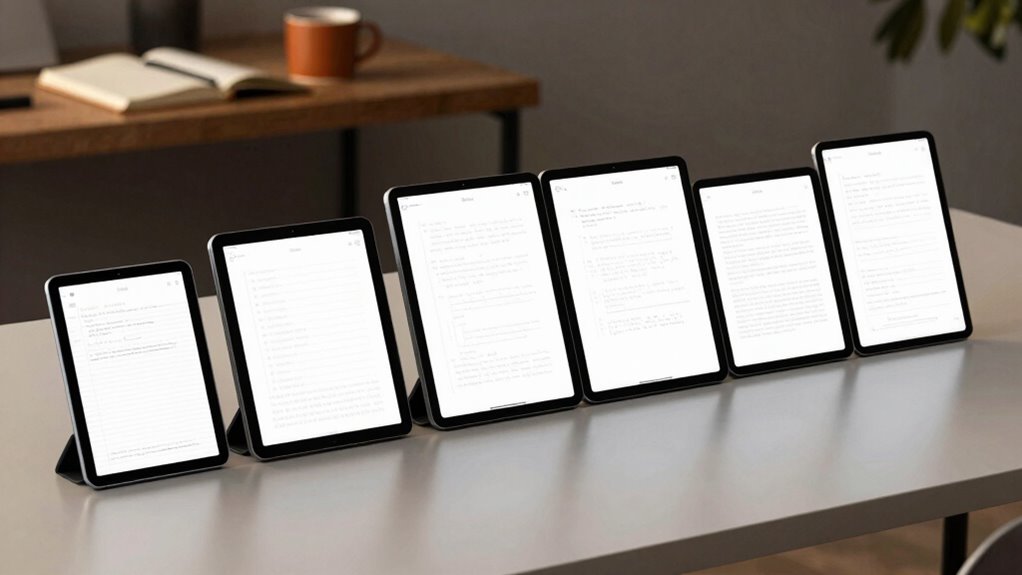

If you’re searching for an e ink tablet that excels at writing, you’re faced with a range of options, each catering to different needs. The BOOX Tablet Go Color 7 Gen II stands out with its vibrant color display, ideal for users who want a colorful reading experience combined with light note-taking. The reMarkable Paper Pure offers a highly responsive, paper-like black-and-white display perfect for focused writing and annotations. Meanwhile, the Kindle Scribe Colorsoft balances a large, easy-to-read color screen with long battery life, suited for readers and writers who prioritize simplicity and endurance. Each choice involves tradeoffs between color capabilities, responsiveness, and multimedia features, so understanding these differences is essential to picking the right device for your workflow.

Get the latest gadgets delivered free — and shop member deals
- Fast, free delivery on millions of items
- Access to Prime Big Deal Days deals on October 6–7
- Prime Video, Amazon Music and more included
Complete the kit



Key Takeaways
- Color e ink tablets like the BOOX Tablet Go Color support vibrant visuals but may have limitations in display contrast and speed.
- The reMarkable Paper Pure excels at natural handwriting and focus, but lacks color and multimedia capabilities.
- Large, color-driven screens such as the Kindle Scribe Colorsoft provide a good balance of readability and battery life for casual use.
- High sensitivity and stylus support vary, impacting precision and writing comfort depending on the model.
- Price points differ significantly; premium models offer more features but come at a higher cost.
| BOOX Tablet Go Color 7 Gen II E Ink Tablet Support Active Stylus InkSense (Black) |  | Best for Color Reading and Light Note-Taking | Screen: 7″ Kaleido 3 color E Ink | Resolution: 1680 x 1264 | Color Depth: 4096 colors | VIEW ON AMAZON | See Our Full Breakdown |
| reMarkable Paper Pure with Marker Plus and Ocean Blue Sleeve Folio |  | Best for Focused Handwriting and Document Review | Display: 10.3-inch black-and-white | Response Time: 21 ms | Includes: Marker Plus, Ocean Blue Sleeve Folio | VIEW ON AMAZON | See Our Full Breakdown |
| XPPen 3-in-1 Color Digital Notebook 10.95” with 16384 Pressure Levels, Battery-Free X3 Pro Pencil, 128GB Storage | 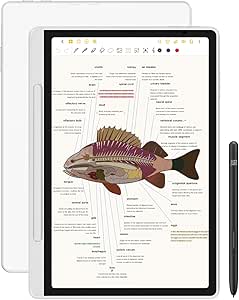 | Best for Precise, Colorful Note-Taking and Creativity | Display Size: 10.95 inches | Color Modes: Monochrome, Light Color, Nature Color | Pen Sensitivity: 16K levels | VIEW ON AMAZON | See Our Full Breakdown |
| Kindle Scribe Colorsoft 64GB (Newest Model) – 11″ Color Display with Pen Included |  | Best for Long-Lasting, Large-Format Reading and Writing | Display: 11-inch Colorsoft | Storage: 64GB | Included Pen: Yes, no charging needed | VIEW ON AMAZON | See Our Full Breakdown |
| reMarkable Paper Pro with Marker Plus |  | Best for Professional-Grade Digital Note-Taking | Display Size: 11.8 inches | Color: Yes | Included Accessories: Marker Plus, 6 spare tips | VIEW ON AMAZON | See Our Full Breakdown |
| e ink tablet for writing | Storage |
|---|---|
| BOOX Tablet Go Color 7 Gen II | 64GB |
| reMarkable Paper Pure with Mar | — |
| XPPen 3-in-1 Color Digital Not | 128GB |
| Kindle Scribe Colorsoft 64GB | 64GB |
| reMarkable Paper Pro with Mark | — |
More Details on Our Top Picks
BOOX Tablet Go Color 7 Gen II E Ink Tablet Support Active Stylus InkSense (Black)
The BOOX Tablet Go Color 7 Gen II stands out for its vibrant 7-inch Kaleido 3 color E Ink screen, supporting 4096 colors, which makes it ideal for reading colorful comics or magazines alongside light note-taking. It runs on Android 13, offering flexibility in app choices, with 64GB storage and 4GB RAM. However, the color display can appear darker and grayer than LCD screens, and the stylus isn’t included, adding to the overall cost. Compared to monochrome e inks, this device sacrifices some contrast but compensates with visual richness—perfect for users who want color in their writing environment but are willing to accept some display limitations.
Pros:- Vibrant color display enhances reading experience
- Supports many document formats
- Lightweight and portable
Cons:- Color screens are inherently darker and less crisp than LCDs
- Stylus not included, adding cost
- Display quality may be inconsistent for some users
Best for: Users who prioritize color visuals for reading and light annotation
Not ideal for: Those seeking high contrast, professional-level note-taking, or multimedia use
- Screen:7″ Kaleido 3 color E Ink
- Resolution:1680 x 1264
- Color Depth:4096 colors
- Storage:64GB
- Connectivity:Wi-Fi, Bluetooth 5.1
- Stylus Support:Active Stylus InkSense
Our verdict“A versatile color e ink device suited for readers who want to add some color to their notes but accept display limitations.”
reMarkable Paper Pure with Marker Plus and Ocean Blue Sleeve Folio
The reMarkable Paper Pure makes a strong case for those who value a highly responsive, paper-like experience. Its 10.3-inch black-and-white display offers fast response times and excellent contrast, ideal for note-taking, sketching, and reviewing documents. The device supports handwriting, conversion to text, and seamless cloud integration. Compared with color options, it sacrifices vibrancy for clarity and focus, making it especially suitable for users who want distraction-free writing and editing. The limited color palette might be a drawback for creative projects requiring color, but for pure writing tasks, this device excels.
Pros:- Fast, responsive, paper-like display
- Excellent contrast for reading and writing
- Supports handwriting to text conversion
Cons:- Limited to black-and-white display
- Requires subscription for full cloud features
- Learning curve for new users
Best for: Professionals and students needing precise, distraction-free note-taking
Not ideal for: Users wanting colorful sketches or multimedia features
- Display:10.3-inch black-and-white
- Response Time:21 ms
- Includes:Marker Plus, Ocean Blue Sleeve Folio
Our verdict“An excellent choice for those prioritizing natural handwriting and focus over color capabilities.”
XPPen 3-in-1 Color Digital Notebook 10.95” with 16384 Pressure Levels, Battery-Free X3 Pro Pencil, 128GB Storage
The XPPen 3-in-1 Digital Notebook offers a large 10.95-inch AG nano-etched LCD with multiple color modes and 90Hz refresh rate for smooth writing and reading. Its 16K pressure sensitivity makes it one of the most precise pens on the market, suitable for detailed note-taking, sketching, and even light professional work. It features AI-enhanced functions and Android 14, providing extensive app support. However, it’s not an e ink device, which means it doesn’t offer the same paper-like comfort or eye strain reduction. Its larger size and advanced features come at a higher price, making it more suitable for those who need color, precision, and versatility over battery life or simplicity.
Pros:- High-pressure sensitivity with 16K levels
- Large, vibrant color display
- Supports multiple AI and app features
Cons:- Not an e ink screen, less paper-like feel
- Narrow viewing angles
- Higher price point
Best for: Creative professionals and detailed note-takers needing color and pressure sensitivity
Not ideal for: Casual users or those seeking a true e ink experience with minimal distractions
- Display Size:10.95 inches
- Color Modes:Monochrome, Light Color, Nature Color
- Pen Sensitivity:16K levels
- Storage:128GB
- Refresh Rate:90Hz
- Operating System:Android 14
Our verdict“A powerful device for color-rich, precise note-taking and creative tasks, best suited for users needing versatility and advanced features.”
Kindle Scribe Colorsoft 64GB (Newest Model) – 11″ Color Display with Pen Included
The Kindle Scribe Colorsoft features an 11-inch high-contrast color display, optimized for reading and writing alike. Its responsive surface and long battery life—lasting weeks—make it ideal for those who want a straightforward device for note-taking and reading without extra bells and whistles. The included pen requires no charging and offers a natural writing feel, and cloud support ensures easy document management. Compared with smaller or more feature-rich options, it emphasizes durability and simplicity, making it excellent for users who want a large, clear display with minimal fuss but less multimedia versatility.
Pros:- Large, high-contrast display
- Long battery life lasting weeks
- Responsive, paper-like writing surface
Cons:- Limited to reading and writing, no multimedia
- No waterproof or rugged features
- Requires cloud services for full functionality
Best for: Readers and writers who value large screens and long battery life
Not ideal for: Users seeking advanced color features or multimedia capabilities
- Display:11-inch Colorsoft
- Storage:64GB
- Included Pen:Yes, no charging needed
- Battery:Weeks
- Weight:400g
Our verdict“A practical device for those needing a large, durable, and simple e ink tablet for extensive reading and writing sessions.”
reMarkable Paper Pro with Marker Plus
The reMarkable Paper Pro offers an 11.8-inch color display that resembles paper, providing a natural writing and reading experience. Its large size, combined with organization tools, PDF annotation, and handwriting conversion, makes it an excellent choice for professionals and students who need a versatile device. Its low-glare screen with adjustable lighting ensures comfort during extended use. Compared to smaller or color-only devices, the Paper Pro emphasizes size, organization, and natural feel, but its premium price might put it out of reach for casual users. It’s best suited for dedicated note-takers or those who want a professional-grade digital notebook.
Pros:- Large 11.8-inch color display
- Natural, paper-like writing feel
- Includes organization and annotation features
Cons:- Premium price point
- Limited to note-taking and reading, no multimedia
- Requires accessories for full feature set
Best for: Professionals and students needing large, organized digital notebooks with color support
Not ideal for: Casual users or those on a tight budget
- Display Size:11.8 inches
- Color:Yes
- Included Accessories:Marker Plus, 6 spare tips
- Features:Color writing, adjustable reading light
Our verdict“A high-end device perfect for professional workflows that demand a large, natural writing experience with organizational tools.”

How We Picked
My selection process focused on devices specifically designed for writing and note-taking with e ink or similar display technologies. I prioritized devices offering stylus support, responsiveness, and display quality that mimics paper. I compared features such as screen size, color capability, storage, battery life, and ecosystem integration, weighing their relevance to writing tasks. I also considered user reviews and known limitations like glare, limited color palettes, or system complexity, to ensure each pick addresses a distinct need and budget range.
Factors to Consider When Choosing E Ink Tablet For Writing
Choosing the right e ink tablet for writing involves balancing display quality, responsiveness, color capabilities, and ecosystem support. Your ideal device depends on whether you prioritize natural handwriting, colorful visuals, or long battery life. Understanding these factors helps match a device to your specific needs and workflow.Display Technology and Size
For writing, a display that feels natural and reduces eye strain is essential. E ink screens mimic paper better than LCDs, especially in monochrome models like the reMarkable. Color screens, such as the BOOX or Kindle Scribe, add vibrancy but often sacrifice contrast and response speed. Size matters too: larger screens provide more writing space but can be less portable, so consider your typical environment and use cases.
Stylus Support and Responsiveness
A responsive stylus with high pressure sensitivity enhances the writing experience, especially for detailed notes or sketches. Devices like the XPPen and reMarkable offer high sensitivity and precision, but some models require additional accessories or stylus purchases. A device with fast response times creates a natural feel, mimicking paper, which is vital for focus and accuracy.
Color and Multimedia Capabilities
If you plan to incorporate colorful diagrams, annotations, or images, a color-capable e ink device like the BOOX or Kindle Scribe will serve you better. However, these often have limitations in contrast and refresh rate. For pure writing and reading without distraction, monochrome models like the reMarkable excel, providing clarity and focus.
Battery Life and Ecosystem
Battery longevity is a key advantage of e ink devices, often lasting weeks. Consider how important this is to you—if you’re frequently on the move, a device like the Kindle Scribe offers weeks of use. Ecosystem integration, cloud support, and app compatibility also influence your productivity, especially if you want seamless syncing across devices and platforms.
Frequently Asked Questions
Are e ink tablets good for extensive writing sessions?
Yes, e ink tablets are well-suited for long writing sessions because their screens mimic paper, reducing eye strain and fatigue. Devices like the reMarkable or Kindle Scribe provide a natural writing feel, making them ideal for extended use. Their low-glare displays and long battery life further support sustained work without frequent recharging.
Can I use color on these tablets for note-taking?
Color capabilities vary across devices. The BOOX Tablet Go Color and Kindle Scribe Colorsoft support color, making them suitable for diagrams or illustrations. However, color e ink screens generally have limitations in contrast and response speed compared to monochrome screens. If vibrant, fast color display is a priority, you might consider alternative technologies, but for most note-taking, monochrome models often suffice.
What is the main tradeoff between color and monochrome e ink tablets?
Color e ink devices prioritize visual richness but tend to have slower refresh rates, lower contrast, and sometimes darker displays compared to monochrome e ink screens. Monochrome devices like the reMarkable focus on clarity, fast response, and minimal distraction but lack color. Your choice depends on whether visual vibrancy or focus and readability is more important for your workflow.
Are styluses included with these tablets?
It varies: some models like the Kindle Scribe include a stylus in the box, offering immediate use, while others like the BOOX Tablet Go Color require you to purchase the stylus separately. The stylus quality also differs, impacting writing precision and comfort. Always check what’s included before buying to ensure you get the features you need.
How important is ecosystem and app support?
Extensive ecosystem and app support can significantly enhance your experience by allowing seamless syncing, document management, and additional functionalities. Devices running Android, like the BOOX or XPPen, offer broader app compatibility, while dedicated devices like the reMarkable focus on core note-taking and reading features. Consider your existing devices and workflow when choosing a platform.
Conclusion
For writers who need a natural, distraction-free experience and prioritize clarity, the reMarkable Paper Pure and reMarkable Paper Pro stand out as top choices. Those seeking colorful visuals or multimedia capabilities should lean towards the BOOX Tablet Go Color or Kindle Scribe. Budget-conscious users or those who want long-lasting devices might prefer the Kindle Scribe for its battery life and simplicity. For creative professionals needing high precision and color, the XPPen offers advanced features at a higher price point. Ultimately, your choice depends on whether you value color, responsiveness, size, or ecosystem integration most.
Fall Picks
fall essentials
As an affiliate, we earn on qualifying purchases.