

The best AI laptop overall in this roundup is the ASUS Vivobook S16, which pairs a Ryzen AI 9 processor with 32GB of memory and a roomy touchscreen. For a more portable Windows option, the Acer Aspire 14 AI with Core Ultra 7 offers a compact 14-inch format, while the MacBook Air 13-inch with M5 is a strong fit for buyers who prefer macOS. The main tradeoffs are screen size versus portability, Windows AI features versus ecosystem preference, and higher specifications versus simpler everyday needs. Not every laptop labeled AI-ready has the same AI processing capability, so the processor and memory deserve close attention. Read on for the full breakdown and help matching a laptop to your work and routine.

Get the latest gadgets delivered free with Prime
- Fast, free delivery on millions of items
- Prime Video, Amazon Music and more included
- Member-only deals all year
Complete the kit



Key Takeaways
- The ASUS Vivobook S16 is the most balanced Windows pick: its Ryzen AI 9 processor, 32GB RAM, 1TB SSD, and 16-inch touchscreen combine strong specifications without the bulk of the 18-inch Vivobook.
- Portability and capacity pull in different directions: the Acer Aspire 14 AI models are easier to carry, while the 17- and 18-inch options prioritize workspace and, in some cases, dedicated graphics.
- Processor labels do not tell the whole AI story: the list ranges from AI-ready entry configurations to systems with newer AI-focused chips, so buyers should verify the specific processor and its NPU capabilities.
- Memory separates flexible work machines from basic everyday choices: several 32GB configurations offer more room for multitasking than the 16GB models, while 24GB provides a useful middle ground.
- MacBook Air buyers are choosing an ecosystem as much as a laptop: the 13-inch model favors portability and the 15-inch model gives more screen space, while the Windows picks offer broader device variety and touchscreen choices.
| ASUS Vivobook 18 Copilot+ PC Laptop, 18-inch WUXGA 144 Hz Display, AMD Ryzen AI 9 465, 32 GB RAM, 1 TB SSD, Windows 11 Home, Quiet Blue (M1807GA-DS99) |  | Best for a Large AI Workstation | Processor: AMD Ryzen AI 9 465 | Memory: 32 GB DDR5 | Storage: 1 TB Gen 4 SSD | VIEW LATEST PRICE | See Our Full Breakdown |
| Acer Aspire 14 AI Copilot+ PC, 14-inch WUXGA, Intel Core Ultra 7 256V, 16GB RAM, 1TB SSD |  | Best for Lightweight Intel AI Productivity | Processor: Intel Core Ultra 7 256V | NPU performance: Up to 47 TOPS | Graphics: Intel Arc 140V | VIEW LATEST PRICE | See Our Full Breakdown |
| Acer Aspire 14 AI Copilot+ PC, 14-Inch WUXGA Touchscreen, Intel Core Ultra 5 226V, 16GB RAM, 1TB SSD |  | Best Compact AI Laptop with Touch | Processor: Intel Core Ultra 5 226V | NPU performance: Up to 40 TOPS | Graphics: Integrated Intel Arc 130V | VIEW LATEST PRICE | See Our Full Breakdown |
| Apple MacBook Air 13.6-inch Laptop with M5 Chip, 16GB Memory, 512GB SSD, 12MP Center Stage Camera, Wi-Fi 7, Silver | 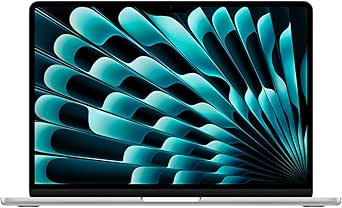 | Best for Apple Intelligence and Portability | Chip: Apple M5 | Display: 13.6-inch Liquid Retina | Memory: 16 GB unified memory | VIEW LATEST PRICE | See Our Full Breakdown |
| ASUS Vivobook S16 16-Inch Touchscreen Laptop, AMD Ryzen AI 9 465, 32GB DDR5, 1TB SSD |  | Best Balanced Large-Screen AI Laptop | Processor: AMD Ryzen AI 9 465 | NPU performance: 50 TOPS | Memory: 32 GB DDR5 dual-channel | VIEW LATEST PRICE | See Our Full Breakdown |
| HP OmniBook 3 14-inch AI PC, 2K OLED Display, Snapdragon X X1-26-100, 16 GB RAM, 512 GB SSD, Windows 11 Home, Nouvelle Silver |  | Best Compact Copilot+ Pick | Display: 14-inch OLED, 1920 × 1200, 16:10, 300 nits | Processor: Snapdragon X X1-26-100, 8 cores, up to 2.97 GHz | Graphics: Integrated Qualcomm Adreno GPU | VIEW LATEST PRICE | See Our Full Breakdown |
| HP OmniBook 7 17.3-Inch Touchscreen Laptop, Intel Core Ultra 7 258V, 32GB RAM, 2TB SSD, NVIDIA GeForce RTX 4050, Windows 11 Pro |  | Best for AI-Adjacent GPU Work | Processor: Intel Core Ultra 7 258V, 8 cores, up to 4.8 GHz | AI NPU: Up to 47 TOPS | Graphics: NVIDIA GeForce RTX 4050 Laptop GPU, 6 GB GDDR6 | VIEW LATEST PRICE | See Our Full Breakdown |
| Acer Aspire Go 16 AI Ready Laptop | 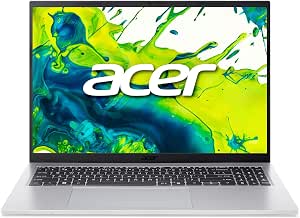 | Best Everyday AI-Ready Value | Processor: Intel Core 7 150U | Memory: 16 GB DDR5 | Storage: 512 GB PCIe Gen4 SSD | VIEW LATEST PRICE | See Our Full Breakdown |
| Lenovo ThinkPad L16 Gen 2 Business Laptop, Intel Core Ultra 5 225U, 16-Inch Touchscreen, 32GB DDR5, 1TB SSD, Windows 11 Pro |  | Best for Business Multitasking | Processor: Intel Core Ultra 5 225U, 12 cores, up to 4.8 GHz | Memory: 32 GB DDR5 | Storage: 1 TB PCIe M.2 SSD | VIEW LATEST PRICE | See Our Full Breakdown |
| HP Pro Business Laptop with 17.3-Inch Touchscreen, Intel Core Ultra 7 255U, 32GB RAM, 1TB SSD, Windows 11 Pro, and Laptop Cooler |  | Best Large-Screen Office Pick | Processor: Intel Core Ultra 7 255U, 12 cores, 14 threads, up to 5.2 GHz | Memory: 32 GB DDR5 | Storage: 1 TB SSD | VIEW LATEST PRICE | See Our Full Breakdown |
| HP OmniBook X 14-inch AI Laptop |  | Best for a Premium Compact Display | Processor: Intel Core Ultra 7 356H, 16 cores, up to 4.7 GHz | Display: 14-inch 3K OLED touchscreen, 2880 × 1800, up to 120 Hz | Memory: 24GB LPDDR5x-8533, onboard | VIEW LATEST PRICE | See Our Full Breakdown |
| Dell 16-Inch Touchscreen Laptop |  | Best for Multitasking and Office Work | Processor: AMD Ryzen AI 7 350, 8 cores, boost up to 5.0 GHz | NPU performance: Up to 50 TOPS | Display: 16-inch FHD+ touchscreen, 1920 × 1200, 16:10 | VIEW LATEST PRICE | See Our Full Breakdown |
| HP OmniBook 16 AI Touchscreen Laptop |  | Best for Privacy-Conscious AI Work | Processor: AMD Ryzen AI 7 445, 6 cores, up to 4.6 GHz | NPU performance: 50+ TOPS | Display: 16-inch IPS touchscreen, 1920 × 1200, 300 nits | VIEW LATEST PRICE | See Our Full Breakdown |
| Apple MacBook Air 15-inch Laptop with M5 Chip |  | Best for a Lightweight macOS AI Laptop | Chip: Apple M5 | Display: 15.3-inch Liquid Retina, supports 1 billion colors | Memory: 16GB unified memory | VIEW LATEST PRICE | See Our Full Breakdown |
| AI laptop | Memory | Storage | Display | Processor |
|---|---|---|---|---|
| ASUS Vivobook 18 Copilot+ PC L | 32 GB DDR5 | 1 TB Gen 4 SSD | 18-inch WUXGA IPS, 1920 × 1200, 16:10 | AMD Ryzen AI 9 465 |
| Acer Aspire 14 AI Copilot+ PC | 16 GB LPDDR5X | 1 TB SSD | 14-inch, 1920 × 1200 LCD, up to 300 nits | Intel Core Ultra 7 256V |
| Acer Aspire 14 AI Copilot+ PC | 16 GB LPDDR5X | 1 TB Gen 4 SSD | 14-inch WUXGA IPS LED touchscreen, 1920 × 1200, 60 Hz | Intel Core Ultra 5 226V |
| Apple MacBook Air 13.6-inch La | 16 GB unified memory | 512 GB SSD | 13.6-inch Liquid Retina | — |
| ASUS Vivobook S16 16-Inch Touc | 32 GB DDR5 dual-channel | 1 TB PCIe Gen 4 SSD | 16-inch WUXGA touchscreen, 1920 × 1200, 120 Hz, 400 nits | AMD Ryzen AI 9 465 |
| HP OmniBook 3 14-inch AI PC | 16 GB LPDDR5x-8448 | 512 GB PCIe Gen4 NVMe M.2 SSD | 14-inch OLED, 1920 × 1200, 16:10, 300 nits | Snapdragon X X1-26-100, 8 cores, up to 2.97 GHz |
| HP OmniBook 7 17.3-Inch Touchs | 32 GB LPDDR5X-8533 | 2 TB PCIe Gen4 SSD | 17.3-inch FHD IPS touchscreen, 1920 × 1080, 400 nits | Intel Core Ultra 7 258V, 8 cores, up to 4.8 GHz |
| Acer Aspire Go 16 AI Ready Lap | 16 GB DDR5 | 512 GB PCIe Gen4 SSD | 16-inch WUXGA IPS touchscreen, 1920 × 1200 | Intel Core 7 150U |
| Lenovo ThinkPad L16 Gen 2 Busi | 32 GB DDR5 | 1 TB PCIe M.2 SSD | 16-inch IPS touchscreen, 1920 × 1200, 16:10, 400 nits, 60 Hz | Intel Core Ultra 5 225U, 12 cores, up to 4.8 GHz |
| HP Pro Business Laptop with 17 | 32 GB DDR5 | 1 TB SSD | 17.3-inch LCD touchscreen, 1600 × 900, 60 Hz, anti-glare | Intel Core Ultra 7 255U, 12 cores, 14 threads, up to 5.2 GHz |
| HP OmniBook X 14-inch AI Lapto | 24GB LPDDR5x-8533, onboard | 1TB PCIe NVMe M.2 SSD | 14-inch 3K OLED touchscreen, 2880 × 1800, up to 120 Hz | Intel Core Ultra 7 356H, 16 cores, up to 4.7 GHz |
| Dell 16-Inch Touchscreen Lapto | 32GB DDR5, 5600 MT/s | 1TB M.2 PCIe NVMe SSD | 16-inch FHD+ touchscreen, 1920 × 1200, 16:10 | AMD Ryzen AI 7 350, 8 cores, boost up to 5.0 GHz |
| HP OmniBook 16 AI Touchscreen | 16GB DDR5-5600 | 1TB PCIe Gen4 NVMe SSD | 16-inch IPS touchscreen, 1920 × 1200, 300 nits | AMD Ryzen AI 7 445, 6 cores, up to 4.6 GHz |
| Apple MacBook Air 15-inch Lapt | 16GB unified memory | 512GB SSD | 15.3-inch Liquid Retina, supports 1 billion colors | — |
More Details on Our Top Picks
ASUS Vivobook 18 Copilot+ PC Laptop, 18-inch WUXGA 144 Hz Display, AMD Ryzen AI 9 465, 32 GB RAM, 1 TB SSD, Windows 11 Home, Quiet Blue (M1807GA-DS99)
The Vivobook 18 is the large-screen pick for buyers who want AI-capable hardware without a separate monitor. Its Ryzen AI 9 465, 32 GB of memory, and 1 TB SSD give it more headroom for multitasking than the 16 GB Acer Aspire 14 AI models, while the 18-inch 16:10 screen leaves room for side-by-side windows. The 144 Hz refresh rate makes scrolling and motion look smoother, but it does not make this integrated-graphics laptop a gaming substitute. Compared with the more portable Vivobook S16, this model provides a larger display but weighs nearly two pounds more. Its 300-nit brightness may also limit comfort in bright rooms, so this is best as a mostly stationary desk companion rather than a frequent travel laptop.
Pros:- 18-inch 16:10 screen gives documents and side-by-side apps generous space
- Ryzen AI 9 465, 32 GB DDR5, and 1 TB SSD provide a strong multitasking configuration
- 144 Hz refresh rate makes everyday scrolling and motion appear smoother
- 70 Wh battery supports fast charging, with a 180-degree hinge for flexible desk positioning
Cons:- At 5.7 pounds, it is substantially less convenient to carry than the 3-pound Acer Aspire 14 AI
- 300-nit maximum brightness can be limiting in bright environments
- Integrated Radeon graphics are not a replacement for a laptop with dedicated graphics
Best for: Home-based professionals who want a roomy screen, substantial memory, and Copilot+ features for multitasking without connecting an external monitor
Not ideal for: Commuters and frequent travelers who need a light laptop, or users who work in bright spaces and need a more luminous display
- Processor:AMD Ryzen AI 9 465
- Memory:32 GB DDR5
- Storage:1 TB Gen 4 SSD
- Display:18-inch WUXGA IPS, 1920 × 1200, 16:10
- Refresh rate:144 Hz
- Graphics:Integrated Radeon Graphics
- Battery:70 Wh, fast charging to 60% in 49 minutes
- Weight:5.7 lbs
Our verdict“Choose the Vivobook 18 if screen space and 32 GB of memory matter more to you than portability.”
Acer Aspire 14 AI Copilot+ PC, 14-inch WUXGA, Intel Core Ultra 7 256V, 16GB RAM, 1TB SSD
The Acer Aspire 14 AI suits buyers who want a genuinely portable Copilot+ laptop with an Intel NPU rated up to 47 TOPS. Its 3.1-pound aluminum body is easier to take between home, office, and classes than the ASUS Vivobook 18, and the 1 TB SSD offers room for local files without relying on cloud storage. The 180-degree hinge and backlit keyboard are practical touches for shared tables and late work sessions. Acer’s claim of up to 22 hours applies to specific video-playback conditions, not every workload, and the listed 300-nit screen may look dim in bright settings. Compared with the touchscreen Acer Aspire 14 AI Core Ultra 5, this configuration favors a higher-tier processor and stronger stated NPU performance over touch input and a larger listed battery capacity.
Pros:- Intel Core Ultra 7 256V includes an NPU rated up to 47 TOPS for supported local AI tasks
- 3.1-pound aluminum chassis is easier to carry than the Vivobook 18
- 1 TB SSD provides useful local storage for work files and media
- Backlit keyboard and 180-degree hinge support flexible everyday use
Cons:- 16 GB of LPDDR5X memory offers less capacity than the 32 GB ASUS Vivobook models
- 300-nit display brightness may be limiting in bright rooms
- The up-to-22-hour battery claim is based on specified video-playback testing and may not match mixed-use workloads
Best for: Students and mobile office workers who want a light aluminum Windows laptop with an Intel NPU and ample SSD space
Not ideal for: People who need a touchscreen, more than 16 GB of memory, or a screen suited to bright outdoor use
- Processor:Intel Core Ultra 7 256V
- NPU performance:Up to 47 TOPS
- Graphics:Intel Arc 140V
- Memory:16 GB LPDDR5X
- Storage:1 TB SSD
- Display:14-inch, 1920 × 1200 LCD, up to 300 nits
- Wireless:Wi-Fi 6E, Bluetooth 5.3
- Weight:3.1 lbs
Our verdict“Pick this Acer if portability and Intel-based AI features outweigh touchscreen input and higher memory capacity.”
Acer Aspire 14 AI Copilot+ PC, 14-Inch WUXGA Touchscreen, Intel Core Ultra 5 226V, 16GB RAM, 1TB SSD
This Aspire 14 pairs a 14-inch WUXGA touchscreen with a 3-pound aluminum chassis, making it the compact choice for people who prefer tapping through pages and controls. Its Core Ultra 5 226V has an NPU rated up to 40 TOPS, so supported AI features can run locally; the 1080p IR webcam also suits frequent video calls and Windows sign-in. Against the Acer Aspire 14 Core Ultra 7, this model gives up some processor and NPU headroom but adds touch input and lists a larger 65 Wh battery. Both are light, 16 GB-memory laptops with 1 TB storage, so choose based on interaction style rather than expecting a major capacity difference. The 60 Hz display and shared-memory integrated graphics make it less suited to high-refresh gaming or graphics-heavy workloads.
Pros:- WUXGA touchscreen adds direct navigation beyond the non-touch Aspire 14 configuration
- NPU rated up to 40 TOPS supports compatible local AI features
- 1080p FHD IR webcam is useful for video calls and camera-based sign-in
- 3-pound aluminum chassis, 65 Wh battery, and 1 TB Gen 4 SSD suit mobile work
Cons:- Core Ultra 5 and up-to-40-TOPS NPU rating sit below the Aspire 14 Core Ultra 7 configuration
- 60 Hz refresh rate is less fluid than the 120 Hz Vivobook S16 display
- Integrated graphics use shared memory rather than dedicated video memory
Best for: Students, consultants, and frequent video callers who want a compact Windows AI laptop with touchscreen controls and an IR webcam
Not ideal for: Users who want a high-refresh screen, dedicated graphics, or more than 16 GB of memory for demanding creative workloads
- Processor:Intel Core Ultra 5 226V
- NPU performance:Up to 40 TOPS
- Graphics:Integrated Intel Arc 130V
- Memory:16 GB LPDDR5X
- Storage:1 TB Gen 4 SSD
- Display:14-inch WUXGA IPS LED touchscreen, 1920 × 1200, 60 Hz
- Webcam:1080p FHD IR
- Battery and weight:65 Wh; 3 lbs
Our verdict“Choose this Aspire if you want touch input and a capable webcam in a compact AI-ready Windows laptop.”
Apple MacBook Air 13.6-inch Laptop with M5 Chip, 16GB Memory, 512GB SSD, 12MP Center Stage Camera, Wi-Fi 7, Silver
The 13.6-inch MacBook Air is the natural pick for buyers who want AI features within Apple’s software and device ecosystem, rather than a Windows Copilot+ PC. Its M5 chip, 2.71-pound body, and up-to-18-hour stated battery life make it more travel-friendly than the Vivobook 18, while the 12MP Center Stage camera can keep a caller in frame and show a desk view during calls. The Liquid Retina display and Wi-Fi 7 round out a polished everyday setup. Its tradeoff is flexibility: this configuration has 16 GB of unified memory and 512 GB of storage, less capacity than either 32 GB ASUS model, and only two Thunderbolt 4 ports plus MagSafe and a headphone jack. Choose it for macOS and Apple integration, not Windows Copilot+ compatibility.
Pros:- M5 chip and Apple Intelligence fit buyers invested in macOS and Apple services
- 2.71-pound design and up-to-18-hour stated battery life suit travel
- 12MP Center Stage camera includes Desk View for video calls
- Wi-Fi 7, MagSafe, Thunderbolt 4, and support for up to two external displays
Cons:- 16 GB unified memory and 512 GB SSD provide less capacity than the ASUS Vivobook models
- macOS does not provide the same Windows Copilot+ PC feature set as the Acer and ASUS picks
- Two Thunderbolt 4 ports can require adapters for multiple wired accessories
Best for: Apple users who want a light laptop for Apple Intelligence, video calls, and everyday work across Mac, iPhone, and other Apple devices
Not ideal for: Windows-only workplaces, buyers who need Copilot+ PC features, or users who need 1 TB storage and 32 GB memory in this configuration
- Chip:Apple M5
- Display:13.6-inch Liquid Retina
- Memory:16 GB unified memory
- Storage:512 GB SSD
- Camera:12MP Center Stage with Desk View
- Wireless:Wi-Fi 7, Bluetooth 6
- Ports:Two Thunderbolt 4, MagSafe charging, headphone jack
- Weight and battery life:2.71 pounds; up to 18 hours
Our verdict“Choose this MacBook Air if portability and Apple Intelligence matter more than Windows AI compatibility or expanded memory and storage.”
ASUS Vivobook S16 16-Inch Touchscreen Laptop, AMD Ryzen AI 9 465, 32GB DDR5, 1TB SSD
The Vivobook S16 balances a generous workspace with a more manageable carry weight than the 18-inch Vivobook. It shares that larger ASUS model’s Ryzen AI 9 465, 32 GB of DDR5, and 1 TB SSD, but adds a touchscreen, 400-nit brightness, and a 120 Hz refresh rate in a 3.75-pound chassis. That combination makes it the more flexible everyday choice for buyers who move between a desk and other rooms. Its listed 50-TOPS NPU supports compatible AI workloads, while USB-A, USB-C, and HDMI reduce the need for adapters compared with the MacBook Air’s two Thunderbolt ports. The tradeoffs: no dedicated graphics processor is specified, and touchscreen support does not establish stylus compatibility. Its 70 Wh battery is substantial, but no runtime claim is provided.
Pros:- Ryzen AI 9 465 with an NPU rated at 50 TOPS supports compatible AI features
- 32 GB DDR5 memory and 1 TB PCIe Gen 4 SSD provide more capacity than the 16 GB Acer Aspire 14 models
- 16-inch touchscreen reaches 400 nits and refreshes at 120 Hz
- USB-A, USB-C, HDMI, privacy-shutter IR camera, and numeric keypad support practical desk use
Cons:- No dedicated graphics processor is specified, limiting its appeal for graphics-heavy workloads
- Touchscreen specifications do not confirm stylus support
- At 3.75 pounds, it is heavier than either 14-inch Acer Aspire 14 AI model
Best for: Hybrid workers who want a bright, responsive touchscreen, strong memory capacity, and a broad selection of built-in ports
Not ideal for: Buyers who need a dedicated graphics processor, confirmed stylus support, or a particularly small laptop for travel
- Processor:AMD Ryzen AI 9 465
- NPU performance:50 TOPS
- Memory:32 GB DDR5 dual-channel
- Storage:1 TB PCIe Gen 4 SSD
- Display:16-inch WUXGA touchscreen, 1920 × 1200, 120 Hz, 400 nits
- Camera:Full HD IR camera with manual privacy shutter
- Ports:2 USB-A, 2 USB-C with DisplayPort and power delivery, HDMI 2.1 TMDS
- Battery and weight:70 Wh; 3.75 lbs
Our verdict“Pick the Vivobook S16 if you want the larger ASUS models’ memory and AI hardware in a brighter touchscreen design that is easier to move around.”
HP OmniBook 3 14-inch AI PC, 2K OLED Display, Snapdragon X X1-26-100, 16 GB RAM, 512 GB SSD, Windows 11 Home, Nouvelle Silver
The HP OmniBook 3 is the most portable AI-focused choice in this group: its 3.1-pound aluminum body, Snapdragon X processor, and Copilot+ features suit everyday work without the bulk of the 17.3-inch HP OmniBook 7. Its 14-inch OLED panel adds rich color for viewing and creative tasks, while the FHD infrared camera supports sharper video calls and facial sign-in. The advertised battery life is unusually long, though actual runtime will depend on workload. Compared with the Acer Aspire Go 16, this HP prioritizes OLED contrast, a lighter chassis, and a dedicated Copilot+ experience over a larger screen. The tradeoffs are 16 GB of onboard memory, which cannot be expanded, and integrated graphics that are not a fit for demanding GPU work.
Pros:- 14-inch OLED display with 1920 × 1200 resolution and 100% DCI-P3 coverage
- Snapdragon X processor and Copilot+ features in a 3.1-pound chassis
- 1080p infrared camera with HDR auto-switch and noise reduction
- USB-C fast charging reaches 50% in approximately 45 minutes
Cons:- 16 GB of memory is onboard and cannot be upgraded
- Integrated Adreno graphics are not suited to demanding GPU workloads
Best for: Mobile students and office users who want a compact Copilot+ laptop, an OLED screen, and a good video-call camera.
Not ideal for: Buyers who need upgradeable memory, dedicated graphics, or a larger workspace for multitasking.
- Display:14-inch OLED, 1920 × 1200, 16:10, 300 nits
- Processor:Snapdragon X X1-26-100, 8 cores, up to 2.97 GHz
- Graphics:Integrated Qualcomm Adreno GPU
- Memory:16 GB LPDDR5x-8448
- Storage:512 GB PCIe Gen4 NVMe M.2 SSD
- Wireless:Wi-Fi 6E
- Ports:2 USB-A, 2 USB-C, HDMI 2.1, headphone/microphone combo
- Weight:3.1 pounds
Our verdict“Choose the OmniBook 3 for portable Copilot+ computing and OLED contrast, but skip it if you need expandable memory or discrete graphics.”
HP OmniBook 7 17.3-Inch Touchscreen Laptop, Intel Core Ultra 7 258V, 32GB RAM, 2TB SSD, NVIDIA GeForce RTX 4050, Windows 11 Pro
The HP OmniBook 7 stands apart from the more portable Copilot+ choices by combining an Intel Core Ultra 7 NPU with an RTX 4050. That discrete GPU makes it the strongest fit here for graphics-heavy creative software and other workloads that can use GPU acceleration; the 32 GB of memory and 2 TB SSD also leave room for large projects. Its 17.3-inch touchscreen offers a broad workspace, but Full HD resolution is less detailed than the 1920 × 1200 screens on the HP OmniBook 3 and Lenovo ThinkPad L16 Gen 2. At 5.18 pounds, it is better treated as a desktop replacement than a daily carry. The listed 47 TOPS NPU is relevant to local AI features, but this machine’s main distinction is its GPU, not a claim of being the most portable AI laptop.
Pros:- RTX 4050 with 6 GB GDDR6 for GPU-accelerated creative workloads
- 32 GB memory and 2 TB SSD provide capacity for demanding multitasking and large files
- 17.3-inch touchscreen reaches 400 nits and covers 100% sRGB
- Thunderbolt 4, HDMI 2.1, and Windows 11 Pro
Cons:- At 5.18 pounds, it is heavy for regular travel
- Full HD resolution is less sharp than the 1920 × 1200 panels on several alternatives
- Factory box is opened and resealed for configuration upgrades
Best for: Creative professionals and power users who want a large touchscreen, dedicated RTX graphics, and substantial local storage.
Not ideal for: Frequent travelers or buyers who prioritize a high-resolution display and light carry weight.
- Processor:Intel Core Ultra 7 258V, 8 cores, up to 4.8 GHz
- AI NPU:Up to 47 TOPS
- Graphics:NVIDIA GeForce RTX 4050 Laptop GPU, 6 GB GDDR6
- Memory:32 GB LPDDR5X-8533
- Storage:2 TB PCIe Gen4 SSD
- Display:17.3-inch FHD IPS touchscreen, 1920 × 1080, 400 nits
- Operating system:Windows 11 Pro
- Weight:5.18 pounds
Our verdict“Pick the OmniBook 7 if RTX graphics and a large screen matter more than portability or higher display resolution.”
Acer Aspire Go 16 AI Ready Laptop
The Acer Aspire Go 16 is the straightforward choice for buyers who want a roomy touchscreen and current everyday hardware without paying for features they may not use. Its Core 7 150U, 16 GB of DDR5 memory, and 512 GB SSD make a sensible base for schoolwork, office apps, and web-based AI tools; the 16-inch 1920 × 1200 display gives documents more vertical space than the 14-inch HP OmniBook 3. The larger panel and 3.7-pound weight make it less pocketable than that HP, while integrated Intel graphics place it well behind the HP OmniBook 7 for GPU-heavy work. The listing describes it as AI-ready but does not specify an NPU or Copilot+ certification, so buyers seeking clearly defined on-device AI hardware should compare it with the OmniBook 3.
Pros:- 16-inch 1920 × 1200 IPS touchscreen provides a spacious workspace
- Core 7 processor, 16 GB DDR5 memory, and 512 GB PCIe Gen4 SSD
- Two USB-C ports, two USB-A ports, and HDMI 2.1
- Uses recycled materials and has EPEAT Gold registration
Cons:- Integrated Intel graphics share system memory and limit demanding graphics work
- No NPU or Copilot+ certification is specified in the product data
- At 3.7 pounds, it is heavier than the 14-inch HP OmniBook 3
Best for: Students and general office users who want a large touch display, familiar Windows apps, and solid everyday specifications.
Not ideal for: Buyers who need a specified NPU, Copilot+ features, or a dedicated graphics processor for local AI and GPU workloads.
- Processor:Intel Core 7 150U
- Memory:16 GB DDR5
- Storage:512 GB PCIe Gen4 SSD
- Display:16-inch WUXGA IPS touchscreen, 1920 × 1200
- Graphics:Integrated Intel Graphics
- Operating system:Windows 11 Home
- Wireless:Wi-Fi 6, Bluetooth 5.1
- Weight:3.7 pounds
Our verdict“Choose the Aspire Go 16 for everyday tasks and a large touchscreen, but look elsewhere for a clearly specified on-device AI platform or discrete graphics.”
Lenovo ThinkPad L16 Gen 2 Business Laptop, Intel Core Ultra 5 225U, 16-Inch Touchscreen, 32GB DDR5, 1TB SSD, Windows 11 Pro
The ThinkPad L16 Gen 2 favors practical business features over the AI-forward positioning of the HP OmniBook 3. Its 32 GB of DDR5 memory and 1 TB SSD give office users breathing room for many open applications and local files, while Windows 11 Pro, a fingerprint reader, and ThinkShield features suit managed work environments. Ethernet joins USB-C, USB-A, and HDMI, which makes connecting to office networks and older peripherals simpler than on the more consumer-focused Acer Aspire Go 16. The 16-inch antiglare touchscreen is bright at 400 nits, but its stated 45% NTSC color coverage is a poor match for color-critical work. A listed battery life of up to five hours is also a substantial limitation for people away from outlets, and the upgraded configuration arrives with its original seal opened.
Pros:- 32 GB DDR5 memory and 1 TB SSD support multitasking and local file storage
- 16-inch 1920 × 1200 antiglare touchscreen reaches 400 nits
- Includes Ethernet, USB-C, USB-A, and HDMI for office connectivity
- Windows 11 Pro, fingerprint reader, and ThinkShield security features
Cons:- Listed battery life is up to five hours
- 45% NTSC color coverage is limited for color-sensitive work
- Original seal was opened for RAM and SSD upgrades
Best for: Business users who keep many applications open, need Windows 11 Pro and Ethernet, and value a fingerprint reader.
Not ideal for: Frequent travelers who need long battery life or creative professionals who rely on accurate color reproduction.
- Processor:Intel Core Ultra 5 225U, 12 cores, up to 4.8 GHz
- Memory:32 GB DDR5
- Storage:1 TB PCIe M.2 SSD
- Display:16-inch IPS touchscreen, 1920 × 1200, 16:10, 400 nits, 60 Hz
- Graphics:Integrated Intel Graphics
- Operating system:Windows 11 Pro
- Wireless:Wi-Fi 6
- Battery life:Up to 5 hours
Our verdict“Choose the ThinkPad L16 Gen 2 for business multitasking, ports, and security features, but not for long stretches away from power or color-critical projects.”
HP Pro Business Laptop with 17.3-Inch Touchscreen, Intel Core Ultra 7 255U, 32GB RAM, 1TB SSD, Windows 11 Pro, and Laptop Cooler
The HP Pro Business Laptop makes the most sense for office users who want a large touchscreen and straightforward business credentials rather than an advanced AI feature set. Its Core Ultra 7 255U, 32 GB of DDR5 memory, and 1 TB SSD provide a solid base for everyday multitasking, while Windows 11 Pro, a fingerprint reader, and a backlit keyboard cover common workplace needs. The 17.3-inch screen is larger than the Lenovo ThinkPad L16 Gen 2’s, but its 1600 × 900 resolution gives text and images less detail than the Lenovo’s 1920 × 1200 panel. It also lacks a specified NPU, and its 34 Wh battery is modest for a large-screen laptop. The included cooler may suit a desk setup, but it does not offset the limited display resolution or battery capacity.
Pros:- 17.3-inch anti-glare touchscreen offers a large workspace
- 32 GB DDR5 memory and 1 TB SSD support everyday multitasking and file storage
- Windows 11 Pro, fingerprint reader, and backlit keyboard
- Includes a PCO laptop cooler
Cons:- 1600 × 900 resolution is less detailed than the ThinkPad L16 Gen 2 display
- 34 Wh battery capacity is modest for a 17.3-inch laptop
- No NPU or Copilot+ features are specified
Best for: Desk-based office users who want a 17.3-inch touchscreen, Windows 11 Pro, and generous memory for everyday multitasking.
Not ideal for: Mobile professionals who need longer unplugged use, high-resolution visuals, or clearly specified on-device AI hardware.
- Processor:Intel Core Ultra 7 255U, 12 cores, 14 threads, up to 5.2 GHz
- Memory:32 GB DDR5
- Storage:1 TB SSD
- Display:17.3-inch LCD touchscreen, 1600 × 900, 60 Hz, anti-glare
- Graphics:Integrated Intel Graphics
- Operating system:Windows 11 Pro
- Battery:34 Wh lithium-ion
- Weight:4.62 pounds
Our verdict“Pick this HP for a large, desk-oriented business touchscreen, but choose the ThinkPad L16 Gen 2 for sharper resolution or the OmniBook 3 for a defined Copilot+ experience.”
HP OmniBook X 14-inch AI Laptop
The HP OmniBook X 14 is the display-focused pick for buyers who want an AI-capable Windows laptop that stays compact. Its 3K OLED touchscreen with a refresh rate up to 120 Hz offers sharper detail and smoother scrolling than the Dell 16-inch laptop’s FHD+ panel, while 24GB of memory and a 1TB SSD give demanding everyday workloads room to breathe. Two Thunderbolt 4 ports sit alongside HDMI and USB-A, so it is easier to connect varied peripherals than the more port-limited MacBook Air 15.
The tradeoff is that its memory is onboard, limiting future upgrades, and integrated graphics are not the fit for graphics-heavy work. HP’s battery figure is an up-to claim, so I would not treat it as a guaranteed runtime. Choose this model for a premium, portable screen—not for upgrade flexibility or discrete-GPU performance.
Pros:- 3K OLED touchscreen with up to a 120 Hz refresh rate
- 24GB onboard memory and 1TB SSD
- Two Thunderbolt 4 ports plus HDMI and USB-A
- Compact aluminum design with MIL-STD testing
Cons:- Onboard memory cannot be upgraded
- Integrated graphics are a limitation for demanding visual workloads
- The stated battery life is an up-to figure, not a guaranteed runtime
Best for: Frequent travelers, visual-content consumers, and office users who want a compact Windows laptop with a high-resolution touchscreen and broad connectivity.
Not ideal for: Buyers who need memory upgrades or strong graphics performance for demanding 3D work and gaming.
- Processor:Intel Core Ultra 7 356H, 16 cores, up to 4.7 GHz
- Display:14-inch 3K OLED touchscreen, 2880 × 1800, up to 120 Hz
- Memory:24GB LPDDR5x-8533, onboard
- Storage:1TB PCIe NVMe M.2 SSD
- Graphics:Integrated Intel Graphics
- Camera:5MP IR with HDR auto-switch
- Ports:2 USB-A, HDMI 2.1, headphone/microphone combo, 2 Thunderbolt 4 USB-C
- Operating system:Windows 11 Home
Our verdict“Choose the HP OmniBook X 14 if a sharp, fast OLED touchscreen matters more than upgradeable memory or dedicated graphics.”
Dell 16-Inch Touchscreen Laptop
The Dell 16-inch makes a practical case for buyers who value memory, workspace, and business-ready software over display sharpness. Its 32GB of DDR5 RAM gives multitaskers more headroom than the HP OmniBook 16 AI’s 16GB, while the Ryzen AI 7 350 includes an NPU rated up to 50 TOPS for compatible on-device AI tasks. Windows 11 Pro, a numeric keypad, and an SD card reader also suit spreadsheet-heavy work and office setups.
The compromise is the 1920 × 1200, 300-nit display: the large 16-inch panel provides useful room, but it is less detailed and less bright than the HP OmniBook X 14’s 3K OLED. Its AI features depend on software and device eligibility, too. I’d pick this Dell for memory capacity and work tools, not for premium screen quality or a compact carry.
Pros:- 32GB DDR5 memory supports heavier multitasking
- 16-inch 16:10 touchscreen and full-size keyboard with numeric keypad
- Windows 11 Pro and Ryzen AI processor with up to 50 TOPS NPU performance
- USB-A, USB-C, HDMI, SD card reader, and headset jack
Cons:- FHD+ resolution is less detailed than the HP OmniBook X 14’s 3K OLED
- Listed display brightness is 300 nits
- AI feature availability depends on eligibility, updates, language, and region
Best for: Office professionals and spreadsheet-heavy multitaskers who want Windows 11 Pro, 32GB of memory, a large touchscreen, and built-in numeric keys.
Not ideal for: Buyers who prioritize a high-resolution, bright display, a lightweight travel laptop, or guaranteed access to every AI feature.
- Processor:AMD Ryzen AI 7 350, 8 cores, boost up to 5.0 GHz
- NPU performance:Up to 50 TOPS
- Display:16-inch FHD+ touchscreen, 1920 × 1200, 16:10
- Display brightness:300 nits
- Memory:32GB DDR5, 5600 MT/s
- Storage:1TB M.2 PCIe NVMe SSD
- Operating system:Windows 11 Pro
- Ports:USB-A, USB-C with DisplayPort 1.4 and Power Delivery, HDMI 1.4, SD card reader, headset jack
Our verdict“Pick the Dell 16 if RAM capacity and office-friendly features matter more to you than a sharper or brighter screen.”
HP OmniBook 16 AI Touchscreen Laptop
The HP OmniBook 16 AI pairs a large touchscreen with a privacy feature that matters in shared offices: a 1080p IR camera with a physical shutter. Its Ryzen AI 7 445 has an NPU rated above 50 TOPS, and Windows 11 Pro makes it a sensible choice for compatible AI features in a work-oriented setup. Compared with the Dell 16, it gives up half the memory but adds the camera shutter and HDMI 2.1; compared with the HP OmniBook X 14, it trades OLED sharpness for a larger, anti-glare screen.
The 16GB of RAM is less generous for heavy multitasking than the Dell’s 32GB, and the 1920 × 1200 resolution and integrated graphics set limits for detailed creative work. Its 3.61-pound weight is also less appealing for frequent carrying than the MacBook Air 15. Choose it for privacy and a roomy work display, rather than memory headroom or premium image detail.
Pros:- 1080p IR camera includes a physical privacy shutter
- Ryzen AI 7 445 NPU rated above 50 TOPS
- 16-inch anti-glare touchscreen with a full-size keyboard and numeric keypad
- HDMI 2.1, two USB-C ports, and two USB-A ports
Cons:- 16GB memory is less suited to heavier multitasking than the Dell 16’s 32GB
- 1920 × 1200 resolution is modest for detailed creative work
- Integrated graphics use shared memory
Best for: Hybrid workers who join video calls in shared spaces and want a large Windows touchscreen with a physical camera shutter and current NPU capability.
Not ideal for: Heavy multitaskers who need 32GB of memory, or creative users who want a high-resolution display or dedicated graphics.
- Processor:AMD Ryzen AI 7 445, 6 cores, up to 4.6 GHz
- NPU performance:50+ TOPS
- Display:16-inch IPS touchscreen, 1920 × 1200, 300 nits
- Memory:16GB DDR5-5600
- Storage:1TB PCIe Gen4 NVMe SSD
- Camera:1080p FHD IR with physical privacy shutter
- Operating system:Windows 11 Pro
- Weight:3.61 pounds
Our verdict“Choose the HP OmniBook 16 AI if you want a large-screen work laptop with a physical camera shutter and strong on-device AI hardware.”
Apple MacBook Air 15-inch Laptop with M5 Chip
The 15-inch MacBook Air with M5 is the lineup’s lightweight macOS choice for buyers who want a larger screen without moving to a heavier 16-inch Windows machine. At 3.32 pounds, it weighs less than the HP OmniBook 16 AI, while its 15.3-inch Liquid Retina display, 12MP Center Stage camera, and six-speaker audio suit calls and media as well as everyday work. Wi-Fi 7 and support for two external displays add useful flexibility for a desk setup.
Its 16GB of unified memory and 512GB SSD offer less capacity than the Dell 16’s 32GB and 1TB, and its two Thunderbolt 4 ports plus MagSafe provide fewer connection types than the HP models without an adapter. It also lacks a specified touchscreen and runs macOS, so Windows-only AI workflows may not fit. Choose it for portability and a broad-screen Apple laptop, not maximum storage or ports.
Pros:- 15.3-inch Liquid Retina display supports 1 billion colors
- Thin 3.32-pound design with battery life stated up to 18 hours
- 12MP Center Stage camera and six-speaker audio with Spatial Audio
- Wi-Fi 7 and support for up to two external displays
Cons:- 16GB unified memory and 512GB SSD are less capacity than the Dell 16 provides
- Two Thunderbolt 4 ports limit built-in connectivity
- No touchscreen is specified, and macOS may not suit Windows-only workflows
Best for: Mac users who want a thin, light 15-inch laptop for calls, everyday productivity, and compatible AI tasks, with room for two external displays.
Not ideal for: Windows-dependent users, touchscreen shoppers, or buyers who need more than 16GB memory, more than 512GB storage, or a wide selection of built-in ports.
- Chip:Apple M5
- Display:15.3-inch Liquid Retina, supports 1 billion colors
- Memory:16GB unified memory
- Storage:512GB SSD
- Camera:12MP Center Stage
- Battery life:Up to 18 hours
- Wireless:Wi-Fi 7 and Bluetooth 6
- Ports:Two Thunderbolt 4 ports, MagSafe charging port, headphone jack
- Operating system:macOS
Our verdict“Choose the MacBook Air 15 if you want a lightweight, large-screen Mac for everyday work and calls, rather than a touchscreen or high-capacity Windows machine.”

How We Picked
I ranked these 14 laptops by how well their stated hardware, display size, and platform suit common AI-enabled computing needs—not by the presence of an AI label alone. I gave more weight to clearly specified processors with AI capabilities, usable memory for multitasking, and a configuration that can handle everyday work without unnecessary compromises. Screen quality and size, storage, portability, and operating system also mattered because they shape daily use as much as processor performance.
The ranking favors complete, versatile configurations first, then moves toward more specialized picks and models with less clearly specified hardware. That puts the ASUS Vivobook S16 near the top for its combination of Ryzen AI 9, 32GB RAM, and 1TB storage; compact systems rank well when portability is the priority, while large laptops with dedicated graphics serve a narrower performance-focused role. I also account for configuration differences within the same product family: the Core Ultra 7 Acer Aspire 14 is a stronger all-round Windows choice than its Core Ultra 5 touchscreen sibling, while the MacBook Air models serve buyers committed to macOS rather than Windows Copilot+ features.
| AI laptop | Graphics | Operating system |
|---|---|---|
| ASUS Vivobook 18 Copilot+ PC L | Integrated Radeon Graphics | — |
| Acer Aspire 14 AI Copilot+ PC | Intel Arc 140V | — |
| Acer Aspire 14 AI Copilot+ PC | Integrated Intel Arc 130V | — |
| Apple MacBook Air 13.6-inch La | — | — |
| ASUS Vivobook S16 16-Inch Touc | — | — |
| HP OmniBook 3 14-inch AI PC | Integrated Qualcomm Adreno GPU | — |
| HP OmniBook 7 17.3-Inch Touchs | NVIDIA GeForce RTX 4050 Laptop GPU, 6 GB GDDR6 | Windows 11 Pro |
| Acer Aspire Go 16 AI Ready Lap | Integrated Intel Graphics | Windows 11 Home |
| Lenovo ThinkPad L16 Gen 2 Busi | Integrated Intel Graphics | Windows 11 Pro |
| HP Pro Business Laptop with 17 | Integrated Intel Graphics | Windows 11 Pro |
| HP OmniBook X 14-inch AI Lapto | Integrated Intel Graphics | Windows 11 Home |
| Dell 16-Inch Touchscreen Lapto | — | Windows 11 Pro |
| HP OmniBook 16 AI Touchscreen | — | Windows 11 Pro |
| Apple MacBook Air 15-inch Lapt | — | macOS |
Factors to Consider When Choosing Best AI Laptops
AI branding can obscure the choices that matter most day to day. I recommend starting with your software, travel habits, and workload, then checking whether the listed configuration has enough memory and storage to remain useful as your needs grow.
Check the processor and NPU, not just the AI label
“AI laptop” can describe machines with meaningfully different processors and on-device AI capabilities. A Copilot+ designation is more specific than a general AI-ready label, but it still does not tell you whether every feature you want is available in your region or software. Look up the exact processor model and its NPU capability before buying, especially if local AI features are a key reason for upgrading. Some AI tools run in the cloud, so a stronger NPU may not speed up every task. Match the hardware to your actual apps rather than treating the broad category label as a performance guarantee.
Choose memory for the work you do at once
Memory affects how comfortably a laptop handles many open apps, large files, and creative workloads at the same time. A 16GB configuration can suit typical office, study, and browsing use, while 24GB or 32GB leaves more room for heavier multitasking and longer-term demands. Do not assume a laptop’s memory can be upgraded later; check the manufacturer’s configuration details before deciding. If you routinely keep many browser tabs open alongside video calls or editing software, prioritizing RAM may make more difference than a small processor step-up. Avoid paying for extra memory that your everyday workload will not use.
Treat screen size as a workflow decision
A larger display can reduce the need for an external monitor and makes side-by-side windows easier to manage, but it adds bulk to a laptop you carry often. Fourteen-inch models are generally easier to fit into a daily commute, while 16- to 18-inch machines suit desk-based work and users who value a broad workspace. Touchscreen support can help with direct interaction, but it does not replace a keyboard and trackpad for long work sessions. Check resolution and panel type as well as diagonal size; OLED and high-resolution displays may suit media and visual work, though they can affect battery demands. Decide whether your laptop will spend more time on a desk or in a bag before settling on a screen.
Pick an operating system around your apps and devices
Choosing Windows or macOS is not a small spec preference: it affects app compatibility, file workflows, and how easily the laptop works with your phone and other devices. Windows has the wider range in this roundup, including Copilot+ systems, touchscreen choices, business configurations, and a model with discrete NVIDIA graphics. MacBook Air models make more sense for buyers who already use macOS apps and Apple devices, but they do not offer the same Windows-specific Copilot+ experience. Before switching platforms, check compatibility for specialized work software, accessories, and any files shared with colleagues. A familiar system can be more valuable than a feature you may rarely use.
Buy graphics for a real workload, not a vague promise
Most AI laptop buyers do not need a discrete graphics card for ordinary office tasks or cloud-based AI tools. A dedicated GPU is more relevant for graphics-heavy creation, some local AI workloads, and games that can use its extra processing power. It adds a different performance profile from an NPU, so do not treat the two as interchangeable. Larger, GPU-equipped systems may also be less convenient to carry and may draw more power under demanding work. If your apps do not benefit from dedicated graphics, a lighter configuration with strong memory and a suitable processor may be a better fit.
Balance storage with how long you keep a laptop
Storage capacity matters when you keep project files, photos, downloads, or media libraries on the laptop rather than in cloud storage. A 1TB SSD provides more local room than a 512GB drive, but the right amount depends on the size of your files and how often you archive them. Think about whether the laptop’s storage is replaceable or expandable before treating an initial configuration as easy to change. A bigger drive is less useful if most of your work lives online, while a smaller drive can become restrictive for large creative projects. Include backups in your plan: a laptop’s internal SSD should not be the only copy of important files.
Frequently Asked Questions
Is an AI-ready laptop the same as a Copilot+ PC?
No. “AI-ready” is a broad description, while Copilot+ PC refers to a more specific class of Windows laptops with defined hardware capabilities. A laptop may support AI features without meeting that Copilot+ designation. Check the exact processor and NPU details, then confirm that the features you want work with your software and region. If your main use is cloud-based AI, the distinction may matter less than memory, screen, and battery suitability.
Should I choose 16GB, 24GB, or 32GB of memory?
For browsing, office work, video calls, and study, 16GB can be enough when the laptop configuration is otherwise a good fit. Choose 24GB or 32GB if you often run demanding apps together, work with larger files, or want more headroom for future software. The roundup includes several 32GB configurations, making them more appealing for heavier multitasking than the 16GB options. Check whether memory is soldered before buying, since an upgrade may not be possible later.
Should I get a Windows AI laptop or a MacBook Air?
Choose based on the apps and devices you rely on, not on an AI label alone. The Windows options in this roundup provide more variety in screen size, touch support, business features, and dedicated graphics. The MacBook Air 13-inch and 15-inch models suit buyers who prefer macOS or already rely on Apple devices; the screen-size choice is mainly about portability versus workspace. Before switching, confirm that your essential apps and accessories work with the platform you plan to buy.
Does a laptop with a dedicated GPU make more sense for AI?
Only for some workloads. A discrete GPU can help with compatible graphics-heavy creation, gaming, and certain local AI tasks, but it is not a substitute for an NPU and may be unnecessary for cloud AI tools or everyday productivity. The HP OmniBook 7 is the clearest dedicated-graphics choice in this list, though its large 17.3-inch format is less suited to frequent travel. If you do not use software that benefits from the GPU, prioritize portability, memory, and display quality instead.
How do I decide between a 14-inch laptop and a 16-inch or larger model?
Start with where you use your laptop most. A 14-inch system is easier to carry and can suit commuters, students, and people who work from different locations, while a larger screen gives more space for documents, timelines, and side-by-side windows. A big screen does not automatically mean a better work experience if the laptop stays in a crowded bag every day. If you mostly work at a desk, compare the larger models with the cost and convenience of using a smaller laptop alongside an external monitor.
Conclusion
For most buyers who want a capable Windows machine with room for multitasking, I recommend the ASUS Vivobook S16 as the best overall, thanks to its Ryzen AI 9 processor, 32GB RAM, and 1TB SSD. The Acer Aspire 14 AI with Core Ultra 7 is my best value-style pick for buyers who want a more portable Copilot+ configuration, while the Core Ultra 5 touchscreen Aspire is a more approachable option for everyday use and a good beginner-friendly choice. For a premium macOS experience, choose between the 13-inch MacBook Air for portability and the 15-inch MacBook Air for added screen space. If your work calls for a large display and dedicated graphics, the HP OmniBook 7 is the specialist pick; if business manageability and Windows 11 Pro matter more, consider the ThinkPad L16 or HP Pro Business model. Match the processor and memory to your actual workload, and let your preferred screen size and operating system settle the final choice.