The best external hard drive for most people is the WD My Passport 6TB, which strikes the ideal balance between capacity, portability, and everyday reliability. If you need massive storage for a desktop archive, the Seagate Expansion 24TB offers the most space per dollar. And when speed is your priority, the Samsung T7 Portable SSD delivers transfers up to ten times faster than any spinning drive. The main tradeoffs in this category come down to capacity versus portability, and traditional hard drives versus solid-state flash. Read on for the full breakdown of 15 top options and how to choose the right one for your workflow.

Get the latest gadgets delivered free with Prime
- Fast, free delivery on millions of items
- Prime Video, Amazon Music and more included
- Member-only deals all year
Complete the kit



Key Takeaways
- The 4–6TB portable range is the sweet spot for most users; larger portable drives get heavy and expensive without offering proportional benefits.
- Desktop external drives deliver far better value per terabyte than portable models, but they require a power outlet and are not meant for travel.
- SSDs are up to 10x faster than HDDs, but they cost significantly more per gigabyte — they only make sense for active projects, not bulk archiving.
- Rugged drives like the LaCie are worth the premium only if you actually work in dusty, wet, or drop-prone environments; otherwise you’re paying for protection you’ll never use.
- Brand reliability matters: WD and Seagate dominate the category, while budget brands like UnionSine and YOTUO are acceptable for non-critical backups but not for irreplaceable data.
- The best overall pick, the WD My Passport 6TB, combines a proven track record with a portable form factor, while the Seagate Expansion 24TB wins on sheer capacity for desktop users.
| WD_BLACK D10 8TB Portable External Game Drive |  | Best for Game Libraries | Capacity: 8 TB | Drive type: Mechanical hard drive | Interface: USB 3.2 | VIEW LATEST PRICE | See Our Full Breakdown |
| UnionSine 1TB Ultra-Slim Portable External Hard Drive, USB 3.0 | 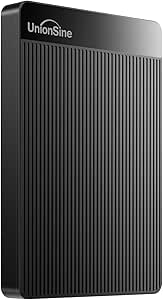 | Best Compact Basic Drive | Capacity: 1 TB | Drive type: Mechanical hard drive | Interface: USB 3.0; also supports USB 2.0 | VIEW LATEST PRICE | See Our Full Breakdown |
| WD My Passport 6TB Portable External Hard Drive, Black |  | Best Portable Backup Drive | Capacity: 6 TB | Drive type: Mechanical hard drive | Interface: USB 2.0/3.0 | VIEW LATEST PRICE | See Our Full Breakdown |
| WD 18TB My Book Desktop External Hard Drive, USB 3.0, Password Protection and Auto Backup Software |  | Best for Secure Desktop Backups | Capacity: 18 TB | Interface: USB 3.0; USB 2.0 compatible | Form factor: 3.5 inches | VIEW LATEST PRICE | See Our Full Breakdown |
| Seagate Expansion 24TB External Desktop Hard Drive, USB 3.0, with Rescue Data Recovery Services |  | Best Maximum-Capacity Pick | Capacity: 24 TB | Drive type: Mechanical hard drive | Interface: USB 3.0 | VIEW LATEST PRICE | See Our Full Breakdown |
| Seagate Expansion 4TB Portable External Hard Drive |  | Best Portable HDD for Everyday Backups | Capacity: 4 TB | Drive type: Mechanical external hard drive | Form factor: 2.5 inches | VIEW LATEST PRICE | See Our Full Breakdown |
| Seagate Expansion Desktop 4TB External Hard Drive (STKP4000400) |  | Best for a Fixed Home or Office Backup | Capacity: 4 TB | Form factor: 3.5-inch | Interface: USB 3.0 | VIEW LATEST PRICE | See Our Full Breakdown |
| LaCie Rugged USB-C 5TB Portable External Hard Drive |  | Best Rugged High-Capacity Portable HDD | Capacity: 5 TB | Form factor: 2.5 inches | Interface: USB 3.2 USB-C, Thunderbolt 3 compatible | VIEW LATEST PRICE | See Our Full Breakdown |
| Samsung T7 Portable SSD 1TB Titan Gray, USB 3.2 Gen 2, Up to 1050 MB/s | 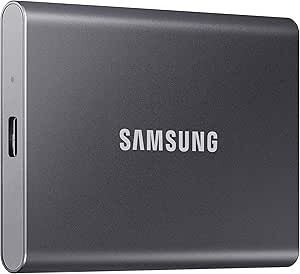 | Best for Fast File Transfers | Capacity: 1 TB | Drive type: Portable NVMe SSD | Interface: USB 3.2 Gen 2 | VIEW LATEST PRICE | See Our Full Breakdown |
| SanDisk 1TB Portable Drive, Up to 600MB/s Read Speed, Black |  | Best Pocket-Sized SSD for Everyday Carry | Capacity: 1 TB | Connectivity: USB Type-C | Read speed: Up to 600 MB/s | VIEW LATEST PRICE | See Our Full Breakdown |
| WD My Passport 5TB Portable External Hard Drive, Black |  | Best for High-Capacity Portable Storage | Storage capacity: 5 TB | Form factor: 2.5 inches | Dimensions: 4.22 x 2.95 x 0.75 inches | VIEW LATEST PRICE | See Our Full Breakdown |
| YOTUO 1TB External Hard Drive, Portable USB 3.0 & USB-C Storage |  | Best for Console and Device Compatibility | Storage capacity: 1 TB | Interface: USB 3.0 and USB-C | Form factor: 2.5 inches | VIEW LATEST PRICE | See Our Full Breakdown |
| SanDisk Extreme Portable SSD, 1TB |  | Best Premium Compact SSD | Storage capacity: 1 TB | Interface: USB 3.0 | Connector: USB Type-C | VIEW LATEST PRICE | See Our Full Breakdown |
| WD My Passport 1TB Portable External Hard Drive, Black |  | Best for Secure Personal Backups | Storage capacity: 1 TB | Drive type: Mechanical hard disk | Form factor: 2.5 inches | VIEW LATEST PRICE | See Our Full Breakdown |
| Seagate Portable 2TB External Hard Drive, USB 3.0 |  | Best for Simple Plug-and-Play Storage | Storage capacity: 2 TB | Interface: USB 3.0 | Hard disk type: Mechanical | VIEW LATEST PRICE | See Our Full Breakdown |
| external hard drife | Interface | Capacity | Form factor | Read speed |
|---|---|---|---|---|
| WD_BLACK D10 8TB Portable Exte | USB 3.2 | 8 TB | — | — |
| UnionSine 1TB Ultra-Slim Porta | USB 3.0; also supports USB 2.0 | 1 TB | 2.5 inches | — |
| WD My Passport 6TB Portable Ex | USB 2.0/3.0 | 6 TB | 2.5 inches | 110 MB/s |
| WD 18TB My Book Desktop Extern | USB 3.0; USB 2.0 compatible | 18 TB | 3.5 inches | Up to 600 MB/s |
| Seagate Expansion 24TB Externa | USB 3.0 | 24 TB | 3.5 inches | 140 MB/s |
| Seagate Expansion 4TB Portable | USB 3.0 | 4 TB | 2.5 inches | 120 MB/s |
| Seagate Expansion Desktop 4TB | USB 3.0 | 4 TB | 3.5-inch | 120 MB/s |
| LaCie Rugged USB-C 5TB Portabl | USB 3.2 USB-C, Thunderbolt 3 compatible | 5 TB | 2.5 inches | 130 MB/s |
| Samsung T7 Portable SSD 1TB Ti | USB 3.2 Gen 2 | 1 TB | — | Up to 1,050 MB/s |
| SanDisk 1TB Portable Drive | — | 1 TB | — | Up to 600 MB/s |
| WD My Passport 5TB Portable Ex | — | — | 2.5 inches | — |
| YOTUO 1TB External Hard Drive | USB 3.0 and USB-C | — | 2.5 inches | — |
| SanDisk Extreme Portable SSD | USB 3.0 | — | — | — |
| WD My Passport 1TB Portable Ex | — | — | 2.5 inches | — |
| Seagate Portable 2TB External | USB 3.0 | — | — | 120 MB/s |
More Details on Our Top Picks
WD_BLACK D10 8TB Portable External Game Drive
The WD_BLACK D10 pairs an 8TB capacity with a 7200 RPM mechanical drive, making it a strong fit for players who need room for a large game library and gameplay recordings. Its stated speed of up to 250 MB/s is higher than the listed read speeds of the WD My Passport 6TB and Seagate Expansion 24TB, though neither comparison turns this into an SSD: game loading and file access remain limited by spinning-disk storage. Active cooling is a practical addition for sustained use, and the two USB-A ports can charge accessories. The tradeoff is desk-bound operation: unlike pocket-sized portable drives, this model needs an AC adapter and takes more setup space. Choose it for gaming capacity and utility, not for cable-free portability.
Pros:- 8TB capacity for games and gameplay recordings
- 7200 RPM mechanism with stated speeds up to 250 MB/s
- Active cooling supports sustained operation
- Two USB-A ports can charge gaming accessories
Cons:- Mechanical storage is slower than the SSD options in the roundup
- Requires an external power adapter
- Less convenient to carry than bus-powered portable drives
Best for: Console and PC gamers who want to keep a large game library and gameplay captures on one externally powered drive
Not ideal for: Travelers or buyers seeking fast SSD-level game loading, since it is a mechanical drive and requires an AC adapter
- Capacity:8 TB
- Drive type:Mechanical hard drive
- Interface:USB 3.2
- Rotational speed:7200 RPM
- Maximum speed:Up to 250 MB/s
- Additional ports:Two 7.5W USB Type-A charging ports
- Compatible platforms:PlayStation, Xbox, PC, Mac
- Power:External AC adapter included
- Warranty:3-year manufacturer’s limited warranty
Our verdict“Pick the WD_BLACK D10 if you want substantial game storage and accessory charging at a gaming setup, and skip it if portability or SSD responsiveness matters more.”
UnionSine 1TB Ultra-Slim Portable External Hard Drive, USB 3.0
The UnionSine 1TB is the simplest carry-along choice here: its slim 2.5-inch design, grippy casing and USB connection suit everyday file transfers without software setup. The listed theoretical read and write speeds are 125 MB/s and 103 MB/s, so it is aimed at documents, photos and general storage rather than demanding high-speed work. Its 1TB capacity is modest beside the WD My Passport 6TB and the desktop drives, but that smaller footprint can make more sense for a student or laptop owner carrying a limited set of files. The anti-slip surface and aluminum layer are useful enclosure features, though they do not make the mechanical drive shockproof. Buyers should also treat the speed figures as theoretical maxima, not guaranteed real-world performance.
Pros:- Slim 2.5-inch design suited to carrying in a bag
- USB 3.0 and USB 2.0 connectivity
- Works without software installation
- Striped casing is designed to improve grip
Cons:- 1TB capacity is limited compared with larger drives in this roundup
- Mechanical 5400 rpm storage is not suited to SSD-level performance
- Listed maximum speeds are theoretical rather than guaranteed
Best for: Students and laptop owners who want a small, straightforward drive for documents, photos and occasional transfers
Not ideal for: Video editors, large media collectors or buyers who need high capacity or SSD-class transfer performance
- Capacity:1 TB
- Drive type:Mechanical hard drive
- Interface:USB 3.0; also supports USB 2.0
- Form factor:2.5 inches
- Rotational speed:5400 rpm
- Maximum read speed:125 MB/s (theoretical)
- Maximum write speed:103 MB/s (theoretical)
- Compatible devices:Desktop, gaming console, laptop, television
- Warranty:Three-year manufacturer’s warranty
Our verdict“Choose the UnionSine for basic, portable 1TB storage, but move to the WD My Passport 6TB if your files or backup needs are likely to grow.”
WD My Passport 6TB Portable External Hard Drive, Black
The WD My Passport 6TB balances a slim portable design with enough room for substantial file collections and routine backups. Its included backup software, ransomware protection, password protection and hardware encryption give it a more security-focused setup than the UnionSine 1TB, which is a simpler storage option. Capacity also exceeds that of the UnionSine while remaining in a 2.5-inch portable format, unlike the much larger desktop WD My Book 18TB. The tradeoff is speed and mobility: this is still a mechanical hard drive, with a listed read speed of 110 MB/s, and its USB 2.0/3.0 interface is less compelling for frequent large transfers than the SSD choices in the roundup. It suits backups and stored media better than active editing or demanding workloads.
Pros:- 6TB capacity in a slim portable format
- Backup software includes ransomware protection
- Password protection and hardware encryption
- More capacity than the UnionSine 1TB while remaining portable
Cons:- Mechanical storage is slower than the SSD options in the roundup
- Listed read speed is 110 MB/s
- USB 2.0/3.0 interface is less suited to frequent large transfers than newer high-speed connections
Best for: Laptop owners and home users who want portable multi-terabyte backups with password protection and bundled backup software
Not ideal for: People who regularly move large video projects or need SSD-level speed for active work
- Capacity:6 TB
- Drive type:Mechanical hard drive
- Interface:USB 2.0/3.0
- Form factor:2.5 inches
- Read speed:110 MB/s
- Data transfer rate:5 gigabits per second
- Security:Hardware encryption and password protection
- Included software:Backup software with ransomware protection
- Compatible devices:Desktop, laptop, tablet
Our verdict“Choose the My Passport 6TB for portable backups and protected file storage; choose an SSD instead if transfer speed is your priority.”
WD 18TB My Book Desktop External Hard Drive, USB 3.0, Password Protection and Auto Backup Software
The WD My Book 18TB is built for a permanent desk setup where capacity and data protection matter more than portability. Its 18TB of space gives photo, video and document collections far more headroom than the WD My Passport 6TB, while bundled backup tools and 256-bit AES hardware encryption add structure and privacy to a desktop backup routine. The listed read speed of 600 MB/s is also higher than the 140 MB/s listed for the Seagate Expansion 24TB, though actual performance depends on the computer and workload. That speed figure does not change the main compromise: a 3.5-inch desktop drive needs external power and weighs 2.8 pounds, so it is not a practical travel companion. Pick it for a secure home or office archive, not for portability.
Pros:- 18TB capacity for large photo, video and document archives
- 256-bit AES hardware encryption with password protection
- Bundled backup, security and drive utility software
- Listed read speed of 600 MB/s
Cons:- 3.5-inch desktop form factor limits portability
- Requires external power
- Bulkier than the portable WD My Passport 6TB
Best for: Home-office users and creators who need a high-capacity desktop backup with encryption and bundled management tools
Not ideal for: People who need storage to travel with a laptop or want a bus-powered drive without a separate power source
- Capacity:18 TB
- Interface:USB 3.0; USB 2.0 compatible
- Form factor:3.5 inches
- Dimensions:9 x 8 x 3.5 inches
- Weight:2.8 pounds
- Read speed:Up to 600 MB/s
- Encryption:256-bit AES hardware encryption
- Included software:WD Backup, WD Security, WD Drive Utilities
- Compatibility:Desktop PC, Mac
Our verdict“Choose the My Book 18TB for a secure, high-capacity desktop archive, and choose a portable model if you need to carry your backups.”
Seagate Expansion 24TB External Desktop Hard Drive, USB 3.0, with Rescue Data Recovery Services
With 24TB in a desktop enclosure, the Seagate Expansion is the capacity leader among these five picks. It suits buyers who would rather keep a large archive on one drive than split it across smaller units; the WD My Book 18TB offers less space but adds hardware encryption and bundled backup software. Seagate keeps setup straightforward with drag-and-drop saving on Windows and Mac, and its included Rescue Data Recovery Services may offer added support if data recovery is needed. The tradeoffs are meaningful: this is a 3.5-inch mechanical drive that needs its 18W power adapter, its listed read speed is 140 MB/s, and the one-year limited warranty is shorter than the three-year warranty on the WD_BLACK D10. Apple Time Machine use requires reformatting, so Mac backup users should plan for that step.
Pros:- 24TB capacity, the largest among these five products
- Simple drag-and-drop file saving
- Compatible with Windows and Mac computers
- Includes Rescue Data Recovery Services
Cons:- Requires an external power adapter and is not bus-powered
- Apple Time Machine use requires reformatting
- One-year limited warranty is shorter than the WD_BLACK D10’s three-year warranty
Best for: Desktop users with very large media or game archives who want a single drive for general file storage
Not ideal for: Laptop travelers, buyers seeking built-in encryption, or Mac users who want immediate Time Machine setup without reformatting
- Capacity:24 TB
- Drive type:Mechanical hard drive
- Interface:USB 3.0
- Data transfer rate:5 gigabits per second
- Read speed:140 MB/s
- Rotational speed:7200 rpm
- Form factor:3.5 inches
- Power adapter:18W
- Warranty and included service:1-year limited warranty; Rescue Data Recovery Services
Our verdict“Choose the Seagate Expansion 24TB when maximum desktop capacity matters more than portability, encryption or direct Time Machine setup.”
Seagate Expansion 4TB Portable External Hard Drive
The Seagate Expansion 4TB suits buyers who want generous backup space in a drive they can carry between a home and office. Its 2.5-inch mechanical design weighs 268 g and connects over USB, so it avoids the separate power adapter required by the Seagate Expansion Desktop 4TB. Plug-and-play setup makes it a straightforward place to keep photo libraries, videos, and general files. It also includes Rescue Data Recovery Services, an added recovery option rather than a substitute for keeping a second backup. The tradeoff is speed: this is a hard drive, not an SSD, and its listed read speed of 120 MB/s is far below the Samsung T7 Portable SSD. Choose it for capacity and everyday portability, not fast editing workflows or the smallest possible footprint.
Pros:- 4TB capacity for a broad mix of backups and media
- Lightweight 2.5-inch design at 268 g
- Plug-and-play USB connection for everyday use
- Includes Rescue Data Recovery Services
Cons:- Mechanical drive is much slower than the Samsung T7 Portable SSD
- Listed compatibility covers most Windows and macOS systems rather than every setup
- Not described as having the drop, dust, and water protection of the LaCie Rugged USB-C
Best for: Laptop owners who need a portable 4TB backup drive for photos, videos, and everyday files.
Not ideal for: Video editors or frequent large-file movers who need SSD-class transfer speeds, or buyers seeking the rugged protection of the LaCie Rugged USB-C.
- Capacity:4 TB
- Drive type:Mechanical external hard drive
- Form factor:2.5 inches
- Interface:USB 3.0
- Rotational speed:7200 rpm
- Read speed:120 MB/s
- Weight:268 g
- Data recovery:Rescue Data Recovery Services
Our verdict“Choose this Seagate if you want a portable, high-capacity HDD for routine backups and can accept slower transfers than an SSD.”
Seagate Expansion Desktop 4TB External Hard Drive (STKP4000400)
For a computer that stays put, the Seagate Expansion Desktop 4TB offers the same capacity as its portable namesake without asking you to prioritize a compact carry-around design. It has a 3.5-inch enclosure, an 18W power adapter, and an 18-inch USB 3.0 cable; automatic recognition on Windows and Mac keeps setup simple. Compared with the portable Seagate Expansion 4TB, this model is better suited to a permanent desk setup, but the adapter makes it less convenient to move. Its listed read speed is 120 MB/s, so it is for storing and backing up media, not SSD-like editing speeds. Mac users who want Time Machine should plan to reformat it, and its 4TB capacity is more modest than the 5TB LaCie Rugged USB-C.
Pros:- 4TB capacity for desktop media libraries and backups
- Windows and Mac computers can recognize it without software installation
- Includes an 18-inch USB 3.0 cable and 18W power adapter
- Listed compatibility includes Mac, PC, and PlayStation 4
Cons:- Power adapter limits portability compared with the portable Seagate Expansion 4TB
- 3.5-inch form factor is intended for a desk rather than travel
- Mac users must reformat it for Time Machine use
Best for: Home and small-office users who want a plug-and-play 4TB media or backup drive that can stay beside a desktop computer.
Not ideal for: Travelers who need a bus-powered drive, or Mac users who want to use Time Machine without reformatting.
- Capacity:4 TB
- Form factor:3.5-inch
- Interface:USB 3.0
- Rotational speed:5400 RPM
- Read speed:120 MB/s
- Average latency:9.26 ms
- Power adapter:18W
- Included cable:18-inch USB 3.0 cable
Our verdict“Pick this model for a simple, stationary 4TB backup setup, but choose the portable Seagate Expansion if you need to carry the drive around.”
LaCie Rugged USB-C 5TB Portable External Hard Drive
The LaCie Rugged USB-C 5TB stands apart from the standard Seagate Expansion 4TB by pairing more storage with an enclosure designed to resist drops, shocks, dust, water, and rain. That protection makes it a stronger fit for photographers and other workers who carry backups between locations, while its USB-C connection also supports Thunderbolt 3. It remains a 5400 rpm mechanical drive, though, with a listed 110 MB/s transfer rate; the Samsung T7 Portable SSD is a much better match for moving active projects quickly. The LaCie is also heavier at 400 g, and the supplied accessories do not include a USB-A-to-USB-C cable. Its extra capacity and rugged build make the tradeoff worthwhile for field storage, but it is not a substitute for an SSD when speed is the priority.
Pros:- 5TB capacity in a portable 2.5-inch drive
- Enclosure resists drops, shocks, dust, water, and rain
- USB-C interface is compatible with Thunderbolt 3
- Includes a data recovery protection plan
Cons:- Mechanical-drive performance is far below the Samsung T7 Portable SSD
- Listed transfer rate is 110 MB/s
- USB-A-to-USB-C cable is not included
Best for: Photographers and field workers who need 5TB of portable backup space in a drive built to handle rougher conditions.
Not ideal for: Buyers who prioritize fast working-file transfers, want a lighter drive, or need a USB-A-to-USB-C cable included.
- Capacity:5 TB
- Form factor:2.5 inches
- Interface:USB 3.2 USB-C, Thunderbolt 3 compatible
- Rotational speed:5400 rpm
- Read speed:130 MB/s
- Data transfer rate:110 MB/s
- Weight:400 g
- Protection:Resists drops, shocks, dust, water, and rain
Our verdict“Choose the LaCie for rugged, high-capacity portable backups, not for SSD-speed transfers or the lightest travel kit.”
Samsung T7 Portable SSD 1TB Titan Gray, USB 3.2 Gen 2, Up to 1050 MB/s
If transfer speed matters more than storage capacity, the Samsung T7 Portable SSD is the clear performance choice in this group. Its NVMe drive lists read speeds up to 1,050 MB/s and write speeds up to 1,000 MB/s, far beyond the 120 MB/s listed for the Seagate Expansion 4TB. That difference can shorten waits when moving large files, although the T7 offers only 1TB while the Seagate provides 4TB. The aluminum body is shock-resistant and drop-tested to 6 feet, and included USB-C-to-C and USB-C-to-A cables make it easier to connect to different devices. Full speed depends on a compatible USB 3.2 Gen 2 host and cable; older ports will run slower. Its 256-bit AES hardware encryption adds a useful security feature, but capacity-conscious backup buyers may prefer an HDD.
Pros:- NVMe read and write speeds up to 1,050 MB/s and 1,000 MB/s
- Compact aluminum body with drop protection up to 6 feet
- Includes USB-C-to-C and USB-C-to-A cables
- 256-bit AES hardware encryption
Cons:- 1TB capacity is lower than the 4TB Seagate Expansion drives and 5TB LaCie Rugged
- Maximum speeds require a compatible USB 3.2 Gen 2 host and cable
- Older USB ports reduce transfer performance
Best for: Photographers, video editors, and mobile professionals who regularly move large files and can work within 1TB of storage.
Not ideal for: Buyers who need several terabytes for a large archive or mainly want low-speed bulk backup space.
- Capacity:1 TB
- Drive type:Portable NVMe SSD
- Interface:USB 3.2 Gen 2
- Read speed:Up to 1,050 MB/s
- Write speed:Up to 1,000 MB/s
- Encryption:256-bit AES hardware encryption
- Shock resistance:Drop protection up to 6 feet
- Material:Aluminum unibody
Our verdict“Choose the T7 when quick transfers, compact durability, and hardware encryption matter more than the larger capacity of an external HDD.”
SanDisk 1TB Portable Drive, Up to 600MB/s Read Speed, Black
The SanDisk 1TB Portable Drive is the small-carry option for buyers who want solid-state storage without stepping up to the Samsung T7’s faster, feature-rich design. It weighs just 1.12 ounces, connects by USB-C, and has no moving parts, making it a compact choice for moving files between a laptop, tablet, or phone. Its read speed reaches 600 MB/s, which is quicker than the listed speeds of the mechanical Seagate Expansion 4TB but below the T7’s 1,050 MB/s ceiling. Drop protection up to 2 meters adds reassurance for everyday travel, though the supplied data does not describe it as having the LaCie Rugged USB-C’s dust and water resistance. Write speeds are lower than read speeds, and 1TB is limited for large archives. Pick it for a light, portable work drive rather than bulk storage.
Pros:- Pocket-sized at 1.12 ounces
- Read speeds up to 600 MB/s
- No moving parts and drop protection up to 2 meters
- USB-C connectivity for desktops, laptops, smartphones, and tablets
Cons:- 1TB capacity is limited beside the 4TB Seagate Expansion and 5TB LaCie Rugged
- Write speeds are lower than read speeds
- Listed read speed is slower than the Samsung T7 Portable SSD
Best for: Students and mobile workers who want a very light USB-C drive for carrying current documents, photos, and project files.
Not ideal for: Users who need multi-terabyte backup capacity, fast sustained writes, or the broader environmental protection described for the LaCie Rugged USB-C.
- Capacity:1 TB
- Connectivity:USB Type-C
- Read speed:Up to 600 MB/s
- Drive design:No moving parts
- Drop protection:Up to 2 meters
- Weight:1.12 ounces
- Dimensions:2.95 x 1.77 x 0.39 inches
- Compatible platforms:Mac and PC
Our verdict“Choose this SanDisk for light everyday carry and quicker reads than an HDD, but pick a larger drive for archives or the T7 for higher speeds.”
WD My Passport 5TB Portable External Hard Drive, Black
The WD My Passport 5TB suits people who need a large archive they can carry, rather than a fast drive for active projects. Its slim 7.4-ounce body holds more than the 1TB options here, including the WD My Passport 1TB and the SanDisk Extreme Portable SSD, making it a stronger fit for large photo libraries, video collections, or frequent backups. WD also includes Acronis backup software with ransomware protection, plus password protection and hardware encryption—useful safeguards for files that travel with you. The tradeoff is that this is a mechanical hard drive, not an SSD, and the listed USB 2.0/3.0 connection comes without a stated transfer speed. Mac users must reformat it, so it is less convenient for people sharing the drive across platforms without setup.
Pros:- Provides 5TB of storage in a portable 2.5-inch drive.
- Slim 7.4-ounce design is practical for carrying in a bag.
- Includes Acronis backup software with ransomware protection.
- Password protection and hardware encryption add security for stored files.
Cons:- Mac use requires reformatting.
- Mechanical storage is slower than the SanDisk Extreme Portable SSD.
- No transfer speed is specified for the listed USB 2.0/3.0 connectivity.
Best for: Photographers, students, and mobile workers who need several terabytes of portable backup space and value built-in security tools.
Not ideal for: Mac users who want a drive ready to use immediately, or editors who need SSD-level transfer speeds for active media projects.
- Storage capacity:5 TB
- Form factor:2.5 inches
- Dimensions:4.22 x 2.95 x 0.75 inches
- Weight:7.4 ounces
- Connectivity:USB 2.0 and USB 3.0
- Security:Password protection and hardware encryption
- Included software:Acronis True Image for Western Digital
- Warranty:3-year limited warranty
Our verdict“Choose the WD My Passport 5TB if portable capacity and included security matter more than SSD speed or immediate Mac compatibility.”
YOTUO 1TB External Hard Drive, Portable USB 3.0 & USB-C Storage
The YOTUO is the lineup’s flexible 1TB hard drive for buyers who want one portable drive to connect to computers and supported consoles. Its USB 3.0 and USB-C interfaces, broad device compatibility, and plug-and-play setup make it more adaptable than the computer-focused Seagate Portable 2TB. A silicone sleeve adds some shock protection for transport, and its 0.16 kg weight keeps it easy to pack. The limits are just as relevant: 1TB may fill quickly with games or media, and PS5 or Xbox Series X/S games cannot run directly from it; the drive supports storage and offloading rather than current-generation gameplay. Unlike the WD My Passport models, it does not list backup software or hardware encryption, so buyers seeking those protections should look elsewhere.
Pros:- USB 3.0 and USB-C connections support a range of compatible devices.
- Silicone sleeve provides shock-absorbing protection.
- Plug-and-play operation does not require additional software or drivers.
- Compact 0.16 kg design is easy to carry.
Cons:- The 1TB capacity may be restrictive for large game libraries.
- PS5 and Xbox Series X/S games cannot run directly from the drive.
- No backup software or hardware encryption is listed, unlike the WD My Passport models.
Best for: Console owners and multi-device households who need a compact drive for offloading files and storing compatible games.
Not ideal for: Players with large libraries who need more than 1TB, or PS5 and Xbox Series X/S owners expecting to play current-generation games directly from the drive.
- Storage capacity:1 TB
- Interface:USB 3.0 and USB-C
- Form factor:2.5 inches
- Rotational speed:7200 rpm
- Weight:0.16 kg
- Data transfer rate:Up to 5 Gbps
- Compatible devices:PC, Mac, Linux, laptops, smartphones, PS4, PS5 (storage only), Xbox One, Xbox Series X/S
Our verdict“Pick the YOTUO for portable, cross-device storage and game offloading, not for a large library or direct play of newer console games.”
SanDisk Extreme Portable SSD, 1TB
For people who move large working files between locations, the SanDisk Extreme Portable SSD offers a different experience from the mechanical drives in this group. Its stated read speed of up to 2000 MB/s can make transfers and project access far quicker than the WD My Passport 5TB or Seagate Portable 2TB, though the SSD’s 1TB capacity is much smaller. The 1.6-ounce body, IP65 dust and water resistance, and drop protection up to 3 meters suit travel and field work better than a basic portable hard drive. It also includes 256-bit AES encryption, but password protection requires a software download and is limited to Windows 10 or later and macOS 12 or later. The listed speed is a maximum read figure; write speeds are lower.
Pros:- Read speeds reach up to 2000 MB/s, well beyond the listed speeds of the mechanical drives here.
- Weighs just 1.6 ounces and has a pocket-sized footprint.
- IP65-rated dust and water resistance plus drop protection up to 3 meters.
- 256-bit AES encryption supports protected storage.
Cons:- 1TB capacity is modest beside the 5TB WD My Passport and other larger hard drives.
- Write speeds are lower than the stated maximum read speed.
- Password protection requires a software download and supported Windows or macOS versions.
Best for: Photographers, video creators, and mobile professionals who prioritize fast transfers, low weight, and protection from dust, water, and drops.
Not ideal for: Buyers who need several terabytes for a large archive, or anyone seeking password protection without installing software on a supported operating system.
- Storage capacity:1 TB
- Interface:USB 3.0
- Connector:USB Type-C
- Maximum read speed:Up to 2000 MB/s
- Dust and water resistance:IP65
- Drop protection:Up to 3 m
- Encryption:256-bit AES
- Dimensions and weight:3.35 × 2 × 0.39 inches; 1.6 ounces
Our verdict“Choose this SanDisk SSD for fast, rugged, pocketable storage, but pick a larger mechanical drive for lower-priority archives that need more capacity.”
WD My Passport 1TB Portable External Hard Drive, Black
The WD My Passport 1TB is a practical pick for backing up a laptop or keeping a modest set of personal files in one place. Its strongest difference from the Seagate Portable 2TB is security: WD lists password protection and hardware encryption, along with Acronis backup software that includes ransomware protection. That makes it a better match for buyers handling sensitive documents than a simple drag-and-drop drive. Capacity is the compromise. At 1TB, it offers half the space of the Seagate and far less than the WD My Passport 5TB, so large video libraries or multiple computer backups can outgrow it. This is also a mechanical drive that needs a USB cable, not a fast, cable-free SSD. The listed USB versions are broad, but no transfer speed is provided.
Pros:- Password protection and hardware encryption help protect stored files.
- Acronis True Image for Western Digital is included for backup and device management.
- Portable 2.5-inch design suits everyday carry.
- Three-year limited warranty is listed.
Cons:- 1TB capacity is limited beside the WD My Passport 5TB and Seagate Portable 2TB.
- Mechanical drive technology is slower than the SanDisk Extreme Portable SSD.
- Requires a USB cable, and no transfer speed is specified.
Best for: Laptop owners who want a compact drive for routine personal backups and prefer encryption and included backup tools.
Not ideal for: People backing up several computers or large media libraries, or users who need SSD speeds for frequent large-file transfers.
- Storage capacity:1 TB
- Drive type:Mechanical hard disk
- Form factor:2.5 inches
- Connectivity:USB 2.0, USB 3.0, USB 3.1, USB 3.2 Gen 2
- Security:Password protection and hardware encryption
- Included software:Acronis True Image for Western Digital
- Warranty:3-year limited warranty
Our verdict“Choose the WD My Passport 1TB for secure everyday backups, but move to the 2TB Seagate or 5TB WD if capacity is your priority.”
Seagate Portable 2TB External Hard Drive, USB 3.0
The Seagate Portable 2TB is the straightforward choice for buyers who want extra room without setup software or a security-focused feature set. Its plug-and-play, drag-and-drop approach keeps everyday file storage simple, and 2TB gives it more breathing room than the 1TB WD My Passport or YOTUO. It works with Windows and Mac computers and includes an 18-inch USB 3.0 cable. Compared with the WD My Passport 1TB, though, Seagate lists no hardware encryption or bundled backup software, so it is less suited to sensitive files or automated protection. Its stated 120 MB/s read speed is also far below the SanDisk Extreme Portable SSD’s maximum, and a wired connection is required. This is a sensible capacity-and-simplicity pick, not a drive for fast project workflows.
Pros:- 2TB capacity provides more room than the 1TB WD My Passport and YOTUO drives.
- Plug-and-play setup supports straightforward drag-and-drop file storage.
- Compatible with Windows and Mac computers.
- Includes an 18-inch USB 3.0 cable.
Cons:- No backup software or hardware encryption is listed, unlike the WD My Passport models.
- Mechanical storage and a stated 120 MB/s read speed are far slower than the SanDisk Extreme Portable SSD.
- Requires a USB connection to a computer.
Best for: Windows and Mac users who want a simple 2TB drive for file storage, manual backups, and everyday transfers.
Not ideal for: People who need hardware encryption, included backup software, or fast SSD-style performance for active creative projects.
- Storage capacity:2 TB
- Interface:USB 3.0
- Hard disk type:Mechanical
- Read speed:120 MB/s
- Data transfer rate:1 Gbit/s
- Compatibility:Windows and Mac
- Included cable:18 inches
Our verdict“Pick the Seagate Portable 2TB for simple, roomy computer storage, but choose a WD My Passport for listed security tools or the SanDisk SSD for speed.”
How We Picked
To rank these external hard drives, I evaluated each model on five criteria: capacity, transfer speed, build quality, portability, and intended use case. I also considered the reliability reputation of each brand and the software bundle that comes with the drive. The ranking prioritizes drives that serve the broadest audience — meaning a portable 4–6TB HDD that works with both Windows and Mac out of the box will rank higher than a niche product with a single use case.
I assigned specific roles to each drive based on what it does best. For example, the WD My Passport 6TB earns the top spot because it offers a large capacity in a slim, bus-powered design, making it the most versatile choice. The Seagate Expansion 24TB ranks high for desktop users who need massive storage at a low cost per terabyte, while the Samsung T7 ranks as the best SSD because its speed justifies its price for creative professionals. Budget drives and rugged models are ranked lower because they serve narrower audiences.
Factors to Consider When Choosing Best External Hard Drives
Choosing the right external hard drive isn’t just about picking the biggest number. Here are the key factors that separate a smart purchase from a regretful one.
Capacity vs. Portability
The biggest mistake buyers make is buying more capacity than they actually need, then dealing with a heavy, bulky drive they never want to carry. Portable drives up to 5TB are small enough to slip into a bag, but once you cross into 8TB and beyond, the drive gets thicker and often requires a power adapter. Desktop drives, like the Seagate Expansion 24TB, are designed to sit on a desk and need an outlet, so they’re only worth it if you’re backing up a whole computer or a media library. For most people, a 4–6TB portable drive offers the best balance — enough space for years of photos, documents, and games without becoming a brick.
HDD vs. SSD: Know the Real Tradeoff
Solid-state drives (SSDs) like the Samsung T7 and SanDisk Extreme are up to ten times faster than traditional hard drives, but they cost two to four times more per gigabyte. That speed only matters if you’re regularly moving large files — video editing, running games, or working with huge datasets. For simple backups and file storage, a hard drive is perfectly fine and gives you far more space for your money. The key is to match the drive type to your workflow: use an SSD for active projects and an HDD for long-term archiving. Many people buy an SSD thinking it will make all their tasks faster, but if you’re just dragging files over once a week, the speed difference is barely noticeable.
Connectivity: USB 3.0, USB-C, and Thunderbolt
Most external drives still use USB 3.0, which offers speeds up to 5 Gbps — enough for any HDD and even many SSDs. USB-C is becoming the standard on newer laptops and phones, and many drives now ship with a USB-C cable or adapter. The important thing is to check whether the drive is compatible with your device’s port. If you have a MacBook with only USB-C ports, you’ll need a drive that includes a USB-C cable or an adapter. Thunderbolt drives are faster but far more expensive and only work with a limited set of devices. For most buyers, a drive with USB 3.0 and a USB-C adapter is the safest bet.
Durability and Ruggedness
Rugged drives like the LaCie Rugged USB-C are built to survive drops, dust, and water splashes. They cost a premium, and that premium only makes sense if you actually work in harsh environments — on a construction site, in a photography studio with lots of gear, or while traveling off-road. If you’re mostly moving a drive between home and office, a standard portable drive is fine. The tradeoff is that rugged drives are heavier and bulkier, and you’re paying for protection you might never use. Consider your real risk of dropping or exposing the drive before spending extra on ruggedness.
Software and Security Features
Many drives come with built-in backup software and password protection. WD My Passport drives include WD Backup and hardware encryption, while Seagate drives offer Rescue Data Recovery services on some models. These features add real value, but they’re not all equal. Hardware encryption is more secure than software-based passwords, and automatic backup software can save you from forgetting to back up. However, if you already use a cloud backup service or have your own backup routine, you might not need the bundled software. The key is to decide what level of security and automation you need before buying, rather than paying for features you’ll never use.
Frequently Asked Questions
How much capacity do I actually need in an external hard drive?
Start by estimating the size of the data you plan to store. A typical user’s photo library, documents, and music might take up 1–2TB, while a gamer with a large Steam library could easily need 4–6TB. If you’re backing up a whole desktop computer, a 6–8TB drive gives you room to grow. For most people, a 4TB drive is the practical sweet spot — it’s affordable, portable, and holds a lot of content. If you’re only storing a few important files, a 1TB drive is plenty. The mistake is buying the largest drive you can find and then never filling it, which wastes money and adds bulk.
Should I buy a portable or a desktop external hard drive?
That depends entirely on where the drive will live. A portable drive is bus-powered, meaning it draws power from your computer’s USB port, so you can carry it anywhere and plug it into any laptop. Desktop drives require a separate power adapter and are meant to stay in one place, but they offer much larger capacities — often 8TB to 24TB — at a lower cost per terabyte. If you need to move files between different computers or take your data on the road, go portable. If you’re setting up a home backup hub or a media server, a desktop drive is the better value. You can always have both: a portable drive for daily use and a desktop drive for full-system backups.
Is an SSD worth the extra cost for external storage?
Only if your work involves moving large files frequently. An SSD like the Samsung T7 can transfer a 4K video file in seconds, while a hard drive might take a minute or more. That speed is invaluable for video editors, photographers, and anyone who runs applications directly from the external drive. For simple file storage and backups, the speed difference is barely noticeable — you’re not sitting there waiting for files to transfer often enough to justify the higher price per gigabyte. If you have the budget and your workflow demands speed, an SSD is a worthy investment. Otherwise, a traditional hard drive gives you far more storage for the same money.
What’s the difference between USB 3.0 and USB-C, and which one do I need?
USB 3.0 is a data transfer standard that offers speeds up to 5 Gbps, while USB-C is a physical connector shape. Many modern drives use USB-C connectors, but they still run at USB 3.0 speeds unless they’re explicitly rated for USB 3.2 Gen 2 or Thunderbolt. The key is to check the speed rating, not just the connector. If your computer has only USB-C ports, you need a drive that comes with a USB-C cable or an adapter. Most drives in this roundup include both USB-C and USB-A cables, so compatibility is rarely an issue. For HDDs, USB 3.0 is more than enough; for SSDs, look for USB 3.2 Gen 2 to get the full speed.
How do I protect my data from drive failure?
No external drive lasts forever, so the only real protection is a backup strategy. The best practice is the 3-2-1 rule: keep three copies of your data, on two different types of media, with one copy off-site. For example, store your files on your computer’s internal drive, back up to an external HDD, and also use a cloud service like Google Drive or Backblaze. Some drives, like certain Seagate models, come with Rescue Data Recovery services that can recover data from a failed drive, but that’s a last resort. Hardware encryption and password protection don’t prevent drive failure, but they do keep your data safe if the drive is lost or stolen. Regularly check your drive’s health with built-in tools like SMART status, and replace it every 3–5 years if you rely on it heavily.
Conclusion
After comparing all 15 drives, the WD My Passport 6TB stands out as the best overall pick for most people — it offers a large capacity in a portable, bus-powered design with reliable software and encryption. If you’re on a budget, the Seagate Expansion 4TB portable is the best value, giving you dependable storage at a low cost per gigabyte. For those who want the premium rugged option, the LaCie Rugged USB-C 5TB is built to survive drops and splashes, though you’ll pay extra for that protection. Beginners should start with the WD My Passport 1TB, which is simple, affordable, and easy to use. And if you have a specific need — massive archiving, ultra-fast transfers, or gaming — the Seagate Expansion 24TB, Samsung T7, and WD_BLACK D10 are the respective specialists. Choose the drive that matches your workflow, and you’ll have reliable storage for years.
Black Friday Picks

Sonos Roam Portable Bluetooth and Wi-Fi Speaker, Black
As an affiliate, we earn on qualifying purchases.