

Among the 12 best ASUS routers for different homes and needs, I’d name the ASUS RT-BE92U the best overall for buyers seeking a tri-band Wi-Fi 7 router with room to grow. The ZenWiFi ET9 three-pack is a better fit for multiroom coverage, while the RT-AX3000 keeps things simpler for a typical home that does not need Wi-Fi 7. The main tradeoff is between newer wireless features and the number of rooms or devices your network needs to serve. Gaming-focused and mesh models address particular needs, but can be more router than a smaller household requires. Read on for the full comparison, selection criteria, and guidance for matching a model to your home.

Get the latest gadgets delivered free with Prime
- Fast, free delivery on millions of items
- Prime Video, Amazon Music and more included
- Member-only deals all year
Complete the kit



Key Takeaways
- The RT-BE92U stands out as the strongest all-around Wi-Fi 7 choice in this group, while its tri-band design makes more sense for growth than for buyers with basic internet needs.
- Mesh and standalone routers solve different coverage problems: the renewed ZenWiFi ET9 three-pack and GT6 two-pack target multiroom reach, while a single router is simpler for a compact home.
- Wi-Fi 7 is not the right reason for every buyer to upgrade. The RT-AX3000 and RT-AX1800S offer Wi-Fi 6 alternatives for households that value straightforward networking over the newest wireless generation.
- Gaming models prioritize specialized network features and capacity, not universal value. The renewed GT-BE98 Pro and GT6 suit gaming-focused homes better than buyers seeking an uncomplicated setup.
- Renewed status changes the buying calculation. The ET9 and GT-BE98 Pro may offer compelling hardware, but buyers should check the seller’s return terms and included accessories before choosing them.
| ASUS ZenWiFi ET9 Tri-band Mesh WiFi 6E System (3-Pack, Renewed) |  | Best for Large Homes | Wireless standard: Wi-Fi 6E (802.11ax) | Frequency bands: Tri-band, including 6GHz | Maximum data rate: Up to 7800 Mbps | VIEW ON AMAZON | See Our Full Breakdown |
| ASUS RT-AX3000 Dual-Band Wi-Fi 6 Gigabit Router |  | Best Value Wi-Fi 6 Router | Wireless standard: Wi-Fi 6 | Frequency bands: Dual-band, 2.4GHz and 5GHz | Maximum data rate: Up to 3000 Mbps | VIEW ON AMAZON | See Our Full Breakdown |
| ASUS RT-BE58U WiFi 7 Router | 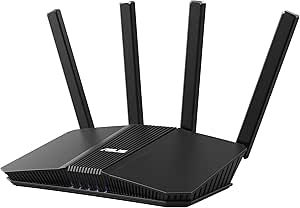 | Best Compact Wi-Fi 7 Upgrade | Wireless standard: Wi-Fi 7 (802.11be) | Frequency bands: Dual-band, 2.4GHz and 5GHz | Maximum speed: Up to 3600 Mbps | VIEW ON AMAZON | See Our Full Breakdown |
| ASUS ZenWiFi BT6 Tri-Band WiFi 7 Mesh Router (1-Pack) |  | Best Wi-Fi 7 Mesh Starter | Wireless standard: Wi-Fi 7 (802.11be) | Frequency bands: Tri-band, 2.4GHz, 5GHz, and 6GHz | Advertised maximum speed: Up to 14 Gbps | VIEW ON AMAZON | See Our Full Breakdown |
| ASUS RT-AC68U AC1900 Dual-Band Wi-Fi Router |  | Best for Basic Wi-Fi 5 Setups | Wireless standard: 802.11ac (Wi-Fi 5) | Frequency bands: 2.4GHz and 5GHz | Combined data rate: Up to 1900 Mbps | VIEW ON AMAZON | See Our Full Breakdown |
| ASUS RT-AX5400 Dual-Band WiFi 6 Router |  | Best for WiFi 6 Gaming and Smart Homes | WiFi standard: WiFi 6 (802.11ax) | Bands: Dual-band: 2.4 GHz and 5 GHz | Maximum data rate: 5,400 Mbps | VIEW ON AMAZON | See Our Full Breakdown |
| ASUS RT-BE92U Tri-Band WiFi 7 Router |  | Best for Tri-Band WiFi 7 Without Gaming-Router Bulk | WiFi standard: WiFi 7 (802.11be) | Bands: Tri-band, including 6 GHz | Maximum speed: Up to 9,700 Mbps | VIEW ON AMAZON | See Our Full Breakdown |
| ASUS ROG Rapture GT-BE98 Pro Quad-Band WiFi 7 Gaming Router (Renewed) |  | Best for High-End Gaming and Multi-Gig Wired Setups | WiFi generation: WiFi 7 (802.11be) | Bands: Quad-band | Maximum data rate: Up to 30 Gbps | VIEW ON AMAZON | See Our Full Breakdown |
| ASUS RT-AX1800S Dual-Band WiFi 6 Router |  | Best Entry-Level WiFi 6 Pick | WiFi standard: WiFi 6 (802.11ax) | Bands: Dual-band | Maximum data rate: 1,800 Mbps | VIEW ON AMAZON | See Our Full Breakdown |
| ASUS RT-BE86U WiFi 7 Gaming Router |  | Best Dual-Band WiFi 7 Upgrade | WiFi standard: WiFi 7 (802.11be) | Maximum wireless speed: 6,800 Mbps | Wired ports: 1 × 10G WAN/LAN and 4 × 1G LAN | VIEW ON AMAZON | See Our Full Breakdown |
| ASUS ROG Rapture GT6 AX10000 Tri-Band WiFi 6 Gaming Mesh System (2-Pack) |  | Best for Large Gaming Homes | System: 2-pack gaming mesh | WiFi generation: WiFi 6 | Frequency bands: Tri-band | VIEW ON AMAZON | See Our Full Breakdown |
| ASUS RT-AXE7800 Tri-Band WiFi 6E Router |  | Best for WiFi 6E and 6GHz | Model: RT-AXE7800 | WiFi standard: WiFi 6E (802.11ax) | Frequency bands: Tri-band: 2.4GHz, 5GHz, and 6GHz | VIEW ON AMAZON | See Our Full Breakdown |
| asus routers for different homes and need | Security | Frequency bands | Antennas |
|---|---|---|---|
| ASUS ZenWiFi ET9 Tri-band Mesh | WPA3 | Tri-band, including 6GHz | — |
| ASUS RT-AX3000 Dual-Band Wi-Fi | — | Dual-band, 2.4GHz and 5GHz | 4 fixed antennas |
| ASUS RT-BE58U WiFi 7 Router | AiProtection Pro, WPA3, firewall, and VPN | Dual-band, 2.4GHz and 5GHz | 4 internal |
| ASUS ZenWiFi BT6 Tri-Band WiFi | AiProtection Pro, WPA3, firewall, VPN, and parental controls | Tri-band, 2.4GHz, 5GHz, and 6GHz | 7 internal |
| ASUS RT-AC68U AC1900 Dual-Band | AiProtection powered by Trend Micro; WPA, WPA2, and WPS | 2.4GHz and 5GHz | — |
| ASUS RT-AX5400 Dual-Band WiFi | — | — | 4 fixed antennas |
| ASUS RT-BE92U Tri-Band WiFi 7 | AiProtection Pro powered by Trend Micro; Safe Browsing | — | — |
| ASUS ROG Rapture GT-BE98 Pro Q | — | — | — |
| ASUS RT-AX1800S Dual-Band WiFi | AiProtection Classic; Instant Guard VPN | — | 4 external |
| ASUS RT-BE86U WiFi 7 Gaming Ro | AiProtection Pro powered by Trend Micro | — | — |
| ASUS ROG Rapture GT6 AX10000 T | AiProtection by Trend Micro, lifetime subscription | Tri-band | 9 internal |
| ASUS RT-AXE7800 Tri-Band WiFi | — | Tri-band: 2.4GHz, 5GHz, and 6GHz | 6 |
More Details on Our Top Picks
ASUS ZenWiFi ET9 Tri-band Mesh WiFi 6E System (3-Pack, Renewed)
The three-unit ZenWiFi ET9 is the clearest fit here for a large or multi-level home that needs broader coverage than a single router can provide. Its Wi-Fi 6E tri-band design adds a 6GHz band, while AiMesh support leaves room to build around compatible ASUS gear. Compared with the single-unit ZenWiFi BT6, this pack arrives with three nodes and lists substantially larger coverage, though BT6 brings Wi-Fi 7 and newer wireless features. The main tradeoff is the renewed condition: the listed warranty is only 90 days, so buyers wanting longer coverage should look at a new router or mesh kit. Its stated 7,800-square-foot coverage is a manufacturer figure, not a guarantee for every floor plan, and walls can limit reach.
Pros:- Three units are suited to spreading coverage across a large home.
- Tri-band Wi-Fi 6E includes a dedicated 6GHz band.
- AiMesh compatibility supports expansion with compatible ASUS routers.
- Includes listed lifetime internet security and parental controls.
Cons:- Renewed condition comes with only a 90-day limited warranty.
- Wi-Fi 6E is an older generation than the Wi-Fi 7 ZenWiFi BT6.
- The 7,800-square-foot coverage figure may not match homes with dense walls or complex layouts.
Best for: Owners of large, multi-level homes who want three mesh units, Wi-Fi 6E, and ASUS security and parental-control features.
Not ideal for: Buyers who want a new system, a longer warranty, or the latest Wi-Fi 7 standard; the renewed listing has a 90-day limited warranty.
- Wireless standard:Wi-Fi 6E (802.11ax)
- Frequency bands:Tri-band, including 6GHz
- Maximum data rate:Up to 7800 Mbps
- Listed coverage:Up to 7,800 sq. ft.
- Pack size:3 units
- Ports:4
- Security:WPA3
- Condition and warranty:Renewed; 90-day limited warranty
Our verdict“Choose the renewed ET9 three-pack when broad mesh coverage matters more than Wi-Fi 7 or a longer warranty.”
ASUS RT-AX3000 Dual-Band Wi-Fi 6 Gigabit Router
The RT-AX3000 makes sense for households that want a capable Wi-Fi 6 upgrade without moving to Wi-Fi 7 or a mesh system. OFDMA and MU-MIMO help the router manage several connected devices, while AiProtection Pro and parental controls add useful network management beyond basic wireless access. Four Gigabit LAN ports and USB 3.0 also give it more wired flexibility than the compact dual-band RT-BE58U, which has newer Wi-Fi 7 features and a 2.5G port. In return, the RT-AX3000 lacks that faster port and uses an older wireless generation. Its listed 3,000-square-foot coverage is best treated as an estimate; homes with difficult layouts may need AiMesh expansion rather than relying on one router alone.
Pros:- Wi-Fi 6 with OFDMA and MU-MIMO supports busy households with multiple devices.
- AiProtection Pro and parental controls are included.
- Four Gigabit LAN ports and USB 3.0 offer useful wired and accessory connections.
- AiMesh compatibility allows expansion with compatible ASUS routers.
Cons:- Dual-band Wi-Fi 6 lacks the 6GHz band found on Wi-Fi 6E and some Wi-Fi 7 options.
- No 2.5G Ethernet port, unlike the RT-BE58U.
- Actual coverage may fall short of the listed 3,000-square-foot figure depending on the home.
Best for: Households upgrading from an older router that want Wi-Fi 6, multiple Gigabit wired connections, and built-in security controls.
Not ideal for: Buyers seeking Wi-Fi 7, a 2.5G Ethernet port, or reliable whole-home coverage from a single router in a large or obstructed home.
- Wireless standard:Wi-Fi 6
- Frequency bands:Dual-band, 2.4GHz and 5GHz
- Maximum data rate:Up to 3000 Mbps
- Listed coverage:Up to 3,000 sq. ft.
- Ethernet ports:1 WAN and 4 Gigabit LAN
- USB:1 USB 3.0 port
- Antennas:4 fixed antennas
- Security and mesh:AiProtection Pro; ASUS AiMesh compatibility
Our verdict“Pick the RT-AX3000 for practical Wi-Fi 6 and wired flexibility when Wi-Fi 7 and 2.5G networking are not priorities.”
ASUS RT-BE58U WiFi 7 Router
The RT-BE58U is a straightforward step into Wi-Fi 7 for smaller homes, with a listed coverage area of 2,000 square feet and a dual-band design that keeps the setup simpler than a mesh system. Multi-Link Operation and 4096-QAM are aimed at compatible devices, while the 2.5G port gives users with faster wired service more headroom than the Gigabit-only RT-AX3000. Its Smart Home Master tools also help separate and manage IoT devices. The tradeoff is that this is not a full-bandwidth showcase for Wi-Fi 7: it has no 6GHz band, and older clients will not gain the full benefit of its newer features. Compared with the tri-band ZenWiFi BT6, it is a single router rather than a mesh-oriented option, but it also avoids buying multiple nodes upfront.
Pros:- Wi-Fi 7 includes Multi-Link Operation and 4096-QAM support.
- A 2.5G port supports faster wired connections than Gigabit-only routers such as the RT-AX3000.
- Smart Home Master helps manage IoT devices.
- AiProtection Pro, WPA3, and VPN features are listed.
Cons:- Dual-band design does not include a 6GHz band.
- Wi-Fi 7 features depend on compatible client devices.
- Listed coverage is smaller than the ZenWiFi ET9 mesh system’s coverage claim.
Best for: Apartment dwellers and small-home owners who want Wi-Fi 7 features, a 2.5G port, and tools for organizing smart-home devices.
Not ideal for: Large-home owners or buyers specifically seeking 6GHz Wi-Fi; this is a dual-band router with a listed 2,000-square-foot coverage area.
- Wireless standard:Wi-Fi 7 (802.11be)
- Frequency bands:Dual-band, 2.4GHz and 5GHz
- Maximum speed:Up to 3600 Mbps
- Bandwidth:160 MHz
- Listed coverage:2,000 sq. ft.
- Ethernet ports:1x 2.5G and 4x 1G
- Antennas:4 internal
- Security:AiProtection Pro, WPA3, firewall, and VPN
Our verdict“Choose the RT-BE58U for a compact Wi-Fi 7 setup with a 2.5G port, provided you do not need 6GHz or mesh coverage.”
ASUS ZenWiFi BT6 Tri-Band WiFi 7 Mesh Router (1-Pack)
The ZenWiFi BT6 one-pack suits buyers who want a Wi-Fi 7-capable router now and the option to expand into an AiMesh network later. Its tri-band setup includes 6GHz, a step beyond the dual-band RT-BE58U, and two 2.5G Ethernet ports give wired devices or a backhaul connection room to grow. The listed coverage reaches 3,000 square feet, but this is still one unit: households with multiple floors or weak-signal areas may need another compatible node. The advertised 14 Gbps maximum is a combined figure, not a promise of that speed on one device. Product details also contain conflicting model and port descriptions, so I would verify the exact hardware configuration before buying. For a ready-made multi-node system, the three-pack ZenWiFi ET9 is a more direct coverage choice, though it uses Wi-Fi 6E.
Pros:- Tri-band Wi-Fi 7 includes a 6GHz band.
- Two 2.5G Ethernet ports support fast wired connections or backhaul.
- AiMesh compatibility allows network expansion with compatible ASUS routers.
- Lists AiProtection Pro, parental controls, and VPN support.
Cons:- A single unit may not cover a large or multi-level home evenly.
- The advertised 14 Gbps is a combined maximum, not an individual-device speed guarantee.
- Product details contain conflicting model and port descriptions.
Best for: Wi-Fi 7 adopters who want a tri-band router with 6GHz and 2.5G wired connections, plus the flexibility to expand with AiMesh.
Not ideal for: Buyers who need multiple mesh nodes out of the box or want unambiguous hardware details before purchase.
- Wireless standard:Wi-Fi 7 (802.11be)
- Frequency bands:Tri-band, 2.4GHz, 5GHz, and 6GHz
- Advertised maximum speed:Up to 14 Gbps
- Listed coverage:Up to 3,000 sq. ft.
- Ethernet:Dual 2.5G Ethernet ports
- Antennas:7 internal
- Pack size:1
- Security:AiProtection Pro, WPA3, firewall, VPN, and parental controls
Our verdict“Start with the BT6 if you want tri-band Wi-Fi 7 and 2.5G ports in one unit, but confirm the hardware details and plan for added nodes if needed.”
ASUS RT-AC68U AC1900 Dual-Band Wi-Fi Router
The RT-AC68U is the sensible choice only when a basic Wi-Fi 5 router meets the household’s needs and newer wireless features are not a priority. Its five Gigabit Ethernet ports give wired devices a useful home, while AiProtection, parental controls, guest networks, and ASUSWRT management cover everyday network tasks. That wired capacity is a contrast with the newer RT-BE58U, which adds Wi-Fi 7 and a 2.5G port but may be more router than a basic setup needs. The main compromise is age: Wi-Fi 5 lacks the newer Wi-Fi 6 efficiency features found on the RT-AX3000, making the AC68U a weaker fit for device-heavy homes or buyers planning a long-term upgrade. Its security options are useful, but the product data lists WPA and WPA2 rather than WPA3.
Pros:- Five Gigabit Ethernet ports provide several wired connections.
- Includes AiProtection security, guest networks, and parental controls.
- Dual-band connectivity covers common 2.4GHz and 5GHz needs.
- Can be managed through ASUSWRT or a mobile app.
Cons:- Wi-Fi 5 is older than the Wi-Fi 6 RT-AX3000 and Wi-Fi 7 models in this roundup.
- Listed security protocols do not include WPA3.
- Less suited to device-heavy homes seeking newer wireless efficiency features.
Best for: Households with mostly wired devices and modest wireless needs that want basic dual-band service, guest networks, and parental controls.
Not ideal for: Homes with many connected devices or buyers upgrading for newer Wi-Fi performance, Wi-Fi 6 efficiency, or WPA3 security.
- Wireless standard:802.11ac (Wi-Fi 5)
- Frequency bands:2.4GHz and 5GHz
- Combined data rate:Up to 1900 Mbps
- Ethernet ports:5 Gigabit ports
- Processor:1 GHz dual-core
- Memory:256 MB RAM; 128 MB flash
- Security:AiProtection powered by Trend Micro; WPA, WPA2, and WPS
- Management:ASUSWRT interface or mobile app
Our verdict“Choose the RT-AC68U for a basic, wired-device-friendly setup only if Wi-Fi 5 and the listed WPA/WPA2 security options suit your needs.”
ASUS RT-AX5400 Dual-Band WiFi 6 Router
The RT-AX5400 is a strong fit for homes that want more WiFi 6 capacity than a basic router without moving to WiFi 7. Its dual-band design and stated speeds up to 5,400 Mbps suit households juggling gaming, streaming, and connected devices, while parental controls and built-in security add useful network management. Compared with the entry-level RT-AX1800S, it has a higher speed tier and more memory; the newer RT-BE86U is the better forward-looking choice if you have WiFi 7 devices or need a 10G port. AiMesh support gives the RT-AX5400 a path to wider coverage, but it remains a dual-band router, and the fixed antennas limit positioning flexibility. Real coverage and throughput depend on the home and connected devices.
Pros:- WiFi 6 and a stated maximum rate of 5,400 Mbps suit busy homes with multiple active devices.
- Built-in security, VPN protection, parental controls, and guest features add network-management options.
- AiMesh compatibility allows expansion with compatible ASUS routers.
- Five ports provide wired connectivity for consoles, computers, and other equipment.
Cons:- Dual-band WiFi lacks the dedicated 6 GHz band available on tri-band models such as the RT-BE92U.
- Fixed antennas offer less placement flexibility than detachable designs.
- Actual coverage and speeds vary with the home layout, interference, and client devices.
Best for: Households with several WiFi 6 devices, online gamers, and smart-home users who want parental controls and the option to expand coverage with AiMesh.
Not ideal for: Buyers building around WiFi 7, needing a 10G wired connection, or prioritizing flexible antenna placement.
- WiFi standard:WiFi 6 (802.11ax)
- Bands:Dual-band: 2.4 GHz and 5 GHz
- Maximum data rate:5,400 Mbps
- Ports:5
- Antennas:4 fixed antennas
- RAM:512 MB
- Security protocols:WPA2-Enterprise, WPA3-Personal, WPS
- Weight:2.7 lb
Our verdict“Choose the RT-AX5400 for a feature-rich WiFi 6 home network, but pick the RT-BE86U if WiFi 7 and 10G wired connectivity matter more.”
ASUS RT-BE92U Tri-Band WiFi 7 Router
The RT-BE92U suits homes ready for WiFi 7 that want a 6 GHz band and tri-band flexibility without stepping up to the large, gaming-focused ROG Rapture GT-BE98 Pro. Its support for 320 MHz channels, 4096-QAM, and multi-link operation is aimed at faster transfers and more adaptable connections, though compatible client devices and network conditions determine how much of that capability a household can use. USB tethering for 4G and 5G gives it a useful backup or alternative WAN option, while Smart Home Master SSIDs help separate device groups. Compared with the dual-band RT-BE86U, this router adds a dedicated 6 GHz band; in return, the headline speed is lower than the GT-BE98 Pro, and many homes will not need its newest wireless features yet.
Pros:- Tri-band WiFi 7 includes 6 GHz and support for channels up to 320 MHz.
- Multi-link operation is designed to improve connection flexibility and transfer efficiency.
- USB tethering supports 4G LTE and 5G connections for an alternate WAN path.
- AiProtection Pro, Safe Browsing, and parental controls are included without a subscription.
Cons:- WiFi 7 features and maximum performance require compatible devices and favorable network conditions.
- Many existing homes may not have enough WiFi 7 clients to benefit from the upgrade.
- Its listed maximum speed is below the quad-band ROG GT-BE98 Pro.
Best for: WiFi 7 early adopters with compatible devices who want tri-band connections, flexible mobile WAN backup, and built-in network security.
Not ideal for: Households with mostly older WiFi clients, or buyers who want the gaming-focused features and extensive multi-gig wired ports of the ROG GT-BE98 Pro.
- WiFi standard:WiFi 7 (802.11be)
- Bands:Tri-band, including 6 GHz
- Maximum speed:Up to 9,700 Mbps
- Maximum channel width:320 MHz
- Modulation:4096-QAM
- WAN features:AI WAN detection; USB tethering for 4G LTE and 5G
- Smart Home Master SSIDs:Up to 3
- Security:AiProtection Pro powered by Trend Micro; Safe Browsing
Our verdict“Pick the RT-BE92U if you want a balanced tri-band WiFi 7 router with mobile tethering, rather than the more specialized GT-BE98 Pro.”
ASUS ROG Rapture GT-BE98 Pro Quad-Band WiFi 7 Gaming Router (Renewed)
The renewed ROG Rapture GT-BE98 Pro is the most specialized pick here: a quad-band WiFi 7 router for gaming households and wired setups that can use its dual 10G and four 2.5G ports. Triple-Level Game Acceleration targets gaming traffic, while the high stated wireless capacity leaves room for many connected devices. Compared with the RT-BE92U, it offers more bands and substantially more multi-gig Ethernet, but that extra capacity is excessive for homes with ordinary broadband, a few clients, or no 10G equipment. The biggest buyer-facing compromise is its renewed condition and 90-day limited warranty, a shorter coverage window than many new-product buyers may prefer. I’d reserve this model for enthusiasts who can use its specialized hardware and accept the condition-related risk.
Pros:- Quad-band WiFi 7 has a stated maximum data rate of up to 30 Gbps.
- Two 10G and four 2.5G ports support high-speed wired devices and network storage.
- Triple-Level Game Acceleration is tailored to gaming traffic.
- AiMesh, VPN features, and subscription-free network security are included.
Cons:- Renewed condition comes with a 90-day limited warranty.
- Its extensive speed and port capacity may go unused in a standard home network.
- Fixed external antennas provide less repositioning flexibility than detachable antennas.
Best for: Competitive gamers and home-lab or media users with multi-gig equipment who want extensive wired capacity alongside quad-band WiFi 7.
Not ideal for: Typical households, buyers without multi-gig devices, or anyone who prefers a new router with a longer warranty.
- WiFi generation:WiFi 7 (802.11be)
- Bands:Quad-band
- Maximum data rate:Up to 30 Gbps
- Ethernet ports:2 × 10G and 4 × 2.5G
- Antenna type:Fixed external
- Security protocol:WPA3
- Weight:4.4 lb
- Condition and warranty:Renewed; 90-day limited warranty
Our verdict“Choose this renewed ROG model only if you can use its gaming features and multi-gig ports and are comfortable with the short warranty.”
ASUS RT-AX1800S Dual-Band WiFi 6 Router
The RT-AX1800S is the straightforward choice for a smaller household moving to WiFi 6 without paying for capabilities it may not use. Its MU-MIMO and OFDMA support is designed to handle multiple devices more efficiently, and four Gigabit LAN ports make it easy to wire a TV, console, or desktop. AiProtection Classic and Instant Guard VPN add security features that are not always present on entry-level routers. Compared with the RT-AX5400, this model has a much lower stated maximum rate and less RAM, so it is a better match for moderate use than a home with heavy simultaneous gaming and streaming. It also lacks a listed USB port, limiting storage-sharing options. Coverage and throughput still depend on placement, walls, interference, and client devices.
Pros:- WiFi 6 with MU-MIMO and OFDMA supports more efficient handling of connected devices.
- Four external antennas and four Gigabit LAN ports serve common home setups.
- AiProtection Classic and Instant Guard VPN provide built-in security features.
- AiMesh compatibility allows expansion with compatible ASUS routers.
Cons:- The 1,800 Mbps stated maximum rate is well below the RT-AX5400 and newer WiFi 7 models.
- No USB port is listed for connecting storage or other USB devices.
- Its 256 MB of RAM is less than the RT-AX5400’s 512 MB.
Best for: Apartment dwellers and small households with a mix of WiFi 6 phones, streaming devices, and a few wired connections.
Not ideal for: Large or heavily connected households, users seeking a USB storage-sharing port, or homes with sustained demanding gaming and streaming on many devices.
- WiFi standard:WiFi 6 (802.11ax)
- Bands:Dual-band
- Maximum data rate:1,800 Mbps
- Antennas:4 external
- Ethernet ports:1 Gigabit WAN and 4 Gigabit LAN
- Processor:Dual-core (4 VPE)
- RAM:256 MB
- Security:AiProtection Classic; Instant Guard VPN
Our verdict“Pick the RT-AX1800S for a modest home that wants WiFi 6 basics and security features, not for a high-demand network.”
ASUS RT-BE86U WiFi 7 Gaming Router
The RT-BE86U makes a practical step into WiFi 7 for gamers and enthusiasts who want a fast wired backbone as well as newer wireless support. Its 10G WAN/LAN port can serve a multi-gig internet connection or a fast wired device, while the quad-core processor and 1 GB of RAM provide more headroom than the entry-level RT-AX1800S. Compared with the tri-band RT-BE92U, this is a dual-band design, so it lacks a dedicated 6 GHz band; buyers with many compatible WiFi 7 devices may prefer the RT-BE92U’s extra band. AiMesh and 4G/5G tethering options add flexibility, and the upright chassis is designed around cooling. Fixed antennas and the absence of 6 GHz are the main compromises for a capable router.
Pros:- WiFi 7 supports combined wireless speeds up to 6,800 Mbps.
- A 10G WAN/LAN port supports multi-gig internet or a fast wired connection.
- AiProtection Pro and parental controls are included without a subscription.
- 4G/5G tethering and AiMesh add WAN and coverage options.
Cons:- Dual-band design lacks the dedicated 6 GHz band found on the RT-BE92U.
- Four fixed antennas limit placement adjustments.
- The stated 2,750 sq. ft. coverage can vary with building materials and layout.
Best for: Gamers and multi-gig internet subscribers who want WiFi 7, a 10G port, and AiMesh expansion in a dual-band router.
Not ideal for: Buyers seeking tri-band WiFi 7 with a dedicated 6 GHz band, or anyone who needs movable antennas for a difficult placement.
- WiFi standard:WiFi 7 (802.11be)
- Maximum wireless speed:6,800 Mbps
- Wired ports:1 × 10G WAN/LAN and 4 × 1G LAN
- Processor:2.6 GHz quad-core 64-bit CPU
- RAM:1 GB
- Listed coverage area:Up to 2,750 sq. ft.
- Security:AiProtection Pro powered by Trend Micro
- Form factor and antennas:Vertical/upright; 4 fixed antennas
Our verdict“Choose the RT-BE86U for dual-band WiFi 7 and a 10G port; opt for the RT-BE92U if tri-band coverage and 6 GHz matter more.”
ASUS ROG Rapture GT6 AX10000 Tri-Band WiFi 6 Gaming Mesh System (2-Pack)
The GT6 is the stronger fit for a large home where gaming traffic and whole-home reach matter more than having the newest WiFi generation. Its two-unit mesh setup, tri-band WiFi 6, and dedicated backhaul help distribute connections across up to 5,800 square feet without relying on a single router to cover every room. Game traffic acceleration and a 2.5 Gbps WAN port add useful headroom for busy networks and faster internet plans. Compared with the single-unit RT-AXE7800, the GT6 is built to spread coverage across multiple locations, but it lacks that model’s 6GHz band. Its WiFi 6 platform may also be less appealing to buyers planning around newer WiFi 7 devices. Choose it for mesh coverage and gaming features; skip it if a single router already covers your home.
Pros:- Two-unit tri-band mesh system with dedicated backhaul
- Coverage rated for up to 5,800 square feet
- 2.5 Gbps WAN port, plus LAN aggregation
- Lifetime AiProtection network security
Cons:- Uses WiFi 6 rather than newer WiFi 7
- Does not provide the dedicated 6GHz band found on the RT-AXE7800
- Actual throughput and coverage depend on the home layout, network, and interference
Best for: Gamers in larger homes who need a two-node mesh, dedicated wireless backhaul, and gaming traffic features.
Not ideal for: Buyers seeking WiFi 7 or a dedicated 6GHz band, or people whose compact home is already well served by a single router.
- System:2-pack gaming mesh
- WiFi generation:WiFi 6
- Frequency bands:Tri-band
- Maximum data transfer rate:10,000 Mbps
- Coverage:Up to 5,800 square feet
- Processor:1.7 GHz tri-core
- WAN port:2.5 Gbps
- Antennas:9 internal
- Security:AiProtection by Trend Micro, lifetime subscription
Our verdict“Pick the GT6 if a large gaming home needs mesh reach and traffic features more than WiFi 7 or 6GHz support.”
ASUS RT-AXE7800 Tri-Band WiFi 6E Router
The RT-AXE7800 is a sensible single-router pick for households ready to use WiFi 6E, especially when compatible devices can connect on its dedicated 6GHz band. That band gives supported devices another route for wireless traffic, while the 2.5G port can serve a high-speed wired connection. Built-in VPN features, flexible parental controls, and AiProtection Pro make it more than a speed-focused choice. Compared with the two-unit ROG Rapture GT6, this router adds 6GHz but does not come as a mesh pair; AiMesh support leaves room to expand later. Its fixed antennas also offer less placement adjustment than models with adjustable antennas, and 6GHz benefits depend on compatible devices and local conditions. Choose it for a capable standalone WiFi 6E network, not as a guaranteed cure for dead zones.
Pros:- Tri-band WiFi 6E includes a dedicated 6GHz band
- 2.5G port supports a high-speed wired connection
- AiProtection Pro, VPN features, and parental controls
- AiMesh support allows network expansion with compatible ASUS devices
Cons:- A single router may not cover large or heavily partitioned homes
- Devices need WiFi 6E support to use the 6GHz band
- Fixed antennas limit placement adjustment
Best for: Households with WiFi 6E-capable phones, laptops, or other devices that want a standalone router with security, VPN, and expansion options.
Not ideal for: Buyers who need a ready-made multi-unit mesh for a large or obstructed home, or whose devices cannot use WiFi 6E.
- Model:RT-AXE7800
- WiFi standard:WiFi 6E (802.11ax)
- Frequency bands:Tri-band: 2.4GHz, 5GHz, and 6GHz
- Maximum data transfer rate:7,800 Mbps
- LAN port bandwidth:2.5 Gigabit
- Number of ports:5
- Antennas:6
- RAM:512 MB
- Compatibility:AiMesh support; Alexa compatible
Our verdict“Choose the RT-AXE7800 for a single-router WiFi 6E upgrade with security and expansion options, but choose the GT6 if you need mesh nodes from the outset.”
How We Picked
I ranked these 12 options by how clearly they serve different home-network needs: everyday use, newer Wi-Fi standards, coverage across several rooms, gaming, or a more compact setup. I weighed wireless generation and band configuration alongside the practical value of the form factor; a mesh kit can address coverage gaps that a high-spec single router cannot, while a basic Wi-Fi 6 router may be a better fit than a premium model for a smaller household.
The order favors flexibility for a broad range of homes, then models with a clear strength for a particular buyer. I also accounted for tradeoffs such as specialized gaming hardware, added mesh nodes, and renewed condition. The product list does not establish measured speed, coverage, setup difficulty, or current software support, so I avoid treating model names or wireless generations as proof of performance. Buyers should check device compatibility, their internet plan, home layout, and included equipment before making a final choice.
Factors to Consider When Choosing 12 Best Asus Routers For Different Homes And Needs
Before choosing among these ASUS routers, start with the problem your current network has—not the newest feature on the box. A coverage gap, crowded wireless environment, older devices, and gaming traffic call for different solutions. These checks can help you avoid paying for capabilities that will not change your day-to-day connection.
Match the router shape to your home layout
A standalone router is usually the simpler choice when your household has one main living area and the signal reaches the rooms where you use devices. A mesh system adds nodes that can spread coverage through a larger or more obstructed home, but each node needs a suitable location and power outlet. Do not assume a three-pack is automatically better than a two-pack; extra nodes can add setup work without solving the actual source of a weak connection. Sketch where the modem, router, and problem rooms sit before choosing a kit. If possible, consider wired backhaul between mesh nodes, since a reliable cable link can reduce the load on wireless communication between them.
Choose Wi-Fi generation around your devices
Wi-Fi 7 is most useful when you own compatible client devices or expect to add them during the router’s useful life. Older phones, laptops, and smart-home devices do not gain every advantage simply because the router supports a newer standard. Wi-Fi 6 models in this roundup may be a more sensible match for a household whose devices and internet plan do not call for the latest generation. Check the wireless capabilities of your most-used devices, not just the newest one in the house. Also confirm that your modem and internet plan can deliver the connection you expect; replacing a router cannot raise the speed of a slower service tier.
Treat band count as a planning tool, not a speed guarantee
Dual-band and tri-band designs allocate wireless traffic differently, but more bands do not guarantee faster service in every home. A tri-band router can offer more room for compatible devices or mesh communication, which may help in a busy network. Its advantage depends on device support, placement, and how the router manages traffic. For a small household with modest internet demands, the added flexibility may go unused. Compare the router’s bands with your device mix and coverage plan rather than choosing by band count alone.
Decide whether gaming features solve a real problem
Gaming-oriented routers are aimed at households that want dedicated network controls and have several devices competing for bandwidth. They cannot remove latency caused by a distant game server, a weak broadband connection, or congestion outside the home. A wired connection to a console or gaming PC can be a better first step when practical. Before paying extra for a gaming design, ask whether you need its network management features or simply want a stable connection in the gaming room. For one player in a small home, a less specialized router may cover the need without the extra complexity.
Check ports and wired expansion before you buy
Wireless features tend to get the attention, but Ethernet ports matter for desktop computers, televisions, network storage, and wired mesh links. Count the devices you plan to connect by cable and check the specifications for the number and type of ports. A router’s wireless generation does not tell you whether its wired connections fit your setup. If your household depends on local file transfers or a wired internet connection above common gigabit speeds, verify the relevant port capabilities rather than inferring them from the model’s Wi-Fi label. A small unmanaged switch can add ports, but it also adds another device and cable to your setup.
Factor in setup, upkeep, and renewed condition
A feature-rich router can take more time to configure and maintain than a basic model, especially if you plan to manage separate networks, parental controls, or gaming priorities. Consider who will handle firmware updates and troubleshooting after installation. For renewed models in this roundup, inspect the seller’s return policy, warranty details, and what accessories are included; a mesh system is less useful if a required power adapter or node is missing. Check the product listing for the exact hardware revision and support details rather than assuming every version has the same capabilities. Clear return terms matter most when you are uncertain about compatibility or wireless reach.
Frequently Asked Questions
Should I choose a mesh system or a single ASUS router for a larger home?
Choose mesh when the main problem is that one router cannot reach rooms across the home, especially if walls or multiple floors weaken the signal. A stronger standalone router may still suit an open layout, so home size alone does not settle the choice. Mesh nodes need sensible placement; putting one in a dead zone can leave it with a weak connection to the main unit. If you can connect nodes by Ethernet, check whether the system supports that arrangement. For a known coverage problem, compare the cost and setup of a multi-node kit with the simpler option of moving or wiring a single router.
Is Wi-Fi 7 worth choosing if most of my devices use Wi-Fi 6?
It can be a reasonable forward-looking purchase, but Wi-Fi 7 will not turn Wi-Fi 6 devices into Wi-Fi 7 clients. The benefit depends on whether you expect to add compatible devices and whether the router’s other features fit your home. If your current network is stable and your internet plan is the main speed limit, a Wi-Fi 6 option may be the more sensible match. Prioritize coverage and wired connections if those are your actual pain points. Choose Wi-Fi 7 for planned device upgrades or a specific need for its newer capabilities, not just because the number is higher.
Are renewed ASUS routers a safe choice for a home network?
A renewed router can suit a buyer who is comfortable checking its condition and seller terms, but renewed status is not the same as buying new. Review the return window, warranty coverage, included power adapters, and whether every mesh unit in the set is present. Confirm the exact model and hardware revision, since product listings can be vague. A mesh kit deserves extra scrutiny because missing or damaged nodes affect the coverage plan. If straightforward support and a predictable return process matter most, a new model may be the lower-risk choice.
Will a gaming router reduce lag in online games?
A gaming router can offer traffic controls that help prioritize game-related traffic when other household activity competes for the connection. It cannot fix delays caused by the broadband provider, a distant game server, or weak wireless reception at the console. First test the gaming device on Ethernet if possible, then check whether other devices are saturating your upload or download connection. Specialized gaming features make more sense in a busy home with several simultaneous users than for one player on an otherwise quiet network. Do not choose a gaming model on the promise of lower latency without identifying where the lag comes from.
Can I keep my existing modem when I replace my ASUS router?
Often, yes: a separate cable or fiber modem can remain in place while you replace the Wi-Fi router. The new router still needs to match the modem’s Ethernet connection and your internet service setup. Some providers require a specific activation process or credentials, so check their instructions before disconnecting the old equipment. If your current device combines modem and router functions, you may need to change its settings to avoid competing wireless networks or routing modes. Confirm your provider’s requirements and identify which device handles the modem function before buying.
Conclusion
For the broadest mix of newer wireless capability and everyday flexibility, I’d start with the RT-BE92U as best overall. Buyers seeking a more accessible Wi-Fi 6 option can look to the RT-AX3000 as best value, while the RT-BE98 Pro is the best premium, gaming-focused pick for households that want specialized features and are comfortable with renewed hardware. For multiroom coverage, compare the ZenWiFi ET9 three-pack and GT6 two-pack against your layout; the former is the clearest mesh choice for spreading coverage, while the latter is aimed more directly at gaming households. I’d point beginners with a compact home toward the simpler RT-AX1800S, and buyers planning for newer compatible devices toward a Wi-Fi 7 model. The right pick depends less on the biggest specification label than on whether you need more reach, newer device support, gaming controls, or uncomplicated everyday Wi-Fi.
Fall Picks
fall essentials
As an affiliate, we earn on qualifying purchases.