
The best AI PC overall in this roundup is the GMKtec EVO-X2 with Ryzen AI Max+ 395, 128GB of memory, and a 2TB SSD: its generous memory and storage suit demanding local AI workloads. For a more workstation-focused build, the MINISFORUM MS-S1 MAX pairs the same processor with 128GB of memory, while the HP OmniDesk is a more familiar desktop choice for business users. The main tradeoffs are compact size versus sustained performance, memory capacity versus upgrade flexibility, and specialized AI hardware versus a straightforward office PC. Some models share the same processor and memory class, so chassis, configuration, and intended use matter as much as the headline AI branding. Read on for the full breakdown and guidance on choosing the right fit.

Get the latest gadgets delivered free with Prime
- Fast, free delivery on millions of items
- Prime Video, Amazon Music and more included
- Member-only deals all year
Complete the kit



Key Takeaways
- 128GB configurations define the high-capacity tier: several Ryzen AI Max+ 395 mini PCs offer ample memory for larger local models, but their differences come down to storage, chassis, and workstation focus.
- The GMKtec EVO-X2 is the broadest-fit pick: its 128GB memory and 2TB SSD make it a strong all-rounder among the listed high-spec mini PCs.
- More storage separates similar configurations: 2TB models such as the GMKtec EVO-X3 and GEEKOM A9 Mega leave more room for models and project files than 1TB counterparts.
- Not every AI PC needs a workstation-class chip: the HP OmniDesk and Dell Pro Micro are aimed at business and everyday desktop use, where manageability and familiar deployment can matter more than local model capacity.
- Check memory type and configuration before buying: the roundup includes both DDR5 and LPDDR5X systems, and the listed capacity alone does not tell you how easily memory can be expanded later.
| HP OmniDesk Business Desktop PC, Intel Core Ultra 7 265, 32GB DDR5 RAM, 1TB SSD |  | Best for Office AI Work | Processor: Intel Core Ultra 7 265, 20 cores, up to 5.2 GHz | Memory: 32GB DDR5, 5600 MHz | Storage: 1TB PCIe Gen 4 NVMe SSD | VIEW LATEST PRICE | See Our Full Breakdown |
| GMKtec EVO-X2 Mini PC with AMD Ryzen AI Max+ 395, 128GB LPDDR5X, and 1TB SSD |  | Best for Local AI Workloads | Processor: AMD Ryzen AI Max+ 395, 16 cores and 32 threads, up to 5.1 GHz | Graphics: AMD Radeon 8060S, 40 RDNA 3.5 compute units | NPU: Up to 50 TOPS | VIEW LATEST PRICE | See Our Full Breakdown |
| GEEKOM A9 Mega AI Workstation Mini PC, Ryzen AI Max+ 395, 128GB RAM, 2TB SSD |  | Best for High-Capacity Workstation Storage | Processor: AMD Ryzen AI Max+ 395, 16 Zen 5 cores | Graphics: AMD Radeon 8060S | Memory: 128GB LPDDR5X, 8000 MT/s | VIEW LATEST PRICE | See Our Full Breakdown |
| GEEKOM IT13 MAX Mini PC, Intel Core Ultra 9 185H, 16GB DDR5 RAM, 1TB SSD |  | Best for Linux-Friendly Compact Setups | Processor: Intel Core Ultra 9 185H | Processor TDP: 65W | Memory: 16GB DDR5 | VIEW LATEST PRICE | See Our Full Breakdown |
| BOSGAME M5 AI Mini PC with AMD Ryzen AI Max+ 395 and 128GB LPDDR5X RAM |  | Best for Windows Pro and Ubuntu Flexibility | Processor: AMD Ryzen AI Max+ 395, 16 cores and 32 threads, up to 5.1 GHz | Memory: 128GB LPDDR5X, 8000 MT/s | Maximum allocatable VRAM: Up to 96GB | VIEW LATEST PRICE | See Our Full Breakdown |
| Dell Pro Micro QCM1250 Mini Business Desktop, Intel Core Ultra 5 235T, Windows 11 Pro |  | Best for Business Desks | Processor: Intel Core Ultra 5 235T, 14 cores | Processor speed: 2.2 GHz base, up to 5 GHz | Memory: Configurable 8GB to 64GB DDR5 | VIEW LATEST PRICE | See Our Full Breakdown |
| GEEKOM IT15 Mini PC, Intel Core Ultra 9 285H, 32GB DDR5 RAM, 1TB SSD |  | Best for Multitasking and Multi-Display Setups | Processor: Intel Core Ultra 9 285H | AI performance: 99 TOPS total: 13 TOPS NPU, 77 TOPS Arc GPU, 9 TOPS CPU | Graphics: Intel Arc 140T | VIEW LATEST PRICE | See Our Full Breakdown |
| AMD Ryzen AI Halo Personal AI Desktop Computer |  | Best for Large Local AI Models | Operating system: Linux | Processor: AMD Ryzen AI Max+ 395, 16 cores and 32 threads | Graphics: AMD Radeon 8060S integrated graphics, 40 RDNA 3.5 compute units | VIEW LATEST PRICE | See Our Full Breakdown |
| MINISFORUM AI X1 Pro-370 Mini PC with AMD Ryzen AI 9 HX 370, 32GB DDR5 RAM, and 1TB SSD | 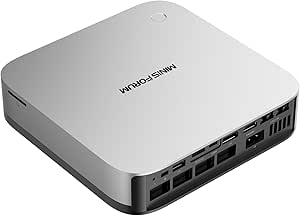 | Best for Expandable Connectivity | Processor: AMD Ryzen AI 9 HX 370, 12 cores and 24 threads, up to 5.1 GHz | Graphics: AMD Radeon 890M | Memory: 32GB DDR5 5600MHz, removable and expandable up to 128GB | VIEW LATEST PRICE | See Our Full Breakdown |
| GMKtec EVO-X3 Mini PC with AMD Ryzen AI Max+ 395, 128GB LPDDR5X, and 2TB PCIe 4.0 SSD |  | Best for AI and Creative Workloads | Processor: AMD Ryzen AI Max+ 395, 16 cores and 32 threads, up to 5.1 GHz | Graphics: Integrated AMD Radeon RX 8060S, 40 RDNA 3.5 compute units | AI performance: Up to 126 TOPS | VIEW LATEST PRICE | See Our Full Breakdown |
| BOSGAME M5 Mini PC, AMD Ryzen AI Max+ 395, 128GB LPDDR5X RAM, 2TB NVMe SSD | | Best for Local AI Workloads | Processor: AMD Ryzen AI Max+ 395, 16 cores / 32 threads, up to 5.1GHz | Memory: 128GB LPDDR5X-8000 unified memory | Storage: 2TB PCIe 4.0 NVMe SSD | VIEW LATEST PRICE | See Our Full Breakdown |
| GMKtec EVO-X2 AI Mini PC, Ryzen AI Max+ 395, 128GB LPDDR5X, 2TB SSD |  | Best for Adjustable Performance | Processor: AMD Ryzen AI Max+ 395, 16 Zen 5 cores / 32 threads, up to 5.1GHz | Graphics: AMD Radeon RX 8060S integrated GPU, 40 RDNA 3.5 compute units | Memory: 128GB LPDDR5X, up to 8000 MT/s | VIEW LATEST PRICE | See Our Full Breakdown |
| GMKtec EVO-X3 Mini PC with AMD Ryzen AI Max+ 395, 128GB LPDDR5X RAM, and 2TB PCIe 4.0 SSD |  | Best for External GPU Expansion | Processor: AMD Ryzen AI Max+ 395, 16 cores / 32 threads, up to 5.1GHz | Graphics: AMD Radeon 8060S, 40 compute units, up to 2900MHz | Memory: 128GB LPDDR5X, up to 8000MT/s | VIEW LATEST PRICE | See Our Full Breakdown |
| MINISFORUM MS-S1 MAX Mini AI Workstation PC, AMD Ryzen AI Max+ 395, 128GB LPDDR5x RAM, 2TB SSD |  | Best for Rack-Ready Expansion | Processor: AMD Ryzen AI Max+ 395, 16 cores / 32 threads, up to 5.1GHz | Graphics: Integrated AMD RDNA 3.5 | NPU and system AI performance: 50 TOPS NPU; 126 TOPS system AI performance | VIEW LATEST PRICE | See Our Full Breakdown |
| GEEKOM GT13 MAX Mini PC, Intel Core Ultra 9 185H, 16GB DDR5 RAM, 1TB SSD |  | Best for Expandable Everyday AI | Processor: Intel Core Ultra 9 185H, 16 cores, up to 5.1GHz | Graphics: Intel Arc Graphics, 8 Xe cores | AI NPU: Up to 11 TOPS | VIEW LATEST PRICE | See Our Full Breakdown |
| AI PC | Processor | Memory | Storage | Graphics |
|---|---|---|---|---|
| HP OmniDesk Business Desktop P | Intel Core Ultra 7 265, 20 cores, up to 5.2 GHz | 32GB DDR5, 5600 MHz | 1TB PCIe Gen 4 NVMe SSD | Integrated Intel Graphics |
| GMKtec EVO-X2 Mini PC with AMD | AMD Ryzen AI Max+ 395, 16 cores and 32 threads, up to 5.1 GHz | 128GB LPDDR5X-8000 unified memory | 1TB M.2 2280 PCIe 4.0 NVMe SSD | AMD Radeon 8060S, 40 RDNA 3.5 compute units |
| GEEKOM A9 Mega AI Workstation | AMD Ryzen AI Max+ 395, 16 Zen 5 cores | 128GB LPDDR5X, 8000 MT/s | 2TB PCIe Gen 4 NVMe SSD | AMD Radeon 8060S |
| GEEKOM IT13 MAX Mini PC | Intel Core Ultra 9 185H | 16GB DDR5 | 1TB SSD | Integrated Intel Arc Graphics |
| BOSGAME M5 AI Mini PC with AMD | AMD Ryzen AI Max+ 395, 16 cores and 32 threads, up to 5.1 GHz | 128GB LPDDR5X, 8000 MT/s | SSD; capacity not specified | Integrated AMD Radeon 8060S |
| Dell Pro Micro QCM1250 Mini Bu | Intel Core Ultra 5 235T, 14 cores | Configurable 8GB to 64GB DDR5 | Configurable 256GB to 2TB M.2 NVMe PCIe SSD | Integrated Intel Graphics |
| GEEKOM IT15 Mini PC | Intel Core Ultra 9 285H | 32GB DDR5, upgradeable to 128GB | 1TB NVMe Gen 4 SSD | Intel Arc 140T |
| AMD Ryzen AI Halo Personal AI | AMD Ryzen AI Max+ 395, 16 cores and 32 threads | 128GB LPDDR5x unified memory, up to 192GB maximum | 2TB M.2 SSD | AMD Radeon 8060S integrated graphics, 40 RDNA 3.5 compute units |
| MINISFORUM AI X1 Pro-370 Mini | AMD Ryzen AI 9 HX 370, 12 cores and 24 threads, up to 5.1 GHz | 32GB DDR5 5600MHz, removable and expandable up to 128GB | 1TB PCIe 4.0 SSD; supports up to three SSDs and 12TB total | AMD Radeon 890M |
| GMKtec EVO-X3 Mini PC with AMD | AMD Ryzen AI Max+ 395, 16 cores and 32 threads, up to 5.1 GHz | 128GB LPDDR5X, up to 8000 MT/s | 2TB PCIe 4.0 SSD | Integrated AMD Radeon RX 8060S, 40 RDNA 3.5 compute units |
| BOSGAME M5 Mini PC | AMD Ryzen AI Max+ 395, 16 cores / 32 threads, up to 5.1GHz | 128GB LPDDR5X-8000 unified memory | 2TB PCIe 4.0 NVMe SSD | Integrated AMD Radeon 8060S, 40 RDNA 3.5 compute units |
| GMKtec EVO-X2 AI Mini PC | AMD Ryzen AI Max+ 395, 16 Zen 5 cores / 32 threads, up to 5.1GHz | 128GB LPDDR5X, up to 8000 MT/s | 2TB SSD | AMD Radeon RX 8060S integrated GPU, 40 RDNA 3.5 compute units |
| GMKtec EVO-X3 Mini PC with AMD | AMD Ryzen AI Max+ 395, 16 cores / 32 threads, up to 5.1GHz | 128GB LPDDR5X, up to 8000MT/s | 2TB PCIe 4.0 SSD | AMD Radeon 8060S, 40 compute units, up to 2900MHz |
| MINISFORUM MS-S1 MAX Mini AI W | AMD Ryzen AI Max+ 395, 16 cores / 32 threads, up to 5.1GHz | Product description lists 128GB LPDDR5x-8000; supplied specifications also contain conflicting 64GB values | 2TB SSD listed in product description | Integrated AMD RDNA 3.5 |
| GEEKOM GT13 MAX Mini PC | Intel Core Ultra 9 185H, 16 cores, up to 5.1GHz | 16GB DDR5; expandable to 96GB | 1TB SSD; expandable to 6TB | Intel Arc Graphics, 8 Xe cores |
More Details on Our Top Picks
HP OmniDesk Business Desktop PC, Intel Core Ultra 7 265, 32GB DDR5 RAM, 1TB SSD
The HP OmniDesk is the grounded choice here for business users who want a full-size desktop for office work and everyday AI-enabled tasks, rather than a compact system built around local model workloads. Its Core Ultra 7 265, 32GB of DDR5 memory, and 1TB NVMe drive give multitasking and file access a solid foundation, while Windows 11 Pro suits managed work environments. Compared with the GMKtec EVO-X2, it has far less memory and integrated graphics that are not aimed at demanding local AI or graphics workloads. In exchange, it offers a more conventional desktop setup with a wired keyboard and mouse included. Its main limits are the lack of a discrete GPU and conflicting listed weights, so I would favor it for productivity over specialist AI development.
Pros:- Core Ultra 7 265 and 32GB DDR5 support demanding everyday multitasking
- 1TB PCIe Gen 4 NVMe SSD provides fast local storage
- Windows 11 Pro, Wi-Fi 6, Bluetooth 5.4, and Ethernet suit office setups
- Wired keyboard and mouse are included
Cons:- Integrated Intel Graphics are a poor fit for GPU-intensive work
- Listed weight conflicts between 12.72 lb and 13.9 lb
- Less memory and AI-focused graphics capacity than the Ryzen AI Max+ 395 mini PCs
Best for: Office teams and small-business users who want a Windows 11 Pro desktop for multitasking, video calls, and routine AI-assisted productivity.
Not ideal for: Developers running large AI models locally or users doing GPU-heavy creative work; the integrated graphics and 32GB memory are less suited to those workloads.
- Processor:Intel Core Ultra 7 265, 20 cores, up to 5.2 GHz
- Memory:32GB DDR5, 5600 MHz
- Storage:1TB PCIe Gen 4 NVMe SSD
- Graphics:Integrated Intel Graphics
- Operating system:Windows 11 Pro
- Wireless:Wi-Fi 6 and Bluetooth 5.4
- Ports:USB-A, USB-C, HDMI, DisplayPort 1.4, Ethernet RJ-45, audio
- Dimensions:13.27 × 12.4 × 6.1 inches
Our verdict“Choose the HP OmniDesk for a ready-to-use business desktop and everyday AI-assisted work, not for large local models or graphics-heavy projects.”
GMKtec EVO-X2 Mini PC with AMD Ryzen AI Max+ 395, 128GB LPDDR5X, and 1TB SSD
The GMKtec EVO-X2 is the strongest fit in this group for buyers who want substantial compute and memory in a compact desktop. Its Ryzen AI Max+ 395, Radeon 8060S graphics, and 128GB of unified memory give it a much higher ceiling for local AI experiments and demanding multitasking than the HP OmniDesk. The NPU is listed at up to 50 TOPS, while dual USB4, Wi-Fi 7, 2.5GbE, and support for four displays make it flexible as a workstation hub. Compared with the GEEKOM A9 Mega, it starts with half the SSD capacity, but it offers two additional M.2 slots for expansion. The key compromise is fixed onboard memory: buyers need to choose this capacity carefully, and added drives are separate purchases.
Pros:- 128GB unified LPDDR5X memory supports memory-intensive local workloads
- Ryzen AI Max+ 395 pairs 16 CPU cores with Radeon 8060S graphics
- Dual USB4, Wi-Fi 7, and 2.5GbE provide broad high-speed connectivity
- Two extra M.2 slots and support for up to four displays add flexibility
Cons:- Onboard memory is not described as user-upgradable
- Included SSD is 1TB, and additional drives must be purchased separately
- Compact integrated-graphics design is not a substitute for a system with a separate professional GPU
Best for: AI developers and technically confident users who want a compact system with large unified memory, strong integrated graphics, and room to add SSD storage.
Not ideal for: Buyers who need user-upgradable system memory, a discrete GPU, or a desktop ready to store a large project library on its included drive.
- Processor:AMD Ryzen AI Max+ 395, 16 cores and 32 threads, up to 5.1 GHz
- Graphics:AMD Radeon 8060S, 40 RDNA 3.5 compute units
- NPU:Up to 50 TOPS
- Memory:128GB LPDDR5X-8000 unified memory
- Storage:1TB M.2 2280 PCIe 4.0 NVMe SSD
- Additional storage:Two M.2 2280 PCIe 4.0 x4 slots; up to 8TB per drive
- Display support:Up to four displays via HDMI 2.1, DisplayPort 1.4, and two USB4 ports
- Networking:Wi-Fi 7, Bluetooth 5.4, and 2.5GbE
Our verdict“Pick the EVO-X2 if local AI capacity and a compact footprint matter more than upgradable memory or a larger included SSD.”
GEEKOM A9 Mega AI Workstation Mini PC, Ryzen AI Max+ 395, 128GB RAM, 2TB SSD
The GEEKOM A9 Mega takes the Ryzen AI Max+ 395 platform and pairs its 128GB of memory with a 2TB Gen 4 SSD, giving AI and creative workloads more included storage than the GMKtec EVO-X2. The listing also specifies up to 96GB of allocatable VRAM, a 50 TOPS NPU, and support for four displays, including 8K output. That combination makes it a better out-of-box fit for users juggling large datasets, model files, or multiple display workflows than the HP OmniDesk. Its dual 2.5GbE ports are a useful distinction for wired network setups. I would still treat the local-AI performance claims as specifications rather than proven results: no independent benchmarks are supplied, and the LPDDR5X memory has no stated upgrade path.
Pros:- 128GB LPDDR5X memory with up to 96GB allocatable as VRAM
- 2TB PCIe Gen 4 SSD offers more included capacity than the GMKtec EVO-X2
- Supports up to four displays and up to 8K output
- Wi-Fi 7, dual 2.5GbE, and a listed three-year limited warranty
Cons:- Memory is LPDDR5X with no upgrade option stated
- Listing provides no independent benchmarks for its local AI performance claims
- Integrated Radeon graphics do not replace a separate GPU for every professional graphics workload
Best for: AI practitioners and creators who want 128GB of unified memory, a larger included SSD, and multi-display support in a mini workstation.
Not ideal for: Buyers who need expandable system memory or validated workload benchmarks before committing to a machine for a specific production task.
- Processor:AMD Ryzen AI Max+ 395, 16 Zen 5 cores
- Graphics:AMD Radeon 8060S
- Memory:128GB LPDDR5X, 8000 MT/s
- Allocatable VRAM:Up to 96GB
- Storage:2TB PCIe Gen 4 NVMe SSD
- AI compute:126 TOPS total; 50 TOPS NPU
- Display support:Up to four displays, up to 8K
- Networking:Wi-Fi 7 and dual 2.5GbE LAN
- Warranty:3-year limited warranty
Our verdict“Choose the A9 Mega over the EVO-X2 if you want the same broad memory class with twice the listed SSD capacity and dual 2.5GbE.”
GEEKOM IT13 MAX Mini PC, Intel Core Ultra 9 185H, 16GB DDR5 RAM, 1TB SSD
The GEEKOM IT13 MAX is the compact, general-purpose option for buyers who want an Intel Core Ultra processor and the freedom to run Linux or Windows. Its 16GB of DDR5 memory and 1TB SSD suit office work, development, and lighter creative tasks, while four-display support is useful in a space-conscious workstation. Compared with the 128GB GMKtec EVO-X2, this model has a much lower ceiling for memory-heavy AI work; its appeal is the smaller, simpler role rather than local large-model capacity. The Intel Arc integrated graphics and 65W operation also make the platform more suited to everyday workloads than GPU-intensive projects. The 16GB configuration is the main limitation, and claims about quieter cooling or performance gains are not independently verified in the supplied details.
Pros:- Compact mini PC design fits space-limited desks
- Supports Windows and major Linux distributions
- Can drive up to four displays, including resolutions up to 7680 × 4320
- 65W processor configuration and a listed three-year warranty
Cons:- 16GB memory can constrain demanding development and AI workloads
- Integrated Intel Arc graphics are less suited to GPU-heavy tasks than the Radeon 8060S systems
- Cooling and performance claims are not independently verified in the supplied details
Best for: Developers and office users who need a compact multi-display PC with Linux flexibility and moderate workloads.
Not ideal for: Local AI users, heavy multitaskers, or creators whose work depends on large memory pools or sustained GPU performance.
- Processor:Intel Core Ultra 9 185H
- Processor TDP:65W
- Memory:16GB DDR5
- Storage:1TB SSD
- Graphics:Integrated Intel Arc Graphics
- Operating systems:Linux; supports Windows and major Linux distributions
- Display support:Up to four displays; maximum resolution 7680 × 4320
- Video output:HDMI, DisplayPort, and USB-C
- Warranty:3 years
Our verdict“Choose the IT13 MAX for a compact Linux-capable work PC, but step up to a 128GB Ryzen AI Max+ system for serious local AI use.”
BOSGAME M5 AI Mini PC with AMD Ryzen AI Max+ 395 and 128GB LPDDR5X RAM
The BOSGAME M5 AI Mini PC stands out for pairing the Ryzen AI Max+ 395 and 128GB unified memory with Windows 11 Pro and stated Ubuntu support. Its ability to allocate up to 96GB as VRAM, plus dual 40Gbps USB4 and support for four high-resolution displays, gives AI developers and technical users a flexible compact platform. Compared with the GEEKOM A9 Mega, the BOSGAME listing does not specify SSD capacity, so storage planning is less clear before purchase. Its one-year full warranty with three-year hardware parts protection also differs from the GEEKOM’s listed three-year limited warranty. Integrated Radeon graphics make this more capable than a basic office mini PC, but it is not a replacement for a separate professional GPU where specialized graphics performance is required.
Pros:- 128GB LPDDR5X unified memory with up to 96GB allocatable as VRAM
- Ryzen AI Max+ 395 provides 16 cores and 32 threads
- Dual 40Gbps USB4, Wi-Fi 7, and 2.5GbE support fast peripheral and network connections
- Supports Windows 11 Pro and Ubuntu, with up to four 8K displays
Cons:- SSD capacity is not specified in the product details
- LPDDR5X memory is described as onboard and is not listed as upgradeable
- Integrated graphics may not suit workloads requiring a separate professional GPU
Best for: Technical users who want a high-memory AI mini PC with Windows 11 Pro, Ubuntu support, fast USB4, and substantial display connectivity.
Not ideal for: Buyers who need a clearly stated SSD capacity, user-upgradable memory, or a discrete GPU for professional rendering and graphics workloads.
- Processor:AMD Ryzen AI Max+ 395, 16 cores and 32 threads, up to 5.1 GHz
- Memory:128GB LPDDR5X, 8000 MT/s
- Maximum allocatable VRAM:Up to 96GB
- Graphics:Integrated AMD Radeon 8060S
- Storage:SSD; capacity not specified
- Display outputs:HDMI 2.1, DisplayPort 1.4, and two USB4; supports up to four 8K displays
- Connectivity:Wi-Fi 7, Bluetooth 5.4, and 2.5GbE Ethernet
- Operating systems:Windows 11 Pro; Ubuntu support
- Warranty:1-year full warranty and 3-year hardware parts protection
Our verdict“Pick the BOSGAME M5 for its OS flexibility and high-memory AI configuration, but verify the included SSD capacity before choosing it over the GEEKOM A9 Mega.”
Dell Pro Micro QCM1250 Mini Business Desktop, Intel Core Ultra 5 235T, Windows 11 Pro
I’d choose the Dell Pro Micro QCM1250 for an office setup where compact size, Windows 11 Pro, and familiar business connections matter more than high-end local AI throughput. Its Core Ultra 5 235T and integrated graphics suit everyday productivity, while support for two 4K displays makes a multi-screen desk practical without a tower. Compared with the more powerful GEEKOM IT15, this Dell is a restrained business machine, not the pick for demanding creative or AI workloads. Its configurable DDR5 memory and SSD let buyers tailor capacity, but the unit has been resealed for upgrades, and the final configuration may vary. I’d also weigh its one-year seller warranty against the IT15’s three-year coverage before choosing.
Pros:- Compact 2.56-pound design frees up desk space
- Windows 11 Pro and a broad selection of business-friendly ports
- Supports two external displays at up to 4K and 60Hz
- DDR5 memory and NVMe storage configurations can be tailored
Cons:- Resealed for memory or SSD upgrades, which may not suit buyers seeking factory-sealed hardware
- Memory and storage configurations may vary
- One-year seller warranty is shorter than the GEEKOM IT15’s stated coverage
Best for: Small-business teams that need a compact Windows 11 Pro desktop for office applications and two-display workstations.
Not ideal for: Local AI developers and creative professionals who need stronger graphics or a clearly specified high-memory configuration.
- Processor:Intel Core Ultra 5 235T, 14 cores
- Processor speed:2.2 GHz base, up to 5 GHz
- Memory:Configurable 8GB to 64GB DDR5
- Storage:Configurable 256GB to 2TB M.2 NVMe PCIe SSD
- Operating system:Windows 11 Pro
- Graphics:Integrated Intel Graphics
- Display support:Two external displays, up to 4K at 60Hz
- Connectivity:Wi-Fi 6E, Bluetooth, Ethernet
- Weight:2.56 lbs
Our verdict“Choose the Dell for a compact, practical business workstation, but look to the GEEKOM IT15 for more demanding AI and creative work.”
GEEKOM IT15 Mini PC, Intel Core Ultra 9 285H, 32GB DDR5 RAM, 1TB SSD
The GEEKOM IT15 is the most flexible pick here for people who want a compact PC to handle demanding multitasking, AI-enabled applications, and a crowded display setup. Its Core Ultra 9 285H, Arc 140T graphics, and stated 99 TOPS of combined AI performance give it a stronger workload profile than the business-focused Dell Pro Micro QCM1250. The included 32GB of DDR5 and 1TB SSD offer a useful starting configuration, and memory can be expanded up to 128GB. It also supports four displays and has Wi-Fi 7 and 2.5Gb Ethernet. Compared with the MINISFORUM AI X1 Pro-370, its advertised display count is higher, but the listed resolution details are inconsistent. I’d verify display compatibility before building a setup around all four outputs.
Pros:- Core Ultra 9 processor and integrated Arc graphics target demanding workloads
- 32GB DDR5 memory is upgradeable to 128GB
- Supports up to four displays
- Wi-Fi 7, Bluetooth 5.4, and 2.5Gbps Ethernet provide modern connectivity
Cons:- Listed display-resolution specifications are inconsistent
- Integrated graphics are less suited to graphics-heavy work than a system with a dedicated GPU
- Its 32GB installed memory is far below the 128GB in the AMD Ryzen AI Halo
Best for: Power users and developers who want a compact, upgradeable system for multitasking, AI applications, and multiple monitors.
Not ideal for: Buyers who need clear, verified maximum display resolutions or a large unified memory pool for running very large local models.
- Processor:Intel Core Ultra 9 285H
- AI performance:99 TOPS total: 13 TOPS NPU, 77 TOPS Arc GPU, 9 TOPS CPU
- Graphics:Intel Arc 140T
- Memory:32GB DDR5, upgradeable to 128GB
- Storage:1TB NVMe Gen 4 SSD
- Display support:Up to four displays; listed resolutions include two 8K and two 4K outputs
- Wireless:Wi-Fi 7 and Bluetooth 5.4
- Ethernet:2.5Gbps
- Warranty:Three years
Our verdict“Pick the IT15 for an upgradeable, multi-display Intel mini PC, but confirm the display details and choose the Ryzen AI Halo for memory-heavy local AI work.”
AMD Ryzen AI Halo Personal AI Desktop Computer
The AMD Ryzen AI Halo is the specialist choice in this group: its 128GB of unified memory is aimed at local AI development and inference, with support listed for models up to 200 billion parameters. That makes it a better fit for memory-hungry experiments than the MINISFORUM AI X1 Pro-370, which starts with 32GB of removable DDR5, or the Dell Pro Micro QCM1250’s more modest configurable memory. A 16-core Ryzen AI Max+ 395, Radeon 8060S graphics, and XDNA 2 NPU round out the compute platform, while Linux, ROCm, and preloaded development tools target hands-on developers. The tradeoff is specialization: Linux may take more setup than Windows, and the listed HDMI output is less expansive than the multi-output designs of the GEEKOM IT15 and MINISFORUM. Its one-year limited warranty is also brief for a development workstation.
Pros:- 128GB unified memory is suited to memory-intensive local AI work
- Listed support for models up to 200 billion parameters
- Includes ROCm support and preloaded AI development tools
- Compact chassis pairs with 10GbE and Wi-Fi 7
Cons:- Linux is less suitable for buyers who require a ready-to-use Windows desktop
- Only HDMI 2.1b is listed for video output
- One-year limited warranty is shorter than the GEEKOM IT15’s stated three years
Best for: AI researchers and developers who want substantial unified memory for running and experimenting with large models locally on Linux.
Not ideal for: Windows-first office users, buyers who need several direct display outputs, or anyone who does not need a large memory pool for local AI.
- Operating system:Linux
- Processor:AMD Ryzen AI Max+ 395, 16 cores and 32 threads
- Graphics:AMD Radeon 8060S integrated graphics, 40 RDNA 3.5 compute units
- NPU:AMD XDNA 2, up to 50 TOPS
- Memory:128GB LPDDR5x unified memory, up to 192GB maximum
- Memory bandwidth:256 GB/s
- Storage:2TB M.2 SSD
- Networking:10GbE LAN, Wi-Fi 7, Bluetooth 5.4
- Dimensions:6 × 6 × 2 inches
Our verdict“Choose the Ryzen AI Halo when large local models and Linux development are the priority, not when you need a general-purpose Windows mini PC.”
MINISFORUM AI X1 Pro-370 Mini PC with AMD Ryzen AI 9 HX 370, 32GB DDR5 RAM, and 1TB SSD
I’d put the MINISFORUM AI X1 Pro-370 on a shortlist for a desk that needs a compact AI-capable PC with room to grow around it. Its Ryzen AI 9 HX 370 and Radeon 890M combine CPU and integrated graphics in a system that supports up to four displays, while USB4 and OCuLink add options for high-speed peripherals or external graphics expansion. Compared with the GEEKOM IT15, it trades Intel’s stated 99 TOPS total AI figure for a stronger expansion story: removable DDR5 can reach 128GB, and storage can scale to three SSDs and 12TB. The included 32GB and 1TB are useful, but buyers must budget for upgrades if they need that ceiling. Its integrated graphics also mean OCuLink is an expansion path, not a built-in dedicated GPU.
Pros:- Ryzen AI 9 HX 370 pairs 12 CPU cores with Radeon 890M graphics
- Removable memory supports upgrades up to 128GB
- Three SSDs can be installed, with stated capacity up to 12TB
- USB4, OCuLink, dual 2.5GbE, and support for four displays
Cons:- Ships with 32GB memory, so reaching the stated maximum requires an upgrade
- Integrated graphics are not a substitute for an installed dedicated GPU
- Its expansion options may be unnecessary for buyers seeking a simple everyday desktop
Best for: Technical users who want a compact Windows PC with multiple displays, upgradeable memory and storage, and options for external graphics.
Not ideal for: Buyers who want large AI workloads ready to run with 128GB memory installed or who need dedicated graphics without adding hardware.
- Processor:AMD Ryzen AI 9 HX 370, 12 cores and 24 threads, up to 5.1 GHz
- Graphics:AMD Radeon 890M
- Memory:32GB DDR5 5600MHz, removable and expandable up to 128GB
- Storage:1TB PCIe 4.0 SSD; supports up to three SSDs and 12TB total
- Display support:Up to four displays; maximum resolution 7680 × 4320
- Ports:2 × USB4, HDMI 2.1, DisplayPort 2.0, OCuLink
- Networking:Dual 2.5Gbps Ethernet, Wi-Fi 7, Bluetooth 5.4
- Operating system:Windows 11
- Weight:2.45 kg
Our verdict“Choose the MINISFORUM for a flexible, upgrade-friendly workstation; pick the Ryzen AI Halo instead if large unified memory for local models matters more than expansion.”
GMKtec EVO-X3 Mini PC with AMD Ryzen AI Max+ 395, 128GB LPDDR5X, and 2TB PCIe 4.0 SSD
The GMKtec EVO-X3 is a strong fit for buyers who want substantial memory and storage in one compact system for local AI, development, or content creation. Its Ryzen AI Max+ 395, 128GB of LPDDR5X, and 2TB PCIe 4.0 SSD give it a more ready-to-work configuration than the MINISFORUM AI X1 Pro-370, which starts with 32GB and depends on upgrades for larger workloads. The EVO-X3 also lists integrated Radeon RX 8060S graphics and up to 126 TOPS of AI performance. Unlike the AMD Ryzen AI Halo, it adds OCuLink for external GPU expansion and dual M.2 slots, with up to 16TB of supported storage. The tradeoffs are fixed onboard memory and a one-year warranty; external graphics also require a separate dock and card.
Pros:- 128GB LPDDR5X memory provides a large pool for local AI and multitasking
- Ryzen AI Max+ 395 and integrated Radeon RX 8060S target compute-heavy work
- 2TB SSD plus dual M.2 slots supports substantial storage expansion
- OCuLink, Wi-Fi 7, and 2.5GbE offer flexible connectivity
Cons:- Onboard LPDDR5X memory is not listed as upgradeable
- OCuLink external graphics requires a separate dock and graphics card
- One-year limited warranty provides a short coverage period
Best for: AI developers and creators who want 128GB memory and 2TB storage installed, with an option to add an external GPU later.
Not ideal for: Buyers who need removable memory, a longer warranty, or a complete external-GPU setup included.
- Processor:AMD Ryzen AI Max+ 395, 16 cores and 32 threads, up to 5.1 GHz
- Graphics:Integrated AMD Radeon RX 8060S, 40 RDNA 3.5 compute units
- AI performance:Up to 126 TOPS
- Memory:128GB LPDDR5X, up to 8000 MT/s
- Storage:2TB PCIe 4.0 SSD
- Additional storage support:Dual M.2 2280 PCIe 4.0 x4 slots; up to 16TB total
- External GPU expansion:OCuLink PCIe 4.0 x4
- Networking:2.5GbE, Wi-Fi 7, Bluetooth 5.4
- Warranty:One-year limited warranty
Our verdict“Pick the EVO-X3 for high-memory local AI and creative work in a compact system, provided fixed RAM and separate external-GPU hardware suit your plans.”
BOSGAME M5 Mini PC, AMD Ryzen AI Max+ 395, 128GB LPDDR5X RAM, 2TB NVMe SSD
The BOSGAME M5 pairs a 16-core Ryzen AI Max+ 395 with 128GB of unified memory, giving memory-hungry local AI models and creative projects more room than the 16GB GEEKOM GT13 MAX. Its integrated Radeon 8060S also suits GPU-accelerated work without a separate graphics card, though it shares system memory and won’t match a dedicated GPU for every graphics task. A second M.2 slot makes it easier to add storage as project files grow, while four-display support and Wi-Fi 7 suit a busy workstation setup. Compared with the more expansion-focused MINISFORUM MS-S1 MAX, this is the more straightforward compact workstation, but it lacks that model’s PCIe x16 slot and dual 10GbE. The listed 240-watt power consumption is a meaningful tradeoff for a small PC.
Pros:- 128GB unified memory supports memory-intensive local AI and creative workloads.
- Radeon 8060S graphics provide capable integrated GPU resources without a separate card.
- Second M.2 slot allows storage expansion.
- Four-display support, Wi-Fi 7, and 2.5GbE offer flexible workstation connectivity.
Cons:- Listed power consumption of 240 watts is high for a compact mini PC.
- Integrated graphics share system memory rather than using dedicated VRAM.
- Does not offer the PCIe x16 expansion or dual 10GbE networking found on the MINISFORUM MS-S1 MAX.
Best for: Developers and creators running local AI workloads who want a large unified memory pool and room to add an SSD.
Not ideal for: Buyers who need dedicated graphics, lower power consumption, or workstation-class expansion such as PCIe x16.
- Processor:AMD Ryzen AI Max+ 395, 16 cores / 32 threads, up to 5.1GHz
- Memory:128GB LPDDR5X-8000 unified memory
- Storage:2TB PCIe 4.0 NVMe SSD
- Storage expansion:Second M.2 2280 PCIe 4.0 slot
- Graphics:Integrated AMD Radeon 8060S, 40 RDNA 3.5 compute units
- AI performance:50 TOPS NPU; up to 126 TOPS total AI performance
- Display support:Up to four displays; up to 8K at 60Hz
- Connectivity:Dual USB4, HDMI 2.1, DisplayPort 1.4, Wi-Fi 7, Bluetooth 5.4, 2.5GbE, SD 4.0
- Operating system:Windows 11 Pro
Our verdict“Choose the BOSGAME M5 for a compact local-AI workstation with ample memory and storage expansion, but skip it if dedicated graphics or lower power use matters more.”
GMKtec EVO-X2 AI Mini PC, Ryzen AI Max+ 395, 128GB LPDDR5X, 2TB SSD
The GMKtec EVO-X2 uses the same Ryzen AI Max+ 395 and 128GB memory combination as the BOSGAME M5, but its distinguishing feature is the choice of Quiet, Balanced, and Performance modes. That lets buyers set a lower-power profile for lighter work or select the higher 140W mode for demanding sessions, rather than treating every task alike. Three fans and three heat pipes support that range, although a multi-fan cooling setup may be audible under load. Like the M5, it has four-display support, Wi-Fi 7, and a 2TB SSD; unlike the EVO-X3, it does not list OCuLink for external GPU expansion. The onboard memory cannot be upgraded, so its large capacity is useful from day one but fixed for the life of the system.
Pros:- Ryzen AI Max+ 395 combines 16 cores with an integrated AI NPU.
- 128GB LPDDR5X memory and a 2TB SSD provide substantial capacity for demanding workloads.
- Three selectable power modes let users tailor operation to the task.
- Four-display support, Wi-Fi 7, USB4, and 2.5GbE cover a broad range of workstation needs.
Cons:- LPDDR5X memory is onboard and cannot be upgraded.
- Three-fan cooling may be audible during demanding workloads.
- Unlike the GMKtec EVO-X3, it does not list OCuLink for external GPU expansion.
Best for: AI developers and power users who want a high-memory mini PC and the ability to choose between quieter and higher-performance operating modes.
Not ideal for: Buyers who need replaceable system memory, OCuLink eGPU expansion, or a fanless or especially quiet computer under heavy load.
- Processor:AMD Ryzen AI Max+ 395, 16 Zen 5 cores / 32 threads, up to 5.1GHz
- Graphics:AMD Radeon RX 8060S integrated GPU, 40 RDNA 3.5 compute units
- Memory:128GB LPDDR5X, up to 8000 MT/s
- Storage:2TB SSD
- Performance modes:Quiet 54W, Balanced 85W, Performance 140W
- Display support:Up to four displays via HDMI 2.1, DisplayPort 1.4, and dual USB4
- Networking:2.5GbE, Wi-Fi 7, Bluetooth 5.4
- Cooling:Three fans and three heat pipes
- Warranty:1-year limited warranty
Our verdict“Pick the EVO-X2 if adjustable power modes matter alongside high-capacity AI hardware, but look elsewhere if you need upgradeable memory or eGPU expansion.”
GMKtec EVO-X3 Mini PC with AMD Ryzen AI Max+ 395, 128GB LPDDR5X RAM, and 2TB PCIe 4.0 SSD
The EVO-X3 stands apart from the GMKtec EVO-X2 by adding OCuLink eGPU expansion, giving buyers a route to connect an external graphics card when integrated Radeon 8060S graphics no longer meet their needs. Its 128GB unified memory and Ryzen AI Max+ 395 also make it suited to local AI and creative applications that benefit from a large shared memory pool. The tradeoff is that OCuLink is not a plug-and-play convenience: the listed connection procedure requires shutting the PC down before connecting or disconnecting the device. It also lists dual-display output, fewer than the four displays supported by the EVO-X2 and BOSGAME M5. Triple-fan cooling supports a powerful compact system, but buyers should weigh the active cooling and external hardware against a simpler all-in-one setup.
Pros:- Ryzen AI Max+ 395 and Radeon 8060S support demanding AI, creative, and graphics workloads.
- 128GB LPDDR5X unified memory offers substantial capacity for large projects.
- OCuLink PCIe Gen4 x4 provides an external GPU expansion path.
- Includes USB4, Wi-Fi 7, Bluetooth 5.4, and 2.5G LAN.
Cons:- OCuLink devices must be connected or disconnected with the PC powered off.
- Supports up to two displays, fewer than the four supported by the GMKtec EVO-X2.
- Triple-fan cooling is required for this compact system and may be audible under load.
Best for: AI developers and creators who want a powerful mini PC now and plan to add an OCuLink external GPU for heavier graphics work.
Not ideal for: Users who need four displays, frequent hot-plugging of peripherals, or a compact setup without external GPU hardware.
- Processor:AMD Ryzen AI Max+ 395, 16 cores / 32 threads, up to 5.1GHz
- Graphics:AMD Radeon 8060S, 40 compute units, up to 2900MHz
- Memory:128GB LPDDR5X, up to 8000MT/s
- Storage:2TB PCIe 4.0 SSD
- AI performance:Up to 126 TOPS total; XDNA 2 NPU up to 50 TOPS
- Display output:Dual display via HDMI 2.1 and USB4, up to 8K
- Expansion:OCuLink PCIe Gen4 x4
- Connectivity:USB4 up to 40Gbps, Wi-Fi 7, Bluetooth 5.4, 2.5G LAN
- Cooling:Triple-fan cooling with three copper pipes
Our verdict“Choose the EVO-X3 if OCuLink eGPU expansion is a priority; choose the EVO-X2 instead if you need four displays and simpler graphics setup.”
MINISFORUM MS-S1 MAX Mini AI Workstation PC, AMD Ryzen AI Max+ 395, 128GB LPDDR5x RAM, 2TB SSD
The MINISFORUM MS-S1 MAX is the most workstation-oriented system here: alongside the Ryzen AI Max+ 395 and 128GB unified memory, it lists a PCIe x16 slot, dual M.2 slots, dual 10GbE, and USB4 V2. Those connections suit a fixed desk or rack deployment better than the more conventional BOSGAME M5, which has useful ports but not the same expansion and networking focus. Rack support and multi-unit clustering also make the MS-S1 MAX a more plausible building block for a small AI setup. The costs are practical rather than theoretical: its 320W supply and dual turbine fans can mean more heat and noise under load. There is also conflicting memory information in the supplied product data, so I would verify the configuration before choosing it.
Pros:- PCIe x16 slot and dual M.2 slots provide more expansion than the BOSGAME M5.
- Dual 10GbE suits high-speed wired networks and workstation transfers.
- USB4 V2 supports data transfer up to 80Gbps.
- Rack deployment and multi-unit clustering support more specialized AI setups.
Cons:- Dual turbine fans may produce noticeable noise under heavy workloads.
- The supplied product text and specifications conflict on memory details, so the configuration needs verification.
- The 320W power supply points to a higher-power system than a basic mini PC.
Best for: AI teams and workstation users planning rack deployment, fast wired networking, or PCIe expansion in a compact system.
Not ideal for: Buyers seeking a quiet everyday mini PC or anyone unwilling to verify the actual memory configuration before purchase.
- Processor:AMD Ryzen AI Max+ 395, 16 cores / 32 threads, up to 5.1GHz
- Graphics:Integrated AMD RDNA 3.5
- NPU and system AI performance:50 TOPS NPU; 126 TOPS system AI performance
- Memory:Product description lists 128GB LPDDR5x-8000; supplied specifications also contain conflicting 64GB values
- Storage:2TB SSD listed in product description
- Storage expansion:Dual M.2 PCIe 4.0 slots; up to 16TB RAID 0/1 listed
- Expansion slot:PCIe x16
- Networking:Dual 10GbE and Wi-Fi 7
- USB and video:USB4 V2 up to 80Gbps; HDMI 2.1 up to 8K at 60Hz
Our verdict“Choose the MS-S1 MAX for rack deployment, fast networking, and expansion options, but verify its memory configuration and accept the likely noise of its cooling system.”
GEEKOM GT13 MAX Mini PC, Intel Core Ultra 9 185H, 16GB DDR5 RAM, 1TB SSD
The GEEKOM GT13 MAX takes a more approachable route to AI computing than the 128GB Ryzen AI Max+ systems in this roundup. Its Core Ultra 9 185H, Intel Arc graphics, and AI Boost NPU suit office work and compatible AI features, while standard DDR5 can be expanded to 96GB as needs change. That upgrade path is a practical distinction from the BOSGAME M5 and GMKtec EVO-X2, whose memory is onboard. However, it ships with just 16GB of RAM and its NPU is rated at up to 11 TOPS, far below the 50 TOPS NPU listed for those Ryzen AI Max+ models. Four-display support, dual 2.5G LAN, and a three-year limited warranty round out the package, but demanding local AI buyers should look to the higher-memory alternatives.
Pros:- Core Ultra 9 185H and Intel Arc graphics suit general productivity and compatible creative workloads.
- DDR5 memory is expandable to 96GB, unlike the onboard memory in the BOSGAME M5.
- Storage can be expanded to 6TB.
- Supports up to four displays and includes dual 2.5G LAN, Wi-Fi 7, and a three-year limited warranty.
Cons:- The included 16GB of memory is a constraint for demanding AI and creative workloads.
- Its NPU is rated at up to 11 TOPS, below the 50 TOPS NPU listed for the Ryzen AI Max+ systems.
- Local AI and gaming capability depends on compatible software and the demands of each workload.
Best for: Office users and light creative professionals who want a compact AI-capable PC with memory and storage they can expand later.
Not ideal for: Local AI practitioners running memory-intensive models or buyers who need a high-performance NPU and substantial memory out of the box.
- Processor:Intel Core Ultra 9 185H, 16 cores, up to 5.1GHz
- Graphics:Intel Arc Graphics, 8 Xe cores
- AI NPU:Up to 11 TOPS
- Memory:16GB DDR5; expandable to 96GB
- Storage:1TB SSD; expandable to 6TB
- Display outputs:Dual USB4, dual HDMI 2.0, Mini DisplayPort 1.4; supports up to four displays
- Connectivity:Wi-Fi 7, Bluetooth 5.4, dual 2.5G LAN
- Cooling:IceBlast 2.0 air cooling
- Warranty:3-year limited warranty
Our verdict“Choose the GT13 MAX for expandable everyday computing and broad connectivity, but pick a 128GB Ryzen AI Max+ PC for demanding local AI work.”
How We Picked
I ranked these PCs around how well their configurations match real AI PC workloads, rather than treating an AI label or processor name as proof of performance. I weighed processor class, memory capacity, storage, form factor, and the likely fit for local inference, creative work, office deployment, and general use. When two options share a processor and memory capacity, I gave more weight to practical distinctions such as 1TB versus 2TB storage and whether the system is presented as a workstation or a compact desktop.
The order favors systems with stronger headroom for local AI and demanding multitasking, while still making room for business desktops and more approachable configurations. Several products are close relatives on paper, so I avoid implying large performance gaps where the supplied specifications do not show one. The list also reflects buyer tradeoffs: high memory capacity can be useful for larger models, but it may limit upgrade flexibility, and compact systems can save desk space without matching the serviceability or expansion of a larger tower.
Factors to Consider When Choosing Best AI PCs
Choosing an AI PC starts with the work you expect it to do, not the word “AI” on the box. I would match memory, storage, and system size to your intended software, then check the details that product listings often leave unclear.
Match Memory Capacity to Your Actual AI Work
For local AI, system memory can shape which models and workloads fit comfortably, so it deserves more attention than a general-purpose office purchase might require. A 128GB configuration offers more room for large models and parallel tasks than the 16GB and 32GB systems in this roundup, but extra capacity is wasted if your work stays in browser-based services. Check whether the memory is soldered or replaceable before treating a listed capacity as a starting point. LPDDR5X and DDR5 are not interchangeable buying signals: capacity, bandwidth, and upgrade path all matter. Look up the memory needs of your preferred models and applications, then leave headroom for the operating system and other tools. If you are unsure, prioritize a configuration that meets your near-term workload without assuming you can add memory later.
Separate an AI-Capable PC From a Local AI Workstation
An NPU can support certain AI features, but it does not automatically make a PC suitable for running large models locally. Local workloads may depend on CPU, integrated or discrete graphics capability, system memory, and software support together. Before buying, confirm which acceleration paths your chosen software actually uses; a feature optimized for an NPU may not benefit from a larger memory pool, and local model inference may depend on other components. Business users who mainly want video-call effects, search, and office assistance may not need a workstation-class configuration. Buyers who plan to run models offline should check compatibility and published workload requirements rather than relying on broad “AI PC” claims. This distinction can prevent paying for hardware that does not improve the task you care about.
Choose Mini PC Convenience With Eyes Open
A mini PC can clear desk space and simplify a small home office, but compact size puts more pressure on cooling, ports, and internal access. Sustained workloads may behave differently from short bursts, so look for independent thermal and noise testing if you plan to run AI tasks for long sessions. Review the port layout against your monitors, external storage, network, and peripherals before settling on a small chassis. Also check whether storage can be replaced or supplemented, since model files and datasets can consume space quickly. A larger desktop may be easier to service or expand, while a mini PC can be the better fit where footprint matters most. Treat the enclosure as part of the performance decision, not only a style choice.
Budget for Model Storage and Data Movement
Local model files, datasets, checkpoints, and creative projects can fill an SSD faster than routine office documents. The 2TB options in this roundup offer more immediate workspace than 1TB configurations, but the right capacity depends on how many models you keep installed and whether you archive projects elsewhere. Check the SSD interface, available slots, and replacement process instead of assuming every mini PC supports the same storage upgrades. External drives can help, yet moving large datasets over a slower connection can interrupt a workflow. Keep a separate backup plan for important work; a second internal drive is not a substitute for backup. If you expect to experiment with several models, choosing more storage at purchase can reduce housekeeping later.
Value Expandability Against a Ready-to-Use Configuration
A preconfigured PC can be convenient, but the listed memory and SSD should be judged alongside what you can change later. Some compact systems use memory that is not intended for user upgrades, while other configurations may make storage replacement easier. Confirm the exact model number and configuration, since product families can include different processors, memory amounts, and storage. For a business rollout, also check operating system edition, management needs, warranty terms, and service access; consumer-focused mini PCs may not fit every IT policy. Paying for a higher-capacity configuration can make sense when upgrades are limited, but not if those resources will sit unused. Compare the whole ownership picture rather than the initial hardware list alone.
Use the Right Benchmark for Your Workload
One benchmark score cannot represent every AI PC task. A local language model, an image-generation workflow, video editing, and everyday AI-assisted office work can stress different parts of a system. Seek results for the software and model family you plan to use, with attention to sustained performance rather than a short peak run. Check whether testing used the same memory configuration and power settings as the system you intend to buy. If reliable task-specific results are unavailable, treat processor comparisons as a starting point, not a guarantee. This approach is especially useful when comparing several systems built around the same chip, where cooling, firmware, and configuration may affect the experience.
Frequently Asked Questions
Do I need 128GB of memory to run AI models locally?
No. The right amount depends on model size, software, and whether you run other demanding applications at the same time. The 128GB systems in this roundup offer more room for larger local workloads, but they may be excessive for small models or cloud-based AI tools. Check the memory requirements for the specific models you plan to run, including whether the software shares system memory with graphics. If you expect to experiment, extra capacity can reduce limits later, but verify whether the memory is upgradeable before relying on a future upgrade.
Is a Ryzen AI Max+ 395 mini PC automatically better for AI than an Intel Core Ultra desktop?
No processor family guarantees a better result across every AI task. Performance depends on the software’s support for the processor’s acceleration features, as well as memory capacity, graphics capability, cooling, and power limits. In this roundup, Ryzen AI Max+ 395 systems generally stand out through their 128GB configurations, which can be useful for memory-intensive local workloads. The HP OmniDesk and Dell Pro Micro may be a more fitting choice for office deployment or routine desktop tasks. Compare results for your intended application instead of choosing by chip name alone.
Should I choose a 1TB or 2TB AI PC?
Choose based on the number and size of models, datasets, and projects you expect to keep on the machine. A 1TB SSD can suit everyday work and a modest collection of tools, while 2TB provides more breathing room for experimentation and larger files. Check whether the system has an accessible second storage slot or whether replacing the included drive is practical. Cloud storage can archive files, but it is less convenient for repeated work with large local datasets. If the model library will grow, the 2TB configuration may save time and maintenance.
Can a mini PC replace a full-size desktop for AI work?
It can for some workloads, especially when the mini PC has sufficient memory and the software fits its processor and graphics capabilities. A compact system is attractive for a small desk or a dedicated local inference setup, but it may offer fewer expansion options and can face tighter cooling limits during long runs. A full-size desktop is often easier to service and configure with additional components. Check sustained workload testing, port selection, storage access, and cooling details before treating a small chassis as an equivalent substitute. The best fit depends on whether footprint or long-term expandability matters more to you.
Which kind of AI PC makes the most sense if I mainly use cloud AI tools?
If most AI processing happens online, you may not need a 128GB local workstation. A business desktop such as the HP OmniDesk or Dell Pro Micro can be a sensible fit when your priorities are everyday responsiveness, office use, and deployment needs. Spend attention on memory for multitasking, storage for your files, and the ports and operating system your workplace requires. A high-capacity Ryzen AI system is more compelling if you plan to run models locally, work offline, or handle demanding creative tasks. Match the hardware to where the processing happens rather than buying for an AI label alone.
Conclusion
For the broadest mix of local AI headroom and practical storage, I recommend the GMKtec EVO-X2 as the best overall choice. The GMKtec EVO-X3 is a strong value-oriented alternative among the listed high-capacity systems when its 2TB configuration and compact format match your needs; compare the exact version before purchasing, since this roundup includes multiple EVO-X3 listings. For a more workstation-centered setup, the MINISFORUM MS-S1 MAX is my best premium pick. Beginners who mainly need a familiar office desktop should start with the HP OmniDesk, while the Dell Pro Micro suits buyers prioritizing a compact business system. For specific needs, the GEEKOM A9 Mega offers 128GB of memory and 2TB storage in a workstation-branded mini PC, while the GEEKOM IT15 is a better match for buyers seeking a 32GB Intel configuration rather than a 128GB local-model system. Choose by workload first, then confirm memory upgrade options, storage access, and software compatibility.