The best hard drive for most people is the WD My Passport 2TB: its capacity suits everyday backups, while its portable design avoids the bulk of desktop drives. For large archives, the Seagate Expansion 24TB offers far more room; for fast transfers, the SanDisk Extreme Portable SSD is the standout, though it is an SSD rather than a traditional hard drive. The main tradeoffs are capacity, portability, speed, and drive type: desktop HDDs store more but need space and power, while portable HDDs are easier to carry but slower than SSDs. I also compare USB connections, practical capacity needs, and the limits of relying on one drive for backup. Continue reading for the full breakdown and help matching a drive to your setup.

Get the latest gadgets delivered free with Prime
- Fast, free delivery on millions of items
- Prime Video, Amazon Music and more included
- Member-only deals all year
Complete the kit



Key Takeaways
WD My Passport 2TB is the balanced pick for everyday portable storage: it offers more headroom than the 1TB models without moving into the larger-capacity tradeoffs of the 5TB and 6TB options.
Seagate Expansion 24TB is the capacity leader in this lineup, but its desktop format is better for stationary archives than for travel or frequent plug-and-go use.
The SanDisk Extreme Portable SSD prioritizes speed, with a listed transfer rate up to 2000MB/s; that makes it a better fit for active projects than a conventional portable HDD, provided the host connection supports its speed.
Portable HDD capacity comes with a size and speed tradeoff: Seagate’s 4TB portable drive and WD’s 5TB and 6TB My Passport models suit larger libraries, but they are not substitutes for an SSD when frequent fast transfers matter.
The 1TB portable choices differ more by connection and product positioning than capacity: SanDisk’s USB-C drive may suit newer devices, while the UnionSine and Maxone options focus on slim, simple USB storage.
| Seagate BarraCuda 8TB 3.5-Inch SATA Internal Hard Drive (ST8000DM004) |  | Best for High-Capacity Desktop Storage | Capacity: 8 TB | Drive type: Mechanical hard drive | Interface: SATA 6 Gb/s | VIEW LATEST PRICE | See Our Full Breakdown |
| Seagate Expansion 24TB External Hard Drive (STKP24000400) |  | Best for Massive Desktop Backups | Capacity: 24 TB | Interface: USB 3.0 | Form factor: 3.5 inches | VIEW LATEST PRICE | See Our Full Breakdown |
| UnionSine 1TB Ultra-Slim Portable External Hard Drive | 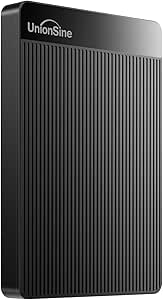 | Best for Budget-Minded Portable HDD Use | Capacity: 1 TB | Drive type: Mechanical hard disk | Form factor: 2.5 inches | VIEW LATEST PRICE | See Our Full Breakdown |
| SanDisk 1TB Portable Drive, USB-C, Black |  | Best Compact Solid-State Alternative | Capacity: 1 TB | Drive type: Solid-state drive | Connectivity: USB Type-C | VIEW LATEST PRICE | See Our Full Breakdown |
| Maxone 1TB Ultra Slim Portable External Hard Drive, USB 3.0 |  | Best for Simple USB-A-Compatible Storage | Capacity: 1 TB | Drive type: Mechanical hard drive | Interface: USB 2.0/3.0 | VIEW LATEST PRICE | See Our Full Breakdown |
| Seagate Expansion 4TB Portable External Hard Drive (STNN4000400) |  | Best for High-Capacity Everyday Carry | Storage capacity: 4 TB | Drive type: Mechanical external hard drive | Form factor: 2.5 inches | VIEW LATEST PRICE | See Our Full Breakdown |
| WD My Passport 1TB Portable External Hard Drive, Black |  | Best for Secure, Light-Duty Backups | Storage capacity: 1 TB | Drive type: Mechanical hard disk | Form factor: 2.5 inches | VIEW LATEST PRICE | See Our Full Breakdown |
| WD My Passport 2TB Portable External Hard Drive, Black | | Best Value for Secure Portable Storage | Storage capacity: 2 TB | Drive type: Mechanical hard disk | Form factor: 2.5 inches | VIEW LATEST PRICE | See Our Full Breakdown |
| WD My Passport 6TB Portable External Hard Drive, Black |  | Best for Maximum Portable Capacity | Storage capacity: 6 TB | Drive type: Mechanical hard disk | Form factor: 2.5 inches | VIEW LATEST PRICE | See Our Full Breakdown |
| SanDisk Extreme Portable SSD, 1TB, Up to 2000MB/s |  | Best Rugged High-Speed Portable Drive | Storage capacity: 1 TB | Drive type: Portable SSD | Read speed: Up to 2000 MB/s | VIEW LATEST PRICE | See Our Full Breakdown |
| 500 GB Portable External Hard Drive, USB 3.0 |  | Best for Basic Console Storage | Storage capacity: 500 GB | Interface: USB 3.0 | Form factor: 2.5 inches | VIEW LATEST PRICE | See Our Full Breakdown |
| WD Elements 2TB Portable External Hard Drive | 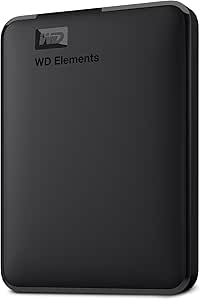 | Best Value for Everyday Backups | Storage capacity: 2 TB | Drive type: Mechanical hard disk | Interface: USB 2.0/3.0 | VIEW LATEST PRICE | See Our Full Breakdown |
| Seagate One Touch 8TB External Hard Drive |  | Best for High-Capacity USB-C Backups | Storage capacity: 8 TB | Drive type: Mechanical hard disk | Interface: USB 3.0 | VIEW LATEST PRICE | See Our Full Breakdown |
| SanDisk 1TB Portable SSD, Up to 1000MB/s Read Speed, Black |  | Best Compact High-Speed Drive | Storage capacity: 1 TB | Drive type: Portable SSD | Interface: USB 3.0 | VIEW LATEST PRICE | See Our Full Breakdown |
| WD My Passport 5TB Portable External Hard Drive |  | Best for Secure, High-Capacity Portable Storage | Storage capacity: 5 TB | Form factor: 2.5 inches | Dimensions: 4.22 × 2.95 × 0.75 inches | VIEW LATEST PRICE | See Our Full Breakdown |
| hard drife | Drive type | Form factor | Interface | Storage capacity |
|---|---|---|---|---|
| Seagate BarraCuda 8TB 3.5-Inch | Mechanical hard drive | 3.5 inches | SATA 6 Gb/s | — |
| Seagate Expansion 24TB Externa | — | 3.5 inches | USB 3.0 | — |
| UnionSine 1TB Ultra-Slim Porta | Mechanical hard disk | 2.5 inches | USB 3.0 | — |
| SanDisk 1TB Portable Drive | Solid-state drive | — | — | — |
| Maxone 1TB Ultra Slim Portable | Mechanical hard drive | 2.5 inches | USB 2.0/3.0 | — |
| Seagate Expansion 4TB Portable | Mechanical external hard drive | 2.5 inches | USB 3.0 | 4 TB |
| WD My Passport 1TB Portable Ex | Mechanical hard disk | 2.5 inches | USB 2.0/3.0 | 1 TB |
| WD My Passport 2TB Portable Ex | Mechanical hard disk | 2.5 inches | — | 2 TB |
| WD My Passport 6TB Portable Ex | Mechanical hard disk | 2.5 inches | — | 6 TB |
| SanDisk Extreme Portable SSD | Portable SSD | — | — | 1 TB |
| 500 GB Portable External Hard | — | 2.5 inches | USB 3.0 | 500 GB |
| WD Elements 2TB Portable Exter | Mechanical hard disk | — | USB 2.0/3.0 | 2 TB |
| Seagate One Touch 8TB External | Mechanical hard disk | 3.5 inches | USB 3.0 | 8 TB |
| SanDisk 1TB Portable SSD | Portable SSD | — | USB 3.0 | 1 TB |
| WD My Passport 5TB Portable Ex | — | 2.5 inches | — | 5 TB |
More Details on Our Top Picks
Seagate BarraCuda 8TB 3.5-Inch SATA Internal Hard Drive (ST8000DM004)
The 8TB capacity makes this BarraCuda a practical choice for adding a large library of games, video, or project files inside a desktop PC. Its SATA 6 Gb/s connection and 256 MB cache suit everyday storage, but the 5,400 rpm mechanism is a tradeoff: it is better for capacity than for snappy access to frequently used files. Compared with the external Seagate Expansion 24TB, this drive takes more installation effort and offers less space, but it fits inside a desktop rather than occupying a separate powered enclosure. It is also sold in an anti-static bag without cables or a retail box, so buyers need to plan for installation supplies. I’d choose it for bulk internal storage, not as a speed-focused boot drive.
Pros:- 8TB capacity accommodates large desktop media and game libraries.
- SATA 6 Gb/s interface and 256 MB cache support standard desktop storage use.
- 3.5-inch form factor is intended for desktop installation.
- Can add internal storage without occupying an external drive enclosure.
Cons:- The 5,400 rpm spindle is slower than faster-spinning desktop drives.
- Anti-static-bag packaging includes no cables or retail box.
- Requires a compatible desktop bay and internal SATA connection.
Best for: Desktop owners who want substantial internal space for games, media, and backups and are comfortable installing a SATA drive.
Not ideal for: Laptop users, buyers who need a ready-to-connect external drive, or anyone prioritizing faster access over capacity.
- Capacity:8 TB
- Drive type:Mechanical hard drive
- Interface:SATA 6 Gb/s
- Form factor:3.5 inches
- Rotational speed:5,400 rpm
- Cache:256 MB
- Stated transfer rate:Up to 190 MB/s
- Weight:630 g
Our verdict“Choose the BarraCuda when you want 8TB of internal desktop storage and can accept modest mechanical-drive speeds and bare-bones packaging.”
Seagate Expansion 24TB External Hard Drive (STKP24000400)
When a single external drive needs to hold an extensive archive, the 24TB capacity is the main reason to pick this Seagate Expansion. USB 3.0 provides a straightforward connection to Windows and Mac computers, while automatic recognition keeps setup simple for ordinary file storage. Compared with the internal Seagate BarraCuda 8TB, this model offers three times the capacity and avoids opening a computer, but it is much bulkier and needs its own power adapter. Its listed read speed is 140 MB/s, so the high capacity does not make it an SSD-like choice for active editing or frequent transfers. The included Rescue Data Recovery Services adds a recovery option, though it does not replace maintaining a separate backup. Mac users planning to use Time Machine must reformat it.
Pros:- 24TB capacity can consolidate a very large media archive or backup set.
- USB 3.0 connection offers simple computer hookup and a stated 5 Gbps data rate.
- Automatic recognition supports Windows and Mac file storage.
- Includes Rescue Data Recovery Services and a one-year limited warranty.
Cons:- Requires an external power adapter, limiting portability.
- Large 3.5-inch desktop enclosure is less convenient to move than portable drives.
- Time Machine use requires reformatting, and listed read speed is 140 MB/s.
Best for: Desktop backup planners, media archivists, and households storing large photo, video, and music collections in one place.
Not ideal for: Travelers, people with limited desk space, and Mac users who want immediate Time Machine setup without reformatting.
- Capacity:24 TB
- Interface:USB 3.0
- Form factor:3.5 inches
- Rotational speed:7,200 rpm
- Read speed:140 MB/s
- Data transfer rate:5 Gbps
- Dimensions:7.04 × 1.65 × 4.92 inches
- Warranty:1-year limited
Our verdict“Pick this Expansion for a stationary archive that needs exceptional capacity, not for travel or SSD-speed workflows.”
UnionSine 1TB Ultra-Slim Portable External Hard Drive
The UnionSine is a straightforward 1TB portable mechanical drive for carrying documents, media, or console files without setting up software. Its 2.5-inch size and included USB 3.0 cable make it easier to move between a laptop and compatible devices than the desktop-sized Seagate Expansion 24TB. The tradeoff is speed and resilience: this is a 5,400 rpm hard drive with stated read and write speeds of up to 125 MB/s and 103 MB/s, not a solid-state drive built for fast transfers or rough handling. Its aluminum anti-interference layer and grippy striped casing add practical touches, while the three-year manufacturer’s warranty is longer than the warranty listed for the Seagate desktop model. Check your device’s port and console requirements before buying; the supplied connection is USB, with no USB-C connection specified.
Pros:- Compact 2.5-inch design is more portable than desktop external drives.
- USB 3.0 cable and plug-and-play setup simplify connection.
- Stated speeds reach up to 125 MB/s read and 103 MB/s write.
- Includes a three-year manufacturer’s warranty.
Cons:- Mechanical drive is more vulnerable to impact than a solid-state drive.
- 5400 rpm speed is less suited to demanding, frequent file transfers.
- The connection details do not specify USB-C.
Best for: Laptop and compatible-console owners who want a compact 1TB drive for everyday file storage and occasional transfers.
Not ideal for: People who need rugged drop resistance, SSD-level transfer speeds, or a specified USB-C connection.
- Capacity:1 TB
- Drive type:Mechanical hard disk
- Form factor:2.5 inches
- Interface:USB 3.0
- Rotational speed:5,400 rpm
- Read speed:Up to 125 MB/s
- Write speed:Up to 103 MB/s
- Warranty:Three-year manufacturer’s warranty
Our verdict“Choose the UnionSine for portable, everyday 1TB storage when a mechanical drive’s speed and handling limits fit your needs.”
SanDisk 1TB Portable Drive, USB-C, Black
This SanDisk is the speed-and-mobility pick for buyers who want portable storage without a spinning mechanism. Its USB-C connection, pocket-sized body, and stated read speeds of up to 600 MB/s make it a much better fit for moving active files than the mechanical UnionSine 1TB, whose listed read speed tops out at 125 MB/s. The SanDisk also has drop protection up to 2 meters, a useful advantage for a drive that may travel in a bag. Capacity remains 1TB, so it cannot match the archival scale of the 24TB Seagate Expansion. The supplied details give a read-speed figure but not a write-speed figure, and that distinction matters for large transfers in both directions. I’d favor it for frequent mobile use, while bulk-storage buyers should choose a larger HDD.
Pros:- Solid-state design has no moving parts.
- USB-C connectivity suits compatible modern devices.
- Stated read speeds reach up to 600 MB/s.
- Rated for drop protection up to 2 meters and weighs 1.12 ounces.
Cons:- 1TB capacity is far below the 24TB Seagate Expansion’s archival space.
- Write speeds are lower than read speeds, with no specific write figure provided.
- USB-C use depends on having a compatible port or adapter.
Best for: Laptop, tablet, or smartphone users who need compact 1TB storage, USB-C connectivity, and faster file access on the move.
Not ideal for: Buyers building a large media archive or anyone who needs a stated write-speed figure before choosing a drive.
- Capacity:1 TB
- Drive type:Solid-state drive
- Connectivity:USB Type-C
- Read speed:Up to 600 MB/s
- Drop protection:Up to 2 meters
- Weight:1.12 ounces
- Dimensions:2.95 × 1.77 × 0.39 inches
- Compatible devices:Desktop, laptop, smartphone, and tablet
Our verdict“Choose this SanDisk for compact, quick-access 1TB storage and drop protection rather than maximum capacity.”
Maxone 1TB Ultra Slim Portable External Hard Drive, USB 3.0
The Maxone suits buyers who want plug-and-play 1TB storage in a slim, bus-powered enclosure. Its 0.4-inch aluminum housing and included 19-inch USB 3.0 cable make it a tidy option for a laptop bag, and it does not need an external power supply. Compared with the SanDisk 1TB Portable Drive, it trades the faster solid-state design and USB-C connection for a mechanical 5,400 rpm drive; that makes the Maxone a basic file-storage choice rather than the better fit for frequent large transfers. Its listed read-speed figure is 625 MB/s, but the product is described as a mechanical HDD, so buyers should not treat that figure as a guaranteed real-world HDD speed. The stated operating-system list is limited to Windows 7, 8, and 10, which leaves newer setups less clearly covered.
Pros:- Slim 0.4-inch aluminum enclosure is easy to pack.
- USB 3.0 connection is backward compatible with USB 2.0.
- Bus-powered, plug-and-play setup requires no external power supply.
- Includes a 19-inch USB cable and three-year manufacturer warranty.
Cons:- Mechanical 5,400 rpm drive is not the best choice for frequent high-speed transfers.
- Listed operating-system compatibility covers Windows 7, 8, and 10 only.
- The listed 625 MB/s read figure is not clearly reconciled with its mechanical-drive design.
Best for: Windows laptop and desktop owners seeking a slim, no-external-power drive for everyday files or compatible PlayStation 4 storage.
Not ideal for: Buyers who need a solid-state drive, confirmed USB-C support, or clearly listed compatibility with newer operating systems.
- Capacity:1 TB
- Drive type:Mechanical hard drive
- Interface:USB 2.0/3.0
- Form factor:2.5 inches
- Thickness:0.4 inch
- Rotational speed:5,400 rpm
- Enclosure material:Aluminum
- Warranty:Three years
Our verdict“Choose the Maxone for slim, simple USB 3.0 storage on a compatible Windows system, but favor the SanDisk for solid-state speed and USB-C.”
Seagate Expansion 4TB Portable External Hard Drive (STNN4000400)
The Seagate Expansion 4TB makes a strong case for buyers who want more room than a basic portable drive without carrying a desktop-sized unit. Its 2.5-inch mechanical design holds photos, video, and everyday backups, while plug-and-play USB setup keeps routine transfers simple on most Windows and macOS systems. Compared with the WD My Passport 2TB, it offers double the listed capacity, but lacks that model’s stated password protection and hardware encryption. The included Rescue Data Recovery Services add a layer of recovery support, not a substitute for keeping a second copy of important files. It is still a mechanical drive, so it is less suited to fast, rugged workflows than the SanDisk Extreme Portable SSD, and the required cable limits completely wireless use.
Pros:- 4TB capacity in a compact 2.5-inch portable form
- Plug-and-play USB setup for most Windows and macOS systems
- Includes Rescue Data Recovery Services
- 268 g weight suits travel and everyday carry
Cons:- Mechanical storage is less suited to demanding speed or impact-prone use than an SSD
- Requires a USB cable connection
- No password protection or hardware encryption is listed
Best for: Travelers and laptop owners who need several terabytes for media and backups in a compact, cable-connected drive.
Not ideal for: People who need SSD-class speed, a cable-free setup, or built-in password protection and hardware encryption.
- Storage capacity:4 TB
- Drive type:Mechanical external hard drive
- Form factor:2.5 inches
- Interface:USB 3.0
- Read speed:120 MB/s
- Rotational speed:7200 rpm
- Weight:268 g
- Data recovery:Rescue Data Recovery Services
Our verdict“Choose this Seagate if you want substantial portable storage and recovery support, but skip it if speed or built-in encryption matters more than capacity.”
WD My Passport 1TB Portable External Hard Drive, Black
The WD My Passport 1TB is the security-focused choice for someone carrying a modest file library rather than a large media archive. Its slim 2.5-inch mechanical drive pairs password protection and hardware encryption with included Acronis True Image for Western Digital software, which supports backups and ransomware protection. Compared with the WD My Passport 2TB, this model gives up half the listed capacity, making it a better fit for documents, schoolwork, and selected photos than growing video collections. It also has less room than the Seagate Expansion 4TB, which prioritizes capacity and includes recovery services instead of the stated security features. The tradeoff is mechanical-drive speed, plus USB connectivity that may call for a compatible port or adapter.
Pros:- Slim 2.5-inch portable design
- Password protection and hardware encryption
- Backup software includes ransomware protection support
- Three-year limited warranty
Cons:- 1TB capacity is limited for large photo or video libraries
- Mechanical storage is slower and less impact-tolerant than an SSD
- USB connection may require a compatible port or adapter
Best for: Students and mobile professionals who want a compact drive for documents and selected files with encryption and backup software.
Not ideal for: Photographers, video editors, or households building a large media archive who are likely to outgrow 1TB.
- Storage capacity:1 TB
- Drive type:Mechanical hard disk
- Form factor:2.5 inches
- Interface:USB 2.0/3.0
- Security:Password protection and hardware encryption
- Included software:Acronis True Image for Western Digital
- Warranty:3-year limited warranty
- Color:Black
Our verdict“Pick this My Passport for compact, security-minded backups of a smaller file collection, not for high-capacity storage or fast project transfers.”
WD My Passport 2TB Portable External Hard Drive, Black
The WD My Passport 2TB balances useful everyday capacity with the security features found on the 1TB My Passport. Its slim design holds a broader working library of documents, photos, and music, while password protection and hardware encryption help protect stored files if the drive is misplaced. Backup and device-management software adds a practical path to routine copies, though it requires download and installation rather than being ready to use out of the box. Compared with the WD My Passport 1TB, the extra capacity gives a growing collection more breathing room; the WD My Passport 6TB is a better fit for much larger archives, but takes the capacity tradeoff in the opposite direction. This remains a mechanical USB drive, so it cannot match the SanDisk Extreme Portable SSD for speed or ruggedness.
Pros:- 2TB capacity for a broader everyday file collection
- Password protection and hardware encryption
- Backup and device-management software supports ransomware defense
- Slim 2.5-inch design and three-year limited warranty
Cons:- Backup software must be downloaded and installed
- Mechanical hard disk is slower and more vulnerable to impacts than an SSD
- Listed USB 2.0/3.0 connectivity may need an adapter for some devices
Best for: People who want a portable backup drive for a growing collection of personal files and value encryption without needing several terabytes.
Not ideal for: Users with large video libraries or active creative projects who need higher capacity or SSD-level transfer speeds.
- Storage capacity:2 TB
- Drive type:Mechanical hard disk
- Form factor:2.5 inches
- Connectivity:USB 2.0/3.0
- Enclosure material:Aluminum
- Security:Password protection and hardware encryption
- Included software:Device management and backup software
- Warranty:3-year limited warranty
Our verdict“Choose the 2TB My Passport for a practical mix of portable capacity and encryption, while larger archives call for the 6TB model.”
WD My Passport 6TB Portable External Hard Drive, Black
For buyers who want a large archive in a carryable enclosure, the WD My Passport 6TB offers the biggest listed capacity among these portable mechanical drives. That makes it better suited to extensive photo, video, and document libraries than the WD My Passport 2TB or Seagate Expansion 4TB, reducing the need to split a collection across multiple drives. It also includes password protection, hardware encryption, and backup software with ransomware protection. The tradeoff is that this is still a mechanical disk, with a listed read speed of 110 MB/s; the SanDisk Extreme Portable SSD is a far better fit for quick project transfers and rougher handling, though its capacity is much lower. USB compatibility spans several generations, but actual transfer rates depend on the connected port and system.
Pros:- 6TB capacity in a 2.5-inch portable drive
- Password protection and hardware encryption
- Acronis backup software includes ransomware protection
- Compatible with USB 2.0, USB 3.0, and USB 3.2 Gen 2 connections
Cons:- Mechanical storage and a listed 110 MB/s read speed limit transfer performance
- Less suited to drops and rough handling than a rugged portable SSD
- USB port capability affects the transfer speeds a system can reach
Best for: Photographers, families, and media collectors who need a large portable archive with built-in encryption and backup tools.
Not ideal for: People who prioritize fast editing transfers, drop resistance, or a lightweight SSD for frequent movement between devices.
- Storage capacity:6 TB
- Drive type:Mechanical hard disk
- Form factor:2.5 inches
- Connectivity:USB 2.0, USB 3.0, USB 3.2 Gen 2
- Read speed:110 MB/s
- Data transfer rate:5 gigabits per second
- Security:Hardware encryption and password protection
- Compatible game console:Sony PlayStation 4
Our verdict“Choose this My Passport when portable archive capacity matters more than SSD speed or impact resistance.”
SanDisk Extreme Portable SSD, 1TB, Up to 2000MB/s
The SanDisk Extreme Portable SSD is the clear choice here for buyers who value speed and durability over maximum capacity. Its claimed read speeds up to 2000 MB/s can make project transfers and freeing device space much quicker than the mechanical WD My Passport 6TB, although that WD offers six times the capacity for archiving. Pocket-sized construction, IP65 dust and water resistance, and protection from drops up to 3 meters suit travel and field work better than the cable-connected hard drives in this group. Security uses 256-bit AES encryption, but requires a software download and a supported operating system. Buyers should also distinguish the stated maximum read speed from write performance; the maximum figure does not describe every transfer. At 1TB, it is best for active files rather than a large long-term media library.
Pros:- Read speeds up to 2000 MB/s for fast transfers
- Pocket-sized design weighs 1.6 oz
- IP65-rated dust and water resistance
- Drop protection up to 3 m and 256-bit AES encryption
Cons:- 1TB capacity is far below the WD My Passport 6TB for archiving
- Write speeds are lower than the stated maximum read speed
- Encryption requires software download and a supported operating system
Best for: Mobile creators and frequent travelers who need fast file transfers, a small footprint, and added protection from dust, water, and drops.
Not ideal for: Buyers seeking several terabytes for a low-maintenance archive or anyone who needs encryption without installing software.
- Storage capacity:1 TB
- Drive type:Portable SSD
- Read speed:Up to 2000 MB/s
- Connector:USB Type-C
- Water and dust resistance:IP65
- Drop protection:Up to 3 m
- Encryption:256-bit AES
- Weight:1.6 oz
Our verdict“Choose this SanDisk SSD for fast, rugged handling of active files, but choose a high-capacity mechanical drive for a larger archive.”
500 GB Portable External Hard Drive, USB 3.0
This is the most modest-capacity option in this group, but its 500 GB size and light 0.35-pound body suit a small library of files or older console games. It connects to Windows without extra software and supports PS4 and Xbox One, making it a straightforward add-on when you want more room without buying a desktop drive. Compared with the 2 TB WD Elements, it gives up substantial backup space; its advantage is a smaller, simpler commitment for occasional transfers. The 5400 rpm mechanical drive is not a match for the SanDisk portable SSD’s speed or shock resistance. Mac users must format it as ExFAT, and PS5 or Xbox Series X|S games need to be copied back to the console to play. Its one-year warranty is also shorter than the WD options here.
Pros:- Compact 0.35-pound design is easy to carry
- Windows setup requires no additional software
- Works with computers and PS4 or Xbox One
- USB 3.0 connection supports convenient file transfers
Cons:- 500 GB offers much less room than the 2 TB WD Elements or 5 TB WD My Passport
- Mac use requires formatting as ExFAT
- Newer-console games must be copied to internal storage before playing
Best for: PS4 or Xbox One owners who need a lightweight drive for a limited game library or basic file transfers
Not ideal for: Mac users seeking immediate plug-and-play access, or PS5 and Xbox Series X|S players who want to play stored games directly from the drive
- Storage capacity:500 GB
- Interface:USB 3.0
- Form factor:2.5 inches
- Rotational speed:5400 rpm
- Read speed:Up to 133 MB/s
- Write speed:Up to 103 MB/s
- Weight:0.35 lbs
- Warranty:1 year
Our verdict“Choose it for lightweight, basic storage or older-console games, but step up to a larger drive for extensive backups.”
WD Elements 2TB Portable External Hard Drive
The WD Elements strikes a practical middle ground: 2 TB of mechanical storage is enough for a sizable collection of photos, videos, and documents without the bulk of a high-capacity desktop unit. Its USB 3.0 and USB 2.0 support lets it connect to a range of computers and consoles, while plug-and-play setup keeps routine backups uncomplicated. Compared with the 500 GB portable drive in this lineup, it leaves far more room for growing files; against the 5 TB WD My Passport, it costs capacity and added security features in exchange for a simpler storage role. This is still a mechanical drive, so it cannot match the SanDisk SSD’s speed or resistance to drops. The supplied listing also gives conflicting size details, so buyers who need a precise form factor should verify the model before purchase.
Pros:- 2 TB capacity suits everyday backups and media storage
- USB 3.0 and USB 2.0 offer broad connection compatibility
- Plug-and-play setup avoids extra software steps
- Compatible with desktop computers, laptops, and gaming consoles
Cons:- Mechanical storage is slower and more vulnerable to drops than the SanDisk portable SSD
- Less capacity than the 5 TB WD My Passport
- Listed form-factor information is inconsistent with its portable design
Best for: Laptop and desktop owners who want a simple, portable drive for regular photo, video, and document backups
Not ideal for: Buyers who need SSD-level transfer speed, drop-resistant storage, or several terabytes for a large media archive
- Storage capacity:2 TB
- Drive type:Mechanical hard disk
- Interface:USB 2.0/3.0
- Data transfer rate:Up to 5 Gbps
- Rotational speed:5400 RPM
- Dimensions:5.8 × 4.8 × 1.8 in
- Weight:4.64 oz
- Warranty:2-year limited
Our verdict“Pick the WD Elements for uncomplicated, moderate-capacity backups; choose an SSD for speed or a larger model for an extensive archive.”
Seagate One Touch 8TB External Hard Drive
The Seagate One Touch pairs 8 TB of storage with a USB-C connection, giving desktop and laptop owners substantial room for backups and everyday files without stepping up to the 24 TB Seagate Expansion. Its Rescue Data Recovery Services add a recovery option that the WD Elements does not list, and the two-year limited warranty is a useful part of the package. The tradeoff is a 3.5-inch mechanical drive: despite the USB-C connection, this is not the compact choice for frequent travel. The supplied data also describes it as bus-powered while listing a 3.5-inch form factor, so buyers should verify power requirements before relying on a cable-only setup. Its listed USB 3.0 interface and stated data-rate figures do not clearly establish real-world transfer performance.
Pros:- 8 TB capacity accommodates large backups and file libraries
- USB-C connectivity works with Mac and PC
- Includes Rescue Data Recovery Services
- Two-year limited warranty
Cons:- 3.5-inch mechanical form factor is less convenient for travel than portable drives
- Listed interface and transfer-rate details do not clearly define practical speed
- Power requirements are unclear given the bus-powered claim and desktop form factor
Best for: Mac and PC users who need a large local backup drive and value included data recovery services
Not ideal for: Frequent travelers or buyers who need clearly documented transfer speeds and power requirements before buying
- Storage capacity:8 TB
- Drive type:Mechanical hard disk
- Interface:USB 3.0
- Connectivity:USB-C
- Form factor:3.5 inches
- Rotational speed:7200 rpm
- Read speed:120 MB/s
- Warranty:2 years
Our verdict“Choose this Seagate for large computer backups and included recovery support, but verify its power setup if you need a cable-only desktop drive.”
SanDisk 1TB Portable SSD, Up to 1000MB/s Read Speed, Black
For buyers who move large files often, this SanDisk is the lineup’s clearest speed-and-portability choice. Its up to 1000 MB/s read speed and pocket-sized, 1.12-ounce SSD design make transfers and travel more convenient than with the mechanical WD Elements or 5 TB WD My Passport. With no moving parts and drop protection up to 2 meters, it is also better suited to being carried between work, school, and home. The compromise is capacity: 1 TB is less room than the 2 TB WD Elements and far less than the 8 TB Seagate One Touch. The stated maximum is for reads; write speed is lower, and actual performance depends on the connected device. Buyers seeking bulk backup space will get more capacity from a mechanical hard drive.
Pros:- Read speeds up to 1000 MB/s support fast file access
- Pocket-sized body weighs 1.12 ounces
- Solid-state design has no moving parts
- Rated for drop protection up to 2 meters
Cons:- 1 TB capacity is lower than the WD Elements and WD My Passport options
- Write speed is below the stated maximum read speed
- Actual usable storage is less than the listed 1 TB
Best for: Photographers, students, and mobile professionals who carry files often and prioritize fast transfers and drop protection
Not ideal for: Buyers who need several terabytes for a large archive or want the most storage capacity per drive
- Storage capacity:1 TB
- Drive type:Portable SSD
- Interface:USB 3.0
- Connector:USB Type-C
- Maximum read speed:1000 MB/s
- Weight:1.12 ounces
- Dimensions:1.77 x 3.35 x 0.39 inches
- Protection:Drop protection up to 2 meters
Our verdict“Choose this SanDisk when portable speed and drop protection matter more than the higher capacity of a mechanical drive.”
WD My Passport 5TB Portable External Hard Drive
The WD My Passport brings together 5 TB of portable capacity and built-in security, making it a stronger fit for a large file collection than the 2 TB WD Elements. Its password protection and hardware encryption help guard stored data, while included Acronis True Image for Western Digital software supports backups and ransomware defense. At 7.4 ounces and under an inch thick, it remains practical to carry, though it is a mechanical hard drive rather than the faster, drop-protected SanDisk SSD. The main tradeoff is setup flexibility: Mac users need to reformat it, and the listed transfer rate of 1 megabit per second is not a dependable guide to real-world performance. Its three-year limited warranty is longer than the coverage listed for the other external hard drives here.
Pros:- 5 TB capacity fits large portable file collections
- Password protection and hardware encryption add data safeguards
- Included backup software supports ransomware defense
- Three-year limited warranty
Cons:- Mac use requires reformatting
- Mechanical storage is less suited to rough handling than the SanDisk portable SSD
- Listed transfer rate of 1 megabit per second is unusually low and does not provide a useful performance expectation
Best for: People carrying a large work or personal archive who want portable capacity plus password protection and hardware encryption
Not ideal for: Mac users who want ready-to-use formatting, or anyone prioritizing SSD speed and drop protection over capacity
- Storage capacity:5 TB
- Form factor:2.5 inches
- Dimensions:4.22 × 2.95 × 0.75 inches
- Weight:7.4 ounces
- Connectivity:USB 2.0, USB 3.0, USB 3.2 Gen 2
- Security:Password protection and hardware encryption
- Included software:Acronis True Image for Western Digital
- Warranty:3-year limited
Our verdict“Choose the My Passport for portable, high-capacity storage with added security, but pick the SanDisk SSD for speed and drop resistance.”
How We Picked
I compared these 15 drives by the job they are built to do, rather than treating all storage as interchangeable. The main criteria were usable capacity, portability, connection type, stated transfer performance, and setup needs. I also separated conventional HDDs from SSDs: an SSD can be a better choice for active files and faster transfers, but it is not the same kind of drive as a spinning hard disk.
The ranking gives priority to fit for common buyer needs and clear tradeoffs. The WD My Passport 2TB leads as a practical portable balance; higher-capacity desktop options rank well for stationary storage, while portable SSDs earn recognition for speed rather than bulk capacity. Smaller-capacity and less fully specified models rank lower when the lineup includes clearer alternatives for similar jobs. A drive’s advertised capacity or speed alone does not determine its place: connection compatibility, power requirements, and intended use all affect whether it is a sensible match.
| hard drife | Drive type | Interface |
|---|---|---|
| Seagate BarraCuda 8TB 3.5-Inch | Mechanical hard drive | SATA 6 Gb/s |
| Seagate Expansion 24TB Externa | — | USB 3.0 |
| UnionSine 1TB Ultra-Slim Porta | Mechanical hard disk | USB 3.0 |
| SanDisk 1TB Portable Drive | Solid-state drive | — |
| Maxone 1TB Ultra Slim Portable | Mechanical hard drive | USB 2.0/3.0 |
| Seagate Expansion 4TB Portable | Mechanical external hard drive | USB 3.0 |
| WD My Passport 1TB Portable Ex | Mechanical hard disk | USB 2.0/3.0 |
| WD My Passport 2TB Portable Ex | Mechanical hard disk | — |
| WD My Passport 6TB Portable Ex | Mechanical hard disk | — |
| SanDisk Extreme Portable SSD | Portable SSD | — |
| 500 GB Portable External Hard | — | USB 3.0 |
| WD Elements 2TB Portable Exter | Mechanical hard disk | USB 2.0/3.0 |
| Seagate One Touch 8TB External | Mechanical hard disk | USB 3.0 |
| SanDisk 1TB Portable SSD | Portable SSD | USB 3.0 |
| WD My Passport 5TB Portable Ex | — | — |
Factors to Consider When Choosing Best Hard Drives
Before choosing among these drives, decide what you need it to do day to day. Storage capacity is only one part of the match: a drive that stays beside a desktop can prioritize room, while one that travels with a laptop should be compact and straightforward to connect. These broader checks can help prevent buying a drive that is too slow for active work, awkward for your setup, or too small for the files you expect to keep.
Choose HDD or SSD by how you use the files
A conventional HDD usually makes sense when the goal is to store large collections or maintain backups without paying for SSD-level speed. An SSD is a stronger fit when you regularly open, edit, or move large files, or when responsiveness matters more than maximum capacity. One common mistake is buying a fast portable SSD for files that are rarely accessed, when a larger HDD would better serve as an archive. The reverse mistake is using a slow HDD as a working drive for projects that need frequent transfers. If your work combines both needs, keep active files on an SSD and use an HDD for a separate copy or archive. Match the drive to the workload, not just the headline speed or capacity.
Estimate capacity from the files you actually keep
Photos, video, game libraries, and computer backups can grow quickly, so add room for future files rather than buying only enough for today. Check how much space your existing library occupies and whether your backup software retains older versions, which can use more storage than a simple file copy. Large capacities are less useful if the drive will mostly sit empty or is difficult to move and connect. A smaller portable drive can be easier to carry, while a desktop model can make sense for a growing archive that stays in one place. Also remember that advertised capacity and the space shown by your computer may differ because of formatting and how capacity is calculated. Leave working headroom rather than planning to fill a drive completely.
Check ports, cables, and device compatibility
USB-C describes a connector shape, not a guaranteed transfer speed, so check the drive’s supported interface and your computer’s port specifications. A fast SSD attached through a slower port will not deliver its full listed performance. Older computers may need a compatible cable or adapter, and some devices such as routers, consoles, or televisions impose their own format and capacity limits. Confirm whether the included cable reaches comfortably and whether the drive can connect directly to your intended device. Avoid assuming that a USB-C drive will work at full speed with every USB-C port. Compatibility is a practical buying factor, not a detail to sort out after the drive arrives.
Decide whether portability or stationary capacity matters more
Portable drives are designed to travel with a laptop and generally draw power through their USB connection, which reduces clutter. Desktop external drives are larger and may need a separate power adapter, but that format is often a more convenient home for a large library that stays at a desk. Think about where the drive will live and how often you will unplug it before choosing capacity. A high-capacity desktop unit can be a poor travel companion, while a slim portable model may be easier to carry but less suited to a permanent household archive. If you move a drive often, protect it from drops and disconnect it safely. Physical convenience can matter more than unused capacity.
Treat backup as a plan, not a single drive
A hard drive can fail, be lost, or be damaged along with the computer it backs up, so one external drive should not be your only copy of important files. Keep a second copy on another device or in a separate location, and consider cloud storage for files you need to access away from home. Set backups to run on a schedule rather than relying on memory, and check that files can be restored from the backup. For a large archive, make sure the chosen capacity can hold the original data plus any version history your software retains. A drive’s size does not protect against accidental deletion or hardware failure. Plan for recovery before you need it.
Pay for features that change your actual workflow
Spend more on speed when you frequently transfer large files, on capacity when the drive will hold a growing archive, or on a portable design when you carry it regularly. Extra capacity can reduce how often you rotate drives, but it does not make a conventional HDD as responsive as an SSD. A slim casing or newer connector may improve convenience, though neither guarantees faster real-world performance. Read the product details for the exact interface, power needs, and supported devices instead of relying on a product family name. If you mainly store occasional backups, a straightforward HDD may be a better fit than paying for speed you rarely use. Let the feature solve a specific problem before paying for it.
Frequently Asked Questions
Should I buy the WD My Passport 2TB or a 5TB or 6TB portable drive?
Choose the 2TB model if you need everyday laptop backups, documents, and a moderate photo library without carrying more capacity than you use. A 5TB or 6TB option suits larger collections, video files, or several years of backups, especially if you want fewer drives to manage. Larger capacity does not make a portable HDD faster, so it is not the right reason to choose one for active editing. Check your current storage use and the size of your backup history before deciding. If your library is still modest, a smaller drive with room to grow can be easier to manage.
Is the SanDisk Extreme Portable SSD worth choosing over a portable hard drive?
It makes sense when you regularly move large files, work directly from external storage, or need a more responsive portable drive. Its listed speed is much higher than what a conventional portable HDD is designed to provide, but your computer and cable must support a suitable connection to benefit. For backups and files you seldom open, a portable HDD may offer a more practical capacity-first choice. SSDs are also a different storage type, so do not compare their speed claims directly with HDD capacity alone. Choose based on whether fast access or long-term bulk storage matters more in your routine.
Can I use the Seagate Expansion 24TB with a laptop?
It can suit a laptop-based setup if the computer has a compatible USB connection and the drive’s power arrangement works for your workspace. Its desktop form is better suited to a desk than a bag, so it is not a natural choice for frequent travel. Before buying, check the included cable, operating-system compatibility, and whether your intended use requires reformatting. A large external drive can store a substantial archive, but it still needs a separate backup plan for important files. If you need storage on the move, a portable model is likely a better fit.
Will a USB-C hard drive work with my older computer?
Often it can, but you need to confirm the connector and cable arrangement for both the drive and computer. An adapter may let a USB-C drive connect to an older USB port, though it will not add speed beyond what that port supports. Check the drive’s operating-system requirements and whether your computer can supply enough power, especially if the drive is not self-powered. A USB-C connector alone does not guarantee high transfer rates or universal compatibility. If you need a simple setup, choose a model with a cable that matches your computer or a supported adapter.
Is one external hard drive enough to back up my computer?
One drive can provide a useful backup, but it leaves your files vulnerable if that drive is lost, damaged, or fails. Keep another copy on a separate device or in a different location, and consider cloud storage for files that need off-site protection. Use backup software or a regular schedule so new files are included without relying on memory. Check occasionally that the backup contains the files you expect and that you can restore them. Capacity matters, but a dependable backup routine matters just as much.
Conclusion
For most everyday users, I recommend the WD My Passport 2TB as the best overall: it balances portable size with enough capacity for common backups and files. For a capacity-first purchase, the Seagate Expansion 24TB is the best premium archive choice in this lineup, provided it will stay near a desk. The Seagate Expansion 4TB Portable is a sensible value direction for buyers who need more room than a basic 1TB drive, while the WD My Passport 1TB is a straightforward pick for beginners with a smaller library. For active projects and fast transfers, choose the SanDisk Extreme Portable SSD; for a large portable collection, compare the WD My Passport 5TB or 6TB with Seagate’s 4TB option and prioritize the capacity you will use. If you mainly need a simple slim drive, the UnionSine or Maxone 1TB models may fit, but check their connection and device compatibility before choosing. Whichever model you pick, keep another copy of important files rather than treating one drive as a complete backup plan.