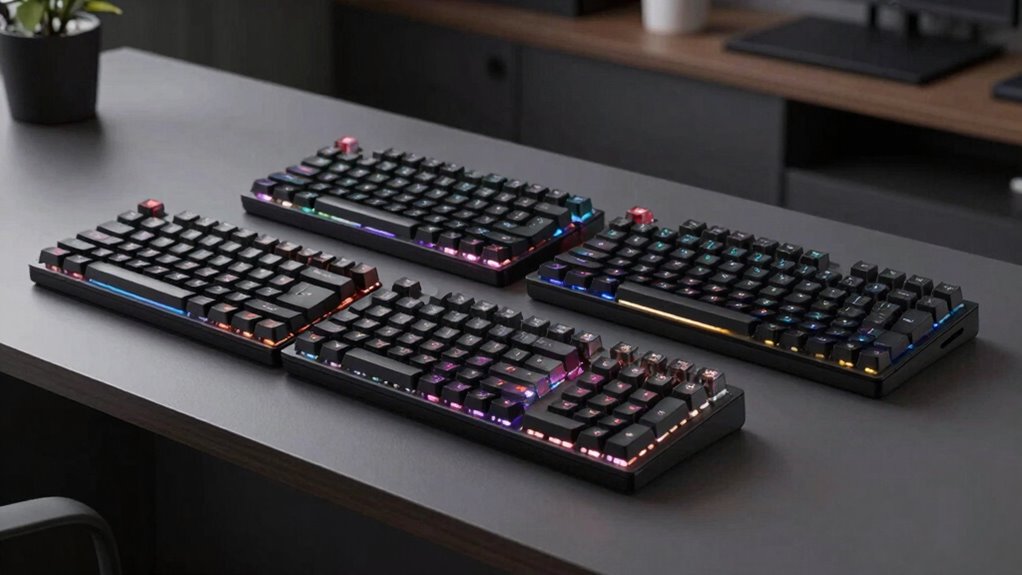

Choosing a quiet mechanical keyboard can feel like a balancing act between sound reduction, performance, and features. For gamers, the SteelSeries Apex 3 RGB offers excellent noise control with its whisper-quiet switches, perfect for late-night gaming sessions. Meanwhile, the Logitech MX Mechanical excels in multi-device workflows with its smart backlighting and tactile switches, making it ideal for professional settings. For those seeking a blend of silence and customization, the Aula F99 and SOLAKAKA KI99 Pro provide versatile wireless options with sound dampening features. The challenge is that some options prioritize quietness at the expense of extensive customization or high-end build quality, making it essential to match features with your actual use case.

Get the latest gadgets delivered free with Prime
- Fast, free delivery on millions of items
- Prime Video, Amazon Music and more included
- Member-only deals all year
Complete the kit



Key Takeaways
- The SteelSeries Apex 3 is best for gamers needing water resistance and quiet switches.
- Keychron K4 HE offers a premium, customizable experience with wireless versatility, suited for tech-savvy users.
- Aula F99 balances quiet typing with a feature-rich setup for office or study environments.
- SOLAKAKA KI99 Pro combines noise reduction and long battery life, ideal for multi-purpose use.
- Logitech MX Mechanical prioritizes workflow with smart lighting and multi-device support, suited for professionals.
| SteelSeries Apex 3 RGB Gaming Keyboard |  | Best Overall for Gaming and Noise Control | Water Resistance: IP32 | RGB Illumination: 10-zone | Switch Type: Whisper quiet gaming switches | VIEW ON AMAZON | See Our Full Breakdown |
| Keychron K4 HE 96% Wireless Hall Effect Keyboard with Number Pad, Magnetic Switches, QMK/VIA, 2.4GHz/Bluetooth/Wired, Mac & Windows, Wood Accent Frame, Black |  | Best for Customization and Premium Wireless Use | Layout: 96% | Switch Type: Gateron Double-Rail Magnetic Switches | Connectivity: 2.4GHz, Bluetooth 5.2, Wired (USB-C) | VIEW ON AMAZON | See Our Full Breakdown |
| Aula F99 Wireless Silent Mechanical Blue Keyboard with Num Pad for Office |  | Best for Office and Study Environments | Connectivity: Bluetooth 5.0, 2.4GHz wireless, USB-C | Switch Type: Pre-lubed silent linear switches, hot-swappable | Backlight: RGB with 16.8 million colors | VIEW ON AMAZON | See Our Full Breakdown |
| SOLAKAKA KI99 Pro Wireless Mechanical Keyboard with RGB Backlit and Hot Swappable Switches |  | Best for Versatile Quiet Use and Long Battery Life | Connection Modes: Bluetooth 5.0, 2.4G, Type-C | Battery Capacity: 10,000mAh | Layout: 96% | VIEW ON AMAZON | See Our Full Breakdown |
| Logitech MX Mechanical Wireless Illuminated Keyboard Tactile – Graphite |  | Best for Productivity and Multi-Device Use | Switch Type: Tactile Quiet Mechanical | Backlit: Smart illumination with automatic adjustment | Connectivity: Bluetooth Low Energy, Logi Bolt | VIEW ON AMAZON | See Our Full Breakdown |
| quiet mechanical keyboard | Switch Type | Layout | Connectivity |
|---|---|---|---|
| SteelSeries Apex 3 RGB Gaming | Whisper quiet gaming switches | — | — |
| Keychron K4 HE 96% Wireless Ha | Gateron Double-Rail Magnetic Switches | 96% | 2.4GHz, Bluetooth 5.2, Wired (USB-C) |
| Aula F99 Wireless Silent Mecha | Pre-lubed silent linear switches, hot-swappable | 95% with num pad | Bluetooth 5.0, 2.4GHz wireless, USB-C |
| SOLAKAKA KI99 Pro Wireless Mec | Silent, hot-swappable | 96% | — |
| Logitech MX Mechanical Wireles | Tactile Quiet Mechanical | — | Bluetooth Low Energy, Logi Bolt |
More Details on Our Top Picks
SteelSeries Apex 3 RGB Gaming Keyboard
The SteelSeries Apex 3 RGB stands out for its water-resistant design and whisper-quiet switches, making it a top pick for gamers who want minimal noise during late-night sessions. Compared to other options, its focus on durability and vibrant RGB lighting offers a more immersive experience, though it lacks extensive customization. The keyboard’s magnetic wrist rest adds comfort, but it does not include programmable keys, which could be a drawback for advanced users seeking more control. Overall, it balances performance and silence well, making it a versatile choice for gamers and casual users alike.
Pros:- Water-resistant IP32 design protects against spills
- Quiet switches reduce noise during gaming
- Full palm support with magnetic wrist rest
- Vibrant RGB lighting with reactive effects
Cons:- Limited customization options
- No programmable keys
- Requires compatible devices for full features
Best for: Gamers or users who prioritize quiet operation during intense gaming sessions
Not ideal for: Users seeking deep customization or programmable macros
- Water Resistance:IP32
- RGB Illumination:10-zone
- Switch Type:Whisper quiet gaming switches
- Wrist Rest:Magnetic, full palm support
- Compatibility:Windows, Mac OS X, Xbox Series S/X, PS4, PS5
Our verdict“A durable, quiet gaming keyboard that balances noise reduction with vibrant features, ideal for gaming without disturbing others.”
Keychron K4 HE 96% Wireless Hall Effect Keyboard with Number Pad, Magnetic Switches, QMK/VIA, 2.4GHz/Bluetooth/Wired, Mac & Windows, Wood Accent Frame, Black
The Keychron K4 HE offers a compact 96% layout with magnetic Gateron switches and tri-mode connectivity, catering to users who want full functionality in a sleek package. Compared to the other options, its premium build with aluminum and wood accents elevates its aesthetic appeal, and the web configurator supports extensive customization. However, its complex setup and higher price point may intimidate casual users or those unfamiliar with mechanical keyboards. This model is perfect for tech enthusiasts who want a fully customizable, wireless solution that minimizes noise while maintaining high performance.
Pros:- Compact 96% layout saves desk space
- Magnetic switches with customizable actuation
- Tri-mode connectivity for seamless device switching
- Premium materials with aluminum frame and wood accents
Cons:- Requires some technical knowledge for setup
- Higher price due to premium features
- Complex customization options may be overwhelming
Best for: Tech-savvy users seeking a customizable, wireless, full-layout keyboard
Not ideal for: Beginners or users who prefer plug-and-play simplicity
- Layout:96%
- Switch Type:Gateron Double-Rail Magnetic Switches
- Connectivity:2.4GHz, Bluetooth 5.2, Wired (USB-C)
- Polling Rate:1000Hz
- Compatibility:Mac, Windows, Linux
- Frame Material:Aluminum with Wood Accents
Our verdict“A high-end, customizable wireless keyboard for users who value aesthetics, performance, and quiet operation in a compact form.”
Aula F99 Wireless Silent Mechanical Blue Keyboard with Num Pad for Office
The Aula F99 is designed for users who need a quiet, versatile wireless keyboard for work or study. Its pre-lubed silent linear switches and sound dampening layers keep noise levels low, while the RGB backlighting adds a touch of style. The 95% layout with a num pad offers familiarity without taking up too much space. Although setup can be somewhat involved due to driver requirements, its multi-connectivity options and macro programmability make it suitable for multitasking or gaming in addition to office tasks. This keyboard strikes a balance between quiet operation and advanced features, appealing to professionals and students alike.
Pros:- Supports multiple connectivity modes
- Silent switches and sound dampening for quiet typing
- RGB lighting with customizable effects
- Hot-swappable switches for easy upgrades
Cons:- Complex setup may require driver installation
- Premium features may be overkill for basic use
- Limited backlight color options
Best for: Office workers or students needing a quiet, feature-rich wireless keyboard
Not ideal for: Casual users or those seeking straightforward plug-and-play devices
- Connectivity:Bluetooth 5.0, 2.4GHz wireless, USB-C
- Switch Type:Pre-lubed silent linear switches, hot-swappable
- Backlight:RGB with 16.8 million colors
- Layout:95% with num pad
- Keycaps:Side-printed PBT, double-shot
- Features:Gasket structure, sound dampening layers, macro keys
Our verdict“A versatile, quiet wireless keyboard with advanced features suited for professional and study environments, though setup complexity is a consideration.”
SOLAKAKA KI99 Pro Wireless Mechanical Keyboard with RGB Backlit and Hot Swappable Switches
The SOLAKAKA KI99 Pro combines a compact 96% layout with noise-reducing features like a gasket structure and silent, hot-swappable switches. It excels in multi-connection modes, offering Bluetooth and 2.4G options, along with a substantial 10,000mAh battery that supports extended use. Compared to others, its customizable RGB lighting and inclusion of a control knob add to its appeal, especially for users who want quiet typing without sacrificing performance or style. Setup may involve software, but the overall package delivers a reliable, low-noise experience suitable for gaming, work, or casual use.
Pros:- Supports multiple connection modes
- Hot-swappable, silent switches
- Long-lasting 10,000mAh battery
- Gasket structure and sound dampening
Cons:- Setup can be complex with software
- Premium features may be unnecessary for basic tasks
- Requires familiarity with customization software
Best for: Multi-purpose users who want long battery life and quiet operation
Not ideal for: Casual users seeking simple plug-and-play devices or minimal features
- Connection Modes:Bluetooth 5.0, 2.4G, Type-C
- Battery Capacity:10,000mAh
- Layout:96%
- Switch Type:Silent, hot-swappable
- Keycap Material:PBT
- Backlighting:RGB, 16.8 million colors
- Special Features:Control knob, gasket structure, customizable software
Our verdict“A well-rounded, quiet wireless keyboard with impressive battery life and noise-reduction features, suited for demanding multi-use scenarios.”
Logitech MX Mechanical Wireless Illuminated Keyboard Tactile – Graphite
The Logitech MX Mechanical offers quiet, tactile switches combined with smart backlit illumination that adjusts to ambient lighting. Its multi-device pairing and customizable keys make it a strong choice for professionals managing multiple workflows. The low-profile keys enhance comfort for extended typing, though its high price tag may be a barrier for casual users. Compared to other options, its focus on workflow efficiency and multi-platform support makes it ideal for multitasking environments, even if some users might prefer more extensive customization options or a more traditional mechanical feel.
Pros:- Quiet, tactile switches for precise feedback
- Smart backlit keys with automatic adjustment
- Supports multi-device pairing across OS platforms
- Long battery life with quick USB-C charging
Cons:- Premium price might be high for some
- Requires Bluetooth or Logi Bolt receiver
- Limited customization compared to gaming models
Best for: Professionals and multitaskers needing a quiet, reliable, multi-device keyboard
Not ideal for: Budget-conscious users or those seeking extensive key customization
- Switch Type:Tactile Quiet Mechanical
- Backlit:Smart illumination with automatic adjustment
- Connectivity:Bluetooth Low Energy, Logi Bolt
- Device Compatibility:Multi-device, multi-OS
- Battery Life:Up to 15 days with backlighting, 10 months off
- Material:Includes 45% post-consumer recycled plastic
Our verdict“A high-quality, quiet, multi-device keyboard that enhances workflow efficiency with minimal noise, ideal for professional settings.”

How We Picked
Our selection process focused on identifying keyboards that explicitly emphasize sound reduction without sacrificing essential features. We evaluated the quality of switches (favoring linear or tactile quiet models), build quality (durability and materials), connectivity options (wired, Bluetooth, or multi-mode), and additional features like backlighting and customization. We also considered user-friendly setup, versatility, and tradeoffs such as price and complexity. Our goal was to present options that cater to different needs—whether gaming, professional work, or casual use—while maintaining a focus on quiet operation.
| quiet mechanical keyboard | Switch Type |
|---|---|
| SteelSeries Apex 3 RGB Gaming | Whisper quiet gaming switches |
| Keychron K4 HE 96% Wireless Ha | Gateron Double-Rail Magnetic Switches |
| Aula F99 Wireless Silent Mecha | Pre-lubed silent linear switches, hot-swappable |
| SOLAKAKA KI99 Pro Wireless Mec | Silent, hot-swappable |
| Logitech MX Mechanical Wireles | Tactile Quiet Mechanical |
Factors to Consider When Choosing Quiet Mechanical Keyboard
When selecting a quiet mechanical keyboard, the key considerations include switch type, build quality, connectivity options, and additional features like backlighting or programmability. The ideal choice depends on your primary use—whether gaming, office work, or casual typing. Understanding the tradeoffs between sound dampening, customization, and price helps ensure you find a keyboard that balances quiet operation with performance and comfort.Switch Types and Noise Levels
Choosing the right switch is fundamental to minimizing noise. Linear switches tend to produce less noise during actuation, making them suitable for quiet environments. Tactile switches offer feedback but may generate slightly more sound. Pre-lubed or sound-dampened switches further reduce noise, which is vital if you work or game in shared spaces. Consider your tolerance for typing feel—some prefer the smoothness of linear switches, while others enjoy the feedback of tactile ones.
Build Quality and Materials
Durability and sound dampening often go hand-in-hand. Keyboards with metal or high-quality plastic frames tend to be sturdier and better at absorbing typing noise. Sound dampening layers, gasket structures, and sound-absorbing keycaps also influence the quietness. If noise reduction is a priority, look for keyboards with these features. However, note that high-end build quality can come with a higher price tag, so balance your budget with your needs.
Connectivity and Compatibility
Decide whether you need wired, wireless, or hybrid connectivity. Wireless options like Bluetooth or 2.4GHz reduce clutter and enable mobility but may introduce latency or setup complexity. Many quiet keyboards now support multi-device pairing, which is a plus for productivity. Compatibility with your operating system is essential—check if the keyboard supports Windows, Mac, or Linux, and whether it includes features like programmable keys or custom macros if needed.
Additional Features and Customization
Backlighting can add visual appeal, but it also consumes power and may introduce noise if not designed well. Custom macro keys, programmability, and software support enhance functionality, especially for gamers or professionals. Hot-swappable switches allow for easy upgrades and customization without soldering. Consider whether you need these extras, but be aware they might increase complexity or cost.
Frequently Asked Questions
Are linear switches quieter than tactile switches?
Yes, linear switches tend to produce less noise because they lack the tactile bump or click that tactile switches have. This makes linear switches a popular choice for those who want a smooth, quiet typing experience. However, some users find tactile switches more satisfying and prefer to use sound-dampening modifications to reduce noise further.
Can I make my mechanical keyboard quieter if it doesn’t have sound-dampening features?
Absolutely. You can add O-rings to switch stems, use sound-absorbing mats, or opt for sound-dampening keycaps. These small modifications significantly reduce noise during keystrokes. However, they may slightly alter the typing feel and are not a substitute for a keyboard designed with built-in noise reduction features.
Is wireless always better for a quiet keyboard?
Wireless keyboards eliminate cable noise and clutter, which can contribute to a quieter workspace. However, wireless connectivity may introduce latency or require batteries and software setup, which can be inconvenient for some users. The best choice depends on your environment and preference for mobility versus simplicity.
Are expensive quiet keyboards worth the cost?
Higher-priced models often feature premium build materials, advanced sound dampening, and extensive customization options. If noise reduction is critical for your environment or you want a durable, feature-rich device, investing in a more expensive keyboard can be justified. For basic quiet typing, more affordable options may suffice.
What is the best switch type for office use?
For office environments, linear or silent tactile switches are generally preferred because they produce less noise during typing. Switches specifically designed for quiet operation, such as pre-lubed linear or sound-dampened tactile switches, help maintain a professional atmosphere while providing comfortable feedback.
Halloween Picks
halloween
As an affiliate, we earn on qualifying purchases.