Finding a smart lock with WiFi built in means choosing a device that combines remote access, easy installation, and reliable connectivity without extra hubs. The ULTRALOQ Bolt SE stands out as the overall best for its seamless app control and Matter support, ensuring future-proof compatibility. For those prioritizing keyless convenience, the Philips WiFi Keypad Deadbolt offers robust remote control with a simple keypad. If you need advanced biometric security, the Fingerprint Smart Door Lock with Handle & Keypad integrates fingerprint access with app control. As you explore options, keep in mind tradeoffs like price, installation complexity, and compatibility. Continue reading for detailed insights into each product’s strengths and weaknesses, helping you find the best fit for your home security needs.

Get the latest gadgets delivered free with Prime
- Fast, free delivery on millions of items
- Prime Video, Amazon Music and more included
- Member-only deals all year
Complete the kit



Key Takeaways
- Top picks balance connectivity, security features, and ease of installation to serve different user needs.
- Many devices now support Matter and voice assistants, improving future-proofing and smart home integration.
- Tradeoffs often involve higher cost for biometric features or more complex installation for advanced locks.
- Keyless entry via keypad or fingerprint is common, but some models require app control for full functionality.
- Compatibility with existing smart home ecosystems varies, making it important to verify integration before purchase.
| ULTRALOQ Bolt SE Wi-Fi Smart Lock with Matter and App Control |  | Best Overall for Versatile Smart Home Integration | Fingerprint Capacity: 50 fingerprints | Passcode Capacity: 50 passcodes | Connectivity: Wi-Fi (2.4 GHz), Matter over Thread | VIEW ON AMAZON | See Our Full Breakdown |
| Philips WiFi Keypad Deadbolt with Handle, Built-in WiFi, App Remote Control |  | Best for Easy Installation and Basic Remote Access | WiFi Connectivity: 2.4GHz WiFi, no hub needed | Auto-Lock: Yes, customizable 0-180 seconds | Battery Life: Up to 6 months | VIEW ON AMAZON | See Our Full Breakdown |
| Fingerprint Smart Door Lock with Handle & Keypad – WiFi, App Control, Alexa & Google Compatible |  | Best for Fast Biometric Access and Voice Integration | Built-in WiFi: Yes | Biometric Recognition: Yes, 0.3 seconds | Deadbolt Security: Heavy-duty | VIEW ON AMAZON | See Our Full Breakdown |
| Philips Wi-Fi Smart Deadbolt Lock, Keyless Entry Door Lock |  | Best for Remote Control and Notifications | Connectivity: Wi-Fi 2.4GHz | Supported Devices: Alexa, Google Assistant | Power: AA alkaline batteries | VIEW ON AMAZON | See Our Full Breakdown |
| Veise VE027 WiFi Smart Lock Fingerprint Keyless Entry Deadbolt Matte Black |  | Best for Fast, Secure, and Weatherproof Access | Connectivity: Wi-Fi (2.4GHz), Bluetooth | Unlock Speed: 0.2 seconds | Fingerprint Storage: 20+ fingerprints | VIEW ON AMAZON | See Our Full Breakdown |
| Yale Assure Lock 2 Touch Fingerprint Deadbolt with Wi-Fi, Satin Nickel |  | Best Overall for Security and Biometric Convenience | Material: Satin Nickel | Connectivity: Wi-Fi (2.4 GHz only) | Recognition Accuracy: 99% | VIEW ON AMAZON | See Our Full Breakdown |
| Built-in WiFi Smart Lock for Front Door, Fingerprint Keypad Deadbolt |  | Best for Versatile Unlocking and Remote Management | Connectivity: Wi-Fi (2.4GHz) | Unlock Methods: App, fingerprint, passcode, IC card, mechanical key, voice control | Fingerprint Recognition Speed: 0.3 seconds | VIEW ON AMAZON | See Our Full Breakdown |
| Built-in WiFi Fingerprint Smart Door Lock with Handle & Keypad – Remote Access & Auto-Lock, Keyless Entry for Home, Airbnb & Rentals, 6-in-1 Unlock: Code/Card/App/Key, Compatible with Alexa & Google |  | Best for Rental and Multi-Method Entry | Connectivity: Wi-Fi | Unlock Methods: Fingerprint, keypad, RFID, app, mechanical key, voice commands | Battery Life: Up to 6 months | VIEW ON AMAZON | See Our Full Breakdown |
| Desloc K221 Fingerprint Smart Door Lock with Handle and 16-Month Battery |  | Best for Long-Lasting Battery Life and Weather Resistance | Battery Capacity: 15000mAh | Battery Life: Up to 16 months | Connectivity: Wi-Fi | VIEW ON AMAZON | See Our Full Breakdown |
| Veise VE027-H Wi-Fi Smart Lock for Front Door with Handle Set, Satin Nickel | 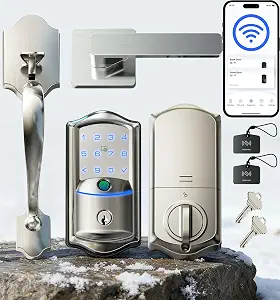 | Best for Durable and Weatherproof Outdoor Use | Material: Aluminum and zinc alloy | Battery Type: 8 AA batteries (not included) | Battery Life: Up to 8 months | VIEW ON AMAZON | See Our Full Breakdown |
| Built-in WiFi Smart Lock, Keyless Entry Door Lock for Front Door, Fingerprint Keypad Deadbolt, App Remote Control, No Hub Needed, 6 Backup Keys, Ideal for Home & Rental |  | Best Overall for Versatile Keyless Access | Connectivity: WiFi | Backup Keys: 6 | Fingerprint Storage: up to 100 | VIEW ON AMAZON | See Our Full Breakdown |
| Veise VE027-L WiFi Smart Lock with Handles Set for Front Door, Matte Black |  | Best for Easy Installation and Multiple Unlocking Modes | Connectivity: Wi-Fi (2.4GHz) | Unlocking Methods: App, fingerprint, passcode, voice, IC card, keys | Fingerprint Capacity: 20 | VIEW ON AMAZON | See Our Full Breakdown |
| Built-in WiFi Smart Lock with Handle Set, Keyless Entry Front Door Lock Set |  | Best for All-in-One Convenience with Voice Control | Connectivity: Wi-Fi (2.4GHz) | Unlocking Methods: App, fingerprint, passcode, IC card, mechanical key, voice control | Fingerprint Storage: Up to 100 | VIEW ON AMAZON | See Our Full Breakdown |
| Veise VE012W WiFi Fingerprint Smart Lock for Front Door, Satin Nickel |  | Best for Fast and Secure Biometric Access | Access Methods: App, fingerprint, PIN, physical keys, voice | Fingerprint Capacity: 20 | Connectivity: WiFi (2.4GHz) | VIEW ON AMAZON | See Our Full Breakdown |
| Wyze Auto-Lock Bolt v2 Fingerprint Keyless Entry Smart Lock with Wi-Fi, Auto-Lock, and Backup Keys |  | Best for Fast, Adaptive Biometric Entry with Learning Capabilities | Brand: WYZE | Model Number: WLCKB2 | Recommended Uses: Home | VIEW ON AMAZON | See Our Full Breakdown |
| smart lock with wifi built in | Connectivity | Battery Life | Material |
|---|---|---|---|
| ULTRALOQ Bolt SE Wi-Fi Smart L | Wi-Fi (2.4 GHz), Matter over Thread | 18 months | Zinc alloy |
| Philips WiFi Keypad Deadbolt w | — | Up to 6 months | — |
| Fingerprint Smart Door Lock wi | — | — | — |
| Philips Wi-Fi Smart Deadbolt L | Wi-Fi 2.4GHz | — | — |
| Veise VE027 WiFi Smart Lock Fi | Wi-Fi (2.4GHz), Bluetooth | Up to 95% more stable connectivity, 98% longer battery life | Matte Black finish |
| Yale Assure Lock 2 Touch Finge | Wi-Fi (2.4 GHz only) | — | Satin Nickel |
| Built-in WiFi Smart Lock for F | Wi-Fi (2.4GHz) | — | — |
| Built-in WiFi Fingerprint Smar | Wi-Fi | Up to 6 months | Zinc alloy |
| Desloc K221 Fingerprint Smart | Wi-Fi | Up to 16 months | — |
| Veise VE027-H Wi-Fi Smart Lock | — | Up to 8 months | Aluminum and zinc alloy |
| Built-in WiFi Smart Lock | WiFi | up to 180 days | — |
| Veise VE027-L WiFi Smart Lock | Wi-Fi (2.4GHz) | Longer with low battery alerts | All-zinc alloy, all-metal handle |
| Built-in WiFi Smart Lock with | Wi-Fi (2.4GHz) | — | Satin Nickel |
| Veise VE012W WiFi Fingerprint | WiFi (2.4GHz) | — | Zinc alloy |
| Wyze Auto-Lock Bolt v2 Fingerp | Wi-Fi | Up to 8 months | — |
More Details on Our Top Picks
ULTRALOQ Bolt SE Wi-Fi Smart Lock with Matter and App Control
The ULTRALOQ Bolt SE stands out for supporting multiple access methods, including fingerprint, passcodes, and app control, making it highly adaptable for various households. Its long battery life of up to 18 months reduces the need for frequent replacements, and the weather-resistant IP65 rating ensures durability outdoors. Compared to the Philips WiFi Keypad Deadbolt, it offers more access options and integrates with Matter over Thread, which future-proofs smart home connectivity—though, it requires a compatible hub for remote Matter control and only supports 2.4 GHz Wi-Fi, which could limit speed and stability. The installation is straightforward for DIYers, but those unfamiliar with smart locks might find setup challenging. This pick makes the most sense for users who want a flexible, durable lock with broad smart home compatibility, despite the need for a Matter hub and some technical setup.
Pros:- Supports multiple access methods including fingerprint, passcodes, and app control
- Long battery life of up to 18 months reduces maintenance
- Easy DIY installation with weather-resistant design
Cons:- Requires a compatible Matter over Thread hub for remote access via Matter
- Wi-Fi only supports 2.4 GHz networks, not 5 GHz
- Setup can be complex for users new to smart locks
Best for: Homeowners seeking a highly versatile, weatherproof lock with broad access options and future-proof smart home tech
Not ideal for: Users with limited technical experience or those who prefer a simple, plug-and-play lock without Matter or Thread integration
- Fingerprint Capacity:50 fingerprints
- Passcode Capacity:50 passcodes
- Connectivity:Wi-Fi (2.4 GHz), Matter over Thread
- Battery Life:18 months
- Material:Zinc alloy
- Water Resistance:IP65 Waterproof
Our verdict“Ideal for tech-savvy homeowners wanting a durable, multi-access smart lock with future-proof connectivity, despite some setup complexity.”
Philips WiFi Keypad Deadbolt with Handle, Built-in WiFi, App Remote Control
The Philips WiFi Keypad Deadbolt is designed for users seeking a straightforward, keyless upgrade with remote management. Its handle set makes it easy to install on most standard doors, and the app allows remote locking and unlocking, making it convenient for everyday use. Compared to the ULTRALOQ Bolt SE, it offers a simpler setup process but supports fewer access methods; it relies primarily on PIN, fingerprint, and remote app control, with auto-lock needing manual activation. The batteries are not included, which can be a minor inconvenience, and its operation is limited to right-opening doors. This lock works well for those who prioritize ease of use and quick installation over advanced smart home features or extensive access options.
Pros:- Easy to install with a complete handle set included
- Remote control via app from anywhere
- Supports multiple access methods: PIN, fingerprint, voice commands
Cons:- Batteries not included, need standard alkaline batteries
- Auto-lock feature must be manually enabled in the app
- Designed primarily for right-opening doors
Best for: Homeowners wanting a simple, reliable, and easy-to-install smart lock with remote control capabilities
Not ideal for: Users seeking advanced features like voice control, multiple access methods, or integration with complex smart home systems
- WiFi Connectivity:2.4GHz WiFi, no hub needed
- Auto-Lock:Yes, customizable 0-180 seconds
- Battery Life:Up to 6 months
- Battery Type:Standard 1.5V alkaline batteries
- Fingerprint Speed:0.3 seconds
- Door Thickness Compatibility:1-3/8″ to 1-3/4″ (38mm to 50mm)
Our verdict“A practical choice for users wanting quick setup and remote access without complex features or extensive customization.”
Fingerprint Smart Door Lock with Handle & Keypad – WiFi, App Control, Alexa & Google Compatible
This Fingerprint Smart Door Lock offers the convenience of remote access without requiring an extra gateway, thanks to its built-in WiFi. Its biometric recognition unlocks in just 0.3 seconds, providing a high-speed, secure experience. It supports multiple unlocking methods—passcode, app, FOB, or mechanical key—making it flexible for various users and situations. Compared with the Veise VE027, it emphasizes quick biometric access and voice assistant compatibility for seamless integration into smart homes. The installation could be complex for non-technical users, and battery life may need regular attention, especially with frequent use. It’s best suited for users who want fast, secure biometric access combined with remote control and voice assistant support, willing to handle a slightly more involved setup.
Pros:- Fast biometric fingerprint unlocking in 0.3 seconds
- Remote control via app without extra gateway
- Supports multiple unlocking options and voice assistants
Cons:- Requires WiFi connection for remote access
- Potentially complex installation process
- Battery life may require frequent replacement
Best for: Tech-savvy homeowners or small business owners wanting fast biometric access with voice control
Not ideal for: Users seeking a straightforward, low-maintenance lock without biometric or voice features
- Built-in WiFi:Yes
- Biometric Recognition:Yes, 0.3 seconds
- Deadbolt Security:Heavy-duty
- Compatibility:Alexa & Google Assistant
- Unlock Methods:Fingerprint, passcode, app, FOB, key
- Auto-lock:Yes
Our verdict“Perfect for users who prioritize speed, security, and voice control, accepting a more involved installation process.”
Philips Wi-Fi Smart Deadbolt Lock, Keyless Entry Door Lock
The Philips Wi-Fi Smart Deadbolt emphasizes remote management and notifications, making it ideal for security-conscious users. It supports multiple unlocking options—app, passcode, fingerprint, voice, and physical key—matching the flexibility of the Veise VE027 but with a focus on real-time alerts and remote locking. Its installation is straightforward for most DIYers, and compatibility with Alexa and Google Assistant broadens voice control options. However, it operates solely on 2.4 GHz Wi-Fi, and the batteries are not included, which could delay setup. The lack of a door sensor means automatic locking confirmation isn’t available, a tradeoff for simplicity. This lock suits users who want comprehensive remote control with notification features, accepting some reliance on batteries and a basic Wi-Fi setup.
Pros:- Multiple unlocking options including app, passcode, fingerprint, voice, and key
- Remote control and real-time notifications enhance security
- Easy DIY installation for most doors
Cons:- Requires AA alkaline batteries, not included
- No door sensor for automatic locking confirmation
- Supports only 2.4GHz Wi-Fi networks
Best for: Homeowners prioritizing remote access, real-time alerts, and flexible unlocking options
Not ideal for: Users seeking advanced integration with smart home systems or a highly automatic locking experience
- Connectivity:Wi-Fi 2.4GHz
- Supported Devices:Alexa, Google Assistant
- Power:AA alkaline batteries
- Compatibility:Doors 1-3/8″ to 2″
- Remote Range:65 ft
- Auto-Lock:Yes, customizable
Our verdict“An excellent choice for users wanting remote control, notifications, and flexible access, despite some limitations in automation.”
Veise VE027 WiFi Smart Lock Fingerprint Keyless Entry Deadbolt Matte Black
The Veise VE027 combines rapid unlocking in 0.2 seconds with AI self-learning fingerprint technology, making it ideal for users who prioritize speed and security. Its durability is evidenced by the IP65 weatherproof rating, suitable for outdoor use in various climates. The lock supports multiple access methods, including PIN, fingerprint, voice commands, and app control, matching the flexibility of the Fingerprint Smart Door Lock with Handle & Keypad. Compared to other options, it emphasizes long battery life and stable connectivity, which is essential for consistent operation. Installation is straightforward but may require some technical skill, especially to align with existing deadbolt configurations. This lock makes the most sense for users seeking a weatherproof, fast, and secure biometric lock with remote management capabilities.
Pros:- Fast unlocking at 0.2 seconds with AI fingerprint technology
- Remote app management for unlocking and access control
- Weatherproof with durable IP65 rating and long battery life
Cons:- Batteries are not included, requiring separate purchase
- Installation may need some technical skill despite being straightforward
- Limited to US standard deadbolts, may not fit all doors
Best for: Homeowners or rental managers wanting a weatherproof, fast biometric lock with long battery life
Not ideal for: Users with non-standard door setups or those preferring simple, keypad-only locks
- Connectivity:Wi-Fi (2.4GHz), Bluetooth
- Unlock Speed:0.2 seconds
- Fingerprint Storage:20+ fingerprints
- Battery Life:Up to 95% more stable connectivity, 98% longer battery life
- Material:Matte Black finish
- Door Hole Diameter:1-1/2″ or 2-1/8″
Our verdict“Best suited for users needing rapid biometric access, weather resistance, and long-term reliability in outdoor conditions.”
Yale Assure Lock 2 Touch Fingerprint Deadbolt with Wi-Fi, Satin Nickel
The Yale Assure Lock 2 stands out for its high-accuracy fingerprint recognition, making it a top choice for those prioritizing biometric security. Unlike the Built-in WiFi Smart Lock for Front Door, which offers multiple unlocking methods, this model focuses heavily on biometric verification combined with two-factor authentication, providing a more secure and streamlined entry experience. Its reliance on 2.4 GHz Wi-Fi limits connectivity options compared to dual-band solutions, but for US and Canadian users with standard deadbolts, installation is straightforward. The auto-lock and hands-free unlocking add convenience without sacrificing security, yet it requires the dedicated app for full control, which could be a hurdle for less tech-savvy users. Compared with other biometric options, it’s more secure but less versatile in connection types.
Pros:- Secure fingerprint recognition with 99% accuracy
- Easy installation on most standard US deadbolts
- Auto-lock and hands-free unlocking for added convenience
- Supports biometric verification and two-factor authentication
Cons:- Limited to 2.4 GHz Wi-Fi networks, restricting connectivity options
- Only compatible with US standard deadbolts, limiting regional use
- Requires smartphone app for full functionality, adding setup complexity
Best for: Homeowners who want biometric security and a straightforward, easy-to-install smart lock with Wi-Fi.
Not ideal for: Users in regions with unreliable Wi-Fi or those needing multi-band network support, since it only works on 2.4 GHz networks.
- Material:Satin Nickel
- Connectivity:Wi-Fi (2.4 GHz only)
- Recognition Accuracy:99%
- Recognition Time:<0.5 seconds
- Compatibility:Most standard US deadbolts
- Regions:U.S. and Canada
Our verdict“This lock is ideal for users seeking biometric security and simple installation, but it’s less suited for regions with complex network setups.”
Built-in WiFi Smart Lock for Front Door, Fingerprint Keypad Deadbolt
This model makes sense for those who want a wide array of unlocking methods, including fingerprint, passcode, RFID, app, and voice, rivaling the multi-method approach of the Veise VE027-H but with added remote control capabilities. Its fast fingerprint recognition (0.3 seconds) ensures quick access, and the ability to manage access remotely via Wi-Fi gives it an edge over simpler keypad-only locks. However, the setup can be more complex, especially for users unfamiliar with smart home devices, and the reliance on Wi-Fi means connectivity issues could impair remote access. Compared with the Yale Assure Lock 2, this offers more unlocking options but may be less secure due to its broader feature set. It suits those wanting flexible access but not necessarily top-tier biometric security.
Pros:- Multiple secure unlocking options including fingerprint, passcode, RFID, app, and voice
- Remote management via built-in Wi-Fi without additional hubs
- Fast fingerprint recognition ensures quick entry
- Auto-lock feature improves security
Cons:- Requires stable Wi-Fi connection for remote control
- Setup process may be complex for non-technical users
- Potential compatibility issues with non-standard doors
Best for: Tech-savvy homeowners or renters who want multiple unlocking options and remote control without complex installation.
Not ideal for: Users with poor Wi-Fi or those seeking a minimalistic, straightforward lock, since setup and maintenance can be somewhat involved.
- Connectivity:Wi-Fi (2.4GHz)
- Unlock Methods:App, fingerprint, passcode, IC card, mechanical key, voice control
- Fingerprint Recognition Speed:0.3 seconds
- Unlock Time:1.5 seconds
- Auto-Lock Range:5–900 seconds
- Support:3-year full replacement plan
Our verdict“Ideal for users who value multiple unlocking methods and remote access, but willing to handle a more involved setup process.”
Built-in WiFi Fingerprint Smart Door Lock with Handle & Keypad – Remote Access & Auto-Lock, Keyless Entry for Home, Airbnb & Rentals, 6-in-1 Unlock: Code/Card/App/Key, Compatible with Alexa & Google
This lock provides a comprehensive approach to keyless entry, combining fingerprint, keypad, RFID, app, physical key, and voice control, similar in flexibility to the Veise VE027-H but with added convenience for rental hosts or multi-user households. Its DIY-friendly installation fits most US doors, and the long battery life with emergency backup ensures reliability. The variety of unlock methods makes it especially suitable for rental properties or busy households needing multiple access points, yet it could be overkill for simple residential use. Compared with more basic locks like the Veise VE027-H, this offers more diversified entry options but requires Wi-Fi for remote features, which might be a downside in low-bandwidth locations.
Pros:- Six unlocking options including fingerprint, keypad, RFID, app, key, and voice
- Easy DIY installation suitable for most US doors
- Long battery life with emergency power backup
- Remote access and management via built-in Wi-Fi
Cons:- Requires Wi-Fi connection for remote control
- Battery life may vary with heavy usage
- Limited to standard door sizes, potentially incompatible with non-standard doors
Best for: Rental hosts or busy households needing multiple, flexible access options with remote management.
Not ideal for: Users seeking a minimalist lock with minimal setup or those with unreliable Wi-Fi connections, due to its dependence on internet access.
- Connectivity:Wi-Fi
- Unlock Methods:Fingerprint, keypad, RFID, app, mechanical key, voice commands
- Battery Life:Up to 6 months
- Backup Power:Type-C emergency port
- Material:Zinc alloy
- Door Compatibility:Standard 1-3/8″ to 2-1/4″ thick doors
Our verdict“Best suited for rental properties or multi-user households seeking versatile, remote-controlled keyless entry with multiple unlocking options.”
Desloc K221 Fingerprint Smart Door Lock with Handle and 16-Month Battery
The Desloc K221 distinguishes itself with an impressive 16-month battery life, making it ideal for users who dislike frequent charging or battery replacements. Its weather-resistant IP65 design ensures reliable operation in various climates, similar to the Veise VE027-H but with a focus on durability and long-term use. The fingerprint scanner is fast and accurate, comparable to the Built-in WiFi Fingerprint Smart Door Lock, yet its long battery life reduces the need for frequent maintenance. However, setup requires a smartphone app, and the security level is BHMA Grade 3, which is sufficient but not the highest tier. Compared with other long-life locks, this one emphasizes durability over multiple unlocking methods or advanced biometric features.
Pros:- Long-lasting 16-month battery life on a single charge
- Weatherproof IP65 design suitable for outdoor use
- Fast, accurate fingerprint recognition
- Remote control via Wi-Fi from anywhere
Cons:- Requires smartphone app for full control
- Fingerprint scanner may not work well with wet or dirty fingers
- Limited to BHMA Grade 3 security level
Best for: Users in outdoor environments or those wanting a low-maintenance, weatherproof lock with extended battery life.
Not ideal for: Homeowners seeking the highest security level or advanced biometric options, as it’s limited to Grade 3 security and basic features.
- Battery Capacity:15000mAh
- Battery Life:Up to 16 months
- Connectivity:Wi-Fi
- Weather Resistance:IP65
- Security Level:BHMA Grade 3
- Included Components:Rechargeable battery, install tools, fingerprint lock
Our verdict“Ideal for outdoor or high-usage environments needing reliable, long-lasting battery performance with weather resistance.”
Veise VE027-H Wi-Fi Smart Lock for Front Door with Handle Set, Satin Nickel
The Veise VE027-H offers a robust combination of weatherproof materials and flexible access options, making it well-suited for outdoor settings. Its support for fingerprint, passcodes, remote control, and voice commands matches the versatility of the Built-in WiFi Smart Lock for Front Door, but with added durability thanks to its aluminum and zinc alloy construction. Installation is straightforward, even for DIYers, and the real-time notifications and access logs provide ongoing security monitoring. The main tradeoff is that it supports only up to 20 fingerprints and batteries are not included, which could be inconvenient for users needing many user profiles or immediate setup. Compared with other outdoor locks, its weatherproof design and flexible access make it particularly attractive for exterior doors.
Pros:- Weatherproof, durable materials suitable for outdoor use
- Multiple unlocking methods including fingerprint, passcodes, app, and voice
- Easy installation without professional help
- Real-time notifications and access history
Cons:- Batteries are not included, requiring purchase separately
- Limited to 20 fingerprints capacity
- Requires Wi-Fi for remote features
Best for: Outdoor homeowners or rental hosts seeking a durable, weatherproof lock with flexible access and remote control features.
Not ideal for: Indoor-only users or those needing a lock with a higher fingerprint capacity or extensive security features.
- Material:Aluminum and zinc alloy
- Battery Type:8 AA batteries (not included)
- Battery Life:Up to 8 months
- Operating Temperature:-31°F to 150°F
- Supported Fingerprints:Up to 20
- Auto-lock Timer:0-180 seconds
Our verdict“Best for outdoor use where weather resistance and flexible access are priorities, but limited fingerprint capacity may be a concern for larger households.”
Built-in WiFi Smart Lock, Keyless Entry Door Lock for Front Door, Fingerprint Keypad Deadbolt, App Remote Control, No Hub Needed, 6 Backup Keys, Ideal for Home & Rental
This smart lock stands out for combining multiple access methods—fingerprint, passcode, app control, and backup keys—in a single device, making it highly adaptable for various users. Its fast biometric recognition ensures quick entry, while weatherproof design extends its outdoor usability. Compared with the Veise VE012W, it offers more access options but lacks remote control via app for unlocking, which could be a limitation for remote management. Installation is straightforward, fitting most standard US doors, but it relies on WiFi for remote features, so connectivity issues could hinder access. The battery life of around six months is decent, though frequent replacements are necessary with heavy use. This pick makes the most sense for homeowners or renters needing reliable, flexible access without a hub.
Pros:- Multiple access methods including fingerprint, passcode, app, and backup keys
- Fast biometric recognition with 99.9% accuracy
- Weatherproof design suitable for outdoor installation
- Easy DIY installation for standard US doors
Cons:- Remote app control limited—cannot lock/unlock remotely via app
- Requires WiFi connection for remote features, susceptible to connectivity issues
- Battery replacement needed approximately every 6 months
Best for: Homeowners and renters seeking a versatile, keyless lock with biometric and remote control options
Not ideal for: Users looking for a device with long-term battery life or heavy-duty outdoor use without frequent maintenance
- Connectivity:WiFi
- Backup Keys:6
- Fingerprint Storage:up to 100
- PIN Storage:up to 100
- Unlock Speed:0.3 seconds
- Battery Life:up to 180 days
- Auto-Lock Timer:5 to 60 seconds
- Door Thickness Compatibility:1-3/8″ to 2-3/16″
Our verdict“This lock is best for users wanting flexible keyless access with quick biometric entry and outdoor durability, accepting some reliance on WiFi connectivity.”
Veise VE027-L WiFi Smart Lock with Handles Set for Front Door, Matte Black
The Veise VE027-L offers an impressive range of unlocking options—app, fingerprint, passcodes, voice control, and physical keys—making it ideal for households with varied preferences. Its quick installation, often completed in about 15 minutes without drilling, sets it apart from more complex setups like the Wyze Bolt v2. While it provides real-time alerts and local data storage, the need for batteries (not included) and WiFi for remote features can be limiting factors. Its IP65 waterproof rating ensures durability outdoors, but it’s primarily designed for standard door sizes and may not fit all configurations. Compared with the Wyze Bolt v2, it’s easier to install, but lacks detailed info on battery life, which could be a concern for long-term use.
Pros:- Multiple unlocking options including app, fingerprint, voice, and physical keys
- Easy, drill-free installation process
- Real-time alerts and local data storage for security
- All-metal handle and durable construction
Cons:- Batteries are not included and require replacement
- WiFi needed for remote access, which could be unreliable in weak signal areas
- Limited info on battery lifespan and long-term power management
Best for: Families or individuals seeking a straightforward, multi-unlocking mode smart lock with easy DIY installation
Not ideal for: Users needing a heavy-duty lock with detailed battery management or advanced weather resistance beyond IP65
- Connectivity:Wi-Fi (2.4GHz)
- Unlocking Methods:App, fingerprint, passcode, voice, IC card, keys
- Fingerprint Capacity:20
- Battery Type:8 AA batteries (not included)
- Battery Life:Longer with low battery alerts
- Material:All-zinc alloy, all-metal handle
- Water Resistance:IP65
- Installation:Fits standard door thickness 35mm-50mm
Our verdict“Ideal for users wanting a versatile, easy-to-install smart lock with multiple unlocking options and straightforward setup.”
Built-in WiFi Smart Lock with Handle Set, Keyless Entry Front Door Lock Set
This smart lock set excels by offering a comprehensive array of unlocking methods—app, fingerprint, passcode, IC card, mechanical key, and voice commands—making it highly adaptable for different user needs. Its automatic locking feature enhances security without user intervention, and remote access via app allows for real-time control. Compared with the Veise VE027-L, it offers broader voice command compatibility but lacks detailed info on battery life or weather resistance, which could be a concern for outdoor or long-term use. Installation is straightforward, fitting most standard U.S. doors, but it requires a stable Wi-Fi network for full remote capabilities. This lock is best suited for those wanting a feature-rich, all-in-one entry solution for home or rental settings.
Pros:- Multiple unlocking options including fingerprint, passcode, app, and voice control
- Automatic locking enhances daily security
- Remote access and real-time notifications via app
- Easy installation without professional help
Cons:- Requires a 2.4GHz Wi-Fi network for full functionality
- Limited info on battery life and backup power options
- No mention of weather resistance for outdoor use
Best for: Homeowners or rental property managers looking for a feature-packed, easy-to-install smart lock with voice control
Not ideal for: Users in areas with unstable Wi-Fi or those needing a lock with prolonged battery longevity without frequent charging or replacements
- Connectivity:Wi-Fi (2.4GHz)
- Unlocking Methods:App, fingerprint, passcode, IC card, mechanical key, voice control
- Fingerprint Storage:Up to 100
- Passcode Storage:Up to 100
- Auto-lock Timer:5 to 900 seconds
- Material:Satin Nickel
- Warranty:3 years
Our verdict“Perfect for users seeking a highly versatile, voice-compatible smart lock with automatic locking and simple DIY setup.”
Veise VE012W WiFi Fingerprint Smart Lock for Front Door, Satin Nickel
This WiFi-enabled fingerprint lock emphasizes rapid, high-accuracy biometric recognition, making it suitable for those prioritizing quick, secure entry. Its recognition speed of 0.2 seconds and 99.99% accuracy surpass many competitors like the Built-in WiFi Smart Lock, which relies on passcodes and fingerprints but with slower recognition. Its durable zinc alloy body and waterproof rating add outdoor resilience, yet it requires DIY installation and batteries (not included). While it offers remote management via WiFi, its IP53 rating limits heavy rain exposure, compared to the more weatherproof models like the Veise VE027-L. The lock learns from usage to improve recognition, but battery replacement frequency could be a concern for heavy users.
Pros:- AI-powered fingerprint recognition with 0.2-second speed
- High accuracy at 99.99%
- Remote management via WiFi
- Durable, waterproof zinc alloy construction
Cons:- Batteries not included, requiring replacement
- Weather resistance rated IP53—less suited for heavy rain or snow
- DIY installation needed, may be challenging for some
Best for: Tech-savvy users wanting fast, secure biometric access with remote management capabilities
Not ideal for: Users seeking a lock with extended battery life or heavy-duty outdoor weatherproofing beyond IP53
- Access Methods:App, fingerprint, PIN, physical keys, voice
- Fingerprint Capacity:20
- Connectivity:WiFi (2.4GHz)
- Recognition Speed:0.2 seconds
- Recognition Rate:99.99%
- Material:Zinc alloy
- Batteries:8 AA (not included)
- Installation:DIY
Our verdict“Ideal for users prioritizing fast, accurate biometric entry combined with WiFi remote control in moderate outdoor conditions.”
Wyze Auto-Lock Bolt v2 Fingerprint Keyless Entry Smart Lock with Wi-Fi, Auto-Lock, and Backup Keys
The Wyze Bolt v2 offers rapid fingerprint unlocking in under half a second, leveraging AI learning to improve recognition accuracy over time. Its remote management through Wi-Fi, combined with multiple unlocking options such as keypad codes and backup keys, makes it highly flexible. Compared to the Veise VE012W, it excels in speed and adaptive learning but has a lower weather resistance rating (IP53), making it less suited for harsh outdoor environments. While its battery life can reach around 8 months, heavy usage may require more frequent replacements. Its robust, weather-resistant design and learning capabilities make it a solid choice for tech enthusiasts who value speed and adaptability, but not for those needing extreme outdoor durability.
Pros:- Unlocks in under 0.5 seconds with fingerprint scanner
- Learns from usage to improve recognition accuracy
- Remote control via Wi-Fi with multiple unlocking options
- Weather-resistant and durable design
Cons:- Requires Wi-Fi for remote management
- Weather resistance rated IP53—less suited for heavy rain or snow
- Battery life varies with usage, potentially requiring replacement sooner in heavy use
Best for: Homeowners who prioritize fast biometric access and smart learning features for everyday use
Not ideal for: Users in extreme weather zones needing a lock rated for harsh outdoor conditions or longer battery life under heavy use
- Brand:WYZE
- Model Number:WLCKB2
- Recommended Uses:Home
- Number of Pieces:1
- Weather Resistance:IP53
- Durability:BHMA2
- Battery Life:Up to 8 months
- Connectivity:Wi-Fi
Our verdict“Best suited for users seeking a fast, adaptive biometric lock with Wi-Fi remote control, accepting moderate weather resistance limitations.”

How We Picked
The selection process focused on evaluating smart locks with built-in WiFi based on performance, user-friendliness, build quality, and value. I examined how easily each lock installs, how reliably it connects to WiFi networks, and whether its app and voice control features are intuitive and responsive. Security features such as biometric options or keyed backups also played a key role, along with compatibility with popular smart home platforms. Products were ranked to highlight a range of priorities—whether budget-friendly, feature-rich, or easiest to set up—ensuring that different types of buyers find suitable options.| smart lock with wifi built in | Material |
|---|---|
| ULTRALOQ Bolt SE Wi-Fi Smart L | Zinc alloy |
| Philips WiFi Keypad Deadbolt w | — |
| Fingerprint Smart Door Lock wi | — |
| Philips Wi-Fi Smart Deadbolt L | — |
| Veise VE027 WiFi Smart Lock Fi | Matte Black finish |
| Yale Assure Lock 2 Touch Finge | Satin Nickel |
| Built-in WiFi Smart Lock for F | — |
| Built-in WiFi Fingerprint Smar | Zinc alloy |
| Desloc K221 Fingerprint Smart | — |
| Veise VE027-H Wi-Fi Smart Lock | Aluminum and zinc alloy |
| Built-in WiFi Smart Lock | — |
| Veise VE027-L WiFi Smart Lock | All-zinc alloy, all-metal handle |
| Built-in WiFi Smart Lock with | Satin Nickel |
| Veise VE012W WiFi Fingerprint | Zinc alloy |
| Wyze Auto-Lock Bolt v2 Fingerp | — |
Factors to Consider When Choosing Smart Lock With Wifi Built In
When choosing a smart lock with WiFi built in, understanding the key factors can help you make an informed decision. Consider your specific needs, such as whether you prioritize biometric security, remote management, or compatibility with existing smart home devices. The installation process varies, so assess if you need a DIY-friendly model or one that requires professional help. Connectivity stability is critical—look for locks with reliable WiFi and support for future standards like Matter. Additionally, consider power sources and backup options to avoid lockouts, especially if you rent or frequently change residences. Balancing these factors will lead to a smart lock that enhances your home security without creating unwanted complications.Connectivity and Compatibility
Reliable WiFi connectivity is the backbone of a smart lock with built-in WiFi. Choose a lock that supports your home’s WiFi setup and offers stable remote access. Compatibility with voice assistants like Alexa, Google Assistant, or Apple HomeKit expands convenience, but verify if additional hubs or bridges are needed. Future-proofing is also worth considering; locks supporting Matter or Z-Wave can integrate smoothly with evolving smart home systems, reducing the risk of obsolescence.
Security Features
Beyond remote control, security features such as biometric fingerprint access, keypad entry, and physical key backups are essential. Consider how each feature aligns with your lifestyle—biometric options provide quick access but may add to the cost, while keypad codes are versatile but potentially less secure if not managed carefully. Look for locks with tamper alerts or auto-lock functions that prevent accidental or forced openings.
Ease of Installation and Use
Installation complexity varies widely. Some models are designed for easy DIY mounting, while others may require professional installation, especially if they replace existing deadbolts or handle sets. User interfaces should be straightforward—apps that are intuitive and responsive make daily use more pleasant. Consider whether the lock supports multiple users or temporary access codes, which is useful for rentals or shared homes.
Power and Backup Options
Most smart locks rely on batteries—check the battery life and how notifications are handled when power runs low. Backup options like physical keys or external power sources add peace of mind, especially in case of WiFi outages or dead batteries. Some locks include features like low-battery alerts or emergency power contacts, which can prevent lockouts at inconvenient times.
Price and Overall Value
While premium models often include advanced features like biometrics and extensive smart home integration, they come at a higher cost. Budget options may lack some conveniences but still offer essential keyless entry and WiFi connectivity. Evaluate what features are most important for your situation and whether the additional expense aligns with your security priorities. Investing in a more capable lock can pay off in long-term convenience and peace of mind.
Frequently Asked Questions
Can I install a smart lock with WiFi myself?
Many smart locks with WiFi are designed for DIY installation, especially those that replace standard deadbolts or handle sets. These models often come with detailed instructions and tools that make setup straightforward for someone comfortable with basic home repairs. However, more complex models that involve wiring or integration with existing security systems might require professional installation to ensure proper functioning and safety.
Will I need a hub or bridge for these locks?
Most smart locks with built-in WiFi do not require a separate hub or bridge, as WiFi connectivity is built-in. This simplifies installation and reduces additional costs. However, some advanced models or those supporting Z-Wave or Zigbee may need a hub if you want to integrate with other smart home devices. Always check the product specifications to confirm whether a hub is necessary for your setup.
How secure are WiFi-enabled smart locks?
WiFi-enabled smart locks include multiple layers of security, such as encrypted communications and multi-factor authentication options. The security of these locks largely depends on your home WiFi network’s strength and how you manage access credentials. Regular firmware updates from manufacturers can patch vulnerabilities, so choosing brands with active support is advisable. Remember, no lock is completely invulnerable, but proper setup significantly reduces risks.
What should I consider if I rent or frequently change residences?
If you’re renting or moving often, look for locks with easy-to-remove mounting and temporary access features like disposable codes or app-based guest access. Battery-powered locks with long-lasting life and backup keys are essential for avoiding lockouts. Additionally, choosing a lock with remote control capabilities ensures you can manage access without needing physical keys or onsite presence, making it easier to coordinate with landlords or new tenants.
Are biometric smart locks worth the extra cost?
Biometric locks provide quick, keyless access through fingerprint recognition, which can improve security and convenience. They are especially useful for busy households or those with children, as it minimizes the need to remember codes or carry keys. However, they tend to be more expensive and may require more maintenance or calibration over time. Whether they are worth the investment depends on how much you value speed and biometric security features in your daily routine.
Conclusion
For most homeowners seeking a reliable, easy-to-install solution, the ULTRALOQ Bolt SE offers a well-rounded balance of features and future compatibility, making it the best overall choice. Those prioritizing affordability and straightforward setup should consider the Philips WiFi Keypad Deadbolt, especially if keyless convenience is your main goal. If you want premium features like biometric access, the Fingerprint Smart Door Lock with Handle & Keypad is a strong contender. Renters or those with frequent moves benefit from models with easy installation and temporary access options, like the Wyze Auto-Lock Bolt v2. Ultimately, your decision should reflect your specific security needs, smart home ecosystem, and budget constraints.