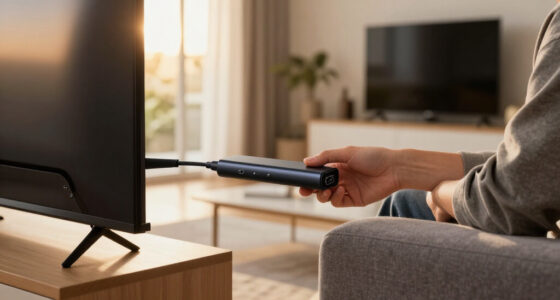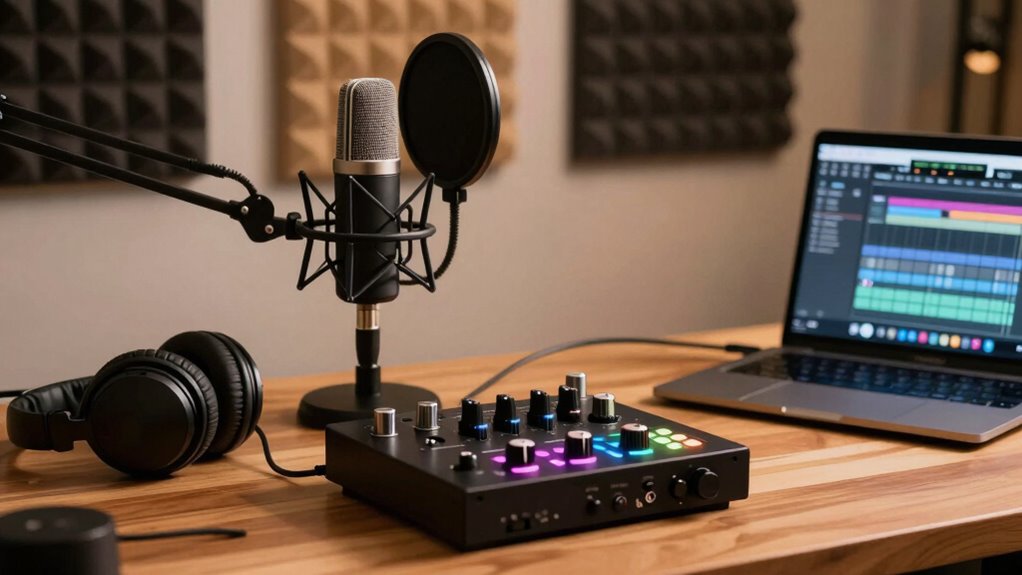

Choosing the right audio interface for podcasting can significantly improve your sound quality and workflow. The Focusrite Scarlett Solo 4th Gen stands out as the overall best, offering excellent sound and simplicity. For those on a budget, the MAONO PS22 Lite delivers decent performance at a lower price point, while the Focusrite Vocaster One is perfect for streamers and solo podcasters who want easy setup. The main tradeoffs in this category involve balancing sound quality, ease of use, and budget constraints. Keep reading for a detailed breakdown to find the best fit for your podcasting needs.

Get the latest gadgets delivered free — and shop member deals
- Fast, free delivery on millions of items
- Access to Prime Big Deal Days deals on October 6–7
- Prime Video, Amazon Music and more included
Complete the kit



Key Takeaways
- Top-tier models like the Focusrite Scarlett 4th Gen offer professional-grade sound but come at a higher price.
- Budget options like the MAONO PS22 Lite provide decent entry-level performance for new podcasters.
- Ease of use and plug-and-play capabilities are more prevalent in models designed for streamers, such as the Focusrite Vocaster One.
- Build quality varies, with premium models often offering more durable construction and better longevity.
- Additional features like bundled software and multiple input options can influence overall value and versatility.
| Focusrite Scarlett Solo 3rd Gen USB-C Audio Interface |  | Best Overall for Solo Podcasters and Home Studios | Connectivity: USB-C | Bit Depth: 24-bit | Sample Rate: 192kHz | VIEW ON AMAZON | See Our Full Breakdown |
| MAONO PS22 Lite USB Audio Interface for PC, Guitar & Vocals Streaming |  | Best for Streaming and Content Creators on a Budget | Compatible Devices: Guitar, Headphone, Laptop, Smartphone, Microphone, Speaker | Supported Software: Ableton Live, Studio One, Logic Pro, Cubase, GarageBand, FL Studio, YouTube, TikTok, OBS, Twitch, Discord | Connectivity Technology: USB | VIEW ON AMAZON | See Our Full Breakdown |
| Focusrite Scarlett Solo 4th Gen USB-C Audio Interface |  | Best for High-Quality Solo Recordings and Small Studios | Compatible Devices: Microphone, Instrument, Personal Computer, Headphones, Studio Monitors | Supported Software: All audio recording software | Connectivity Technology: USB | VIEW ON AMAZON | See Our Full Breakdown |
| Focusrite Vocaster One |  | Best for Podcasters and Streamers Needing Broadcast-Quality Sound | Gain: Over 70dB | Connectivity: TRRS for phone, TRS for camera | Features: Auto Gain, Presets, Mute, Stereo Loopback | VIEW ON AMAZON | See Our Full Breakdown |
| MAONO AME2 Audio Interface Mixer, Podcast Studio Console with XLR Input |  | Best for Versatile Podcast and Streaming Setups | Preamp Support: Phantom power, 60dB gain | Sound Pads: 11 customizable, with recording and looping | Inputs: XLR, 6.35mm instrument, AUX-IN, MIC1/2, INST | VIEW ON AMAZON | See Our Full Breakdown |
| PreSonus AudioBox 96 25th Anniversary USB Audio Interface |  | Best Overall for Portable High-Quality Recording | Number of Inputs: 2 high-headroom instrument inputs, 2 mic preamps | Sample Rate: 24-bit/96 kHz | Connectivity: USB 2.0 | VIEW ON AMAZON | See Our Full Breakdown |
| M-AUDIO M-Track Duo USB Audio Interface |  | Best for Versatile, Budget-Friendly Recording | Audio Resolution: 48kHz | Inputs: 2 combo XLR/Line/Instrument | Phantom Power: Yes | VIEW ON AMAZON | See Our Full Breakdown |
| M-AUDIO M-Track Solo USB Audio Interface |  | Best for Simple, All-in-One Podcasting and Streaming | Input Type: Combo XLR/Line with phantom power | Sample Rate: 48kHz | Outputs: Headphone and stereo RCA | VIEW ON AMAZON | See Our Full Breakdown |
| Focusrite Scarlett 2i2 4th Gen USB-C Audio Interface |  | Best for Studio-Quality Sound and Professional Use | Generation: 4th | Connectivity: USB-C | Dynamic Range: 120dB | VIEW ON AMAZON | See Our Full Breakdown |
| MAONO P2 Hybrid USB Audio Interface Dual XLR for PC, Phone, iPad, Guitar |  | Best for Versatile, High-Resolution Streaming and Podcasting | Supported Devices: Guitar, Headphone, Laptop, Microphone, Smartphone | Sample Rate: 192 KHz | Inputs: 2 XLR | VIEW ON AMAZON | See Our Full Breakdown |
| MAONO E2 Gen2 Podcast Equipment Bundle Audio Interface Mixer |  | Best All-in-One Podcast Setup | Inputs: 2 XLR combo inputs | Preamp Gain: 60dB | Ports: USB-C, 3.5mm, Bluetooth | VIEW ON AMAZON | See Our Full Breakdown |
| MAONO G1 Neo Gaming Audio Mixer Audio Interface with XLR Input & 48V | 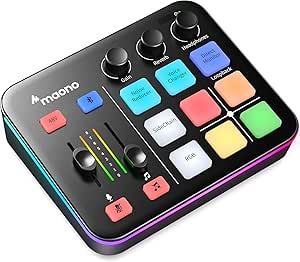 | Best Compact XLR Streaming Mixer | Input: XLR with 48V phantom power | Output: Headphone and line out | RGB Lighting: 12 color variations with customizable effects | VIEW ON AMAZON | See Our Full Breakdown |
| audio interface for podcasting | Connectivity | Inputs | Outputs |
|---|---|---|---|
| Focusrite Scarlett Solo 3rd Ge | USB-C | 1 microphone, 1 instrument | 2 balanced outputs |
| MAONO PS22 Lite USB Audio Inte | — | — | — |
| Focusrite Scarlett Solo 4th Ge | — | — | — |
| Focusrite Vocaster One | TRRS for phone, TRS for camera | — | — |
| MAONO AME2 Audio Interface Mix | USB-C, Bluetooth, smartphone, PC, tablet | XLR, 6.35mm instrument, AUX-IN, MIC1/2, INST | LIVE-OUTPUT1/2, MONITOR SPK, AUX-IN |
| PreSonus AudioBox 96 25th Anni | USB 2.0 | — | High-powered headphone output, balanced ¼” TRS outputs |
| M-AUDIO M-Track Duo USB Audio | USB | 2 combo XLR/Line/Instrument | 1/4" headphone, stereo 1/4" outputs |
| M-AUDIO M-Track Solo USB Audio | USB | — | Headphone and stereo RCA |
| Focusrite Scarlett 2i2 4th Gen | USB-C | 2 | Headphone and line outputs |
| MAONO P2 Hybrid USB Audio Inte | — | 2 XLR | — |
| MAONO E2 Gen2 Podcast Equipmen | — | 2 XLR combo inputs | — |
| MAONO G1 Neo Gaming Audio Mixe | — | — | — |
More Details on Our Top Picks
Focusrite Scarlett Solo 3rd Gen USB-C Audio Interface
The Focusrite Scarlett Solo 3rd Gen stands out for its high-quality 24-bit/192kHz conversion, making it ideal for podcasters who prioritize clear, professional sound without complex setup. Compared to the MAONO PS22 Lite, it offers superior audio fidelity and a more robust software bundle, though it’s limited to two inputs, which may restrict multi-mic setups. Its switchable Air mode adds brightness to voice recordings, giving a noticeable edge for voice-centric content. The compact design and durable build make it suitable for travel and everyday use, but its software options can feel overwhelming for beginners. Overall, this interface makes the most sense for solo creators or small studios aiming for high-quality output without expanding to multi-input configurations.
Pros:- High-quality 24-bit/192kHz audio conversion ensures professional sound clarity
- Ease of use with gain Halo metering and switchable Air mode
- Includes a comprehensive software bundle for recording, editing, and mixing
- Compact and durable, suitable for travel
Cons:- Limited to two inputs, restricting multi-mic or multi-instrument setups
- Requires USB-C port, which may need adapters for older computers
Best for: Solo podcasters, singer-songwriters, and home studio owners seeking high-quality audio with minimal fuss
Not ideal for: Podcasters or musicians needing more than two inputs or multi-channel recording capabilities
- Connectivity:USB-C
- Bit Depth:24-bit
- Sample Rate:192kHz
- Inputs:1 microphone, 1 instrument
- Outputs:2 balanced outputs
- Included Software:Pro Tools Intro+, Ableton Live Lite, Cubase LE, Hitmaker Expansion
- Warranty:3 years
Our verdict“This interface is perfect for solo podcasters and musicians who want professional sound in a simple, portable package.”
MAONO PS22 Lite USB Audio Interface for PC, Guitar & Vocals Streaming
The MAONO PS22 Lite offers high-resolution 24-bit/192kHz recording, making it suitable for streamers and podcasters who need versatile connectivity in a small form factor. Unlike the Focusrite Scarlett Solo, it supports a broader range of devices, including smartphones and tablets, thanks to its compatibility with Android and iOS. Its multiple input options for microphones and guitars, combined with software support for popular streaming platforms like OBS and TikTok, make it a flexible choice for live content. However, being limited to two channels and requiring compatible drivers can be drawbacks for those wanting multi-track recording or plug-and-play simplicity. This interface suits content creators who prioritize flexibility and high-res sound but are comfortable with some setup complexity.
Pros:- High-resolution 24-bit/192kHz audio quality for clear recordings
- Supports multiple devices including smartphones and laptops
- Versatile inputs for microphones and guitars with phantom power
- Includes routing software for streaming and broadcasting
Cons:- Limited to 2 channels, restricting multi-mic setups
- Setup can be challenging without prior experience or driver installation
Best for: Streamers, YouTubers, and solo content creators who need versatile device compatibility and high-quality audio
Not ideal for: Pro musicians or podcasters requiring multi-mic or multi-track recording capabilities
- Compatible Devices:Guitar, Headphone, Laptop, Smartphone, Microphone, Speaker
- Supported Software:Ableton Live, Studio One, Logic Pro, Cubase, GarageBand, FL Studio, YouTube, TikTok, OBS, Twitch, Discord
- Connectivity Technology:USB
- Number of Channels:2
- Frequency Response:20 KHz
- Item Dimensions:6.29″D x 5.19″W x 2″H
- Item Weight:0.43 kg
Our verdict“This interface is well-suited for streamers and content creators who need high-quality, flexible audio input options on multiple devices.”
Focusrite Scarlett Solo 4th Gen USB-C Audio Interface
The Focusrite Scarlett Solo 4th Gen builds on its predecessors with studio-grade converters and a detailed mic preamp, making it a top choice for musicians and solo podcasters who want crisp, professional sound. Compared to the 3rd Gen, it offers slightly improved audio fidelity and a more refined interface, though it retains the limitation of two inputs. Its Air mode continues to give vocals and guitars a brighter, more present tone. While the basic feature set may seem limited for multi-instrument or multi-mic needs, this model is better suited for individuals focused on single-source recording, especially vocals or guitar. It’s a solid pick for those seeking a straightforward, high-quality interface for personal or small-scale projects.
Pros:- Studio-grade converters with 120dB dynamic range for clear, detailed sound
- Enhanced mic preamp with Air mode for more vibrant recordings
- Includes comprehensive software bundle for recording and production
- Compact, portable design suitable for various environments
Cons:- Limited to two inputs, not ideal for multi-mic or multi-instrument recording
- Basic feature set may fall short for advanced recording needs
Best for: Solo musicians, vocalists, and podcasters seeking high-fidelity sound with minimal complexity
Not ideal for: Anyone needing multi-channel recording or multi-mic setups for larger projects
- Compatible Devices:Microphone, Instrument, Personal Computer, Headphones, Studio Monitors
- Supported Software:All audio recording software
- Connectivity Technology:USB
- Number of Channels:2
- Frequency Response:20 KHz
Our verdict“This interface offers excellent sound quality for solo creators who prioritize simplicity and professional results.”
Focusrite Vocaster One
The Focusrite Vocaster One targets podcasters and streamers with its broadcast-quality sound and user-friendly features. Its auto gain and preset modes simplify level setting, making it accessible for beginners or those who want quick results. Compared with the Scarlett Solo, it offers more tailored connectivity options, including TRRS for phones and TRS for cameras, which are critical for live streaming setups. However, it’s limited to a single microphone input, which could restrict multi-person podcasts or interviews. No built-in microphone means additional equipment is required, but its ease of use compensates for that. This device is ideal for users who prioritize ease of setup and consistent voice quality over multi-mic flexibility.
Pros:- Broadcast-quality sound with minimal setup effort
- Auto Gain feature automates level control for consistent audio
- Multiple connectivity options for phones and cameras
- Preset modes for enhancing voice clarity
Cons:- Limited to one microphone input, restricting multi-person recordings
- No built-in microphone, requiring additional equipment
Best for: Podcasters, live streamers, and solo broadcasters who want straightforward, broadcast-quality audio
Not ideal for: Groups or multi-mic setups requiring multiple inputs or advanced routing
- Gain:Over 70dB
- Connectivity:TRRS for phone, TRS for camera
- Features:Auto Gain, Presets, Mute, Stereo Loopback
Our verdict“This interface is best for solo podcasters or streamers who need reliable, high-quality voice capture with minimal fuss.”
MAONO AME2 Audio Interface Mixer, Podcast Studio Console with XLR Input
The MAONO AME2 offers a wide array of features, including high-quality preamps, multiple input options, and built-in effects, making it a flexible choice for podcasting, streaming, and music recording. Compared with the focused simplicity of the Focusrite Scarlett Solo, it caters to users who want more control over their sound with customizable pads and effects. Its support for phantom power and multiple input types—including XLR and 6.35mm jacks—provides greater flexibility for various microphones and instruments. However, it excludes support for USB microphones, and its complex setup may challenge beginners. This device is best suited for creators who want a professional, multi-faceted audio setup that can adapt to different recording scenarios.
Pros:- High-quality preamps with phantom power for clear, detailed microphone sound
- Multiple customizable sound pads for creative control
- Supports a wide range of inputs and outputs for versatile setup
- Built-in effects and tone controls for personalized sound shaping
Cons:- Does not support USB microphones, limiting plug-and-play options
- Setup complexity may be difficult for newcomers
- Limited to analog microphones, no USB mic compatibility
Best for: Podcast producers, streamers, and musicians who require flexible input options and customizable sound effects
Not ideal for: Beginners seeking a plug-and-play solution or users only using USB mics
- Preamp Support:Phantom power, 60dB gain
- Sound Pads:11 customizable, with recording and looping
- Inputs:XLR, 6.35mm instrument, AUX-IN, MIC1/2, INST
- Outputs:LIVE-OUTPUT1/2, MONITOR SPK, AUX-IN
- Effects:6 reverb modes, 12 auto-tune steps, tone controls
- Connectivity:USB-C, Bluetooth, smartphone, PC, tablet
Our verdict“This mixer caters to creators wanting a flexible, customizable setup for podcasting and streaming, despite its steeper learning curve.”
PreSonus AudioBox 96 25th Anniversary USB Audio Interface
The PreSonus AudioBox 96 stands out for its combination of professional-grade audio quality and portability, making it a top choice for podcasters who need reliable sound on the go. Its high-quality Class-A mic preamps deliver clear, warm vocals, comparable to higher-end interfaces like the Focusrite Scarlett 2i2, but with the added benefit of included over $1000 worth of recording software. While it’s limited to two inputs, this keeps its setup simple for solo podcasters or small panels. A notable tradeoff is that it lacks built-in DSP or effects, which might be a downside for users wanting real-time processing without extra software. Compared to the M-Audio M-Track Duo, it offers better conversion quality but at a slightly higher price point and less onboard versatility.
Pros:- High-quality Class-A mic preamps for clear, warm sound
- Supports professional standards with 24-bit/96 kHz conversion
- Includes extensive recording software valued over $1000
- Portable and bus-powered for mobile use
Cons:- Limited to 2 inputs, restricting multi-mic setups
- No built-in DSP or effects for real-time processing
- Potential latency issues on some systems due to USB connection
Best for: Podcasters who prioritize high-quality audio in portable setups and use professional software.
Not ideal for: Larger podcast crews or streamers needing multiple mics and onboard effects, as it has only 2 inputs and no DSP.
- Number of Inputs:2 high-headroom instrument inputs, 2 mic preamps
- Sample Rate:24-bit/96 kHz
- Connectivity:USB 2.0
- Phantom Power:Yes
- Included Software:Studio One Artist, Ableton Live Lite, Studio Magic Plug-In suite
- Outputs:High-powered headphone output, balanced ¼” TRS outputs
- MIDI I/O:Yes
Our verdict“This interface suits solo podcasters and mobile creators needing studio-grade sound in a portable package.”
M-AUDIO M-Track Duo USB Audio Interface
The M-Audio M-Track Duo makes a compelling case for those starting out or needing a flexible interface for vocals and instruments. Its combo XLR/Line/Instrument inputs support a wide range of microphones and guitars, similar to the Focusrite Scarlett 2i2, but at a more accessible price. The 48kHz resolution might be a limitation for users seeking the utmost fidelity, especially compared to interfaces supporting up to 192kHz like the MAONO P2. Nevertheless, its zero-latency monitoring and simple interface make it a reliable choice for streaming or recording on a budget. The tradeoff is fewer advanced features and a basic software bundle, which might not satisfy more advanced users. Compared to the Focusrite Scarlett Solo, it offers better input versatility but lacks higher sample rates and onboard effects.
Pros:- Versatile combo XLR/Line/Instrument inputs
- High-quality crystal preamps for clear audio
- Zero-latency monitoring with USB/Direct switch
- Affordable price point for entry-level recording
Cons:- Limited to 48kHz maximum sample rate
- Basic software bundle lacking advanced features
- No onboard effects or DSP processing
Best for: Beginners or budget-conscious podcasters who need versatile inputs and straightforward operation.
Not ideal for: Producers requiring high sample rates or complex routing, as it maxes out at 48kHz with limited extras.
- Audio Resolution:48kHz
- Inputs:2 combo XLR/Line/Instrument
- Phantom Power:Yes
- Outputs:1/4″ headphone, stereo 1/4″ outputs
- Included Software:MPC Beats
- Connectivity:USB
Our verdict“Ideal for beginners or casual streamers seeking a flexible, budget-friendly interface for vocals and instruments.”
M-AUDIO M-Track Solo USB Audio Interface
The M-Audio M-Track Solo is designed to deliver fuss-free, reliable recording for streamers and podcasters alike. Its single combo XLR/Line input with phantom power simplifies setup without sacrificing quality—comparable to the Focusrite Scarlett Solo but with a slightly more streamlined design. Its 48kHz resolution ensures decent audio clarity for most podcasting needs. The inclusion of MPC Beats software offers a basic production environment, though it lacks the multi-channel capacity of larger interfaces. The tradeoff is that it’s less suited for multi-mic setups or advanced editing, making it best for solo hosts or quick recordings. Compared to the Focusrite Scarlett Solo, it provides similar features but with a more portable form factor.
Pros:- Simple, no-fuss setup with one combo XLR/Line input
- Decent 48kHz audio resolution for clear recordings
- Includes MPC Beats for basic production tasks
- Compact and portable design
Cons:- Limited to a single input, restricting multi-mic recordings
- No onboard effects or advanced routing options
- Basic software bundle may lack features for complex editing
Best for: Podcasters and streamers seeking a straightforward, all-in-one interface for single-mic setups.
Not ideal for: Podcasters planning multi-mic recordings or requiring high sample rates, as it has only one input and limited features.
- Input Type:Combo XLR/Line with phantom power
- Sample Rate:48kHz
- Outputs:Headphone and stereo RCA
- Included Software:MPC Beats
- Connectivity:USB
Our verdict“A practical choice for solo podcasters or streamers needing a compact, easy-to-use interface.”
Focusrite Scarlett 2i2 4th Gen USB-C Audio Interface
The Focusrite Scarlett 2i2 4th Gen emerges as a favorite for users demanding professional-level sound and robust features. Its impressive 120dB dynamic range and auto gain technology help prevent clipping, making it ideal for home studios or advanced streaming setups. The interface’s USB-C connectivity ensures fast, reliable connections with newer devices, although this may be a limitation for users with older USB-A ports. Compared with the PreSonus AudioBox 96, it offers superior onboard features like auto gain and more flexible software integration, but it remains limited to two inputs. If your setup involves multiple mics or instruments, this may be a drawback, but for high-quality single or dual-source recording, it excels.
Pros:- Exceptional 120dB dynamic range for clear, detailed sound
- Auto gain and clip safe features for easy level management
- Includes industry-standard software and plugins
- USB-C connectivity ensures fast data transfer
Cons:- Limited to two inputs, not suitable for multi-mic setups
- Requires newer USB-C ports, incompatible with some older systems
- Higher price point compared to entry-level interfaces
Best for: Producers, musicians, or serious podcasters who need high dynamic range and reliable, studio-quality sound.
Not ideal for: Users with older computers lacking USB-C ports or requiring more than two inputs for multi-mic recordings.
- Generation:4th
- Connectivity:USB-C
- Dynamic Range:120dB
- Included Software:Pro Tools Intro+, Ableton Live Lite, Cubase LE, Hitmaker Expansion
- Inputs:2
- Outputs:Headphone and line outputs
Our verdict“This is the best pick for those who prioritize high fidelity and professional features in a compact interface.”
MAONO P2 Hybrid USB Audio Interface Dual XLR for PC, Phone, iPad, Guitar
The MAONO P2 Hybrid offers impressive flexibility with its dual XLR inputs and compatibility across a broad range of devices, from computers to smartphones. Its support for 24-bit/192kHz audio surpasses many competitors like the M-Audio M-Track Duo, making it well-suited for high-fidelity podcasting and streaming. Its low-latency monitoring and software routing options give it an edge for real-time use, though setting up these features can be a challenge for non-technical users. The device’s size and design are less portable than smaller interfaces, which might impact those on the move. Compared to the Focusrite Scarlett 2i2, it offers broader device compatibility but at the cost of increased complexity for setup.
Pros:- High-quality 24-bit/192kHz audio recording
- Dual XLR inputs support microphones and instruments
- Compatible with a wide range of devices and software
- Low-latency direct monitoring for real-time audio
Cons:- Requires setup for optimal software routing
- Limited to two channels, not suited for multi-mic recordings
- Design is less portable for on-the-go use
Best for: Streamers, multi-device podcasters, and musicians needing high-resolution recording with broad device compatibility.
Not ideal for: Podcasters who prefer plug-and-play simplicity or need a compact, lightweight interface for quick setups.
- Supported Devices:Guitar, Headphone, Laptop, Microphone, Smartphone
- Sample Rate:192 KHz
- Inputs:2 XLR
- Operating System:Android, ChromeOS, Windows, iOS, macOS
- Audio Input:Microphone, Guitar, PC, Smartphone, iPad
- Dimensions:6.42″D x 8.27″W x 3.23″H
Our verdict“This interface suits experienced streamers and podcasters who need high-resolution, multi-device compatibility with flexible routing options.”
MAONO E2 Gen2 Podcast Equipment Bundle Audio Interface Mixer
The MAONO E2 Gen2 stands out for combining an audio interface and mixer into a single package, making it ideal for podcasters who need versatility without multiple devices. Compared to the Focusrite Scarlett Solo 3rd Gen, which focuses solely on audio quality, this bundle offers built-in sound effects and voice modulation, providing creative options on the fly. Its USB-C, Bluetooth, and 3.5mm connectivity ensure compatibility across devices, yet the lack of power delivery support can limit use with smartphones during extended sessions. The dual XLR inputs with high-quality preamps deliver clear, noise-reduced audio, crucial for professional-sounding podcasts. However, its interface might seem complex for absolute beginners, and it doesn’t support charging phones or tablets directly. This makes it a solid choice for streamers or creators needing a comprehensive, flexible setup.
Pros:- High-quality preamps with low noise for clear audio
- Multiple connectivity options including Bluetooth and USB-C
- Built-in sound effects and voice modulation for creative flexibility
- Long battery life supports extended sessions
Cons:- Does not support power delivery for charging devices
- Interface can be complex for beginners
- Limited to recording and mixing, no advanced editing features
Best for: Podcast creators and streamers seeking an all-in-one device with sound effects and live mixing capabilities
Not ideal for: Podcasters who prioritize straightforward audio quality over additional features or those needing phone charging capability
- Inputs:2 XLR combo inputs
- Preamp Gain:60dB
- Ports:USB-C, 3.5mm, Bluetooth
- Battery Life:Up to 8 hours
- Sound Effects:8 customizable buttons
- Compatibility:Mac, Windows, smartphone, tablet
Our verdict“This bundle is perfect for podcasters who want a versatile, feature-rich setup without juggling multiple devices.”
MAONO G1 Neo Gaming Audio Mixer Audio Interface with XLR Input & 48V
The MAONO G1 Neo caters well to streamers and gamers who want high-quality XLR microphone support with phantom power in a compact form. Unlike the Focusrite Vocaster One, which targets podcasters with simple interfaces, the G1 Neo emphasizes RGB lighting and gaming aesthetics, adding a visual flair to streams. Its easy-to-use controls and real-time monitoring make it accessible for newcomers, yet its limited to XLR microphones means users with USB mics will need additional equipment. The device’s noise reduction and phantom power ensure professional sound, but requiring an external power adapter can be inconvenient for mobile setups. It’s a good fit for streamers who prioritize sound quality and aesthetics over broad device compatibility.
Pros:- High-quality sound with built-in preamp and phantom power
- RGB lighting with customizable effects enhances streaming atmosphere
- User-friendly interface with Bluetooth input and real-time monitoring
- Supports a variety of streaming platforms and devices
Cons:- Not compatible with USB microphones or Xbox consoles
- Requires external power adapter for stable use
- Limited to XLR microphones, no USB microphone support
Best for: Gamers and streamers who want high-quality XLR audio with customizable lighting effects
Not ideal for: Podcasters preferring USB microphones or those using Xbox consoles, as the G1 Neo lacks USB mic support and Xbox compatibility
- Input:XLR with 48V phantom power
- Output:Headphone and line out
- RGB Lighting:12 color variations with customizable effects
- Compatibility:Phones, computers, tablets, PS4, PS5
- Gain Range:-45dB to -55dB
- Power Supply:5V power adapter (recommended)
Our verdict“This device is well-suited for streamers who want a compact, visually engaging XLR microphone setup with reliable audio quality.”

How We Picked
These products were evaluated based on a combination of sound quality, build durability, ease of use, connectivity options, and value for money. We prioritized interfaces that are specifically suited for podcasting, considering features like XLR inputs, headphone outputs, and compatibility with popular recording software. The ranking also accounts for user feedback and industry reputation, aiming to recommend options that cater to different experience levels and budgets. Our goal was to identify products that balance performance and practicality, helping podcasters make an informed choice without overpaying for features they don’t need.| audio interface for podcasting | Connectivity |
|---|---|
| Focusrite Scarlett Solo 3rd Ge | USB-C |
| MAONO PS22 Lite USB Audio Inte | — |
| Focusrite Scarlett Solo 4th Ge | — |
| Focusrite Vocaster One | TRRS for phone, TRS for camera |
| MAONO AME2 Audio Interface Mix | USB-C, Bluetooth, smartphone, PC, tablet |
| PreSonus AudioBox 96 25th Anni | USB 2.0 |
| M-AUDIO M-Track Duo USB Audio | USB |
| M-AUDIO M-Track Solo USB Audio | USB |
| Focusrite Scarlett 2i2 4th Gen | USB-C |
| MAONO P2 Hybrid USB Audio Inte | — |
| MAONO E2 Gen2 Podcast Equipmen | — |
| MAONO G1 Neo Gaming Audio Mixe | — |
Factors to Consider When Choosing Audio Interface For Podcasting
When selecting an audio interface for podcasting, several key factors influence the overall experience and quality. It’s important to consider not just the initial cost but also how the device integrates into your setup, its durability, and the features offered. Making the right choice depends on your specific needs, whether you’re a beginner, a solo creator, or a professional. Let’s explore the main considerations that should guide your decision.Number of Inputs and Outputs
Assess how many microphones or instruments you’ll need to connect simultaneously. For solo podcasters, a single XLR input might suffice, but if you plan to interview guests or add multiple audio sources, look for interfaces with multiple inputs. More inputs often mean higher cost and complexity, so prioritize what aligns with your recording goals. Additionally, check for headphone outputs and monitor controls to manage audio playback effectively.
Sound Quality and Preamps
The core function of an interface is to convert analog signals into digital. Higher-quality preamps deliver cleaner sound, especially important for spoken word clarity. Cheaper models might introduce noise or distortion, which can be distracting during editing. Investing in a model with reputable preamps ensures your recordings sound professional, reducing the need for extensive post-production corrections.
Connectivity and Compatibility
Ensure the interface connects seamlessly with your computer, whether via USB-C, USB-A, or Thunderbolt. Compatibility with your recording software and operating system is essential. Some interfaces also support mobile devices like smartphones or tablets, broadening your recording options. Consider future-proofing by choosing a device with versatile connectivity if you plan to upgrade your setup later.
Build Quality and Portability
Podcasting setups can sometimes involve travel or outdoor recordings, so durable construction becomes significant. Metal chassis tend to withstand more wear than plastic ones, and compact designs favor portability. If your recording environment is stable, build quality may be less critical, but for on-the-go podcasters, a sturdy, lightweight device can make a difference in longevity and ease of use.
Additional Features and Software
Some interfaces come bundled with recording software, plugins, or loopback features that facilitate streaming or multi-source mixing. These extras can add value but also inflate the price, so evaluate whether they align with your workflow. Also, look for features like direct monitoring, which allows latency-free audio playback—crucial for real-time editing and feedback during recording sessions.
Frequently Asked Questions
Do I need an audio interface if I only record with a USB microphone?
If your microphone connects via USB, an external audio interface might not be necessary, as the mic’s built-in converter handles audio processing. However, using an audio interface can improve sound quality, provide more control over audio levels, and allow for multiple microphones or instruments in the future. If you plan to expand or want higher fidelity, investing in an interface is a wise choice even with a USB mic.
Can I use a portable audio interface for remote recording?
Yes, many portable interfaces are designed for mobile use, with features like bus-powered operation and compact size. They connect easily to laptops or even tablets and smartphones, making remote recording straightforward. Always check compatibility with your device and whether the interface offers enough inputs for your needs before choosing a portable model.
Should I prioritize higher sample rates and bit depths when choosing an interface?
While higher sample rates and bit depths can theoretically produce better audio fidelity, for spoken word podcasting, standard settings like 44.1kHz or 48kHz are typically sufficient. Investing in higher specs may not translate into noticeable quality improvements but can increase cost. Focus instead on clean preamps, good build quality, and reliable connectivity for the best overall experience.
Is it better to buy a budget interface or spend more for a premium model?
Budget interfaces are suitable for beginners or those with simple needs, offering decent sound without a hefty price tag. However, higher-end models often provide better preamps, durability, and additional features that can improve recording quality and workflow. Consider your long-term goals and whether upgrading later might be necessary; sometimes investing a bit more upfront pays off in reliability and sound clarity.
What should I do if I experience latency issues during recording?
Latency can be reduced by enabling direct monitoring on your interface, which allows you to hear audio without delay. Also, ensure your computer’s audio buffer size is set appropriately in your recording software—lower buffer sizes reduce latency but increase CPU load. Using interfaces with high-quality drivers and connecting through USB-C or Thunderbolt can also improve performance, making real-time recording smoother.
Conclusion
For those starting out or seeking simplicity, the Focusrite Scarlett Solo 4th Gen offers excellent value with straightforward setup and reliable sound quality. If budget is a concern, the MAONO PS22 Lite provides a decent entry point, while the Focusrite Vocaster One suits streamers and solo podcasters who want quick, hassle-free operation. For professionals or serious hobbyists aiming for top-tier audio quality, investing in higher-end models like the Scarlett 2i2 4th Gen helps ensure future-proofing and expanded capabilities. Your choice ultimately depends on your current needs and future plans—consider what features matter most for your podcasting journey.
As an affiliate, we earn on qualifying purchases.Fall Picks
fall essentials