Finding the right wireless access point for your home can significantly boost your Wi-Fi coverage and performance, especially with multiple devices or large spaces. The Omada AX3000 stands out as the best overall due to its robust features and reliability. For those seeking the latest in Wi-Fi technology, the Omada BE5000 offers Wi-Fi 7 support and a 2.5G port, making it a future-proof choice. However, these options come with tradeoffs—higher cost, complexity, or overkill for small spaces. Continue reading for a detailed comparison to help you choose the best fit for your home network needs.

Get the latest gadgets delivered free — and shop member deals
- Fast, free delivery on millions of items
- Access to Prime Big Deal Days deals on October 6–7
- Prime Video, Amazon Music and more included
Complete the kit



Key Takeaways
- The best overall pick, the Omada AX3000, balances performance with affordability and durability.
- Wi-Fi 7 support in the Omada BE5000 makes it ideal for users planning to upgrade their network in the near future.
- Ubiquiti’s nanoHD offers a compact design with enterprise-grade features, suited for tech-savvy users.
- Many options include advanced security features, but ease of setup varies widely.
- Price and future-proofing are key tradeoffs; spending more generally yields longer-lasting performance.
| Omada AX3000 Wireless Access Point with DC Adapter and 5-Year Warranty |  | Best Overall for Advanced Home Networks | Wireless Speed: up to 2976 Mbps | Technology: Wi-Fi 6 | Standards Supported: 802.3at PoE plus, Passive PoE, 12V DC | VIEW ON AMAZON | See Our Full Breakdown |
| Omada BE5000 Wireless Access Point with 2.5G Port and Wi-Fi 7 |  | Best for High-Performance, Future-Proof Business-Grade Home Use | Wireless Technology: Wi-Fi 7 | Wi-Fi Speed: up to 5.0 Gbps | Wi-Fi Bands: Dual-band 5 GHz and 2.4 GHz | VIEW ON AMAZON | See Our Full Breakdown |
| Ubiquiti UniFi nanoHD Compact 802.11ac Wave2 MU-MIMO Enterprise Access Point | 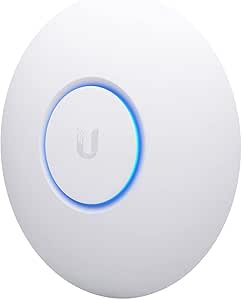 | Best for High-Density Home Environments | Frequency Band: Dual-Band | Wireless Compatibility: 802.11ac | Data Transfer Rate: 1733 Mbps | VIEW ON AMAZON | See Our Full Breakdown |
| NETGEAR WiFi 6 Wireless Access Point with Power Adapter |  | Best for Small Office or Home Office Expansion | WiFi Standard: WiFi 6 (AX1800) | Bands: Dual-band 2.4 GHz and 5 GHz | Max Speed: Up to 1,800 Mbps | VIEW ON AMAZON | See Our Full Breakdown |
| TP-Link AC1200 WiFi Router Dual Band Wireless Internet Router (Archer A54) | 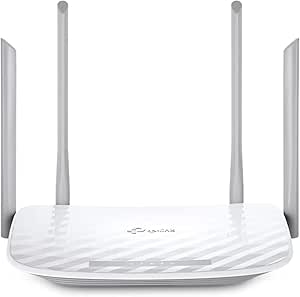 | Best Budget-Friendly Home Router with Mesh Compatibility | Wi-Fi Bands: Dual-band 2.4 GHz and 5 GHz | Max Speed: 1200 Mbps | Coverage: Up to 1,000 sq. ft. | VIEW ON AMAZON | See Our Full Breakdown |
| TP-Link TL-WA1201 AC1200 Dual Band Wireless Gigabit Access Point |  | Best Versatile Deployment for Home and Small Business | Speed: 1200 Mbps | Frequency Bands: 2.4GHz and 5GHz | Wireless Standards: 802.11ac, 802.11b, 802.11g, 802.11n, 802.11a | VIEW ON AMAZON | See Our Full Breakdown |
More Details on Our Top Picks
Omada AX3000 Wireless Access Point with DC Adapter and 5-Year Warranty
This option stands out for combining high-speed Wi-Fi 6 performance with flexible installation options and centralized cloud management. Compared with the TP-Link Archer A54, the AX3000 offers significantly faster speeds and supports mesh and roaming features that are ideal for larger homes. However, its advanced features like seamless roaming require Omada SDN controllers, adding complexity for non-technical users. The slim design and multiple power options make it versatile for various settings, but without the controllers, some features are inaccessible. This pick makes the most sense for users who want a future-proof, high-performance access point that can scale with their home network.
Pros:- Ultra-fast Wi-Fi 6 speeds up to 2976 Mbps with advanced features
- Easy cloud management for centralized control
- Slim, modern design suitable for various environments
- Flexible power options including PoE and DC adapter
Cons:- Mesh WiFi and seamless roaming require Omada SDN controllers
- Advanced features may involve complex setup processes
Best for: Tech-savvy homeowners seeking high-speed Wi-Fi 6 with centralized control and mesh capability
Not ideal for: Casual users or those with simple setups who prefer plug-and-play solutions without cloud management
- Wireless Speed:up to 2976 Mbps
- Technology:Wi-Fi 6
- Standards Supported:802.3at PoE plus, Passive PoE, 12V DC
- Warranty:5 years
- Management:Cloud-based, Omada SDN, app control
- Power Options:PoE, Passive PoE, DC adapter
Our verdict“This access point is best for users who need high speeds, scalability, and centralized management in a sophisticated home network.”
Omada BE5000 Wireless Access Point with 2.5G Port and Wi-Fi 7
The Omada BE5000 is designed for users who need top-tier performance, supporting Wi-Fi 7 with speeds up to 5.0 Gbps and a 2.5G Ethernet port, making it ideal for homes with many devices or aspiring smart home hubs. Its dual-band 4-stream setup offers extensive coverage and reliable connectivity, surpassing the capabilities of Wi-Fi 6 models like the NETGEAR AX1800. While its advanced features and high throughput are impressive, setting it up can be complex for non-technical users, especially if their existing network infrastructure isn’t compatible with Wi-Fi 7. This choice is best for those who want cutting-edge speed and network management for multiple devices and future expansion.
Pros:- Supports Wi-Fi 7 with speeds up to 5.0 Gbps for demanding applications
- Includes a 2.5G Ethernet port for fast wired connections
- Flexible deployment with PoE and DC options
- Advanced network management features for seamless roaming
Cons:- Requires compatible infrastructure for full Wi-Fi 7 benefits
- Setup complexity may deter non-technical users
Best for: Homeowners with high-bandwidth needs and a willingness to invest in future-proof technology
Not ideal for: Casual users or those with limited technical experience who prefer simple plug-and-play devices
- Wireless Technology:Wi-Fi 7
- Wi-Fi Speed:up to 5.0 Gbps
- Wi-Fi Bands:Dual-band 5 GHz and 2.4 GHz
- Ethernet Port:2.5G
- Power Supply:PoE and DC power
- Warranty:5 years
Our verdict“Ideal for tech enthusiasts seeking top-tier speed and network scalability, though setup complexity is a consideration.”
Ubiquiti UniFi nanoHD Compact 802.11ac Wave2 MU-MIMO Enterprise Access Point
The Ubiquiti UniFi nanoHD is tailored for homes with many concurrent devices or high-density usage, supporting over 200 users with dual-band MU-MIMO technology. Its design is discreet, blending into various home environments, and it supports 802.3af PoE, making installation flexible. Compared to Wi-Fi 6 or Wi-Fi 7 options, it relies on Wi-Fi 5 technology, which may limit future-proofing but provides reliable performance for current needs. Its requirement for a PoE switch or power source can add to initial setup complexity. This model is excellent for users who prioritize dense device support over cutting-edge speeds.
Pros:- Supports over 200 concurrent users, ideal for dense environments
- Dual-band MU-MIMO technology for reliable, fast connections
- Flexible PoE installation options
- Compact and discreet design
Cons:- Requires PoE switch or power source for operation
- Additional covers sold separately for aesthetic blending
Best for: Homes with many smart devices or multiple simultaneous users in a high-density environment
Not ideal for: Users seeking Wi-Fi 6 or Wi-Fi 7 speeds or simple plug-and-play solutions
- Frequency Band:Dual-Band
- Wireless Compatibility:802.11ac
- Data Transfer Rate:1733 Mbps
- Number of Ports:2
- Voltage:48V
- Coverage:Extensive
- Wi-Fi Generation:WiFi 5
Our verdict“Best suited for users with many devices needing high-density support, accepting the limitations of Wi-Fi 5 technology.”
NETGEAR WiFi 6 Wireless Access Point with Power Adapter
The NETGEAR WiFi 6 AX1800 AP offers a reliable way to extend your existing network with support for up to 1,800 Mbps speeds, making it suitable for small business or home office environments. It outperforms older standards by supporting WPA3 security and multiple SSIDs, offering flexible deployment with wall or ceiling mount options. When compared to the TP-Link Archer A54, the NETGEAR model’s Wi-Fi 6 standard provides better performance with multiple devices. However, it requires an existing router and Ethernet connection, limiting its use as a standalone solution. It’s best for users who already have a wired backbone and need to expand Wi-Fi coverage securely.
Pros:- Supports high-speed Wi-Fi 6 with multiple devices
- Secure with WPA3 encryption
- Flexible power options and easy to install
- Supports multiple SSIDs for network segmentation
Cons:- Requires existing router and Ethernet connection
- Limited indoor coverage, up to 1,500 sq. ft.
Best for: Small business owners or remote workers needing secure, high-speed Wi-Fi expansion
Not ideal for: Home users lacking existing Ethernet infrastructure or seeking simple plug-and-play devices
- WiFi Standard:WiFi 6 (AX1800)
- Bands:Dual-band 2.4 GHz and 5 GHz
- Max Speed:Up to 1,800 Mbps
- Supported Devices:128 registered, 30 active
- Coverage Area:Up to 1,500 sq. ft.
- Security:WPA2 & WPA3
Our verdict“Best for users with existing wired networks who want to expand Wi-Fi coverage securely and efficiently.”
TP-Link AC1200 WiFi Router Dual Band Wireless Internet Router (Archer A54)
The TP-Link Archer A54 is a solid choice for budget-conscious homes, delivering dual-band speeds of up to 1200 Mbps and supporting EasyMesh for whole-home coverage. While it doesn’t support the latest Wi-Fi 6 or Wi-Fi 7 standards, it provides reliable performance for typical streaming, browsing, and light gaming. Compared with the NETGEAR AX1800 AP, it offers similar speeds but with potentially less management control, and its performance can vary depending on obstacles and environment. Its easy management via the Tether app makes it accessible for most users, but it’s less suited for dense device environments or future-proofing needs.
Pros:- Fast dual-band speeds suitable for streaming and gaming
- Supports WPA3 security for enhanced protection
- Easy network management via mobile app
- Compatible with EasyMesh for seamless coverage
Cons:- Does not support Wi-Fi 6 or Wi-Fi 7
- Performance is dependent on environment and obstacles
- Requires a separate modem for internet access
Best for: Home users seeking an affordable, easy-to-manage dual-band Wi-Fi solution
Not ideal for: Homes with high device density or those wanting the latest Wi-Fi standard for future-proofing
- Wi-Fi Bands:Dual-band 2.4 GHz and 5 GHz
- Max Speed:1200 Mbps
- Coverage:Up to 1,000 sq. ft.
- Antennas:Four external
- Security:WPA3
- Features:Access Point Mode, EasyMesh
Our verdict“Best suited for budget-minded households wanting reliable dual-band Wi-Fi with mesh support, accepting some limitations in speed and future compatibility.”
TP-Link TL-WA1201 AC1200 Dual Band Wireless Gigabit Access Point
The TP-Link TL-WA1201 stands out for its dual-band Wi-Fi speeds up to 1200 Mbps, making it a solid choice for homes with multiple devices or small offices. Unlike the Omada AX3000, which offers Wi-Fi 6 and higher speeds, this model prioritizes flexibility with its multiple operation modes, including AP, Range Extender, and Client. The external antennas with Beamforming improve coverage, but the device’s reliance on a single Gigabit Ethernet port can limit wired connectivity options when compared to the NETGEAR WiFi 6, which often features multiple ports or higher throughput capabilities. Additionally, the TL-WA1201’s support for PoE simplifies installation in locations where power outlets are scarce, though it requires a compatible PoE power supply, adding to setup complexity. It lacks advanced management features found in enterprise-grade access points like the Ubiquiti UniFi nanoHD, making it less suited for users needing granular control. Overall, this pick is ideal for users seeking a flexible, dual-band access point that balances performance and ease of installation without demanding advanced network management.
Pros:- Supports dual-band Wi-Fi speeds up to 1200 Mbps for smooth streaming and browsing
- Flexible deployment with multiple operation modes including AP and Range Extender
- External antennas with Beamforming provide improved coverage and signal focus
- PoE support allows for easier installation in locations without nearby power outlets
Cons:- Limited to a single Gigabit Ethernet port, which can restrict wired device connections
- Lacks advanced network management or enterprise features for larger setups
- Requires a PoE power supply, adding extra equipment for optimal installation
Best for: Homeowners or small business owners who want versatile placement options with simple setup and reliable coverage
Not ideal for: Tech enthusiasts needing advanced management features or multiple Ethernet ports for complex wired setups
- Speed:1200 Mbps
- Frequency Bands:2.4GHz and 5GHz
- Wireless Standards:802.11ac, 802.11b, 802.11g, 802.11n, 802.11a
- Number of Antennas:4
- Antenna Type:Fixed
- Ports:1 Gigabit Ethernet port
- Voltage:12V DC
- Supported Modes:Client, Multi-SSID, Range Extender, Access Point
- PoE Support:Yes (Passive PoE)
Our verdict“This access point is well-suited for users seeking flexible, high-speed Wi-Fi coverage with straightforward installation in a home or small office setting.”
How We Picked
Each product was evaluated based on performance, ease of installation, build quality, feature set, and value for home use. We prioritized options that offer reliable coverage, user-friendly setup, and scalability for future upgrades. Products with advanced management features or higher speeds were favored for larger or more demanding homes, while simpler models suited smaller spaces or less technical users. The ranking reflects a balance between cost and capability, ensuring options for different budgets and needs.Factors to Consider When Choosing Wireless Access Point For Home
When selecting a wireless access point for home, it’s important to consider several factors beyond basic speed. The right choice depends on your home size, existing equipment, and future plans. Understanding these considerations can prevent common mistakes like overpaying for unnecessary features or choosing incompatible devices. Here are key factors to keep in mind:Coverage Area and Home Size
Assess your home’s size and layout to determine how many access points you’ll need. Larger homes or those with many walls may require multiple units or more powerful models. It’s better to overestimate slightly than to find yourself with dead zones later. Consider whether a single, high-powered access point will suffice or if a mesh setup is necessary for seamless coverage.
Speed and Wi-Fi Standards
Look for models supporting the latest Wi-Fi standards, like Wi-Fi 6 or Wi-Fi 7, as they deliver faster speeds and better efficiency with multiple devices. However, ensure your existing devices can take advantage of these standards, as older hardware may not benefit. Higher speeds are more relevant for streaming, gaming, or multiple simultaneous users, whereas casual browsing may not require cutting-edge tech.
Ease of Setup and Management
Some access points offer intuitive apps and simple interfaces, making them suitable for non-technical users. Others provide advanced management features like VLAN support or detailed analytics for more control. Be wary of models that claim to be plug-and-play but end up requiring complex configuration, especially if you prefer a straightforward setup.
Security Features
Security is often overlooked but is critical for protecting your home network. Features like WPA3 encryption, automatic firmware updates, and guest network support can enhance safety. Opt for models that receive regular security updates and have robust management options to keep your network safe from intrusions.
Price and Upgradeability
While budget options can suffice for small homes, investing in a higher-end model can future-proof your network. Consider whether the access point supports additional units or mesh setups to expand coverage later. Be mindful of hidden costs such as accessories or subscription-based management services, and choose a device that aligns with your long-term needs.
Frequently Asked Questions
Do I need a wired connection for my access point?
Ideally, yes. Connecting your access point via Ethernet ensures the best possible performance and stability, especially for high-bandwidth activities. Wireless backhaul options exist but may introduce latency or reduced speeds, which can impact gaming or streaming. If running Ethernet isn’t feasible, look for models supporting mesh or wireless backhaul features to improve coverage without cables.
Can I replace my router with a standalone access point?
Yes, a standalone access point can replace or supplement your existing router, especially if your router lacks sufficient coverage or performance. However, ensure the device you choose can operate in access point mode and is compatible with your network. Sometimes, combining a router and access point simplifies management, but dedicated access points often provide better coverage and scalability for larger homes.
Will a higher-priced access point automatically give me better coverage?
Not necessarily. While higher-priced models often feature more powerful radios, better antennas, and advanced management, coverage also depends on home layout, interference, and placement. A well-placed mid-range device can outperform an expensive unit if it’s positioned strategically. Consider your specific home environment and needs before opting for premium models.
How important is Wi-Fi 6 or Wi-Fi 7 support for my home network?
Support for Wi-Fi 6 or Wi-Fi 7 ensures faster speeds, better handling of multiple devices, and improved efficiency, especially in busy households. However, to benefit fully, your devices need to support these standards. If most of your gadgets are older, investing heavily in Wi-Fi 6 or 7 hardware might offer limited immediate gains, but it prepares your network for future upgrades.
Is it better to buy an all-in-one router or a dedicated access point?
Choosing between an all-in-one router and a dedicated access point depends on your needs. An all-in-one device simplifies setup and management but might compromise on performance or scalability. Dedicated access points often deliver superior coverage and flexibility, especially in larger homes or complex layouts. If you already have a reliable router, adding a dedicated access point can significantly enhance your Wi-Fi experience.
Conclusion
For most home users, the Omada AX3000 offers the best overall blend of performance, reliability, and ease of use, making it ideal for those seeking a solid, future-proof solution. If you prioritize cutting-edge technology and future-proofing, the Omada BE5000 with Wi-Fi 7 support is worth considering. Budget-conscious buyers or those with smaller spaces may find the TP-Link TL-WA1201 or similar models sufficient. For tech enthusiasts wanting enterprise features in a compact form, the Ubiquiti nanoHD makes a compelling choice. Ultimately, your decision hinges on your specific home size, device needs, and willingness to invest in scalability.Halloween Picks
halloween
As an affiliate, we earn on qualifying purchases.