
The CanaKit Raspberry Pi 4 4GB Starter Pro Kit is my best overall pick for a balanced starter setup, while the CanaKit Extreme Kit – Aluminum Edition suits buyers who want 8GB RAM and a metal case. For retro gaming, the Vilros Retro Gaming Kit stands out with two gamepads and a 64GB card. The main tradeoffs are how much memory you need, whether bundled storage and cooling fit your project, and how much setup convenience matters. A bare board can make sense if you already own accessories, but a complete kit saves time when starting from scratch. Read on for the full comparison and guidance on choosing among all 13 kits.

Get the latest gadgets delivered free with Prime
- Fast, free delivery on millions of items
- Prime Video, Amazon Music and more included
- Member-only deals all year
Complete the kit



Key Takeaways
- The CanaKit 4GB Starter Pro Kit is the strongest all-rounder for buyers who want a ready-to-build setup without prioritizing a specialized use such as gaming or maximum memory.
- The 8GB CanaKit Aluminum Edition is the memory-and-case upgrade, but buyers whose projects are light on multitasking may get more from a better-matched accessory bundle.
- The Vilros Retro Gaming Kit is the clearest purpose-built option: its two controllers and 64GB card make it more directly suited to gaming than general starter kits.
- Several kits pair 4GB boards with different storage capacities, so card size and included power, cooling, and case accessories can matter more than the kit label.
- The Raspberry Pi 4 Model B 2GB is a deliberate bare-board choice; it makes most sense for owners who already have compatible accessories, not buyers seeking an all-in-one starter package.




| Raspberry Pi 4 kit | Board | Processor | Storage | RAM |
|---|---|---|---|---|
| Vilros Raspberry Pi 4 4GB Retr | Raspberry Pi 4 Model B | Broadcom BCM2711 quad-core Cortex-A72 at 1.5GHz | 64GB Class 10 microSD card preloaded with NOOBS; 8GB flash drive | — |
| Vilros Raspberry Pi 4 4GB Basi | Raspberry Pi 4 | — | MicroSD card not included | — |
| Raspberry Pi 4 Model B | Raspberry Pi 4 Model B | Broadcom BCM2711 quad-core 64-bit Cortex-A72 at 1.5GHz | — | — |
| CanaKit Raspberry Pi 4 4GB Sta | Raspberry Pi 4 Model B | Broadcom quad-core at 1.5GHz | Preloaded 32GB EVO+ microSD card | — |
| CanaKit Raspberry Pi 4 Extreme | Raspberry Pi 4 Model B | Quad-core at 1.5GHz | Preloaded 128GB Class 10 microSD card | — |
| GeeekPi Starter Kit for Raspbe | Raspberry Pi 4 Model B | — | 64GB Class-10 microSD card with reader | 4GB LPDDR4 |
| CanaKit Raspberry Pi 4 Extreme | Raspberry Pi 4 Model B | 1.5GHz quad-core Broadcom | 128GB preloaded Class-10 microSD | 4GB LPDDR4 |
| RasTech Raspberry Pi 4 4GB Sta | Raspberry Pi 4 Model B | — | 32GB microSD card | 4GB LPDDR4X |
| iRasptek Basic Kit for Raspber | Raspberry Pi 4 Model B | 1.5GHz quad-core Broadcom BCM2711 ARM Cortex-A72 | — | 2GB LPDDR4 |
| Vilros Raspberry Pi 4 Complete | Raspberry Pi 4, 4GB model | 1.5GHz; CPU model listed as Cortex A8 | 64GB preloaded microSD | 4GB DDR4 (as listed) |
| CanaKit Raspberry Pi 4 Complet | Raspberry Pi 4 Model B | 1.5GHz 64-bit quad-core ARMv8 CPU | 32GB EVO+ Class 10 microSD card | 4GB |
| CanaKit Raspberry Pi 4 4GB Bas | Raspberry Pi 4 Model B | 1.5GHz quad-core ARM processor | — | 4GB |
| Vilros Basic Starter Kit for R | Raspberry Pi 4 Model B | Broadcom BCM2711 quad-core Cortex-A72 at 1.5GHz | — | 4GB LPDDR4 |
More Details on Our Top Picks
Vilros Raspberry Pi 4 4GB Retro Gaming Kit with 2 USB Gamepad Controllers, Gaming Case, 64GB Micro SD Card, HDMI Cable, Power Supply, and Quickstart Guide
I’d pick this Vilros kit when the goal is a two-player retro console, not a general-purpose Pi build. The two weighted USB gamepads, gaming-style case with fan, and 64GB microSD card preloaded with NOOBS make it more immediately game-focused than the CanaKit Starter Pro, which supplies setup accessories but no controllers. An included 8GB flash drive adds a place to store ROM files, but games are not included, and buyers still need a display and, for setup, a mouse. Its 4GB Pi has enough memory for broad Pi projects too, though the bundled controllers and gaming case add little value if you mainly want a desktop or server. I’d also allow for possible card re-partitioning if the displayed capacity seems smaller than expected.
Pros:- Two weighted USB gamepads make a two-player setup possible without buying controllers separately.
- 64GB microSD card is preloaded with NOOBS for a simpler initial setup.
- Gaming-style case includes a fan and provides easy access to ports.
- Includes a power supply, HDMI cable, and 8GB flash drive for ROM storage.
Cons:- A screen and mouse are not included, and game ROMs must be sourced separately.
- The included microSD card may appear to have less capacity until it is re-partitioned.
- The gaming accessories are unnecessary bulk for buyers focused on non-gaming projects.
Best for: Buyers building a two-player retro gaming setup who want controllers, storage, cooling, and core connection accessories in one kit.
Not ideal for: People seeking a general-purpose desktop or server kit who already own controllers, or anyone expecting a screen, mouse, or game ROMs to be included.
- Board:Raspberry Pi 4 Model B
- Memory:4GB RAM
- Processor:Broadcom BCM2711 quad-core Cortex-A72 at 1.5GHz
- Wireless:802.11b/g/n/ac Wi-Fi and Bluetooth 5.0
- Video:2 × micro HDMI, up to 4Kp60
- Storage:64GB Class 10 microSD card preloaded with NOOBS; 8GB flash drive
- Cooling and case:Gaming-style case with built-in fan
- Controllers:2 × weighted USB gamepads
- Power:UL-certified 5.1V 3A USB-C supply with on/off switch
Our verdict“Choose this Vilros kit for an all-in-one, two-player retro gaming start; pick the CanaKit Starter Pro instead for a more general project kit.”
Vilros Raspberry Pi 4 4GB Basic Starter Kit with Fan-Cooled Heavy-Duty Aluminum Alloy Case
This Vilros kit puts its effort into the parts that protect and cool a Pi: a heavy-duty aluminum alloy case, an installed fan, and a USB-C supply with an on/off switch. That makes it a more focused choice than the CanaKit Starter Pro, which includes a microSD card and several setup extras but uses a different case. The catch is meaningful: no microSD card is included, so this is not the easiest route from unboxing to a working system. I’d choose it for a project that will run for long periods or sit in a setting where a sturdy enclosure matters, provided I’m comfortable sourcing storage and installing an operating system. If you want a ready-to-start bundle, the Vilros Retro Gaming Kit includes a preloaded card and more accessories.
Pros:- Heavy-duty aluminum alloy case offers a robust enclosure.
- Built-in fan provides active cooling for sustained operation.
- USB-C power supply includes a convenient on/off switch.
- 4GB Raspberry Pi 4 gives room for multitasking and varied project software.
Cons:- MicroSD card is not included, so storage and operating-system setup are up to the buyer.
- The kit provides fewer ready-to-use accessories than the Vilros Retro Gaming Kit.
- Active cooling adds a fan to a build that may not need one for lighter workloads.
Best for: Makers building a fixed Raspberry Pi project who value a sturdy aluminum enclosure and active cooling and already have, or plan to choose, a microSD card.
Not ideal for: First-time Pi buyers who want storage and an operating system included, or users who prefer a light, simple kit with fewer setup decisions.
- Board:Raspberry Pi 4
- Memory:4GB RAM
- Case:Heavy-duty aluminum alloy
- Cooling:Fan-cooled
- Power:USB-C power supply with on/off switch
- Included accessories:Aluminum case, fan, and power supply
- Storage:MicroSD card not included
Our verdict“Pick this Vilros kit for a durable, actively cooled build if you’re prepared to supply your own microSD card.”
Raspberry Pi 4 Model B (2GB RAM)
This is the choice for buyers who want the Raspberry Pi 4 itself, rather than a bundle of accessories they may already own. Its 2GB of RAM and quad-core processor suit lightweight desktop use, home automation, and learning projects, while dual micro HDMI outputs, USB 3.0, Gigabit Ethernet, and Wi-Fi provide a strong set of connections for a small board. Compared with the 4GB Vilros Basic Starter Kit, this model offers less memory and skips the case, cooling, power supply, and storage; that keeps the setup flexible but leaves more shopping and assembly to me. It’s also less ready to use than the CanaKit Starter Pro. Buyers should check their cable supply, since micro HDMI adapters or cables may be needed.
Pros:- 2GB Pi 4 board provides a capable base for lightweight projects and learning.
- Dual micro HDMI outputs support two displays, including up to 4Kp60 output.
- USB 3.0, Gigabit Ethernet, dual-band Wi-Fi, and Bluetooth 5.0 offer flexible connectivity.
- Standard Raspberry Pi form factor supports compatible accessories and prior-generation add-ons.
Cons:- Power supply, microSD card, case, and cooling accessories are not included.
- 2GB RAM is less suited to heavier multitasking than the 4GB Vilros and CanaKit kits.
- Micro HDMI ports may require cables or adapters that buyers do not already own.
Best for: Experienced makers and educators who already have a compatible power supply, microSD card, case, and cables and want a Pi 4 board for a focused project.
Not ideal for: Beginners seeking a complete kit, or users planning memory-heavy desktop workloads who would benefit from 4GB or 8GB RAM.
- Board:Raspberry Pi 4 Model B
- Memory:2GB LPDDR4-2400 SDRAM
- Processor:Broadcom BCM2711 quad-core 64-bit Cortex-A72 at 1.5GHz
- Wireless:2.4/5.0GHz 802.11b/g/n/ac Wi-Fi and Bluetooth 5.0 with BLE
- Wired networking:Gigabit Ethernet
- USB:2 × USB 3.0 and 2 × USB 2.0
- Video:2 × micro HDMI, up to 4Kp60
- Expansion:40-pin GPIO header; PoE capable with a HAT
- Power:5.1V 3A via USB Type-C or GPIO
Our verdict“Choose this board if you already have the essentials and want a flexible Pi 4 for a defined project; choose a bundled kit for an easier setup.”
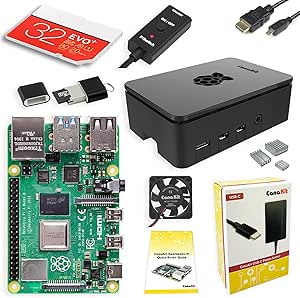
CanaKit Raspberry Pi 4 4GB Starter Pro Kit
The CanaKit Starter Pro is the most balanced option here for someone who wants to begin general Pi projects without sourcing storage and basic setup accessories separately. Its preloaded 32GB microSD card, card reader, heat sinks, low-noise fan, and 3.5A USB-C power supply make it more complete for a first build than the Vilros aluminum kit, which leaves the SD card to the buyer. The 6-foot HDMI cable and quick-start documentation also help with a straightforward desktop-style setup. Its tradeoffs are practical: the supply is specified for a US plug, and the product data flags no built-in Wi-Fi adapter, so wireless setup may require an external dongle. The Pi 4 normally has wireless capability; buyers should verify the included configuration rather than assume an adapter is bundled.
Pros:- Preloaded 32GB microSD card and card reader simplify operating-system setup.
- Includes a low-noise fan, heat sinks, and a premium high-gloss case.
- 3.5A USB-C supply and 6-foot HDMI cable cover key connection needs.
- Quick-start documentation helps make this more approachable than a bare board.
Cons:- Power supply is described as US-plug only, limiting convenience in other regions.
- Product data says a separate Wi-Fi dongle may be needed; confirm wireless support before buying.
- The 32GB card offers less storage than the 64GB Vilros Retro Gaming Kit or 128GB CanaKit Extreme Kit.
Best for: First-time Pi builders in a compatible power-plug region who want storage, cooling, a card reader, and basic setup accessories for general projects.
Not ideal for: Buyers outside the US plug region, or anyone who needs confirmed wireless accessories included and wants to avoid checking the kit’s Wi-Fi configuration.
- Board:Raspberry Pi 4 Model B
- Memory:4GB RAM
- Processor:Broadcom quad-core at 1.5GHz
- Storage:Preloaded 32GB EVO+ microSD card
- Case and cooling:High-gloss case with integrated low-noise fan; heat sinks included
- Power:3.5A USB-C supply, US plug
- Video cable:6-foot HDMI cable
- Setup accessories:USB-MicroSD card reader and quick-start documentation
- USB ports:4 total
Our verdict“Choose the CanaKit Starter Pro for a well-equipped general-purpose first build if its plug and wireless setup match your needs.”
CanaKit Raspberry Pi 4 Extreme Kit – Aluminum Edition (8GB RAM)
This CanaKit Extreme kit is the lineup’s strongest fit for workloads that can use 8GB of RAM and generous local storage. The preloaded 128GB Class 10 microSD card, two 6-foot HDMI cables, card reader, and USB-C on/off switch make it far more equipped than the bare 2GB Raspberry Pi 4 board. Its aluminum self-cooling case also avoids a fan, which suits buyers who prefer a quiet build. The tradeoff is cooling headroom: passive cooling may be less suitable for sustained heavy workloads than the fan-cooled Vilros Basic Starter Kit or CanaKit Starter Pro. It also has only two USB ports on the Pi, so several wired peripherals may call for a hub. I’d reserve the extra memory for demanding multitasking rather than a simple Pi project.
Pros:- 8GB LPDDR4 RAM gives more headroom for memory-intensive software than the 4GB kits.
- Preloaded 128GB Class 10 microSD card provides substantial included storage.
- Aluminum self-cooling case operates without a fan.
- Includes two 6-foot HDMI cables, USB-C on/off switch, and microSD card reader.
Cons:- Passive cooling may be less suited to sustained heavy workloads than the fan-cooled Vilros Basic Starter Kit.
- The Pi provides only two USB ports, so multiple wired peripherals may require a hub.
- The additional memory and storage may be unnecessary for simple projects.
Best for: Developers and advanced makers running memory-intensive applications, multiple services, or multitasking setups who want large bundled storage and a quiet enclosure.
Not ideal for: Buyers running basic projects that do not need 8GB RAM, or users expecting active cooling and several direct USB connections for peripherals.
- Board:Raspberry Pi 4 Model B
- Memory:8GB LPDDR4
- Processor:Quad-core at 1.5GHz
- Storage:Preloaded 128GB Class 10 microSD card
- Case and cooling:Aluminum self-cooling case with soft-touch black lid
- Power:3.5A USB-C power supply
- Display cables:2 × 6-foot HDMI cables
- Included accessories:USB-C on/off switch and microSD card reader
- USB ports on Pi:2
Our verdict“Choose this CanaKit for RAM-intensive work and quiet, high-capacity setup; choose a fan-cooled 4GB kit for lighter workloads or sustained heat.”
GeeekPi Starter Kit for Raspberry Pi 4 (4GB) – Case, 64 GB SD Card with Reader, Cables & 18W USB-C Power Supply
I’d pick the GeeekPi Starter Kit when sustained workloads and a full accessory bundle matter more than a slim enclosure. Its 4GB Raspberry Pi 4 comes with a fan, four aluminum heatsinks, a 64GB card, reader, HDMI cables, and a switched 5V 3.6A USB-C supply, so the core setup pieces are in one package. Compared with the Vilros Complete Starter Kit, GeeekPi provides more storage than a 32GB card would, but Vilros has a preloaded operating system that can shorten setup. The cooling hardware may help manage heat during heavier tasks, though it adds bulk to the case. I’d also plan to install the operating system yourself: the card is not described as preloaded, and the included Pi has just two USB ports.
Pros:- Includes the Raspberry Pi 4 board, case, cooling hardware, card, reader, cables, and power supply.
- Fan and four aluminum heatsinks provide active and passive cooling.
- 64GB Class-10 microSD card leaves room for an OS, applications, and project files.
- 5V 3.6A USB-C supply includes an on/off switch.
Cons:- Operating system setup is left to the buyer.
- Fan and heatsinks make the case bulkier than simpler starter-kit enclosures.
- The included Pi has only two USB ports.
Best for: Makers planning sustained workloads who want a 4GB Pi, active cooling, and the main setup accessories bundled together.
Not ideal for: First-time users who want an operating system ready on the card, or buyers who need a compact case and several USB connections.
- Board:Raspberry Pi 4 Model B
- RAM:4GB LPDDR4
- Storage:64GB Class-10 microSD card with reader
- Cooling:40mm PWM fan and four aluminum heatsinks
- Power supply:5V 3.6A USB-C with on/off switch
- Connectivity:HDMI; Bluetooth listed
- USB ports:2
- Weight:539g
- Warranty:6 months
Our verdict“Choose GeeekPi for a cooling-focused 4GB setup with a roomy card, provided you’re comfortable installing the OS yourself.”
CanaKit Raspberry Pi 4 Extreme Kit – 128GB Edition (4GB RAM)
The CanaKit Extreme Kit 128GB Edition is the storage-forward choice here: its 128GB microSD card is preloaded, giving buyers more room for software and files while reducing initial setup work. The package also includes dual 6-foot HDMI cables, a filtered 3.5A USB-C supply with PiSwitch, heatsinks, and a high-gloss case with a low-noise fan. Compared with the GeeekPi Starter Kit, CanaKit offers twice the card capacity and a preloaded system, while GeeekPi specifies a higher-amperage supply. This kit still centers on a 4GB board, and its two USB ports can limit a desk setup with several peripherals. The monitor and any Wi-Fi dongle are not included; built-in Pi connectivity should not be confused with a bundled adapter.
Pros:- Preloaded 128GB microSD card provides substantial room and reduces initial software setup.
- Includes two 6-foot HDMI cables rated for up to 4K 60p.
- Low-noise fan, heatsinks, and a filtered 3.5A USB-C supply are bundled.
- PiSwitch adds a convenient power control.
Cons:- Only the 4GB RAM configuration is included.
- Monitor is not included, and the listing also notes no Wi-Fi dongle.
- Two USB ports may require a hub for a peripheral-heavy setup.
Best for: Hobbyists and developers who want a preloaded, higher-capacity card and a bundled cooling case and display cables.
Not ideal for: Buyers who need 8GB RAM, a monitor, or more than two direct USB connections without adding a hub.
- Board:Raspberry Pi 4 Model B
- RAM:4GB LPDDR4
- Processor:1.5GHz quad-core Broadcom
- Storage:128GB preloaded Class-10 microSD
- Cooling and case:High-gloss case with integrated low-noise fan and heatsinks
- Power supply:3.5A USB-C with noise filter and PiSwitch
- Display:Two 6-foot HDMI cables, up to 4K 60p
- USB ports:2
- Warranty:1-year limited warranty
Our verdict“Pick CanaKit’s Extreme 128GB edition if you want a preloaded, roomy card and a broad set of core accessories around a 4GB Pi.”
RasTech Raspberry Pi 4 4GB Starter Kit – 32GB SD Card, Copper Heat Sinks, HDMI Cables, 5V 3A Power Supply with On/Off Switch, Case, Cooling Fan, Card Reader & Screwdriver
The RasTech Raspberry Pi 4 Starter Kit stands out for the board’s four USB ports, including two USB 3.0 connections—a useful distinction for projects that attach storage, input devices, or other peripherals. Its 4GB board also supports dual 4K display output, while Wi-Fi 802.11ac, Bluetooth 5.0, and Gigabit Ethernet give networked builds several connection options. The kit adds copper heatsinks, a fan, HDMI cables, a switched supply, card reader, and screwdriver. Compared with the iRasptek Basic Kit, RasTech offers twice the RAM and twice the total USB ports, but its 32GB card is smaller than the cards in the GeeekPi and CanaKit bundles. The OS is not preinstalled, so software setup remains part of the job.
Pros:- Four USB ports, including two USB 3.0 ports, support more direct peripheral connections.
- 4GB RAM and dual 4K display output suit flexible desktop and project setups.
- Includes copper heatsinks, a cooling fan, and a 5V 3A switched supply.
- Wi-Fi 802.11ac, Bluetooth 5.0, and Gigabit Ethernet offer varied network connections.
Cons:- The 32GB card is smaller than the 64GB GeeekPi and 128GB CanaKit cards.
- The operating system is not preinstalled.
- The included extras may be unnecessary for buyers who only need a simple headless setup.
Best for: Builders connecting multiple USB peripherals or storage devices who want 4GB RAM and wired or wireless networking.
Not ideal for: Users who want a preloaded operating system or need generous included storage for media and project files.
- Board:Raspberry Pi 4 Model B
- RAM:4GB LPDDR4X
- CPU:1.5GHz quad-core ARM Cortex-A72
- Storage:32GB microSD card
- USB ports:4 total: 2 USB 3.0 and 2 USB 2.0
- Wireless:802.11ac Wi-Fi and Bluetooth 5.0
- Wired network:Gigabit Ethernet
- Power supply:5V 3A USB-C with on/off switch
- Cooling:Copper heatsinks and fan
Our verdict“Choose RasTech when four USB ports and broad connectivity matter more than a preloaded OS or larger bundled storage.”
iRasptek Basic Kit for Raspberry Pi 4 Model B (2GB) – Case, 5V 3A Power Supply, Cooling Fan & Heat Sink
I’d choose the iRasptek Basic Kit for projects that need the Raspberry Pi 4 platform but not the 4GB memory included in most of this group. The 2GB board is paired with an ABS case, four aluminum heatsinks, a fan, and a PSE-certified 5V 3A USB-C supply with over-current and surge protection. Wi-Fi 5, Bluetooth 5.0, Gigabit Ethernet, and USB 3.0 keep it capable for networked tasks and everyday peripherals. Compared with the RasTech Starter Kit, iRasptek gives up two gigabytes of RAM and two USB ports, but its simpler bundle may suit a focused, lower-memory build. The listing describes just two USB ports, so a hub may be needed. It also does not list an included microSD card, leaving storage to the buyer.
Pros:- Includes an ABS case, fan, four heatsinks, and USB-C power supply.
- PSE-certified supply lists over-current and surge protection.
- Wi-Fi 2.4/5GHz, Bluetooth 5.0, and Gigabit Ethernet support varied network setups.
- Supports dual 4K displays according to the product description.
Cons:- 2GB RAM is less suited to memory-heavy multitasking than the 4GB options in this roundup.
- Only two USB ports are listed, compared with four on the RasTech kit.
- No microSD card is specified in the supplied product details.
Best for: Budget-conscious makers building a focused networked project, kiosk, or lightweight server who don’t need 4GB RAM.
Not ideal for: Desktop users running memory-heavy applications, or anyone wanting storage and multiple USB connections included in the kit.
- Board:Raspberry Pi 4 Model B
- RAM:2GB LPDDR4
- Processor:1.5GHz quad-core Broadcom BCM2711 ARM Cortex-A72
- USB ports:2 listed
- Wireless:Wi-Fi 2.4/5GHz and Bluetooth 5.0
- Wired network:Gigabit Ethernet
- Power supply:5V 3A USB-C, PSE certified
- Case:Black ABS
- Cooling:Quiet fan and four aluminum heatsinks
Our verdict“Pick iRasptek for a straightforward, lower-memory Pi 4 build when you already have storage and don’t need many USB devices.”
Vilros Raspberry Pi 4 Complete Starter Kit – 4GB Model with Clear Transparent Case
The Vilros Complete Starter Kit is the easiest fit for a first-time builder who wants the operating system already on the 64GB card. Its 4GB Pi, transparent fan-cooled case, heatsinks, switched 4A supply, HDMI cable, storage bag, and quick-start guide cover the main setup needs, while the clear enclosure makes it easier to see the board and connections. Compared with the CanaKit Extreme 128GB Edition, Vilros supplies half the card capacity but adds a guide and bag; CanaKit’s larger preloaded card better suits users keeping more files and software locally. Neither bundle includes a monitor, keyboard, or mouse. Vilros also lists no warranty, and buyers should check the CPU specification carefully: the supplied listing says Cortex A8, which conflicts with the commonly specified Pi 4 processor family.
Pros:- Preloaded 64GB microSD card reduces initial OS setup work.
- Quick-start guide and storage bag add practical support for a new builder.
- Clear case, fan, and heatsinks provide visibility and active cooling.
- 4A power supply includes an inline on/off switch.
Cons:- Keyboard, mouse, and monitor are not included.
- No warranty is specified.
- The supplied CPU listing says Cortex A8, which conflicts with the commonly specified Pi 4 processor family and merits verification.
Best for: First-time Raspberry Pi buyers who value a preloaded card, quick-start guidance, and an easy-to-inspect clear case.
Not ideal for: Buyers who need a stated warranty, more than 64GB of bundled storage, or a kit that includes monitor and input devices.
- Board:Raspberry Pi 4, 4GB model
- RAM:4GB DDR4 (as listed)
- Storage:64GB preloaded microSD
- Processor:1.5GHz; CPU model listed as Cortex A8
- Operating system:Linux
- Case:Clear transparent case with built-in fan and heatsinks
- Power supply:Vilros 4A supply with inline on/off switch
- Included extras:HDMI cable, storage bag, and quick-start guide
Our verdict“Choose Vilros for a guided first setup with a preloaded card and clear case, but verify the processor listing and plan to supply your own peripherals.”
CanaKit Raspberry Pi 4 Complete Desktop Starter Kit (4GB RAM)
The CanaKit Complete Desktop Starter Kit is the most ready-to-use desktop package in this group: it pairs a 4GB Raspberry Pi 4 with a keyboard, mouse, case, power supply, HDMI cable, and a pre-loaded 32GB microSD card. That makes setup simpler than with the CanaKit Basic Kit, which leaves the OS and micro HDMI cable to the buyer. Its fan and heat sinks also provide active cooling for longer-running tasks. The tradeoff is that this is a bulkier, more bundled choice, and its 4GB of RAM is less suited to memory-heavy projects than an 8GB board. You will still need a monitor, and buyers who already own peripherals may prefer the leaner Basic Kit instead.
Pros:- Includes keyboard, mouse, case, power supply, and HDMI cable for a desktop setup
- Pre-loaded 32GB microSD card supports a quicker start
- Fan and heat sinks help manage heat during sustained use
- Supports 4K 60p video output
Cons:- The 4GB board may limit memory-intensive multitasking and advanced projects
- A monitor is not included
- Extra desktop accessories add little value for buyers who already have peripherals
Best for: First-time Raspberry Pi buyers who want the core desktop peripherals and a preloaded operating system in one package
Not ideal for: Buyers who already own a keyboard and mouse, need more than 4GB of RAM, or expect a monitor to be included
- Board:Raspberry Pi 4 Model B
- RAM:4GB
- Processor:1.5GHz 64-bit quad-core ARMv8 CPU
- Storage:32GB EVO+ Class 10 microSD card
- Operating system:Raspbian pre-loaded
- Cooling:Fan-based case with heat sinks
- Video output:Up to 3840 × 2160 at 60p
- Included desktop accessories:Keyboard, mouse, power supply, and HDMI cable
Our verdict“Choose this CanaKit bundle if you want a ready-to-assemble desktop setup, and skip it if you already have peripherals or need more memory.”
CanaKit Raspberry Pi 4 4GB Basic Kit with PiSwitch
The CanaKit Basic Kit with PiSwitch suits buyers who want the board, dependable power, and cooling without paying for a keyboard-and-mouse bundle they may not need. Its 3.5A USB-C supply has a noise filter, while the PiSwitch provides a physical power control that the Complete Desktop Starter Kit does not list. Three aluminum heat sinks help dissipate heat, but this kit is less plug-and-play: you must provide a micro HDMI cable and install a compatible operating system. Compared with the Vilros Basic Starter Kit, its standout is the specified 3.5A supply and PiSwitch; the Vilros adds a fan-cooled case and HDMI adapter. Choose CanaKit for a simpler board-focused build, not for a complete desktop setup.
Pros:- 3.5A USB-C power supply includes a noise filter
- PiSwitch adds convenient physical power control
- Three aluminum heat sinks support passive heat dissipation
- Board-focused bundle avoids peripheral extras some builders do not need
Cons:- Micro HDMI cable and compatible operating system are not included
- The kit description does not specify a case or microSD card
- Raspberry Pi 4 power demands require suitable power management
Best for: Hobbyists and developers who already have a display cable and microSD card and want a PiSwitch with a specified 3.5A power supply
Not ideal for: New users who want an operating system, micro HDMI cable, or desktop peripherals included
- Board:Raspberry Pi 4 Model B
- RAM:4GB
- Processor:1.5GHz quad-core ARM processor
- Power supply:3.5A USB-C, UL-listed, with noise filter
- Power control:PiSwitch on/off switch
- Cooling:Three aluminum heat sinks
- Operating system:Raspberry Pi OS required; not included
- Connectivity:HDMI and USB
Our verdict“Pick this kit if you want a board-focused build with a PiSwitch and already have storage and display accessories.”
Vilros Basic Starter Kit for Raspberry Pi 4 with Fan Cooled ABS Case – Includes Raspberry Pi 4 Board and 7 Accessories (4GB, Clear Transparent Case)
The Vilros Basic Starter Kit offers a more guided, contained start than the CanaKit Basic Kit: it includes a clear snap-fit case, fan, heat sinks, switched power supply, HDMI adapter, storage bag, and quick-start guide. The transparent shell makes the board and connections easy to see, a practical aid when learning how the pieces fit together. Its pre-installed fan adds active cooling, while the included guide and adapter reduce some setup friction. Compared with the CanaKit Complete Desktop Starter Kit, though, Vilros does not list a keyboard, mouse, preloaded microSD card, or full HDMI cable, so it is not as ready for desktop use. The clear ABS case can also show scratches and fingerprints, and the 4GB board is the only memory option described.
Pros:- Clear snap-fit ABS case makes the board and components visible
- Pre-installed fan and heat sinks provide active cooling
- Power supply includes an inline on/off switch
- HDMI adapter, storage bag, and quick-start guide are included
Cons:- A keyboard, mouse, and microSD card are not listed among the included accessories
- Clear plastic may show fingerprints and scratches
- Only the 4GB version is specified
Best for: Beginners who want a visible board, basic cooling, a quick-start guide, and a switched power supply
Not ideal for: Buyers seeking a complete desktop bundle, preloaded storage, or a higher-memory Raspberry Pi 4
- Board:Raspberry Pi 4 Model B
- RAM:4GB LPDDR4
- Processor:Broadcom BCM2711 quad-core Cortex-A72 at 1.5GHz
- Wireless:2.4GHz Wi-Fi and Bluetooth 5.0
- Wired networking:Gigabit Ethernet
- USB ports:2× USB 3.0 and 2× USB 2.0
- Video output:2× micro HDMI; dual 4K support
- Cooling and case:Clear ABS case with pre-installed fan and heat sinks
- Included accessories:3A USB-C power supply with inline switch, HDMI adapter, storage bag, and quick-start guide
Our verdict“Choose Vilros for a beginner-friendly, easy-to-see build with cooling, but choose the CanaKit Complete kit for a more complete desktop bundle.”
How We Picked
I compared the 13 listings by how well each one matches common Raspberry Pi 4 buying needs: starting from scratch, learning, general-purpose projects, desktop-style use, and retro gaming. The main factors were board memory, included storage, power supply, case and cooling, useful extras, and how much setup work the package appears to leave to the buyer. I also distinguished complete bundles from board-only or basic configurations, since their value depends on what a buyer already owns.
The ranking favors kits that offer a practical balance of core components and a clear use case. Specialized picks rank well for their intended jobs but not as universal recommendations; a larger card, metal enclosure, gamepads, or bundled switch helps only when it matches the planned build. Product details vary across these listings, so buyers should check the exact board, memory, power supply, and accessory contents before ordering. The standalone 2GB board ranks as a fit for experienced owners rather than newcomers because it does not provide the same ready-to-use bundle as the starter kits.
| Raspberry Pi 4 kit | Board |
|---|---|
| Vilros Raspberry Pi 4 4GB Retr | Raspberry Pi 4 Model B |
| Vilros Raspberry Pi 4 4GB Basi | Raspberry Pi 4 |
| Raspberry Pi 4 Model B | Raspberry Pi 4 Model B |
| CanaKit Raspberry Pi 4 4GB Sta | Raspberry Pi 4 Model B |
| CanaKit Raspberry Pi 4 Extreme | Raspberry Pi 4 Model B |
| GeeekPi Starter Kit for Raspbe | Raspberry Pi 4 Model B |
| CanaKit Raspberry Pi 4 Extreme | Raspberry Pi 4 Model B |
| RasTech Raspberry Pi 4 4GB Sta | Raspberry Pi 4 Model B |
| iRasptek Basic Kit for Raspber | Raspberry Pi 4 Model B |
| Vilros Raspberry Pi 4 Complete | Raspberry Pi 4, 4GB model |
| CanaKit Raspberry Pi 4 Complet | Raspberry Pi 4 Model B |
| CanaKit Raspberry Pi 4 4GB Bas | Raspberry Pi 4 Model B |
| Vilros Basic Starter Kit for R | Raspberry Pi 4 Model B |
Factors to Consider When Choosing Best Raspberry Pi 4 Kits
Kit names can make bundles sound interchangeable, but the right choice depends on the project and the parts already on hand. I would start with the board’s memory and the included essentials, then judge add-ons by whether they solve a real setup need.
Choose RAM for the workload, not the biggest number
Memory affects how comfortably the Pi handles multiple applications, larger workloads, and desktop-style use. The 2GB board can suit simpler single-purpose projects, especially if you already own a power supply, case, and storage card. A 4GB kit is a more flexible starting point for general learning and varied home projects, while 8GB gives extra room for memory-heavy tasks. More RAM does not automatically make every program faster, so do not pay for capacity your software cannot use. Think about what will run at the same time, such as a browser, development tools, or background services. If your plan is still uncertain, a balanced 4GB bundle is often a more sensible starting point than choosing memory alone.
Check what the storage card includes—and what it does not
Bundled cards range from 32GB to 128GB among the listed kits, but capacity is only part of the decision. A larger card can hold more files and projects, yet it does not guarantee a faster or more reliable card. Check whether the bundle includes a card reader, since that can simplify installing an operating system from another computer. Some listings name a card but do not make its speed or preloaded software clear; do not assume it arrives ready to boot. Keep important project files backed up separately, because a microSD card should not be treated as permanent storage. Buyers who already own a suitable card may prefer a kit whose value comes from its power and cooling accessories instead.
Match cooling and the case to the setting
A case protects the board and shapes how easily you can reach its ports and connectors. A fan-cooled enclosure can help manage heat during sustained workloads, while heat sinks add another cooling measure without taking up much space. Metal cases can provide a sturdier feel, but their size, access, and cooling arrangement should suit the desk or enclosure where the Pi will live. For a light classroom project or occasional coding session, an elaborate cooling setup may be unnecessary. For continuous operation or heavier processing, check how the case moves air and whether the fan needs a connection or configuration step. Also confirm that the enclosure is designed for the Raspberry Pi 4, since case fit and port access are specific to the board layout.
Treat power and switches as practical setup choices
The power supply is a core component, not a throw-in accessory: an unsuitable supply can cause instability when the board and attached devices draw more power. Look at the included supply’s stated output and connector, then compare those details with the board and peripherals you plan to use. A kit with an on/off switch or PiSwitch can make routine access easier, particularly when the computer is tucked away. A switch does not replace a proper software shutdown, so learn how to close down the operating system before cutting power. If you have a compatible, dependable USB-C supply already, a bundle’s power accessory may add little value. Check the full contents rather than assuming every kit includes the same power arrangement.
Pay for accessories that fit the project
Bundles are most useful when their extras remove a real buying or setup step. The Vilros gaming kit’s two controllers are directly relevant to multiplayer retro gaming, whereas that bundle is less compelling for a server or electronics project. Desktop-style kits can be a better match for someone who wants a more complete workstation setup, while a basic kit may leave room to choose a keyboard, display, or other peripherals personally. Extra cables, a reader, or a screwdriver can help a first build, but they should not outweigh a good board, suitable power, and a usable case. Make a short list of what you already own before choosing a bundle. That prevents paying for duplicate accessories or discovering that a key item is still missing.
Decide whether a kit or a bare board makes more sense
A kit reduces the number of separate compatibility decisions, which can be helpful for a first Raspberry Pi build. A bare board gives experienced users more control over each component and avoids accessories they may not need. The Raspberry Pi 4 Model B 2GB in this lineup is the clearest example of the bare-board path, so it is a weaker fit if you need a case, power supply, and storage card as well. Bundled contents still deserve a careful check: “starter” does not always mean that every peripheral needed for your project is included. List the board, power, storage, cooling, case, display connection, and input devices you need, then compare that list against each package. Paying for a kit makes sense when its contents fit together and save setup effort, not simply because it contains more parts.
Frequently Asked Questions
Is a 2GB Raspberry Pi 4 enough for a first project?
It can be enough for a focused project such as learning basic coding or running a single lightweight service. For general use with several applications open, 4GB offers more breathing room and is the more flexible option among the starter kits here. The 2GB board-only listing is best suited to buyers who already have compatible accessories and know what they want to build. Newcomers may find that a complete 4GB bundle reduces both memory and setup compromises. Choose according to the workload rather than assuming the highest capacity is necessary.
Should I choose a 128GB card over a 32GB or 64GB card?
Choose the larger card if you expect to keep many files, game images, or project data on the Pi itself. For learning Linux, coding, or running a compact single-purpose project, a smaller card may be ample. Capacity does not tell you the card’s speed, durability, or whether an operating system is preloaded, so check those details separately. A card reader can also be useful if you need to prepare the card on another computer. If you are unsure, base the decision on storage needs and keep important data backed up elsewhere.
Do I need a fan or an aluminum case for a Raspberry Pi 4?
Not every project needs active cooling, but heat management matters more when the board runs under sustained load or sits in a warm, enclosed space. A fan-cooled case is a practical fit for long-running or heavier tasks, while a simple case may suit short sessions and lighter workloads. An aluminum enclosure can offer a sturdier housing, though buyers should check its cooling design and access to ports. Fans add a moving part and may need a connection or setup step. Match cooling to how long and how hard the Pi will run, rather than treating extra cooling as a requirement for every build.
Can I use a Raspberry Pi 4 kit for retro gaming without buying more accessories?
The Vilros Retro Gaming Kit is the most directly prepared option in this lineup because it includes two USB gamepad controllers, a 64GB microSD card, a case, and other listed essentials. That does not mean every game or software setup is included, so check what the listing says about the card and any preloaded content. You will also need a compatible display and may need to configure the software yourself. A general starter kit can work for gaming too, but you may need to source controllers separately. Choose the gaming bundle when its included controllers and card match your intended setup.
When is a Raspberry Pi 4 kit better than buying the board alone?
A kit is a better fit when you need several essentials at once, such as a case, power supply, storage card, or cooling. It can reduce compatibility research and make it easier to start a first build. Buying the board alone can be sensible if you already own suitable accessories or want to select each part for a specialized project. Compare the actual bundle contents against a written parts list rather than relying on labels such as “starter” or “complete.” If the bundle includes duplicates or accessories you will not use, a more limited package may suit you better.
Conclusion
For most buyers, I recommend the CanaKit Raspberry Pi 4 4GB Starter Pro Kit as the best overall balance of board capacity and starter-kit convenience. The GeeekPi Starter Kit is a strong value-minded choice for buyers who want a 4GB board, 64GB card, case, and listed power supply in one package. For a premium-focused build, choose the CanaKit Extreme Kit – Aluminum Edition if its 8GB memory and metal case suit your workload. Beginners who want a more complete desk setup should look at the CanaKit Complete Desktop Starter Kit, while retro-gaming buyers have the clearest match in the Vilros Retro Gaming Kit. If you already own accessories and want a board for a modest project, the Raspberry Pi 4 Model B 2GB avoids paying for extras you may not need.
Halloween Picks
halloween
As an affiliate, we earn on qualifying purchases.