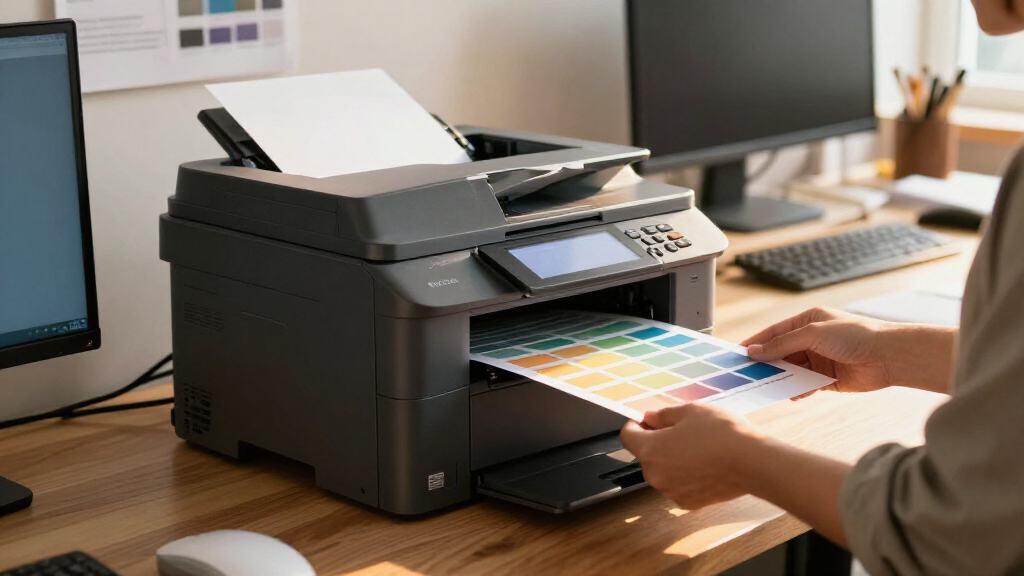
The best overall Ricoh printer in this roundup is the RICOH P 502, a practical A4 monochrome choice for offices that need focused document printing, while the IM C3500 suits teams that need color multifunction features. For larger-format work, the SP-6430DN stands out as an A3 monochrome option. The main tradeoff is between compact, single-function printers and larger multifunction systems that can handle shared office workflows but demand more space and setup. Color, paper size, print volume, and whether a model is renewed also affect which choice makes sense. Read on for the full breakdown of all 13 Ricoh printers and how I’d match them to different buyers.

Get the latest gadgets delivered free with Prime
- Fast, free delivery on millions of items
- Prime Video, Amazon Music and more included
- Member-only deals all year
Complete the kit



Key Takeaways
- The roundup splits into two clear groups: A4 monochrome printers such as the RICOH P 502 focus on document output, while the IM and Aficio multifunction models add copying and color for shared office work.
- Paper size changes the shortlist: the SP-6430DN and Aficio MP C-series models support A3-oriented workflows that an A4 printer cannot replace.
- Color multifunction capability comes with a footprint tradeoff: models such as the IM C3500 and IM C6000 are more suited to team hubs than small desks.
- Renewed status calls for extra due diligence: several IM, MP C-series, and MP 5055 listings are renewed, so buyers should verify condition, included supplies, and return coverage.
- Single-function models can be the more sensible fit: buyers who only print monochrome documents may avoid paying in space and complexity for copier features they will not use.
| Ricoh Aficio SP 5200DN Monochrome Laser Printer |  | Best for High-Volume Monochrome Workgroups | Printer type: Monochrome laser | Print speed: Up to 47 ppm | Print resolution: 1200 x 600 dpi | VIEW LATEST PRICE | See Our Full Breakdown |
| Ricoh IM C4500 Color Laser Multifunction Copier (Renewed) |  | Best for High-Capacity Color Office Work | Printer type: Color laser multifunction | Functions: Print, copy, scan | Print speed: Up to 45 ppm in color and black-and-white | VIEW LATEST PRICE | See Our Full Breakdown |
| Ricoh SP-6430DN Single Function Monochrome A3 Laser Printer |  | Best for Monochrome A3 Printing | Printer type: Single-function monochrome laser | Maximum media size: A3 | Print resolution: 1200 x 1200 dpi | VIEW LATEST PRICE | See Our Full Breakdown |
| Ricoh SP 4510DN Monochrome Laser Printer |  | Best Compact Workgroup Printer | Printer type: Monochrome laser | Print speed: Up to 42 ppm | Print resolution: 1200 x 1200 dpi | VIEW LATEST PRICE | See Our Full Breakdown |
| Ricoh C125 MF Color Laser All-in-One Printer |  | Best for Small-Office Color All-in-One Needs | Printer type: Color laser multifunction | Functions: Print, copy, scan, fax | Print speed: Up to 26 ppm in color and black-and-white | VIEW LATEST PRICE | See Our Full Breakdown |
| Ricoh Aficio MP C4504 A3 Color Laser Multifunction Printer |  | Best for A3 Color Workgroups | Printer type: Color laser multifunction printer | Functions: Copy, fax, print, scan | Print speed: Up to 45 pages per minute, color and black-and-white | VIEW LATEST PRICE | See Our Full Breakdown |
| RICOH P 502 1200 X 1200 Dpi A4 Wi-Fi, W128254671 | 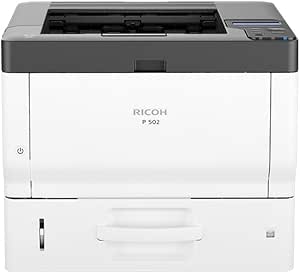 | Best Compact Monochrome Option | Listed printer type: Inkjet (product title identifies the P 502; verify listing configuration) | Output: Monochrome, print only | Resolution: 1200 x 1200 dpi | VIEW LATEST PRICE | See Our Full Breakdown |
| Ricoh IM C6000 Color Laser Multifunction Copier |  | Best for Maximum Color Throughput | Printer type: Color laser multifunction printer | Functions: Print, copy, scan; optional fax | Print speed: Up to 60 pages per minute, color and black-and-white | VIEW LATEST PRICE | See Our Full Breakdown |
| Ricoh Aficio MP C5504 Color Laser Multifunction Printer |  | Best for Fast Oversize Document Work | Printer type: Color laser multifunction printer | Functions: Print, copy, scan | Print speed: Up to 55 pages per minute, color and black-and-white | VIEW LATEST PRICE | See Our Full Breakdown |
| Ricoh IM C3500 Color Laser Multifunction Copier (Renewed) |  | Best for Moderate-Volume Color Offices | Printer type: Color laser multifunction | Functions: Print, copy, scan | Print speed: Up to 35 pages per minute, color and black-and-white | VIEW LATEST PRICE | See Our Full Breakdown |
| Ricoh MP C3004 Color Laser Multifunction Printer (Renewed) |  | Best for Flexible Color Production | Functions: Print, copy, scan; optional fax | Print speed: Up to 30 ppm, color and black-and-white | Print resolution: 1200 × 1200 dpi | VIEW LATEST PRICE | See Our Full Breakdown |
| Ricoh IM C3000 Color Laser Multifunction Printer |  | Best for Wireless Office Workgroups | Functions: Print, copy, scan | Print speed: Up to 30 ppm | Maximum print resolution: 1200 × 1200 dpi | VIEW LATEST PRICE | See Our Full Breakdown |
| Ricoh Aficio MP 5055 Monochrome Laser Multifunction Copier (Renewed) |  | Best for High-Volume Monochrome Output | Output type: Monochrome laser | Functions: Print, copy, scan | Print speed: 50 ppm | VIEW LATEST PRICE | See Our Full Breakdown |
| Ricoh printer | Print speed | Connectivity | Printer type | Maximum media size |
|---|---|---|---|---|
| Ricoh Aficio SP 5200DN Monochr | Up to 47 ppm | USB, Ethernet | Monochrome laser | 8.5 x 14 inches |
| Ricoh IM C4500 Color Laser Mul | Up to 45 ppm in color and black-and-white | Wi-Fi, network, USB | Color laser multifunction | — |
| Ricoh SP-6430DN Single Functio | — | Ethernet | Single-function monochrome laser | A3 |
| Ricoh SP 4510DN Monochrome Las | Up to 42 ppm | Ethernet, USB 2.0 | Monochrome laser | 8.5 x 14 inches |
| Ricoh C125 MF Color Laser All- | Up to 26 ppm in color and black-and-white | USB, Wi-Fi, Ethernet | Color laser multifunction | 8.5 x 14 inches |
| Ricoh Aficio MP C4504 A3 Color | Up to 45 pages per minute, color and black-and-white | Wi-Fi, network, USB | Color laser multifunction printer | A3 |
| RICOH P 502 1200 X 1200 Dpi A4 | — | — | — | A4 |
| Ricoh IM C6000 Color Laser Mul | Up to 60 pages per minute, color and black-and-white | — | Color laser multifunction printer | Legal (listing also names 12 x 18-inch media) |
| Ricoh Aficio MP C5504 Color La | Up to 55 pages per minute, color and black-and-white | Gigabit Ethernet, USB, Wi-Fi | Color laser multifunction printer | 12 x 18 inches (SRA3) |
| Ricoh IM C3500 Color Laser Mul | Up to 35 pages per minute, color and black-and-white | Wi-Fi, USB, network | Color laser multifunction | — |
| Ricoh MP C3004 Color Laser Mul | Up to 30 ppm, color and black-and-white | Ethernet, USB 2.0, optional Wi-Fi, NFC | — | — |
| Ricoh IM C3000 Color Laser Mul | Up to 30 ppm | Wi-Fi, USB | — | — |
| Ricoh Aficio MP 5055 Monochrom | 50 ppm | Ethernet, optional Wi-Fi | — | 11 × 17 inches (tabloid/ledger) |
More Details on Our Top Picks
Ricoh Aficio SP 5200DN Monochrome Laser Printer
I’d choose the Aficio SP 5200DN for an office that sends sustained batches of black-and-white documents and values capacity over a small footprint. Its 47-page-per-minute speed, 550-sheet main tray, and 100-sheet multipurpose tray help limit both queue time and refills, while automatic duplexing cuts paper use on routine reports. Compared with the SP 4510DN, it offers a higher stated print speed and a much larger monthly duty cycle, making it the stronger fit for heavier workloads. The tradeoff is a 56.7-pound chassis and monochrome-only output; it also has less memory than some complex jobs may benefit from. I’d skip it if color, Wi-Fi, or frequent relocation matters more than high-volume network printing.
Pros:- 47 ppm output suits busy monochrome print queues
- 550-sheet main tray plus 100-sheet multipurpose tray reduces refills
- Automatic duplex printing can reduce paper use
- Ethernet and USB support shared and direct connections
Cons:- Monochrome printing cannot produce color materials
- At 56.7 pounds, it is difficult to reposition
- 256 MB of memory may constrain complex print jobs
Best for: Office teams that print large, recurring batches of monochrome documents over a wired network.
Not ideal for: Small offices needing color, wireless setup, or a printer that is easy to move.
- Printer type:Monochrome laser
- Print speed:Up to 47 ppm
- Print resolution:1200 x 600 dpi
- Monthly duty cycle:Up to 200,000 pages
- Paper capacity:550-sheet input tray; 100-sheet multipurpose tray
- Duplex printing:Automatic
- Connectivity:USB, Ethernet
- Maximum media size:8.5 x 14 inches
- Weight:56.7 pounds
Our verdict“Choose the Aficio SP 5200DN for heavy wired monochrome workloads, but not if you need color or a compact, movable printer.”
Ricoh IM C4500 Color Laser Multifunction Copier (Renewed)
The renewed IM C4500 is the most suitable pick here for a department that needs color printing, scanning, and copying alongside substantial paper capacity. It prints color and black-and-white pages at a stated 45 ppm, and its four trays can hold up to 4,700 sheets, a major advantage over the C125 MF’s 250-sheet tray for shared office workloads. Automatic duplexing, Wi-Fi, network, and USB connections add flexibility, while included PostScript 3 support serves offices with varied document workflows. That capacity and multifunction scope come with a large footprint, and this is a renewed unit rather than a new one. Its 90-day limited warranty is also shorter than the one-year coverage listed for several other picks, so buyers prioritizing warranty duration should look elsewhere.
Pros:- Prints color and black-and-white at up to 45 ppm
- Four trays support up to 4,700 sheets
- Combines color printing, copying, and scanning
- Wi-Fi, network, and USB connectivity with PostScript 3 support
Cons:- Renewed condition may mean prior wear compared with a new unit
- 90-day limited warranty offers a short coverage period
- Large capacity and multifunction design may take up excessive office space
Best for: Departments that need a shared color print, copy, and scan device with high paper capacity and multiple connection options.
Not ideal for: Home offices or buyers who want a new unit, a small machine, or longer warranty coverage.
- Printer type:Color laser multifunction
- Functions:Print, copy, scan
- Print speed:Up to 45 ppm in color and black-and-white
- Print resolution:1200 x 1200 dpi
- Paper capacity:Up to 4,700 sheets
- Paper trays:4
- Connectivity:Wi-Fi, network, USB
- Duplex printing:Automatic
- Condition and warranty:Renewed; 90-day limited warranty
Our verdict“Pick the renewed IM C4500 for high-volume shared color work if its size and short warranty fit your office’s risk tolerance.”
Ricoh SP-6430DN Single Function Monochrome A3 Laser Printer
Among these five, the SP-6430DN is the clear choice when documents exceed standard letter or legal sizes: it supports A3 media, unlike the SP 4510DN and SP 5200DN, which top out at 8.5 x 14 inches. Its 1200 x 1200 dpi resolution, automatic duplexing, and support for labels, envelopes, and recycled paper make it useful for offices producing varied large-format monochrome materials. The stated 38-page-per-minute speed and under-seven-second first-print readiness also suit short jobs as well as batches. The tradeoffs are a lack of color and limited connectivity: the listed connection is Ethernet, with no built-in Wi-Fi. I’d choose another model if wireless access or color handouts are routine requirements.
Pros:- Supports A3 media, beyond the 8.5 x 14-inch limit of the SP 4510DN
- 1200 x 1200 dpi resolution and automatic duplex printing
- Handles labels, envelopes, and recycled paper
- Under-seven-second first-print readiness and 600-sheet maximum capacity
Cons:- Monochrome-only output rules out color documents
- Ethernet is the only listed connectivity option; no built-in Wi-Fi
- Listed power use of 1200 watts may not suit buyers focused on power consumption
Best for: Workgroups that print monochrome A3 documents, labels, or envelopes and can connect by Ethernet.
Not ideal for: Teams needing color output, built-in Wi-Fi, or a lower-power printer.
- Printer type:Single-function monochrome laser
- Maximum media size:A3
- Print resolution:1200 x 1200 dpi
- Maximum copy speed:38 ppm
- First-print readiness:Under 7 seconds
- Duplex printing:Automatic
- Maximum sheet capacity:600 sheets
- Connectivity:Ethernet
- Supported media:Envelopes, labels, recycled paper
Our verdict“Choose the SP-6430DN when A3 monochrome printing is the priority and Ethernet-only connectivity is acceptable.”
Ricoh SP 4510DN Monochrome Laser Printer
The SP 4510DN balances workgroup speed with a comparatively manageable 30.9-pound weight, making it easier to place than the 56.7-pound Aficio SP 5200DN. It reaches 42 ppm at 1200 x 1200 dpi and includes automatic duplexing, Ethernet, and USB, so it covers the core needs of a wired office without the SP 5200DN’s heavier build. Its stated maximum sheet capacity of 1,600 sheets can also support larger queues when configured for that capacity. The boundary is format: it handles media up to 8.5 x 14 inches, while the SP-6430DN is the better choice for A3 jobs. This is also monochrome-only, so I’d pass if color output or A3 printing is part of the regular workload.
Pros:- 42 ppm speed supports shared workgroup queues
- 1200 x 1200 dpi resolution with automatic duplex printing
- Ethernet and USB 2.0 connections
- 30.9-pound weight is lower than the Aficio SP 5200DN’s
Cons:- Monochrome-only printing cannot produce color documents
- Maximum media size is 8.5 x 14 inches, not A3
- No built-in Wi-Fi is listed
Best for: Small and midsize workgroups that want fast, wired monochrome printing without a very heavy chassis.
Not ideal for: Offices that need color output, A3 documents, or built-in Wi-Fi.
- Printer type:Monochrome laser
- Print speed:Up to 42 ppm
- Print resolution:1200 x 1200 dpi
- Maximum media size:8.5 x 14 inches
- Maximum sheet capacity:1,600 sheets
- Duplex printing:Automatic
- Connectivity:Ethernet, USB 2.0
- Dimensions:12 x 15.4 x 12 inches
- Weight:30.9 pounds
Our verdict“Choose the SP 4510DN for fast, wired letter-to-legal monochrome work when A3 and color printing are not needed.”
Ricoh C125 MF Color Laser All-in-One Printer
The C125 MF is the most approachable fit here for a small office that wants color printing plus copying, scanning, and faxing in one device. Its 26 ppm color and black-and-white speeds are below the IM C4500’s 45 ppm, but the smaller 250-sheet tray and all-in-one feature set are better aligned with lighter daily workloads than a high-capacity departmental copier. Wi-Fi, Ethernet, and USB give users a choice of connection, and the 4.3-inch touchscreen provides a direct way to manage common tasks. The compromises are substantial weight at 66 pounds and a single-sheet multipurpose tray, which limits convenient switching between media. I’d favor the IM C4500 for a busy shared office, but this model makes more sense when the extra functions matter more than raw throughput.
Pros:- Prints, copies, scans, and faxes in one device
- Wi-Fi, Ethernet, and USB connectivity
- Automatic duplex printing at up to 26 ppm
- 4.3-inch color touchscreen and 250-sheet main tray
Cons:- 66-pound weight makes moving and placement difficult
- Single-sheet multipurpose tray is inconvenient for frequent media changes
- Slower than the IM C4500 for high-volume print workloads
Best for: Small-office owners who need color printing, copying, scanning, faxing, and wireless or wired connections in one machine.
Not ideal for: High-volume departments, buyers needing frequent alternate-media printing, or anyone who must move the printer regularly.
- Printer type:Color laser multifunction
- Functions:Print, copy, scan, fax
- Print speed:Up to 26 ppm in color and black-and-white
- Print resolution:Color: 1200 x 1200 dpi; black-and-white: 2400 x 1200 dpi
- Paper capacity:250-sheet tray; single-sheet multipurpose tray
- Maximum media size:8.5 x 14 inches
- Duplex printing:Automatic
- Connectivity:USB, Wi-Fi, Ethernet
- Display and weight:4.3-inch color touchscreen; 66 pounds
Our verdict“Choose the C125 MF for a small office that needs color and four document functions, not for a high-volume department.”
Ricoh Aficio MP C4504 A3 Color Laser Multifunction Printer
The MP C4504 is the strongest fit here for offices that need A3 color output and a broad set of shared-paper options without stepping up to the faster IM C6000. Its 45-page-per-minute speed, copy, scan, and fax functions, plus automatic duplexing suit busy teams that handle mixed office jobs. Four trays and a stated maximum capacity of 4,700 sheets can reduce interruptions when several media types are in rotation. Compared with the MP C5504, it offers a lower listed print speed, while retaining A3 support and a tilting 10.1-inch panel. The tradeoff is substantial: this renewed machine measures 47.5 inches in each of two dimensions and has only a 90-day limited warranty, so it calls for dedicated office space and comfort with renewed equipment.
Pros:- Prints and copies color and black-and-white jobs at up to 45 pages per minute.
- Supports A3 media and automatic two-sided printing.
- Four trays and a stated maximum capacity of 4,700 sheets support varied, high-volume workflows.
- Includes Wi-Fi, network, and USB connectivity with a tilting 10.1-inch operation panel.
Cons:- Its 47.5 x 26.3 x 47.5-inch dimensions require substantial dedicated space.
- Renewed condition and a 90-day limited warranty may not suit buyers seeking longer-term coverage.
- The MP C5504 offers faster stated printing and single-pass duplex scanning.
Best for: Department offices that regularly print A3 color documents, need faxing and scanning, and have room for a full-size shared copier.
Not ideal for: Home offices or small teams with limited floor space, and buyers who want a longer warranty or a compact desktop printer.
- Printer type:Color laser multifunction printer
- Functions:Copy, fax, print, scan
- Print speed:Up to 45 pages per minute, color and black-and-white
- Print resolution:Up to 1200 x 1200 dpi
- Maximum media size:A3
- Maximum sheet capacity:4,700 sheets
- Connectivity:Wi-Fi, network, USB
- Condition and warranty:Renewed; 90-day limited warranty
Our verdict“Choose the MP C4504 if your office needs A3 color multifunction capability and high paper capacity more than a compact footprint or a longer warranty.”
RICOH P 502 1200 X 1200 Dpi A4 Wi-Fi, W128254671
The RICOH P 502 is the only clearly positioned print-only monochrome option in this group, making it a simpler fit for buyers who do not need color copying, scanning, or faxing. Its listed 1200 x 1200 resolution and A4 limit suit standard document work, while Bluetooth, NFC, Ethernet, USB, and Wi-Fi-related naming point to several ways to connect. Compared with the large MP C4504 or IM C6000, its smaller stated paper capacity is a clear sign that it is not intended as a department copier. The supplied product information is inconsistent, though: it labels the unit an inkjet, lists a 100-sheet maximum capacity, and gives an 11-page-per-minute copy speed, but does not provide a reliable print-speed figure. I would verify the exact configuration before buying.
Pros:- Print-only design avoids paying for multifunction features a document-focused buyer may not need.
- Lists 1200 x 1200 dpi resolution for text and monochrome document output.
- A4 maximum media size fits common office paperwork.
- Lists Ethernet, USB, Bluetooth, and NFC connectivity.
Cons:- The listing gives conflicting printer-type details and does not state a clear print speed.
- The listed maximum sheet capacity is only 100 sheets, far below the large-capacity multifunction models in this roundup.
- It lacks color output and listed scan, copy, and fax functions.
Best for: Individuals or small offices that mainly print standard-size black-and-white documents and want a print-only device with wired and wireless connection options.
Not ideal for: Teams needing color, A3 output, scanning, copying, faxing, or a dependable high-volume specification; the listing data is sparse and inconsistent.
- Listed printer type:Inkjet (product title identifies the P 502; verify listing configuration)
- Output:Monochrome, print only
- Resolution:1200 x 1200 dpi
- Maximum media size:A4
- Maximum sheet capacity:100 sheets
- Output sheet capacity:250 sheets
- Connectivity listed:Bluetooth, NFC, Ethernet, USB
- Duplex:Manual
Our verdict“Consider the P 502 only for straightforward A4 monochrome printing after confirming the exact model specifications and configuration.”
Ricoh IM C6000 Color Laser Multifunction Copier
For a high-volume office, the IM C6000 leads this batch on stated speed: up to 60 pages per minute in color and black-and-white. That gives it an advantage over the MP C5504 at 55 ppm and the MP C4504 at 45 ppm when queues are a daily problem. Automatic duplexing, a flatbed scanner, Wi-Fi, USB, and a maximum capacity of 4,700 sheets suit shared departmental use. It also supports Legal media and listed sizes including 12 x 18 inches, although the product data names Legal as its maximum media size, so buyers needing regular oversized work should confirm the exact configuration. The renewed unit has a 90-day limited warranty, fax is optional, and its two listed trays are fewer than the four on the MP C4504 and MP C5504.
Pros:- Highest stated print speed in this batch at up to 60 pages per minute.
- Automatic duplex printing helps reduce manual handling and paper use.
- Maximum paper capacity of 4,700 sheets supports longer runs between refills.
- Includes Wi-Fi and USB connectivity with a flatbed scanner.
Cons:- Fax capability is optional rather than included as standard.
- The renewed listing provides only a 90-day limited warranty.
- Two trays are listed, fewer than the four on the MP C4504 and MP C5504.
- The stated maximum media size is Legal despite listing 12 x 18-inch media among supported sizes.
Best for: Large departments with heavy color print and copy queues that value high throughput and can verify media needs and optional fax requirements.
Not ideal for: Small offices with modest print volumes, buyers who require standard faxing, or teams that need confirmed A3 handling and more listed trays.
- Printer type:Color laser multifunction printer
- Functions:Print, copy, scan; optional fax
- Print speed:Up to 60 pages per minute, color and black-and-white
- Maximum print resolution:1200 x 1200 dpi
- Maximum media size:Legal (listing also names 12 x 18-inch media)
- Maximum paper capacity:4,700 sheets
- Paper trays:2
- Condition and warranty:Renewed; 90-day limited warranty
Our verdict“Pick the IM C6000 for the strongest stated color throughput, but confirm media handling and fax configuration before committing.”
Ricoh Aficio MP C5504 Color Laser Multifunction Printer
The MP C5504 balances high color speed with broader media support: it prints and copies at up to 55 pages per minute and accepts media up to 12 x 18 inches. Its single-pass document feeder is a particular advantage for offices digitizing two-sided paperwork, with a stated scan rate of up to 180 images per minute for duplex documents. That makes it a more scan-focused choice than the faster IM C6000, whose supplied details list a flatbed scanner but no comparable feeder speed. Four trays and a 10.1-inch touchscreen also make it suited to shared work. The headline 4,700-sheet capacity requires optional trays, and booklet or staple-less finishing depends on supported accessories. Like several larger Ricoh options here, it comes with a 90-day limited warranty.
Pros:- Prints and copies color and black-and-white jobs at up to 55 pages per minute.
- Single-pass feeder scans two-sided documents at up to 180 images per minute.
- Supports media up to 12 x 18 inches and automatic duplex printing.
- Offers four trays, a 10.1-inch touchscreen, and Ethernet, USB, and Wi-Fi.
Cons:- The 4,700-sheet maximum capacity requires optional trays; standard capacity is 1,200 sheets.
- Booklet and staple-less finishing depend on supported accessories.
- The 90-day limited warranty may be restrictive for a renewed office machine.
Best for: Print rooms and busy office teams that handle large-format color work and frequently scan double-sided document stacks.
Not ideal for: Small offices that cannot accommodate a floor-standing multifunction device or buyers who need the maximum paper capacity without adding optional trays.
- Printer type:Color laser multifunction printer
- Functions:Print, copy, scan
- Print speed:Up to 55 pages per minute, color and black-and-white
- Print resolution:Up to 1200 x 1200 dpi
- Maximum media size:12 x 18 inches (SRA3)
- Standard and maximum paper capacity:1,200 sheets standard; up to 4,700 with optional trays
- Duplex document scanning:Up to 180 images per minute
- Connectivity:Gigabit Ethernet, USB, Wi-Fi
Our verdict“Choose the MP C5504 if oversized color output and fast duplex scanning matter more than avoiding optional paper and finishing accessories.”
Ricoh IM C3500 Color Laser Multifunction Copier (Renewed)
The IM C3500 makes the most sense for offices that need color copying and scanning but do not need the faster pace of the MP C5504 or IM C6000. At 35 pages per minute, it is the slowest of those three large color multifunction choices, yet it still offers automatic duplexing, Wi-Fi, USB, network connectivity, and media up to 12 x 18 inches. Its stated capacity of up to 4,700 pages can help reduce refill stops, though the listing does not detail a standard capacity or tray count. Compared with the MP C4504, it shares wide-format support but has a lower stated speed and does not list fax as standard. It is renewed with a 90-day limited warranty, so it suits buyers prioritizing capability over long warranty coverage.
Pros:- Prints and copies color and black-and-white jobs at up to 35 pages per minute.
- Supports media up to 12 x 18 inches for larger office documents.
- Automatic duplex printing and Wi-Fi, USB, and network connectivity are listed.
- Maximum capacity of up to 4,700 pages can reduce refill frequency.
Cons:- Its 35-page-per-minute speed is below the MP C5504 and IM C6000.
- Fax is optional rather than listed as a standard function.
- Renewed condition comes with a 90-day limited warranty, and the listing does not specify standard paper capacity or tray count.
Best for: Small-to-midsize office teams with steady but not extreme color workloads that need scanning, copying, duplexing, and 12 x 18-inch media support.
Not ideal for: High-volume print rooms that need the fastest throughput, buyers who require standard faxing, or small home offices without room for a floor-standing copier.
- Printer type:Color laser multifunction
- Functions:Print, copy, scan
- Print speed:Up to 35 pages per minute, color and black-and-white
- Resolution:1200 x 1200 dpi
- Maximum paper size:12 x 18 inches
- Maximum paper capacity:4,700 pages
- Connectivity:Wi-Fi, USB, network
- Condition and warranty:Renewed; 90-day limited warranty
Our verdict“Choose the IM C3500 for broad color multifunction features and large-format support at a more moderate stated speed, provided renewed condition and short warranty coverage fit your needs.”
Ricoh MP C3004 Color Laser Multifunction Printer (Renewed)
The MP C3004 suits offices that need color, copying, and scanning alongside room for oversized or heavier media. Its support for paper up to 12 × 18 inches and 300 gsm gives it more flexibility for covers, presentations, and larger-format office work than the monochrome Aficio MP 5055. The 10.1-inch Smart Operation Panel and security tools also fit shared workgroups where users need a straightforward interface and controlled document release.
At up to 30 pages per minute, it is capable but not as fast as the MP 5055’s 50-ppm monochrome output. This is a renewed machine with a 90-day warranty, so buyers should weigh its broad paper handling against the shorter coverage. Wi-Fi and fax are optional, not guaranteed in the listed configuration.
Pros:- Prints, copies, and scans, with fax available as an option.
- Handles media up to 12 × 18 inches and 300 gsm for larger or heavier office jobs.
- Automatic duplex printing and a 10.1-inch Smart Operation Panel support routine shared use.
- Security features include user authentication and secure print.
Cons:- Wi-Fi and fax are optional, so the standard configuration may not meet every office’s connectivity needs.
- Its 30-ppm speed is slower than the monochrome Aficio MP 5055 for high-volume text output.
- Renewed condition comes with a 90-day limited warranty.
Best for: Shared offices that regularly print color, scan or copy documents, and produce tabloid-size or heavier media.
Not ideal for: Buyers who need guaranteed Wi-Fi or fax out of the box, or who prefer a new machine with a longer warranty.
- Functions:Print, copy, scan; optional fax
- Print speed:Up to 30 ppm, color and black-and-white
- Print resolution:1200 × 1200 dpi
- Maximum paper size:12 × 18 inches (SRA3)
- Standard paper capacity:1,200 sheets
- Maximum paper capacity:4,700 sheets with optional trays
- Connectivity:Ethernet, USB 2.0, optional Wi-Fi, NFC
- Condition and warranty:Renewed; 90-day limited warranty
Our verdict“Choose the renewed MP C3004 if your office needs flexible color and oversized-media handling more than maximum monochrome speed.”
Ricoh IM C3000 Color Laser Multifunction Printer
The IM C3000 is a practical fit for workgroups that want color printing, copying, and scanning without making optional Wi-Fi part of the buying decision. Its listed Wi-Fi connectivity distinguishes it from the renewed MP C3004, whose wireless connection is an add-on. Both models reach 30 pages per minute and support up to 4,700 sheets, making the choice less about headline speed and more about the stated connection setup and media needs.
Automatic duplex printing helps reduce manual handling for routine two-sided jobs, while support for media up to 12 × 18 inches gives the machine room for larger office documents. The tradeoff is a renewed unit with a 90-day warranty; fax is optional, and the listed USB provision is limited to one port. I’d favor it over the MP C3004 when Wi-Fi is a priority, but not when fax must be included.
Pros:- Combines color printing, copying, and scanning in one device.
- Wi-Fi is listed as a connectivity feature rather than an optional add-on.
- Automatic duplex printing supports convenient two-sided workflows.
- Expandable paper capacity accommodates up to 4,700 sheets.
Cons:- Fax is optional and is not included among the listed standard functions.
- Only one USB port is listed.
- Renewed condition carries a 90-day limited warranty.
Best for: Office teams that need a renewed color multifunction printer with listed Wi-Fi and automatic two-sided printing.
Not ideal for: Organizations that require fax as standard, multiple USB ports, or longer warranty coverage.
- Functions:Print, copy, scan
- Print speed:Up to 30 ppm
- Maximum print resolution:1200 × 1200 dpi
- Duplex printing:Automatic
- Connectivity:Wi-Fi, USB
- USB ports:1
- Maximum sheet capacity:4,700 sheets
- Condition and warranty:Renewed; 90-day limited warranty
Our verdict“Pick the IM C3000 if built-in Wi-Fi matters more than standard fax or the MP C3004’s more detailed heavy-media specifications.”
Ricoh Aficio MP 5055 Monochrome Laser Multifunction Copier (Renewed)
For offices that print mostly text and value throughput over color, the Aficio MP 5055 is the speed-focused pick here. Its 50-ppm output is substantially faster than the 30-ppm MP C3004 and IM C3000, making it better suited to large batches of monochrome documents. A single-pass feeder rated at up to 180 images per minute for duplex scanning can also shorten the handling time for multi-page jobs.
The tradeoff is firm: this machine prints in monochrome only, while the two C3000-series models offer color. It supports ledger-size media up to 11 × 17 inches, smaller than the MP C3004’s 12 × 18-inch maximum. Wireless networking and finishing features are optional, and the renewed unit has a 90-day warranty, so check the configuration before choosing it for a specific workflow.
Pros:- 50-ppm monochrome printing supports heavier document workloads than the 30-ppm color models in this batch.
- Single-pass feeder scans duplex documents at up to 180 images per minute.
- Supports media up to 11 × 17 inches for tabloid and ledger jobs.
- 10.1-inch Smart Operation Panel and secure-print features suit shared office use.
Cons:- Monochrome output cannot handle color documents.
- Wi-Fi and advanced finishing options are optional add-ons.
- Renewed condition includes a 90-day limited warranty.
Best for: Mid-to-large offices processing frequent monochrome print and copy batches, with duplex scanning and ledger-size output needs.
Not ideal for: Teams that print color, need standard Wi-Fi, or require stapling and booklet finishing included.
- Output type:Monochrome laser
- Functions:Print, copy, scan
- Print speed:50 ppm
- Duplex scan speed:Up to 180 ipm
- Resolution:1200 × 1200 dpi
- Maximum media size:11 × 17 inches (tabloid/ledger)
- Paper capacity:1,200 sheets standard; expandable to 4,700
- Connectivity:Ethernet, optional Wi-Fi
- Condition and warranty:Renewed; 90-day limited warranty
Our verdict“Choose the MP 5055 when fast monochrome throughput and duplex scanning matter more than color or wider media support.”
How We Picked
I ranked these 13 Ricoh printers by how well each model’s stated role matches real office needs: document-only output, color printing, A3 support, or multifunction copying. I weighed the practical value of a focused A4 printer against the broader workflow capabilities of larger systems, while treating print speed, resolution, connectivity, and paper handling as useful only when they support the buyer’s actual workload. A multifunction unit does not rank higher simply for having more features; those features matter most when multiple people share the device.
I also considered space, setup, maintenance, and purchasing risk. Larger Aficio and IM machines can serve as office hubs, but require more room and a compatible operating environment than a compact printer. Renewed listings receive a more cautious fit because condition, consumables, and seller support can vary. The ordering favors versatile options for common office needs, then models with more specialized strengths, while noting where a simpler or smaller machine may be the better purchase.
| Ricoh printer | Printer type | Functions |
|---|---|---|
| Ricoh Aficio SP 5200DN Monochr | Monochrome laser | — |
| Ricoh IM C4500 Color Laser Mul | Color laser multifunction | Print, copy, scan |
| Ricoh SP-6430DN Single Functio | Single-function monochrome laser | — |
| Ricoh SP 4510DN Monochrome Las | Monochrome laser | — |
| Ricoh C125 MF Color Laser All- | Color laser multifunction | Print, copy, scan, fax |
| Ricoh Aficio MP C4504 A3 Color | Color laser multifunction printer | Copy, fax, print, scan |
| RICOH P 502 1200 X 1200 Dpi A4 | — | — |
| Ricoh IM C6000 Color Laser Mul | Color laser multifunction printer | Print, copy, scan; optional fax |
| Ricoh Aficio MP C5504 Color La | Color laser multifunction printer | Print, copy, scan |
| Ricoh IM C3500 Color Laser Mul | Color laser multifunction | Print, copy, scan |
| Ricoh MP C3004 Color Laser Mul | — | Print, copy, scan; optional fax |
| Ricoh IM C3000 Color Laser Mul | — | Print, copy, scan |
| Ricoh Aficio MP 5055 Monochrom | — | Print, copy, scan |
Factors to Consider When Choosing Best Ricoh Printers
Before choosing among Ricoh models, I’d narrow the field by matching the printer to the work and the place it will live. These decisions can prevent a capable office machine from becoming an expensive mismatch.
Match the printer to your actual monthly workload
Start with the number of people who will print and how often they send jobs, not just the occasional peak day. A busy shared printer needs room for the queue and paper replenishment, while a low-volume desk setup may benefit more from a simpler single-function device. Check the manufacturer’s duty-cycle guidance and recommended monthly volume for the exact model before buying; a headline speed alone does not show whether the machine suits sustained work. If your workload changes seasonally, account for the busy months rather than choosing only for a quiet week. A larger machine can be wasteful when most of its capacity sits unused, but an undersized one may create delays and frequent supply changes.
Decide whether A3 support is a real requirement
A3 capability is useful for spreadsheets, plans, posters, and layouts that must stay on one sheet, but it is not a general upgrade for everyday letter- or A4-size documents. Buyers sometimes choose an A3 machine for flexibility and then discover that the extra size complicates placement and paper storage. Confirm the sizes you need to print, copy, and scan, since those functions may not support identical media ranges. If A3 work is occasional, compare the cost and effort of using a print service with keeping a larger device on site. Choose A3 when it is part of a recurring workflow, not merely a possibility.
Count the functions your team will actually use
A multifunction printer can replace separate devices and simplify a shared office, especially when copying is part of routine work. It also introduces more setup and maintenance points than a printer that only prints. Before paying for copier functions, ask who needs them, how often they are used, and whether the device will sit somewhere accessible to the whole team. Scan destinations, authentication, and network policies may need configuration by an administrator. For a home office or print-only role, a focused printer can be easier to place and manage.
Choose monochrome or color by document purpose
Monochrome is a strong fit for text-heavy records, forms, and internal documents where color adds little practical value. Color matters when charts, branded materials, or visual documents must be clear without an outside print service. A common mistake is to buy color for occasional convenience without accounting for multiple toner supplies and the added upkeep. Consider whether the team needs color every week or only for rare projects. If color is essential, check the workflow and supply requirements alongside the stated print capability rather than treating color support as the only deciding factor.
Check installation, connectivity, and room requirements
Office-class Ricoh machines can need more than a nearby power outlet: network access, a stable location, clear service access, and an appropriate paper supply all affect day-to-day use. Verify dimensions and weight before delivery, particularly for A3 multifunction systems, and confirm that your intended floor or furniture can support the machine. Check supported network connections and operating-system compatibility against the computers and print server already in place. Wi-Fi availability on a listed model does not automatically mean every office feature will work without configuration. Planning these details before purchase can prevent a capable printer from being difficult to install or share.
Treat renewed equipment as a separate buying decision
Renewed Ricoh machines may fit buyers seeking an office-class feature set, but the listing label alone does not tell you the unit’s condition or remaining service life. Ask what inspection or refurbishment was completed, whether toner or other supplies are included, and what warranty and return terms apply. Also check the expected availability of replacement parts and consumables for the exact model. A lower purchase commitment can lose its appeal if setup, repairs, or missing components create extra work. For a business-critical shared printer, documented support may matter more than the machine’s feature list.
Frequently Asked Questions
Which Ricoh printer should I choose for a small office that mainly prints documents?
I’d start with an A4 monochrome model such as the RICOH P 502 if the team prints text documents and does not need built-in copying or color. A single-function printer can be simpler to place and manage than an office copier. If several people need to copy or scan at the same device, compare an IM multifunction model instead. Before ordering, confirm its connection options, supported operating systems, and expected monthly workload. The right choice depends on whether shared functions solve a regular problem, not just whether they are available.
Is an A3 Ricoh printer worth choosing if I only print large pages occasionally?
It depends on how much delay, handling, or outsourcing your occasional A3 jobs create. An A3-capable Ricoh can keep large spreadsheets or layouts in-house, but the machine may take more room and require more involved setup than an A4 printer. If A3 jobs are rare and non-urgent, an outside print service may be simpler. If the work is frequent, confidential, or time-sensitive, keeping A3 capability on site can be more useful. Check that the exact model supports the media sizes and functions your workflow needs.
Should I buy a renewed Ricoh multifunction printer for business use?
A renewed unit can make sense when you need multifunction or A3 capability and can verify the seller’s support terms. Request details about inspection, included toner and accessories, warranty length, and the return process before committing. For a printer that supports daily business operations, also check parts and consumables availability for that model. A renewed device is a less comfortable fit when downtime would interrupt important work and there is no service plan. Compare the full ownership requirements, not only the listed condition.
Do I need a Ricoh multifunction copier if I already have a scanner?
Not necessarily. If the scanner already meets your team’s needs and printing is the only shared task, a single-function Ricoh printer may avoid redundant equipment and extra setup. A multifunction copier is more useful when several people need routine copying or prefer a centralized device for print, copy, and scan work. Consider where each machine will sit and whether staff can reach it easily. Also check how the Ricoh’s scan workflow fits your network and document-handling rules before replacing an existing scanner.
What should I verify before ordering a large Ricoh office printer?
Confirm the machine’s dimensions, weight, access route, and required clearance for paper loading and service. Check power and network requirements, supported operating systems, and whether your office needs administrator setup. Ask what supplies are included and how to order replacements for the specific model. For renewed units, verify condition, warranty, and returns in writing. These checks matter as much as print features because a large office machine can be difficult to install or support after delivery.
Conclusion
For a straightforward document-printing setup, I’d choose the RICOH P 502 as the best overall fit in this lineup; buyers who want a lower-complexity, print-only office machine should compare the monochrome SP models as the value-minded options. The IM C6000 is the premium direction for a high-demand shared color workflow, while the IM C3500 is a more approachable multifunction choice for teams that need color without making the largest model their default. For beginners, I’d favor a focused A4 printer over an A3 copier unless there is a clear need for copying or larger sheets. For specific needs, choose the SP-6430DN for A3 monochrome printing and an Aficio or IM color multifunction model when A3 color and shared office functions are part of the job. Before deciding, confirm dimensions, connectivity, workload fit, and renewed-unit support where applicable.
Fall Picks

DJI Osmo Action 4 Essential Combo Waterproof 4K Action Camera
As an affiliate, we earn on qualifying purchases.