TL;DR
A 2027 buying guide compares 10 network attached storage devices for home and business use, from single-drive personal storage to rackmount systems. It identifies the Synology DS225+ as its best overall balance, while noting that drive redundancy, included storage, setup demands and pricing vary across the lineup.
A 2027 network attached storage buying guide compares 10 devices for home and business users, naming the Synology DS225+ its best overall balance for shared storage and backups. The selection ranges from one-bay units with bundled drives to multi-bay rackmount systems, underscoring how capacity, redundancy and setup needs shape the choice.

Get the latest gadgets delivered free with Prime
- Fast, free delivery on millions of items
- Prime Video, Amazon Music and more included
- Member-only deals all year
The guide favors the two-bay DS225+ for buyers seeking a flexible system that is manageable at home. Its DiskStation Manager software supports automated backups to cloud services, external drives and remote NAS devices, according to the source. The model is sold diskless, so buyers must add compatible drives; the guide lists a three-year warranty.
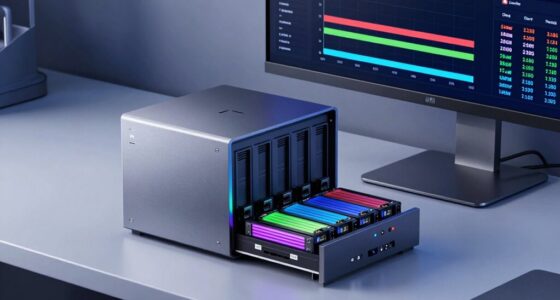
For more demanding applications, the guide points to the UGREEN NASync DXP2800, which has an Intel N100 quad-core processor and 8 GB of DDR5 memory. It has two hard-drive bays and two M.2 NVMe SSD slots, but storage drives are sold separately. The source says it can suit users running Docker, virtual machines, media servers or compatible network-camera features.
Business and rack deployments have different options. The QNAP TS-864eU-8G-US offers eight bays in a short-depth rackmount format and is sold diskless. The BUFFALO TeraStation 5420RN is listed with four 8 TB drives, or 32 TB raw capacity, and 24 TB usable in RAID 5. At the simpler end, the BUFFALO LinkStation 210 comes in 2 TB and 4 TB versions with a drive included, while the single-bay Synology DS124 is diskless.
Choose storage for your workload Home and business NAS picks
The 2027 guide compares 10 devices, from simple personal storage to rackmount systems. The right fit depends on capacity, redundancy, included drives and setup needs.
Best overall balance
The guide favors a flexible two-bay system for shared storage and backups.
Synology DS225+
Backup software supports cloud services, external drives and remote NAS devices. It is diskless, so buyers supply compatible drives.
UGREEN DXP2800
Two drive bays and two M.2 NVMe slots support demanding setups such as Docker, virtual machines and media servers. Drives are sold separately.
Match the setup to the space
Bay count and deployment needs shape expansion, resilience and administration.
- LinkStation 210 includes a drive in 2 TB and 4 TB versions.
- Single-bay devices trade internal drive redundancy for simplicity.
- DS223j is described as a quiet private-cloud option.
- QNAP TS-864eU-8G-US is an eight-bay short-depth rackmount system.
- TeraStation 5420RN includes four 8 TB drives.
- Plan for rack space, capacity and ongoing administration.
Check before buying
The supplied guide has no consistent price comparison, benchmark results or full compatibility matrix.
Decide how much storage you need after configuration.
Multi-bay systems offer more options; RAID does not replace a separate backup.
Check compatible drives, features, warranty terms, price and availability with manufacturers and retailers.
Matching NAS Capacity to the Workload
The lineup shows why NAS shopping involves more than comparing headline storage capacity. Bay count affects redundancy and expansion: a single-bay device cannot mirror data to a second internal drive, while multi-bay systems can offer more configuration choices. RAID can help protect against a drive failure, but it does not replace a separate backup.
Included drives also change the real cost and setup. Bundled-drive models can be ready to configure sooner, while diskless products let buyers choose storage but require a separate purchase. For businesses, rack space, capacity planning and ongoing administration may matter as much as the device’s processor or software features.
Products Worth Considering

Apple MacBook Air 15-inch Laptop with M5 Chip, 16GB Memory, 512GB SSD, Liquid Retina Display, and Touch ID (Midnight)

Amazon Kindle Scribe (16GB) with Premium Pen, Tungsten

Kindle Paperwhite Signature Edition 32GB (2024 Model) – Metallic Black
As an affiliate, we earn on qualifying purchases.
How the Ten Picks Differ
The source’s 10-device selection spans distinct use cases rather than a single performance tier. Alongside the DS225+, DS223j and DS124 from Synology, it includes the UGREEN DXP2800 and DH2300, the QNAP rackmount model, the BUFFALO TeraStation and two LinkStation configurations. The source also identifies the Synology DS223j as a quiet private-cloud option and the UGREEN DH2300 as a personal storage and phone-backup choice.
Warranty terms in the guide range from two years on several models to three years on the DS225+, TeraStation 5420RN and QNAP TS-864eU-8G-US. The source includes affiliate links and says it may earn a commission on qualifying purchases. It does not provide a consistent price comparison in the supplied material.
“The DS225+ is the strongest all-rounder in this lineup.”
— Thorsten Meyer AI buying guide
Prices, Compatibility and Test Results
The supplied source does not include current prices, independent test results or a full compatibility matrix. Buyers should confirm supported drive models, operating-system and app features, and the latest warranty terms before purchasing. Storage limits and supported features may depend on drive selection, software version and configuration; the source does not detail all such conditions.
The guide is labeled as AI-assisted and includes affiliate disclosures. Its rankings are editorial assessments in the supplied material, and no methodology or comparative benchmark data is provided. The listed products and configurations should be checked against manufacturer specifications and retailer availability.
Check Drives and Deployment Needs
Before choosing a device, buyers should identify their required usable capacity, decide whether they need internal drive redundancy, and check whether the NAS will sit on a desk or in a rack. They should then compare the cost of the enclosure plus compatible drives with bundled-drive alternatives, and plan a separate backup path. Retail prices, stock and configurations can change, so the guide’s listed specifications and warranty information should be verified at purchase time.
Key Questions
Which NAS does the guide rank best overall?
The guide names the Synology DS225+ as its best overall balance, citing its two-bay design and backup software. It is diskless, so buyers must supply drives.
Which listed NAS is aimed at rack deployments?
The QNAP TS-864eU-8G-US is an eight-bay short-depth rackmount option. The four-bay BUFFALO TeraStation 5420RN is another rack-oriented choice and is listed with four 8 TB drives.
Do single-bay NAS devices provide drive redundancy?
No. A one-bay device has no second internal drive for mirroring. The guide says the LinkStation 210 and Synology DS124 trade that resilience for simpler personal storage.
Are drives included with every model?
No. The DS225+, DS223j, DS124, UGREEN DXP2800 and QNAP TS-864eU-8G-US are listed as diskless. The BUFFALO LinkStation 210 options and TeraStation 5420RN include drives in the configurations described.
Does the guide provide independent performance comparisons?
The supplied material gives product specifications and editorial recommendations, but does not provide a testing methodology or benchmark results. Buyers should confirm compatibility, pricing and current specifications with manufacturers and retailers.
Source: Thorsten Meyer AI