
TL;DR

Get the latest gadgets delivered free with Prime
- Fast, free delivery on millions of items
- Prime Video, Amazon Music and more included
- Member-only deals all year
An XDA Developers contributor reports that a DIY NAS assembled from old drives of different brands, capacities and ages has proved dependable in their experience. The account suggests mismatched drives may reduce shared manufacturing-batch risks, but it is a personal observation, not evidence that mixed drives are generally more reliable.
An XDA Developers contributor says a DIY network-attached storage (NAS) system assembled from old PC hard drives of different brands, capacities and ages has been dependable in their experience. The account challenges the assumption that matching drives are always the safer choice, but it does not establish that mixed drives are more reliable for NAS users generally.
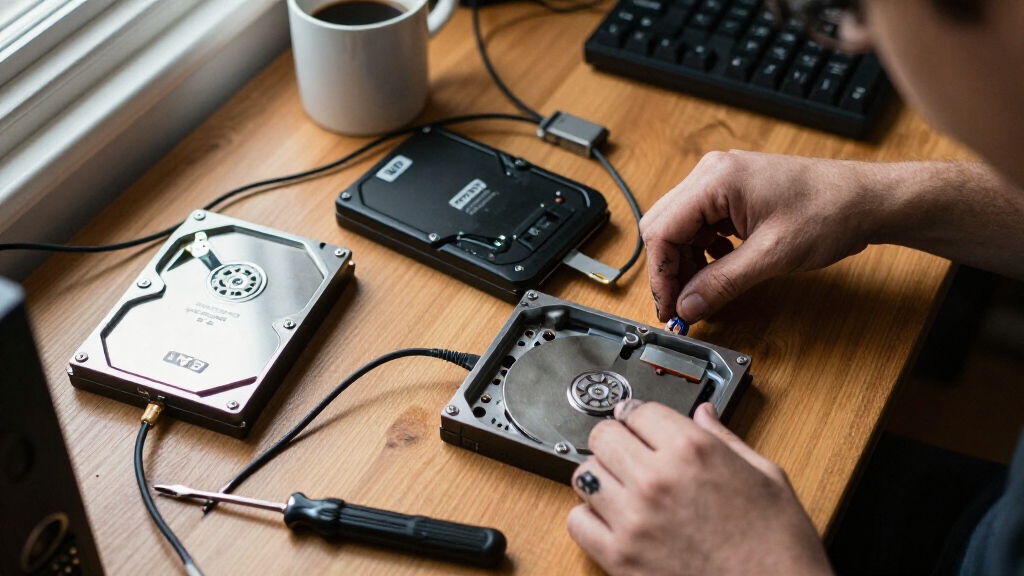
The contributor built the system from drives collected during PC upgrades and salvaged from computers that other people no longer wanted. The disks vary in manufacturer, capacity, age and operating hours. The writer says the setup has continued to work well and that, when a disk fails, they look for another used drive rather than automatically buying a matching replacement.
The system uses RAIDZ2, a storage configuration that can tolerate failures within the array. The writer reports about 14TB of usable capacity, while acknowledging that larger disks contribute capacity that the array cannot use. In the example given, combining a 4TB disk with a 6TB disk means the larger disk’s extra 2TB is not available to the array.
Performance is another compromise. The contributor’s collection includes 5,400-rpm and 7,200-rpm drives, and says faster disks do not add much benefit when slower ones limit the shared workload. That has not been a major problem because the NAS mainly stores data that is written once and rarely changed. The account does not provide drive failure rates, a comparison against an equivalent matched-drive system, or a measured reliability test.
Home storage · Field report · October 26, 2026
Mismatched Drives From Old PCs Made My NAS More Reliable Than Matched Drives
One XDA Developers contributor says a DIY NAS built from assorted salvaged hard drives has served them well. It is a practical case study in reuse, with trade-offs in capacity and speed—and no comparative evidence that mixed drives are generally more reliable.
01 / The setup
A storage pool assembled over time
The collection came from PC upgrades and discarded computers. The disks differ in brand, capacity, age and operating hours; the mix was a result of available parts, not a planned reliability strategy.
Old PCs, reused
The contributor gathered drives from personal upgrades and machines other people no longer wanted.
RAIDZ2 protection
The configuration can tolerate failures within the array, but it does not guard against every cause of data loss.
Mostly write once
The NAS mainly stores data that is written once and seldom changed, making uneven drive speeds less troublesome for this use.
02 / The trade-offs
Reuse saves money; uniformity saves guesswork
A mixed set can be workable when the owner understands how smaller disks and slower drives constrain the shared pool.
Capacity follows the smaller disk
In the example described, a 4TB disk paired with a 6TB disk leaves the larger disk’s extra 2TB unavailable to the array. Actual usable capacity depends on the full drive set and configuration.
*Illustrative pair only; not a capacity calculation for the full NAS.
Speed varies across the set
The contributor’s collection includes slower 5,400-rpm and faster 7,200-rpm drives. For shared work, slower disks can limit the pace, while the mostly archival workload makes that compromise acceptable.
03 / Reliability, carefully stated
Different batches may diversify risk
The idea is plausible: disks bought together can share a production batch or similar wear history. But this account cannot show whether mixed drives fail less often.
Less shared history
Different ages and operating hours may mean failures are less correlated. The writer believes this could reduce simultaneous failures.
No comparative data
There are no reported failure rates, matched-array comparison, measured test period or details sufficient to estimate the effect.
Condition still matters
Reliability depends on the specific disks, their health, workload, cooling and maintenance—not matching alone.
“All of the other differences among my mixed array of disks haven’t caused any actual issues.”XDA Developers contributor
04 / What this case can show
Useful experience, limited proof
The report is best read as a low-cost home storage example. It does not establish that mismatched drives are safer, or that this setup suits another workload.
What is described
- A DIY NAS assembled from salvaged drives of different brands, sizes and ages.
- RAIDZ2 and about 14TB of usable capacity, according to the contributor.
- A mostly write-once, seldom-changed storage workload.
- A plan to replace failed disks with suitable used drives from their collection.
What remains unknown
- Exact models, ages, health readings and failure history.
- How long the system has been observed and how it performs under heavy activity.
- How often mixed drives reduce correlated failures compared with matched drives.
- The owner’s backup arrangements and recovery experience.
05 / A sensible decision path
Check the disks. Plan for loss. Keep a backup.
The contributor expects to keep replacing failures with usable hardware on hand. Anyone considering the same approach can make the trade-offs explicit before relying on the array.
Inspect
Check each drive’s condition, health readings, capacity and operating history.
Calculate
Understand how the chosen configuration handles unequal disk sizes and usable space.
Match to use
Consider workload, speed limits, cooling, maintenance and replacement availability.
Back up separately
Keep an independent copy of important files. RAIDZ2 is not a substitute for backup.
06 / Quick answers
Key questions
The account offers a household example, not a universal drive-buying rule.
What does “mismatched” mean here?
Hard drives from different manufacturers, capacities, ages and operating hours, salvaged from old PCs rather than bought together.
How much usable storage does it have?
The contributor reports about 14TB in this RAIDZ2 system. The article lacks details to calculate capacity for other drive sets.
Do mixed drives make a NAS more reliable?
The article does not establish that. It offers a personal report and a theory about shared batch risk, without comparative failure data.
Does RAIDZ2 replace a separate backup?
No. RAIDZ2 provides fault tolerance within the array, but cannot protect against every form of data loss. Keep a separate backup.
The Trade-Offs Behind Mixed Drives
The account offers a practical example for people considering a home NAS on a limited budget: reusing available hardware can be workable if the owner accepts less efficient capacity use and uneven performance. It also points to a risk in buying several identical drives at once. Drives from the same production batch may share a defect or similar wear history, so their failures could be correlated rather than independent.
That possibility is not proof that mixed drives last longer. Reliability depends on the specific disks, their condition, workload, cooling and maintenance, among other factors. A mismatched set can also make it harder to predict performance and replace failed capacity. The contributor’s experience is best read as a case study in a low-cost setup, not a general recommendation to prefer mismatched hardware.
For readers, the central point is that drive matching is one factor among several, not a substitute for protecting data. RAIDZ2 provides fault tolerance within the array, but it does not by itself protect against every cause of data loss. A separate backup remains important, particularly for files that cannot be replaced.
Products Worth Considering

LG UltraGear 32GX850A-B 32-Inch 4K UHD Glossy OLED Gaming Monitor

LG UltraGear 27-Inch QHD OLED Gaming Monitor, 240Hz, 0.03ms, G-SYNC Compatible, FreeSync Premium Pro, HDMI 2.1

Sonos Era 100 Wireless Smart Speaker, Black
As an affiliate, we earn on qualifying purchases.
Why Drive Matching Is Common
NAS builders often choose drives with the same capacity and specifications because a uniform set makes it easier to plan storage and achieve consistent behavior. In many redundant arrays, usable capacity is constrained by the smallest drive, so mixing sizes can leave part of larger disks unused. Different rotational speeds can also produce uneven performance when the system handles work across multiple drives.
The XDA Developers contributor says the mixed setup was not a deliberate reliability strategy: it grew out of old computers and accumulated parts. The writer’s concern about same-batch failures comes from reports of users experiencing multiple drive failures, but the article does not identify specific cases or quantify how often that happens. The contributor says their disks differ in age and power-on hours, a diversity they believe may reduce the chance of simultaneous failures.
“I ended up with a stack of mismatched hard drives on my desk that were yanked out of old PCs.”
— XDA Developers contributor
What One NAS Cannot Prove
The account does not disclose the drives’ exact models, ages, health readings, failure history or workload beyond describing the stored data as mostly write-once and seldom changed. It also does not provide a test period, a matched-drive comparison, or enough data to calculate whether varied drives reduced the risk of simultaneous failure.
It remains unclear how the setup would perform under sustained heavy activity, or how readily a replacement drive could be found with suitable capacity and condition. The writer’s report that the system has been dependable is an individual experience; it should not be treated as proof that mixed drives are safer or that RAID replaces independent backups.
How the Setup Will Be Replaced
The contributor says they plan to keep replacing failed disks with usable drives from their collection of discarded hardware rather than ordering identical replacements. No specific upcoming upgrade, failure or performance test is reported. The next useful evidence would be a longer-term account that records drive health and failures, along with details of the workload and backup arrangements.
For anyone considering a similar build, the practical next step is to check the condition and capacity of each disk, understand how the chosen storage configuration handles unequal sizes, and maintain a separate backup. The contributor’s experience shows that a mixed-drive NAS can serve one household’s needs; whether it suits another system depends on its capacity, performance and reliability requirements.
Key Questions
What does the contributor mean by mismatched drives?
The NAS uses hard drives from different manufacturers and capacities, with varying ages and operating hours. They were salvaged from old PCs rather than bought together as one matched set.
How much usable storage does this NAS have?
The contributor reports about 14TB of usable storage in their RAIDZ2 setup. That figure applies to this system; the article does not give enough details to calculate capacity for other drive combinations.
Do mismatched drives make a NAS more reliable?
The article does not establish that. The contributor believes varied drives may be less likely to share a manufacturing defect or fail at the same time, but reports only personal experience and provides no comparative failure data.
What are the drawbacks of mixing hard drives?
In this setup, larger disks contribute unused capacity because the array is constrained by smaller drives. Different drive speeds can also limit throughput, as slower disks can bottleneck shared work.
Does RAIDZ2 replace a separate backup?
No. RAIDZ2 provides a degree of fault tolerance within the storage array, but it does not protect against every form of data loss. A separate backup remains important for files that need to be preserved.
Source: XDA Developers