
Portable external SSDs have become the fastest way to carry large files, back up a laptop, or expand a console without lugging around a spinning hard drive. After comparing 12 leading models, the Samsung T9 1TB stands out as the best overall pick thanks to its USB 3.2 Gen 2×2 speeds of up to 2,000 MB/s, roughly double what standard models deliver. If raw speed is less pressing, the Samsung T7 Shield 2TB earns its place with rugged durability at a strong price per terabyte, while the SSK 500GB is the budget-friendly entry point for first-time buyers. The main tradeoff in this category is simple: paying more gets you either faster transfer rates or tougher build quality, but rarely both at the entry level. Capacity pricing varies widely too, with 2TB models often costing barely more than their 1TB siblings. Read on for the full breakdown of which drive fits your workflow and budget.

Get the latest gadgets delivered free with Prime
- Fast, free delivery on millions of items
- Prime Video, Amazon Music and more included
- Member-only deals all year
Complete the kit



Key Takeaways
- Only one drive in this lineup, the Samsung T9, uses USB 3.2 Gen 2×2 — every other model tops out around 1,050 MB/s, so paying a premium elsewhere buys durability or capacity, not speed.
- The 2TB Samsung T7 Shield delivers the best price-per-terabyte among rugged options, making it smarter value than buying two 1TB drives separately.
- Sustained write speed, not the headline number, separates these drives during large video transfers — Samsung‘s models throttle less aggressively than the budget SanDisk 800MB/s units.
- The SSK drives match brand-name speeds on paper at a lower price, but lack the encryption software and warranty support that Samsung and SanDisk include.
- At 500GB, both the SSK and SanDisk options cost nearly as much per gigabyte as 1TB models, so small-capacity drives only make sense for very light storage needs.
| Lexar ES3 1TB Portable SSD Silver |  | Best for Security-Minded Mobile Users | Capacity: 1TB | Interface: USB 3.2 Gen 2 | Read Speed: up to 1050MB/s | VIEW LATEST PRICE | See Our Full Breakdown |
| Samsung T7 Shield Portable SSD 2TB |  | Best Rugged Pick | Capacity: 2TB | Interface: USB 3.2 Gen 2 | Transfer Speed: up to 1050MB/s | VIEW LATEST PRICE | See Our Full Breakdown |
| SanDisk 1TB Portable SSD – Lavender | 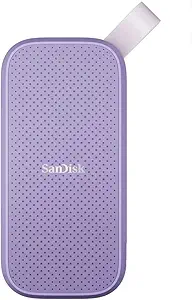 | Best Style Pick for Everyday Carry | Capacity: 1TB | Color: Lavender | Interface: USB-C, USB 3.2 Gen 2 | VIEW LATEST PRICE | See Our Full Breakdown |
| Samsung T7 Portable SSD 1TB Titan Gray |  | Best Slim All-Rounder | Capacity: 1TB | Color: Titan Gray | Interface: USB 3.2 Gen 2 | VIEW LATEST PRICE | See Our Full Breakdown |
| SanDisk 1TB Extreme Portable SSD |  | Best for Rugged Speed | Capacity: 1TB | Transfer Speeds: up to 2000MB/s | Connectivity: USB Type-C | VIEW LATEST PRICE | See Our Full Breakdown |
| SSK Portable SSD 500GB External Solid State Drive |  | Best Budget Entry Point | Capacity: 500GB (~465GB usable on Windows) | Max Read Speed: 1050MB/s | Max Write Speed: 1000MB/s | VIEW LATEST PRICE | See Our Full Breakdown |
| SSK Portable SSD 1TB External Solid State Drive |  | Best Value Per Terabyte | Capacity: 1TB (~931GB usable on Windows) | Read Speed: up to 1050MB/s | Write Speed: up to 1000MB/s | VIEW LATEST PRICE | See Our Full Breakdown |
| Samsung T9 Portable SSD 1TB USB 3.2 Gen 2×2 |  | Best Overall | Capacity: 1TB | Interface: USB 3.2 Gen 2×2 | Max Speed: 2000 MB/s | VIEW LATEST PRICE | See Our Full Breakdown |
| SanDisk 2TB Extreme Portable SSD |  | Best High-Capacity Rugged Pick | Capacity: 2TB | Read Speed: 1050MB/s | Write Speed: 1000MB/s | VIEW LATEST PRICE | See Our Full Breakdown |
| SanDisk 1TB Portable SSD with Up to 800MB/s Transfer Speed |  | Best for Photographers | Capacity: 1TB | Transfer Speed: Up to 800MB/s | Interface: USB-C, USB 3.2 Gen 2 | VIEW LATEST PRICE | See Our Full Breakdown |
| SanDisk 500GB Portable SSD – Up to 1000 MB/s, Drop Protection, USB-C, Black |  | Best Compact Starter Pick | Capacity: 500GB | Max Transfer Speed: 1000 MB/s | Connectivity: USB Type-C | VIEW LATEST PRICE | See Our Full Breakdown |
| portable external SSD | Capacity | Interface |
|---|---|---|
| Lexar ES3 1TB Portable SSD Sil | 1TB | USB 3.2 Gen 2 |
| Samsung T7 Shield Portable SSD | 2TB | USB 3.2 Gen 2 |
| SanDisk 1TB Portable SSD | 1TB | USB-C, USB 3.2 Gen 2 |
| Samsung T7 Portable SSD 1TB Ti | 1TB | USB 3.2 Gen 2 |
| SanDisk 1TB Extreme Portable S | 1TB | — |
| SSK Portable SSD 500GB Externa | 500GB (~465GB usable on Windows) | — |
| SSK Portable SSD 1TB External | 1TB (~931GB usable on Windows) | USB 3.2 Gen2 |
| Samsung T9 Portable SSD 1TB US | 1TB | USB 3.2 Gen 2×2 |
| SanDisk 2TB Extreme Portable S | 2TB | — |
| SanDisk 1TB Portable SSD with | 1TB | USB-C, USB 3.2 Gen 2 |
| SanDisk 500GB Portable SSD | 500GB | — |
More Details on Our Top Picks
Lexar ES3 1TB Portable SSD Silver
Among the 1TB options here, the Lexar ES3 stands out as the only drive with built-in 256-bit AES encryption, which matters if you carry client files or personal documents offsite. Its 1050MB/s read speed matches the Samsung T7 line, though its 42g, 10.5mm-thick body is slightly chunkier than the svelte T7. Compared with the SanDisk 1TB at 800MB/s, this model pulls ahead on raw throughput — but that advantage shrinks on older USB ports that lack Gen 2 support. The lack of MagSafe and the iPhone 14-or-older cutoff limit its appeal for Apple users with aging hardware. Still, for buyers who want speed plus security at a mid-range price, this is the strongest pairing in the batch.
Pros:- 256-bit AES encryption included — rare at this price point
- Full 1050MB/s read / 1000MB/s write speeds matching pricier rivals
- Works across phones, laptops, and gaming consoles
- Featherweight 42g design easy to pocket
Cons:- Performance drops sharply on non-Gen 2 USB ports
- No MagSafe support and incompatible with iPhone 14 and earlier
Best for: Freelancers and business travelers who carry sensitive files and want hardware encryption on a budget
Not ideal for: iPhone 14-and-older owners, since the drive isn’t compatible with those models
- Capacity:1TB
- Interface:USB 3.2 Gen 2
- Read Speed:up to 1050MB/s
- Write Speed:up to 1000MB/s
- Encryption:256-bit AES
- Weight:42g
- Thickness:10.5mm
Our verdict“If data security is a priority alongside speed, this is the value pick that outpaces the Samsung T7 on features without paying a premium.”
Samsung T7 Shield Portable SSD 2TB
Where the standard Samsung T7 offers shock resistance alone, the T7 Shield adds IP65 water and dust resistance plus survivability from 9.8-foot drops — nearly double the fall rating of its sibling. That gap is the whole story: if your drive lives in a camera bag that gets rained on, or rides along on hikes and job sites, the Shield justifies itself. The 1050MB/s speed is identical to the regular T7 2TB, so you’re purely paying for toughness, not performance. Compared with the drop-resistant SanDisk 1TB Lavender, the Shield’s added weather sealing makes it the better outdoor companion. The tradeoffs are real, though: the rubberized shell adds bulk, and no encryption is included, unlike the Lexar ES3.
Pros:- IP65 water and dust resistance, unique in this lineup
- Survives 9.8-foot drops — twice the rating of the standard T7
- 2TB capacity in multiple size options
- Full 1050MB/s transfer speed with no ruggedness penalty
Cons:- No built-in encryption or security software
- Bulkier and pricier than the non-rugged T7
Best for: Outdoor photographers, videographers, and field workers whose gear faces rain, dust, and drops
Not ideal for: Desk-bound users who never leave home — the regular T7 delivers the same speed for less, in a slimmer body
- Capacity:2TB
- Interface:USB 3.2 Gen 2
- Transfer Speed:up to 1050MB/s
- Water/Dust Resistance:IP65
- Drop Resistance:up to 9.8 feet
- Operating Temperature:0°C to 60°C
- Compatibility:PC, Mac, Android, iOS, gaming consoles
Our verdict“This model makes the most sense for anyone whose SSD leaves the house in rough conditions — everyone else should save money with the standard T7.”
SanDisk 1TB Portable SSD – Lavender
The SanDisk 1TB Lavender is the most approachable drive in this batch, trading headline speeds for a friendlier package. At 800MB/s, it trails the 1050MB/s Samsung T7 1TB by a noticeable margin — fine for photo offloads and document backups, noticeable when moving 4K video projects. What it offers instead is a 2-meter drop rating and a rubber hook for clipping to a bag, a small design touch none of the Samsung options match. Set against the SanDisk Extreme line, this model skips the extreme weather sealing but keeps the everyday durability most people actually need. It’s better suited to students and casual users than professionals moving massive files, and the absence of bundled software or encryption means sensitive data needs third-party protection.
Pros:- 2-meter drop resistance for everyday mishaps
- Handy rubber hook for attaching to bags and keychains
- Trusted SanDisk brand with broad USB-C compatibility
- Lightweight, pocket-friendly form
Cons:- Slowest read speed in this batch at 800MB/s
- No included software or encryption
Best for: Students and casual users who want a dependable, good-looking 1TB drive for everyday backups
Not ideal for: Video editors and photographers moving large 4K files — the 800MB/s ceiling will feel slow next to a T7
- Capacity:1TB
- Color:Lavender
- Interface:USB-C, USB 3.2 Gen 2
- Read Speed:up to 800MB/s
- Drop Resistance:up to 2 meters
Our verdict“A sensible everyday drive for light workloads — pick it for the design and price, not for speed.”
Samsung T7 Portable SSD 1TB Titan Gray
The Samsung T7 1TB hits the sweet spot this roundup keeps circling back to: 1050MB/s speeds, a slim shock-resistant body, and wide device compatibility in a package that slips into a shirt pocket. Compared with the Lexar ES3, it’s the sleeker drive and works with a broader range of iPhones, but it gives up hardware encryption. Against its own 2TB sibling, the 1TB version costs less upfront while keeping identical performance — a better entry point if you’re not sure how much capacity you need. The 6-foot drop protection covers typical desk-to-floor accidents, though it stops well short of the T7 Shield’s weatherproofing. It also supports direct 4K recording from compatible phones, a genuine perk for mobile creators who’d otherwise fill internal storage mid-shoot.
Pros:- Full 1050MB/s speed without the rugged-model price premium
- Slim, pocketable design with 6-foot drop protection
- Supports direct 4K 60fps recording from compatible phones
- Cheaper entry point than the 2TB version with identical performance
Cons:- No included encryption or password protection
- 1TB fills quickly for video-heavy users
Best for: Mobile creators and everyday users who want flagship-tier speed at a 1TB entry price
Not ideal for: Anyone needing encrypted storage — no security features are included, unlike the Lexar ES3
- Capacity:1TB
- Color:Titan Gray
- Interface:USB 3.2 Gen 2
- Max Speed:1050MB/s
- Shock Resistance:up to 6 feet
- Compatibility:PC, mobile phones, iPhone 15 Pro
Our verdict“The most balanced pick in the lineup for buyers who want Samsung speed and reliability in a slim, affordable 1TB drive.”
SanDisk 1TB Extreme Portable SSD
The SanDisk 1TB Extreme Portable SSD stands out for combining 2000MB/s transfer speeds with genuine field durability — IP65 water and dust resistance plus 3-meter drop protection. That pairing is rare at this size. Compared with the SSK 1TB, which tops out around 1050MB/s, this model nearly halves the wait when moving large video projects, and it adds 256-bit AES encryption that the SSK lacks entirely. Against the Samsung T9, its closest speed rival, the SanDisk pulls ahead on weather sealing, making it the safer pick for outdoor shoots. The tradeoff is price: you pay a premium for the ruggedized shell and Gen 2×2 speeds, and USB-C-only connectivity means older USB-A laptops need an adapter.
Pros:- Nearly double the speed of standard 1050MB/s drives at up to 2000MB/s
- IP65 water and dust resistance with 3m drop protection
- 256-bit AES hardware encryption included
- Pocket-sized despite the rugged build
Cons:- Premium price compared with 1050MB/s alternatives like the SSK 1TB
- USB-C only — no USB-A cable or adapter in the box
Best for: Outdoor photographers and videographers who need fast transfers in wet, dusty, or drop-prone conditions
Not ideal for: Budget buyers or anyone with older USB-A-only computers — the premium price and single port type add hidden costs
- Capacity:1TB
- Transfer Speeds:up to 2000MB/s
- Connectivity:USB Type-C
- Protection:IP65 water/dust resistance, 3m drop protection
- Encryption:256-bit AES
- Form Factor:Compact pocket-sized design
Our verdict“Buy this if you work outdoors and need both speed and survivability; skip it if a cheaper 1050MB/s drive like the SSK covers your needs.”
SSK Portable SSD 500GB External Solid State Drive
For buyers who want 1050MB/s speeds without paying flagship prices, the SSK 500GB is the most sensible entry point in this lineup. It matches the read speeds of drives like the Samsung T7 Shield 2TB at a fraction of the cost per purchase, and unlike the SanDisk Extreme models, it ships with both USB-C and USB-A cables, so it works with virtually any computer out of the box. The aluminum alloy chassis doubles as a heatsink, keeping sustained write speeds stable during big transfers. The compromises are real though: 500GB fills up fast if you shoot 4K video, Windows reports closer to 465GB of usable space, and there’s no encryption software for sensitive files.
Pros:- 1050MB/s read speed at a budget-friendly price
- Includes both USB-C and USB-A cables for universal compatibility
- Featherweight at 36.6g with a pocketable footprint
- Aluminum case dissipates heat for sustained transfers
Cons:- 500GB capacity fills quickly for video work (about 465GB usable on Windows)
- No encryption or security software included
Best for: Students and casual users who want fast, versatile external storage on a tight budget
Not ideal for: Content creators working with 4K footage or anyone carrying sensitive data — capacity is tight and encryption is absent
- Capacity:500GB (~465GB usable on Windows)
- Max Read Speed:1050MB/s
- Max Write Speed:1000MB/s
- Connection:USB-C & USB-A, USB 3.2 Gen2
- Weight:36.6g
- Dimensions:2.6 x 1.5 x 0.5 inches
- Material:Aluminum alloy
Our verdict“The cheapest legitimate way into fast portable SSD storage, provided half a terabyte is enough for your files.”
SSK Portable SSD 1TB External Solid State Drive
While its 500GB sibling wins on sheer affordability, the SSK 1TB is where the value per terabyte peaks in this batch. You get the same 1050MB/s read and 1000MB/write speeds, the same 36.6g aluminum body, but double the storage for video libraries and backups. It’s explicitly built for 4K ProRes HDR capture on iPhone, which the cheaper SanDisk 800MB/s model struggles to sustain. Where it falls short of the Samsung T9 is raw throughput — 1050MB/s versus 2000MB/s — but most laptops and phones can’t exceed Gen 2 speeds anyway, so the T9’s advantage only matters on Gen 2×2-equipped desktops. Like the 500GB version, it skips bundled software and encryption, and Windows shows roughly 931GB usable.
Pros:- 1TB of storage at one of the lowest price points in the roundup
- Handles 4K ProRes HDR video capture directly from iPhone
- Same compact 36.6g build as the 500GB model
- Cross-platform support with both USB-C and USB-A
Cons:- No included software, encryption, or drive health tools
- Caps at 1050MB/s — half the speed of the SanDisk Extreme and Samsung T9
Best for: iPhone 15 Pro videographers and laptop users who need a full terabyte of fast storage without flagship pricing
Not ideal for: Owners of USB 3.2 Gen 2×2 desktops who could actually use the Samsung T9’s doubled speeds, or users needing built-in encryption
- Capacity:1TB (~931GB usable on Windows)
- Read Speed:up to 1050MB/s
- Write Speed:up to 1000MB/s
- Interface:USB 3.2 Gen2
- Weight:36.6g
- Dimensions:2.6 x 1.5 x 0.5 inches
- Material:Aluminum alloy
- Power Consumption:less than 2.4 Watts
Our verdict“The smart middle ground: full terabyte, full Gen 2 speed, minimal cost — just bring your own backup and security software.”
Samsung T9 Portable SSD 1TB USB 3.2 Gen 2×2
The Samsung T9 earns the top spot because it balances everything a buyer actually needs: 2000MB/s Gen 2×2 speeds, advanced thermal management that keeps those speeds consistent under load, and the broadest compatibility in the roundup — desktops, cameras, gaming consoles, and iPhone 15 Pro ProRes 4K capture. Compared with the SanDisk 1TB Extreme, its direct speed rival, the T9 leans on thermal design and ongoing firmware updates rather than weather sealing, so it’s the better pick for desk-bound creators and the weaker choice in the rain. Samsung’s track record with the popular T7 line also means dependable long-term support. The catch: hitting 2000MB/s requires a Gen 2×2 port and the included cable, so older hardware buyers are paying for speed they can’t use.
Pros:- Up to 2000MB/s over USB 3.2 Gen 2×2
- Advanced thermal management sustains performance during long transfers
- Works with cameras, consoles, iPhones, and desktops
- Backed by ongoing firmware and health-monitoring updates
Cons:- Full speed requires the included cable and a Gen 2×2 port
- Higher price than 1050MB/s alternatives like the SSK 1TB
- No water or dust resistance unlike the SanDisk Extreme line
Best for: Creators with modern USB 3.2 Gen 2×2 hardware who want maximum sustained transfer speeds across all their devices
Not ideal for: Laptop and console users with standard USB ports — they’ll pay a premium for speeds their hardware can’t reach
- Capacity:1TB
- Interface:USB 3.2 Gen 2×2
- Max Speed:2000 MB/s
- Compatibility:Desktop, camera, gaming console, iPhone 15 Pro ProRes 4K
- Thermal Design:Advanced thermal management
- Support:Ongoing firmware and health-monitoring updates
Our verdict“If your hardware supports Gen 2×2, this is the drive to beat; otherwise the SSK 1TB delivers most of the experience for less.”
SanDisk 2TB Extreme Portable SSD
When one terabyte isn’t enough, the SanDisk 2TB Extreme is the most complete large-capacity option here. It blends NVMe-level 1050MB/s speeds with IP65 sealing, 3-meter drop protection, and 256-bit AES hardware encryption — a security feature neither SSK drive offers and the Samsung T9 can’t match on the durability front. The carabiner loop sounds like a gimmick until you’re clipping it to a camera bag on a hike. Where it concedes ground to the newer SanDisk 1TB Extreme is raw throughput: this model’s 1050MB/s is half the speed of its refreshed sibling, so choose capacity over velocity if you shoot long-form projects in the field. Real-world speeds also depend heavily on the host device.
Pros:- 2TB capacity for large photo and video libraries
- IP65 rating, 3m drop protection, and -20°C to 85°C temperature tolerance
- 256-bit AES hardware encryption for sensitive files
- Carabiner loop for attaching to bags and straps
Cons:- 1050MB/s is half the speed of the newer SanDisk 1TB Extreme
- Real-world performance varies with the host device
Best for: Adventure filmmakers and travelers who need two terabytes of encrypted, weatherproof storage away from a desk
Not ideal for: Speed-focused buyers with Gen 2×2 ports — the newer 1TB Extreme doubles this drive’s throughput for similar money
- Capacity:2TB
- Read Speed:1050MB/s
- Write Speed:1000MB/s
- Water and Dust Resistance:IP65
- Drop Protection:Up to 3 meters
- Encryption:256-bit AES hardware encryption
- Temperature Range:-20°C to 85°C
Our verdict“The pick when capacity and rugged security matter more than maximum speed — the field-ready 2TB workhorse of the group.”
SanDisk 1TB Portable SSD with Up to 800MB/s Transfer Speed
Among a lineup full of 1,000+ MB/s claims, this SanDisk 1TB model stands out for something speed numbers don’t capture: field-tested durability that working photographers actually depend on. The 2-meter drop protection and the rubber hook loop are the real story here — that hook clips onto a camera bag strap, which is why this drive shows up on shoots far more often than the slicker Samsung T7, whose glossy shell offers no attachment point at all. Yes, its 800MB/s ceiling trails the T7’s 1,050MB/s, but for offloading memory cards in the field, that gap rarely translates into more than a minute or two of waiting. Compared with the Lexar ES3, this SanDisk trades raw throughput for a tougher, more grabbable chassis. The tradeoff is honest: you pay a slight speed and style penalty for a drive built to survive being tossed in a van.
Pros:- Drop-resistant build rated for falls up to 2 meters
- Rubber hook loop attaches securely to camera bags and straps
- 1TB capacity fits large RAW photo libraries and 4K video projects
- Trusted reputation among professional photographers
Cons:- 800MB/s top speed trails the 1,050MB/s class leaders from Samsung and Lexar
- Real-world performance varies depending on host device and conditions
Best for: Working photographers and videographers who offload memory cards in the field and need a drive that clips to a bag and survives drops
Not ideal for: Buyers chasing maximum sustained throughput for editing 4K footage directly off the drive — the 800MB/s ceiling trails 1,050MB/s rivals like the Samsung T7
- Capacity:1TB
- Transfer Speed:Up to 800MB/s
- Interface:USB-C, USB 3.2 Gen 2
- Drop Protection:Up to 2 meters
- Attachment:Rubber hook loop for bags and straps
- Brand:SanDisk
Our verdict“Buy this if your drive lives in a camera bag rather than a desk drawer — it trades a bit of speed for durability and portability that shooting professionals need.”
SanDisk 500GB Portable SSD – Up to 1000 MB/s, Drop Protection, USB-C, Black
Not everyone needs terabytes of storage, and this SanDisk 500GB drive makes the smartest case for going small that I’ve seen in this roundup. It matches the SSK 500GB on paper at 1,000 MB/s, but SanDisk’s drop protection and brand track record give it an edge in confidence for a first-time SSD buyer. Where the Samsung T9 pushes into USB 3.2 Gen 2×2 territory most laptops can’t exploit, this drive sticks to standard USB-C, meaning plug-and-play compatibility with virtually everything and no wasted speed you can’t use. The compromises are real, though: 500GB fills up fast once you start moving video files, and the lack of an included cable in the box is an annoying corner-cut that the budget SSK drives manage to avoid. As a first portable SSD for documents, photos, and light video work, it nails the brief.
Pros:- 1,000 MB/s transfer speed rivals pricier 1TB rivals
- Pocket-sized with 2-meter drop protection
- True plug-and-play with USB-C laptops and tablets, no setup needed
- Lower entry price than the 1TB and 2TB tiers
Cons:- 500GB capacity is limiting for video and large media collections
- No USB-C cable included in the box
- Sustained performance varies across host devices
Best for: Students and casual users buying their first portable SSD for photos, documents, and everyday backups who don’t want to pay for unused capacity
Not ideal for: Video editors or anyone working with large media libraries — 500GB fills quickly and forces constant file juggling
- Capacity:500GB
- Max Transfer Speed:1000 MB/s
- Connectivity:USB Type-C
- Drop Protection:Up to 2 meters
- Setup:Plug-and-play, no installation required
- Color:Black
- Brand:SanDisk
Our verdict“A great first portable SSD for light-duty storage at near-flagship speed — just don’t expect 500GB to last if you work with video.”
How We Picked
My ranking logic starts with real-world transfer performance, meaning sustained write speeds over long file copies rather than the peak numbers on the box, because that is where cheap drives fall apart during video or photo offloads. From there I weighed build quality and portability: rubberized drop protection, IP ratings, and pocket-friendly weight all matter for a drive meant to travel. Price per terabyte was calculated at each capacity to surface which listings actually represent good value versus paying a brand premium for the same silicon.
I also factored in software and security, since AES-256 encryption utilities and reliable warranty support differentiate otherwise identical drives. Finally, connectivity compatibility played a role — Gen 2×2 speeds only benefit users with modern PCs, so drives were not penalized for 1,050 MB/s limits if their price reflected it. The result is a lineup ordered by overall usefulness: speed leaders first, then rugged all-rounders, then value and capacity picks, with budget models placed where their tradeoffs make sense.
| portable external SSD | Interface |
|---|---|
| Lexar ES3 1TB Portable SSD Sil | USB 3.2 Gen 2 |
| Samsung T7 Shield Portable SSD | USB 3.2 Gen 2 |
| SanDisk 1TB Portable SSD | USB-C, USB 3.2 Gen 2 |
| Samsung T7 Portable SSD 1TB Ti | USB 3.2 Gen 2 |
| SanDisk 1TB Extreme Portable S | — |
| SSK Portable SSD 500GB Externa | — |
| SSK Portable SSD 1TB External | USB 3.2 Gen2 |
| Samsung T9 Portable SSD 1TB US | USB 3.2 Gen 2×2 |
| SanDisk 2TB Extreme Portable S | — |
| SanDisk 1TB Portable SSD with | USB-C, USB 3.2 Gen 2 |
| SanDisk 500GB Portable SSD | — |
Factors to Consider When Choosing Portable External SSDs
Choosing between portable external SSDs comes down to matching a drive’s strengths to how you actually work. These are the factors that moved the needle most in this comparison.Speed Tiers: Why the Interface Matters More Than the Number
Every drive here except the Samsung T9 uses USB 3.2 Gen 2, which caps real-world transfers around 1,000 MB/s. The T9’s Gen 2×2 interface can double that, but only if both your computer’s port and cable support 2×2 — plug it into an older port and it slows to match everything else. A common mistake is paying the Gen 2×2 premium for a laptop or console that cannot use it, which is money wasted. Another trap: a drive rated 1,050 MB/s may sustain only 400–600 MB/s during a 100GB video copy once its cache fills. Check sustained-write benchmarks for your specific use case, not just the marketing figure. For everyday document and photo transfers, the difference between these tiers is barely noticeable.
Capacity Pricing: Where the Value Cliff Sits
Across this lineup, 500GB drives carry the worst cost per gigabyte, often within $20–30 of their 1TB siblings. That makes 500GB a false economy unless the drive is for a single narrow purpose, like a boot drive for a Steam Deck. The value sweet spot in 2026 sits at 1TB for most buyers and 2TB for anyone working with 4K video or large game libraries. Watch for pricing inversions too — in this comparison, the 2TB T7 Shield occasionally dropped below the combined price of two 1TB drives during sales. Buy capacity based on where you will be in a year, not where you are today, because SSDs fill up faster than most people expect. Also remember that a nearly full SSD writes slower, so leaving 10–15% headroom protects performance.
Durability: Rugged Versus Standard Builds
There is a real split between standard drives like the Samsung T7 and the SanDisk Extreme, and ruggedized models like the T7 Shield with its IP65 rating and three-meter drop protection. If the drive lives in a laptop bag on paved commutes, standard builds are fine and usually slimmer. Photographers, field workers, and travelers should pay the small premium for rubberized armor, because a single dropped drive can cost more in lost data than the price difference. One caveat: IP ratings apply to the closed port cover, and many people leave covers dangling. Also note that durability ratings protect against drops, not loss or theft — encryption matters more there. Match the build to your actual risk, not a worst-case fantasy scenario.
Encryption and Software: The Hidden Differentiator
Hardware encryption support and bundled security software separate the major brands from budget names like SSK. Samsung and SanDisk both ship AES-256 encryption utilities that let you password-protect the entire drive, which matters enormously if you carry client files, financial documents, or work data. Budget drives frequently offer no software at all, leaving you to find third-party tools like VeraCrypt, which work but add friction and can confuse less technical users. Console gamers can ignore this entirely, since encryption often blocks console use. Business buyers should treat missing encryption software as close to a dealbreaker, regardless of how attractive the price looks. This is the area where a $20 savings quietly costs you real protection.
Warranty and Brand Reliability
Warranty length varies more than most buyers realize: Samsung and SanDisk typically back their portable SSDs with five-year coverage, while lesser-known brands often offer three years or an unspecified term. SSDs fail without warning more often than hard drives, which usually degrade gradually, so the warranty is your safety net for hardware death — though never for data recovery, which no brand covers. Established brands also maintain firmware update tools and data migration software that budget manufacturers skip. That said, a shorter warranty is a reasonable tradeoff for a drive used as occasional secondary backup rather than a primary working drive. Weigh the replacement cost against the savings honestly. If the drive holds anything irreplaceable, the answer is simple: buy the longer warranty.
Frequently Asked Questions
Is the Samsung T9 worth the extra cost if my computer only has regular USB-C ports?
Probably not. The T9’s 2,000 MB/s advantage depends entirely on a USB 3.2 Gen 2×2 port, which is still uncommon outside high-end desktops and recent gaming laptops. On a standard 10Gbps USB-C port, the T9 performs nearly identically to the cheaper T7 or SanDisk Extreme, so you would be paying a premium for speed you cannot access. Before buying, check your laptop or motherboard specs for ‘USB 3.2 Gen 2×2′ or ’20Gbps’ branding. If it is absent, save the difference and put it toward capacity instead. The T9 only makes sense as a future-proofing purchase if you plan to upgrade your main machine soon.
Should I buy one 2TB drive or two 1TB drives for the same total money?
One 2TB drive is usually the better call for most people. Managing a single volume is simpler, transfer sessions run uninterrupted, and the price per terabyte almost always favors the larger drive — the 2TB T7 Shield in this lineup illustrates that clearly. Two drives win in one scenario: if you keep one as an off-site backup, splitting storage means a single loss or theft costs you only half your data. Photographers who shoot on location sometimes prefer a primary plus a mirrored backup drive. But if backup is the goal, a dedicated backup strategy beats splitting capacity. For general use, consolidate and simplify.
Do budget brands like SSK really match Samsung and SanDisk on performance?
On paper, yes — the SSK drives claim the same 1,050 MB/s ceiling as the brand-name models, and short benchmark runs usually confirm it. The differences show up elsewhere: sustained writes on large transfers tend to drop off faster once the SLC cache is exhausted, the encryption software is missing, and warranty support is harder to exercise if something fails. For a drive that shuttles files between trusted home devices, those gaps barely matter and the savings are real. For a drive holding irreplaceable work data, the brand premium buys peace of mind that is hard to replicate. Treat budget drives as capacity plays, not flagship replacements.
Can I use these portable SSDs with a PlayStation 5 or Xbox?
Yes, all twelve drives work with both consoles over USB, but with different levels of usefulness. On PS5, external SSDs can store and play PS4 games directly, while PS5 games must be moved to internal storage to play — so an external SSD functions as fast cold storage. Xbox consoles allow full direct play from external drives, making any of these a straightforward game library expansion. Speed-wise, even the 800MB/s SanDisk model outpaces what consoles demand over USB, so do not overspend on the T9 for console use. A rugged 1TB or 2TB drive like the T7 Shield hits the sweet spot for gaming, since consoles get moved and bumped more than desktops.
How much does the drop-protection rating actually matter for everyday use?
Less than marketing suggests for desk-bound drives, more than you would guess for anyone who travels. Standard aluminum drives like the T7 survive short drops onto carpet but can die from a fall onto concrete, while the T7 Shield’s rubber shell and IP65 rating handle three-meter drops plus dust and rain. The realistic question is where the drive lives: if it rides in a backpack daily or accompanies you outdoors, rugged protection is cheap insurance. If it sits next to a desktop that never moves, the slimmer standard drives are the smarter buy — they are lighter and often cheaper at the same capacity. Also remember that no rating protects against leaving a drive in a hot car, which kills SSDs through heat, not impact.
Conclusion
The right pick depends entirely on what you carry and how fast you need it to move. For the best overall choice, the Samsung T9 1TB justifies its price with double the transfer speed of everything else here, provided your hardware supports Gen 2×2. The best value goes to the Samsung T7 Shield 2TB, which pairs rugged durability with the strongest price per terabyte in the lineup — the sensible default for most buyers. For a premium capacity play, the SanDisk Extreme 2TB offers proven reliability and encryption software for large media libraries.
Beginners and budget shoppers get the most from the SSK 1TB, which matches brand-name speeds at a lower price, provided they do not need encryption software or long warranty support. The SSK 500GB and SanDisk 500GB fill niche roles for console expansion or single-purpose drives. Whatever you choose, match the drive to your actual port speeds and storage trajectory rather than the biggest number on the box — that is how you avoid paying for performance you will never see.